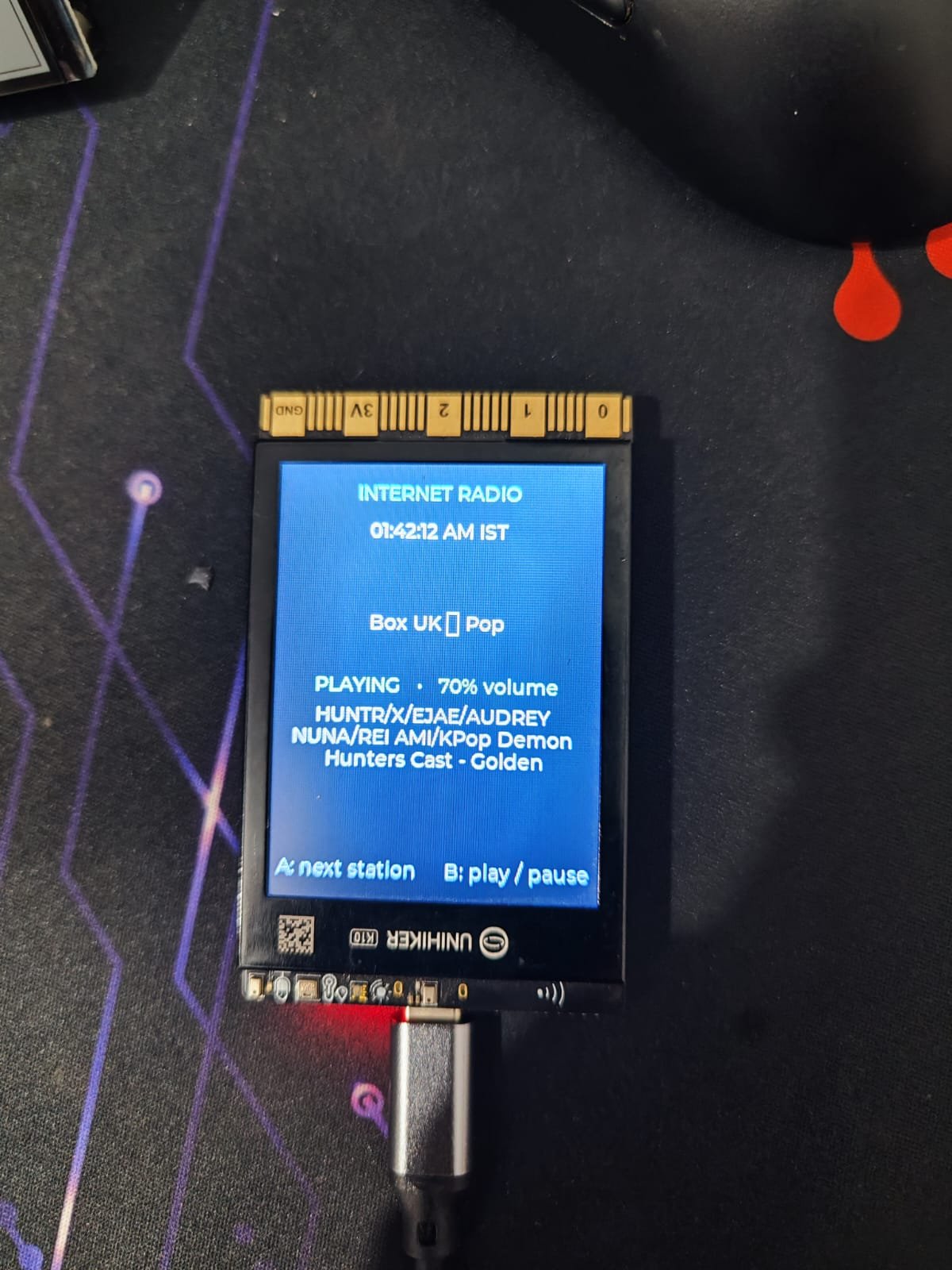
The Unihiker K10 is an ESP32-S3 based internet radio player with a built-in display and speaker. This guide walks through setting up WiFi connectivity, streaming audio from online radio stations, and controlling playback using the board's integrated buttons and touchscreen interface.
Builders will receive a complete parts list, wiring diagram for any external components, step-by-step assembly instructions, and ready-to-flash firmware that handles WiFi connection, station selection, volume control, and real-time clock display. The project demonstrates audio streaming, I2S speaker control, and LVGL UI development on the ESP32-S3 platform.
Wiring diagram
Assemble it in 3 steps
1. Use the built-in controls
No extra parts or jumper wires are needed. The UNIHIKER K10 already contains the screen, speaker, Wi-Fi, Button A, and Button B used by this radio.
- Leave the small BOOT and RESET buttons alone; this project uses the separate A and B user buttons.
- Do not connect an external speaker to the board’s internal speaker wiring; the built-in speaker is already connected to its audio amplifier.
2. Power the board safely
Place the K10 on a dry, non-metal surface and plug a USB-C cable into its USB-C socket, then connect the other end to a normal USB power source or computer. The cable powers the board and lets Schematik send the radio program.
- Keep the board’s antenna area clear of metal objects so it can receive your 2.4 GHz Wi-Fi signal.
- Use a good USB cable. A loose or power-only cable can make the board restart or prevent programming.
3. Use the radio controls
After the program is on the board and it connects to Wi-Fi, press Button A once to move to the next station. Press Button B once to pause or resume sound. The screen shows the selected station, any title the station sends, playback state, and the current time in India.
- The sound level is set to about half volume. Each Button A press also starts the newly selected station.
- Internet stations can change or temporarily go offline, so a station may take a few seconds to start or may need to be selected again later.
Deploy the firmware
#include <Arduino.h>
#include <WiFi.h>
#include <time.h>
#include <unihiker_k10.h>
#include <lvgl.h>
#include <Audio.h>

struct Station {
  const char *name;
  const char *url;
};


// Forward declarations
void setLabelText(lv_obj_t *label, const String &text);
void updateStatus();
void startStation();
void updateClock();
void handleButtons();
void createScreen();
void audio_showstreamtitle(const char *info);
void audio_showstation(const char *info);

constexpr char WIFI_SSID[] = "YOUR_WIFI_SSID";
constexpr char WIFI_PASSWORD[] = "YOUR_WIFI_PASSWORD";

// These are hard-wired internally from the ESP32-S3 to the K10's NS4168
// I2S speaker amplifier. They are not I2C wires.
constexpr int I2S_BCLK = 0;
constexpr int I2S_LRCK = 38;
constexpr int I2S_DOUT = 45;
// ESP32-audioI2S accepts levels from 0 (silent) to 21 (maximum).
// 15 is approximately 70% and leaves a little headroom for loud streams.
constexpr uint8_t VOLUME_70_PERCENT = 15;

// Direct MP3/Icecast streams avoid playlist pages and the HTTP 520 response
// returned by LISTEN.moe's fallback endpoint.
const Station STATIONS[] = {
  {"PopTron — US Pop", "https://ice6.somafm.com/poptron-128-mp3"},
  {"Box UK — Pop", "https://boxstream.danceradiouk.com/stream"},
  {"Radio Anime 24 — Asian music", "http://91.232.4.33:7028/stream?type=http&nocache=123077"},
  {"Yumi Co. — City Pop / Anime", "http://s1.yumicoradio.net:8000/stream_128"},
  {"AnimeAMAZE — Anime radio", "http://icecast.d3mediaproductions.com:8000/AnimeAMAZE192"},
  {"J1 HITS — Japanese pop", "https://jenny.torontocast.com:2000/stream/J1HITS"},
  {"J1 GOLD — Japanese classics", "https://jenny.torontocast.com:2000/stream/J1GOLD"}
};
constexpr size_t STATION_COUNT = sizeof(STATIONS) / sizeof(STATIONS[0]);

UNIHIKER_K10 k10;
// ESP32-audioI2S uses I2S controller 1, while the K10 framework retains
// controller 0 for its board services. The GPIO matrix routes controller 1
// to the same three physical speaker lines.
Audio audio(false, 3, 1);

lv_obj_t *stationLabel = nullptr;
lv_obj_t *statusLabel = nullptr;
lv_obj_t *timeLabel = nullptr;
lv_obj_t *trackLabel = nullptr;

size_t stationIndex = 0;
bool isPlaying = false;
bool previousA = false;
bool previousB = false;
String currentTrack = "Waiting for station details";
String lastTimeText;
unsigned long lastClockUpdate = 0;

void setLabelText(lv_obj_t *label, const String &text) {
  if (label != nullptr) lv_label_set_text(label, text.c_str());
}

void updateStatus() {
  setLabelText(stationLabel, STATIONS[stationIndex].name);
  setLabelText(statusLabel, isPlaying ? "PLAYING   •   70% volume" : "PAUSED   •   70% volume");
  setLabelText(trackLabel, currentTrack);
}

void startStation() {
  audio.stopSong();
  if (STATIONS[stationIndex].url[0] == '\0') {
    currentTrack = "This public Mirchi stream is unavailable";
    isPlaying = false;
    updateStatus();
    return;
  }
  currentTrack = "Buffering stream…";
  isPlaying = true;
  audio.connecttohost(STATIONS[stationIndex].url);
  updateStatus();
}

void updateClock() {
  if (millis() - lastClockUpdate < 1000) return;
  lastClockUpdate = millis();
  struct tm timeInfo;
  char text[24];
  if (getLocalTime(&timeInfo, 20)) {
    strftime(text, sizeof(text), "%I:%M:%S %p IST", &timeInfo);
  } else {
    snprintf(text, sizeof(text), "Getting IST time…");
  }
  if (lastTimeText != text) {
    lastTimeText = text;
    setLabelText(timeLabel, lastTimeText);
  }
}

void handleButtons() {
  const bool aPressed = k10.buttonA->isPressed();
  const bool bPressed = k10.buttonB->isPressed();
  if (aPressed && !previousA) {
    stationIndex = (stationIndex + 1) % STATION_COUNT;
    startStation();
  }
  if (bPressed && !previousB && STATIONS[stationIndex].url[0] != '\0') {
    audio.pauseResume();
    isPlaying = !isPlaying;
    updateStatus();
  }
  previousA = aPressed;
  previousB = bPressed;
}

void createScreen() {
  k10.setScreenBackground(0x101827);
  lv_obj_t *title = lv_label_create(lv_scr_act());
  lv_label_set_text(title, "INTERNET RADIO");
  lv_obj_set_style_text_color(title, lv_color_hex(0x67E8F9), 0);
  lv_obj_set_style_text_font(title, &lv_font_montserrat_14, 0);
  lv_obj_align(title, LV_ALIGN_TOP_MID, 0, 14);

  timeLabel = lv_label_create(lv_scr_act());
  lv_obj_set_style_text_color(timeLabel, lv_color_hex(0xE5E7EB), 0);
  lv_obj_align(timeLabel, LV_ALIGN_TOP_MID, 0, 42);
  lv_label_set_text(timeLabel, "Getting IST time…");

  stationLabel = lv_label_create(lv_scr_act());
  lv_obj_set_width(stationLabel, 210);
  lv_label_set_long_mode(stationLabel, LV_LABEL_LONG_WRAP);
  lv_obj_set_style_text_align(stationLabel, LV_TEXT_ALIGN_CENTER, 0);
  lv_obj_set_style_text_color(stationLabel, lv_color_hex(0xFFFFFF), 0);
  lv_obj_set_style_text_font(stationLabel, &lv_font_montserrat_14, 0);
  lv_obj_align(stationLabel, LV_ALIGN_CENTER, 0, -42);

  statusLabel = lv_label_create(lv_scr_act());
  lv_obj_set_style_text_color(statusLabel, lv_color_hex(0x86EFAC), 0);
  lv_obj_align(statusLabel, LV_ALIGN_CENTER, 0, 4);

  trackLabel = lv_label_create(lv_scr_act());
  lv_obj_set_width(trackLabel, 216);
  lv_label_set_long_mode(trackLabel, LV_LABEL_LONG_WRAP);
  lv_obj_set_style_text_align(trackLabel, LV_TEXT_ALIGN_CENTER, 0);
  lv_obj_set_style_text_color(trackLabel, lv_color_hex(0xCBD5E1), 0);
  lv_obj_align(trackLabel, LV_ALIGN_CENTER, 0, 42);

  lv_obj_t *help = lv_label_create(lv_scr_act());
  lv_label_set_text(help, "A: next station     B: play / pause");
  lv_obj_set_style_text_color(help, lv_color_hex(0x94A3B8), 0);
  lv_obj_align(help, LV_ALIGN_BOTTOM_MID, 0, -14);
  updateStatus();
}

void audio_showstreamtitle(const char *info) {
  if (info != nullptr && info[0] != '\0') {
    currentTrack = info;
    setLabelText(trackLabel, currentTrack);
  }
}

void audio_showstation(const char *info) {
  if (info != nullptr && info[0] != '\0') {
    currentTrack = info;
    setLabelText(trackLabel, currentTrack);
  }
}

void setup() {
  Serial.begin(115200);
  k10.begin();
  k10.initScreen(0);
  createScreen();

  // Keep the small working section in fast internal RAM, but put the long
  // compressed-stream queue in the K10's PSRAM. The previous 120 KB/0 call
  // did the opposite and starved Wi-Fi and I2S DMA of internal RAM.
  audio.setBufsize(16 * 1024, 384 * 1024);
  audio.setPinout(I2S_BCLK, I2S_LRCK, I2S_DOUT);
  audio.setVolume(VOLUME_70_PERCENT);

  WiFi.mode(WIFI_STA);
  WiFi.setSleep(false);
  WiFi.begin(WIFI_SSID, WIFI_PASSWORD);
  const unsigned long connectStarted = millis();
  while (WiFi.status() != WL_CONNECTED && millis() - connectStarted < 15000) {
    lv_timer_handler();
    delay(10);
  }

  configTzTime("IST-5:30", "time.google.com", "pool.ntp.org");
  if (WiFi.status() == WL_CONNECTED) startStation();
  else {
    currentTrack = "Wi-Fi connection failed";
    isPlaying = false;
    updateStatus();
  }
}

void loop() {
  // Service network download, MP3 decode, and I2S output on every pass.
  audio.loop();

  // The screen has no animation. Service its timers infrequently so TFT SPI
  // work cannot repeatedly compete with audio, while buttons still react fast.
  static unsigned long lastUiService = 0;
  const unsigned long now = millis();
  if (now - lastUiService >= 100) {
    lastUiService = now;
    handleButtons();
    updateClock();
    lv_timer_handler();
  }
}
Remix this project
Make it yours in one click
Open a full copy of this project in your own Schematik workspace, diagram, code, parts, and assembly steps included. Swap the sensor, add features, or redesign the whole thing with AI. The author's original stays untouched.