Community project
IoT Air Quality Monitor
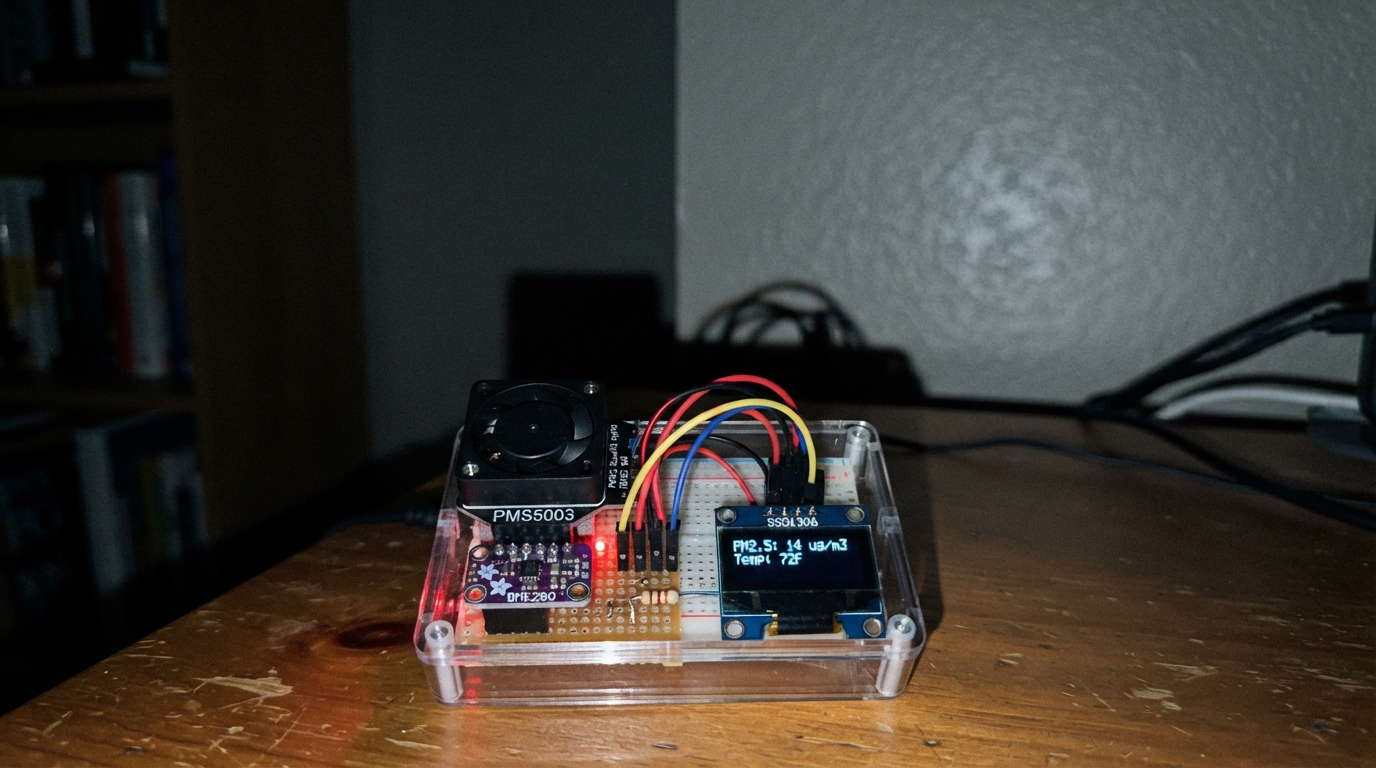
This IoT air quality monitor uses an ESP32 to track particulate matter, temperature, humidity, and atmospheric pressure in real time. The PMS5003 sensor detects fine particles while the BME280 captures environmental conditions, with readings displayed on an SSD1306 OLED screen and an alert LED that activates when air quality degrades.
The guide provides a complete parts list, wiring diagram showing all sensor connections, step-by-step assembly instructions, and Arduino firmware ready to deploy. Builders will have everything needed to assemble the monitor, configure WiFi connectivity, and begin monitoring indoor or outdoor air quality immediately.
Wiring diagram

Gather all the parts
Assemble it in 7 steps
1. Prepare the parts
Use a NodeMCU 1.0 ESP-12E, a Plantower PMS5003 with its 1.25 mm cable or adapter, and an Adafruit BME280 breakout. Disconnect USB before wiring. Check the sensor pin labels; cable colours can vary.
2. Connect the particle sensor
Connect PMS5003 VCC to NodeMCU VIN (USB 5 V), GND to GND, and TX to D5 (particle data). Leave RX, SET, RESET and the two unused pins disconnected.
- Reverse power can damage the sensor. The sensor needs 5 V for its fan; do not connect VCC to 3V3. VIN must carry USB 5 V on your NodeMCU.
3. Connect the environmental sensor
Connect Adafruit BME280 VIN to 3V3, GND to GND, SDI to D2 (data), and SCK to D1 (clock). Leave CS and SDO unconnected for the default 0x77 I2C address.
4. Place and power the monitor
Keep the PMS5003 inlet and outlet clear, away from splashes and dust buildup. Use a ventilated enclosure and keep the BME280 away from the board's heat. Keep USB disconnected until all display and alert-light wiring is complete, then recheck every connection before connecting a reliable 5 V USB supply.
- This is not a certified safety alarm and must not be used to detect carbon monoxide or protect life.
5. Connect the OLED screen
With USB unplugged, connect the 0.96-inch SSD1306 I2C screen VCC to 3V3 and GND to GND. Connect SDA to D2 (data) and SCL to D1 (clock), sharing those two pins with the BME280.
- Check the labels on your screen; some OLED modules swap the power pins. Reversed power can damage it.
6. Connect the red alert light
Connect D6 to one end of the 330 ohm resistor. Connect the other resistor end to the red LED's long leg (positive). Connect the short leg to GND. The resistor can face either way and limits current.
- Never connect the LED directly to a pin without its resistor.
7. Choose a suitable location
For outdoor readings, use a weather-protected ventilated enclosure, with the sensor openings clear and protected from rain and condensation. Keep the BME280 away from electronics heat and direct sunlight. Use one monitor per location.
- The electronics and sensors are not waterproof; do not expose them to rain.
Review all connections
1. Connections between "particles" and "ESP32"
2. Connections between "environment" and "ESP32"
3. Connections between "display" and "ESP32"
4. Connections between "alert_resistor" and "ESP32"
5. Connections between "alert_led" and "ESP32"
Deploy the firmware
#include <Arduino.h>
#include <Wire.h>
#include <ESP8266WiFi.h>
#include <ESP8266WebServer.h>
#include <ESP8266HTTPClient.h>
#include <WiFiClientSecureBearSSL.h>
#include <SoftwareSerial.h>
#include <Adafruit_BME280.h>
#include <Adafruit_GFX.h>
#include <Adafruit_SSD1306.h>
#include <time.h>
#include <math.h>
#include "config.h"
// PMS5003 TX -> NodeMCU D5 (GPIO14). This sensor transmits by itself.
constexpr uint8_t PMS_RX_PIN = D5;
constexpr uint8_t ALERT_LED_PIN = D6;
Adafruit_SSD1306 oled(128, 64, &Wire, -1);
bool oledOk = false;
SoftwareSerial pms;
Adafruit_BME280 bme;
ESP8266WebServer server(80);
const char caCert[] PROGMEM = R"EOF_CERT(
-----BEGIN CERTIFICATE-----
MIIDrzCCApegAwIBAgIQCDvgVpBCRrGhdWrJWZHHSjANBgkqhkiG9w0BAQUFADBh
MQswCQYDVQQGEwJVUzEVMBMGA1UEChMMRGlnaUNlcnQgSW5jMRkwFwYDVQQLExB3
d3cuZGlnaWNlcnQuY29tMSAwHgYDVQQDExdEaWdpQ2VydCBHbG9iYWwgUm9vdCBD
QTAeFw0wNjExMTAwMDAwMDBaFw0zMTExMTAwMDAwMDBaMGExCzAJBgNVBAYTAlVT
MRUwEwYDVQQKEwxEaWdpQ2VydCBJbmMxGTAXBgNVBAsTEHd3dy5kaWdpY2VydC5j
b20xIDAeBgNVBAMTF0RpZ2lDZXJ0IEdsb2JhbCBSb290IENBMIIBIjANBgkqhkiG
9w0BAQEFAAOCAQ8AMIIBCgKCAQEA4jvhEXLeqKTTo1eqUKKPC3eQyaKl7hLOllsB
CSDMAZOnTjC3U/dDxGkAV53ijSLdhwZAAIEJzs4bg7/fzTtxRuLWZscFs3YnFo97
nh6Vfe63SKMI2tavegw5BmV/Sl0fvBf4q77uKNd0f3p4mVmFaG5cIzJLv07A6Fpt
43C/dxC//AH2hdmoRBBYMql1GNXRor5H4idq9Joz+EkIYIvUX7Q6hL+hqkpMfT7P
T19sdl6gSzeRntwi5m3OFBqOasv+zbMUZBfHWymeMr/y7vrTC0LUq7dBMtoM1O/4
gdW7jVg/tRvoSSiicNoxBN33shbyTApOB6jtSj1etX+jkMOvJwIDAQABo2MwYTAO
BgNVHQ8BAf8EBAMCAYYwDwYDVR0TAQH/BAUwAwEB/zAdBgNVHQ4EFgQUA95QNVbR
TLtm8KPiGxvDl7I90VUwHwYDVR0jBBgwFoAUA95QNVbRTLtm8KPiGxvDl7I90VUw
DQYJKoZIhvcNAQEFBQADggEBAMucN6pIExIK+t1EnE9SsPTfrgT1eXkIoyQY/Esr
hMAtudXH/vTBH1jLuG2cenTnmCmrEbXjcKChzUyImZOMkXDiqw8cvpOp/2PV5Adg
06O/nVsJ8dWO41P0jmP6P6fbtGbfYmbW0W5BjfIttep3Sp+dWOIrWcBAI+0tKIJF
PnlUkiaY4IBIqDfv8NZ5YBberOgOzW6sRBc4L0na4UU+Krk2U886UAb3LujEV0ls
YSEY1QSteDwsOoBrp+uvFRTp2InBuThs4pFsiv9kuXclVzDAGySj4dzp30d8tbQk
CAUw7C29C79Fv1C5qfPrmAESrciIxpg0X40KPMbp1ZWVbd4=
-----END CERTIFICATE-----
)EOF_CERT";
BearSSL::X509List trustAnchor(caCert);
uint16_t pm1 = 0, pm25 = 0, pm10 = 0;
uint32_t pmAt = 0, lastEnv = 0, lastUpload = 0;
bool pmSeen = false, bmeOk = false, envValid = false;
float temperature = NAN, humidity = NAN, pressure = NAN;
String uploadStatus = "Not sent yet";
uint8_t frame[32];
size_t framePos = 0;
bool freshPM() { return pmSeen && millis() >= 30000 && (uint32_t)(millis() - pmAt) < 15000; }
uint16_t wordAt(int i) { return (uint16_t(frame[i]) << 8) | frame[i + 1]; }
void readParticles() {
while (pms.available()) {
uint8_t c = pms.read();
if (framePos == 0 && c != 0x42) continue;
if (framePos == 1 && c != 0x4d) { framePos = (c == 0x42) ? 1 : 0; continue; }
frame[framePos++] = c;
if (framePos == sizeof(frame)) {
uint16_t sum = 0;
for (int i = 0; i < 30; ++i) sum += frame[i];
if (wordAt(2) == 28 && sum == wordAt(30)) {
// Atmospheric environment readings, in micrograms per cubic metre.
pm1 = wordAt(10); pm25 = wordAt(12); pm10 = wordAt(14);
pmAt = millis(); pmSeen = true;
}
framePos = 0;
}
}
}
void readEnvironment() {
if (!bmeOk) bmeOk = bme.begin(0x77, &Wire);
if (!bmeOk) { envValid = false; return; }
temperature = bme.readTemperature();
humidity = bme.readHumidity();
pressure = bme.readPressure() / 100.0f;
envValid = isfinite(temperature) && isfinite(humidity) && isfinite(pressure);
}
// An instantaneous screening trigger, not a health-based safe limit.
bool pollutionAlert() { return freshPM() && pm25 >= PM25_ALERT_UG_M3; }
void updateLocalDisplay() {
digitalWrite(ALERT_LED_PIN, pollutionAlert() ? HIGH : LOW);
if (!oledOk) return;
String text;
if (freshPM()) {
text = "PM1: " + String(pm1) + " ug/m3\nPM2.5: " + String(pm25) + " ug/m3\nPM10: " + String(pm10) + " ug/m3\n";
} else text = "PM: unavailable\n\n\n";
if (envValid) {
text += "T:" + String(temperature, 1) + "C H:" + String(humidity, 0) + "%\n";
text += "P:" + String(pressure, 0) + " hPa\n";
} else text += "Env unavailable\n\n";
text += !freshPM() ? "PM SENSOR NOT READY\n" : pollutionAlert() ? "HIGH PM2.5!\n" : "PM2.5 below alert\n";
text += WiFi.status() == WL_CONNECTED ? "WiFi connected" : "WiFi disconnected";
static String previous;
if (text == previous) return;
previous = text;
oled.clearDisplay();
oled.setCursor(0, 0);
oled.print(text);
oled.display();
}
void servePage() {
String page = F("<!doctype html><html><head><meta name='viewport' content='width=device-width,initial-scale=1'><meta http-equiv='refresh' content='5'><title>Air monitor</title></head><body><h1>Air quality monitor</h1>");
if (freshPM()) {
page += "<p>PM1.0: " + String(pm1) + " µg/m³<br>PM2.5: " + String(pm25) + " µg/m³<br>PM10: " + String(pm10) + " µg/m³</p>";
} else page += F("<p>Particle readings warming up or unavailable.</p>");
if (envValid) page += "<p>Temperature: " + String(temperature, 1) + " °C<br>Humidity: " + String(humidity, 1) + "%<br>Pressure: " + String(pressure, 1) + " hPa</p>";
else page += F("<p>Environmental sensor unavailable.</p>");
if (!freshPM()) page += F("<p>Alert: particle sensor unavailable.</p>");
else page += pollutionAlert() ? F("<p>Alert: high PM2.5.</p>") : F("<p>PM2.5 below alert threshold.</p>");
page += "<p>Cloud: " + uploadStatus + "</p>";
page += F("<p>Indicative readings only; not a certified pollution measurement.</p></body></html>");
server.send(200, "text/html", page);
}
void sendCloud() {
if (!strlen(THINGSPEAK_WRITE_KEY)) { uploadStatus = "Add a ThingSpeak write key in config.h"; return; }
if (WiFi.status() != WL_CONNECTED) { uploadStatus = "Wi-Fi disconnected"; return; }
if (time(nullptr) < 1704067200) { uploadStatus = "Waiting for internet time"; return; }
if (!freshPM() && !envValid) { uploadStatus = "No valid sensor data"; return; }
String url = "https://api.thingspeak.com/update?api_key=" + String(THINGSPEAK_WRITE_KEY);
if (freshPM()) url += "&field1=" + String(pm1) + "&field2=" + String(pm25) + "&field3=" + String(pm10);
if (envValid) url += "&field4=" + String(temperature, 1) + "&field5=" + String(humidity, 1) + "&field6=" + String(pressure, 1);
BearSSL::WiFiClientSecure client;
client.setTrustAnchors(&trustAnchor);
client.setTimeout(6000);
HTTPClient http;
http.setTimeout(6000);
if (!http.begin(client, url)) { uploadStatus = "Cloud connection setup failed"; return; }
int code = http.GET();
String body = code == HTTP_CODE_OK ? http.getString() : "";
if (code == HTTP_CODE_OK && body.toInt() > 0) uploadStatus = "Last update accepted";
else uploadStatus = "Update failed (HTTP " + String(code) + ")";
http.end();
Serial.println(uploadStatus);
}
void setup() {
Serial.begin(115200);
pinMode(ALERT_LED_PIN, OUTPUT);
digitalWrite(ALERT_LED_PIN, LOW);
Wire.begin(D2, D1);
oledOk = oled.begin(SSD1306_SWITCHCAPVCC, 0x3C);
if (oledOk) { oled.setTextSize(1); oled.setTextColor(SSD1306_WHITE); }
else Serial.println("OLED unavailable at 0x3C");
pms.begin(9600, SWSERIAL_8N1, PMS_RX_PIN, -1, false, 256);
readEnvironment();
server.on("/", servePage);
server.begin();
WiFi.mode(WIFI_STA);
if (strlen(WIFI_NAME)) WiFi.begin(WIFI_NAME, WIFI_PASSWORD);
configTime(0, 0, "pool.ntp.org", "time.nist.gov");
Serial.println("Air monitor starting. Set Wi-Fi and ThingSpeak in include/config.h.");
}
void loop() {
readParticles();
server.handleClient();
uint32_t now = millis();
static bool announced = false;
if (WiFi.status() == WL_CONNECTED && !announced) {
Serial.print("Dashboard: http://"); Serial.println(WiFi.localIP()); announced = true;
} else if (WiFi.status() != WL_CONNECTED) announced = false;
if ((uint32_t)(now - lastEnv) >= 5000) { lastEnv = now; readEnvironment(); }
updateLocalDisplay();
if ((uint32_t)(now - lastUpload) >= 60000) { lastUpload = now; sendCloud(); }
yield();
}Remix this project
Make it yours in one click
Open a full copy of this project in your own Schematik workspace, diagram, code, parts, and assembly steps included. Swap the sensor, add features, or redesign the whole thing with AI. The author's original stays untouched.