Community project
Live F1 Race Tracker
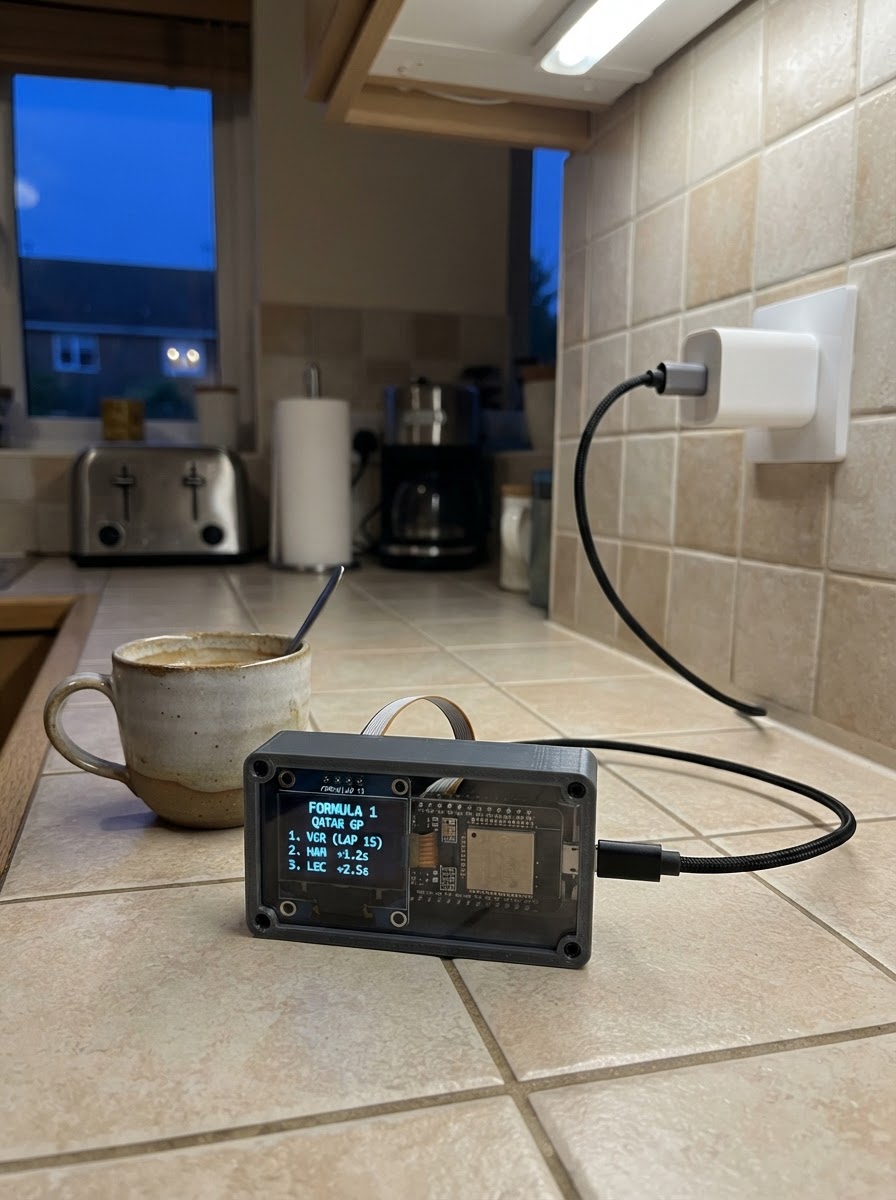
This project builds a live Formula 1 race tracker powered by an ESP32 microcontroller and a large touchscreen display. The tracker fetches real-time race data from the OpenF1 API over WiFi, displaying current lap counts, driver positions, tire compounds, and gap-to-leader information in a compact, at-a-glance format.
The guide provides a complete parts list, wiring diagram, and step-by-step assembly instructions for housing the electronics in a 3D-printed enclosure. Builders will also receive the full ESP32 firmware with WiFi connectivity, HTTP client setup, and touchscreen rendering code ready to compile and deploy.
Wiring diagram

Gather all the parts
Assemble it in 7 steps
1. Gather the parts
Prepare the Waveshare ESP32-S3-Touch-LCD-7 board, a USB-C data-and-power cable, a regulated 5 V USB power source rated for at least 1 A, and—if using the supplied enclosure design—the printed front bezel, printed rear tray, four M3×10 mm screws, and optionally four M3 heat-set inserts.
- Use a USB-C cable known to transfer data as well as power; some charge-only cables cannot be used for flashing.
- PETG is preferred if the enclosure will sit in a hot vehicle, while PLA is suitable for indoor use.
- Use only regulated 5 V through the board USB-C port.
- Do not power the board from USB-C and a separate external supply at the same time.
2. Print the optional enclosure
Open data/waveshare_esp32_s3_touch_lcd_7_case.scad in a CAD/slicer workflow that supports OpenSCAD. Export the bezel with PART set to "bezel" and the rear tray with PART set to "back". Print both at 0.20 mm layers, at least three walls/perimeters, and about 20% infill.
- Print the bezel front-face down and the rear tray with its flat back on the print bed.
- Do not scale either part; scaling changes display clearance and screw-hole diameter.
- Measure the actual display board before printing a final case. If the board does not sit flat, adjust the source parameters rather than forcing it into the tray.
3. Install inserts and inspect the case
If using heat-set inserts, install one M3 insert in each rear-tray corner ear with a soldering iron set for the insert material. Let the plastic cool fully. Check that the USB-C cable notch is clear of stringing or sharp edges.
- Heat-set inserts are optional; the printed screw holes can be used directly for a light-duty case.
- Clean the cable notch with a hobby knife only while the display board is outside the enclosure.
- Keep hot tools away from the LCD, touch glass, and board.
- Never place the screen face-down directly on a rough work surface.
4. Fit the display board into the rear tray
With the display facing the open side of the rear tray, lower the Waveshare board into the tray. Route the USB-C plug and cable through the case notch, then connect the plug to the board without sharply bending the cable.
- Place a clean microfiber cloth under the display while handling it.
- Confirm that the screen perimeter is not pinched and that the board lies flat before fitting the bezel.
- Do not force the board into the case. Stop and correct the print clearance if the LCD or PCB bows.
- Do not press directly on the centre of the LCD or touch panel.
5. Attach the front bezel
Lay the front bezel over the screen, align all four corner ears with the rear tray, and install four M3×10 mm screws. Tighten in a diagonal pattern, a little at a time, until the halves meet and the display is held securely.
- The bezel should retain the PCB around its perimeter without touching or stressing the active display area.
- If the bezel causes visible pressure marks on the LCD, remove it and increase the bezel clearance in the OpenSCAD source.
- Do not overtighten the screws; overtightening can crack the printed ears or flex the display assembly.
6. Place and power the dashboard
Put the assembled dashboard where it has stable 2.4 GHz Wi-Fi coverage and can be viewed safely. Connect the USB-C cable to the regulated 5 V adapter or a computer USB port, then connect the supply to mains power if applicable.
- Keep the cable strain-relieved so it cannot pull on the board connector.
- For continuous use, use a quality 5 V supply with at least 1 A available; the project estimates up to about 850 mA with the backlight and Wi-Fi active.
- Keep the unit dry and ventilated.
- Do not use an unregulated adapter, damaged cable, or a supply with exposed conductors.
7. Confirm the assembled controls
Once the dashboard firmware is running, use the touchscreen timing-tower rows to select or deselect drivers. Selected drivers are highlighted on the track map. The timing tower displays race order, lap number, team colours, and tyre-compound indicators when supplied by the live data feed.
- Allow a few seconds after startup for Wi-Fi and the live-data connection to initialise.
- During periods without an active session, the public timing source can show the newest available session rather than live race data.
- Do not try to open the enclosure or disconnect power while the board is resting screen-down.
Review all connections
1. Connections between "usb_c_power" and "ESP32"
Deploy the firmware
#include <stdio.h>
#include <stdlib.h>
#include <string.h>
#include <stdbool.h>
#include "freertos/FreeRTOS.h"
#include "freertos/task.h"
#include "esp_err.h"
#include "esp_http_client.h"
#include "esp_lcd_panel_ops.h"
#include "esp_lcd_panel_rgb.h"
#include "driver/gpio.h"
#include "driver/i2c_master.h"
#include "nvs_flash.h"
#include "esp_wifi.h"
#include "esp_event.h"
#include "esp_netif.h"
#include "cJSON.h"

#define WIFI_SSID "YOUR_WIFI_NAME"
#define WIFI_PASSWORD "YOUR_WIFI_PASSWORD"
#define SCREEN_W 800
#define SCREEN_H 480
#define MAX_CARS 20
#define OPENF1_URL "https://api.openf1.org"

typedef enum { TYRE_UNKNOWN, TYRE_HARD, TYRE_MEDIUM, TYRE_SOFT } tyre_t;
typedef struct { int number; int position; float x; float y; bool selected; char code[5]; char gap[16]; uint16_t team_color; tyre_t tyre; } car_t;
static int current_lap = 0;
static car_t cars[MAX_CARS];
static int car_count = 0;
static int selected_count = 0;
static uint16_t *framebuffer = NULL;
static i2c_master_dev_handle_t touch_handle = NULL;

static uint16_t color565(uint8_t r, uint8_t g, uint8_t b) { return ((r & 0xF8) << 8) | ((g & 0xFC) << 3) | (b >> 3); }
static void pixel(int x, int y, uint16_t c) { if (x >= 0 && x < SCREEN_W && y >= 0 && y < SCREEN_H) framebuffer[y * SCREEN_W + x] = c; }
static void fill(int x, int y, int w, int h, uint16_t c) { for (int yy = y; yy < y + h; yy++) for (int xx = x; xx < x + w; xx++) pixel(xx, yy, c); }
/* Compact seven-segment numerals keep the 20-car tower readable without a font asset. */
static void digit(int x, int y, int n, int s, uint16_t c) {
    static const uint8_t segs[10] = {0x3f,0x06,0x5b,0x4f,0x66,0x6d,0x7d,0x07,0x7f,0x6f};
    if (n < 0 || n > 9) return; uint8_t m = segs[n]; int l = 4 * s, t = s;
    if (m & 0x01) fill(x+s,y,l,t,c); if (m & 0x02) fill(x+l+s,y+s,t,l,c);
    if (m & 0x04) fill(x+l+s,y+l+2*s,t,l,c); if (m & 0x08) fill(x+s,y+2*l+2*s,l,t,c);
    if (m & 0x10) fill(x,y+l+2*s,t,l,c); if (m & 0x20) fill(x,y+s,t,l,c);
    if (m & 0x40) fill(x+s,y+l+s,l,t,c);
}
static void number2(int x, int y, int value, int s, uint16_t c) { digit(x, y, (value / 10) % 10, s, c); digit(x + 7*s, y, value % 10, s, c); }
static void marker(int x, int y, uint16_t team, bool selected) {
    /* Team colour identifies every car; a red centre distinguishes a user selection. */
    fill(x - 7, y - 7, 15, 15, color565(8, 12, 16));
    fill(x - 6, y - 6, 13, 13, team);
    fill(x - 3, y - 3, 7, 7, selected ? color565(255, 48, 76) : color565(10, 15, 20));
}

static car_t *find_car(int number) { for (int i = 0; i < car_count; i++) if (cars[i].number == number) return &cars[i]; return NULL; }
static uint16_t team_colour_from_hex(const char *hex) {
    unsigned int rgb = 0;
    if (hex && sscanf(hex, "%x", &rgb) == 1) return color565((rgb >> 16) & 0xFF, (rgb >> 8) & 0xFF, rgb & 0xFF);
    return color565(240, 245, 248);
}
static char *http_get(const char *path) {
    char url[200]; snprintf(url, sizeof(url), "%s%s", OPENF1_URL, path);
    esp_http_client_config_t cfg = {.url = url, .timeout_ms = 12000, .transport_type = HTTP_TRANSPORT_OVER_SSL, .skip_cert_common_name_check = true};
    esp_http_client_handle_t client = esp_http_client_init(&cfg);
    if (!client || esp_http_client_open(client, 0) != ESP_OK) { if (client) esp_http_client_cleanup(client); return NULL; }
    int length = esp_http_client_fetch_headers(client);
    if (length < 1 || length > 150000) { esp_http_client_close(client); esp_http_client_cleanup(client); return NULL; }
    char *body = calloc(1, length + 1);
    if (!body || esp_http_client_read_response(client, body, length) < 1) { free(body); body = NULL; }
    esp_http_client_close(client); esp_http_client_cleanup(client); return body;
}
static int race_order(const void *a, const void *b) { const car_t *aa = a, *bb = b; return aa->position - bb->position; }
static tyre_t tyre_from_compound(const char *compound) {
    if (!compound) return TYRE_UNKNOWN;
    if (strcasecmp(compound, "HARD") == 0) return TYRE_HARD;
    if (strcasecmp(compound, "MEDIUM") == 0) return TYRE_MEDIUM;
    if (strcasecmp(compound, "SOFT") == 0) return TYRE_SOFT;
    return TYRE_UNKNOWN;
}
static uint16_t tyre_colour(tyre_t tyre) {
    if (tyre == TYRE_HARD) return color565(245, 245, 245);
    if (tyre == TYRE_MEDIUM) return color565(255, 210, 0);
    if (tyre == TYRE_SOFT) return color565(235, 36, 42);
    return color565(82, 96, 108);
}
static void update_openf1(void) {
    char *body = http_get("/v1/drivers?session_key=latest");
    if (!body) return;
    cJSON *list = cJSON_Parse(body); free(body); if (!list) return;
    car_t previous[MAX_CARS]; int previous_count = car_count; memcpy(previous, cars, sizeof(cars));
    int n = cJSON_GetArraySize(list); car_count = n > MAX_CARS ? MAX_CARS : n;
    for (int i = 0; i < car_count; i++) { cJSON *row = cJSON_GetArrayItem(list, i); cJSON *num = cJSON_GetObjectItem(row, "driver_number"); cJSON *name = cJSON_GetObjectItem(row, "name_acronym"); cJSON *team = cJSON_GetObjectItem(row, "team_colour"); int number = num ? num->valueint : 0; bool chosen = false; for (int j = 0; j < previous_count; j++) if (previous[j].number == number) chosen = previous[j].selected; cars[i] = (car_t){.number = number, .position = i + 1, .selected = chosen}; snprintf(cars[i].code, sizeof(cars[i].code), "%s", cJSON_IsString(name) ? name->valuestring : "UNK"); cars[i].team_color = team_colour_from_hex(cJSON_IsString(team) ? team->valuestring : NULL); }
    cJSON_Delete(list);
    body = http_get("/v1/position?session_key=latest");
    if (body) { list = cJSON_Parse(body); free(body); if (list) { for (int i = 0; i < cJSON_GetArraySize(list); i++) { cJSON *row = cJSON_GetArrayItem(list, i); cJSON *num = cJSON_GetObjectItem(row, "driver_number"); cJSON *pos = cJSON_GetObjectItem(row, "position"); car_t *car = num ? find_car(num->valueint) : NULL; if (car && cJSON_IsNumber(pos)) car->position = pos->valueint; } cJSON_Delete(list); } }
    body = http_get("/v1/laps?session_key=latest");
    if (body) { list = cJSON_Parse(body); free(body); if (list) { current_lap = 0; for (int i = 0; i < cJSON_GetArraySize(list); i++) { cJSON *lap = cJSON_GetObjectItem(cJSON_GetArrayItem(list, i), "lap_number"); if (cJSON_IsNumber(lap) && lap->valueint > current_lap) current_lap = lap->valueint; } cJSON_Delete(list); } }
    body = http_get("/v1/location?session_key=latest");
    if (body) { list = cJSON_Parse(body); free(body); if (list) { for (int i = 0; i < cJSON_GetArraySize(list); i++) { cJSON *row = cJSON_GetArrayItem(list, i); cJSON *num = cJSON_GetObjectItem(row, "driver_number"); cJSON *x = cJSON_GetObjectItem(row, "x"); cJSON *y = cJSON_GetObjectItem(row, "y"); car_t *car = num ? find_car(num->valueint) : NULL; if (car && cJSON_IsNumber(x) && cJSON_IsNumber(y)) { car->x = x->valuedouble; car->y = y->valuedouble; } } cJSON_Delete(list); } }
    /* The final/latest stint returned for each driver identifies the compound currently fitted. */
    body = http_get("/v1/stints?session_key=latest");
    if (body) { list = cJSON_Parse(body); free(body); if (list) { for (int i = 0; i < car_count; i++) cars[i].tyre = TYRE_UNKNOWN; for (int i = 0; i < cJSON_GetArraySize(list); i++) { cJSON *row = cJSON_GetArrayItem(list, i); cJSON *num = cJSON_GetObjectItem(row, "driver_number"); cJSON *compound = cJSON_GetObjectItem(row, "compound"); car_t *car = num ? find_car(num->valueint) : NULL; if (car && cJSON_IsString(compound)) car->tyre = tyre_from_compound(compound->valuestring); } cJSON_Delete(list); } }
    qsort(cars, car_count, sizeof(car_t), race_order);
}
static void draw_dashboard(void) {
    uint16_t bg = color565(9, 14, 20), panel = color565(22, 33, 43), line = color565(69, 86, 98), white = color565(240, 245, 248), red = color565(255, 48, 76);
    /* Tower is 120 pixels (15%); the remaining 680 pixels are reserved for the track. */
    fill(0, 0, SCREEN_W, SCREEN_H, bg); fill(0, 0, 120, SCREEN_H, panel); fill(124, 0, 676, SCREEN_H, panel);
    fill(0, 0, 120, 32, color565(34, 47, 60)); number2(48, 6, current_lap, 2, white);
    /* Twenty 21-pixel rows: order comes from the latest live position feed. */
    for (int i = 0; i < car_count && i < MAX_CARS; i++) {
        int row_y = 38 + i * 21; fill(4, row_y, 112, 18, color565(15, 23, 30));
        fill(5, row_y + 2, 7, 14, cars[i].team_color); number2(17, row_y + 3, cars[i].position, 1, white);
        number2(42, row_y + 3, cars[i].number, 1, white);
        /* Tyre swatch follows the driver identifier: hard=white, medium=yellow, soft=red. */
        fill(91, row_y + 4, 11, 10, color565(5, 8, 11));
        fill(93, row_y + 6, 7, 6, tyre_colour(cars[i].tyre));
        if (cars[i].selected) { fill(108, row_y + 2, 5, 14, red); }
    }
    /* Fallback centreline makes an empty feed visibly distinct from a stalled display. */
    for (int i = 0; i < 620; i++) { int y = 240 + ((i % 180) - 90) * ((i % 2) ? 1 : 0) / 4; pixel(150 + i, y, line); pixel(150 + i, y + 1, line); }
    float min_x = 1e9f, max_x = -1e9f, min_y = 1e9f, max_y = -1e9f;
    for (int i = 0; i < car_count; i++) if (cars[i].x != 0 || cars[i].y != 0) { if (cars[i].x < min_x) min_x = cars[i].x; if (cars[i].x > max_x) max_x = cars[i].x; if (cars[i].y < min_y) min_y = cars[i].y; if (cars[i].y > max_y) max_y = cars[i].y; }
    for (int i = 0; i < car_count; i++) if (min_x < max_x && min_y < max_y) { int x = 145 + (int)((cars[i].x - min_x) * 625.0f / (max_x - min_x)); int y = 55 + (int)((max_y - cars[i].y) * 370.0f / (max_y - min_y)); marker(x, y, cars[i].team_color, cars[i].selected); }
}
static bool read_touch(int *x, int *y) {
    uint8_t reg[2] = {0x81, 0x4E}; uint8_t data[6] = {0};
    if (i2c_master_transmit_receive(touch_handle, reg, 2, data, 6, 20) != ESP_OK || !(data[0] & 0x80) || !(data[0] & 0x0F)) return false;
    *x = data[2] | (data[3] << 8); *y = data[4] | (data[5] << 8); uint8_t clear[3] = {0x81, 0x4E, 0}; i2c_master_transmit(touch_handle, clear, 3, 20); return true;
}
static void wifi_event(void *arg, esp_event_base_t base, int32_t event, void *data) { if (base == WIFI_EVENT && (event == WIFI_EVENT_STA_START || event == WIFI_EVENT_STA_DISCONNECTED)) esp_wifi_connect(); }
static void start_wifi(void) { esp_netif_init(); esp_event_loop_create_default(); esp_netif_create_default_wifi_sta(); wifi_init_config_t init = WIFI_INIT_CONFIG_DEFAULT(); esp_wifi_init(&init); esp_event_handler_register(WIFI_EVENT, ESP_EVENT_ANY_ID, wifi_event, NULL); wifi_config_t config = {0}; strncpy((char *)config.sta.ssid, WIFI_SSID, sizeof(config.sta.ssid)); strncpy((char *)config.sta.password, WIFI_PASSWORD, sizeof(config.sta.password)); esp_wifi_set_mode(WIFI_MODE_STA); esp_wifi_set_config(WIFI_IF_STA, &config); esp_wifi_start(); }
void app_main(void) {
    ESP_ERROR_CHECK(nvs_flash_init());
    gpio_config_t backlight = {.pin_bit_mask = 1ULL << 6, .mode = GPIO_MODE_OUTPUT}; gpio_config(&backlight); gpio_set_level(6, 1);
    esp_lcd_rgb_panel_config_t rgb = {.data_width = 16, .bits_per_pixel = 16, .num_fbs = 1, .pclk_gpio_num = 7, .vsync_gpio_num = 3, .hsync_gpio_num = 46, .de_gpio_num = 5, .data_gpio_nums = {14,38,18,17,10,39,0,45,48,47,21,1,2,42,41,40}, .timings = {.pclk_hz = 14000000, .h_res = SCREEN_W, .v_res = SCREEN_H, .hsync_pulse_width = 10, .hsync_back_porch = 43, .hsync_front_porch = 8, .vsync_pulse_width = 8, .vsync_back_porch = 12, .vsync_front_porch = 8}, .flags = {.fb_in_psram = 1, .pclk_active_neg = 1}};
    esp_lcd_panel_handle_t lcd; ESP_ERROR_CHECK(esp_lcd_new_rgb_panel(&rgb, &lcd)); ESP_ERROR_CHECK(esp_lcd_panel_reset(lcd)); ESP_ERROR_CHECK(esp_lcd_panel_init(lcd)); ESP_ERROR_CHECK(esp_lcd_rgb_panel_get_frame_buffer(lcd, 1, (void **)&framebuffer));
    i2c_master_bus_handle_t bus; i2c_master_bus_config_t bus_config = {.i2c_port = I2C_NUM_0, .sda_io_num = 8, .scl_io_num = 9, .clk_source = I2C_CLK_SRC_DEFAULT}; ESP_ERROR_CHECK(i2c_new_master_bus(&bus_config, &bus)); i2c_device_config_t touch_config = {.device_address = 0x5D, .scl_speed_hz = 400000}; ESP_ERROR_CHECK(i2c_master_bus_add_device(bus, &touch_config, &touch_handle));
    start_wifi(); draw_dashboard(); int refresh_ticks = 0;
    while (true) { int x, y; if (read_touch(&x, &y) && x < 120 && y >= 38 && y < 458) { int row = (y - 38) / 21; if (row < car_count && row < MAX_CARS) { if (cars[row].selected) { cars[row].selected = false; selected_count--; } else if (selected_count < 6) { cars[row].selected = true; selected_count++; } draw_dashboard(); } } if (++refresh_ticks >= 30) { update_openf1(); draw_dashboard(); refresh_ticks = 0; } vTaskDelay(pdMS_TO_TICKS(100)); }
}
Remix this project
Make it yours in one click
Open a full copy of this project in your own Schematik workspace, diagram, code, parts, and assembly steps included. Swap the sensor, add features, or redesign the whole thing with AI. The author's original stays untouched.