Community project
Motion-Triggered Telegram Camera Alerts
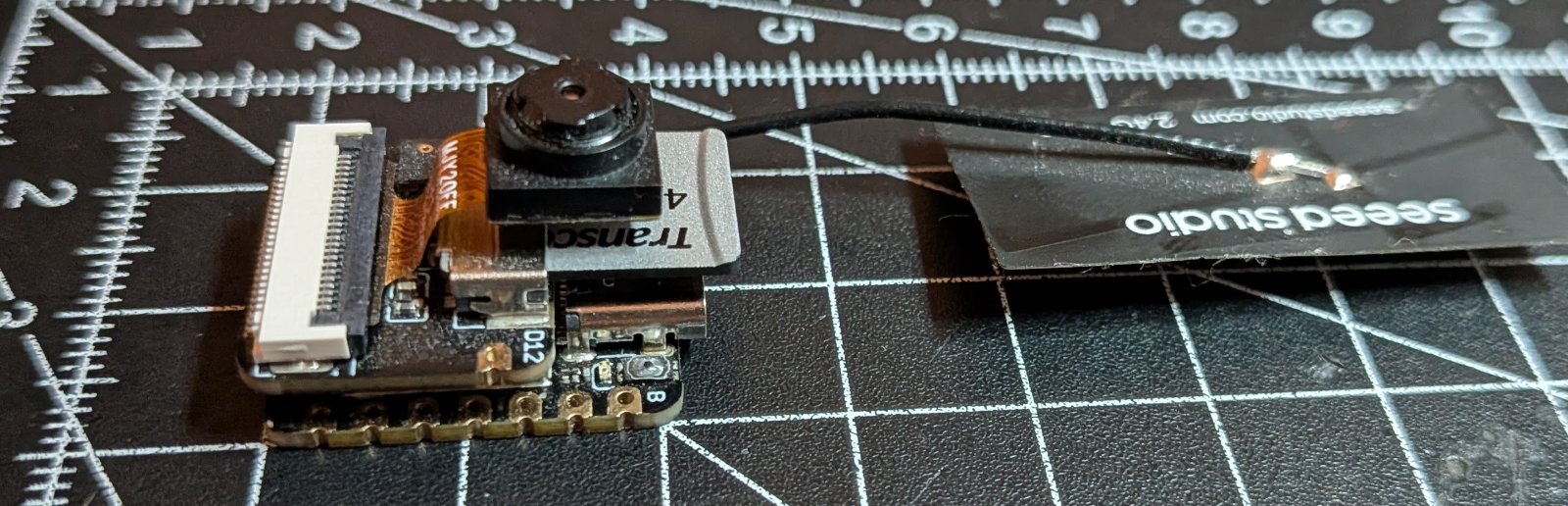
This project turns an ESP32 with a camera module into a motion-detection security system that sends alerts via Telegram, email, or WhatsApp. When motion is detected, the device captures photos and delivers them instantly to a configured messaging service, making it ideal for monitoring entry points, workshops, or any space that needs remote surveillance.
The guide provides a complete parts list, wiring diagram, and step-by-step assembly instructions for connecting the camera unit and sensor expansion board. Configuration happens through a simple text file on a microSD card, and the firmware handles WiFi connectivity, motion analysis, and message delivery—no complex coding required to get started.
Wiring diagram
Assemble it in 4 steps
1. Kameraeinheit zusammenstecken
Schiebe das OV3660-Flachbandkabel gerade und vollständig in den Kamerastecker der Sense-Erweiterungsplatine. Die Kontakte des Flachbandkabels müssen zur Kontaktseite des Steckers zeigen; klappe die kleine Verriegelung danach vorsichtig zu.
- Wenn das Kabel schräg sitzt, nimm es heraus und setze es neu ein statt es mit Kraft zu drücken.
- Ein falsch herum oder nur halb eingestecktes Flachbandkabel verhindert Kamerabilder und kann die empfindlichen Kontakte beschädigen.
2. Sense-Erweiterung auf den XIAO stecken
Drücke die Sense-Erweiterungsplatine gerade auf den Seeed XIAO ESP32-S3, bis beide Stiftleisten vollständig sitzen. Die Kamera zeigt dabei von der Platine weg; Kamera und microSD-Steckplatz sind bereits auf der Erweiterung verbunden.
- Lege die Platine so ab, dass die Kamera auf den Bereich zeigt, den sie überwachen soll.
- Es sind keine zusätzlichen Kabel an den Kamera-Pins nötig.
- Stecke oder ziehe die Erweiterung nicht, während sie über USB mit Strom versorgt wird; das kann die Platine beschädigen.
3. microSD-Karte vorbereiten
Formatiere eine microSD-Karte als FAT32 und stecke sie in den Kartensteckplatz der Sense-Erweiterung. Schalte das Gerät mit dem USB-C-Kabel einmal ein; es legt die Datei `config.txt` auf der Karte an. Ziehe danach die Stromversorgung ab, nimm die Karte heraus und trage hinter den Gleichheitszeichen WLAN-Name, WLAN-Passwort, Telegram-Bot-Token und numerische Chat-ID ein. Setze die Karte wieder ein. Wenn das Kamerabild gedreht sein soll, ändere außerdem `CAMERA_ROTATION=0` auf `90`, `180` oder `270`; `360` ist ebenfalls erlaubt und entspricht wieder `0`.
- Lass alle anderen Zeilen unverändert, wenn du nur WLAN und Telegram einrichten möchtest.
- Für eine auf dem Kopf montierte Kamera ist `CAMERA_ROTATION=180` meist die passende Einstellung.
- Du kannst später Werte wie `CONFIRMATION_FRAMES`, `ALBUM_SIZE`, `ALBUM_WAIT_MS` oder `PHOTO_SIZE` in derselben Datei ändern, ohne das Programm neu aufzuspielen.
- Die Datei enthält dein WLAN-Passwort und den Telegram-Bot-Token. Gib die Karte oder eine Kopie der Datei nicht an andere weiter.
- Ziehe die Karte nicht heraus, solange die Platine mit Strom versorgt wird; dabei können Dateien auf der Karte beschädigt werden.
4. Über USB-C mit Strom versorgen
Stecke die vorbereitete microSD-Karte ein und verbinde den USB-C-Anschluss des XIAO ESP32-S3 mit einer stabilen USB-Stromquelle. Das Kabel liefert Strom und wird auch zum Aufspielen der Software verwendet.
- Richte die Kamera erst aus, bevor du das USB-Kabel einsteckst.
- Verwende eine verlässliche USB-Stromquelle; bei zu wenig Strom kann die Kamera neu starten oder kein Bild aufnehmen.
Deploy the firmware
#include <Arduino.h>
#include <WiFi.h>
#include <WiFiClientSecure.h>
#include <WebServer.h>
#include <SPI.h>
#include <SD.h>
#include "esp_camera.h"
#include "esp_heap_caps.h"
#include "img_converters.h"
// Program code stays on the ESP32. Edit /config.txt on a FAT32 microSD card.
struct Settings {
String wifiSsid, wifiPassword, telegramToken, telegramChatId;
bool telegramEnabled = true;
bool emailEnabled = false;
String smtpHost, smtpUser, smtpPassword, emailFrom, emailTo;
uint16_t smtpPort = 465;
bool whatsappEnabled = false;
String whatsappAccessToken, whatsappPhoneNumberId, whatsappRecipient;
uint16_t pixelChangeThreshold = 28, changedSamplesToTrigger = 550, sampleIntervalMs = 250;
uint8_t confirmationFrames = 5, maxImagesPerSend = 10;
uint16_t maxWaitBeforeSendMs = 3000;
framesize_t photoSize = FRAMESIZE_VGA;
int jpegQuality = 12;
uint16_t cameraRotation = 0;
bool alarmArmed = true;
};
struct StoredPhoto { uint8_t *data = nullptr; size_t length = 0; };
// Forward declarations
String trimValue(String v);
bool boolValue(const String &v);
bool applySetting(const String &key, const String &value);
void createConfigTemplate();
bool loadSettingsFromSd();
bool textSet(const String &v,const char *placeholder);
bool anyDeliveryConfigured();
bool connectWiFi();
void configureCamera(camera_config_t &c);
bool motionDetected(camera_fb_t *f);
void applyCameraRotation();
bool rotateJpegQuarterTurn(uint8_t *&data,size_t &length);
bool captureJpegCopy(uint8_t*&data,size_t&length);
void clearQueuedPhotos();
bool queuePhotoCopy(uint8_t *&data, size_t length);
String base64(const uint8_t *data,size_t len);
String urlEncode(const String &text);
bool httpStatus200(WiFiClientSecure &c);
bool sendTelegramAlbum(uint8_t n);
bool sendTelegramPhotosIndividually(uint8_t n);
bool sendTelegramMessage(const String &text);
bool installTelegramControls();
void pollTelegramCommands();
bool telegramResponseOk(WiFiClientSecure &c);
bool smtpReply(WiFiClientSecure &c,int wanted);
bool sendEmailAlbum(uint8_t n);
String jsonEscape(String v);
bool sendWhatsAppPhoto(const StoredPhoto &p,uint8_t index);
bool sendWhatsAppAlbum(uint8_t n);
bool deliverAlbum(uint8_t n);
void removeSentPhotos(uint8_t n);
void sendQueuedAlbumIfDue(bool force);
void startWebInterface();
void handleWebRoot();
void handleWebSave();
void handleWebReboot();
void handleWebDeleteConfig();
void handleWebRawConfig();
void handleWebTerminal();
void protokoll(const String &text);
void writeCurrentSettings(File &f);
String htmlEscape(const String &value);
String htmlInput(const char *name, const String &value, bool secret=false, bool neustartNoetig=false);
String htmlBooleanSelect(const char *name, bool value);
const int SD_CS_PIN=21, SD_SCK_PIN=7, SD_MISO_PIN=8, SD_MOSI_PIN=9;
SPIClass sdSpi(FSPI);
Settings settings;
bool sdReady=false, cameraReady=false;
uint32_t lastStatusMs=0;
uint8_t *previousFrame=nullptr;
size_t previousFrameLength=0;
const uint8_t QUEUE_CAPACITY=20;
StoredPhoto photoQueue[QUEUE_CAPACITY];
uint8_t queuedPhotoCount=0, motionFrameStreak=0;
bool motionConfirmed=false;
uint32_t oldestQueuedPhotoMs=0, lastSampleMs=0, lastTelegramPollMs=0;
long telegramUpdateOffset=0;
WebServer webServer(80);
bool rebootRequested=false;
uint32_t rebootRequestedMs=0;
bool alteKonfigurationsnamenGefunden=false;
// Die letzten Meldungen werden zusätzlich zur USB-Seriellschnittstelle für die lokale Webansicht gepuffert.
String webProtokoll;
const size_t WEB_PROTOKOLL_MAX_ZEICHEN=7000;
void protokoll(const String &text){
// Eigene Programmmeldungen gehen immer gleichzeitig an USB und ins Web-Protokoll.
Serial.print(text);
Serial.write('\n');
webProtokoll += String(millis()/1000) + " s " + text + "\n";
if(webProtokoll.length()>WEB_PROTOKOLL_MAX_ZEICHEN) webProtokoll.remove(0,webProtokoll.length()-WEB_PROTOKOLL_MAX_ZEICHEN);
}
String trimValue(String v) { v.trim(); return v; }
bool boolValue(const String &v) { return v=="1" || v.equalsIgnoreCase("true") || v.equalsIgnoreCase("yes") || v.equalsIgnoreCase("on"); }
bool applySetting(const String &key, const String &value) {
// Ältere englische Dateien werden einmalig übernommen und danach als deutsche
// config.txt gespeichert. So bleiben vorhandene Zugangsdaten erhalten.
if(key=="WIFI_SSID") { alteKonfigurationsnamenGefunden=true; return applySetting("WLAN_NAME",value); }
if(key=="WIFI_PASSWORD") { alteKonfigurationsnamenGefunden=true; return applySetting("WLAN_PASSWORT",value); }
if(key=="TELEGRAM_ENABLED") { alteKonfigurationsnamenGefunden=true; return applySetting("TELEGRAM_AKTIV",value); }
if(key=="TELEGRAM_BOT_TOKEN") { alteKonfigurationsnamenGefunden=true; return applySetting("TELEGRAM_BOT_SCHLUESSEL",value); }
if(key=="TELEGRAM_CHAT_ID") { alteKonfigurationsnamenGefunden=true; return applySetting("TELEGRAM_CHAT_NUMMER",value); }
if(key=="EMAIL_ENABLED") { alteKonfigurationsnamenGefunden=true; return applySetting("E_MAIL_AKTIV",value); }
if(key=="SMTP_HOST") { alteKonfigurationsnamenGefunden=true; return applySetting("E_MAIL_SERVER",value); }
if(key=="SMTP_PORT") { alteKonfigurationsnamenGefunden=true; return applySetting("E_MAIL_PORT",value); }
if(key=="SMTP_USER") { alteKonfigurationsnamenGefunden=true; return applySetting("E_MAIL_BENUTZERNAME",value); }
if(key=="SMTP_PASSWORD") { alteKonfigurationsnamenGefunden=true; return applySetting("E_MAIL_PASSWORT",value); }
if(key=="EMAIL_FROM") { alteKonfigurationsnamenGefunden=true; return applySetting("E_MAIL_ABSENDER",value); }
if(key=="EMAIL_TO") { alteKonfigurationsnamenGefunden=true; return applySetting("E_MAIL_EMPFÄNGER",value); }
if(key=="WHATSAPP_ENABLED") { alteKonfigurationsnamenGefunden=true; return applySetting("WHATSAPP_AKTIV",value); }
if(key=="WHATSAPP_ACCESS_TOKEN") { alteKonfigurationsnamenGefunden=true; return applySetting("WHATSAPP_ZUGANGSSCHLUESSEL",value); }
if(key=="WHATSAPP_PHONE_NUMBER_ID") { alteKonfigurationsnamenGefunden=true; return applySetting("WHATSAPP_TELEFON_NUMMER_ID",value); }
if(key=="WHATSAPP_RECIPIENT") { alteKonfigurationsnamenGefunden=true; return applySetting("WHATSAPP_EMPFÄNGER",value); }
if(key=="PIXEL_CHANGE_THRESHOLD") { alteKonfigurationsnamenGefunden=true; return applySetting("MINDEST_HELLIGKEITSAENDERUNG",value); }
if(key=="CHANGED_SAMPLES_TO_TRIGGER") { alteKonfigurationsnamenGefunden=true; return applySetting("MINDEST_ANZAHL_VERAENDERTER_BILDPUNKTE",value); }
if(key=="SAMPLE_INTERVAL_MS") { alteKonfigurationsnamenGefunden=true; return applySetting("BILDVERGLEICH_ABSTAND_MS",value); }
if(key=="CONFIRMATION_FRAMES") { alteKonfigurationsnamenGefunden=true; return applySetting("BILDER_BIS_BEWEGUNGSBESTAETIGUNG",value); }
if(key=="ALBUM_SIZE") { alteKonfigurationsnamenGefunden=true; return applySetting("MAXIMALE_BILDER_PRO_VERSAND",value); }
if(key=="ALBUM_WAIT_MS") { alteKonfigurationsnamenGefunden=true; return applySetting("MAXIMALE_WARTEZEIT_BIS_VERSAND_MS",value); }
if(key=="PHOTO_SIZE") { alteKonfigurationsnamenGefunden=true; return applySetting("FOTOGROESSE",value); }
if(key=="JPEG_QUALITY") { alteKonfigurationsnamenGefunden=true; return applySetting("JPEG_QUALITAET",value); }
if(key=="CAMERA_ROTATION") { alteKonfigurationsnamenGefunden=true; return applySetting("KAMERA_DREHUNG",value); }
if(key=="ALARM_ARMED") { alteKonfigurationsnamenGefunden=true; return applySetting("ALARM_AKTIV",value); }
if(key=="WLAN_NAME") settings.wifiSsid=value; else if(key=="WLAN_PASSWORT") settings.wifiPassword=value;
else if(key=="TELEGRAM_AKTIV") settings.telegramEnabled=boolValue(value);
else if(key=="TELEGRAM_BOT_SCHLUESSEL") settings.telegramToken=value; else if(key=="TELEGRAM_CHAT_NUMMER") settings.telegramChatId=value;
else if(key=="E_MAIL_AKTIV") settings.emailEnabled=boolValue(value); else if(key=="E_MAIL_SERVER") settings.smtpHost=value;
else if(key=="E_MAIL_PORT") settings.smtpPort=constrain(value.toInt(),1,65535); else if(key=="E_MAIL_BENUTZERNAME") settings.smtpUser=value;
else if(key=="E_MAIL_PASSWORT") settings.smtpPassword=value; else if(key=="E_MAIL_ABSENDER") settings.emailFrom=value; else if(key=="E_MAIL_EMPFÄNGER") settings.emailTo=value;
else if(key=="WHATSAPP_AKTIV") settings.whatsappEnabled=boolValue(value); else if(key=="WHATSAPP_ZUGANGSSCHLUESSEL") settings.whatsappAccessToken=value;
else if(key=="WHATSAPP_TELEFON_NUMMER_ID") settings.whatsappPhoneNumberId=value; else if(key=="WHATSAPP_EMPFÄNGER") settings.whatsappRecipient=value;
else if(key=="MINDEST_HELLIGKEITSAENDERUNG") settings.pixelChangeThreshold=value.toInt(); else if(key=="MINDEST_ANZAHL_VERAENDERTER_BILDPUNKTE") settings.changedSamplesToTrigger=value.toInt();
else if(key=="BILDVERGLEICH_ABSTAND_MS") settings.sampleIntervalMs=max((long)50,value.toInt()); else if(key=="BILDER_BIS_BEWEGUNGSBESTAETIGUNG") settings.confirmationFrames=constrain(value.toInt(),1,20);
else if(key=="MAXIMALE_BILDER_PRO_VERSAND") settings.maxImagesPerSend=constrain(value.toInt(),2,10); else if(key=="MAXIMALE_WARTEZEIT_BIS_VERSAND_MS") settings.maxWaitBeforeSendMs=max((long)250,value.toInt());
else if(key=="FOTOGROESSE") { if(value=="QVGA") settings.photoSize=FRAMESIZE_QVGA; else if(value=="VGA") settings.photoSize=FRAMESIZE_VGA; else if(value=="SVGA") settings.photoSize=FRAMESIZE_SVGA; else return false; }
else if(key=="JPEG_QUALITAET") settings.jpegQuality=constrain(value.toInt(),4,63);
else if(key=="KAMERA_DREHUNG") { int r=value.toInt(); if(r!=0&&r!=90&&r!=180&&r!=270&&r!=360)return false; settings.cameraRotation=(r==360?0:r); }
else if(key=="ALARM_AKTIV") settings.alarmArmed=boolValue(value);
else return false; return true;
}
void createConfigTemplate() {
File f=SD.open("/config.txt",FILE_WRITE);
if(!f) return;
// One literal makes every separating blank line unambiguous on the SD card.
f.print(
"# WLAN\n"
"WLAN_NAME=YOUR_WIFI_NAME\n"
"WLAN_PASSWORT=YOUR_WLAN_PASSWORT\n"
"\n"
"# Telegram\n"
"TELEGRAM_AKTIV=true\n"
"TELEGRAM_BOT_SCHLUESSEL=123456789:REPLACE_WITH_BOT_TOKEN\n"
"TELEGRAM_CHAT_NUMMER=REPLACE_WITH_NUMERIC_CHAT_ID\n"
"\n"
"# E-Mail: Bei manchen Anbietern brauchst du ein App-Passwort statt deines normalen Passworts.\n"
"E_MAIL_AKTIV=false\n"
"E_MAIL_SERVER=smtp.example.com\n"
"E_MAIL_PORT=465\n"
"E_MAIL_BENUTZERNAME=camera@example.com\n"
"E_MAIL_PASSWORT=REPLACE_WITH_E_MAIL_PASSWORT\n"
"E_MAIL_ABSENDER=camera@example.com\n"
"E_MAIL_EMPFÄNGER=recipient@example.com\n"
"\n"
"# WhatsApp benötigt einen Zugangsschlüssel der offiziellen Meta WhatsApp Business Cloud API.\n"
"WHATSAPP_AKTIV=false\n"
"WHATSAPP_ZUGANGSSCHLUESSEL=REPLACE_WITH_META_ACCESS_TOKEN\n"
"WHATSAPP_TELEFON_NUMMER_ID=REPLACE_WITH_PHONE_NUMBER_ID\n"
"WHATSAPP_EMPFÄNGER=15551234567\n"
"\n"
"# Kamera und Bewegung\n"
"MINDEST_HELLIGKEITSAENDERUNG=28\n"
"MINDEST_ANZAHL_VERAENDERTER_BILDPUNKTE=550\n"
"BILDVERGLEICH_ABSTAND_MS=250\n"
"BILDER_BIS_BEWEGUNGSBESTAETIGUNG=5\n"
"MAXIMALE_BILDER_PRO_VERSAND=10\n"
"MAXIMALE_WARTEZEIT_BIS_VERSAND_MS=3000\n"
"FOTOGROESSE=VGA\n"
"JPEG_QUALITAET=12\n"
"KAMERA_DREHUNG=0\n"
"\n"
"# Zustand nach jedem Neustart. Telegram-Befehle: /arm, /disarm, /status.\n"
"ALARM_AKTIV=true\n"
);
f.close();
}
bool loadSettingsFromSd() {
alteKonfigurationsnamenGefunden=false;
File f=SD.open("/config.txt",FILE_READ);
if(!f){createConfigTemplate();return false;}
while(f.available()){
String l=trimValue(f.readStringUntil('\n'));
if(!l.length()||l.startsWith("#"))continue;
int p=l.indexOf('=');
if(p>0&&!applySetting(trimValue(l.substring(0,p)),trimValue(l.substring(p+1))))protokoll("[Config] Unbekannter Eintrag ignoriert: "+l.substring(0,p));
}
f.close();
if(!alteKonfigurationsnamenGefunden)return true;
File neu=SD.open("/config.neu",FILE_WRITE);
if(!neu){protokoll("[Config] Alte Namen erkannt, aber neue Datei konnte nicht erstellt werden.");return true;}
writeCurrentSettings(neu);
neu.close();
SD.remove("/config.txt.bak");
if(!SD.rename("/config.txt","/config.txt.bak")||!SD.rename("/config.neu","/config.txt")){
protokoll("[Config] Automatische Umstellung fehlgeschlagen; die alte Datei bleibt als config.txt.bak erhalten.");
if(!SD.exists("/config.txt")&&SD.exists("/config.txt.bak"))SD.rename("/config.txt.bak","/config.txt");
return true;
}
protokoll("[Config] Englische Namen automatisch umgestellt. Sicherung: /config.txt.bak");
return true;
}
bool textSet(const String &v,const char *placeholder) { return v.length()>0 && v!=placeholder && !v.startsWith("REPLACE_"); }
bool anyDeliveryConfigured() { bool tg=!settings.telegramEnabled || (settings.telegramToken.length()>12&&!settings.telegramToken.startsWith("123456789:")&&textSet(settings.telegramChatId,"REPLACE_WITH_NUMERIC_CHAT_ID")); bool em=!settings.emailEnabled || (settings.smtpHost.length()&&settings.smtpUser.length()&&textSet(settings.smtpPassword,"REPLACE_WITH_E_MAIL_PASSWORT")&&settings.emailFrom.length()&&settings.emailTo.length()); bool wa=!settings.whatsappEnabled || (textSet(settings.whatsappAccessToken,"REPLACE_WITH_META_ACCESS_TOKEN")&&textSet(settings.whatsappPhoneNumberId,"REPLACE_WITH_PHONE_NUMBER_ID")&&settings.whatsappRecipient.length()); return tg&&em&&wa&&(settings.telegramEnabled||settings.emailEnabled||settings.whatsappEnabled); }
bool connectWiFi(){
if(WiFi.status()==WL_CONNECTED)return true;
protokoll("[WiFi] Connecting to configured network...");
WiFi.mode(WIFI_STA);
WiFi.begin(settings.wifiSsid.c_str(),settings.wifiPassword.c_str());
uint32_t t=millis();
while(WiFi.status()!=WL_CONNECTED&&millis()-t<20000)delay(250);
if(WiFi.status()==WL_CONNECTED){
protokoll("[WiFi] Connected. IP address: "+WiFi.localIP().toString());
return true;
}
protokoll("[WiFi] Connection failed; will retry in 5 seconds.");
return false;
}
void configureCamera(camera_config_t &c){c.ledc_channel=LEDC_CHANNEL_0;c.ledc_timer=LEDC_TIMER_0;c.pin_d0=15;c.pin_d1=17;c.pin_d2=18;c.pin_d3=16;c.pin_d4=14;c.pin_d5=12;c.pin_d6=11;c.pin_d7=48;c.pin_xclk=10;c.pin_pclk=13;c.pin_vsync=38;c.pin_href=47;c.pin_sccb_sda=40;c.pin_sccb_scl=39;c.pin_pwdn=-1;c.pin_reset=-1;c.xclk_freq_hz=20000000;c.pixel_format=PIXFORMAT_JPEG;c.frame_size=settings.photoSize;c.jpeg_quality=settings.jpegQuality;c.fb_count=1;c.fb_location=CAMERA_FB_IN_PSRAM;c.grab_mode=CAMERA_GRAB_WHEN_EMPTY;}
bool motionDetected(camera_fb_t *f){
// OV3660 JPEG frames are stable on the XIAO; decode a small image for motion comparison.
if(!f||f->format!=PIXFORMAT_JPEG)return false;
const size_t samples=(size_t)f->width*f->height;
const size_t rgbBytes=samples*3UL;
uint8_t *rgb=(uint8_t*)heap_caps_malloc(rgbBytes,MALLOC_CAP_SPIRAM|MALLOC_CAP_8BIT);
if(!rgb||!fmt2rgb888(f->buf,f->len,PIXFORMAT_JPEG,rgb)){free(rgb);return false;}
if(!previousFrame||previousFrameLength!=samples){free(previousFrame);previousFrame=(uint8_t*)heap_caps_malloc(samples,MALLOC_CAP_SPIRAM|MALLOC_CAP_8BIT);if(!previousFrame){free(rgb);return false;}previousFrameLength=samples;for(size_t i=0;i<samples;i++)previousFrame[i]=(uint8_t)(((uint16_t)rgb[i*3]*30+(uint16_t)rgb[i*3+1]*59+(uint16_t)rgb[i*3+2]*11)/100);free(rgb);return false;}
uint32_t changed=0;
for(size_t i=0;i<samples;i+=4){uint8_t gray=(uint8_t)(((uint16_t)rgb[i*3]*30+(uint16_t)rgb[i*3+1]*59+(uint16_t)rgb[i*3+2]*11)/100);if(abs((int)gray-(int)previousFrame[i])>=settings.pixelChangeThreshold)++changed;previousFrame[i]=gray;}
// Refresh unsampled pixels too, so a stationary scene becomes the new reference.
for(size_t i=1;i<samples;i+=4)previousFrame[i]=(uint8_t)(((uint16_t)rgb[i*3]*30+(uint16_t)rgb[i*3+1]*59+(uint16_t)rgb[i*3+2]*11)/100);
for(size_t i=2;i<samples;i+=4)previousFrame[i]=(uint8_t)(((uint16_t)rgb[i*3]*30+(uint16_t)rgb[i*3+1]*59+(uint16_t)rgb[i*3+2]*11)/100);
for(size_t i=3;i<samples;i+=4)previousFrame[i]=(uint8_t)(((uint16_t)rgb[i*3]*30+(uint16_t)rgb[i*3+1]*59+(uint16_t)rgb[i*3+2]*11)/100);
free(rgb);return changed>=settings.changedSamplesToTrigger;
}
void applyCameraRotation(){sensor_t*s=esp_camera_sensor_get();if(s){s->set_hmirror(s,settings.cameraRotation==180);s->set_vflip(s,settings.cameraRotation==180);}}
bool rotateJpegQuarterTurn(uint8_t *&data,size_t &length){if(settings.cameraRotation!=90&&settings.cameraRotation!=270)return true;uint16_t w=640,h=480;if(settings.photoSize==FRAMESIZE_QVGA){w=320;h=240;}else if(settings.photoSize==FRAMESIZE_SVGA){w=800;h=600;}size_t n=(size_t)w*h*3;uint8_t*a=(uint8_t*)heap_caps_malloc(n,MALLOC_CAP_SPIRAM|MALLOC_CAP_8BIT),*b=(uint8_t*)heap_caps_malloc(n,MALLOC_CAP_SPIRAM|MALLOC_CAP_8BIT);if(!a||!b||!fmt2rgb888(data,length,PIXFORMAT_JPEG,a)){free(a);free(b);return false;}for(uint16_t y=0;y<h;y++)for(uint16_t x=0;x<w;x++){size_t src=((size_t)y*w+x)*3;uint16_t dx=settings.cameraRotation==90?h-1-y:y,dy=settings.cameraRotation==90?x:w-1-x;memcpy(b+((size_t)dy*h+dx)*3,a+src,3);}uint8_t*j=nullptr;size_t l=0;bool ok=fmt2jpg(b,n,h,w,PIXFORMAT_RGB888,settings.jpegQuality,&j,&l);free(a);free(b);if(!ok||!j)return false;free(data);data=j;length=l;return true;}
bool captureJpegCopy(uint8_t*&data,size_t&length){data=nullptr;length=0;sensor_t*s=esp_camera_sensor_get();if(!s)return false;s->set_framesize(s,settings.photoSize);s->set_quality(s,settings.jpegQuality);applyCameraRotation();delay(180);camera_fb_t*p=esp_camera_fb_get();if(p){data=(uint8_t*)heap_caps_malloc(p->len,MALLOC_CAP_SPIRAM|MALLOC_CAP_8BIT);if(data){memcpy(data,p->buf,p->len);length=p->len;}esp_camera_fb_return(p);}if(data&&!rotateJpegQuarterTurn(data,length)){free(data);data=nullptr;length=0;}s->set_hmirror(s,false);s->set_vflip(s,false);s->set_framesize(s,FRAMESIZE_QVGA);delay(120);return data!=nullptr;}
void clearQueuedPhotos(){for(uint8_t i=0;i<queuedPhotoCount;i++){free(photoQueue[i].data);photoQueue[i]={};}queuedPhotoCount=0;oldestQueuedPhotoMs=0;}
bool queuePhotoCopy(uint8_t *&data, size_t length){if(queuedPhotoCount>=QUEUE_CAPACITY||!data||!length)return false;photoQueue[queuedPhotoCount++]={data,length};data=nullptr;if(!oldestQueuedPhotoMs)oldestQueuedPhotoMs=millis();return true;}
String base64(const uint8_t *data,size_t len){static const char t[]="ABCDEFGHIJKLMNOPQRSTUVWXYZabcdefghijklmnopqrstuvwxyz0123456789+/";String out;out.reserve(((len+2)/3)*4);for(size_t i=0;i<len;i+=3){uint32_t n=(uint32_t)data[i]<<16;if(i+1<len)n|=(uint32_t)data[i+1]<<8;if(i+2<len)n|=data[i+2];out+=t[(n>>18)&63];out+=t[(n>>12)&63];out+=(i+1<len?t[(n>>6)&63]:'=');out+=(i+2<len?t[n&63]:'=');}return out;}
String urlEncode(const String &text){static const char hex[]="0123456789ABCDEF";String out;out.reserve(text.length()*3);for(size_t i=0;i<text.length();i++){uint8_t c=(uint8_t)text[i];if((c>='a'&&c<='z')||(c>='A'&&c<='Z')||(c>='0'&&c<='9')||c=='-'||c=='_'||c=='.'||c=='~')out+=(char)c;else{out+='%';out+=hex[c>>4];out+=hex[c&15];}}return out;}
bool httpStatus200(WiFiClientSecure &c){uint32_t t=millis();while(!c.available()&&millis()-t<20000)delay(10);String status=c.readStringUntil('\n');c.stop();return status.indexOf(" 200 ")>=0||status.indexOf(" 201 ")>=0;}
bool telegramResponseOk(WiFiClientSecure &c){
// Do not use Stream::readString() here. On this ESP32-S3 core it keeps
// querying a TLS socket after Telegram has closed it, producing errno 9.
uint32_t deadline=millis()+20000;
while(!c.available()&&millis()<deadline)delay(5);
if(!c.available()){c.stop();return false;}
String status=c.readStringUntil('\n');
bool ok=status.indexOf(" 200 ")>=0||status.indexOf(" 201 ")>=0;
int contentLength=-1;
bool headersDone=false;
deadline=millis()+3000;
while(millis()<deadline&&!headersDone){
if(!c.available()){delay(2);continue;}
String line=c.readStringUntil('\n');
if(line.startsWith("Content-Length:")||line.startsWith("content-length:"))contentLength=line.substring(line.indexOf(':')+1).toInt();
if(line=="\r"||line.length()==0)headersDone=true;
}
String response;
if(headersDone){
if(contentLength>0)response.reserve(contentLength);
uint32_t idleDeadline=millis()+500;
while((contentLength<0||response.length()<(size_t)contentLength)&&millis()<idleDeadline){
while(c.available()&&(contentLength<0||response.length()<(size_t)contentLength)){
response+=(char)c.read();
idleDeadline=millis()+150;
}
delay(2);
}
}
c.stop();
return ok;
}
bool sendTelegramAlbum(uint8_t n){if(!settings.telegramEnabled)return true;WiFiClientSecure c;c.setInsecure();if(!c.connect("api.telegram.org",443))return false;String b="----XIAOBoundary",media="[";for(uint8_t i=0;i<n;i++){if(i)media+=',';media+="{\"type\":\"photo\",\"media\":\"attach://motion"+String(i)+"\"";if(!i)media+=",\"caption\":\"Confirmed camera movement: "+String(n)+" images\"";media+="}";}media+=']';String start="--"+b+"\r\nContent-Disposition: form-data; name=\"chat_id\"\r\n\r\n"+settings.telegramChatId+"\r\n--"+b+"\r\nContent-Disposition: form-data; name=\"media\"\r\n\r\n"+media+"\r\n";size_t len=start.length();for(uint8_t i=0;i<n;i++){String h="--"+b+"\r\nContent-Disposition: form-data; name=\"motion"+String(i)+"\"; filename=\"motion.jpg\"\r\nContent-Type: image/jpeg\r\n\r\n";len+=h.length()+photoQueue[i].length+2;}String tail="--"+b+"--\r\n";len+=tail.length();c.printf("POST /bot%s/sendMediaGroup HTTP/1.1\r\n",settings.telegramToken.c_str());c.println("Host: api.telegram.org");c.println("Connection: close");c.println("Content-Type: multipart/form-data; boundary="+b);c.println("Content-Length: "+String(len));c.println();c.print(start);for(uint8_t i=0;i<n;i++){c.print("--"+b+"\r\nContent-Disposition: form-data; name=\"motion"+String(i)+"\"; filename=\"motion.jpg\"\r\nContent-Type: image/jpeg\r\n\r\n");c.write(photoQueue[i].data,photoQueue[i].length);c.print("\r\n");}c.print(tail);return telegramResponseOk(c);}
bool sendTelegramPhotosIndividually(uint8_t n){
if(!settings.telegramEnabled)return true;
bool allSent=true;
for(uint8_t i=0;i<n;i++){
WiFiClientSecure c;
c.setInsecure();
if(!c.connect("api.telegram.org",443)){
protokoll("[Telegram] Could not connect for image "+String(i+1)+" of "+String(n)+".");
allSent=false;
break;
}
String boundary="----XIAOSinglePhoto";
String caption="Confirmed camera movement: image "+String(i+1)+" of "+String(n);
String head="--"+boundary+"\r\nContent-Disposition: form-data; name=\"chat_id\"\r\n\r\n"+settings.telegramChatId+
"\r\n--"+boundary+"\r\nContent-Disposition: form-data; name=\"caption\"\r\n\r\n"+caption+
"\r\n--"+boundary+"\r\nContent-Disposition: form-data; name=\"photo\"; filename=\"motion.jpg\"\r\nContent-Type: image/jpeg\r\n\r\n";
String tail="\r\n--"+boundary+"--\r\n";
size_t bodyLength=head.length()+photoQueue[i].length+tail.length();
c.printf("POST /bot%s/sendPhoto HTTP/1.1\r\n",settings.telegramToken.c_str());
c.println("Host: api.telegram.org");
c.println("Connection: close");
c.println("Content-Type: multipart/form-data; boundary="+boundary);
c.println("Content-Length: "+String(bodyLength));
c.println();
c.print(head);
c.write(photoQueue[i].data,photoQueue[i].length);
c.print(tail);
if(!telegramResponseOk(c)){
protokoll("[Telegram] Image "+String(i+1)+" of "+String(n)+" failed; remaining images stay queued.");
allSent=false;
break;
}
protokoll("[Telegram] Image "+String(i+1)+" of "+String(n)+" sent.");
delay(150);
}
return allSent;
}
bool sendTelegramMessage(const String &text){
if(!settings.telegramEnabled)return false;
WiFiClientSecure c;c.setInsecure();
if(!c.connect("api.telegram.org",443))return false;
// This is Telegram's on-screen reply keyboard: the three labels are tappable.
String keyboard="{\"keyboard\":[[{\"text\":\"/arm\"},{\"text\":\"/disarm\"}],[{\"text\":\"/status\"}]],\"resize_keyboard\":true,\"is_persistent\":true}";
String body="chat_id="+urlEncode(settings.telegramChatId)+"&text="+urlEncode(text)+"&reply_markup="+urlEncode(keyboard);
c.printf("POST /bot%s/sendMessage HTTP/1.1\r\n",settings.telegramToken.c_str());
c.println("Host: api.telegram.org");c.println("Connection: close");c.println("Content-Type: application/x-www-form-urlencoded");c.println("Content-Length: "+String(body.length()));c.println();c.print(body);
return telegramResponseOk(c);
}
bool installTelegramControls(){
if(!settings.telegramEnabled)return false;
WiFiClientSecure c;c.setInsecure();
if(!c.connect("api.telegram.org",443))return false;
String commands="{\"commands\":[{\"command\":\"arm\",\"description\":\"Alarmanlage aktivieren\"},{\"command\":\"disarm\",\"description\":\"Alarmanlage deaktivieren\"},{\"command\":\"status\",\"description\":\"Alarmstatus abfragen\"}]}";
c.printf("POST /bot%s/setMyCommands HTTP/1.1\r\n",settings.telegramToken.c_str());
c.println("Host: api.telegram.org");c.println("Connection: close");c.println("Content-Type: application/json");c.println("Content-Length: "+String(commands.length()));c.println();c.print(commands);
bool menuOk=httpStatus200(c);
bool keyboardOk=sendTelegramMessage("Alarmsteuerung bereit. Mit /arm, /disarm und /status kannst du die Anlage steuern.");
protokoll(menuOk&&keyboardOk?"[Telegram] Control buttons installed.":"[Telegram] Could not install control buttons; check bot token and chat ID.");
return menuOk&&keyboardOk;
}
void pollTelegramCommands(){
if(!settings.telegramEnabled||millis()-lastTelegramPollMs<2000)return;
lastTelegramPollMs=millis();
WiFiClientSecure c;c.setInsecure();
if(!c.connect("api.telegram.org",443))return;
String path="/bot"+settings.telegramToken+"/getUpdates?timeout=0&offset="+String(telegramUpdateOffset);
c.println("GET "+path+" HTTP/1.1");c.println("Host: api.telegram.org");c.println("Connection: close");c.println();
uint32_t start=millis();
while(!c.available()&&millis()-start<10000)delay(10);
if(!c.available()){protokoll("[Telegram] No response to command check; retrying later.");c.stop();return;}
String header=c.readStringUntil('\n');
if(header.indexOf(" 200 ")<0){protokoll("[Telegram] Command check was rejected.");c.stop();return;}
// Telegram may close TLS before connected() is queried on this ESP32-S3 core.
// Avoid connected(): it can repeatedly call setsockopt on the closed socket.
bool headersDone=false;
uint32_t headerDeadline=millis()+3000;
while(millis()<headerDeadline&&!headersDone){
if(!c.available()){delay(5);continue;}
String line=c.readStringUntil('\n');
if(line=="\r"||line.length()==0)headersDone=true;
}
if(!headersDone){protokoll("[Telegram] Incomplete command response headers.");c.stop();return;}
String body="";
uint32_t bodyDeadline=millis()+5000;
uint32_t lastByteMs=millis();
while(millis()<bodyDeadline){
while(c.available()){body+=(char)c.read();lastByteMs=millis();}
if(body.length()&&millis()-lastByteMs>150)break;
delay(5);
}
c.stop();
int scan=0;
while(true){
int updateAt=body.indexOf("\"update_id\":",scan);if(updateAt<0)break;
int idStart=updateAt+12,idEnd=idStart;while(idEnd<(int)body.length()&&isDigit(body[idEnd]))idEnd++;
long updateId=body.substring(idStart,idEnd).toInt();
int nextUpdate=body.indexOf("\"update_id\":",idEnd);
String one=body.substring(updateAt,nextUpdate<0?(int)body.length():nextUpdate);
telegramUpdateOffset=updateId+1;
int chatAt=one.indexOf("\"chat\":{\"id\":");
int textAt=one.indexOf("\"text\":\"");
if(chatAt<0||textAt<0){scan=idEnd;continue;}
int chatStart=chatAt+13,chatEnd=chatStart;while(chatEnd<(int)one.length()&&(isDigit(one[chatEnd])||one[chatEnd]=='-'))chatEnd++;
String chatId=one.substring(chatStart,chatEnd);
int commandStart=textAt+8,commandEnd=one.indexOf('"',commandStart);
if(chatId!=settings.telegramChatId||commandEnd<0){scan=idEnd;continue;}
String command=one.substring(commandStart,commandEnd);command.toLowerCase();
// The reply-keyboard labels and typed slash commands are both accepted.
if(command=="/arm"||command=="arm"||command.startsWith("/arm@")){
settings.alarmArmed=true;motionFrameStreak=0;motionConfirmed=false;clearQueuedPhotos();
protokoll("[Alarm] Armed by Telegram.");sendTelegramMessage("Alarm armed. Camera movement is being monitored.");
}else if(command=="/disarm"||command=="disarm"||command.startsWith("/disarm@")){
settings.alarmArmed=false;motionFrameStreak=0;motionConfirmed=false;clearQueuedPhotos();
protokoll("[Alarm] Disarmed by Telegram.");sendTelegramMessage("Alarm disarmed. No movement photos will be sent.");
}else if(command=="/status"||command=="status"||command.startsWith("/status@")){
String state=settings.alarmArmed?"ARMED":"DISARMED";
String reply="Alarm status: "+state+". WiFi: "+String(WiFi.status()==WL_CONNECTED?"connected":"offline")+". Queued images: "+String(queuedPhotoCount)+".";
protokoll("[Alarm] Status requested by Telegram.");sendTelegramMessage(reply);
}
scan=idEnd;
}
}
bool smtpReply(WiFiClientSecure &c,int wanted){uint32_t t=millis();while(!c.available()&&millis()-t<15000)delay(10);String r=c.readStringUntil('\n');return r.startsWith(String(wanted));}
bool sendEmailAlbum(uint8_t n){if(!settings.emailEnabled)return true;WiFiClientSecure c;c.setInsecure();if(!c.connect(settings.smtpHost.c_str(),settings.smtpPort))return false;if(!smtpReply(c,220))return false;c.println("EHLO xiao-camera");if(!smtpReply(c,250))return false;c.println("AUTH LOGIN");if(!smtpReply(c,334))return false;c.println(base64((const uint8_t*)settings.smtpUser.c_str(),settings.smtpUser.length()));if(!smtpReply(c,334))return false;c.println(base64((const uint8_t*)settings.smtpPassword.c_str(),settings.smtpPassword.length()));if(!smtpReply(c,235))return false;c.println("MAIL FROM:<"+settings.emailFrom+">");if(!smtpReply(c,250))return false;c.println("RCPT TO:<"+settings.emailTo+">");if(!smtpReply(c,250))return false;c.println("DATA");if(!smtpReply(c,354))return false;String b="----XIAOEmailBoundary";c.println("From: <"+settings.emailFrom+">");c.println("To: <"+settings.emailTo+">");c.println("Subject: Confirmed camera movement");c.println("MIME-Version: 1.0");c.println("Content-Type: multipart/mixed; boundary="+b);c.println();c.println("--"+b);c.println("Content-Type: text/plain; charset=utf-8\r\n");c.println("Confirmed camera movement: "+String(n)+" image(s).");for(uint8_t i=0;i<n;i++){c.println("--"+b);c.println("Content-Type: image/jpeg; name=\"motion"+String(i+1)+".jpg\"");c.println("Content-Transfer-Encoding: base64");c.println("Content-Disposition: attachment; filename=\"motion"+String(i+1)+".jpg\"\r\n");String enc=base64(photoQueue[i].data,photoQueue[i].length);for(size_t p=0;p<enc.length();p+=76)c.println(enc.substring(p,p+76));}c.println("--"+b+"--");c.println(".");bool ok=smtpReply(c,250);c.println("QUIT");c.stop();return ok;}
String jsonEscape(String v){v.replace("\\","\\\\");v.replace("\"","\\\"");return v;}
bool sendWhatsAppPhoto(const StoredPhoto &p,uint8_t index){if(!settings.whatsappEnabled)return true;WiFiClientSecure c;c.setInsecure();if(!c.connect("graph.facebook.com",443))return false;String b="----XIAOWABoundary";String head="--"+b+"\r\nContent-Disposition: form-data; name=\"messaging_product\"\r\n\r\nwhatsapp\r\n--"+b+"\r\nContent-Disposition: form-data; name=\"type\"\r\n\r\nimage/jpeg\r\n--"+b+"\r\nContent-Disposition: form-data; name=\"file\"; filename=\"motion.jpg\"\r\nContent-Type: image/jpeg\r\n\r\n",tail="\r\n--"+b+"--\r\n";c.printf("POST /v22.0/%s/media HTTP/1.1\r\n",settings.whatsappPhoneNumberId.c_str());c.println("Host: graph.facebook.com");c.println("Authorization: Bearer "+settings.whatsappAccessToken);c.println("Connection: close");c.println("Content-Type: multipart/form-data; boundary="+b);c.println("Content-Length: "+String(head.length()+p.length+tail.length()));c.println();c.print(head);c.write(p.data,p.length);c.print(tail);uint32_t t=millis();while(!c.available()&&millis()-t<20000)delay(10);String status=c.readStringUntil('\n');String body=c.readString();c.stop();if(status.indexOf(" 200 ")<0)return false;int a=body.indexOf("\"id\":\"");if(a<0)return false;a+=6;int z=body.indexOf('"',a);if(z<0)return false;String mediaId=body.substring(a,z);WiFiClientSecure m;m.setInsecure();if(!m.connect("graph.facebook.com",443))return false;String caption="Confirmed camera movement, image "+String(index+1);String json="{\"messaging_product\":\"whatsapp\",\"recipient_type\":\"individual\",\"to\":\""+jsonEscape(settings.whatsappRecipient)+"\",\"type\":\"image\",\"image\":{\"id\":\""+mediaId+"\",\"caption\":\""+caption+"\"}}";m.printf("POST /v22.0/%s/messages HTTP/1.1\r\n",settings.whatsappPhoneNumberId.c_str());m.println("Host: graph.facebook.com");m.println("Authorization: Bearer "+settings.whatsappAccessToken);m.println("Connection: close");m.println("Content-Type: application/json");m.println("Content-Length: "+String(json.length()));m.println();m.print(json);return httpStatus200(m);}
bool sendWhatsAppAlbum(uint8_t n){for(uint8_t i=0;i<n;i++)if(!sendWhatsAppPhoto(photoQueue[i],i))return false;return true;}
bool deliverAlbum(uint8_t n){
protokoll("[Send] Sending "+String(n)+" confirmed motion image(s)...");
bool ok=true;
if(settings.telegramEnabled){ bool sent=sendTelegramPhotosIndividually(n); protokoll(sent?"[Telegram] Individual images sent.":"[Telegram] Sending failed; images remain queued."); ok=sent&&ok; }
if(settings.emailEnabled){ bool sent=sendEmailAlbum(n); protokoll(sent?"[Email] Images sent.":"[Email] Sending failed; images remain queued."); ok=sent&&ok; }
if(settings.whatsappEnabled){ bool sent=sendWhatsAppAlbum(n); protokoll(sent?"[WhatsApp] Images sent.":"[WhatsApp] Sending failed; images remain queued."); ok=sent&&ok; }
return ok;
}
void removeSentPhotos(uint8_t n){for(uint8_t i=0;i<n;i++)free(photoQueue[i].data);for(uint8_t i=n;i<queuedPhotoCount;i++)photoQueue[i-n]=photoQueue[i];queuedPhotoCount-=n;for(uint8_t i=queuedPhotoCount;i<QUEUE_CAPACITY;i++)photoQueue[i]={};oldestQueuedPhotoMs=queuedPhotoCount?millis():0;}
void sendQueuedAlbumIfDue(bool force){if(!motionConfirmed||!queuedPhotoCount)return;bool full=queuedPhotoCount>=settings.maxImagesPerSend,due=oldestQueuedPhotoMs&&millis()-oldestQueuedPhotoMs>=settings.maxWaitBeforeSendMs;if(!force&&!full&&!due)return;uint8_t n=min(queuedPhotoCount,settings.maxImagesPerSend);if(deliverAlbum(n))removeSentPhotos(n);}
String htmlEscape(const String &value){
String r=value; r.replace("&","&"); r.replace("<","<"); r.replace(">",">"); r.replace("\"","""); return r;
}
String sternchen(bool neustartNoetig){
return String(" <span class='")+(neustartNoetig?"stern-neustart":"stern-sofort")+"' title='"+(neustartNoetig?"Wird erst nach einem Neustart der Kamera vollständig übernommen.":"Wird nach dem Speichern ohne Neustart übernommen.")+"'>*</span>";
}
String htmlInput(const char *name,const String &value,bool secret,bool neustartNoetig){
return "<label>"+String(name)+sternchen(neustartNoetig)+"<input type='"+(secret?"password":"text")+"' name='"+name+"' value='"+htmlEscape(value)+"'></label>";
}
String htmlMotionInput(const char *name,const String &value,const char *help,bool neustartNoetig=false){
return "<label>"+String(name)+" <button class='help-icon' type='button' aria-expanded='false'>?</button>"+sternchen(neustartNoetig)+"<span class='help-text' hidden>"+htmlEscape(String(help))+"</span><input type='text' name='"+name+"' value='"+htmlEscape(value)+"'></label>";
}
String htmlBooleanSelect(const char *name,bool value){
String selectedTrue=value?" selected":"";
String selectedFalse=value?"":" selected";
return "<label>"+String(name)+sternchen(false)+"<select name='"+name+"'><option value='true'"+selectedTrue+">true</option><option value='false'"+selectedFalse+">false</option></select></label>";
}
void writeCurrentSettings(File &f){
f.print("# WLAN\nWLAN_NAME="+settings.wifiSsid+"\nWLAN_PASSWORT="+settings.wifiPassword+"\n\n");
f.print("# Telegram\nTELEGRAM_AKTIV="+String(settings.telegramEnabled?"true":"false")+"\nTELEGRAM_BOT_SCHLUESSEL="+settings.telegramToken+"\nTELEGRAM_CHAT_NUMMER="+settings.telegramChatId+"\n\n");
f.print("# E-Mail: Bei manchen Anbietern brauchst du ein App-Passwort statt deines normalen Passworts.\nE_MAIL_AKTIV="+String(settings.emailEnabled?"true":"false")+"\nE_MAIL_SERVER="+settings.smtpHost+"\nE_MAIL_PORT="+String(settings.smtpPort)+"\nE_MAIL_BENUTZERNAME="+settings.smtpUser+"\nE_MAIL_PASSWORT="+settings.smtpPassword+"\nE_MAIL_ABSENDER="+settings.emailFrom+"\nE_MAIL_EMPFÄNGER="+settings.emailTo+"\n\n");
f.print("# WhatsApp benötigt einen Zugangsschlüssel der offiziellen Meta WhatsApp Business Cloud API.\nWHATSAPP_AKTIV="+String(settings.whatsappEnabled?"true":"false")+"\nWHATSAPP_ZUGANGSSCHLUESSEL="+settings.whatsappAccessToken+"\nWHATSAPP_TELEFON_NUMMER_ID="+settings.whatsappPhoneNumberId+"\nWHATSAPP_EMPFÄNGER="+settings.whatsappRecipient+"\n\n");
f.print("# Kamera und Bewegung\nMINDEST_HELLIGKEITSAENDERUNG="+String(settings.pixelChangeThreshold)+"\nMINDEST_ANZAHL_VERAENDERTER_BILDPUNKTE="+String(settings.changedSamplesToTrigger)+"\nBILDVERGLEICH_ABSTAND_MS="+String(settings.sampleIntervalMs)+"\nBILDER_BIS_BEWEGUNGSBESTAETIGUNG="+String(settings.confirmationFrames)+"\nMAXIMALE_BILDER_PRO_VERSAND="+String(settings.maxImagesPerSend)+"\nMAXIMALE_WARTEZEIT_BIS_VERSAND_MS="+String(settings.maxWaitBeforeSendMs)+"\nFOTOGROESSE="+String(settings.photoSize==FRAMESIZE_QVGA?"QVGA":settings.photoSize==FRAMESIZE_SVGA?"SVGA":"VGA")+"\nJPEG_QUALITAET="+String(settings.jpegQuality)+"\nKAMERA_DREHUNG="+String(settings.cameraRotation)+"\n\n");
f.print("# Zustand nach jedem Neustart. Telegram-Befehle: /arm, /disarm, /status.\nALARM_AKTIV="+String(settings.alarmArmed?"true":"false")+"\n");
}
void handleWebRoot(){
String p="<!doctype html><html><head><meta name='viewport' content='width=device-width,initial-scale=1'><style>*{box-sizing:border-box}html{background:#f4f6f8}body{font-family:Arial,sans-serif;margin:0;padding:clamp(10px,2vw,24px);max-width:1600px;margin-inline:auto;color:#17212b}h1{font-size:clamp(20px,2vw,26px);margin:0 0 4px}p{margin:4px 0 14px;font-size:14px;line-height:1.35}form[action='/save']{display:block}.layout-row,.delivery-grid{display:block;margin:0}.layout-row>.card,.delivery-grid>.card,.camera-card{margin-bottom:14px}.card{background:#fff;border:1px solid #ccd4dc;border-radius:8px;padding:12px;min-width:0;box-shadow:0 1px 2px #0000000d}.card h2{font-size:16px;margin:0 0 10px;padding-bottom:7px;border-bottom:1px solid #dbe2e8}.fields{display:grid;grid-template-columns:1fr;gap:12px}.alarm-card .fields{grid-template-columns:1fr;max-width:none}label{display:block;margin:0;font-size:12px;font-weight:bold;min-width:0;line-height:1.25;white-space:nowrap;overflow-x:auto;overflow-y:visible;padding-bottom:1px}input,select{display:block;box-sizing:border-box;width:100%;max-width:100%;height:34px;padding:6px 8px;margin-top:4px;font-size:14px;border:1px solid #9aa7b3;border-radius:4px;background:#fff;min-width:0}.versand-felder-inaktiv{opacity:.42}.versand-felder-inaktiv input:disabled{background:#e8ecef;color:#68737c;cursor:not-allowed}.actions{display:flex;flex-wrap:wrap;align-items:stretch;gap:8px}.actions form{margin:0}.actions button,.raw-link{width:220px;height:42px;padding:9px 14px;margin:0;font-size:14px;border:0;border-radius:4px;background:#1769aa;color:#fff;cursor:pointer;text-align:center;text-decoration:none;display:inline-flex;align-items:center;justify-content:center}.actions form[action='/reboot'] button{background:#9b3131}.raw-link{margin-left:auto;background:#566573}.terminal-link{background:#273746}.help-icon{display:inline-flex;justify-content:center;align-items:center;width:20px;height:20px;padding:0;margin-left:3px;border:0;border-radius:50%;background:#1769aa;color:#fff;font-size:13px;font-weight:bold;line-height:1;cursor:pointer;vertical-align:middle}.help-text{display:block;max-width:100ch;margin:5px 0 3px;padding:7px 8px;border-left:3px solid #1769aa;border-radius:3px;background:#eaf3fb;color:#20313e;font-size:12px;font-weight:normal;line-height:1.35;white-space:normal;overflow-wrap:break-word}.help-text[hidden]{display:none!important}.stern-neustart,.stern-sofort{font-size:21px;font-weight:bold;cursor:help;vertical-align:middle;line-height:0}.stern-neustart{color:#c62828}.stern-sofort{color:#17823b}small{font-weight:normal}@media(max-width:640px){body{padding:10px}.layout-row>.card,.delivery-grid>.card,.camera-card{margin-bottom:10px}.fields,.alarm-card .fields{grid-template-columns:1fr}.card{padding:10px}input,select{width:100%}.actions{display:grid;grid-template-columns:1fr}.actions button,.raw-link{width:100%;margin-left:0}}</style></head><body><h1>Kamera-Einstellungen</h1><p>Diese Seite ist nur im lokalen WLAN erreichbar. Speichern schreibt die Werte nach <code>/config.txt</code> auf die SD-Karte.</p><form id='settings-form' method='post' action='/save'>";
p+="<div class='layout-row'><section class='card'><h2>1. WLAN</h2><div class='fields'>"+htmlInput("WLAN_NAME",settings.wifiSsid,false,true)+htmlInput("WLAN_PASSWORT",settings.wifiPassword,true,true)+"</div></section>";
p+="<section class='card alarm-card'><h2>2. Alarm</h2><div class='fields'>"+htmlBooleanSelect("ALARM_AKTIV",settings.alarmArmed)+"</div></section></div>";
p+="<section class='card camera-card'><h2>3. Kamera und Bewegung</h2><div class='fields'>"+htmlMotionInput("MINDEST_HELLIGKEITSAENDERUNG",String(settings.pixelChangeThreshold),"Wie stark sich ein Bildpunkt in der Helligkeit ändern muss. Kleinere Werte reagieren empfindlicher, aber auch auf Rauschen. Sinnvoll: 20 bis 60; Startwert: 28.")+htmlMotionInput("MINDEST_ANZAHL_VERAENDERTER_BILDPUNKTE",String(settings.changedSamplesToTrigger),"Wie viele geprüfte Bildpunkte sich ändern müssen, bevor ein Bild als Bewegung zählt. Kleinere Werte lösen leichter aus. Sinnvoll: 300 bis 1200; Startwert: 550.")+htmlMotionInput("BILDVERGLEICH_ABSTAND_MS",String(settings.sampleIntervalMs),"Wartezeit zwischen zwei Bildvergleichen in Millisekunden. Kleinere Werte reagieren schneller, brauchen aber mehr Rechenleistung. Sinnvoll: 150 bis 1000 ms; Startwert: 250 ms.")+htmlMotionInput("BILDER_BIS_BEWEGUNGSBESTAETIGUNG",String(settings.confirmationFrames),"So viele direkt aufeinanderfolgende Bewegungsbilder sind nötig, bevor der Alarm bestätigt ist. Sinnvoll: 3 bis 8; Startwert: 5.")+htmlMotionInput("MAXIMALE_BILDER_PRO_VERSAND",String(settings.maxImagesPerSend),"Höchstens so viele wartende Bilder werden in einer Versandrunde einzeln gesendet. Erlaubt: 2 bis 10; Startwert: 10.")+htmlMotionInput("MAXIMALE_WARTEZEIT_BIS_VERSAND_MS",String(settings.maxWaitBeforeSendMs),"Spätestens nach dieser Zeit wird das älteste wartende Bild gesendet, auch wenn die Versandrunde noch nicht voll ist. Sinnvoll: 500 bis 10000 ms; Startwert: 3000 ms.")+htmlMotionInput("FOTOGROESSE",settings.photoSize==FRAMESIZE_QVGA?"QVGA":settings.photoSize==FRAMESIZE_SVGA?"SVGA":"VGA","Größe der gespeicherten und gesendeten Fotos. Erlaubt: QVGA für kleine Dateien, VGA als guter Standard oder SVGA für mehr Details und größere Dateien. Startwert: VGA.",true)+htmlMotionInput("JPEG_QUALITAET",String(settings.jpegQuality),"JPEG-Komprimierung: kleinere Zahl bedeutet bessere Bildqualität und größere Dateien. Erlaubt: 4 bis 63. Sinnvoll: 10 bis 20; Startwert: 12.",true)+htmlMotionInput("KAMERA_DREHUNG",String(settings.cameraRotation),"Dreht das Kamerabild. Erlaubt: 0, 90, 180 oder 270 Grad. Nutze 180 Grad, wenn die Kamera kopfüber eingebaut ist.",true)+"</div></section>";
p+="<div class='delivery-grid'><section class='card'><h2>4. Telegram</h2><div class='fields'>"+htmlBooleanSelect("TELEGRAM_AKTIV",settings.telegramEnabled)+"</div><div class='fields versand-felder' data-aktiv-feld='TELEGRAM_AKTIV'>"+htmlInput("TELEGRAM_BOT_SCHLUESSEL",settings.telegramToken,true)+htmlInput("TELEGRAM_CHAT_NUMMER",settings.telegramChatId)+"</div></section>";
p+="<section class='card'><h2>5. E-Mail</h2><div class='fields'>"+htmlBooleanSelect("E_MAIL_AKTIV",settings.emailEnabled)+"</div><div class='fields versand-felder' data-aktiv-feld='E_MAIL_AKTIV'>"+htmlInput("E_MAIL_SERVER",settings.smtpHost)+htmlInput("E_MAIL_PORT",String(settings.smtpPort))+htmlInput("E_MAIL_BENUTZERNAME",settings.smtpUser)+htmlInput("E_MAIL_PASSWORT",settings.smtpPassword,true)+htmlInput("E_MAIL_ABSENDER",settings.emailFrom)+htmlInput("E_MAIL_EMPFÄNGER",settings.emailTo)+"</div></section>";
p+="<section class='card'><h2>6. WhatsApp Cloud API</h2><div class='fields'>"+htmlBooleanSelect("WHATSAPP_AKTIV",settings.whatsappEnabled)+"</div><div class='fields versand-felder' data-aktiv-feld='WHATSAPP_AKTIV'>"+htmlInput("WHATSAPP_ZUGANGSSCHLUESSEL",settings.whatsappAccessToken,true)+htmlInput("WHATSAPP_TELEFON_NUMMER_ID",settings.whatsappPhoneNumberId)+htmlInput("WHATSAPP_EMPFÄNGER",settings.whatsappRecipient)+"</div></section></div>";
p+="</form><div class='actions'><button type='submit' form='settings-form'>Auf SD-Karte speichern</button><form method='post' action='/reboot'><button type='submit'>Kamera neu starten</button></form><form method='post' action='/delete-config' onsubmit=\"return confirm('Soll die aktuelle config.txt auf der SD-Karte wirklich gelöscht werden? Nach einem Neustart wird eine Beispiel-Datei erstellt.');\"><button class='delete-button' type='submit'>Aktuelle config.txt löschen</button></form><a class='raw-link' href='/config-raw' target='_blank' rel='noopener'>config.txt roh anzeigen</a><a class='raw-link terminal-link' href='/terminal' target='_blank' rel='noopener'>Serielles Protokoll öffnen</a></div><p><small><span class='stern-neustart'>*</span> rot: erst nach einem Neustart vollständig aktiv. <span class='stern-sofort'>*</span> grün: nach „Auf SD-Karte speichern“ ohne Neustart aktiv. Die Schalter haben Auswahllisten für <code>true</code> und <code>false</code>. Steht ein Versand-Schalter auf <code>false</code>, sind die Felder dieser Versandart grau und gesperrt. Zugangsdaten werden als verdeckte Felder angezeigt; den vorhandenen Wert nicht löschen, wenn er bleiben soll.</small></p><script>function aktualisiereVersandfelder(){document.querySelectorAll('.versand-felder').forEach(function(bereich){var schalter=document.getElementsByName(bereich.dataset.aktivFeld)[0];var aktiv=schalter&&schalter.value==='true';bereich.classList.toggle('versand-felder-inaktiv',!aktiv);bereich.querySelectorAll('input,select').forEach(function(feld){feld.disabled=!aktiv;});});}document.querySelectorAll('select').forEach(function(schalter){if(schalter.name.endsWith('_AKTIV'))schalter.addEventListener('change',aktualisiereVersandfelder);});document.querySelectorAll('.help-icon').forEach(function(zeichen){zeichen.addEventListener('click',function(ereignis){ereignis.preventDefault();ereignis.stopPropagation();var text=this.parentElement.querySelector('.help-text');var offen=this.getAttribute('aria-expanded')==='true';text.hidden=offen;this.setAttribute('aria-expanded',offen?'false':'true');});});aktualisiereVersandfelder();</script></body></html>";
webServer.send(200,"text/html; charset=utf-8",p);
}
void handleWebSave(){
const char *keys[]={"WLAN_NAME","WLAN_PASSWORT","TELEGRAM_AKTIV","TELEGRAM_BOT_SCHLUESSEL","TELEGRAM_CHAT_NUMMER","E_MAIL_AKTIV","E_MAIL_SERVER","E_MAIL_PORT","E_MAIL_BENUTZERNAME","E_MAIL_PASSWORT","E_MAIL_ABSENDER","E_MAIL_EMPFÄNGER","WHATSAPP_AKTIV","WHATSAPP_ZUGANGSSCHLUESSEL","WHATSAPP_TELEFON_NUMMER_ID","WHATSAPP_EMPFÄNGER","MINDEST_HELLIGKEITSAENDERUNG","MINDEST_ANZAHL_VERAENDERTER_BILDPUNKTE","BILDVERGLEICH_ABSTAND_MS","BILDER_BIS_BEWEGUNGSBESTAETIGUNG","MAXIMALE_BILDER_PRO_VERSAND","MAXIMALE_WARTEZEIT_BIS_VERSAND_MS","FOTOGROESSE","JPEG_QUALITAET","KAMERA_DREHUNG","ALARM_AKTIV"};
for(const char *key:keys) if(webServer.hasArg(key)) applySetting(key,trimValue(webServer.arg(key)));
File f=SD.open("/config.new",FILE_WRITE);
if(!f){webServer.send(500,"text/plain","SD card error: settings were not saved.");return;}
writeCurrentSettings(f); f.close(); SD.remove("/config.txt");
if(!SD.rename("/config.new","/config.txt")){webServer.send(500,"text/plain","Could not replace config.txt on the SD card.");return;}
protokoll("[Web] Settings saved to /config.txt.");
webServer.send(200,"text/html; charset=utf-8","<h1>Gespeichert</h1><p>Die Einstellungen stehen jetzt in <code>/config.txt</code>. Grün markierte Werte gelten sofort; bei rot markierten Werten starte die Kamera neu.</p><p><a href='/'>Zurück</a></p>");
}
void handleWebReboot(){webServer.send(200,"text/html; charset=utf-8","<h1>Neustart wird ausgeführt</h1><p>Die Kamera startet in zwei Sekunden neu.</p>");rebootRequested=true;rebootRequestedMs=millis();}
void handleWebTerminal(){
String page="<!doctype html><html><head><meta name='viewport' content='width=device-width,initial-scale=1'><meta http-equiv='refresh' content='1'><style>body{margin:0;padding:12px;background:#111;color:#d7ffd7;font:14px monospace}h1{font:700 18px Arial,sans-serif;color:#fff;margin:0 0 8px}p{font:13px Arial,sans-serif;color:#cbd5e1}pre{white-space:pre-wrap;word-break:break-word;margin:0}</style></head><body><h1>Serielles Protokoll</h1><p>Diese Ansicht aktualisiert sich jede Sekunde und zeigt die letzten Meldungen der Kamera. Die USB-Seriellschnittstelle bleibt weiterhin nutzbar.</p><pre>"+htmlEscape(webProtokoll)+"</pre></body></html>";
webServer.send(200,"text/html; charset=utf-8",page);
}
void handleWebRawConfig(){
File f=SD.open("/config.txt",FILE_READ);
if(!f){webServer.send(404,"text/plain; charset=utf-8","/config.txt wurde auf der SD-Karte nicht gefunden.");return;}
webServer.streamFile(f,"text/plain; charset=utf-8");
f.close();
}
void handleWebDeleteConfig(){
if(!SD.exists("/config.txt")){webServer.send(404,"text/html; charset=utf-8","<h1>Nichts gelöscht</h1><p>Auf der SD-Karte gibt es keine <code>/config.txt</code>.</p><p><a href='/'>Zurück</a></p>");return;}
if(!SD.remove("/config.txt")){webServer.send(500,"text/html; charset=utf-8","<h1>Löschen fehlgeschlagen</h1><p>Die <code>/config.txt</code> konnte nicht von der SD-Karte gelöscht werden.</p><p><a href='/'>Zurück</a></p>");return;}
protokoll("[Web] /config.txt was deleted from the SD card.");
webServer.send(200,"text/html; charset=utf-8","<h1>config.txt gelöscht</h1><p>Die aktuelle Datei wurde von der SD-Karte gelöscht. Starte die Kamera neu: Sie legt dann eine Beispiel-Datei <code>/config.txt</code> an und hält an, damit du sie bearbeiten kannst.</p><form method='post' action='/reboot'><button type='submit'>Jetzt neu starten</button></form>");
}
void startWebInterface(){
webServer.on("/",HTTP_GET,handleWebRoot); webServer.on("/save",HTTP_POST,handleWebSave); webServer.on("/reboot",HTTP_POST,handleWebReboot); webServer.on("/delete-config",HTTP_POST,handleWebDeleteConfig); webServer.on("/config-raw",HTTP_GET,handleWebRawConfig); webServer.on("/terminal",HTTP_GET,handleWebTerminal);
webServer.onNotFound([](){webServer.send(404,"text/plain","Not found");}); webServer.begin();
protokoll("[Web] Settings page: http://"+WiFi.localIP().toString());
}
void setup(){
Serial.begin(115200);
delay(1000);
protokoll("[XIAO Camera] Starting motion camera...");
protokoll("[SD] Looking for FAT32 microSD card...");
sdSpi.begin(SD_SCK_PIN,SD_MISO_PIN,SD_MOSI_PIN,SD_CS_PIN);
sdReady=SD.begin(SD_CS_PIN,sdSpi,40000000);
if(!sdReady){protokoll("[SD] Card not found. Insert a FAT32 card and restart.");return;}
protokoll("[SD] Card ready. Reading /config.txt...");
if(!loadSettingsFromSd()||settings.wifiSsid.length()==0||settings.wifiSsid=="YOUR_WIFI_NAME"||!anyDeliveryConfigured()){protokoll("[Config] Edit /config.txt on the microSD card, then restart.");return;}
protokoll("[Config] Motion: "+String(settings.confirmationFrames)+" frames; up to "+String(settings.maxImagesPerSend)+" queued images; wait: "+String(settings.maxWaitBeforeSendMs)+" ms. Telegram sends each image separately.");
protokoll("[Config] Delivery enabled - Telegram: "+String(settings.telegramEnabled?"yes":"no")+", Email: "+String(settings.emailEnabled?"yes":"no")+", WhatsApp: "+String(settings.whatsappEnabled?"yes":"no")+".");
protokoll("[Alarm] Starts "+String(settings.alarmArmed?"ARMED":"DISARMED")+". Telegram commands: /arm, /disarm, /status.");
protokoll("[Camera] Initializing OV3660 in JPEG mode...");
camera_config_t c={};
configureCamera(c);
esp_err_t cameraResult=esp_camera_init(&c);
cameraReady=cameraResult==ESP_OK;
if(!cameraReady){protokoll("[Camera] Initialization failed, error 0x"+String((unsigned int)cameraResult,HEX)+". Check that the Sense expansion board and camera ribbon are fully seated.");return;}
// The normal motion-capture path reads directly from the camera driver.
// Apply 180° here, once after initialization, so every captured frame is flipped.
applyCameraRotation();
protokoll("[Camera] Ready. Camera rotation: "+String(settings.cameraRotation)+" degrees. Waiting for a stable reference image...");
if(connectWiFi()){
startWebInterface();
if(settings.telegramEnabled)installTelegramControls();
}
}
void loop(){
if(!sdReady||!cameraReady){delay(1000);return;}
if(!connectWiFi()){delay(5000);return;}
webServer.handleClient();
if(rebootRequested&&millis()-rebootRequestedMs>2000)ESP.restart();
pollTelegramCommands();
if(millis()-lastStatusMs>=10000){
protokoll("[Status] Alarm: "+String(settings.alarmArmed?"armed":"disarmed")+", WiFi "+String(WiFi.status()==WL_CONNECTED?"connected":"offline")+", queued: "+String(queuedPhotoCount)+", movement streak: "+String(motionFrameStreak)+"/"+String(settings.confirmationFrames)+", confirmed: "+String(motionConfirmed?"yes":"no")+".");
lastStatusMs=millis();
}
if(!settings.alarmArmed){
if(motionFrameStreak||motionConfirmed||queuedPhotoCount){motionFrameStreak=0;motionConfirmed=false;clearQueuedPhotos();}
delay(20);
return;
}
sendQueuedAlbumIfDue(false);
if(millis()-lastSampleMs<settings.sampleIntervalMs)return;
lastSampleMs=millis();
// Return the driver-owned frame immediately. JPEG decoding is slower than a
// camera frame period; keeping this buffer during decoding causes FB-OVF.
camera_fb_t *f=esp_camera_fb_get();
if(!f){protokoll("[Camera] No frame received; trying again.");return;}
uint8_t *jpegCopy=(uint8_t*)heap_caps_malloc(f->len,MALLOC_CAP_SPIRAM|MALLOC_CAP_8BIT);
size_t jpegLength=f->len;
uint16_t frameWidth=f->width, frameHeight=f->height;
pixformat_t frameFormat=f->format;
if(jpegCopy)memcpy(jpegCopy,f->buf,jpegLength);
esp_camera_fb_return(f);
if(!jpegCopy){protokoll("[Camera] No PSRAM available for motion check.");return;}
camera_fb_t copiedFrame={};
copiedFrame.buf=jpegCopy;
copiedFrame.len=jpegLength;
copiedFrame.width=frameWidth;
copiedFrame.height=frameHeight;
copiedFrame.format=frameFormat;
bool movement=motionDetected(&copiedFrame);
if(!movement){
free(jpegCopy);
if(motionFrameStreak||motionConfirmed)protokoll("[Motion] Scene is still; motion count reset.");
if(!motionConfirmed)clearQueuedPhotos();
motionFrameStreak=0;
motionConfirmed=false;
return;
}
if(motionFrameStreak<settings.confirmationFrames){
++motionFrameStreak;
protokoll("[Motion] Change detected: "+String(motionFrameStreak)+" of "+String(settings.confirmationFrames)+" confirmation images.");
}
// This exact frame both confirmed movement and becomes an album image.
// No second camera capture is started, so the driver has no backlog to overflow.
if(!queuePhotoCopy(jpegCopy,jpegLength)){
protokoll("[Camera] Image queue full; sending current album.");
sendQueuedAlbumIfDue(true);
if(!queuePhotoCopy(jpegCopy,jpegLength)){
protokoll("[Camera] Could not queue the current image.");
free(jpegCopy);
}
}
if(motionFrameStreak>=settings.confirmationFrames&&!motionConfirmed){
motionConfirmed=true;
protokoll("[Motion] Confirmed. Motion images will be sent individually.");
}
sendQueuedAlbumIfDue(false);
}Remix this project
Make it yours in one click
Open a full copy of this project in your own Schematik workspace — diagram, code, parts, and assembly steps included. Swap the sensor, add features, or redesign the whole thing with AI. The author's original stays untouched.