Community project
NFC Jukebox Player
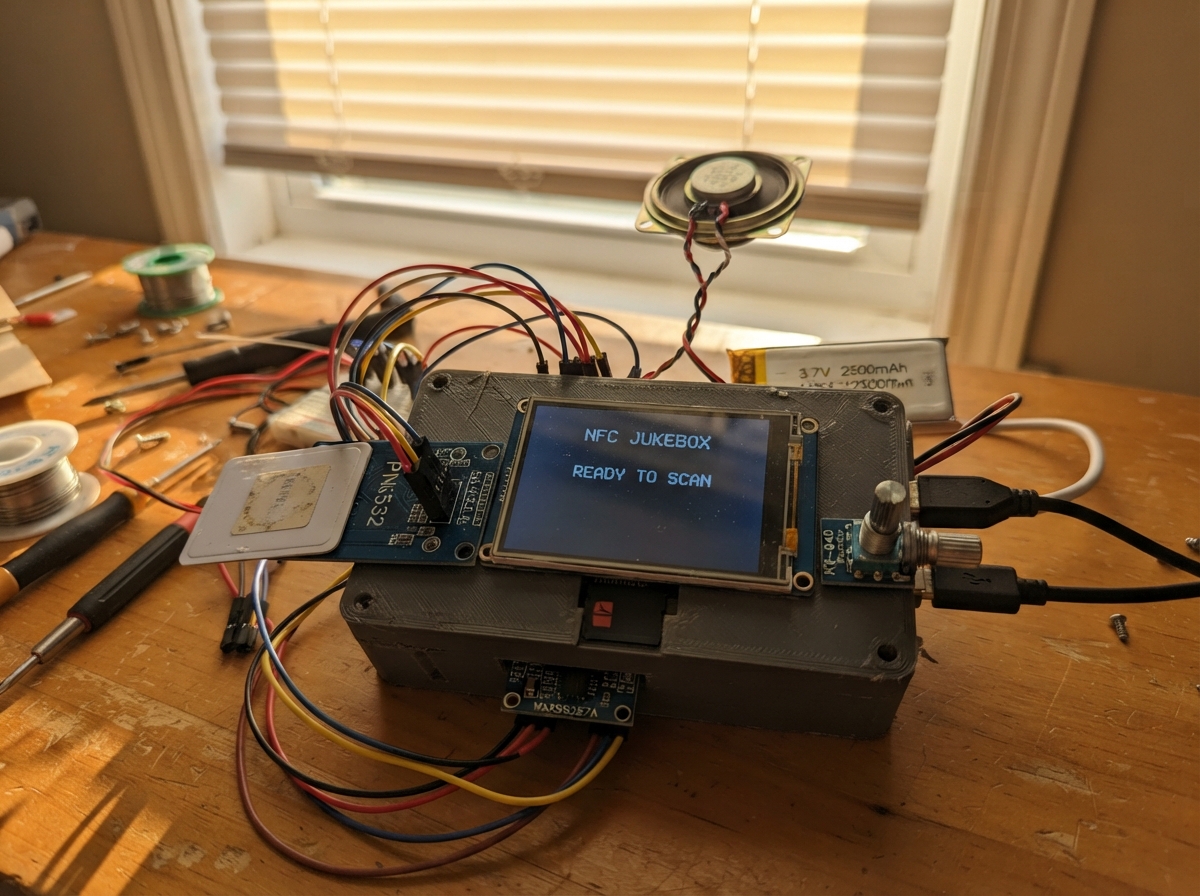
Build a portable music player that reads NFC tags to trigger songs stored on a microSD card. This ESP32-based jukebox combines an ILI9341 touchscreen display, PN532 NFC reader, MAX98357A audio amplifier, and dual rotary encoders for intuitive control. The guide provides a complete wiring diagram, parts list, and step-by-step assembly instructions to get music playing in minutes.
The firmware handles NFC tag detection, audio playback via I2S, battery monitoring with the MAX17043 fuel gauge, and dual-encoder control for track selection and volume adjustment. A rechargeable lithium battery with PowerBoost charging keeps the player portable, while the touchscreen displays track information with custom color themes. Perfect for learning embedded audio systems, wireless communication, and power management on the ESP32.
Wiring diagram

Gather all the parts
Assemble it in 6 steps
1. Place the main board and power parts
Mount the ESP32-S3 board, the PowerBoost charger, and the battery where they cannot touch metal. Plug the battery into the PowerBoost BAT and GND connections: BAT+ → PowerBoost BAT (battery power), BAT- → PowerBoost GND (ground). Connect PowerBoost 5V → ESP32 VIN (board power).
- Keep the PowerBoost USB connector reachable from the enclosure so the battery can be charged.
- Do not connect the battery backwards — swapped battery wires can damage the charger and battery. Do not charge a swollen or damaged battery.
2. Wire the screen and music card reader
Connect the TFT and microSD module to the shared pins: TFT MOSI and microSD MOSI → GPIO11 (data), TFT MISO and microSD MISO → GPIO13 (data), TFT SCK and microSD SCK → GPIO12 (clock). Connect TFT CS → GPIO10 (screen select), TFT DC → GPIO15 (screen command signal), TFT RST → GPIO16 (screen reset), TFT touch CS → GPIO17 (touch select), and microSD CS → GPIO14 (card select). Connect each module VCC → 3V3 (power) and GND → GND (ground). Connect TFT BL → 3V3 (backlight power).
- Format the microSD card as FAT32 and put MP3 files named 01.mp3, 02.mp3, and 03.mp3 in its top folder.
- Use a 3.3 V-compatible microSD module and screen. Supplying 5 V to a 3.3 V-only module can damage it.
3. Add NFC and battery-level reader
Connect PN532 VCC and MAX17043 VCC → 3V3 (power), and both GND pins → GND (ground). Connect PN532 SDA and MAX17043 SDA → GPIO8 (data), and PN532 SCL and MAX17043 SCL → GPIO9 (clock). Set the PN532 board’s small switches or jumpers to I2C mode before powering it.
- The NFC reader and battery gauge share the same two data wires; that is expected.
- Do not leave the PN532 configured for SPI or UART — it will not respond to this wiring.
4. Wire the speaker amplifier
Connect MAX98357A VIN → VIN/5V (amplifier power), GND → GND (ground), BCLK → GPIO38 (audio timing), LRC → GPIO39 (audio timing), and DIN → GPIO40 (audio data). Connect MAX98357A SPK+ → speaker POS (sound), and MAX98357A SPK- → speaker NEG (sound).
- Use short twisted wires between the amplifier and speaker if possible to reduce noise.
- Never connect either speaker wire to GND; this amplifier drives both speaker wires and grounding one can damage the amplifier.
5. Wire the two control knobs
For the song knob, connect VCC → 3V3 (power), GND → GND (ground), CLK → GPIO1 (turn signal), DT → GPIO2 (turn direction), and SW → GPIO3 (press signal). For the sound knob, connect VCC → 3V3 (power), GND → GND (ground), CLK → GPIO4 (turn signal), DT → GPIO5 (turn direction), and SW → GPIO6 (press signal).
- The left knob selects a track and starts it when pressed. The right knob changes volume; press it once to make turning it change bass instead.
- Make sure VCC and GND are not swapped — swapped power can damage the knob modules.
6. Check before closing the enclosure
With the battery unplugged, inspect every power connection and make sure all modules share GND. Insert the prepared microSD card, then connect the battery and briefly power the board by USB. Keep the NFC reader face exposed so you can tap a tag against it.
- Every NFC tag picks one of the three demo tracks from its unique built-in number. Replace the example file names in the code when you expand the music library.
- Do not close the enclosure until the screen, speaker, knobs, card reader, and NFC reader all respond.
Review all connections
1. Connections between "nfc_reader" and "ESP32"
2. Connections between "tft" and "ESP32"
3. Connections between "sd_card" and "ESP32"
4. Connections between "audio_amp" and "ESP32"
5. Connections between "song_knob" and "ESP32"
6. Connections between "sound_knob" and "ESP32"
7. Connections between "battery" and "ESP32"
8. Connections between "powerboost" and "ESP32"
9. Connections between "battery_gauge" and "ESP32"
Deploy the firmware
#include <Arduino.h>
#include <Wire.h>
#include <SPI.h>
#include <SD.h>
#include <Adafruit_GFX.h>
#include <Adafruit_ILI9341.h>
#include <Adafruit_PN532.h>
#include <SparkFun_MAX1704x_Fuel_Gauge_Arduino_Library.h>
#include <Audio.h>

constexpr uint8_t I2C_SDA_PIN = 8;
constexpr uint8_t I2C_SCL_PIN = 9;
constexpr uint8_t SPI_MOSI_PIN = 11;
constexpr uint8_t SPI_MISO_PIN = 13;
constexpr uint8_t SPI_SCK_PIN = 12;
constexpr uint8_t TFT_CS_PIN = 10;
constexpr uint8_t TFT_DC_PIN = 15;
constexpr uint8_t TFT_RST_PIN = 16;
constexpr uint8_t SD_CS_PIN = 14;
constexpr uint8_t I2S_BCLK_PIN = 38;
constexpr uint8_t I2S_LRC_PIN = 39;
constexpr uint8_t I2S_DIN_PIN = 40;
constexpr uint8_t SONG_CLK_PIN = 1;
constexpr uint8_t SONG_DT_PIN = 2;
constexpr uint8_t SONG_SW_PIN = 3;
constexpr uint8_t SOUND_CLK_PIN = 4;
constexpr uint8_t SOUND_DT_PIN = 5;
constexpr uint8_t SOUND_SW_PIN = 6;

struct Track {
  const char *title;
  const char *artist;
  const char *file;
  uint16_t artColor;
};

const Track tracks[] = {
  {"Midnight Ride", "Jukebox Demo", "/01.mp3", ILI9341_MAGENTA},
  {"Sunrise", "Jukebox Demo", "/02.mp3", ILI9341_ORANGE},
  {"Neon City", "Jukebox Demo", "/03.mp3", ILI9341_CYAN}
};
constexpr uint8_t TRACK_COUNT = sizeof(tracks) / sizeof(tracks[0]);

Adafruit_ILI9341 screen(TFT_CS_PIN, TFT_DC_PIN, TFT_RST_PIN);
Adafruit_PN532 nfc(Wire);
SFE_MAX1704X fuelGauge;
Audio audio;

uint8_t selectedTrack = 0;
uint8_t playingTrack = 0;
uint8_t volumeLevel = 14;
int8_t bassLevel = 0;
bool bassMode = false;
bool sdReady = false;
bool nfcReady = false;
bool gaugeReady = false;
bool playing = false;
uint32_t playStartedAt = 0;
uint32_t lastClockDraw = 0;
uint32_t lastBatteryDraw = 0;
int lastSongClk;
int lastSoundClk;
int lastSongButton = HIGH;
int lastSoundButton = HIGH;
uint32_t lastSongButtonAt = 0;
uint32_t lastSoundButtonAt = 0;

void drawStaticScreen() {
  screen.fillScreen(ILI9341_BLACK);
  screen.fillRect(0, 0, 320, 28, ILI9341_NAVY);
  screen.setTextColor(ILI9341_WHITE, ILI9341_NAVY);
  screen.setTextSize(2);
  screen.setCursor(8, 6);
  screen.print("NFC JUKEBOX");
  screen.drawRect(235, 5, 58, 16, ILI9341_WHITE);
  screen.fillRect(294, 10, 3, 7, ILI9341_WHITE);
  screen.setTextColor(ILI9341_DARKGREY, ILI9341_BLACK);
  screen.setTextSize(1);
  screen.setCursor(10, 220);
  screen.print("Turn left knob: select   Press: play");
  screen.setCursor(10, 232);
  screen.print("Turn right: volume   Press: bass mode");
}

void drawTrack() {
  const Track &track = tracks[selectedTrack];
  screen.fillRect(12, 42, 112, 112, track.artColor);
  screen.fillRect(20, 50, 96, 96, ILI9341_BLACK);
  screen.fillCircle(68, 98, 41, track.artColor);
  screen.fillCircle(68, 98, 14, ILI9341_BLACK);
  screen.fillCircle(68, 98, 4, ILI9341_WHITE);

  screen.fillRect(135, 42, 178, 100, ILI9341_BLACK);
  screen.setTextColor(ILI9341_WHITE, ILI9341_BLACK);
  screen.setTextSize(2);
  screen.setCursor(135, 49);
  screen.print(track.title);
  screen.setTextColor(ILI9341_LIGHTGREY, ILI9341_BLACK);
  screen.setTextSize(1);
  screen.setCursor(135, 77);
  screen.print(track.artist);
  screen.setCursor(135, 95);
  screen.print(playing && playingTrack == selectedTrack ? "PLAYING" : "SELECTED");
  screen.fillRect(135, 116, 175, 30, ILI9341_BLACK);
  screen.setTextColor(ILI9341_GREEN, ILI9341_BLACK);
  screen.setTextSize(2);
  screen.setCursor(135, 119);
  screen.print("00:00");
}

void drawControls() {
  screen.fillRect(12, 166, 296, 44, ILI9341_BLACK);
  screen.setTextColor(ILI9341_WHITE, ILI9341_BLACK);
  screen.setTextSize(1);
  screen.setCursor(12, 169);
  screen.print("VOLUME");
  screen.setCursor(164, 169);
  screen.print(bassMode ? "BASS (ACTIVE)" : "BASS");
  screen.drawRect(12, 184, 130, 12, ILI9341_WHITE);
  screen.drawRect(164, 184, 130, 12, ILI9341_WHITE);
  screen.fillRect(14, 186, map(volumeLevel, 0, 21, 0, 126), 8, ILI9341_GREEN);
  screen.fillRect(166, 186, map(bassLevel + 12, 0, 18, 0, 126), 8, bassMode ? ILI9341_YELLOW : ILI9341_BLUE);
}

void drawBattery() {
  if (!gaugeReady) return;
  float percent = fuelGauge.getSOC();
  percent = constrain(percent, 0.0f, 100.0f);
  screen.fillRect(237, 7, 54, 12, ILI9341_NAVY);
  screen.fillRect(238, 8, (int)(percent * 0.52f), 10, percent < 20 ? ILI9341_RED : ILI9341_GREEN);
  screen.setTextColor(ILI9341_WHITE, ILI9341_NAVY);
  screen.setTextSize(1);
  screen.setCursor(252, 9);
  screen.print((int)percent);
  screen.print('%');
}

void drawElapsedTime() {
  screen.fillRect(135, 116, 175, 30, ILI9341_BLACK);
  screen.setTextColor(ILI9341_GREEN, ILI9341_BLACK);
  screen.setTextSize(2);
  screen.setCursor(135, 119);
  uint32_t elapsed = playing ? (millis() - playStartedAt) / 1000 : 0;
  char timeText[6];
  snprintf(timeText, sizeof(timeText), "%02lu:%02lu", elapsed / 60, elapsed % 60);
  screen.print(timeText);
}

void startSelectedTrack() {
  if (!sdReady) return;
  audio.stopSong();
  playingTrack = selectedTrack;
  playing = audio.connecttoFS(SD, tracks[selectedTrack].file);
  if (playing) playStartedAt = millis();
  drawTrack();
}

void applyTone() {
  audio.setTone(bassLevel, 0, 0);
  drawControls();
}

void updateEncoder(uint8_t clkPin, uint8_t dtPin, int &lastClk, bool isSongKnob) {
  int clkNow = digitalRead(clkPin);
  if (clkNow != lastClk && clkNow == LOW) {
    int direction = digitalRead(dtPin) != clkNow ? 1 : -1;
    if (isSongKnob) {
      selectedTrack = (selectedTrack + direction + TRACK_COUNT) % TRACK_COUNT;
      drawTrack();
    } else if (bassMode) {
      bassLevel = constrain(bassLevel + direction, -12, 6);
      applyTone();
    } else {
      volumeLevel = constrain(volumeLevel + direction, 0, 21);
      audio.setVolume(volumeLevel);
      drawControls();
    }
  }
  lastClk = clkNow;
}

void checkButtons() {
  int songNow = digitalRead(SONG_SW_PIN);
  if (lastSongButton == HIGH && songNow == LOW && millis() - lastSongButtonAt > 180) {
    lastSongButtonAt = millis();
    startSelectedTrack();
  }
  lastSongButton = songNow;

  int soundNow = digitalRead(SOUND_SW_PIN);
  if (lastSoundButton == HIGH && soundNow == LOW && millis() - lastSoundButtonAt > 180) {
    lastSoundButtonAt = millis();
    bassMode = !bassMode;
    drawControls();
  }
  lastSoundButton = soundNow;
}

void checkNfc() {
  if (!nfcReady) return;
  uint8_t uid[7];
  uint8_t uidLength = 0;
  if (nfc.readPassiveTargetID(PN532_MIFARE_ISO14443A, uid, &uidLength, 40)) {
    uint32_t hash = 0;
    for (uint8_t i = 0; i < uidLength; i++) hash = hash * 33 + uid[i];
    selectedTrack = hash % TRACK_COUNT;
    startSelectedTrack();
    delay(450);
  }
}

void setup() {
  Serial.begin(115200);
  pinMode(SONG_CLK_PIN, INPUT_PULLUP);
  pinMode(SONG_DT_PIN, INPUT_PULLUP);
  pinMode(SONG_SW_PIN, INPUT_PULLUP);
  pinMode(SOUND_CLK_PIN, INPUT_PULLUP);
  pinMode(SOUND_DT_PIN, INPUT_PULLUP);
  pinMode(SOUND_SW_PIN, INPUT_PULLUP);
  lastSongClk = digitalRead(SONG_CLK_PIN);
  lastSoundClk = digitalRead(SOUND_CLK_PIN);

  Wire.begin(I2C_SDA_PIN, I2C_SCL_PIN);
  screen.begin();
  screen.setRotation(1);
  drawStaticScreen();

  SPI.begin(SPI_SCK_PIN, SPI_MISO_PIN, SPI_MOSI_PIN, SD_CS_PIN);
  sdReady = SD.begin(SD_CS_PIN, SPI);

  nfc.begin();
  uint32_t version = nfc.getFirmwareVersion();
  nfcReady = version != 0;
  if (nfcReady) nfc.SAMConfig();

  gaugeReady = fuelGauge.begin();
  audio.setPinout(I2S_BCLK_PIN, I2S_LRC_PIN, I2S_DIN_PIN);
  audio.setVolume(volumeLevel);
  applyTone();
  drawTrack();
  drawBattery();
}

void loop() {
  audio.loop();
  updateEncoder(SONG_CLK_PIN, SONG_DT_PIN, lastSongClk, true);
  updateEncoder(SOUND_CLK_PIN, SOUND_DT_PIN, lastSoundClk, false);
  checkButtons();
  checkNfc();

  if (millis() - lastClockDraw >= 1000) {
    lastClockDraw = millis();
    drawElapsedTime();
  }
  if (millis() - lastBatteryDraw >= 30000) {
    lastBatteryDraw = millis();
    drawBattery();
  }
}
Remix this project
Make it yours in one click
Open a full copy of this project in your own Schematik workspace — diagram, code, parts, and assembly steps included. Swap the sensor, add features, or redesign the whole thing with AI. The author's original stays untouched.