Community project
Musical Notes Quiz Game
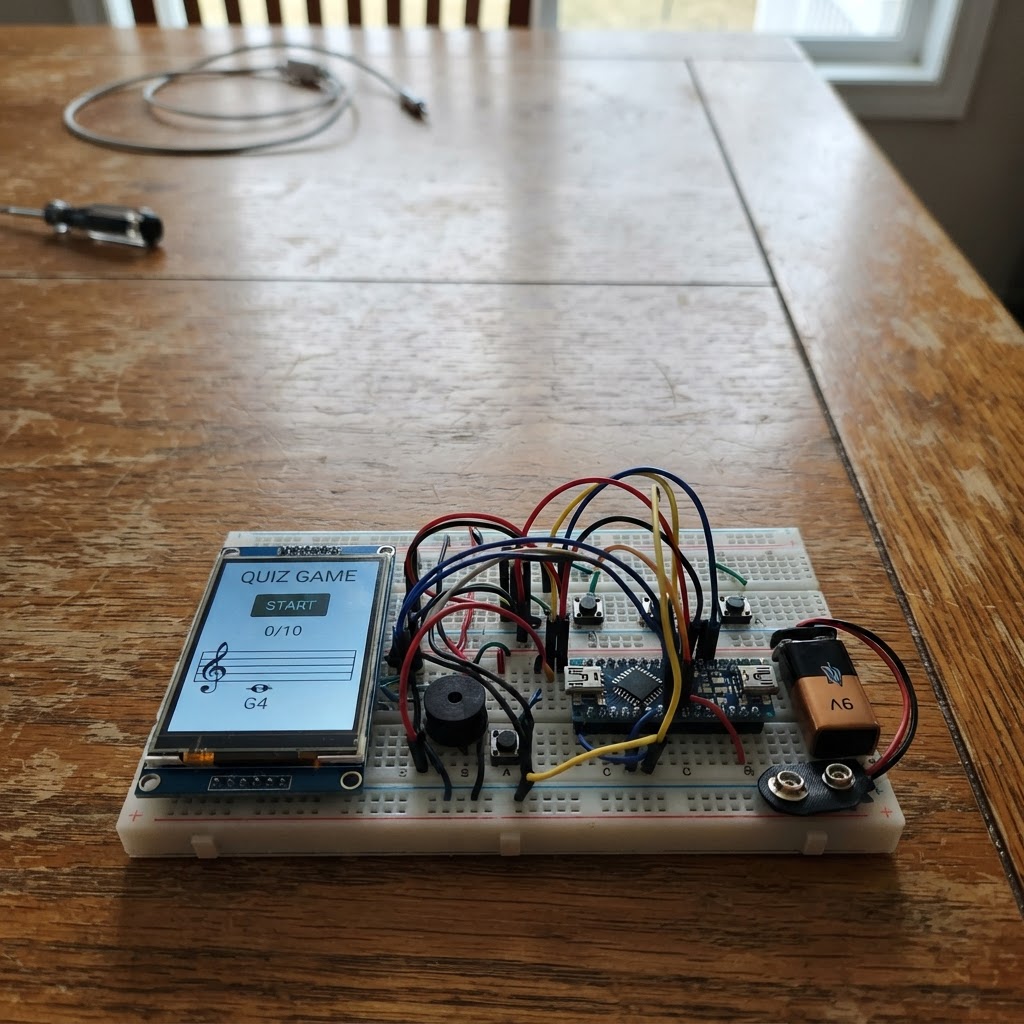
This project turns an ESP32 and ILI9341 touchscreen into an interactive musical notes quiz game. Players tap on the screen to identify notes displayed on a musical staff, with immediate visual feedback and scoring.
The guide includes a complete wiring diagram showing SPI connections between the ESP32 and touchscreen, a full parts list, Arduino firmware with touch input handling and game logic, and step-by-step assembly instructions. Builders will learn how to interface a capacitive touchscreen with an ESP32, render graphics on a TFT display, and create an interactive quiz application.
Wiring diagram

Gather all the parts
Assemble it in 6 steps
1. ตัดไฟก่อนเริ่มต่อวงจร
ถอดสาย USB ออกจาก ESP32 DevKit v1 ก่อนต่อจอทุกครั้ง วางบอร์ดและโมดูลจอ ILI9341/XPT2046 บนพื้นที่ไม่เป็นสื่อนำไฟ
- ใช้สายจัมเปอร์สั้นเพื่อให้สัญญาณ SPI เสถียร
- ห้ามจ่ายไฟ 5V เข้าขา VCC ของจอรุ่นนี้ เพราะโมดูลตามแบบใช้ไฟและสัญญาณ 3.3V
2. ต่อไฟและกราวด์ร่วม
ต่อ VCC ของจอไปที่ขา 3V3 ของ ESP32 และต่อ GND ของจอไปที่ GND ของ ESP32 ต่อ TFT_BL ของจอเข้ากับ 3V3 เพื่อเปิดไฟพื้นหลังตลอดเวลา
- ตรวจคำพิมพ์บนโมดูลจริงให้แน่ใจว่าเป็น VCC ไม่ใช่ขา LED ของโมดูลคนละรุ่น
- ESP32 GPIO เป็นลอจิก 3.3V เท่านั้น
3. ต่อบัส SPI ที่ใช้ร่วมกัน
ต่อ SCK ของจอไป GPIO18, MISO ไป GPIO19 และ MOSI ไป GPIO23 ขาทั้งสามเส้นใช้ร่วมกันทั้งจอ ILI9341 และตัวสัมผัส XPT2046 บนโมดูลเดียวกัน
- ต่อชื่อขาตามฉลากของโมดูล: SCK อาจเขียนว่า CLK และ MOSI อาจเขียนว่า DIN/SDI
- อย่าสลับ MOSI กับ MISO เพราะจอหรือระบบสัมผัสจะไม่ทำงาน
4. ต่อขาควบคุมจอและระบบสัมผัส
ต่อ TFT_CS ไป GPIO14, TFT_DC ไป GPIO26, TFT_RST ไป GPIO27 และ TOUCH_CS ไป GPIO25 ขา TOUCH_IRQ ไม่ต้องต่อ เพราะโค้ดอ่านการสัมผัสแบบ polling
- บางโมดูลเรียก TFT_CS ว่า CS และ TOUCH_CS ว่า T_CS
- ตรวจว่าไม่มีสายแตะกัน โดยเฉพาะบริเวณขา 3V3 และ GND
5. ตรวจผังสายก่อนเสียบ USB
ตรวจอีกครั้งว่ามี 9 การต่อหลัก: 3V3, GND, GPIO18, GPIO19, GPIO23, GPIO14, GPIO26, GPIO27 และ GPIO25 จากนั้นเสียบ USB เพื่อจ่ายไฟให้ ESP32
- หากหน้าจอไม่สว่าง ให้ตัดไฟก่อนแล้วตรวจ VCC, GND และ TFT_BL
- หากจอมีตัวเลือกจัมเปอร์สำหรับ 5V/3.3V ให้ตั้งตามคู่มือของโมดูลและคงสัญญาณ GPIO ที่ 3.3V เสมอ
6. เล่นเกมต้นแบบ
กด Deploy ใน Schematik เพื่อแฟลชเกม เมื่อหน้าเมนูขึ้น ให้แตะ Easy, Medium หรือ Hard จากนั้นแตะหมากสีน้ำเงินและแตะจุดสีเขียวเพื่อเดิน ระบบจะแสดงเฉพาะตาที่ถูกกติกาและให้ AI สีแดงเดินตอบ
- หากตำแหน่งแตะคลาดเล็กน้อย โค้ดมีค่าปรับเทียบ XPT2046 อยู่ในฟังก์ชัน readTouch เพื่อปรับตามจอแต่ละล็อตได้
- ต้นแบบนี้ไม่มีระบบบันทึกผลวิจัยหรือ microSD; ให้ทดสอบกติกาและการเล่นก่อนเพิ่มระบบเก็บข้อมูลในรุ่นถัดไป
Review all connections
1. Connections between "tft_touch_1" and "ESP32"
Deploy the firmware
#include <Arduino.h>
#include <SPI.h>
#include <Adafruit_GFX.h>
#include <Adafruit_ILI9341.h>
#include <XPT2046_Touchscreen.h>

// ESP32 DevKit v1 + ILI9341/XPT2046. Use 3.3 V only.
#define TFT_CS 14
#define TFT_DC 26
#define TFT_RST 27
#define TOUCH_CS 25
#define SPI_SCK 18
#define SPI_MISO 19
#define SPI_MOSI 23


// Hoisted type definitions
struct Move { int8_t fr,fc,tr,tc,cr,cc; bool capture; };


// Forward declarations
bool inside(int r,int c);
bool mine(int8_t p,int side);
void addMove(int fr,int fc,int tr,int tc,int cr,int cc);
void resetBoard();
void pieceMoves(int r,int c,int side,bool capturesOnly);
void legalMoves(int side,int onlyR,int onlyC);
void execute(Move m);
void drawBoard();
void showMenu();
int scorePosition();
int evaluateMove(Move m);
void computerTurn();
void handleBoardTouch(int x,int y);
bool readTouch(int &x,int &y);

Adafruit_ILI9341 tft(TFT_CS, TFT_DC, TFT_RST);
XPT2046_Touchscreen touch(TOUCH_CS);
const int N=8, SQ=27, BX=4, BY=22;
const uint16_t LIGHT=0xF79E, DARK=0x7A22, BLUE=0x001F, RED=0xD104;
int8_t board[N][N]; // + player, - AI; magnitude 2 = king
int selectedR=-1,selectedC=-1,chainR=-1,chainC=-1,difficulty=0;
bool menu=true,humanTurn=true,finished=false;
char statusText[42]="Choose difficulty";

Move moves[96]; int moveCount=0;

bool inside(int r,int c){return r>=0&&r<N&&c>=0&&c<N;}
bool mine(int8_t p,int side){return p!=0&&((p>0)==(side>0));}
void addMove(int fr,int fc,int tr,int tc,int cr=-1,int cc=-1){if(moveCount<96)moves[moveCount++]={(int8_t)fr,(int8_t)fc,(int8_t)tr,(int8_t)tc,(int8_t)cr,(int8_t)cc,cr>=0};}

void resetBoard(){
  memset(board,0,sizeof(board));
  for(int r=0;r<3;r++)for(int c=0;c<N;c++)if((r+c)&1)board[r][c]=-1;
  for(int r=5;r<N;r++)for(int c=0;c<N;c++)if((r+c)&1)board[r][c]=1;
  selectedR=selectedC=chainR=chainC=-1; humanTurn=true;finished=false;
  strcpy(statusText,"Your turn: touch blue piece");
}

// Prototype Thai draughts rules: forced captures, chained captures, promotion.
// Men move forward, but may capture in all four diagonal directions.
void pieceMoves(int r,int c,int side,bool capturesOnly){
  int p=board[r][c]; if(!mine(p,side))return;
  const int d[4][2]={{-1,-1},{-1,1},{1,-1},{1,1}};
  if(abs(p)==1){
    for(int i=0;i<4;i++){int mr=r+d[i][0],mc=c+d[i][1],tr=r+2*d[i][0],tc=c+2*d[i][1];if(inside(mr,mc)&&inside(tr,tc)&&mine(board[mr][mc],-side)&&board[tr][tc]==0)addMove(r,c,tr,tc,mr,mc);}
    if(!capturesOnly){int dr=side>0?-1:1;for(int dc=-1;dc<=1;dc+=2)if(inside(r+dr,c+dc)&&board[r+dr][c+dc]==0)addMove(r,c,r+dr,c+dc);}
  }else{
    for(int i=0;i<4;i++){int rr=r+d[i][0],cc=c+d[i][1];while(inside(rr,cc)&&board[rr][cc]==0){if(!capturesOnly)addMove(r,c,rr,cc);rr+=d[i][0];cc+=d[i][1];}if(inside(rr,cc)&&mine(board[rr][cc],-side)){int tr=rr+d[i][0],tc=cc+d[i][1];if(inside(tr,tc)&&board[tr][tc]==0)addMove(r,c,tr,tc,rr,cc);}}
  }
}
void legalMoves(int side,int onlyR=-1,int onlyC=-1){
  moveCount=0;
  if(onlyR>=0)pieceMoves(onlyR,onlyC,side,true);else for(int r=0;r<N;r++)for(int c=0;c<N;c++)pieceMoves(r,c,side,true);
  if(moveCount||onlyR>=0)return; // capture is compulsory
  for(int r=0;r<N;r++)for(int c=0;c<N;c++)pieceMoves(r,c,side,false);
}
void execute(Move m){int p=board[m.fr][m.fc];board[m.fr][m.fc]=0;board[m.tr][m.tc]=p;if(m.capture)board[m.cr][m.cc]=0;if(p==1&&m.tr==0)board[m.tr][m.tc]=2;if(p==-1&&m.tr==7)board[m.tr][m.tc]=-2;}

void drawBoard(){
  tft.fillScreen(ILI9341_BLACK);tft.fillRect(0,0,320,19,ILI9341_NAVY);tft.setTextSize(1);tft.setTextColor(ILI9341_WHITE);tft.setCursor(5,5);tft.print("THAI DRAUGHTS  AI: ");tft.print(difficulty==0?"EASY":difficulty==1?"MEDIUM":"HARD");
  for(int r=0;r<N;r++)for(int c=0;c<N;c++){int x=BX+c*SQ,y=BY+r*SQ;tft.fillRect(x,y,SQ,SQ,((r+c)&1)?DARK:LIGHT);if(r==selectedR&&c==selectedC)tft.drawRect(x+1,y+1,SQ-2,SQ-2,ILI9341_YELLOW);int p=board[r][c];if(p){tft.fillCircle(x+SQ/2,y+SQ/2,9,p>0?BLUE:RED);tft.drawCircle(x+SQ/2,y+SQ/2,9,ILI9341_WHITE);if(abs(p)==2){tft.setTextColor(ILI9341_YELLOW);tft.setCursor(x+11,y+9);tft.print("K");}}}
  if(selectedR>=0){legalMoves(1,chainR>=0?chainR:selectedR,chainC>=0?chainC:selectedC);for(int i=0;i<moveCount;i++)if(moves[i].fr==selectedR&&moves[i].fc==selectedC)tft.fillCircle(BX+moves[i].tc*SQ+SQ/2,BY+moves[i].tr*SQ+SQ/2,3,ILI9341_GREEN);}
  tft.fillRect(0,226,320,14,ILI9341_BLACK);tft.setTextColor(ILI9341_WHITE);tft.setCursor(3,229);tft.print(statusText);
}
void showMenu(){
  tft.fillScreen(ILI9341_NAVY);tft.setTextColor(ILI9341_WHITE);tft.setTextSize(2);tft.setCursor(45,20);tft.print("THAI DRAUGHTS");tft.setTextSize(1);tft.setCursor(27,48);tft.print("Choose AI difficulty");
  const uint16_t col[3]={ILI9341_GREEN,ILI9341_ORANGE,ILI9341_RED};const char* lab[3]={"EASY - random legal move","MEDIUM - capture and score","HARD - best board score"};
  for(int i=0;i<3;i++){int y=72+i*45;tft.fillRoundRect(20,y,280,34,6,col[i]);tft.setTextColor(ILI9341_BLACK);tft.setCursor(34,y+12);tft.print(lab[i]);}tft.setTextColor(ILI9341_WHITE);tft.setCursor(22,215);tft.print("Blue: student  Red: AI");
}
int scorePosition(){int s=0;for(int r=0;r<N;r++)for(int c=0;c<N;c++){int p=board[r][c];if(p<0)s+=(abs(p)==2?180:100);if(p>0)s-=(abs(p)==2?180:100);}return s;}
int evaluateMove(Move m){int8_t a=board[m.fr][m.fc],b=board[m.tr][m.tc],cap=m.capture?board[m.cr][m.cc]:0;execute(m);int s=scorePosition();board[m.fr][m.fc]=a;board[m.tr][m.tc]=b;if(m.capture)board[m.cr][m.cc]=cap;return s;}
void computerTurn(){
  legalMoves(-1);if(!moveCount){finished=true;strcpy(statusText,"You win! Touch for menu");drawBoard();return;}int pick=random(moveCount);
  if(difficulty>0){int best=-32000;for(int i=0;i<moveCount;i++){int v=evaluateMove(moves[i])+(moves[i].capture?40:0);if(v>best){best=v;pick=i;}}}
  Move m=moves[pick];execute(m);while(m.capture){legalMoves(-1,m.tr,m.tc);if(!moveCount)break;int q=0,best=-32000;for(int i=0;i<moveCount;i++){int v=evaluateMove(moves[i]);if(v>best){best=v;q=i;}}m=moves[q];execute(m);}humanTurn=true;selectedR=selectedC=-1;strcpy(statusText,"Your turn: touch blue piece");drawBoard();
}
void handleBoardTouch(int x,int y){
  if(finished){menu=true;showMenu();return;}if(!humanTurn||y<BY||y>=BY+8*SQ||x<BX||x>=BX+8*SQ)return;int r=(y-BY)/SQ,c=(x-BX)/SQ;
  if(selectedR<0){if(mine(board[r][c],1)){if(chainR>=0&&(r!=chainR||c!=chainC))return;selectedR=r;selectedC=c;strcpy(statusText,"Touch green dot to move");drawBoard();}return;}
  legalMoves(1,chainR>=0?chainR:selectedR,chainC>=0?chainC:selectedC);for(int i=0;i<moveCount;i++)if(moves[i].fr==selectedR&&moves[i].fc==selectedC&&moves[i].tr==r&&moves[i].tc==c){Move m=moves[i];execute(m);selectedR=selectedC=-1;if(m.capture){legalMoves(1,m.tr,m.tc);if(moveCount){chainR=m.tr;chainC=m.tc;selectedR=m.tr;selectedC=m.tc;strcpy(statusText,"Forced capture: continue");drawBoard();return;}}chainR=chainC=-1;legalMoves(-1);if(!moveCount){finished=true;strcpy(statusText,"You win! Touch for menu");drawBoard();return;}humanTurn=false;strcpy(statusText,"AI thinking...");drawBoard();delay(250);computerTurn();return;}
  if(mine(board[r][c],1)&&chainR<0){selectedR=r;selectedC=c;drawBoard();}
}
bool readTouch(int &x,int &y){if(!touch.touched())return false;TS_Point p=touch.getPoint();x=constrain(map(p.y,300,3800,0,320),0,319);y=constrain(map(p.x,250,3850,0,240),0,239);delay(120);return true;}
void setup(){randomSeed(esp_random());SPI.begin(SPI_SCK,SPI_MISO,SPI_MOSI);tft.begin();tft.setRotation(1);touch.begin();touch.setRotation(1);showMenu();}
void loop(){int x,y;if(!readTouch(x,y))return;if(menu){if(y>=72&&y<207){difficulty=(y-72)/45;menu=false;resetBoard();drawBoard();}}else handleBoardTouch(x,y);}
Remix this project
Make it yours in one click
Open a full copy of this project in your own Schematik workspace, diagram, code, parts, and assembly steps included. Swap the sensor, add features, or redesign the whole thing with AI. The author's original stays untouched.