Community project
Offline E-Ink Plant Clock
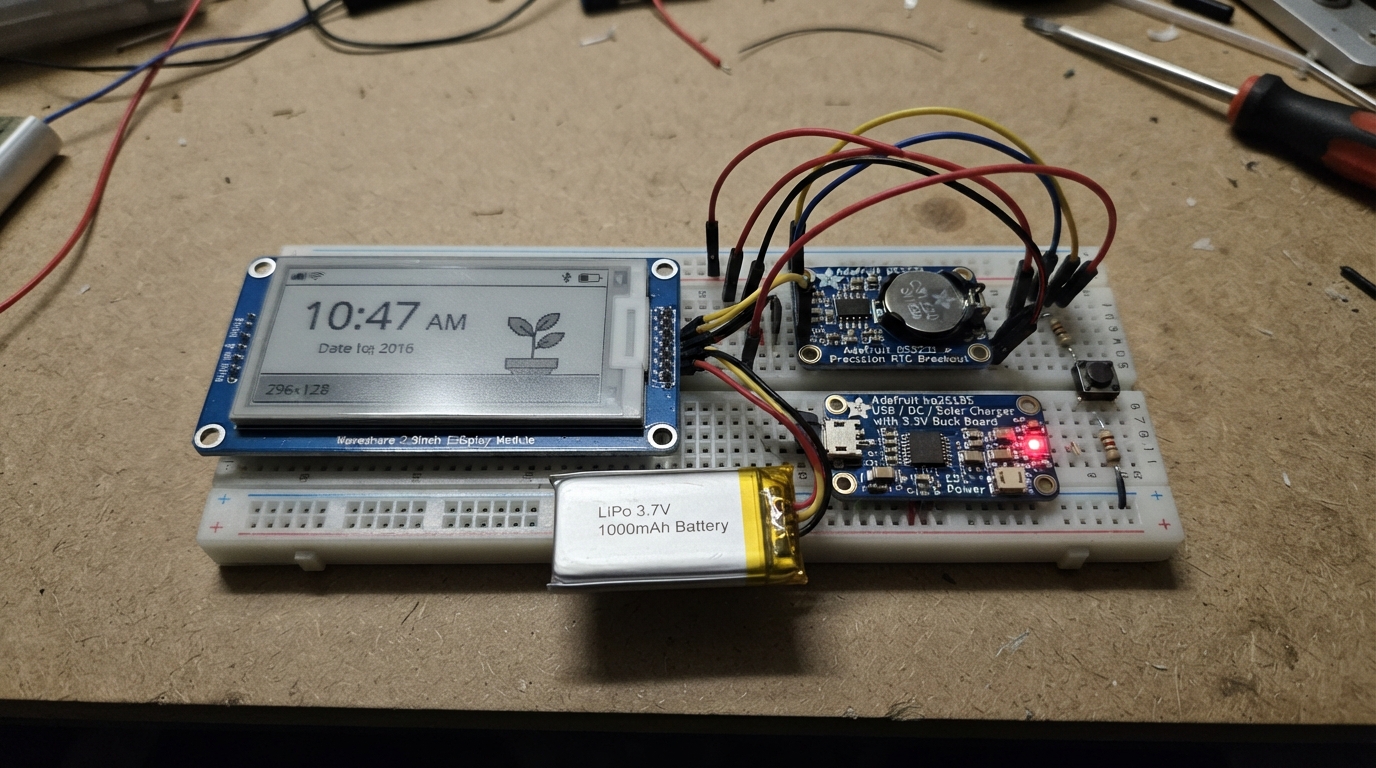
This offline plant care companion combines an E-Ink display, precision real-time clock, and ESP32 microcontroller to create a low-power bedside clock that tracks plant watering schedules and growth stages. The device features a virtual plant that grows based on consistent care, weather integration via mobile setup, and a gentle alarm system with visual and audio cues.
The guide provides a complete wiring diagram, parts list, and step-by-step assembly instructions for connecting the Waveshare E-Ink display, DS3231 RTC module, three control buttons, status LED, and piezo buzzer. Firmware is included with support for mobile configuration, persistent plant progress tracking, and deep sleep optimization for extended battery life on the integrated LiPo battery with solar charging capability.
Wiring diagram

Gather all the parts
Assemble it in 9 steps
1. Coloca la pila de respaldo del reloj
Inserta la pila CR1220 en el portapila de rtc_1 con el lado marcado con “+” hacia arriba. Esta pila conserva la fecha y la hora aunque la batería principal se descargue o se desconecte.
- No fuerces ni inviertas la pila: colocada al revés no conserva la hora y puede dañar el portapila.
2. Conecta la pantalla de tinta electrónica
Con la alimentación desconectada, conecta epaper_1 a la ESP32: VCC → 3V3 (alimentación), GND → GND (tierra), DIN → GPIO23 (datos), CLK → GPIO18 (reloj de datos), CS → GPIO19 (selección de pantalla), DC → GPIO27 (orden o dibujo), RST → GPIO26 (reinicio) y BUSY → GPIO13 (aviso de que la pantalla está ocupada).
- La pantalla no lleva luz propia; es normal que no brille en una habitación oscura.
- Mantén sus cables cortos y firmes para evitar refrescos incompletos.
- Conecta VCC solamente a 3V3, nunca a 5V: 5V puede dañar la pantalla.
3. Conecta el reloj de precisión
Une rtc_1 a la ESP32: VIN → 3V3 (alimentación), GND → GND (tierra), SDA → GPIO21 (datos de hora) y SCL → GPIO22 (reloj de comunicación).
- Asegúrate de que VIN y GND no estén intercambiados: una alimentación invertida puede dañar el módulo.
4. Monta los tres botones
Para water_button_1, conecta una pata a GND (tierra) y la opuesta a GPIO32 (señal); conecta water_pullup_1 entre 3V3 y esa misma unión de GPIO32 (mantiene la señal estable). Para light_button_1, conecta una pata a GND (tierra) y la opuesta a GPIO33 (señal); conecta light_pullup_1 entre 3V3 y esa misma unión de GPIO33. Para sync_button_1, conecta una pata a GND (tierra) y la opuesta a GPIO14 (solicita una sincronización). En un pulsador de cuatro patas, usa dos patas de lados opuestos, no dos del mismo lado.
- Una pulsación corta de Riego riega el olivo; mantenlo pulsado unos 1,5 segundos para cosechar aceitunas en temporada.
- El botón Luz enciende el LED rojo durante tres segundos; el botón Sincronización fuerza una conexión Wi‑Fi breve.
- Las resistencias de 10 kΩ son necesarias: sin ellas el reloj puede detectar pulsaciones aunque nadie toque el botón.
5. Monta la luz roja tenue
Conecta GPIO25 a una pata de night_led_resistor_1. Conecta la otra pata de la resistencia al ánodo de night_led_1, que es la pata larga. Conecta el cátodo del LED, la pata corta y lado plano, a GND (tierra). Orienta el LED hacia la pantalla y cúbrelo con un pequeño tubo o visera para que ilumine el papel electrónico, no tus ojos.
- La resistencia de 4,7 kΩ hace que la luz roja sea suave y no deslumbre.
- No conectes el LED directamente entre GPIO25 y GND: sin resistencia se puede dañar el LED o el pin de la placa.
6. Monta la alarma sonora
Coloca alarm_buzzer_1 en dos filas distintas de la protoboard. Conecta cualquiera de sus dos patas a GPIO4 (señal de alarma) y la otra pata a GND (tierra). El piezo no tiene polaridad, por lo que puedes intercambiar sus patas. Déjalo con su abertura libre y mirando hacia fuera de la caja para que el sonido no quede ahogado.
- La alarma alterna dos tonos y suena como máximo un minuto. Pulsa Riego, Luz o Sincronización para detenerla antes.
- Compra un piezo pasivo de dos patas, no un módulo zumbador activo de tres pines: el programa genera la melodía desde GPIO4.
7. Conecta batería y cargador
Conecta el conector de battery_1 al terminal BAT de charger_1: positivo de batería → BAT (alimentación de batería) y negativo → GND (tierra). Después une 3V3 de charger_1 a 3V3 de la ESP32 (alimentación regulada) y GND de charger_1 a GND de la ESP32 (tierra común). Para cargar, usa únicamente el conector USB-C del cargador.
- Una LiPo conectada al revés puede calentarse, dañarse o provocar incendio. Detente si la batería se hincha, se calienta o el cable está dañado.
- No alimentes la ESP32 desde USB mientras el cargador ya alimenta su pin 3V3.
8. Configura el reloj y la alarma desde el móvil
Enciende el reloj. Busca en el móvil la red Wi‑Fi llamada “Reloj-Descanso”, conéctate usando la clave “dormirbien” y abre http://192.168.4.1. Introduce el nombre y contraseña de tu red doméstica, tu ciudad con país, la hora de alarma y deja seleccionado “Olivo — ciclo anual y cosecha”. El reloj guarda los datos y apaga su propia red al terminar.
- Para abrir de nuevo este menú, reinicia el reloj manteniendo pulsados Riego y Luz a la vez.
9. Coloca el reloj para dormir
Deja la pantalla visible, el piezo con la abertura sin tapar y el LED rojo apuntando a la pantalla. El reloj actualiza la hora una vez por minuto y entra en sueño profundo entre actualizaciones; pulsa Luz solo cuando quieras leerlo en penumbra.
- Fuera de la configuración y de las conexiones cortas permitidas, el firmware apaga Wi‑Fi y Bluetooth.
Review all connections
1. Connections between "epaper_1" and "ESP32"
2. Connections between "rtc_1" and "ESP32"
3. Connections between "rtc_backup_1" and "ESP32"
4. Connections between "battery_1" and "ESP32"
5. Connections between "charger_1" and "ESP32"
6. Connections between "night_led_resistor_1" and "ESP32"
7. Connections between "night_led_1" and "ESP32"
8. Connections between "water_button_1" and "ESP32"
9. Connections between "light_button_1" and "ESP32"
10. Connections between "sync_button_1" and "ESP32"
11. Connections between "water_pullup_1" and "ESP32"
12. Connections between "light_pullup_1" and "ESP32"
13. Connections between "alarm_buzzer_1" and "ESP32"
Deploy the firmware
#include <Arduino.h>
#if defined(ESP32)
#include <WiFi.h>
#include <WebServer.h>
#include <WiFiUdp.h>
#include <HTTPClient.h>
#endif
#include <ArduinoJson.h>
#include <Preferences.h>
#include <Wire.h>
#include <RTClib.h>
#include <GxEPD2_BW.h>
#include <Fonts/FreeMonoBold24pt7b.h>
#include <Fonts/FreeMonoBold9pt7b.h>
#if defined(ESP32)
#include <esp_bt.h>
#include <esp_wifi.h>
#include <esp_sleep.h>
#endif

// Waveshare 2.9 inch, 296 x 128 pixel monochrome display (V2 / T94 controller).

struct Settings {
  String ssid;
  String password;
  String place;
  float latitude = 0;
  float longitude = 0;
  bool hasCoordinates = false;
  int lastSyncDay = -1;
  int lastWaterDay = -1;
  bool rainToday = false;
  int temperatureC = -99;  // daily forecast maximum, shown only after a successful weather check
  // Persistent Tamagotchi progress. A week with five or more watered days adds growth.
  int growthStage = 0;       // 0 seed, 1 sprout, 2 young, 3 medium, 4 adult, 5 flowering
  int growthPoints = 0;      // successful care days accumulated across the year
  int weekStartDay = -1;
  int careDaysThisWeek = 0;
  int lastCareCountDay = -1;
  int lastSetbackDay = -1;
  String treeType = "olive";  // selected during the first phone setup
  int oliveHarvestedYear = -1;
  int alarmHour = 7;
  int alarmMinute = 0;
  bool alarmEnabled = true;
  int lastAlarmDay = -1;
};


// Forward declarations

// Forward declarations

// Forward declarations

// Forward declarations

// Forward declarations
void processCaptiveDns();

void drawPlant(int growthStage, int health);

int plantStage(const DateTime &now);

int dayKey(const DateTime &when);

void radiosOff();
void loadSettings();
void saveSettings();
String htmlPage();
bool geocodePlace(const String &place, uint32_t deadline);
void startPortal();
bool connectBriefly(uint32_t deadline);
bool fetchTimeAndRain(uint32_t deadline);
void syncNetwork(bool forced);
int plantHealth(const DateTime &now);
void updatePlantGrowth(const DateTime &now);
void drawOliveTree(int growthStage, int health, const DateTime &now);
const char *growthName(int growthStage);
bool isOliveSeason(const DateTime &now);
bool oliveReadyToHarvest(const DateTime &now);
void harvestOlives(const DateTime &now);
void updateDisplay();
void soundAlarm(const DateTime &now);
bool pressed(int pin);
void sleepUntilNextMinute();

constexpr int EPD_SCK = 18;
constexpr int EPD_MOSI = 23;
constexpr int EPD_CS = 19;
constexpr int EPD_DC = 27;
constexpr int EPD_RST = 26;
constexpr int EPD_BUSY = 13;
constexpr int RTC_SDA = 21;
constexpr int RTC_SCL = 22;
constexpr int NIGHT_LED = 25;
constexpr int ALARM_BUZZER = 4;
constexpr int SYNC_BUTTON = 14;
constexpr int WATER_BUTTON = 32;
constexpr int LIGHT_BUTTON = 33;
constexpr uint32_t WIFI_BUDGET_MS = 5000;
constexpr int DAY_START_HOUR = 8;
constexpr int DAY_END_HOUR = 21;

#if defined(ESP32)
GxEPD2_BW<GxEPD2_290_T94, GxEPD2_290_T94::HEIGHT> display(
  GxEPD2_290_T94(EPD_CS, EPD_DC, EPD_RST, EPD_BUSY));
#else
// Browser-only canvas facade: real ESP32 builds instantiate the Waveshare driver above.
constexpr int GxEPD_BLACK = 0;
constexpr int GxEPD_WHITE = 1;
class BrowserEpaper {
 public:
  void init(int, bool, int, bool) {} void setRotation(int) {} void setFullWindow() {}
  void firstPage() {} bool nextPage() { return false; } void fillScreen(int) {}
  void setTextColor(int) {} void setFont(const void* = nullptr) {} void setCursor(int, int) {}
  template<typename T> void print(const T&) {} void drawRect(int,int,int,int,int) {}
  void drawLine(int,int,int,int,int) {} void fillCircle(int,int,int,int) {}
  void drawCircle(int,int,int,int) {} void drawPixel(int,int,int) {} void hibernate() {}
};
BrowserEpaper display;
const uint8_t FreeMonoBold24pt7b = 0;
const uint8_t FreeMonoBold9pt7b = 0;
#endif

RTC_DS3231 rtc;
Preferences prefs;
#if defined(ESP32)
WebServer server(80);
WiFiUDP captiveDns;
bool portalRunning = false;

// Answers every DNS question with the ESP32 access-point address, so phones open
// the same local configuration page without relying on the DNSServer library.
void processCaptiveDns() {
  const int size = captiveDns.parsePacket();
  if (size < 12) return;
  uint8_t query[256];
  const int count = captiveDns.read(query, min(size, (int)sizeof(query)));
  if (count < 12) return;
  query[2] = 0x81; query[3] = 0x80; query[6] = 0; query[7] = 1;
  query[8] = query[9] = query[10] = query[11] = 0;
  captiveDns.beginPacket(captiveDns.remoteIP(), captiveDns.remotePort());
  captiveDns.write(query, count);
  const uint8_t answer[] = {0xC0,0x0C,0x00,0x01,0x00,0x01,0x00,0x00,0x00,0x3C,0x00,0x04};
  captiveDns.write(answer, sizeof(answer));
  IPAddress ip = WiFi.softAPIP();
  captiveDns.write(ip[0]); captiveDns.write(ip[1]); captiveDns.write(ip[2]); captiveDns.write(ip[3]);
  captiveDns.endPacket();
}
#endif


Settings settings;

void radiosOff() {
#if defined(ESP32)
  WiFi.disconnect(true, true);
  WiFi.mode(WIFI_OFF);
  esp_wifi_stop();
  btStop();
#endif
}

void loadSettings() {
  prefs.begin("sleepclock", false);
  settings.ssid = prefs.getString("ssid", "");
  settings.password = prefs.getString("pass", "");
  settings.place = prefs.getString("place", "");
  settings.latitude = prefs.getFloat("lat", 0);
  settings.longitude = prefs.getFloat("lon", 0);
  settings.hasCoordinates = prefs.getBool("coords", false);
  settings.lastSyncDay = prefs.getInt("syncday", -1);
  settings.lastWaterDay = prefs.getInt("waterday", -1);
  settings.rainToday = prefs.getBool("rain", false);
  settings.temperatureC = prefs.getInt("tempC", -99);
  settings.growthStage = prefs.getInt("growstage", 0);
  settings.growthPoints = prefs.getInt("growpts", 0);
  settings.weekStartDay = prefs.getInt("weekstart", -1);
  settings.careDaysThisWeek = prefs.getInt("careweek", 0);
  settings.lastCareCountDay = prefs.getInt("careday", -1);
  settings.lastSetbackDay = prefs.getInt("setback", -1);
  settings.treeType = prefs.getString("tree", "olive");
  settings.oliveHarvestedYear = prefs.getInt("harvestyr", -1);
  settings.alarmHour = prefs.getInt("alarmhr", 7);
  settings.alarmMinute = prefs.getInt("alarmmin", 0);
  settings.alarmEnabled = prefs.getBool("alarmon", true);
  settings.lastAlarmDay = prefs.getInt("alarmday", -1);
}

void saveSettings() {
  prefs.putString("ssid", settings.ssid);
  prefs.putString("pass", settings.password);
  prefs.putString("place", settings.place);
  prefs.putFloat("lat", settings.latitude);
  prefs.putFloat("lon", settings.longitude);
  prefs.putBool("coords", settings.hasCoordinates);
  prefs.putInt("syncday", settings.lastSyncDay);
  prefs.putInt("waterday", settings.lastWaterDay);
  prefs.putBool("rain", settings.rainToday);
  prefs.putInt("tempC", settings.temperatureC);
  prefs.putInt("growstage", settings.growthStage);
  prefs.putInt("growpts", settings.growthPoints);
  prefs.putInt("weekstart", settings.weekStartDay);
  prefs.putInt("careweek", settings.careDaysThisWeek);
  prefs.putInt("careday", settings.lastCareCountDay);
  prefs.putInt("setback", settings.lastSetbackDay);
  prefs.putString("tree", settings.treeType);
  prefs.putInt("harvestyr", settings.oliveHarvestedYear);
  prefs.putInt("alarmhr", settings.alarmHour);
  prefs.putInt("alarmmin", settings.alarmMinute);
  prefs.putBool("alarmon", settings.alarmEnabled);
  prefs.putInt("alarmday", settings.lastAlarmDay);
}

String htmlPage() {
  return F("<!doctype html><html><meta name=viewport content='width=device-width,initial-scale=1'>"
           "<style>body{font-family:sans-serif;max-width:32rem;margin:2rem auto;padding:0 1rem}input{width:100%;padding:.7rem;margin:.3rem 0 1rem;box-sizing:border-box}button{padding:.8rem 1.2rem}</style>"
           "<h1>Reloj de descanso</h1><p>Esta red solo se usa ahora para guardar la configuración. Después el reloj apagará Wi-Fi y Bluetooth.</p>"
           "<form action='/save' method='post'><label>Nombre de tu Wi-Fi</label><input name='ssid' required>"
           "<label>Contraseña Wi-Fi</label><input name='pass' type='password'>"
           "<label>Ciudad y país</label><input name='place' placeholder='Madrid, España' required>"
           "<label>Hora de alarma</label><input name='alarm' type='time' value='07:00'>"
           "<label><input name='alarmon' type='checkbox' checked> Activar alarma sonora</label>"
           "<label>Árbol virtual</label><select name='tree'><option value='olive' selected>Olivo — ciclo anual y cosecha</option></select>"
           "<p>El olivo crece lentamente. Mantén pulsado Riego durante la época de cosecha para recoger las aceitunas.</p>"
           "<button>Guardar y conectar</button></form></html>");
}

#if defined(ESP32)
bool geocodePlace(const String &place, uint32_t deadline) {
  if (millis() >= deadline) return false;
  HTTPClient http;
  String url = "https://nominatim.openstreetmap.org/search?format=jsonv2&limit=1&q=";
  String encoded;
  const char *hex = "0123456789ABCDEF";
  for (size_t i = 0; i < place.length(); i++) {
    char c = place[i];
    if (isalnum((unsigned char)c)) encoded += c;
    else { encoded += '%'; encoded += hex[(c >> 4) & 15]; encoded += hex[c & 15]; }
  }
  http.setTimeout((int)max(250L, (long)(deadline - millis())));
  http.setUserAgent("SleepClock/1.0 local setup");
  if (!http.begin(url)) return false;
  int code = http.GET();
  if (code != 200) { http.end(); return false; }
  JsonDocument doc;
  DeserializationError err = deserializeJson(doc, http.getString());
  http.end();
  if (err || !doc.is<JsonArray>() || doc.as<JsonArray>().size() == 0) return false;
  settings.latitude = doc[0]["lat"].as<float>();
  settings.longitude = doc[0]["lon"].as<float>();
  settings.hasCoordinates = true;
  return true;
}

void startPortal() {
  WiFi.mode(WIFI_AP);
  WiFi.softAP("Reloj-Descanso", "dormirbien");
  captiveDns.begin(53);
  server.on("/", HTTP_GET, [](){ server.send(200, "text/html; charset=utf-8", htmlPage()); });
  server.on("/generate_204", HTTP_GET, [](){ server.sendHeader("Location", "/"); server.send(302, "text/plain", ""); });
  server.on("/save", HTTP_POST, [](){
    settings.ssid = server.arg("ssid");
    settings.password = server.arg("pass");
    settings.place = server.arg("place");
    settings.treeType = server.arg("tree");
    if (settings.treeType != "olive") settings.treeType = "olive";
    String alarm = server.arg("alarm");
    if (alarm.length() == 5 && alarm.charAt(2) == ':') {
      settings.alarmHour = constrain(alarm.substring(0, 2).toInt(), 0, 23);
      settings.alarmMinute = constrain(alarm.substring(3, 5).toInt(), 0, 59);
    }
    settings.alarmEnabled = server.hasArg("alarmon");
    server.send(200, "text/html; charset=utf-8", "<h1>Guardado</h1><p>El reloj intentará localizar la ciudad ahora. Si no termina a tiempo, volverá a intentarlo en su siguiente sincronización diurna.</p>");
    WiFi.softAPdisconnect(true);
    WiFi.mode(WIFI_STA);
    WiFi.begin(settings.ssid.c_str(), settings.password.c_str());
    uint32_t deadline = millis() + WIFI_BUDGET_MS;
    while (WiFi.status() != WL_CONNECTED && millis() < deadline) delay(20);
    if (WiFi.status() == WL_CONNECTED) geocodePlace(settings.place, deadline);
    saveSettings();
    delay(1200);
    radiosOff();
    ESP.restart();
  });
  server.onNotFound([](){ server.sendHeader("Location", "/"); server.send(302, "text/plain", ""); });
  portalRunning = true;
  while (portalRunning) { processCaptiveDns(); server.handleClient(); delay(2); }
}

bool connectBriefly(uint32_t deadline) {
  if (settings.ssid.isEmpty()) return false;
  WiFi.mode(WIFI_STA);
  WiFi.setSleep(true);
  WiFi.begin(settings.ssid.c_str(), settings.password.c_str());
  while (WiFi.status() != WL_CONNECTED && millis() < deadline) delay(15);
  return WiFi.status() == WL_CONNECTED;
}

bool fetchTimeAndRain(uint32_t deadline) {
  bool changed = false;
  if (!settings.hasCoordinates && !settings.place.isEmpty()) geocodePlace(settings.place, deadline);
  if (millis() >= deadline || !settings.hasCoordinates) return changed;
  HTTPClient http;
  String url = "https://api.open-meteo.com/v1/forecast?latitude=" + String(settings.latitude, 4) + "&longitude=" + String(settings.longitude, 4) + "&daily=precipitation_probability_max,temperature_2m_max&timezone=auto&forecast_days=1";
  http.setTimeout((int)max(250L, (long)(deadline - millis())));
  if (!http.begin(url)) return changed;
  int code = http.GET();
  if (code == 200) {
    JsonDocument doc;
    if (!deserializeJson(doc, http.getString())) {
      int chance = doc["daily"]["precipitation_probability_max"][0] | 0;
      settings.rainToday = chance >= 50;
      settings.temperatureC = (int)round(doc["daily"]["temperature_2m_max"][0] | -99.0);
      if (settings.rainToday) settings.lastWaterDay = dayKey(rtc.now());
      changed = true;
    }
  }
  http.end();
  return changed;
}

void syncNetwork(bool forced) {
  DateTime now = rtc.now();
  bool withinDayWindow = now.hour() >= DAY_START_HOUR && now.hour() < DAY_END_HOUR;
  if (!forced && (!withinDayWindow || settings.lastSyncDay == dayKey(now))) return;
  uint32_t deadline = millis() + WIFI_BUDGET_MS;
  if (connectBriefly(deadline)) {
    configTime(0, 0, "pool.ntp.org", "time.nist.gov");
    while (time(nullptr) < 1700000000 && millis() < deadline) delay(20);
    time_t epoch = time(nullptr);
    if (epoch >= 1700000000) {
      struct tm t;
      localtime_r(&epoch, &t);
      rtc.adjust(DateTime(t.tm_year + 1900, t.tm_mon + 1, t.tm_mday, t.tm_hour, t.tm_min, t.tm_sec));
    }
    fetchTimeAndRain(deadline);
    settings.lastSyncDay = dayKey(rtc.now());
    saveSettings();
  }
  radiosOff();
}
#else
// Browser-only network stubs: they do not replace any ESP32 firmware path.
bool geocodePlace(const String &place, uint32_t deadline) { (void)place; (void)deadline; return false; }
void startPortal() {}
bool connectBriefly(uint32_t deadline) { (void)deadline; return false; }
bool fetchTimeAndRain(uint32_t deadline) { (void)deadline; return false; }
void syncNetwork(bool forced) { (void)forced; }
#endif

int plantHealth(const DateTime &now) {
  const int dryDays = max(0, dayKey(now) - settings.lastWaterDay);
  if (settings.rainToday || dryDays == 0) return 3;  // healthy
  if (dryDays <= 2) return 2;                        // thirsty
  if (dryDays <= 4) return 1;                        // dry
  return 0;                                          // wilted
}

// Care is evaluated once per calendar day. Five cared-for days grow the plant
// one step; a severe 14-day drought can remove one step, never below a seed.
void updatePlantGrowth(const DateTime &now) {
  const int today = dayKey(now);
  if (settings.weekStartDay < 0) settings.weekStartDay = today;
  if (today != settings.lastCareCountDay) {
    if (settings.rainToday || settings.lastWaterDay == today) settings.careDaysThisWeek++;
    settings.lastCareCountDay = today;
  }
  if (today - settings.weekStartDay >= 7) {
    if (settings.careDaysThisWeek >= 5 && settings.growthStage < 5) {
      settings.growthStage++;
      settings.growthPoints += settings.careDaysThisWeek;
    }
    settings.weekStartDay = today;
    settings.careDaysThisWeek = 0;
  }
  const int dryDays = max(0, today - settings.lastWaterDay);
  if (dryDays >= 14 && settings.lastSetbackDay != today) {
    settings.growthStage = max(0, settings.growthStage - 1);
    settings.lastSetbackDay = today;
  }
  saveSettings();
}

const char *growthName(int growthStage) {
  static const char *names[] = {"Semilla", "Brote", "Joven", "Mediana", "Adulta", "En flor"};
  return names[constrain(growthStage, 0, 5)];
}

// Each plant is a 24 x 32 pixel monochrome sprite.  One bit is one screen pixel:
// 0 is the paper white; 1 is black ink.  Stages are: dead, dry, thirsty, healthy.
const uint8_t PLANT_DEAD[] PROGMEM = {
  0x00,0x00,0x00, 0x00,0x00,0x00, 0x00,0x00,0x00, 0x00,0x00,0x00,
  0x00,0x00,0x00, 0x00,0x00,0x00, 0x01,0x80,0x00, 0x02,0x40,0x00,
  0x04,0x20,0x00, 0x00,0x80,0x00, 0x00,0x80,0x00, 0x00,0x80,0x00,
  0x00,0x80,0x00, 0x00,0x80,0x00, 0x00,0x80,0x00, 0x7F,0xFE,0x00,
  0x40,0x02,0x00, 0x7F,0xFE,0x00, 0x00,0x00,0x00, 0x00,0x00,0x00,
  0x00,0x00,0x00, 0x00,0x00,0x00, 0x00,0x00,0x00, 0x00,0x00,0x00,
  0x00,0x00,0x00, 0x00,0x00,0x00, 0x00,0x00,0x00, 0x00,0x00,0x00,
  0x00,0x00,0x00, 0x00,0x00,0x00, 0x00,0x00,0x00, 0x00,0x00,0x00
};
const uint8_t PLANT_DRY[] PROGMEM = {
  0x00,0x00,0x00, 0x00,0x00,0x00, 0x00,0x00,0x00, 0x00,0x00,0x00,
  0x00,0x00,0x00, 0x03,0xC0,0x00, 0x04,0x20,0x00, 0x08,0x10,0x00,
  0x00,0x80,0x00, 0x00,0x80,0x00, 0x03,0x80,0x00, 0x04,0x80,0x00,
  0x08,0x80,0x00, 0x00,0x80,0x00, 0x00,0x80,0x00, 0x7F,0xFE,0x00,
  0x40,0x02,0x00, 0x7F,0xFE,0x00, 0x00,0x00,0x00, 0x00,0x00,0x00,
  0x00,0x00,0x00, 0x00,0x00,0x00, 0x00,0x00,0x00, 0x00,0x00,0x00,
  0x00,0x00,0x00, 0x00,0x00,0x00, 0x00,0x00,0x00, 0x00,0x00,0x00,
  0x00,0x00,0x00, 0x00,0x00,0x00, 0x00,0x00,0x00, 0x00,0x00,0x00
};
const uint8_t PLANT_THIRSTY[] PROGMEM = {
  0x00,0x00,0x00, 0x00,0x00,0x00, 0x00,0x00,0x00, 0x00,0x00,0x00,
  0x00,0x00,0x00, 0x06,0x60,0x00, 0x0F,0xF0,0x00, 0x1F,0xF8,0x00,
  0x0F,0xF0,0x00, 0x06,0x60,0x00, 0x00,0x80,0x00, 0x01,0x80,0x00,
  0x03,0x00,0x00, 0x00,0x80,0x00, 0x00,0x80,0x00, 0x7F,0xFE,0x00,
  0x40,0x02,0x00, 0x7F,0xFE,0x00, 0x00,0x00,0x00, 0x00,0x00,0x00,
  0x00,0x00,0x00, 0x00,0x00,0x00, 0x00,0x00,0x00, 0x00,0x00,0x00,
  0x00,0x00,0x00, 0x00,0x00,0x00, 0x00,0x00,0x00, 0x00,0x00,0x00,
  0x00,0x00,0x00, 0x00,0x00,0x00, 0x00,0x00,0x00, 0x00,0x00,0x00
};
const uint8_t PLANT_HEALTHY[] PROGMEM = {
  0x00,0x00,0x00, 0x00,0x00,0x00, 0x00,0x00,0x00, 0x00,0x00,0x00,
  0x03,0xC0,0x00, 0x0F,0xF0,0x00, 0x1F,0xF8,0x00, 0x3F,0xFC,0x00,
  0x1F,0xF8,0x00, 0x0F,0xF0,0x00, 0x00,0x80,0x00, 0x01,0xC0,0x00,
  0x03,0xE0,0x00, 0x01,0xC0,0x00, 0x00,0x80,0x00, 0x7F,0xFE,0x00,
  0x40,0x02,0x00, 0x7F,0xFE,0x00, 0x00,0x00,0x00, 0x00,0x00,0x00,
  0x00,0x00,0x00, 0x00,0x00,0x00, 0x00,0x00,0x00, 0x00,0x00,0x00,
  0x00,0x00,0x00, 0x00,0x00,0x00, 0x00,0x00,0x00, 0x00,0x00,0x00,
  0x00,0x00,0x00, 0x00,0x00,0x00, 0x00,0x00,0x00, 0x00,0x00,0x00
};

bool isOliveSeason(const DateTime &now) {
  return now.month() == 10 || now.month() == 11 || now.month() == 12 || now.month() == 1;
}

bool oliveReadyToHarvest(const DateTime &now) {
  return settings.growthStage == 5 && plantHealth(now) == 3 &&
         isOliveSeason(now) && settings.oliveHarvestedYear != now.year();
}

void harvestOlives(const DateTime &now) {
  if (oliveReadyToHarvest(now)) {
    settings.oliveHarvestedYear = now.year();
    saveSettings();
  }
}

void drawOliveTree(int growthStage, int health, const DateTime &now) {
  const int x = 232, groundY = 82;
  const int stage = constrain(growthStage, 0, 5);
  const bool wilted = health == 0;
  const bool dry = health == 1;
  const bool fruiting = oliveReadyToHarvest(now);
  const int trunkTop = groundY - (stage == 0 ? 8 : 16 + stage * 8);
  display.drawRect(x + 18, groundY - 8, 28, 8, GxEPD_BLACK);
  display.drawLine(x + 16, groundY - 9, x + 48, groundY - 9, GxEPD_BLACK);
  if (stage == 0) { display.fillCircle(x + 32, groundY - 14, 2, GxEPD_BLACK); return; }
  display.drawLine(x + 30, groundY - 10, wilted ? x + 25 : x + 31, trunkTop, GxEPD_BLACK);
  display.drawLine(x + 34, groundY - 10, wilted ? x + 27 : x + 33, trunkTop, GxEPD_BLACK);
  const int spread = 4 + stage * 5;
  display.drawLine(x + 32, trunkTop + 10, x + 32 - spread, trunkTop + 1, GxEPD_BLACK);
  display.drawLine(x + 32, trunkTop + 14, x + 32 + spread, trunkTop + 3, GxEPD_BLACK);
  if (stage >= 3) {
    display.drawLine(x + 32, trunkTop + 20, x + 26 - spread, trunkTop + 11, GxEPD_BLACK);
    display.drawLine(x + 32, trunkTop + 22, x + 38 + spread, trunkTop + 12, GxEPD_BLACK);
  }
  if (wilted) {
    display.drawLine(x + 25, trunkTop + 3, x + 13, trunkTop + 12, GxEPD_BLACK);
    display.drawLine(x + 28, trunkTop + 8, x + 43, trunkTop + 17, GxEPD_BLACK);
    return;
  }
  const int r = dry ? max(3, stage + 2) : max(4, stage + 4);
  const int top = max(5, trunkTop - 11 - stage * 2);
  display.drawCircle(x + 32, top + r, r, GxEPD_BLACK);
  display.drawCircle(x + 32 - spread / 2, top + r + 7, r, GxEPD_BLACK);
  display.drawCircle(x + 32 + spread / 2, top + r + 7, r, GxEPD_BLACK);
  if (stage >= 3) {
    display.drawCircle(x + 32 - spread, top + r + 14, r - 1, GxEPD_BLACK);
    display.drawCircle(x + 32 + spread, top + r + 14, r - 1, GxEPD_BLACK);
  }
  if (health == 2) display.drawLine(x + 24, trunkTop + 5, x + 14, trunkTop + 13, GxEPD_BLACK);
  if (stage == 5 && health == 3) {
    for (int i = 0; i < 11; ++i) {
      const int ox = x + 14 + ((i * 13) % 37);
      const int oy = top + 7 + ((i * 11) % 28);
      if (fruiting) display.fillCircle(ox, oy, 2, GxEPD_BLACK);
      else { display.drawCircle(ox, oy, 1, GxEPD_BLACK); display.drawPixel(ox, oy, GxEPD_WHITE); }
    }
  }
}

void soundAlarm(const DateTime &now) {
  if (!settings.alarmEnabled || settings.lastAlarmDay == dayKey(now) ||
      now.hour() != settings.alarmHour || now.minute() != settings.alarmMinute) return;
  settings.lastAlarmDay = dayKey(now);
  saveSettings();
  const uint32_t stopAt = millis() + 60000UL;
  while (millis() < stopAt) {
    if (pressed(WATER_BUTTON) || pressed(LIGHT_BUTTON) || pressed(SYNC_BUTTON)) break;
    tone(ALARM_BUZZER, 2400, 350);
    delay(500);
    tone(ALARM_BUZZER, 3100, 350);
    delay(500);
  }
  noTone(ALARM_BUZZER);
}

void updateDisplay() {
  DateTime now = rtc.now();
  updatePlantGrowth(now);
  static const char *weekdays[] = {"DOM", "LUN", "MAR", "MIE", "JUE", "VIE", "SAB"};
  char timeText[6], dateText[22], weatherText[25], phaseText[26];
  snprintf(timeText, sizeof(timeText), "%02d:%02d", now.hour(), now.minute());
  snprintf(dateText, sizeof(dateText), "%s %02d %s", weekdays[now.dayOfTheWeek()], now.day(), "SEP");
  if (settings.temperatureC == -99) snprintf(weatherText, sizeof(weatherText), "TIEMPO: sin datos");
  else snprintf(weatherText, sizeof(weatherText), "TEMPERATURA: %d C", settings.temperatureC);
  snprintf(phaseText, sizeof(phaseText), "ALARMA: %s", settings.alarmEnabled ? "ON" : "OFF");
  display.setRotation(1);
  display.setFullWindow();
  display.firstPage();
  do {
    display.fillScreen(GxEPD_WHITE);
    display.setTextColor(GxEPD_BLACK);
    // Main clock: the intentionally large, bold face is the visual anchor.
    display.setFont(&FreeMonoBold24pt7b);
    display.setCursor(9, 48); display.print(timeText);
    display.setFont(&FreeMonoBold9pt7b);
    display.setCursor(11, 68); display.print("AM");
    display.setCursor(11, 86); display.print(dateText);
    // Weather pictogram, left of the tree.
    const int iconX = 180, iconY = 32;
    if (settings.rainToday) {
      display.drawCircle(iconX, iconY - 2, 9, GxEPD_BLACK);
      display.drawLine(iconX - 13, iconY + 8, iconX + 13, iconY + 8, GxEPD_BLACK);
      display.drawLine(iconX - 7, iconY + 12, iconX - 10, iconY + 18, GxEPD_BLACK);
      display.drawLine(iconX + 3, iconY + 12, iconX, iconY + 18, GxEPD_BLACK);
    } else {
      display.drawCircle(iconX, iconY, 8, GxEPD_BLACK);
      for (int i = 0; i < 8; ++i) {
        float a = i * PI / 4.0f;
        display.drawLine(iconX + cos(a) * 12, iconY + sin(a) * 12, iconX + cos(a) * 17, iconY + sin(a) * 17, GxEPD_BLACK);
      }
    }
    display.setCursor(112, 86); display.print(weatherText);
    display.drawLine(8, 93, 288, 93, GxEPD_BLACK);
    display.setCursor(10, 112); display.print(settings.rainToday ? "LLUVIA: REGADA" : "DESPERTADOR: OFF");
    display.setCursor(171, 112); display.print(phaseText);
    display.setFont();
    display.setCursor(189, 125); display.print("LUZ NOCTURNA   RIEGO/WIFI");
    drawOliveTree(settings.growthStage, plantHealth(now), now);
  } while (display.nextPage());
  display.hibernate();
}

bool pressed(int pin) { return digitalRead(pin) == LOW; }

int dayKey(const DateTime &when) {
  return (int)(when.unixtime() / 86400UL);
}

void sleepUntilNextMinute() {
#if !defined(ESP32)
  // The browser preview remains awake; the physical ESP32 deep-sleeps below.
  return;
#else
  uint32_t ms = 60000UL - (millis() % 60000UL);
  if (ms < 1000) ms += 60000UL;
  esp_sleep_enable_timer_wakeup((uint64_t)ms * 1000ULL);
  // GPIO32 and GPIO33 have physical 10 kOhm pull-ups; either button pulls its pin to ground.
  esp_sleep_enable_ext1_wakeup((1ULL << WATER_BUTTON) | (1ULL << LIGHT_BUTTON), ESP_EXT1_WAKEUP_ANY_LOW);
  esp_deep_sleep_start();
#endif
}

void setup() {
  pinMode(NIGHT_LED, OUTPUT); digitalWrite(NIGHT_LED, LOW);
  pinMode(ALARM_BUZZER, OUTPUT); digitalWrite(ALARM_BUZZER, LOW);
  pinMode(SYNC_BUTTON, INPUT_PULLUP);
  pinMode(WATER_BUTTON, INPUT);
  pinMode(LIGHT_BUTTON, INPUT);
  radiosOff();
  Wire.begin(RTC_SDA, RTC_SCL);
  rtc.begin();
#if defined(ESP32)
  SPI.begin(EPD_SCK, -1, EPD_MOSI, EPD_CS);
#endif
  display.init(115200, true, 2, false);
  loadSettings();

  // Hold both outer buttons after a restart to reopen the local setup menu.
  if (settings.ssid.isEmpty() || (pressed(WATER_BUTTON) && pressed(LIGHT_BUTTON))) startPortal();

  DateTime now = rtc.now();
  soundAlarm(now);
  if (pressed(WATER_BUTTON)) {
    uint32_t pressedAt = millis();
    while (pressed(WATER_BUTTON) && millis() - pressedAt < 1800) delay(10);
    if (millis() - pressedAt >= 1400) harvestOlives(now);
    else { settings.lastWaterDay = dayKey(now); settings.rainToday = false; saveSettings(); }
  }
  if (pressed(LIGHT_BUTTON)) { digitalWrite(NIGHT_LED, HIGH); delay(3000); digitalWrite(NIGHT_LED, LOW); }
  if (pressed(SYNC_BUTTON)) syncNetwork(true);
  else syncNetwork(false);
  updateDisplay();
  sleepUntilNextMinute();
}

void loop() {}
Remix this project
Make it yours in one click
Open a full copy of this project in your own Schematik workspace — diagram, code, parts, and assembly steps included. Swap the sensor, add features, or redesign the whole thing with AI. The author's original stays untouched.