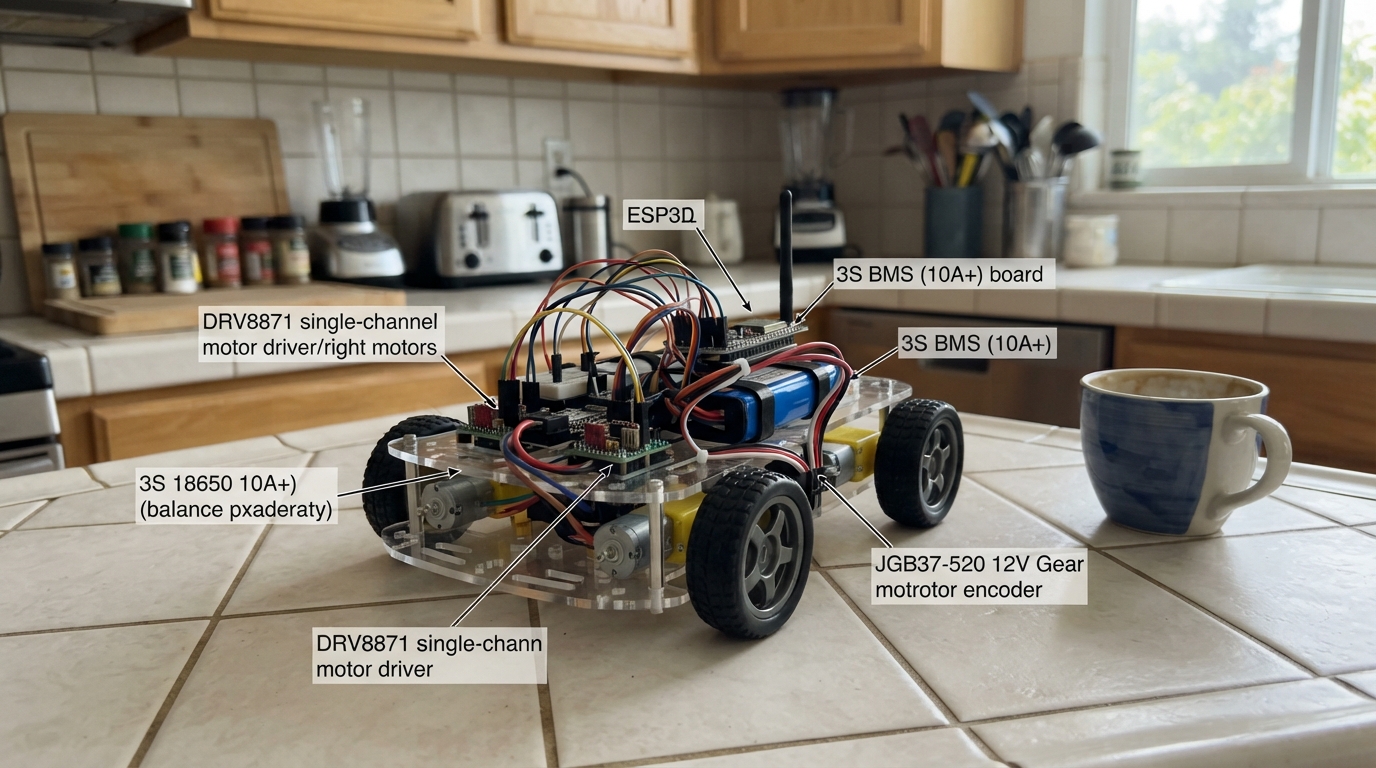
This project builds a WiFi-controlled wheeled robot powered by an ESP32 that streams live video and responds to phone commands. The rover uses dual 12 V gear motors with encoders for precise speed matching, dual motor drivers for independent wheel control, and a protected lithium-ion battery supply with a buck converter for clean 5 V logic power.
The guide provides a complete wiring diagram, parts list, and step-by-step assembly instructions for integrating the motor drivers, encoders, and power distribution. Included firmware implements closed-loop speed control, a web interface for phone control, and live camera streaming—allowing the rover to drive forward, reverse, turn left and right from any browser on the local WiFi network.
Wiring diagram

Gather all the parts
Assemble it in 5 steps
1. Build the protected 3-cell battery supply
Use a properly matched 3-cell 18650 battery pack and its 3S BMS. Connect battery PACK− to BMS B−, the first cell join to B1, the second cell join to B2, and battery PACK+ to B+. Use BMS P+ and P− as the car’s only power output (protected battery power).
- Use 16–18 AWG wire for the BMS output and motor supply wires because the motors can draw a large starting current.
- Never reverse the B1 and B2 cell-tap wires — a wrongly connected BMS can be destroyed immediately.
- Never connect a charger or motor load directly to bare cells; bypassing the BMS can overheat or permanently damage lithium-ion cells.
2. Set and connect the 5 V converter
Connect MP1584 VIN to BMS P+ (battery power) and MP1584 GND to BMS P− (ground). Before connecting the camera board, measure MP1584 VOUT with a multimeter and adjust its screw to exactly 5.0 V. Connect VOUT to the camera board 5V/VIN pin (controller power) and connect MP1584 GND to a camera-board GND pin (shared ground).
- Mark the MP1584 module “5 V” after adjusting it so it cannot be accidentally changed later.
- Do not connect the 3-cell battery directly to the camera board — full battery voltage can damage it.
- Do not connect the converter to the camera board until its output measures exactly 5.0 V — excessive voltage can damage the board.
3. Wire both motor drivers
For the left driver, connect VM to BMS P+ (motor power), GND to BMS P− (ground), IN1 to GPIO38 (left motor control), and IN2 to GPIO39 (left motor control). Connect OUT1 to the left motor M+ (motor output) and OUT2 to left motor M− (motor output). For the right driver, connect VM to BMS P+ (motor power), GND to BMS P− (ground), IN1 to GPIO40 (right motor control), and IN2 to GPIO41 (right motor control). Connect OUT1 to the right motor M+ (motor output) and OUT2 to right motor M− (motor output).
- Keep the thick motor wires short and routed away from the camera ribbon cable.
- If Forward makes one wheel turn the wrong way, disconnect battery power and swap only that motor’s two thick wires at its driver output.
- All driver GND terminals must reach BMS P− and the camera-board GND; without this shared ground, motor-control signals are unreliable.
- Do not change motor wires while the battery is connected — a short circuit can damage the driver or battery wiring.
4. Connect the wheel encoders
Connect each encoder VCC wire to the camera board 3V3 pin (safe encoder power) and each encoder GND wire to camera-board GND (ground). Connect left encoder A to GPIO42 (left wheel pulses) and right encoder A to GPIO47 (right wheel pulses). Leave each encoder B wire separately covered with heat-shrink or tape (unused signal).
- Your motor cable colours may differ; identify the encoder’s VCC, GND, A, and B wires from the motor seller’s diagram before connecting them.
- The encoder must be powered from 3.3 V, not the 5 V converter output, so its pulse signal cannot damage the ESP32 input.
- Do not connect an encoder output that measures 5 V to GPIO42 or GPIO47 — 5 V signals can damage the ESP32. Use the encoder's 3.3 V supply and check its signal level first.
- Keep encoder wires away from the motor wires where possible; motor noise can create false wheel pulses.
5. Mount, deploy, and drive from the phone
Secure the battery, BMS, converter, motor drivers, ESP32 board, and OV2640 camera so no metal pads can touch. Keep the wheels lifted for the first test. Plug the board into USB and press Deploy. On the phone, join Wi-Fi network Rover-Cam using password drive-rover, then open http://192.168.4.1. The page shows the live camera image and driving buttons. Hold Forward or Reverse to drive straight; use Left or Right while moving forward for a gentle rolling turn.
- The car stops if the phone stops sending commands for about half a second.
- Turning slows the inside wheel instead of reversing it, which reduces tyre scrub and sliding.
- For the first test, keep the wheels off the ground and clear of fingers, hair, clothing, and camera wires.
- Disconnect battery power before altering any wiring.
Review all connections
1. Connections between "battery_3s" and "ESP32"
2. Connections between "bms_3s" and "ESP32"
3. Connections between "drv8871_left" and "ESP32"
4. Connections between "drv8871_right" and "ESP32"
5. Connections between "left_motor" and "ESP32"
6. Connections between "right_motor" and "ESP32"
7. Connections between "mp1584_5v" and "ESP32"
Deploy the firmware
#include <Arduino.h>
#include <WiFi.h>
#include "esp_camera.h"
#include "esp_http_server.h"

enum Motion { STOPPED, FORWARD, REVERSE, LEFT, RIGHT };


// Forward declarations
void IRAM_ATTR leftEncoderISR();
void IRAM_ATTR rightEncoderISR();
void writeMotor(int in1, int in2, int speed);
void setMotorOutputs(int leftSpeed, int rightSpeed);
bool reversesWheelDirection(Motion next);
void setRequestedMotion(Motion next);
Motion motionFromText(const String &text);
void updateClosedLoopDrive();
esp_err_t indexHandler(httpd_req_t *request);
esp_err_t moveHandler(httpd_req_t *request);
esp_err_t streamHandler(httpd_req_t *request);
void startServers();
bool startCamera();

constexpr int LEFT_IN1 = 38;
constexpr int LEFT_IN2 = 39;
constexpr int RIGHT_IN1 = 40;
constexpr int RIGHT_IN2 = 41;
constexpr int LEFT_ENCODER_A = 42;
constexpr int RIGHT_ENCODER_A = 47;
constexpr uint32_t COMMAND_TIMEOUT_MS = 450;
constexpr uint32_t SPEED_SAMPLE_MS = 100;
constexpr uint32_t DIRECTION_CHANGE_PAUSE_MS = 120;
constexpr uint32_t PWM_FREQUENCY = 18000;
constexpr uint8_t PWM_RESOLUTION = 8;
constexpr int PWM_MAX = 255;
constexpr int DRIVE_SPEED = 180;
constexpr int TURN_INNER_SPEED = 100;
constexpr float SPEED_MATCH_GAIN = 1.8f;
constexpr int MAX_SPEED_CORRECTION = 40;

const char *AP_NAME = "Rover-Cam";
const char *AP_PASSWORD = "drive-rover";

httpd_handle_t webServer = nullptr;
httpd_handle_t streamServer = nullptr;
volatile uint32_t leftEncoderTicks = 0;
volatile uint32_t rightEncoderTicks = 0;
uint32_t previousLeftTicks = 0;
uint32_t previousRightTicks = 0;
uint32_t lastSpeedSampleMs = 0;
uint32_t lastCommandMs = 0;
Motion currentMotion = STOPPED;
Motion requestedMotion = STOPPED;
int leftCommand = 0;
int rightCommand = 0;

void IRAM_ATTR leftEncoderISR() { leftEncoderTicks++; }
void IRAM_ATTR rightEncoderISR() { rightEncoderTicks++; }

void writeMotor(int in1, int in2, int speed) {
  int duty = constrain(abs(speed), 0, PWM_MAX);
  if (speed > 0) {
    ledcWrite(in1, duty);
    ledcWrite(in2, 0);
  } else if (speed < 0) {
    ledcWrite(in1, 0);
    ledcWrite(in2, duty);
  } else {
    ledcWrite(in1, 0);
    ledcWrite(in2, 0);
  }
}

void setMotorOutputs(int leftSpeed, int rightSpeed) {
  writeMotor(LEFT_IN1, LEFT_IN2, leftSpeed);
  writeMotor(RIGHT_IN1, RIGHT_IN2, rightSpeed);
}

bool reversesWheelDirection(Motion next) {
  if (currentMotion == STOPPED || next == STOPPED) return false;
  if ((currentMotion == FORWARD && next == REVERSE) || (currentMotion == REVERSE && next == FORWARD)) return true;
  return false;
}

void setRequestedMotion(Motion next) {
  if (reversesWheelDirection(next)) {
    setMotorOutputs(0, 0);
    delay(DIRECTION_CHANGE_PAUSE_MS);
  }
  requestedMotion = next;
  currentMotion = next;
  if (next == STOPPED) {
    leftCommand = 0;
    rightCommand = 0;
    setMotorOutputs(0, 0);
  }
}

Motion motionFromText(const String &text) {
  if (text == "forward") return FORWARD;
  if (text == "reverse") return REVERSE;
  if (text == "left") return LEFT;
  if (text == "right") return RIGHT;
  return STOPPED;
}

void updateClosedLoopDrive() {
  uint32_t now = millis();
  if (now - lastSpeedSampleMs < SPEED_SAMPLE_MS) return;
  lastSpeedSampleMs = now;
  noInterrupts();
  uint32_t leftNow = leftEncoderTicks;
  uint32_t rightNow = rightEncoderTicks;
  interrupts();
  int leftTicks = leftNow - previousLeftTicks;
  int rightTicks = rightNow - previousRightTicks;
  previousLeftTicks = leftNow;
  previousRightTicks = rightNow;

  if (requestedMotion == STOPPED) return;
  int leftBase = DRIVE_SPEED;
  int rightBase = DRIVE_SPEED;
  int direction = requestedMotion == REVERSE ? -1 : 1;
  if (requestedMotion == LEFT) leftBase = TURN_INNER_SPEED;
  if (requestedMotion == RIGHT) rightBase = TURN_INNER_SPEED;

  // The faster wheel is gently reduced and the slower wheel raised, so straight driving stays straight.
  int correction = constrain((leftTicks - rightTicks) * SPEED_MATCH_GAIN, -MAX_SPEED_CORRECTION, MAX_SPEED_CORRECTION);
  leftCommand = constrain(leftBase - correction, 0, PWM_MAX);
  rightCommand = constrain(rightBase + correction, 0, PWM_MAX);
  setMotorOutputs(direction * leftCommand, direction * rightCommand);
}

const char INDEX_HTML[] PROGMEM = R"HTML(
<!doctype html><html><head><meta name="viewport" content="width=device-width,initial-scale=1,user-scalable=no"><title>Rover Cam</title><style>
body{margin:0;background:#111;color:#eee;font:18px Arial;text-align:center}h1{font-size:22px;margin:12px}img{width:100%;max-width:640px;background:#222}.pad{display:grid;grid-template-columns:repeat(3,88px);grid-template-rows:repeat(3,62px);gap:8px;justify-content:center;margin:15px auto}button{font-size:18px;border:0;border-radius:10px;background:#2676d2;color:white;touch-action:none}button.stop{background:#c62828}.note{font-size:13px;color:#bbb;margin:10px}
</style></head><body><h1>Rover Cam</h1><img src="http://192.168.4.1:81/stream" alt="live camera stream"><div class="pad"><span></span><button data-c="forward">▲</button><span></span><button data-c="left">◀</button><button class="stop" data-c="stop">STOP</button><button data-c="right">▶</button><span></span><button data-c="reverse">▼</button><span></span></div><div class="note">Hold a direction button to move. Releasing it stops the car.</div><script>
let held=false,active='stop';function send(c){fetch('/move?d='+c).catch(()=>{});}document.querySelectorAll('button').forEach(b=>{let c=b.dataset.c;b.onpointerdown=e=>{e.preventDefault();held=true;active=c;send(c)};b.onpointerup=b.onpointerleave=b.onpointercancel=e=>{if(held){held=false;active='stop';send('stop')}};b.onclick=()=>{if(c==='stop')send('stop')}});setInterval(()=>{if(held)send(active)},180);
</script></body></html>
)HTML";

esp_err_t indexHandler(httpd_req_t *request) {
  httpd_resp_set_type(request, "text/html");
  return httpd_resp_send(request, INDEX_HTML, HTTPD_RESP_USE_STRLEN);
}

esp_err_t moveHandler(httpd_req_t *request) {
  char query[32] = {};
  char command[12] = {};
  if (httpd_req_get_url_query_str(request, query, sizeof(query)) == ESP_OK) httpd_query_key_value(query, "d", command, sizeof(command));
  setRequestedMotion(motionFromText(String(command)));
  lastCommandMs = millis();
  httpd_resp_set_type(request, "text/plain");
  return httpd_resp_sendstr(request, "OK");
}

esp_err_t streamHandler(httpd_req_t *request) {
  static const char *CONTENT_TYPE = "multipart/x-mixed-replace;boundary=frame";
  static const char *BOUNDARY = "\r\n--frame\r\n";
  static const char *PART = "Content-Type: image/jpeg\r\nContent-Length: %u\r\n\r\n";
  char header[64];
  httpd_resp_set_type(request, CONTENT_TYPE);
  while (true) {
    camera_fb_t *frame = esp_camera_fb_get();
    if (!frame) return ESP_FAIL;
    esp_err_t result = httpd_resp_send_chunk(request, BOUNDARY, strlen(BOUNDARY));
    if (result == ESP_OK) result = httpd_resp_send_chunk(request, header, snprintf(header, sizeof(header), PART, frame->len));
    if (result == ESP_OK) result = httpd_resp_send_chunk(request, reinterpret_cast<const char *>(frame->buf), frame->len);
    esp_camera_fb_return(frame);
    if (result != ESP_OK) return result;
  }
}

void startServers() {
  httpd_config_t config = HTTPD_DEFAULT_CONFIG();
  config.max_uri_handlers = 4;
  httpd_uri_t indexUri = {.uri = "/", .method = HTTP_GET, .handler = indexHandler, .user_ctx = nullptr};
  httpd_uri_t moveUri = {.uri = "/move", .method = HTTP_GET, .handler = moveHandler, .user_ctx = nullptr};
  if (httpd_start(&webServer, &config) == ESP_OK) { httpd_register_uri_handler(webServer, &indexUri); httpd_register_uri_handler(webServer, &moveUri); }
  config.server_port = 81; config.ctrl_port = 32769;
  httpd_uri_t streamUri = {.uri = "/stream", .method = HTTP_GET, .handler = streamHandler, .user_ctx = nullptr};
  if (httpd_start(&streamServer, &config) == ESP_OK) httpd_register_uri_handler(streamServer, &streamUri);
}

bool startCamera() {
  camera_config_t config = {};
  config.ledc_channel = LEDC_CHANNEL_0; config.ledc_timer = LEDC_TIMER_0;
  config.pin_d0 = 11; config.pin_d1 = 9; config.pin_d2 = 8; config.pin_d3 = 10;
  config.pin_d4 = 12; config.pin_d5 = 18; config.pin_d6 = 17; config.pin_d7 = 16;
  config.pin_xclk = 15; config.pin_pclk = 13; config.pin_vsync = 6; config.pin_href = 7;
  config.pin_sccb_sda = 4; config.pin_sccb_scl = 5; config.pin_pwdn = -1; config.pin_reset = -1;
  config.xclk_freq_hz = 20000000; config.pixel_format = PIXFORMAT_JPEG; config.frame_size = FRAMESIZE_QVGA;
  config.jpeg_quality = 12; config.fb_count = psramFound() ? 2 : 1;
  config.fb_location = psramFound() ? CAMERA_FB_IN_PSRAM : CAMERA_FB_IN_DRAM; config.grab_mode = CAMERA_GRAB_LATEST;
  return esp_camera_init(&config) == ESP_OK;
}

void setup() {
  Serial.begin(115200);
  ledcAttach(LEFT_IN1, PWM_FREQUENCY, PWM_RESOLUTION); ledcAttach(LEFT_IN2, PWM_FREQUENCY, PWM_RESOLUTION);
  ledcAttach(RIGHT_IN1, PWM_FREQUENCY, PWM_RESOLUTION); ledcAttach(RIGHT_IN2, PWM_FREQUENCY, PWM_RESOLUTION);
  setMotorOutputs(0, 0);
  pinMode(LEFT_ENCODER_A, INPUT_PULLUP); pinMode(RIGHT_ENCODER_A, INPUT_PULLUP);
  attachInterrupt(digitalPinToInterrupt(LEFT_ENCODER_A), leftEncoderISR, RISING);
  attachInterrupt(digitalPinToInterrupt(RIGHT_ENCODER_A), rightEncoderISR, RISING);
  if (!startCamera()) { Serial.println("Camera setup failed; check the OV2640 ribbon cable."); return; }
  WiFi.mode(WIFI_AP); WiFi.softAP(AP_NAME, AP_PASSWORD);
  Serial.print("Connect phone to Rover-Cam, then open http://"); Serial.println(WiFi.softAPIP());
  startServers(); lastCommandMs = millis();
}

void loop() {
  if (currentMotion != STOPPED && millis() - lastCommandMs > COMMAND_TIMEOUT_MS) setRequestedMotion(STOPPED);
  updateClosedLoopDrive();
  delay(2);
}
Remix this project
Make it yours in one click
Open a full copy of this project in your own Schematik workspace, diagram, code, parts, and assembly steps included. Swap the sensor, add features, or redesign the whole thing with AI. The author's original stays untouched.