Community project
Portable Lung Function Monitor
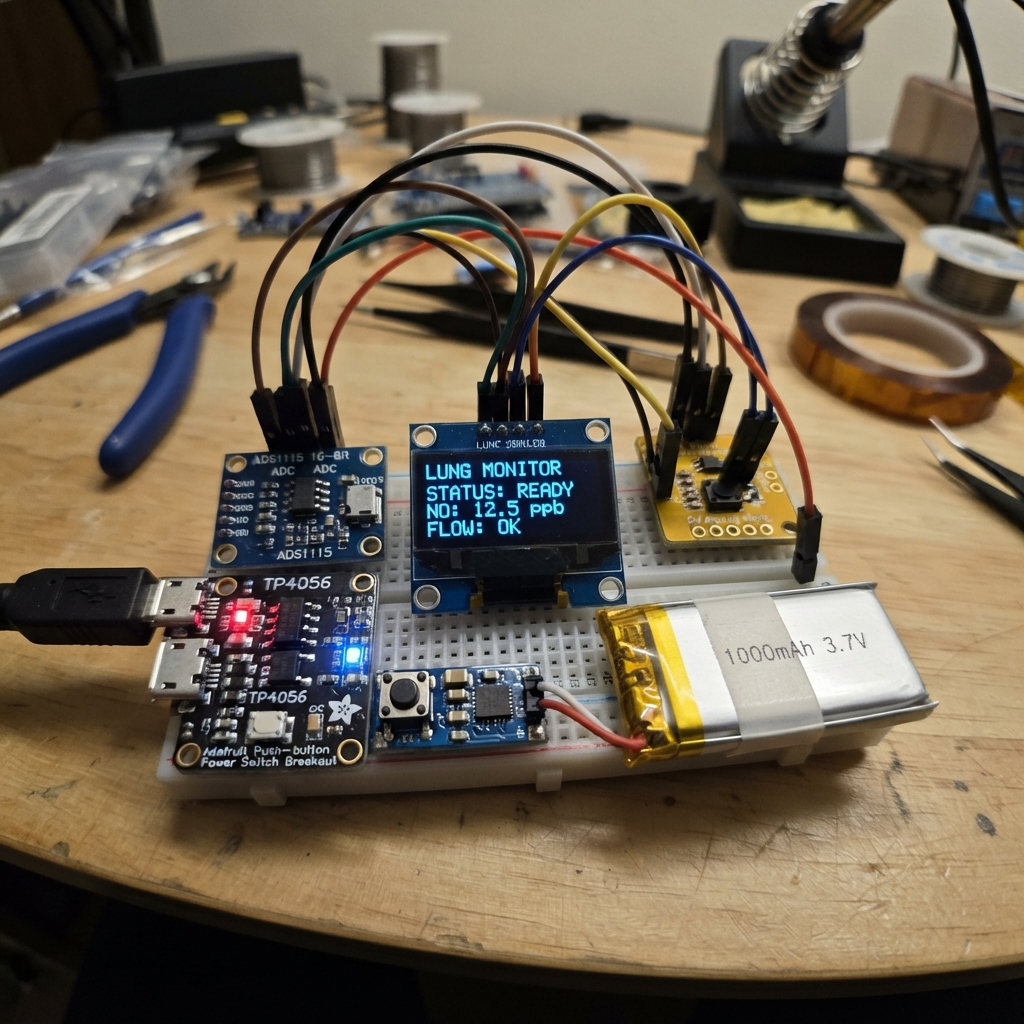
This portable lung function monitor measures exhaled nitric oxide (FeNO) and airflow to help assess respiratory health. Built around an Arduino Uno, it combines a nitric oxide sensor and airflow sensor with real-time display on a compact OLED screen, all powered by a rechargeable LiPo battery with integrated charging and power management.
The guide provides a complete parts list, wiring diagram showing sensor connections through the ADS1115 analog-to-digital converter, step-by-step assembly instructions for the air path and sensor dividers, and calibrated Arduino firmware. Builders will learn to set up I2C communication, configure the dual sensors, and interpret FeNO and flow readings on the display.
Wiring diagram

Gather all the parts
Assemble it in 6 steps
1. ركّب مسار التنفس
ثبّت mouthpiece_1 بحيث يكون طرف الفم للخارج والطرف الآخر متصلًا ميكانيكيًا بمدخل airflow_sensor_1. اجعل مسار الهواء محكمًا ولا تجعل الرطوبة أو اللعاب يصلان إلى لوحة الحساس.
- استخدم قطعة فم جديدة أو قابلة للتعقيم لكل مستخدم.
- لا تستخدم هذا المسار لمشاركة النفس بين أشخاص؛ يمكن أن ينقل التلوث.
2. كوّن مقسمي جهد الحساسين
لكل حساس: صِل AOUT بالحساس إلى END1 للمقاومة 10 kΩ، ثم صِل END2 للمقاومة 10 kΩ ومدخل ADS1115 المقابل والطرف END1 للمقاومة 20 kΩ في نفس الصف. صِل END2 للمقاومة 20 kΩ إلى GND. استخدم no_series_r_1 وno_ground_r_1 مع AIN0، وflow_series_r_1 وflow_ground_r_1 مع AIN1.
- المقاومات ليس لها اتجاه؛ القيمة 10 kΩ تحمل الألوان بني-أسود-برتقالي غالبًا، و20 kΩ أحمر-أسود-برتقالي غالبًا.
- لا توصل خرج حساس 5 فولت مباشرة إلى ADS1115 العامل على 3.3 فولت؛ قد يتلف مدخل المحول.
3. صِل الشاشة والمحول بالـ Uno
صِل VDD في ads1115_1 وVCC في oled_1 إلى 3.3V (power)، وصِل طرفي GND إلى GND (ground). صِل SDA في القطعتين إلى A4/GPIO18 (data)، وSCL في القطعتين إلى A5/GPIO19 (clock). صِل VCC في no_sensor_1 وairflow_sensor_1 إلى 5V (power)، وأرضيهما إلى GND (ground).
- اقرأ الملصقات المطبوعة على الشاشة؛ بعض الشاشات المشابهة تغير ترتيب أرجلها.
- تأكد أن VCC وGND غير متبادلين — عكسهما قد يتلف الشاشة أو الحساس.
4. ركّب البطارية ومفتاح التشغيل
صِل +V في lipo_1 إلى B+ في charger_1 وGND إلى B-. صِل OUT+ في charger_1 إلى IN في power_switch_1 وOUT- إلى GND فيه. صِل OUT في power_switch_1 إلى VIN+ في boost_1 وGND إلى VIN-. صِل زر power_button_1 بين BTN وGND في power_switch_1.
- اضبط خرج boost_1 بملتيميتر إلى 5.0 فولت قبل توصيل Arduino Uno.
- لا تقصر سلكي البطارية ولا تشحن بطارية ليثيوم تالفة أو منتفخة؛ ذلك قد يسبب سخونة أو حريقًا.
5. غذِّ لوحة Arduino
بعد ضبط boost_1، صِل VOUT+ فيه إلى دبوس 5V في Arduino Uno (power)، وصِل VOUT- إلى GND في Arduino Uno (ground). رتّب الأسلاك بعيدًا عن مسار الفم والهواء.
- اضغط زر power_button_1 لتشغيل أو إيقاف التغذية؛ شاشة OLED يجب أن تعرض رسالة البدء.
- لا توصل خرج الرافع إلى دبوس VIN؛ هذا التصميم يخرج 5 فولت منظمًا ويجب أن يدخل دبوس 5V فقط.
6. عاير قبل أي قراءة
شغّل الجهاز في هواء نظيف واترك حساس NO يسخن بالزمن الذي يطلبه مصنع الحساس. عدّل معاملات المعايرة في البرنامج باستخدام نقطة الصفر ومعيار تدفق وغاز مرجعيين موثقين لطراز الحساس لديك.
- العرض يضع نجمة بجانب FeNO ليذكّرك أن الرقم تقديري إلى أن تُدخل معايرة حسّاسك.
- لا تستخدم الأرقام المعروضة لاتخاذ قرار علاجي أو لتغيير دواء؛ هذا نموذج هندسي وليس جهاز FeNO طبيًا معتمدًا.
Review all connections
1. Connections between "lipo_1" and "Arduino"
2. Connections between "charger_1" and "Arduino"
3. Connections between "power_switch_1" and "Arduino"
4. Connections between "power_button_1" and "Arduino"
5. Connections between "boost_1" and "Arduino"
6. Connections between "ads1115_1" and "Arduino"
7. Connections between "oled_1" and "Arduino"
8. Connections between "no_sensor_1" and "Arduino"
9. Connections between "no_series_r_1" and "Arduino"
10. Connections between "no_ground_r_1" and "Arduino"
11. Connections between "airflow_sensor_1" and "Arduino"
12. Connections between "flow_series_r_1" and "Arduino"
13. Connections between "flow_ground_r_1" and "Arduino"
Deploy the firmware
#include <Wire.h>
#include <Adafruit_GFX.h>
#include <Adafruit_SSD1306.h>
#include <Adafruit_ADS1X15.h>

#define I2C_SDA_PIN 18
#define I2C_SCL_PIN 19

const uint8_t SCREEN_WIDTH = 128;
const uint8_t SCREEN_HEIGHT = 64;
const uint8_t OLED_RESET = 255;
const float DIVIDER_RECONSTRUCTION = 1.5f;  // 10 kΩ over 20 kΩ divider

// Replace these two values with the calibration supplied for YOUR NO sensor.
const float NO_ZERO_VOLTS = 0.0f;
const float FENO_PPB_PER_VOLT = 1.0f;

// Replace these values with the airflow module's calibration values.
const float FLOW_ZERO_VOLTS = 0.0f;
const float FLOW_LPM_PER_VOLT = 10.0f;
const unsigned long UPDATE_INTERVAL_MS = 500;

Adafruit_SSD1306 display(SCREEN_WIDTH, SCREEN_HEIGHT, &Wire, OLED_RESET);
Adafruit_ADS1115 ads;
bool adcReady = false;
unsigned long lastUpdateMs = 0;

float clampNonNegative(float value) {
  return value < 0.0f ? 0.0f : value;
}

void drawStatus(float sensorNoVolts, float fenoPpb, float flowLpm) {
  display.clearDisplay();
  display.setTextColor(SSD1306_WHITE);
  display.setTextSize(1);
  display.setCursor(0, 0);
  display.println(F("Spirometer / FeNO"));
  display.drawLine(0, 10, 127, 10, SSD1306_WHITE);

  display.setCursor(0, 16);
  display.print(F("Flow: "));
  display.print(flowLpm, 2);
  display.println(F(" L/min"));

  display.setCursor(0, 30);
  display.print(F("NO:   "));
  display.print(sensorNoVolts * 1000.0f, 1);
  display.println(F(" mV"));

  display.setCursor(0, 44);
  display.print(F("FeNO: "));
  display.print(fenoPpb, 1);
  display.println(F(" ppb*"));

  display.setCursor(0, 56);
  display.println(F("*Calibration required"));
  display.display();
}

void drawAdcError() {
  display.clearDisplay();
  display.setTextColor(SSD1306_WHITE);
  display.setTextSize(1);
  display.setCursor(0, 0);
  display.println(F("ADS1115 not found"));
  display.println();
  display.println(F("Check 3.3V, GND,"));
  display.println(F("SDA=A4, SCL=A5"));
  display.display();
}

void setup() {
  Wire.begin();
  display.begin(SSD1306_SWITCHCAPVCC, 0x3C);
  display.clearDisplay();
  display.setTextColor(SSD1306_WHITE);
  display.setTextSize(1);
  display.setCursor(0, 0);
  display.println(F("Starting monitor..."));
  display.display();

  adcReady = ads.begin(0x48);
  if (adcReady) {
    ads.setGain(GAIN_ONE); // ±4.096 V range; divider keeps the input below 3.3 V.
  } else {
    drawAdcError();
  }
  delay(800);
}

void loop() {
  if (!adcReady) {
    delay(250);
    return;
  }

  unsigned long now = millis();
  if (now - lastUpdateMs < UPDATE_INTERVAL_MS) {
    delay(20);
    return;
  }
  lastUpdateMs = now;

  int16_t noCounts = ads.readADC_SingleEnded(0);
  int16_t flowCounts = ads.readADC_SingleEnded(1);

  float noSensorVolts = ads.computeVolts(noCounts) * DIVIDER_RECONSTRUCTION;
  float flowSensorVolts = ads.computeVolts(flowCounts) * DIVIDER_RECONSTRUCTION;
  float fenoPpb = clampNonNegative((noSensorVolts - NO_ZERO_VOLTS) * FENO_PPB_PER_VOLT);
  float flowLpm = clampNonNegative((flowSensorVolts - FLOW_ZERO_VOLTS) * FLOW_LPM_PER_VOLT);

  drawStatus(noSensorVolts, fenoPpb, flowLpm);
}
Remix this project
Make it yours in one click
Open a full copy of this project in your own Schematik workspace — diagram, code, parts, and assembly steps included. Swap the sensor, add features, or redesign the whole thing with AI. The author's original stays untouched.