Community project
Autonomous Color-Sorting Line Follower
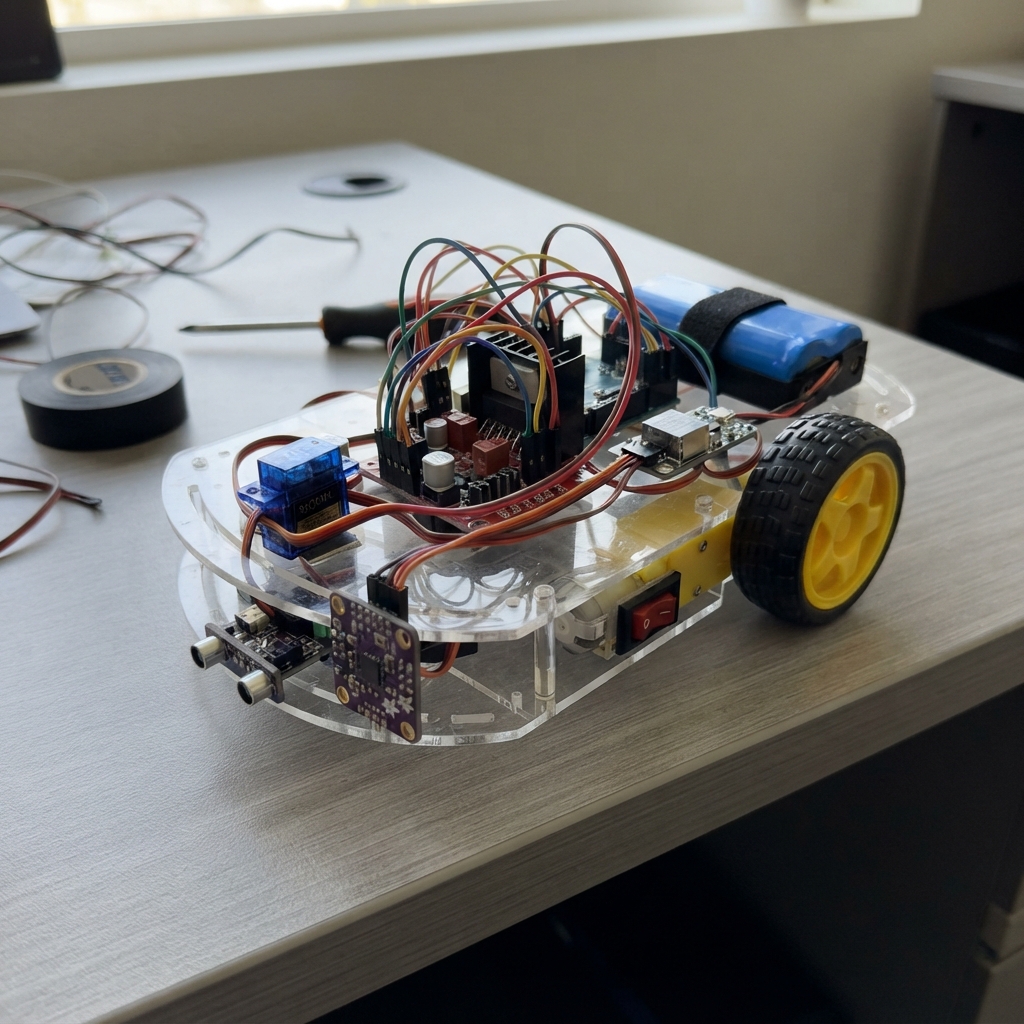
This autonomous robot follows a black line on the ground while identifying and sorting objects by color. Built around an Arduino Uno, it uses three IR sensors for line tracking, a TCS34725 RGB color sensor to classify red, green, blue, and yellow objects, and a servo-controlled claw to pick and place items. The guide provides a complete wiring diagram, parts list with power management details, and step-by-step assembly instructions for mounting the drive motors, claw mechanism, and sensor array.
The firmware implements proportional line-following logic, color classification based on normalized RGB ratios, and state machine control for autonomous sorting operations. Builders will learn motor control via PWM and H-bridge, I2C sensor integration, servo actuation, and how to tune thresholds for reliable line and color detection in their specific lighting conditions.
Wiring diagram
Gather all the parts
Assemble it in 6 steps
1. Mount the drive and claw
Fix both geared motors to a chassis, fit two wheels and a caster, and secure the Uno and driver. Keep wheels lifted during first tests. Mount the claw so 70 degrees opens and 110 degrees closes without forcing the mechanism; adjust these firmware angles before loading it.
- A stalled servo or motor can overheat. Keep fingers clear of the claw.
2. Prepare battery power safely
Use a factory-built protected 2S pack with a matching 8.4 V charger. Connect battery positive through the 2 A fuse and switch to driver 12V and buck VIN. Battery negative, buck GND and driver GND share ground. Set the buck output to 5.0 V with a meter BEFORE connecting any electronics.
- Never charge through the Uno or use loose unprotected cells. Stop at 6.4 V resting; 5.9 V is too low for normal operation. Never short a lithium battery.
3. Connect the regulated supply
Remove the L298N 5V-EN regulator jumper AND the ENA and ENB jumpers. Buck VOUT feeds Uno 5V, driver 5V, servo VCC and sensor power. Connect the capacitor positive to 5 V and striped negative to ground near the servo. Use short substantial power wires, not a breadboard for motor current.
- Disconnect the battery before plugging USB into the Uno to prevent two supplies fighting. Never connect the 8.4 V pack directly to the servo or Uno 5V. The L298N loses several volts and may struggle with a low battery; check temperature and starting performance.
4. Connect motor controls
Connect ENA to D5 and ENB to D6 for speed. IN1 to D7 and IN2 to D8 control the left motor; IN3 to D9 and IN4 to D10 control the right motor. OUT1/OUT2 feed the left motor, OUT3/OUT4 the right. Servo signal goes to D2. If a wheel runs backward in the lifted test, switch off and swap only that motor's two output wires.
5. Mount and wire the sensors
Mount three four-pin TCRT5000 analog modules facing downward a few millimeters over the track. Left AO goes to A0, center AO to A1 and right AO to A2; leave DO unused. Connect each VCC to 5 V and GND to ground. Use an Adafruit 1334 TCS34725 breakout: VIN to 5 V, GND to ground, SDA to A4 for data and SCL to A5 for clock. Mount it close to the object or marker with consistent lighting.
- A bare TCS34725 or unshifted 3.3 V module is not a safe substitute. These downward sensors do not provide forward obstacle detection.
6. Check motion and sensing
With wheels raised, check all polarities and jumper removal. Start with an unloaded claw. Firmware starts stopped and locks motion if the color sensor is missing. Use raw IR readings over black and white to tune LINE_THRESHOLD and BLACK_IS_HIGH; color thresholds also need testing with actual samples. It follows a dark line, stops on lost line or junction, and stops and closes once at a stable red, green, blue or yellow marker. Pick/drop motion is one claw only, not a lifting arm or automatic delivery route.
Review all connections
1. Connections between "battery" and "Arduino"
2. Connections between "fuse" and "Arduino"
3. Connections between "switch" and "Arduino"
4. Connections between "driver" and "Arduino"
5. Connections between "buck" and "Arduino"
6. Connections between "claw" and "Arduino"
7. Connections between "color" and "Arduino"
8. Connections between "cap" and "Arduino"
9. Connections between "irLeft" and "Arduino"
10. Connections between "irCenter" and "Arduino"
11. Connections between "irRight" and "Arduino"
Deploy the firmware
#include <Arduino.h>
#include <Wire.h>
#include <Servo.h>
#include <Adafruit_TCS34725.h>
const uint8_t ENA=5, ENB=6, IN1=7, IN2=8, IN3=9, IN4=10, CLAW=2;
const uint8_t IR[3]={A0,A1,A2};
// Tune these with raw readings printed while stopped. Flip polarity if needed.
const int LINE_THRESHOLD=500;
const bool BLACK_IS_HIGH=true;
const int OPEN_ANGLE=70, CLOSED_ANGLE=110;
Servo claw;
Adafruit_TCS34725 color(TCS34725_INTEGRATIONTIME_50MS,TCS34725_GAIN_4X);
bool sensorOK=false, running=false, handled=false;
uint8_t stable=0, lastColor=0;
unsigned long lastSample=0;
void motors(int left,int right){
 digitalWrite(IN1,left>0); digitalWrite(IN2,LOW);
 digitalWrite(IN3,right>0); digitalWrite(IN4,LOW);
 analogWrite(ENA,constrain(left,0,180)); analogWrite(ENB,constrain(right,0,180));
}
uint8_t classify(uint16_t r,uint16_t g,uint16_t b,uint16_t c){
 if(c<50 || c>60000) return 0;
 float sum=(float)r+g+b;
 if(sum<1) return 0;
 float R=r/sum,G=g/sum,B=b/sum;
 if(R>0.36 && G>0.33 && B<0.22) return 4;
 if(R>0.46 && R>G*1.3 && R>B*1.3) return 1;
 if(G>0.42 && G>R*1.2 && G>B*1.2) return 2;
 if(B>0.40 && B>R*1.2 && B>G*1.15) return 3;
 return 0;
}
void setup(){
 const uint8_t outputs[]={ENA,ENB,IN1,IN2,IN3,IN4};
 for(uint8_t p: outputs) {pinMode(p,OUTPUT);digitalWrite(p,LOW);}
 Serial.begin(115200);
 claw.write(OPEN_ANGLE); claw.attach(CLAW);
 Wire.begin(); Wire.setWireTimeout(25000,true);
 sensorOK=color.begin();
 Serial.println(F("Stopped. f=follow, s=stop, o=open/drop, c=close/pick. Reset to rearm color pickup."));
 if(!sensorOK) Serial.println(F("Color sensor missing: motion locked."));
}
void loop(){
 if(Serial.available()){
  char cmd=Serial.read();
  if(cmd=='s'){running=false; motors(0,0);}
  if(cmd=='f' && sensorOK){running=true;}
  if(cmd=='o' || cmd=='c'){running=false;motors(0,0);claw.write(cmd=='o'?OPEN_ANGLE:CLOSED_ANGLE);}
 }
 if(millis()-lastSample<80) return;
 lastSample=millis();
 int raw[3];bool line[3];
 for(uint8_t i=0;i<3;i++){raw[i]=analogRead(IR[i]); line[i]=BLACK_IS_HIGH?raw[i]>LINE_THRESHOLD:raw[i]<LINE_THRESHOLD;}
 uint16_t r=0,g=0,b=0,c=0;
 if(sensorOK) color.getRawData(&r,&g,&b,&c);
 uint8_t detected=classify(r,g,b,c);
 stable=detected && detected==lastColor?min(10,(int)stable+1):0;
 lastColor=detected;
 if(running && !handled && stable>=3){
  motors(0,0);running=false;handled=true;claw.write(CLOSED_ANGLE);
  Serial.println(F("Colored marker: stopped and closed claw. o=drop; f=continue."));
 }
 if(running){
  if(!line[0]&&!line[1]&&!line[2]){motors(0,0);running=false;Serial.println(F("Line lost: stopped."));}
  else if(line[0]&&line[2]){motors(0,0);running=false;Serial.println(F("Junction: stopped."));}
  else if(line[0])motors(70,140);
  else if(line[2])motors(140,70);
  else motors(120,120);
 }else motors(0,0);
 static unsigned long report=0;
 if(millis()-report>=500){report=millis();
  Serial.print(F("IR L/C/R: "));for(int v:raw){Serial.print(v);Serial.print(' ');}
  Serial.print(F(" RGB/C: ")); Serial.print(r);Serial.print(' ');Serial.print(g);Serial.print(' ');Serial.print(b);Serial.print(' ');Serial.print(c);
  Serial.print(F(" color: "));
  switch(detected){case 1:Serial.println(F("RED"));break;case 2:Serial.println(F("GREEN"));break;case 3:Serial.println(F("BLUE"));break;case 4:Serial.println(F("YELLOW"));break;default:Serial.println(F("unknown"));}
 }
}
Download project files
Remix this project
Make it yours in one click
Open a full copy of this project in your own Schematik workspace — diagram, code, parts, and assembly steps included. Swap the sensor, add features, or redesign the whole thing with AI. The author's original stays untouched.