Community project
Potentiometer Ping Pong
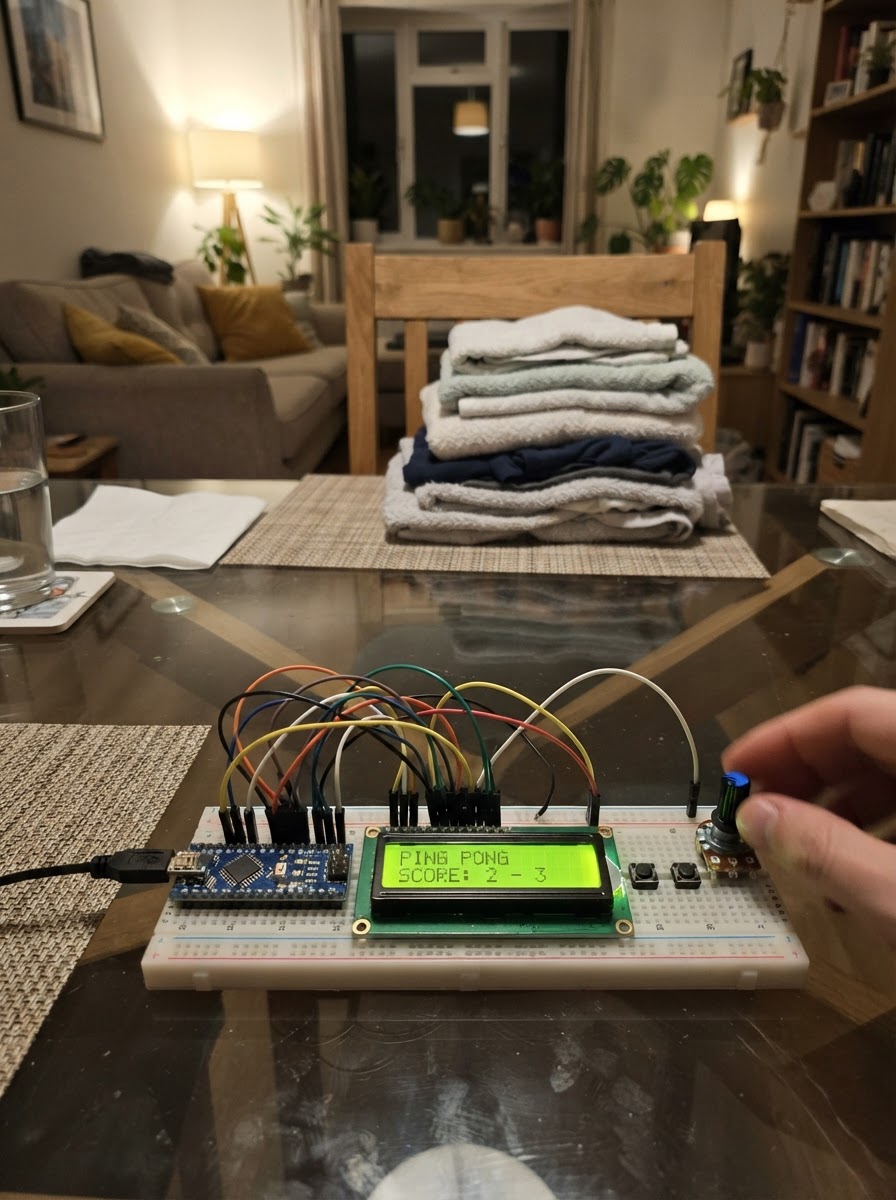
Potentiometer Ping Pong is a two-player arcade game built on an Arduino Uno with an I2C LCD display and two potentiometers as paddle controllers. Players rotate their knobs to move paddles up and down, competing to keep the ball in play and score points against their opponent.
This guide provides a complete wiring diagram, parts list, and step-by-step assembly instructions to get the game running. The included firmware handles menu navigation, single-player and two-player modes, ball physics, and a chaos mode with multiple balls. Once wired and programmed, the game is ready to play immediately from the LCD interface.
Wiring diagram

Gather all the parts
Assemble it in 5 steps
1. Power off before wiring
Disconnect the Uno USB cable while making connections. Use a breadboard so the LCD and both potentiometers share the Uno 5V and GND rails.
- A standard 10 kΩ potentiometer has two outer terminals and one centre wiper terminal.
- Do not connect or move wires while the Uno is powered.
2. Connect the I²C LCD
Wire LCD VCC to Uno 5V and LCD GND to Uno GND. Wire LCD SDA to Uno A4 and LCD SCL to Uno A5.
- On an Uno, A4 is the I²C data pin and A5 is the I²C clock pin.
- Most common I²C backpacks use address 0x27, which this project uses.
- Keep SDA and SCL separate; reversing them prevents the display from communicating.
3. Wire Player 1/menu potentiometer
Connect one outer P1 terminal to Uno 5V, the other outer terminal to Uno GND, and its centre wiper terminal to A0.
- If turning clockwise moves the paddle/menu selection the opposite way from your preference, swap only the two outer terminals.
- P1 is also the menu selector.
- The centre wiper must go to A0, not directly to 5V or GND.
4. Wire Player 2 potentiometer
Connect one outer P2 terminal to Uno 5V, the other outer terminal to Uno GND, and its centre wiper terminal to A1.
- P2 is used only in Two Player mode; in Singleplayer, the right paddle is controlled by the built-in AI.
- Both potentiometers and the LCD must share the Uno GND connection.
5. Power and play
Reconnect USB power. Turn P1 to the top-row or bottom-row option and hold it steady for 15 seconds to choose Normal/Chaos, then Singleplayer/Two Player. During a match, each knob chooses its paddle row. In Normal mode, the first player to 7 wins.
- The LCD uses | for paddles and + for balls.
- Chaos mode adds a ball every 10 seconds and does not keep score.
- If the LCD lights but has no readable text, first adjust the small contrast screw on its I²C backpack.
Review all connections
1. Connections between "lcd_1" and "Arduino"
2. Connections between "p1_pot" and "Arduino"
3. Connections between "p2_pot" and "Arduino"
Deploy the firmware
#include <Arduino.h>
#include <Wire.h>
#include <LiquidCrystal_I2C.h>


// Hoisted type definitions
enum Screen { MODE_MENU, PLAYER_MENU, PLAYING, WIN_SCREEN };

struct Ball {
  int8_t x;
  int8_t y;
  int8_t dx;
  int8_t dy;
};


// Forward declarations
byte knobRow(byte pin);
void printRow(byte row, const char *text);
void drawMenu();
void resetBall(byte index);
void startGame();
void updateMenu();
void showWinner();
void scoreFor(byte player);
void moveBall(byte i);
void drawGame();
void updateGame();

const byte P1_POT_PIN = A0;
const byte P2_POT_PIN = A1;
const unsigned long MENU_HOLD_MS = 15000UL;
const unsigned long FRAME_MS = 180UL;
const unsigned long CHAOS_ADD_MS = 10000UL;
const byte WIN_SCORE = 7;
const byte MAX_CHAOS_BALLS = 20;

LiquidCrystal_I2C lcd(0x27, 16, 2);


Screen screen = MODE_MENU;
bool chaosMode = false;
bool singlePlayer = false;
byte menuChoice = 0;
byte heldChoice = 255;
unsigned long holdStarted = 0;
unsigned long lastFrame = 0;
unsigned long lastChaosBall = 0;


Ball balls[MAX_CHAOS_BALLS];
byte ballCount = 0;
byte p1Row = 0;
byte p2Row = 0;
byte p1Score = 0;
byte p2Score = 0;
byte winner = 0;

byte knobRow(byte pin) {
  return analogRead(pin) >= 512 ? 1 : 0;
}

void printRow(byte row, const char *text) {
  lcd.setCursor(0, row);
  lcd.print(text);
}

void drawMenu() {
  char line[17];
  lcd.clear();
  if (screen == MODE_MENU) {
    snprintf(line, sizeof(line), "%c Normal", menuChoice == 0 ? '>' : ' ');
    printRow(0, line);
    snprintf(line, sizeof(line), "%c Chaos", menuChoice == 1 ? '>' : ' ');
    printRow(1, line);
  } else {
    snprintf(line, sizeof(line), "%c Singleplayer", menuChoice == 0 ? '>' : ' ');
    printRow(0, line);
    snprintf(line, sizeof(line), "%c Two Player", menuChoice == 1 ? '>' : ' ');
    printRow(1, line);
  }
}

void resetBall(byte index) {
  balls[index].x = 7;
  balls[index].y = index & 1;
  balls[index].dx = (index & 1) ? 1 : -1;
  balls[index].dy = (index % 3 == 0) ? 1 : -1;
}

void startGame() {
  p1Score = 0;
  p2Score = 0;
  p1Row = 0;
  p2Row = 0;
  ballCount = 1;
  resetBall(0);
  lastChaosBall = millis();
  lastFrame = millis();
  screen = PLAYING;
  lcd.clear();
}

void updateMenu() {
  byte choice = knobRow(P1_POT_PIN);
  if (choice != menuChoice) {
    menuChoice = choice;
    heldChoice = 255;
    drawMenu();
  }
  if (heldChoice != menuChoice) {
    heldChoice = menuChoice;
    holdStarted = millis();
  }
  unsigned long elapsed = millis() - holdStarted;
  lcd.setCursor(8, 1);
  if (elapsed < MENU_HOLD_MS) {
    lcd.print("Hold ");
    lcd.print((MENU_HOLD_MS - elapsed + 999UL) / 1000UL);
    lcd.print("s ");
  }
  if (elapsed >= MENU_HOLD_MS) {
    if (screen == MODE_MENU) {
      chaosMode = (menuChoice == 1);
      screen = PLAYER_MENU;
      heldChoice = 255;
      drawMenu();
    } else {
      singlePlayer = (menuChoice == 0);
      startGame();
    }
  }
}

void showWinner() {
  lcd.clear();
  lcd.setCursor(0, 0);
  lcd.print("Nice one P");
  lcd.print(winner);
  lcd.setCursor(0, 1);
  lcd.print("Turn knob restart");
}

void scoreFor(byte player) {
  if (chaosMode) return;
  if (player == 1) p1Score++; else p2Score++;
  if (p1Score >= WIN_SCORE || p2Score >= WIN_SCORE) {
    winner = (p1Score >= WIN_SCORE) ? 1 : 2;
    screen = WIN_SCREEN;
    showWinner();
  }
}

void moveBall(byte i) {
  Ball &b = balls[i];
  int8_t nextX = b.x + b.dx;
  int8_t nextY = b.y + b.dy;
  if (nextY < 0 || nextY > 1) {
    b.dy = -b.dy;
    nextY = b.y + b.dy;
  }
  if (nextX == 0 && b.dx < 0) {
    if (nextY == p1Row) {
      b.dx = 1;
      nextX = 1;
    } else {
      scoreFor(2);
      resetBall(i);
      return;
    }
  }
  if (nextX == 15 && b.dx > 0) {
    if (nextY == p2Row) {
      b.dx = -1;
      nextX = 14;
    } else {
      scoreFor(1);
      resetBall(i);
      return;
    }
  }
  b.x = nextX;
  b.y = nextY;
}

void drawGame() {
  char rows[2][17] = {"                ", "                "};
  rows[p1Row][0] = '|';
  rows[p2Row][15] = '|';
  if (!chaosMode) {
    rows[0][7] = '0' + p1Score;
    rows[0][8] = ':';
    rows[0][9] = '0' + p2Score;
  } else {
    rows[0][6] = 'C';
    rows[0][7] = ':';
    rows[0][8] = '0' + (ballCount / 10);
    rows[0][9] = '0' + (ballCount % 10);
  }
  for (byte i = 0; i < ballCount; i++) {
    if (balls[i].x > 0 && balls[i].x < 15) rows[balls[i].y][balls[i].x] = '+';
  }
  lcd.setCursor(0, 0);
  lcd.print(rows[0]);
  lcd.setCursor(0, 1);
  lcd.print(rows[1]);
}

void updateGame() {
  p1Row = knobRow(P1_POT_PIN);
  if (singlePlayer) {
    byte target = p2Row;
    for (byte i = 0; i < ballCount; i++) {
      if (balls[i].dx > 0) {
        target = balls[i].y;
        break;
      }
    }
    p2Row = target;
  } else {
    p2Row = knobRow(P2_POT_PIN);
  }
  if (chaosMode && millis() - lastChaosBall >= CHAOS_ADD_MS) {
    lastChaosBall += CHAOS_ADD_MS;
    if (ballCount < MAX_CHAOS_BALLS) {
      resetBall(ballCount);
      ballCount++;
    }
  }
  if (millis() - lastFrame >= FRAME_MS) {
    lastFrame = millis();
    for (byte i = 0; i < ballCount; i++) {
      moveBall(i);
      if (screen != PLAYING) return;
    }
    drawGame();
  }
}

void setup() {
  lcd.init();
  lcd.backlight();
  drawMenu();
}

void loop() {
  if (screen == MODE_MENU || screen == PLAYER_MENU) {
    updateMenu();
  } else if (screen == PLAYING) {
    updateGame();
  } else if (screen == WIN_SCREEN && analogRead(P1_POT_PIN) < 450) {
    screen = MODE_MENU;
    heldChoice = 255;
    drawMenu();
  }
}
Remix this project
Make it yours in one click
Open a full copy of this project in your own Schematik workspace, diagram, code, parts, and assembly steps included. Swap the sensor, add features, or redesign the whole thing with AI. The author's original stays untouched.