Community project
RC Kontrollü Balıkçı Gemisi
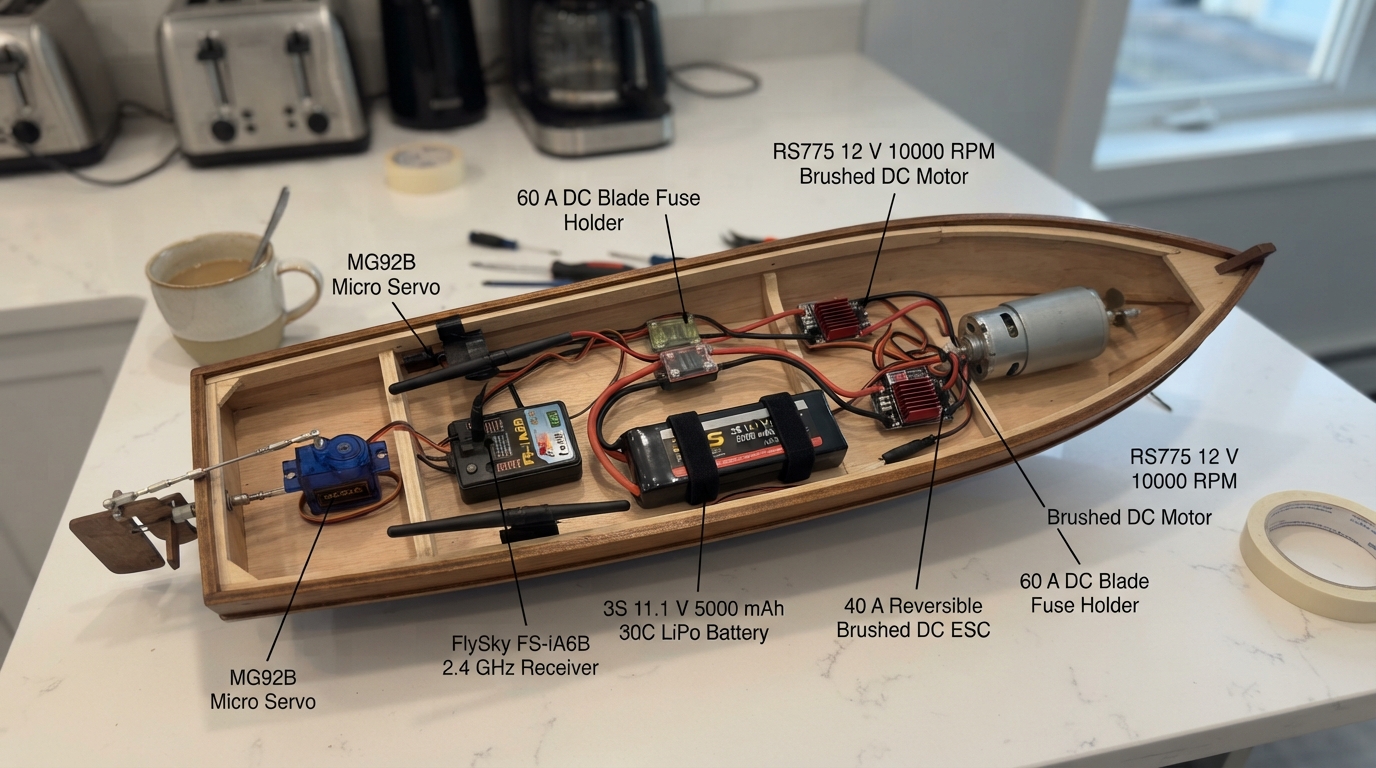
Build a remote-controlled fishing boat powered by dual brushed DC motors and controlled via a 2.4 GHz FlySky RC transmitter. This project combines an Arduino Uno with two reversible motor controllers, a high-torque servo for rudder control, and an 11.1 V LiPo battery to create a fully functional RC vessel capable of forward, reverse, and turning maneuvers.
This guide provides a complete wiring diagram, parts list, and Arduino firmware that handles RC signal processing, motor control, and failsafe mechanisms. Follow the assembly steps to mount the motors and propeller shafts, connect the battery and fuse holder, wire the ESCs and servo, and perform safe initial startup procedures to get your boat on the water.
Wiring diagram
Gather all the parts
Assemble it in 5 steps
1. İki motoru ve pervane millerini yerleştirin
port_rs775 motorunu teknenin sol arkasına, starboard_rs775 motorunu sağ arkasına sağlam motor yataklarıyla takın. Her motorun D-şaftına uygun kaplinle kendi pervane milini bağlayın; pervaneleri en son takın.
- İki şaft gövde içinden su almadan çıkmalı; şaft contalarını ve gresini kontrol edin.
- Motorları yalnızca ince plastik yüzeye vidalamayın; yüksek tork titreşimle motor yatağını kırabilir.
2. Ana batarya ve sigortayı bağlayın
battery_3s BAT+ ucunu main_fuse IN ucuna bağlayın. main_fuse OUT ucundan iki ayrı kalın kabloyla port_esc BAT+ ve starboard_esc BAT+ uçlarına gidin. battery_3s BAT- ucunu iki ayrı kalın kabloyla her iki ESC'nin BAT- ucuna bağlayın (güç).
- Batarya bağlantısını en son yapın ve sigortayı bataryaya mümkün olduğunca yakın yerleştirin.
- Kısa devre LiPo bataryayı, kabloları ve tekneyi hızla ısıtabilir; açıkta metal bağlantı bırakmayın.
3. Motor denetleyicilerini motorlara bağlayın
port_esc MOTOR+ ucunu port_rs775 M+ ucuna, port_esc MOTOR- ucunu port_rs775 M- ucuna bağlayın. starboard_esc MOTOR+ ucunu starboard_rs775 M+ ucuna, starboard_esc MOTOR- ucunu starboard_rs775 M- ucuna bağlayın (motor gücü).
- İlk kuru testte gaz yönü tersse, o motora giden iki kalın kabloyu kendi arasında yer değiştirin.
- Pervaneler takılıyken masa üzerinde test yapmayın; yüksek hızlı pervane yaralanmaya neden olabilir.
4. Arduino, alıcı ve dümeni bağlayın
rc_receiver CH1 → Arduino D2 (dümen sinyali), rc_receiver CH2 → Arduino D3 (gaz sinyali), rudder_servo SIGNAL → Arduino D10 (dümen komutu), port_esc PWM → Arduino D9 (sol motor komutu), starboard_esc PWM → Arduino D11 (sağ motor komutu). port_esc BEC 5V → Arduino 5V, rc_receiver B/VCC ve rudder_servo VCC (güç); her GND ucu → ortak GND (toprak).
- starboard_esc üzerindeki kırmızı BEC 5V teli bağlanmayacak: ucunu ayrı ayrı ısı ile daralan makaronla kapatın. Siyah/kahverengi GND teli bağlı kalır.
- İki ESC'nin 5 V BEC çıkışını birbirine bağlamayın; iki güç kaynağı birbirini zorlayıp alıcıya veya Arduino'ya zarar verebilir.
5. Güvenli ilk çalıştırmayı yapın
Pervaneler sökülüyken vericiyi açın ve gaz kolunu tam ortaya alın. Arduino'yu USB ile bağlayın, Schematik'te Deploy düğmesine basın, sonra bataryayı bağlayın. Dümen hareketini ve iki motorun yönünü kısa süreli test edin.
- Tekneyi sehpa üzerinde sabitleyin; gaz ortadaysa iki motor da durmalıdır.
- LiPo bataryayı yalnızca 3S denge şarj cihazıyla şarj edin ve şarj sırasında gözetimsiz bırakmayın.
Review all connections
1. Connections between "battery_3s" and "Arduino"
2. Connections between "main_fuse" and "Arduino"
3. Connections between "port_esc" and "Arduino"
4. Connections between "starboard_esc" and "Arduino"
5. Connections between "rudder_servo" and "Arduino"
6. Connections between "rc_receiver" and "Arduino"
Deploy the firmware
#include <Arduino.h>
#include <Servo.h>

const uint8_t RC_STEER_PIN = 2;
const uint8_t RC_THROTTLE_PIN = 3;
const uint8_t PORT_ESC_PIN = 9;
const uint8_t STARBOARD_ESC_PIN = 11;
const uint8_t RUDDER_SERVO_PIN = 10;

const uint16_t PULSE_MIN_US = 1000;
const uint16_t PULSE_CENTER_US = 1500;
const uint16_t PULSE_MAX_US = 2000;
const uint16_t PULSE_VALID_LOW_US = 900;
const uint16_t PULSE_VALID_HIGH_US = 2100;
const uint32_t PULSE_TIMEOUT_US = 25000;
const uint32_t SIGNAL_LOSS_MS = 150;

Servo portEsc;
Servo starboardEsc;
Servo rudder;
uint16_t lastThrottleUs = PULSE_CENTER_US;
uint16_t lastSteeringUs = PULSE_CENTER_US;
uint32_t lastGoodSignalMs = 0;

bool validRcPulse(uint32_t pulse) {
  return pulse >= PULSE_VALID_LOW_US && pulse <= PULSE_VALID_HIGH_US;
}

uint16_t clampPulse(uint32_t pulse) {
  return (uint16_t)constrain((long)pulse, PULSE_MIN_US, PULSE_MAX_US);
}

void stopBoatAndCenterRudder() {
  // Reversible brushed ESCs use the centre pulse as stop.
  portEsc.writeMicroseconds(PULSE_CENTER_US);
  starboardEsc.writeMicroseconds(PULSE_CENTER_US);
  rudder.writeMicroseconds(PULSE_CENTER_US);
  lastThrottleUs = PULSE_CENTER_US;
  lastSteeringUs = PULSE_CENTER_US;
}

void setup() {
  pinMode(LED_BUILTIN, OUTPUT);
  pinMode(RC_STEER_PIN, INPUT);
  pinMode(RC_THROTTLE_PIN, INPUT);

  portEsc.attach(PORT_ESC_PIN, PULSE_MIN_US, PULSE_MAX_US);
  starboardEsc.attach(STARBOARD_ESC_PIN, PULSE_MIN_US, PULSE_MAX_US);
  rudder.attach(RUDDER_SERVO_PIN, PULSE_MIN_US, PULSE_MAX_US);
  stopBoatAndCenterRudder();

  // Keep throttle at stop while the ESC starts and arms.
  delay(3000);
  lastGoodSignalMs = millis();
}

void loop() {
  const uint32_t steeringPulse = pulseIn(RC_STEER_PIN, HIGH, PULSE_TIMEOUT_US);
  const uint32_t throttlePulse = pulseIn(RC_THROTTLE_PIN, HIGH, PULSE_TIMEOUT_US);

  if (validRcPulse(steeringPulse) && validRcPulse(throttlePulse)) {
    lastGoodSignalMs = millis();
    const uint16_t requestedSteering = clampPulse(steeringPulse);
    const uint16_t requestedThrottle = clampPulse(throttlePulse);

    // Do not keep rewriting the outputs when the sticks have not moved.
    if (abs((int)requestedSteering - (int)lastSteeringUs) >= 2) {
      rudder.writeMicroseconds(requestedSteering);
      lastSteeringUs = requestedSteering;
    }
    if (abs((int)requestedThrottle - (int)lastThrottleUs) >= 2) {
      portEsc.writeMicroseconds(requestedThrottle);
      starboardEsc.writeMicroseconds(requestedThrottle);
      lastThrottleUs = requestedThrottle;
    }
    digitalWrite(LED_BUILTIN, HIGH);
  } else if (millis() - lastGoodSignalMs > SIGNAL_LOSS_MS) {
    // Lost radio signal: remove propulsion and put the rudder straight ahead.
    stopBoatAndCenterRudder();
    digitalWrite(LED_BUILTIN, LOW);
  }

  delay(2);
}
Remix this project
Make it yours in one click
Open a full copy of this project in your own Schematik workspace — diagram, code, parts, and assembly steps included. Swap the sensor, add features, or redesign the whole thing with AI. The author's original stays untouched.
Related projects
VW T1 RPM LED Strip
Arduino · October 20, 2026Christoph Brinkmann
Solar Clap-Controlled Follow-Me Home
Arduino · October 19, 2026Jella Mae Lhyzelle Rodillo
Solar Light Tracker
Arduino · October 19, 2026kelleyriverarodriguez1969