Community project
Solar Light Tracker
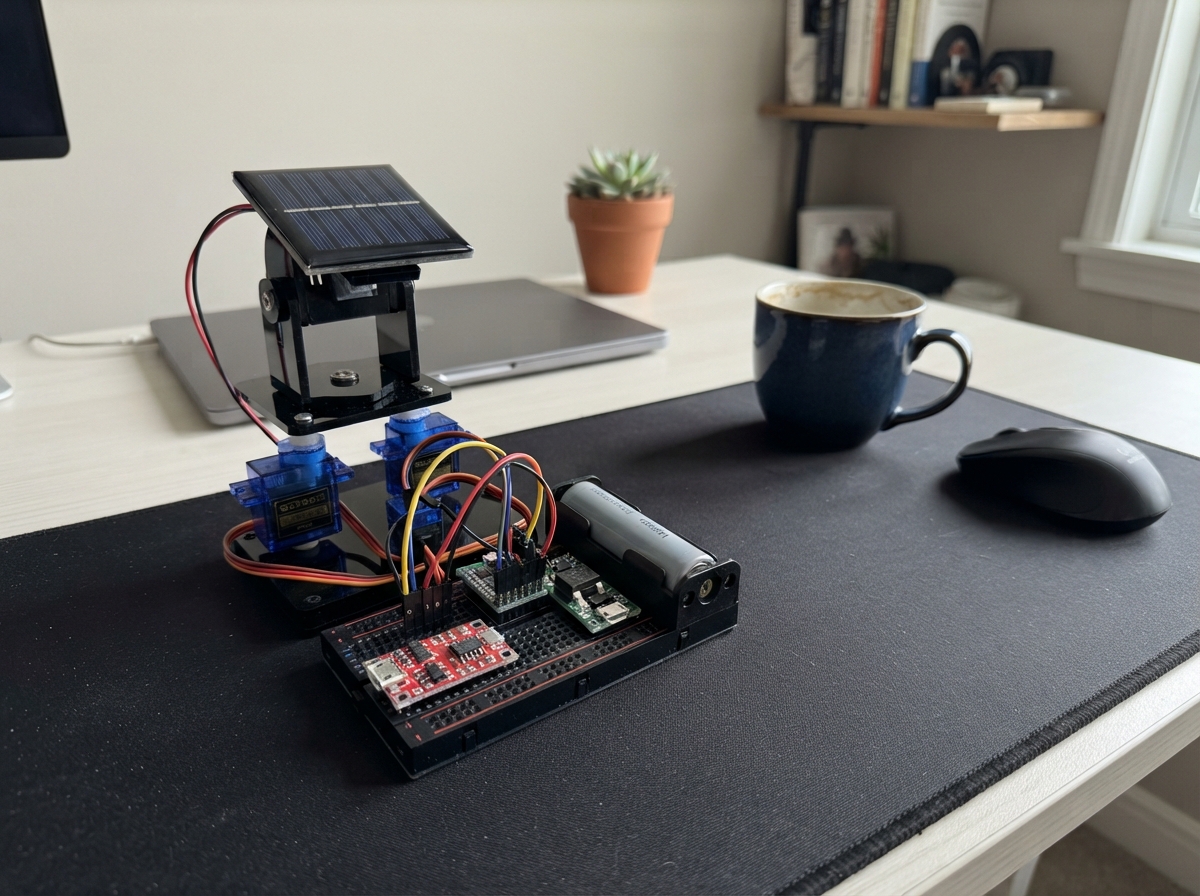
This solar light tracker uses four photoresistors arranged in a 2x2 grid to detect the brightest light source and automatically orient a dual-axis servo bracket toward it. The Arduino Uno reads light levels from each quadrant, compares them, and commands two SG90 servos to pan and tilt the sensor head until all four readings are balanced, keeping the tracker pointed at the sun or brightest available light.
The project runs entirely on solar power, with a 5V/1W panel charging an 18650 Li-ion cell through a TP4056 protection module, then boosting the voltage to a stable 5V rail for the Arduino and servo controller. This guide provides a complete wiring diagram, parts list, Arduino firmware with configurable thresholds and movement limits, and step-by-step assembly instructions from building the light-sensor head through safely testing servo movement.
Wiring diagram
Gather all the parts
Assemble it in 7 steps
1. Make the light-sensor head
Mount ldr_tl, ldr_tr, ldr_bl, and ldr_br at the four corners of a small flat plate. Glue or tape two thin, opaque strips between them as a raised cross, so each sensor is slightly shaded when the head is not facing the brightest light. Keep the top-left, top-right, bottom-left, and bottom-right positions exactly as named when viewing the front of the moving head.
- A cross about 10–20 mm taller than the sensors makes direction differences easier to detect.
- Photoresistors have no positive or negative leg, so either lead can be used first.
2. Build the four light-reading connections
For each sensor, connect one photoresistor lead to the 5 V rail (power). Connect its other lead to both its matching Arduino analog input and one end of its matching 10 kΩ resistor (signal): ldr_tl to A0, ldr_tr to A1, ldr_bl to A2, and ldr_br to A3. Connect the free end of every 10 kΩ resistor to GND (ground).
- Each sensor and resistor pair meets in one shared breadboard row; that same row also gets the wire to A0, A1, A2, or A3.
- Use red wires for 5 V, black wires for GND, and four different colors for the four signal wires.
- Do not connect an analog-input row directly to both 5 V and GND; the 10 kΩ resistor must sit between that row and GND.
3. Mount the servos and bracket
Fit pan_servo into the fixed part of pan_tilt_bracket, then fit tilt_servo into the moving part. Leave the servo horns loose until the first powered center position, then attach them with the head pointing roughly forward and level. Secure the sensor plate to the tilt section so it moves with both axes.
- Do not force either bracket axis by hand after the horns are fitted; stripped gears can make a clicking sound.
- Keep the panel or sensor head light enough for the servos to lift without struggling.
4. Wire the servo controller
Connect pca9685 VCC to the 5 V rail (power), GND to GND (ground), SDA to Arduino A4 (data), and SCL to Arduino A5 (data). Connect pca9685 V+ to the 5 V rail (servo power) and OE to GND (this keeps its outputs enabled). Plug pan_servo into PCA9685 channel 0 and tilt_servo into channel 1: brown or black to GND, red to V+, and orange, yellow, or white to the signal pin.
- The Uno’s A4 and A5 pins are used as communication wires here; do not use them for the light sensors.
- Check the small labels beside each three-pin PCA9685 channel before plugging in each servo lead.
- Make sure the servo plug is not reversed — swapped 5 V and GND can damage a servo or the controller.
5. Build the solar battery supply with power disconnected
With battery_18650 removed from battery_holder, connect solar_panel positive to tp4056 IN+ and solar_panel negative to tp4056 IN-. Connect the holder’s positive and negative leads to tp4056 B+ and B-. Connect tp4056 OUT+ to boost_5v VIN+ and tp4056 OUT- to boost_5v VIN-. Fit only one 18650 cell in battery_holder, observing its marked positive and negative ends.
- Use a TP4056 board that has separate OUT+ and OUT- pads; these are the protected load outputs.
- The unused position in the two-cell holder must remain empty.
- Never fit two cells in the holder or connect its series output to the TP4056 — the charger is for one cell only and can be damaged by a two-cell pack.
- Keep the bare solar-panel leads apart; touching them together wastes power and can heat thin wires.
6. Set and connect the regulated 5 V rail
Before joining the Arduino or servos, use a multimeter to adjust boost_5v VOUT+ and VOUT- to exactly 5.0 V. Then connect VOUT+ to the shared 5 V rail (power) and VOUT- to the shared GND rail (ground). Connect the Arduino expansion board 5 V pin to that 5 V rail and its GND pin to the GND rail. Place servo_capacitor across the same rails: its long positive lead to 5 V and its striped negative lead to GND.
- Put the capacitor physically close to the PCA9685 V+ and GND terminals.
- All grounds must be joined together: boost module, Uno, PCA9685, sensors, and both servos.
- Do not connect the boost module to the Uno VIN pin; this regulated 5 V supply must go to the Uno 5 V pin.
- If the boost output is above 5.2 V, stop and adjust it before connecting electronics — excess voltage can damage the Uno and servos.
7. Check movement safely
Place the assembly where both axes have clear space to move. Hold a flashlight or bright lamp to one side of the sensor head; it should take small steps toward that brighter side. If an axis moves away from the light after deployment, change its INVERT_PAN or INVERT_TILT setting in the project code and deploy again.
- Test indoors with a lamp first, then move outdoors for solar use.
- The 1 W panel charges slowly; it does not provide enough sunlight power to run two actively loaded servos continuously while also charging the battery.
- Keep fingers and wires out of the bracket’s moving path so a servo cannot pinch them or pull out a lead.
Review all connections
1. Connections between "solar_panel" and "Arduino"
2. Connections between "battery_18650" and "Arduino"
3. Connections between "battery_holder" and "Arduino"
4. Connections between "tp4056" and "Arduino"
5. Connections between "boost_5v" and "Arduino"
6. Connections between "pca9685" and "Arduino"
7. Connections between "pan_servo" and "Arduino"
8. Connections between "tilt_servo" and "Arduino"
9. Connections between "servo_capacitor" and "Arduino"
10. Connections between "ldr_tl" and "Arduino"
11. Connections between "resistor_tl" and "Arduino"
12. Connections between "ldr_tr" and "Arduino"
13. Connections between "resistor_tr" and "Arduino"
14. Connections between "ldr_bl" and "Arduino"
15. Connections between "resistor_bl" and "Arduino"
16. Connections between "ldr_br" and "Arduino"
17. Connections between "resistor_br" and "Arduino"
Deploy the firmware
#include <Wire.h>
#include <Adafruit_PWMServoDriver.h>

const uint8_t LDR_TL_PIN = A0;
const uint8_t LDR_TR_PIN = A1;
const uint8_t LDR_BL_PIN = A2;
const uint8_t LDR_BR_PIN = A3;

const uint8_t PAN_CHANNEL = 0;
const uint8_t TILT_CHANNEL = 1;
const uint16_t SERVO_MIN_PULSE = 110;
const uint16_t SERVO_MAX_PULSE = 510;
const int LIGHT_THRESHOLD = 35;
const int DARK_LEVEL = 45;
const unsigned long SAMPLE_INTERVAL_MS = 250;

// Change either setting to true only if that axis moves away from the brighter side.
const bool INVERT_PAN = false;
const bool INVERT_TILT = false;

const int PAN_MIN = 20;
const int PAN_MAX = 160;
const int TILT_MIN = 30;
const int TILT_MAX = 150;

Adafruit_PWMServoDriver pwm = Adafruit_PWMServoDriver(0x40);
int panPosition = 90;
int tiltPosition = 90;
unsigned long lastSampleMs = 0;

int readAverage(uint8_t pin) {
  long total = 0;
  for (uint8_t i = 0; i < 8; ++i) {
    total += analogRead(pin);
    delay(2);
  }
  return total / 8;
}

uint16_t angleToPulse(int angle) {
  angle = constrain(angle, 0, 180);
  return map(angle, 0, 180, SERVO_MIN_PULSE, SERVO_MAX_PULSE);
}

void moveServos() {
  pwm.setPWM(PAN_CHANNEL, 0, angleToPulse(panPosition));
  pwm.setPWM(TILT_CHANNEL, 0, angleToPulse(tiltPosition));
}

void setup() {
  Wire.begin();
  pwm.begin();
  pwm.setPWMFreq(50);
  delay(10);
  moveServos();
}

void loop() {
  const unsigned long now = millis();
  if (now - lastSampleMs < SAMPLE_INTERVAL_MS) {
    delay(5);
    return;
  }
  lastSampleMs = now;

  const int topLeft = readAverage(LDR_TL_PIN);
  const int topRight = readAverage(LDR_TR_PIN);
  const int bottomLeft = readAverage(LDR_BL_PIN);
  const int bottomRight = readAverage(LDR_BR_PIN);

  const int totalLight = topLeft + topRight + bottomLeft + bottomRight;
  if (totalLight < DARK_LEVEL * 4) {
    return;
  }

  const int leftLight = (topLeft + bottomLeft) / 2;
  const int rightLight = (topRight + bottomRight) / 2;
  const int topLight = (topLeft + topRight) / 2;
  const int bottomLight = (bottomLeft + bottomRight) / 2;

  const int horizontalDifference = rightLight - leftLight;
  const int verticalDifference = topLight - bottomLight;
  bool changed = false;

  if (abs(horizontalDifference) > LIGHT_THRESHOLD) {
    const int direction = horizontalDifference > 0 ? 1 : -1;
    panPosition = constrain(panPosition + (INVERT_PAN ? -direction : direction), PAN_MIN, PAN_MAX);
    changed = true;
  }

  if (abs(verticalDifference) > LIGHT_THRESHOLD) {
    const int direction = verticalDifference > 0 ? 1 : -1;
    tiltPosition = constrain(tiltPosition + (INVERT_TILT ? -direction : direction), TILT_MIN, TILT_MAX);
    changed = true;
  }

  if (changed) {
    moveServos();
  }
}
Remix this project
Make it yours in one click
Open a full copy of this project in your own Schematik workspace — diagram, code, parts, and assembly steps included. Swap the sensor, add features, or redesign the whole thing with AI. The author's original stays untouched.