Schematik build
Tiny Retro Windows PC
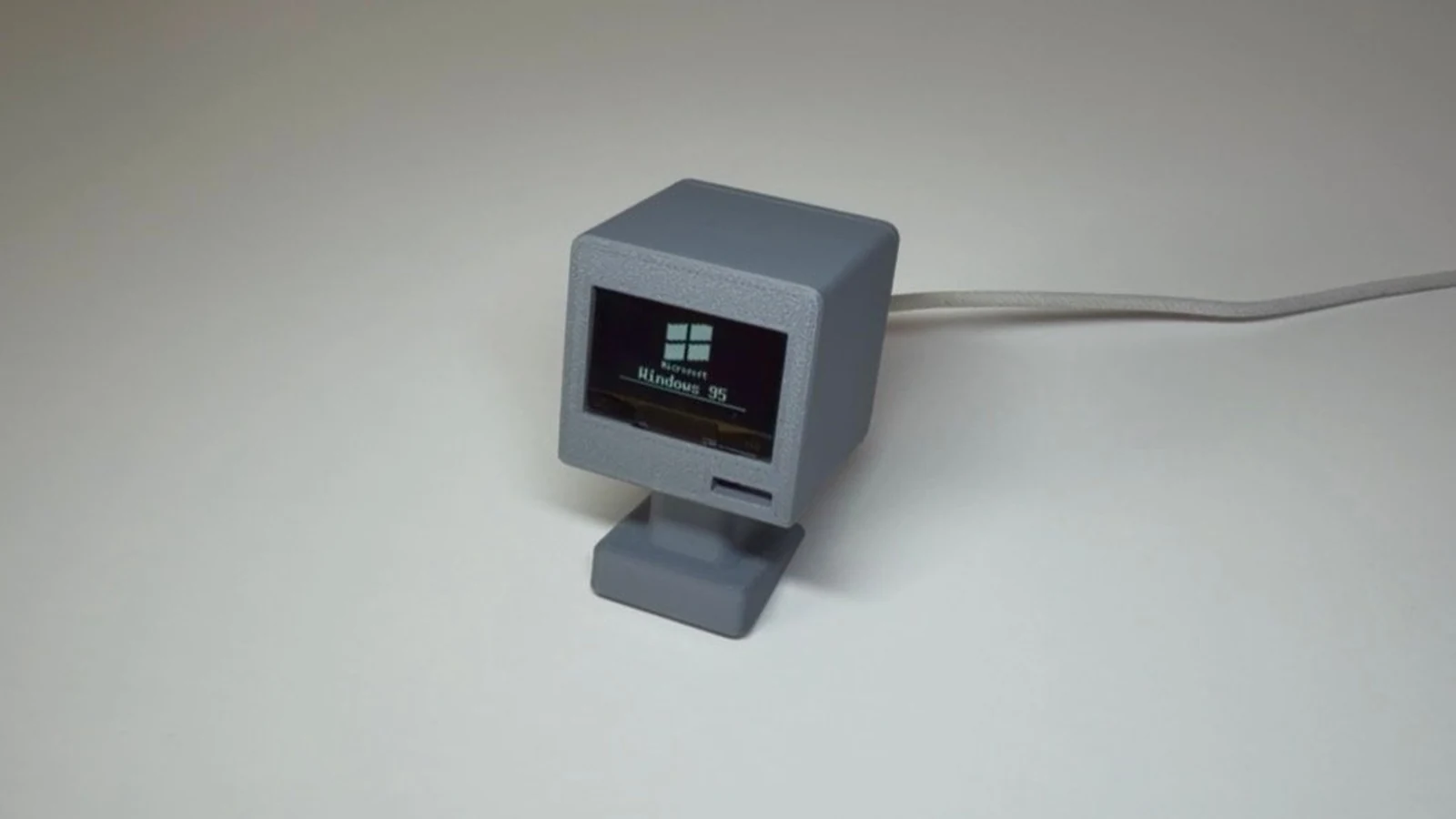
This project brings nostalgic Windows-era visuals to a tiny OLED screen powered by an ESP32. The build combines retro boot sequences, terminal animations, and interactive desktop demos that capture the aesthetic of early computing on a 128x64 display.
The guide provides a complete parts list, wiring diagram showing how to connect the SH1106 OLED to the ESP32's I2C pins, and pre-built firmware with multiple selectable demos. Assembly takes minutes—just identify the labeled header pins, wire power and the two signal lines, then upload the code and cycle through the retro experiences.
Wiring diagram
Gather all the parts
Assemble it in 4 steps
1. Find the labeled header pins
Hold the XIAO so you can read its D-number labels. Find D8, D7, one 3V3 pin, and one GND pin; do not look for GPIO6 or GPIO7 because they are not available on this board's headers.
- D8 is the header pin connected to GPIO19, and D7 is the header pin connected to GPIO17.
- Do not connect the OLED power lead to VIN; this screen is being powered at 3.3 volts.
2. Connect power to the OLED
Use a red jumper from the OLED VCC pin to the XIAO 3V3 pin (power). Use a black jumper from OLED GND to XIAO GND (ground).
- Check the tiny labels on the OLED circuit board before pushing in the wires.
- Make sure VCC and GND are not swapped — swapped power can damage the screen.
3. Connect the two screen signal wires
Use a jumper from OLED SDA to XIAO D8, which is GPIO19 (data). Use another jumper from OLED SCL to XIAO D7, which is GPIO17 (clock).
- Keep these two wires short and firmly seated; the OLED module normally includes the pull-up resistors that keep these wires at a reliable idle level.
- Do not swap SDA and SCL. The built-in OLED test can diagnose a swap, but the normal demos need SDA on D8 and SCL on D7.
4. Power the board and choose a demo
Plug the XIAO into your computer with its USB cable. The firmware is set to the retro boot demo by default. To use another included demo, change DEMO_MODE near the top of main.cpp to 1 for OLED test, 2 for pin finder, 4 for terminal typing, or 5 for the BLE desktop, then press Deploy.
- For filming, leave CONTRAST at 50. For a brighter screen viewed directly, set CONTRAST to 255.
- The pin-finder briefly tests many safe header pins; leave it disconnected from other external circuits while using that mode.
Review all connections
1. Connections between "oled_1" and "ESP32"
Deploy the firmware
#include <Arduino.h>
#include <Wire.h>
#include <U8g2lib.h>

// Select one image to deploy: 1=OLED test, 2=pin finder, 3=retro boot,
// 4=terminal type, 5=BLE mouse desktop.  The default is the filming boot demo.
#define DEMO_RETRO_BOOT 3
#define DEMO_MODE DEMO_RETRO_BOOT
#define OLED_DRIVER_SH1106 1   // Set to 0 only if this module proves to be SSD1306.
#define CONTRAST 50            // 50 films well; use 255 for a bright desk display.
#define OLED_SCL 17            // XIAO D7
#define OLED_SDA 19            // XIAO D8
#define OLED_BUS_HZ 600000UL
#define FRAME_US 33333UL
#define WIFI_ENABLE_PIN 3
#define WIFI_ANT_CONFIG_PIN 14

#if OLED_DRIVER_SH1106

// Forward declarations
static void serialBegin();
static uint8_t probe(TwoWire &bus, uint8_t address);
static uint8_t findOLED(TwoWire &bus);
static bool startOLED();
static void pacedFrame();
static void font();
static void desktop(int cx, int cy, bool pressed, bool menu);
static void flagLogo();
static void lineTest(int p);
static void mouseNotify(NimBLERemoteCharacteristic*,uint8_t*d,size_t n,bool);

U8G2_SH1106_128X64_NONAME_F_HW_I2C u8g2(U8G2_R0, U8X8_PIN_NONE, OLED_SCL, OLED_SDA);
#else
U8G2_SSD1306_128X64_NONAME_F_HW_I2C u8g2(U8G2_R0, U8X8_PIN_NONE, OLED_SCL, OLED_SDA);
#endif

static uint32_t frameNo = 0, nextFrameUs = 0, lateFrames = 0;
static uint8_t oledAddress = 0;

static void serialBegin() {
  Serial.begin(115200);
  const uint32_t t0 = millis();
  while (!Serial && millis() - t0 < 2000) delay(10);
}
static uint8_t probe(TwoWire &bus, uint8_t address) {
  bus.beginTransmission(address); return bus.endTransmission();
}
static uint8_t findOLED(TwoWire &bus) {
  uint8_t a = 0;
  for (uint8_t i = 0x08; i < 0x78; ++i) if (probe(bus, i) == 0) { Serial.printf("I2C device: 0x%02X\n", i); if (i == 0x3C || i == 0x3D) a = i; }
  return a;
}
static bool startOLED() {
  Wire.begin(OLED_SDA, OLED_SCL, 100000); // deliberately explicit bring-up clock
  Serial.printf("Scanning GPIO%d SDA / GPIO%d SCL...\n", OLED_SDA, OLED_SCL);
  oledAddress = findOLED(Wire);
  if (!oledAddress) return false;
  u8g2.setI2CAddress(oledAddress << 1);
  u8g2.setBusClock(OLED_BUS_HZ);
  u8g2.begin();
  u8g2.setContrast(CONTRAST);
#if OLED_DRIVER_SH1106
  u8g2.sendF("ca", 0xD5, 0xF0); // faster panel oscillator for filming
#endif
  Serial.printf("OLED at 0x%02X, bus %lu Hz\n", oledAddress, OLED_BUS_HZ);
  return true;
}
static void pacedFrame() {
  const uint32_t now = micros();
  if ((int32_t)(nextFrameUs - now) > 0) delayMicroseconds(nextFrameUs - now);
  const uint32_t after = micros();
  if ((int32_t)(after - nextFrameUs) > (int32_t)FRAME_US) { lateFrames++; nextFrameUs = after + FRAME_US; }
  else nextFrameUs += FRAME_US; // deadline is derived from the preceding deadline
  frameNo++;
}
static void font() { u8g2.setFont(u8g2_font_6x10_tf); }
static void desktop(int cx, int cy, bool pressed, bool menu) {
  u8g2.drawFrame(0, 0, 128, 64); u8g2.drawHLine(0, 52, 128);
  u8g2.drawBox(2, 54, 31, 8); u8g2.setDrawColor(0); font(); u8g2.drawStr(6, 61, "Start"); u8g2.setDrawColor(1);
  if (pressed) { u8g2.setDrawColor(2); u8g2.drawBox(2, 54, 31, 8); u8g2.setDrawColor(1); }
  u8g2.drawFrame(4, 7, 22, 18); u8g2.drawStr(6, 31, "My PC");
  if (menu) { u8g2.drawBox(2, 22, 62, 30); u8g2.setDrawColor(0); u8g2.drawStr(7, 32, "Programs"); u8g2.drawStr(7, 42, "Shut Down..."); u8g2.setDrawColor(1); }
  u8g2.drawTriangle(cx, cy, cx, cy + 8, cx + 5, cy + 5);
}
static void flagLogo() {
  // Four 15x12 panes in a sheared 34px-wide window; no artificial wave.
  for (int x=0; x<34; ++x) { int y=11 - x/5; bool left=x<15, top=(x*100/34)<45; if ((x<15 && top) || (x>=15 && top)) u8g2.drawVLine(47+x,y,12); if ((x<15 && !top) || (x>=15 && !top)) u8g2.drawVLine(47+x,y+13,12); }
  // carve the perspective split and horizontal pane split.
  u8g2.setDrawColor(0); for(int y=5;y<38;y++) u8g2.drawPixel(62,y); u8g2.drawHLine(47,24,34); u8g2.setDrawColor(1);
}

#if DEMO_MODE == 1
static bool oledOK = false; static uint32_t retryAt = 0;
static void lineTest(int p) { pinMode(p, OUTPUT); digitalWrite(p, LOW); delayMicroseconds(5); pinMode(p, INPUT); delayMicroseconds(5); Serial.printf("GPIO%d release reads %d (a fitted pull-up should read 1 immediately)\n",p,digitalRead(p)); }
void setup() { serialBegin(); oledOK=startOLED(); if(!oledOK){Serial.println("No OLED response: check VCC=3V3, GND, and D8/D7. Electrical pull-up test:");lineTest(OLED_SDA);lineTest(OLED_SCL);lineTest(9); Wire.begin(OLED_SCL,OLED_SDA,100000);Serial.println("Swapped-pins scan:");findOLED(Wire);retryAt=millis()+3000;} nextFrameUs=micros()+FRAME_US; }
void loop() { if(!oledOK){if(millis()>=retryAt){oledOK=startOLED();retryAt=millis()+3000;} delay(10);return;} pacedFrame(); uint8_t page=(frameNo/150)%4;u8g2.clearBuffer();font(); if(page==0){u8g2.drawStr(8,22,"ESP32-C6 OLED");u8g2.drawStr(8,40,"SH1106 bring-up OK");} else if(page==1){u8g2.drawFrame(0,0,128,64);for(int y=8;y<56;y+=4)for(int x=8;x<120;x+=4)if(((x+y)/4)&1)u8g2.drawBox(x,y,3,3);} else if(page==2){int x=(frameNo%220);if(x>110)x=220-x;int y=(frameNo%110);if(y>55)y=110-y;u8g2.drawDisc(x+8,y+5,4);}else {u8g2.drawStr(0,20,"Scrolling at 30 fps");u8g2.setCursor(128-(frameNo%180),43);u8g2.print("uptime ");u8g2.print(millis()/1000);u8g2.print(" s");}u8g2.sendBuffer();if(frameNo%30==0)Serial.printf("30.00 fps, %lu late frame(s)\n",lateFrames);}
#elif DEMO_MODE == 2
static const uint8_t safePins[]={0,1,2,4,5,9,10,11,15,16,17,18,19,20,21,22,23};
void setup(){serialBegin();Serial.println("Pull-up/pair I2C finder; USB and flash GPIOs are excluded.");for(uint8_t p:safePins){pinMode(p,OUTPUT);digitalWrite(p,LOW);delayMicroseconds(5);pinMode(p,INPUT);delayMicroseconds(5);if(digitalRead(p))Serial.printf("GPIO%d has an external pull-up\n",p);}for(uint8_t s:safePins)for(uint8_t c:safePins)if(s!=c){Wire.begin(s,c,100000);uint8_t a=findOLED(Wire);if(a)Serial.printf("FOUND: SDA GPIO%d, SCL GPIO%d, address 0x%02X\n",s,c,a);}Serial.println("Sweep complete.");}
void loop(){delay(1000);}
#elif DEMO_MODE == 3
void setup(){serialBegin();if(!startOLED())Serial.println("OLED absent; retry by resetting after wiring it.");nextFrameUs=micros()+FRAME_US;}
void loop(){pacedFrame();uint32_t f=frameNo%525;u8g2.clearBuffer();font();if(f<150){}else if(f<285){uint32_t t=f-150;u8g2.drawStr(2,10,"Award Modular BIOS v4.51PG");u8g2.drawStr(2,22,"CPU: ESP32-C6");u8g2.drawStr(2,34,"Memory Test:");u8g2.setCursor(2,46);u8g2.print(min(16384UL,t*130));u8g2.print("K OK");if(t>110)u8g2.drawStr(2,60,"Starting Windows 95...");}else if(f<345){String s="C:\\>vibe built with schematik.io";uint8_t n=min((uint32_t)s.length(),(f-285)/2);u8g2.drawStr(2,30,s.substring(0,n).c_str());}else if(f<435){flagLogo();u8g2.drawStr(36,43,"Windows 95");u8g2.drawFrame(18,52,92,7);int w=min(88,(int)((f-345)*2));u8g2.drawBox(20,54,w,3);for(int x=20;x<20+w;x+=4)u8g2.drawPixel(x,54);}else{uint32_t t=f-435;bool menu=t>45;desktop(min(20+(int)t,110),min(10+(int)t/2,55),t>35&&t<45,menu);}u8g2.sendBuffer();if(frameNo%30==0)Serial.printf("30.00 fps, %lu late frame(s)\n",lateFrames);}
#elif DEMO_MODE == 4
static const char text[]="vibe built with schematik.io"; static uint8_t typed=0; static uint32_t due=0;static uint32_t hash32(uint32_t x){x^=x>>16;x*=0x7feb352d;x^=x>>15;x*=0x846ca68b;return x^(x>>16);}
void setup(){serialBegin();startOLED();nextFrameUs=micros()+FRAME_US;due=millis()+700;}
void loop(){pacedFrame();if(typed<strlen(text)&&millis()>=due){uint32_t h=hash32(typed);uint16_t d=133+(h%335);if(text[typed]==' ')d+=160;if(text[typed]=='.')d+=260;if((h%17)==0)d+=450;typed++;due=millis()+d;}u8g2.clearBuffer();font();u8g2.drawStr(2,25,"C:\\>");String s=String(text).substring(0,typed);u8g2.drawStr(22,25,s.c_str());if(typed<strlen(text)||((frameNo/15)&1)==0)u8g2.drawBox(22+typed*6,16,5,10);u8g2.sendBuffer();}
#else
// BLE mode is kept behind this selector so the other four demos stay lean.
#include <NimBLEDevice.h>
static portMUX_TYPE cursorMux=portMUX_INITIALIZER_UNLOCKED;static int cx=64,cy=30,rx=0,ry=0;static bool click=false,menu=false;
static void mouseNotify(NimBLERemoteCharacteristic*,uint8_t*d,size_t n,bool){if(n<3)return;portENTER_CRITICAL(&cursorMux);rx+=int8_t(d[1]);ry+=int8_t(d[2]);click=d[0]&1;portEXIT_CRITICAL(&cursorMux);}
void setup(){serialBegin();pinMode(WIFI_ENABLE_PIN,OUTPUT);digitalWrite(WIFI_ENABLE_PIN,LOW);pinMode(WIFI_ANT_CONFIG_PIN,OUTPUT);digitalWrite(WIFI_ANT_CONFIG_PIN,LOW);startOLED();NimBLEDevice::init("C6 Win95 Host");NimBLEDevice::setSecurityAuth(true,false,true);NimBLEDevice::setSecurityIOCap(BLE_HS_IO_NO_INPUT_OUTPUT);Serial.println("Move the mouse so it advertises; BLE connection retries run continuously.");nextFrameUs=micros()+FRAME_US;}
void loop(){pacedFrame();int x,y;bool b;portENTER_CRITICAL(&cursorMux);x=rx/12; y=ry/12;rx-=x*12;ry-=y*12;b=click;portEXIT_CRITICAL(&cursorMux);cx=constrain(cx+x,0,123);cy=constrain(cy+y,0,55);if(b&&cy>51&&cx<35)menu=true;u8g2.clearBuffer();desktop(cx,cy,b,menu);u8g2.sendBuffer();}
#endif
Download project files
Remix this project
Make it yours in one click
Open a full copy of this project in your own Schematik workspace — diagram, code, parts, and assembly steps included. Swap the sensor, add features, or redesign the whole thing with AI. The author's original stays untouched.
Related projects
How to Build One ESP32 Split-Flap Clock Digit
ESP32 · Intermediate · 2–3 hours · July 22, 2026Schematik
How to Build a Tiny OLED Desk Command Centre
ESP32 · Beginner · 30 minutes · June 12, 2026Schematik
Handheld Retro Game Console
ESP32 · Intermediate · 60 minutes · July 17, 2026Schematik