Community project
Room Temperature Monitor
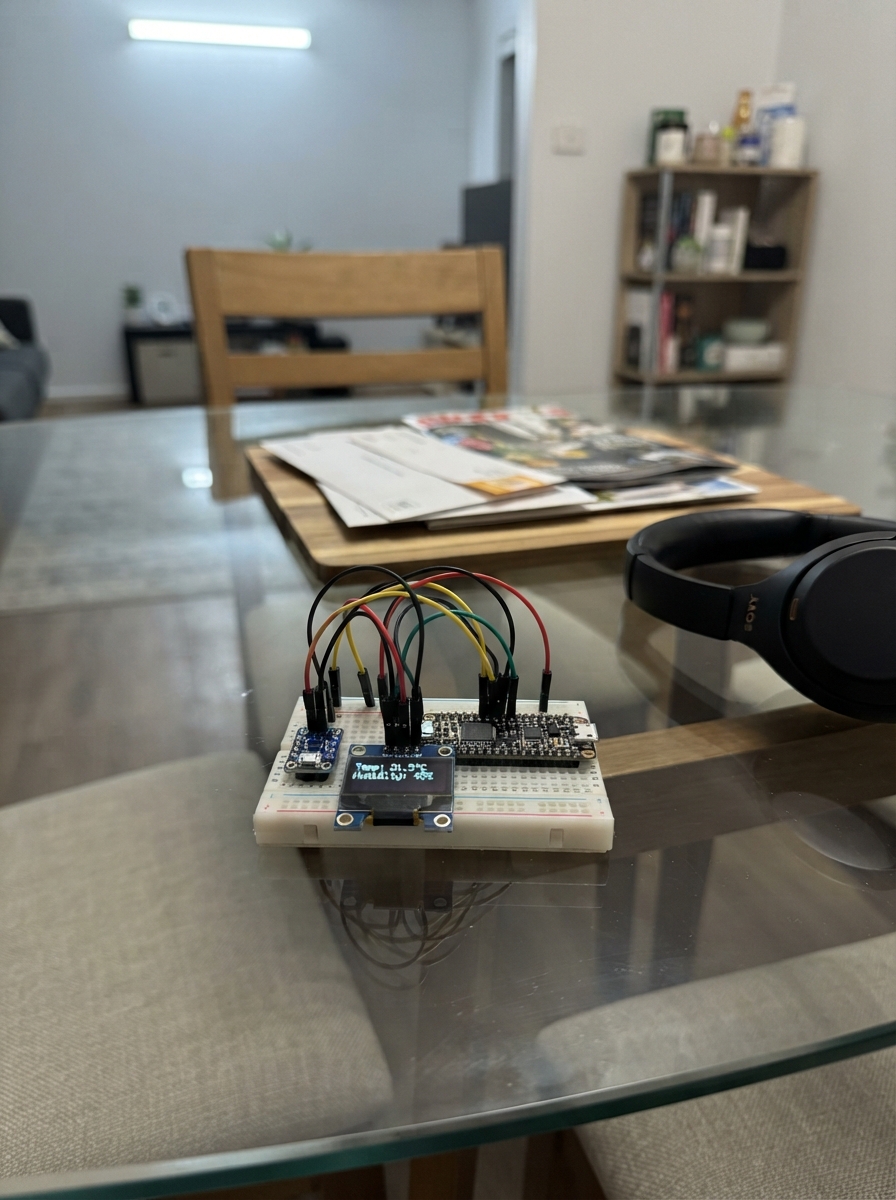
This project builds a real-time room temperature and humidity monitor using an ESP32 microcontroller, a BME280 environmental sensor, and an SSD1306 OLED display. The sensor continuously measures atmospheric conditions and displays them on the screen, making it useful for monitoring climate in offices, bedrooms, or workshops.
The guide provides a complete wiring diagram showing how to connect the BME280 and OLED display to the ESP32 via I2C, a full parts list, and step-by-step assembly instructions. Included firmware handles sensor initialization, periodic readings every two seconds, and real-time display updates showing temperature in Celsius and relative humidity percentage.
Wiring diagram

Gather all the parts
Assemble it in 6 steps
1. Keep the board unpowered while wiring
Place the ESP32 DevKit v1, BME280 sensor, and OLED screen on a non-metal table. Leave the USB cable unplugged until every wire is in place.
- Put the parts so you can read the tiny labels beside their pins.
- Do not connect or move wires while the USB cable is plugged in; a loose wire can touch the wrong pin and damage a part.
2. Power the BME280 sensor
Connect the BME280 VCC pin to the ESP32 3V3 pin (power). Connect the BME280 GND pin to an ESP32 GND pin (ground).
- Use red for the 3V3 wire and black for the GND wire so power connections are easy to inspect.
- Make sure VCC and GND are not swapped — swapped power can damage the sensor.
3. Connect the BME280 signal wires
Connect BME280 SDA to ESP32 GPIO21 (data). Connect BME280 SCL to ESP32 GPIO22 (clock). Leave the BME280 SDO pin unconnected; this uses the sensor's normal address.
- The BME280 board may label SDA as SDI and SCL as SCK; use the small printed labels on your board.
- Do not connect the BME280 to a 5V pin; this design uses the ESP32's 3V3 pin.
4. Power the OLED screen
Connect the OLED VCC pin to the ESP32 3V3 pin (power). Connect the OLED GND pin to an ESP32 GND pin (ground). These can share the same 3V3 and GND rows as the sensor when using a breadboard.
- A breadboard power row lets both modules share one 3V3 wire and one GND wire.
- Make sure VCC and GND are not swapped — swapped power can damage the screen.
5. Connect the OLED signal wires
Connect OLED SDA to ESP32 GPIO21 (data). Connect OLED SCL to ESP32 GPIO22 (clock). These two wires deliberately share the matching BME280 signal connections.
- Sharing SDA and SCL is normal here: the sensor and screen each have their own address, so they can use the same two wires.
- Check that SDA goes to GPIO21 and SCL goes to GPIO22; crossing them prevents both the sensor and screen from communicating.
6. Place the sensor in the room
Keep the BME280 away from the ESP32 board, direct sun, radiators, open windows, and breathing distance. Use jumper wires long enough to place it where it samples the room air rather than heat from the electronics.
- Let the monitor run for about five minutes after moving it so the sensor can settle to the room temperature.
- Do not seal the sensor inside an airtight box; it needs room air flowing around it to measure accurately.
Review all connections
1. Connections between "bme280_1" and "ESP32"
2. Connections between "oled_1" and "ESP32"
Deploy the firmware
#include <Wire.h>
#include <Adafruit_BME280.h>
#include <Adafruit_GFX.h>
#include <Adafruit_SSD1306.h>

constexpr int I2C_SDA = 21;
constexpr int I2C_SCL = 22;
constexpr int SCREEN_WIDTH = 128;
constexpr int SCREEN_HEIGHT = 64;
constexpr uint8_t OLED_ADDRESS = 0x3C;
constexpr uint8_t ROOM_SENSOR_I2C_ADDRESS = 0x77;
constexpr unsigned long SAMPLE_INTERVAL_MS = 2000;

Adafruit_BME280 bme;
Adafruit_SSD1306 display(SCREEN_WIDTH, SCREEN_HEIGHT, &Wire, -1);

bool sensorReady = false;
float lastTemperature = NAN;
float lastHumidity = NAN;
unsigned long lastSampleAt = 0;

void showMessage(const char *line1, const char *line2) {
  display.clearDisplay();
  display.setTextColor(SSD1306_WHITE);
  display.setTextSize(1);
  display.setCursor(0, 8);
  display.println(line1);
  display.setCursor(0, 28);
  display.println(line2);
  display.display();
}

void drawReadings(float temperatureC, float humidity) {
  display.clearDisplay();
  display.setTextColor(SSD1306_WHITE);

  display.setTextSize(1);
  display.setCursor(0, 0);
  display.println("ROOM TEMPERATURE");
  display.drawLine(0, 11, SCREEN_WIDTH - 1, 11, SSD1306_WHITE);

  display.setTextSize(3);
  display.setCursor(0, 18);
  display.print(temperatureC, 1);
  display.setTextSize(2);
  display.print(" C");

  display.setTextSize(1);
  display.setCursor(0, 51);
  display.print("Humidity: ");
  display.print(humidity, 0);
  display.println(" %");

  display.display();
}

void setup() {
  Wire.begin(I2C_SDA, I2C_SCL);

  if (!display.begin(SSD1306_SWITCHCAPVCC, OLED_ADDRESS)) {
    while (true) {
      delay(1000);
    }
  }

  showMessage("Room monitor", "Starting sensor...");
  sensorReady = bme.begin(ROOM_SENSOR_I2C_ADDRESS, &Wire);
  if (!sensorReady) {
    showMessage("Sensor not found", "Check BME280 wires");
  }
}

void loop() {
  const unsigned long now = millis();
  if (now - lastSampleAt < SAMPLE_INTERVAL_MS) {
    return;
  }
  lastSampleAt = now;

  if (!sensorReady) {
    sensorReady = bme.begin(ROOM_SENSOR_I2C_ADDRESS, &Wire);
    if (!sensorReady) {
      return;
    }
    lastTemperature = NAN;
    lastHumidity = NAN;
  }

  const float temperatureC = bme.readTemperature();
  const float humidity = bme.readHumidity();
  if (isnan(temperatureC) || isnan(humidity)) {
    sensorReady = false;
    showMessage("Sensor read error", "Check BME280 wires");
    return;
  }

  if (isnan(lastTemperature) || isnan(lastHumidity) ||
      fabsf(temperatureC - lastTemperature) >= 0.1f ||
      fabsf(humidity - lastHumidity) >= 1.0f) {
    drawReadings(temperatureC, humidity);
    lastTemperature = temperatureC;
    lastHumidity = humidity;
  }
}
Remix this project
Make it yours in one click
Open a full copy of this project in your own Schematik workspace — diagram, code, parts, and assembly steps included. Swap the sensor, add features, or redesign the whole thing with AI. The author's original stays untouched.