Community project
Sensor Data Dashboard
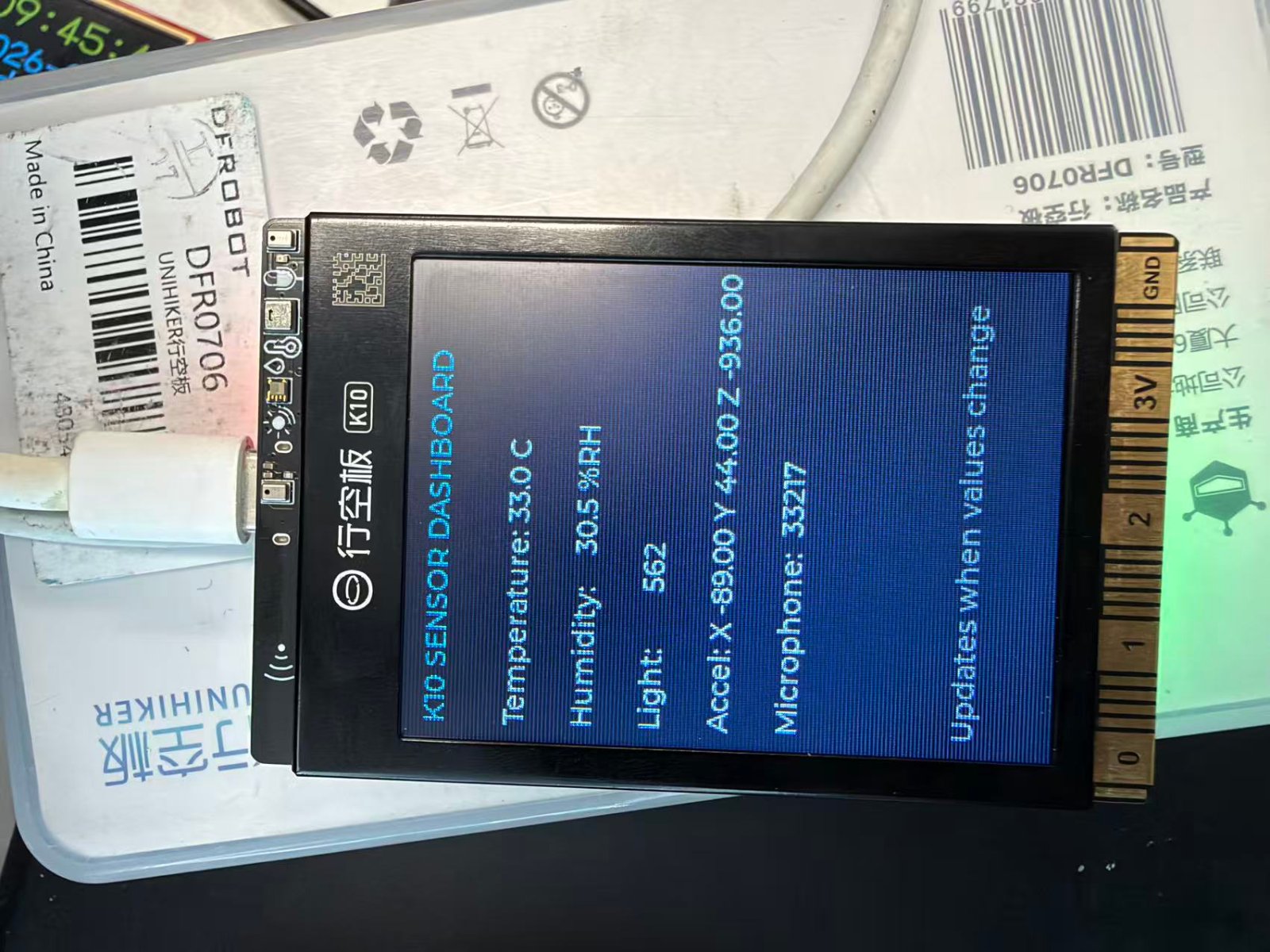
Build a real-time sensor data dashboard on the UNIHIKER K10 display that reads temperature, humidity, light, acceleration, and microphone input. This project demonstrates how to collect data from multiple onboard sensors and present it on a live-updating interface.
The guide includes a complete parts list, wiring diagram for USB power connection, and firmware code that samples all available sensors and refreshes the display with current readings. Builders will learn how to initialize the K10 platform, configure LVGL UI elements, and efficiently update sensor values without unnecessary screen redraws.
Wiring diagram
Assemble it in 2 steps
1. Place the UNIHIKER K10 safely
Place the UNIHIKER K10 on a non-conductive desk or in its case with the LCD facing upward. This project uses only the K10's built-in screen and built-in sensors: AHT20 temperature/humidity, LTR303ALS light, SC7A20H accelerometer, and microphones.
- Keep the sensor openings uncovered so light, air, and sound reach the board.
- No external jumpers, resistors, or sensor modules are required.
- Do not rest the board on metal or conductive foam while powered.
2. Connect USB power
Connect the K10 to a suitable USB power source using its USB cable. The board powers the LCD and all onboard sensors from this connection.
- After deploying the project from Schematik, hold the board where its light sensor and microphone can observe the room.
- Use only the board's intended USB power connector; do not apply external voltage to the edge pins for this project.
Deploy the firmware
#include <Arduino.h>
#include "unihiker_k10.h"
#include <stdio.h>
#include <string.h>


// Forward declarations
void setLabelIfChanged(lv_obj_t *label, char *previous, size_t previousSize, const char *text);

UNIHIKER_K10 k10;
AHT20 aht20;

static lv_obj_t *titleLabel;
static lv_obj_t *tempLabel;
static lv_obj_t *humidityLabel;
static lv_obj_t *lightLabel;
static lv_obj_t *accelLabel;
static lv_obj_t *micLabel;
static lv_obj_t *footerLabel;

static char lastTemp[32] = "";
static char lastHumidity[32] = "";
static char lastLight[32] = "";
static char lastAccel[48] = "";
static char lastMic[32] = "";
static unsigned long lastSampleMs = 0;

void setLabelIfChanged(lv_obj_t *label, char *previous, size_t previousSize, const char *text) {
  if (strcmp(previous, text) != 0) {
    lv_label_set_text(label, text);
    strncpy(previous, text, previousSize - 1);
    previous[previousSize - 1] = '\0';
  }
}

lv_obj_t *makeLabel(const char *text, int y) {
  lv_obj_t *label = lv_label_create(lv_scr_act());
  lv_label_set_text(label, text);
  lv_obj_set_width(label, 230);
  lv_obj_align(label, LV_ALIGN_TOP_LEFT, 8, y);
  return label;
}

void setup() {
  k10.begin();
  k10.initScreen(2);

  lv_obj_set_style_bg_color(lv_scr_act(), lv_color_hex(0x101820), 0);
  lv_obj_set_style_text_color(lv_scr_act(), lv_color_hex(0xF4F7FA), 0);

  titleLabel = makeLabel("K10 SENSOR DASHBOARD", 8);
  lv_obj_set_style_text_color(titleLabel, lv_color_hex(0x66D9EF), 0);
  tempLabel = makeLabel("Temperature: --.- C", 48);
  humidityLabel = makeLabel("Humidity:    --.- %RH", 82);
  lightLabel = makeLabel("Light:       ----", 116);
  accelLabel = makeLabel("Accel: X --.-- Y --.-- Z --.--", 150);
  micLabel = makeLabel("Microphone:  ----", 184);
  footerLabel = makeLabel("Updates when values change", 270);
  lv_obj_set_style_text_color(footerLabel, lv_color_hex(0xA0AAB4), 0);

  k10.rgb->brightness(20);
  k10.rgb->write(-1, 0, 20, 0);
}

void loop() {
  lv_timer_handler();

  const unsigned long now = millis();
  if (now - lastSampleMs < 500) {
    delay(2);
    return;
  }
  lastSampleMs = now;

  const float temperatureC = aht20.getData(AHT20::eAHT20TempC);
  const float humidityRH = aht20.getData(AHT20::eAHT20HumiRH);
  const uint16_t lightLevel = k10.readALS();
  const float accelX = k10.getAccelerometerX();
  const float accelY = k10.getAccelerometerY();
  const float accelZ = k10.getAccelerometerZ();
  const uint16_t micLevel = k10.readMICData();

  char line[56];
  snprintf(line, sizeof(line), "Temperature: %.1f C", temperatureC);
  setLabelIfChanged(tempLabel, lastTemp, sizeof(lastTemp), line);

  snprintf(line, sizeof(line), "Humidity:    %.1f %%RH", humidityRH);
  setLabelIfChanged(humidityLabel, lastHumidity, sizeof(lastHumidity), line);

  snprintf(line, sizeof(line), "Light:       %u", lightLevel);
  setLabelIfChanged(lightLabel, lastLight, sizeof(lastLight), line);

  snprintf(line, sizeof(line), "Accel: X %.2f Y %.2f Z %.2f", accelX, accelY, accelZ);
  setLabelIfChanged(accelLabel, lastAccel, sizeof(lastAccel), line);

  snprintf(line, sizeof(line), "Microphone:  %u", micLevel);
  setLabelIfChanged(micLabel, lastMic, sizeof(lastMic), line);

  // Green means the dashboard is sampling normally.
  k10.rgb->write(-1, 0, 20, 0);
}
Remix this project
Make it yours in one click
Open a full copy of this project in your own Schematik workspace — diagram, code, parts, and assembly steps included. Swap the sensor, add features, or redesign the whole thing with AI. The author's original stays untouched.