Community project
Smart Plant Watering And Fish Feeding
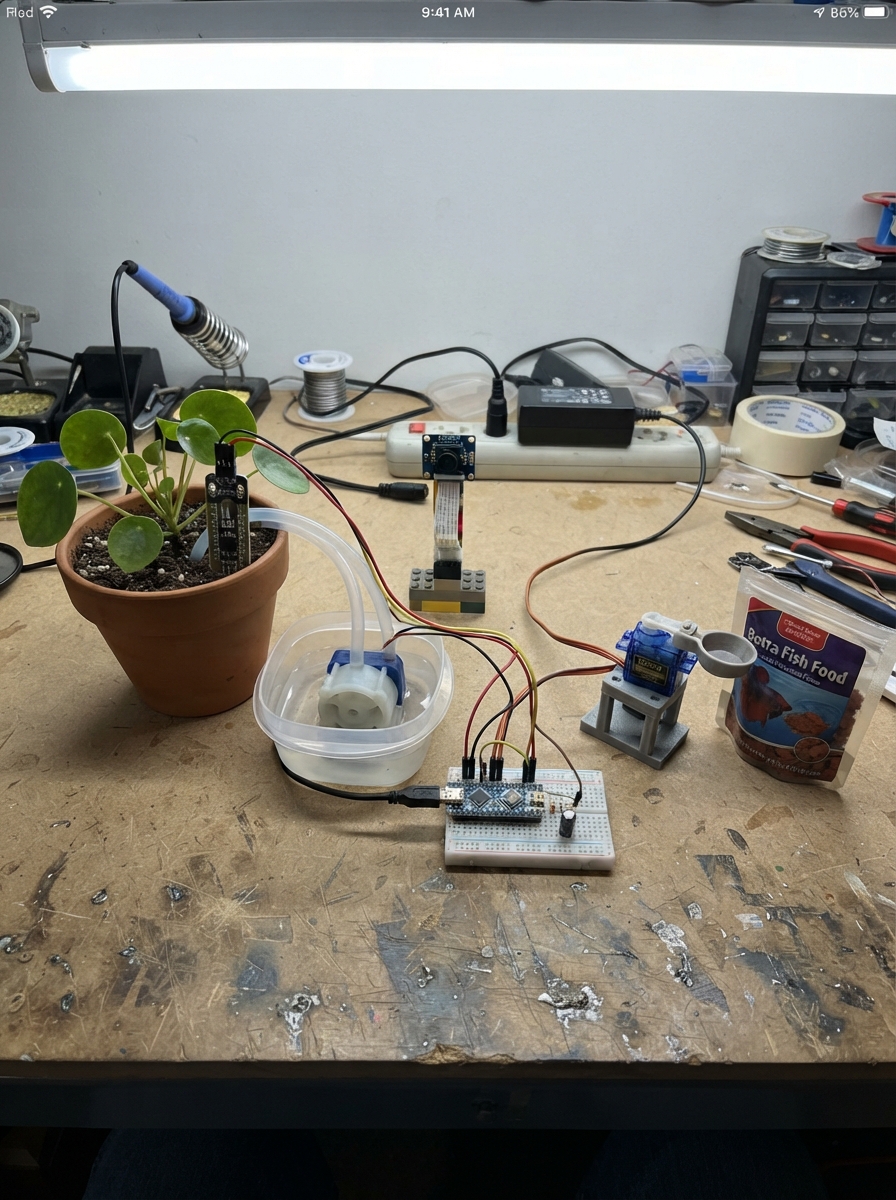
This project combines automated plant watering and fish feeding into a single ESP32-based system that monitors soil moisture and dispenses water or food on a schedule. The system uses a capacitive soil sensor to detect when plants need water, a peristaltic pump to deliver precise amounts, and a servo-controlled feeder for fish meals. A built-in camera provides visual monitoring of the setup.
The guide includes a complete wiring diagram, parts list, and step-by-step assembly instructions for mounting the camera, connecting the soil sensor, wiring the pump driver circuit, and building the food pocket mechanism. Firmware with web-based controls and safety features is provided, along with calibration steps to ensure reliable automation before leaving the system unattended.
Wiring diagram
Gather all the parts
Assemble it in 6 steps
1. Install camera with power disconnected
Use the Freenove ESP32-S3 WROOM N8R8 board with its matching OV2640 ribbon camera. Unlock the camera connector, insert ribbon in the maker's indicated orientation, and lock it. Camera wires in the diagram represent the socket connections, not jumper wires. Leave the SD socket empty.
2. Connect the soil sensor
Connect red VCC to 3V3, black GND to GND, and yellow AOUT to GPIO1 (soil reading). Insert the probe near roots away from the water outlet. Keep its connector dry.
3. Wire the pump driver
With all power unplugged, connect driver In to GPIO14 (pump control), GND to board GND, and V+ to the separate 5V adapter positive. Connect pump positive to adapter positive and pump negative to driver Out. Fit the 10k resistor from In to GND. The driver includes a flyback diode.
- Never power the pump from a GPIO or board USB rail. Do not connect adapter positive to board 5V; join grounds only. Use an enclosed regulated adapter and keep all mains equipment away from water.
4. Build the measured food pocket
Connect servo red to adapter positive, brown to common GND, and orange signal to GPIO21 (position). Connect capacitor positive to adapter positive and its striped negative leg to GND near the servo. Attach a small rotating cup or single-pocket disk to the horn with a fixed cover, so one move dispenses only one measured portion and cannot empty the hopper. Closed position is 1000 microseconds, dispensing is 1500 microseconds for 700 milliseconds. Adjust the mechanical linkage with power off.
- A simple open hopper gate may dump too much food. Test many cycles over a cup before putting it over fish. SG90 accepts the board's 3.3V control signal; its power remains separate 5V.
5. Place the water tubing and camera
Use a small separate clean-water reservoir, not the fish tank. Put intake tubing into the reservoir and secure the outlet above the soil with an air gap. Keep the reservoir below the outlet to reduce siphoning. Mount the pump and all electronics dry, above splash level, and point the camera toward the plant and feeder.
- No reservoir-level or flow sensor is fitted. Inspect water level and tubing daily; do not leave this prototype unattended. It does not replace aquarium filtration or aeration.
6. Calibrate before enabling automation
Power the board by USB and motors by their separate 5V adapter. Join GardenFish Wi-Fi using GrowFish2026 and open http://192.168.4.1. Page login is admin / GardenFish42. Enter home Wi-Fi for internet time and viewing on that local network. Save a dry-soil reading and a watered-and-drained reading before enabling watering. Start with the default 12-hour food interval; test the food pocket over a cup. The first automatic feed waits a full interval. Observe several watering and feeding cycles and match portions to the plant and fish.
- Watering uses relative soil readings
- not a universal moisture percentage. Each pulse is 3 seconds
- followed by at least 10 minutes soaking
- maximum 6 pulses per hour. Controls start disabled; use Save to enable them. The camera refreshes once per second. Change default passwords in firmware before use on shared networks; never port-forward this page.
Review all connections
1. Connections between "soil" and "ESP32"
2. Connections between "feeder" and "ESP32"
3. Connections between "supply" and "ESP32"
4. Connections between "driver" and "ESP32"
5. Connections between "pump" and "ESP32"
6. Connections between "pulldown" and "ESP32"
7. Connections between "cap" and "ESP32"
8. Connections between "camera" and "ESP32"
Deploy the firmware
#include <Arduino.h>
#include <WiFi.h>
#include <WebServer.h>
#include <Preferences.h>
#include <esp_camera.h>
#include <esp_arduino_version.h>
#include <time.h>
// Camera mapping: Freenove maker camera_pins.h CAMERA_MODEL_ESP32S3_EYE.
constexpr int PUMP=14, SOIL=1, SERVO=21;
WebServer web(80); Preferences prefs;
bool camOK=false, waterEnabled=false, feedEnabled=false;
int dry=3000,wet=1500,raw=0,moist=0; unsigned intervalHours=12;
volatile bool pumping=false,feeding=false; volatile uint32_t pumpAt=0,feedAt=0;
uint32_t lastWater=0,windowAt=0; unsigned doses=0; time_t lastFeed=0;
portMUX_TYPE mux=portMUX_INITIALIZER_UNLOCKED;
void servoPulse(int us){
 uint32_t duty=(uint32_t)us*65535/20000;
#if ESP_ARDUINO_VERSION_MAJOR >= 3
 ledcWrite(SERVO,duty);
#else
 ledcWrite(6,duty);
#endif
}
// Dedicated safety task: HTTP/camera delays cannot hold pump or feeder on.
void safety(void*){for(;;){uint32_t n=millis();
 if(pumping && n-pumpAt>=3000){digitalWrite(PUMP,LOW);pumping=false;}
 if(feeding && n-feedAt>=700){servoPulse(1000);feeding=false;}
 vTaskDelay(pdMS_TO_TICKS(10));}}
void startFeed(){if(feeding)return;feedAt=millis();feeding=true;servoPulse(1500);}
bool auth(){if(web.authenticate("admin","GardenFish42"))return true;web.requestAuthentication();return false;}
void redirect(){web.sendHeader("Location","/");web.send(303);}
const char PAGE[] PROGMEM=R"HTML(<!doctype html><meta name="viewport" content="width=device-width"><title>Garden and fish</title>
<h2>Plant and fish monitor</h2><img id="cam" width="320"><pre id="status"></pre>
<p>Water: 3-second doses, 10-minute soak, maximum 6 doses per rolling hour. No water-level sensor: use a small reservoir.</p>
<form method="post" action="/cal"><button name="point" value="dry">Save DRY soil reading</button><button name="point" value="wet">Save WET soil reading</button></form>
<p>Calibrate in your dry soil, then watered and drained soil. Automation stays off until enabled.</p>
<form method="post" action="/settings"><label><input type="checkbox" name="water">Enable watering below 30%</label><br><label><input type="checkbox" name="feed">Enable automatic feeding</label><br>Feed interval, hours (1–168): <input name="hours" type="number" min="1" max="168" value="12"><button>Save (unchecked means disabled)</button></form>
<form method="post" action="/test"><button>Test one food pocket</button></form><p>Test over a cup, not over the tank. Automatic feeding needs internet time. First feed is one interval after enabling; no catch-up feeds.</p>
<form method="post" action="/wifi">Home Wi-Fi name <input name="ssid"> Password <input type="password" name="pass"><button>Connect</button></form>
<p>Fallback Wi-Fi: GardenFish / GrowFish2026. Page login: admin / GardenFish42. Keep on trusted local networks only.</p>
<script>async function tick(){try{document.querySelector('#status').textContent=await(await fetch('/status')).text()}catch(e){} }
function shot(){document.querySelector('#cam').src='/jpg?t='+Date.now()};document.querySelector('#cam').onload=()=>setTimeout(shot,1000);document.querySelector('#cam').onerror=()=>setTimeout(shot,3000);shot();setInterval(tick,2000);tick();</script>)HTML";
void cameraInit(){camera_config_t c={};
 c.ledc_channel=LEDC_CHANNEL_0;c.ledc_timer=LEDC_TIMER_0;
 c.pin_d0=11;c.pin_d1=9;c.pin_d2=8;c.pin_d3=10;c.pin_d4=12;c.pin_d5=18;c.pin_d6=17;c.pin_d7=16;
 c.pin_xclk=15;c.pin_pclk=13;c.pin_vsync=6;c.pin_href=7;
 c.pin_sccb_sda=4;c.pin_sccb_scl=5;c.pin_pwdn=-1;c.pin_reset=-1;
 c.xclk_freq_hz=20000000;c.pixel_format=PIXFORMAT_JPEG;c.frame_size=FRAMESIZE_QVGA;c.jpeg_quality=15;c.fb_count=1;
 c.fb_location=CAMERA_FB_IN_DRAM; // Small frame works without external PSRAM.
 camOK=esp_camera_init(&c)==ESP_OK;Serial.printf("Camera: %s\n",camOK?"ready":"failed; check ribbon");}
void setup(){Serial.begin(115200);pinMode(PUMP,OUTPUT);digitalWrite(PUMP,LOW);
 analogReadResolution(12);analogSetPinAttenuation(SOIL,ADC_11db);
 cameraInit();
#if ESP_ARDUINO_VERSION_MAJOR >= 3
 ledcAttachChannel(SERVO,50,16,6);
#else
 ledcSetup(6,50,16);ledcAttachPin(SERVO,6);
#endif
 servoPulse(1000);xTaskCreate(safety,"safety",3072,nullptr,3,nullptr);
 prefs.begin("garden",false);dry=prefs.getInt("dry",3000);wet=prefs.getInt("wet",1500);intervalHours=prefs.getUInt("hours",12);
 waterEnabled=prefs.getBool("water",false);feedEnabled=prefs.getBool("feed",false);lastFeed=prefs.getLong64("lastFeed",0);
 WiFi.mode(WIFI_AP_STA);WiFi.softAP("GardenFish","GrowFish2026");String ssid=prefs.getString("ssid","");if(ssid.length())WiFi.begin(ssid.c_str(),prefs.getString("pass","").c_str());
 configTime(0,0,"pool.ntp.org","time.nist.gov");
 web.on("/",HTTP_GET,[]{if(auth())web.send_P(200,"text/html",PAGE);});
 web.on("/status",HTTP_GET,[]{if(!auth())return;String s="Raw soil: "+String(raw)+" | relative moisture: "+String(moist)+"%\nWater: "+String(waterEnabled?"enabled":"disabled")+" | doses this hour: "+String(doses)+"\nFeed: "+String(feedEnabled?"enabled":"disabled")+" | interval: "+String(intervalHours)+"h\nTime: "+String(time(nullptr)>1700000000?"synchronized":"waiting (feeding paused)")+"\nCamera: "+String(camOK?"ready":"failed")+"\nHome network address: "+WiFi.localIP().toString();web.send(200,"text/plain",s);});
 web.on("/jpg",HTTP_GET,[]{if(!auth())return;if(!camOK){web.send(503);return;}camera_fb_t* f=esp_camera_fb_get();if(!f){web.send(503);return;}web.sendHeader("Cache-Control","no-store");web.setContentLength(f->len);web.send(200,"image/jpeg","");web.client().write(f->buf,f->len);esp_camera_fb_return(f);});
 web.on("/cal",HTTP_POST,[]{if(!auth())return;waterEnabled=false;prefs.putBool("water",false);if(web.arg("point")=="dry"){dry=raw;prefs.putInt("dry",dry);prefs.putBool("hasDry",true);}else{wet=raw;prefs.putInt("wet",wet);prefs.putBool("hasWet",true);}redirect();});
 web.on("/settings",HTTP_POST,[]{if(!auth())return;waterEnabled=web.hasArg("water")&&prefs.getBool("hasDry")&&prefs.getBool("hasWet")&&dry-wet>200;
 bool en=web.hasArg("feed");if(en&&!feedEnabled){lastFeed=time(nullptr)>1700000000?time(nullptr):0;prefs.putLong64("lastFeed",lastFeed);}feedEnabled=en;
 intervalHours=constrain(web.arg("hours").toInt(),1L,168L);prefs.putBool("water",waterEnabled);prefs.putBool("feed",feedEnabled);prefs.putUInt("hours",intervalHours);redirect();});
 web.on("/test",HTTP_POST,[]{if(!auth())return;time_t t=time(nullptr);if(t>1700000000 && t-lastFeed>=60){lastFeed=t;prefs.putLong64("lastFeed",lastFeed);startFeed();}redirect();});
 web.on("/wifi",HTTP_POST,[]{if(!auth())return;prefs.putString("ssid",web.arg("ssid"));prefs.putString("pass",web.arg("pass"));WiFi.begin(web.arg("ssid").c_str(),web.arg("pass").c_str());redirect();});
 web.begin();lastWater=millis();windowAt=millis();Serial.println("Join GardenFish; open http://192.168.4.1");}
void loop(){uint32_t n=millis();static uint32_t sampled=0;if(n-sampled>=1000){sampled=n;long sum=0;for(int i=0;i<16;i++)sum+=analogRead(SOIL);raw=sum/16;
 moist=dry>wet?constrain((dry-raw)*100/(dry-wet),0,100):0;
 if(n-windowAt>=3600000){windowAt=n;doses=0;}
 if(waterEnabled&&!pumping&&raw>100&&raw<4000&&dry-wet>200&&moist<30&&doses<6&&n-lastWater>=600000){lastWater=n;doses++;pumpAt=n;pumping=true;digitalWrite(PUMP,HIGH);}
 time_t t=time(nullptr);if(feedEnabled&&t>1700000000){if(lastFeed==0){lastFeed=t;prefs.putLong64("lastFeed",t);}else if(t>=lastFeed+(time_t)intervalHours*3600&&!feeding){lastFeed=t;prefs.putLong64("lastFeed",t);startFeed();}}
 }web.handleClient();delay(2);}
Remix this project
Make it yours in one click
Open a full copy of this project in your own Schematik workspace, diagram, code, parts, and assembly steps included. Swap the sensor, add features, or redesign the whole thing with AI. The author's original stays untouched.