Community project
Smart RFID Parking Barrier
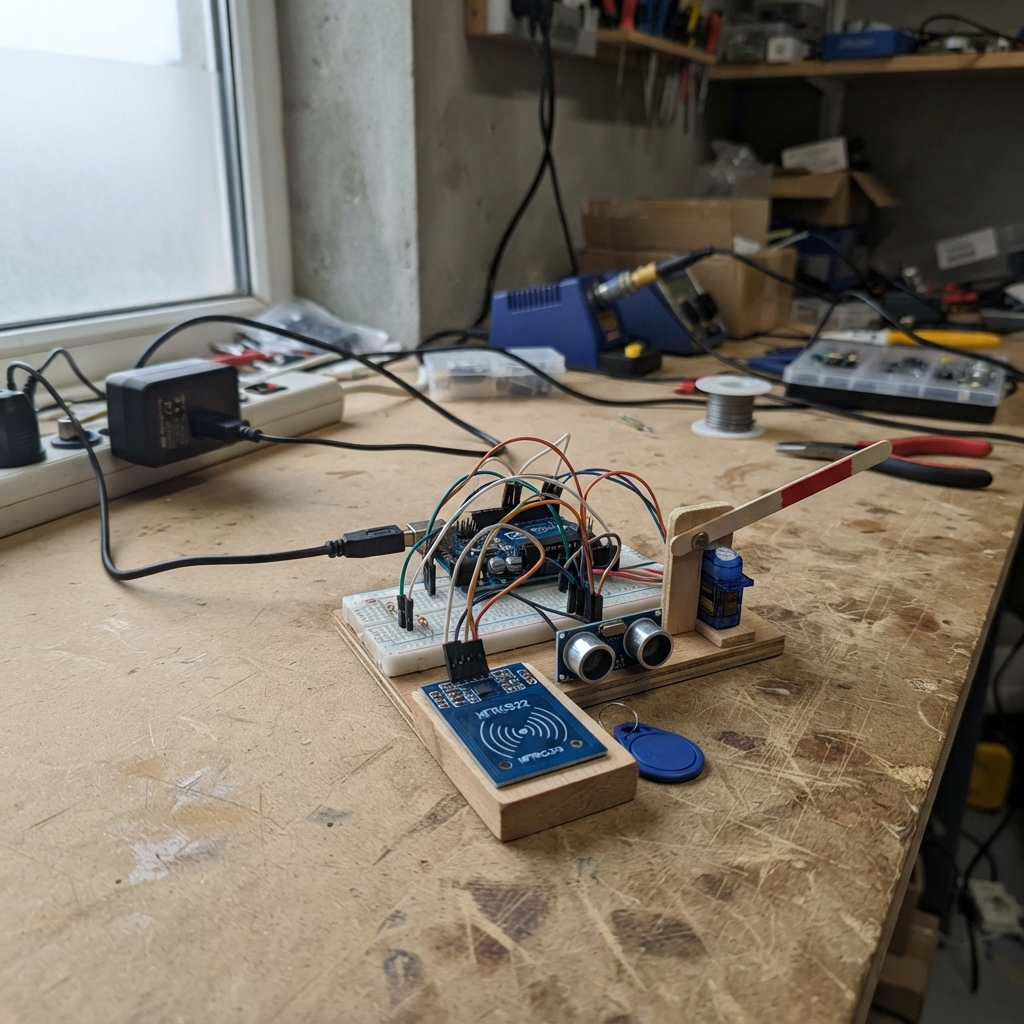
This smart parking barrier combines RFID card authentication with ultrasonic vehicle detection to automate gate control. When a vehicle approaches, the HC-SR04 sensor detects it and prompts for an RFID card scan. Once a valid card is presented to the MFRC522 reader, the SG90 servo rotates to lift the barrier, allowing the vehicle to pass before automatically closing after a set time.
This guide provides a complete wiring diagram showing how to connect the RFID module, ultrasonic sensor, and servo to the ESP32, along with a parts list, the Arduino firmware for gate sequencing logic, and step-by-step assembly instructions. The resistor voltage divider protects the ESP32's input pin from the ultrasonic sensor's 5 V echo signal.
Wiring diagram

Gather all the parts
Assemble it in 6 steps
1. Keep the two power sources separate
Leave the ESP32-S3 unplugged at first. Use its USB socket only for the board. Set the separate regulated supply to 5.0 V before connecting it; its positive output will power only the servo and ultrasonic sensor.
- A 5 V supply rated for at least 2 A gives the servo room for its short starting surge.
- Do not connect the separate supply's 5 V positive wire to the ESP32-S3 3V3 pin — that can damage the board.
2. Connect the RFID reader
With power still off, connect the RC522 VCC pin to ESP32-S3 3V3 and GND to GND. Connect RC522 SDA to GPIO10, SCK to GPIO12, MOSI to GPIO11, MISO to GPIO13, and RST to GPIO14.
- On this reader, the pin printed SDA is the chip-select wire, not an I²C SDA wire.
- Make sure RC522 VCC goes to 3V3, not 5 V — most RC522 modules can be damaged or unreliable at 5 V.
3. Build the Echo protection divider
Connect HC-SR04 Echo to one end of the 1 kΩ resistor. Join the other end of that 1 kΩ resistor, one end of the 2 kΩ resistor, and ESP32-S3 GPIO4 in the same breadboard row. Connect the free end of the 2 kΩ resistor to ESP32-S3 GND.
- The shared middle row is the safe, reduced-voltage Echo signal for GPIO4.
- Do not connect the HC-SR04 Echo pin directly to GPIO4 — a classic HC-SR04 produces a 5 V Echo pulse that can damage a 3.3 V ESP32-S3 input.
4. Connect the ultrasonic sensor
Connect HC-SR04 TRIG to GPIO2. Connect its VCC to the external supply +5 V and its GND to the external supply GND. Connect that same external supply GND to an ESP32-S3 GND pin.
- The shared ground is what lets the ESP32-S3 read the sensor signal correctly.
- Do not swap VCC and GND on the sensor — swapped power can damage the sensor.
5. Connect the barrier servo
Connect the SG90 brown or black wire to the external supply GND, the red wire to external +5 V, and the orange, yellow, or white signal wire to GPIO21. Keep the external supply GND connected to ESP32-S3 GND.
- Fit the servo horn loosely for the first test, so it can move without forcing the barrier mechanism.
- Do not power the red servo wire from ESP32-S3 3V3 or a small USB breadboard rail — the servo can reset the board or damage its regulator.
6. Power and test the gate sequence
Plug the ESP32-S3 into USB, then turn on the external 5 V supply. After deploying the firmware, open the Serial Monitor at 115200 baud. Hold an object within 20 cm of the ultrasonic sensor, then place a 13.56 MHz RFID card close to the RC522 antenna; the printed UID is the card identifier used by this test.
- The servo opens for five seconds and then returns closed. Keep hands clear of the horn while testing.
- If the servo twitches or the board restarts, turn power off and recheck the shared ground and the dedicated 5 V servo supply.
Review all connections
1. Connections between "rc522_1" and "ESP32"
2. Connections between "ultrasonic_1" and "ESP32"
3. Connections between "echo_resistor_top_1" and "ESP32"
4. Connections between "echo_resistor_bottom_1" and "ESP32"
5. Connections between "servo_supply_1" and "ESP32"
6. Connections between "barrier_servo_1" and "ESP32"
Deploy the firmware
#include <Arduino.h>
#include <SPI.h>
#include <MFRC522.h>
#include <ESP32Servo.h>

// These GPIO assignments match the assembled gate module wiring.
constexpr uint8_t RC522_SS_PIN = 10;
constexpr uint8_t RC522_RST_PIN = 14;
constexpr uint8_t ULTRASONIC_TRIG_PIN = 2;
constexpr uint8_t ULTRASONIC_ECHO_PIN = 4;
constexpr uint8_t SERVO_PIN = 21;

constexpr int VEHICLE_DISTANCE_CM = 20;
constexpr int BARRIER_CLOSED_ANGLE = 10;
constexpr int BARRIER_OPEN_ANGLE = 90;
constexpr unsigned long SENSOR_INTERVAL_MS = 100;
constexpr unsigned long BARRIER_OPEN_TIME_MS = 5000;

MFRC522 rfid(RC522_SS_PIN, RC522_RST_PIN);
Servo barrierServo;

enum GateState { WAIT_FOR_VEHICLE, WAIT_FOR_CARD, BARRIER_OPEN };
GateState gateState = WAIT_FOR_VEHICLE;
unsigned long lastSensorTime = 0;
unsigned long barrierOpenedAt = 0;

int readDistanceCm() {
  digitalWrite(ULTRASONIC_TRIG_PIN, LOW);
  delayMicroseconds(2);
  digitalWrite(ULTRASONIC_TRIG_PIN, HIGH);
  delayMicroseconds(10);
  digitalWrite(ULTRASONIC_TRIG_PIN, LOW);

  unsigned long echoUs = pulseIn(ULTRASONIC_ECHO_PIN, HIGH, 25000);
  if (echoUs == 0) return -1;
  return echoUs / 58;
}

void printCardUid() {
  Serial.print("RFID card UID: ");
  for (byte i = 0; i < rfid.uid.size; i++) {
    if (rfid.uid.uidByte[i] < 0x10) Serial.print('0');
    Serial.print(rfid.uid.uidByte[i], HEX);
    if (i + 1 < rfid.uid.size) Serial.print(':');
  }
  Serial.println();
}

void setup() {
  Serial.begin(115200);
  pinMode(ULTRASONIC_TRIG_PIN, OUTPUT);
  pinMode(ULTRASONIC_ECHO_PIN, INPUT);

  barrierServo.setPeriodHertz(50);
  barrierServo.attach(SERVO_PIN, 500, 2400);
  barrierServo.write(BARRIER_CLOSED_ANGLE);

  SPI.begin(12, 13, 11, RC522_SS_PIN);
  rfid.PCD_Init();

  Serial.println("Smart Parking gate test ready.");
  Serial.println("Barrier closed. Bring a vehicle within 20 cm, then scan an RFID card.");
}

void loop() {
  unsigned long now = millis();

  if (gateState == WAIT_FOR_VEHICLE && now - lastSensorTime >= SENSOR_INTERVAL_MS) {
    lastSensorTime = now;
    int distanceCm = readDistanceCm();
    if (distanceCm > 0 && distanceCm <= VEHICLE_DISTANCE_CM) {
      Serial.print("Vehicle detected at ");
      Serial.print(distanceCm);
      Serial.println(" cm. Scan an RFID card.");
      gateState = WAIT_FOR_CARD;
    }
  }

  if (gateState == WAIT_FOR_CARD && rfid.PICC_IsNewCardPresent() && rfid.PICC_ReadCardSerial()) {
    printCardUid();
    Serial.println("RFID card accepted for this demonstration. Opening barrier.");
    barrierServo.write(BARRIER_OPEN_ANGLE);
    barrierOpenedAt = now;
    gateState = BARRIER_OPEN;
    rfid.PICC_HaltA();
    rfid.PCD_StopCrypto1();
  }

  if (gateState == BARRIER_OPEN && now - barrierOpenedAt >= BARRIER_OPEN_TIME_MS) {
    barrierServo.write(BARRIER_CLOSED_ANGLE);
    Serial.println("Barrier closed. Waiting for the next vehicle.");
    gateState = WAIT_FOR_VEHICLE;
  }

  delay(1);
}
Remix this project
Make it yours in one click
Open a full copy of this project in your own Schematik workspace — diagram, code, parts, and assembly steps included. Swap the sensor, add features, or redesign the whole thing with AI. The author's original stays untouched.