Community project
Smartphone Pomodoro Timer
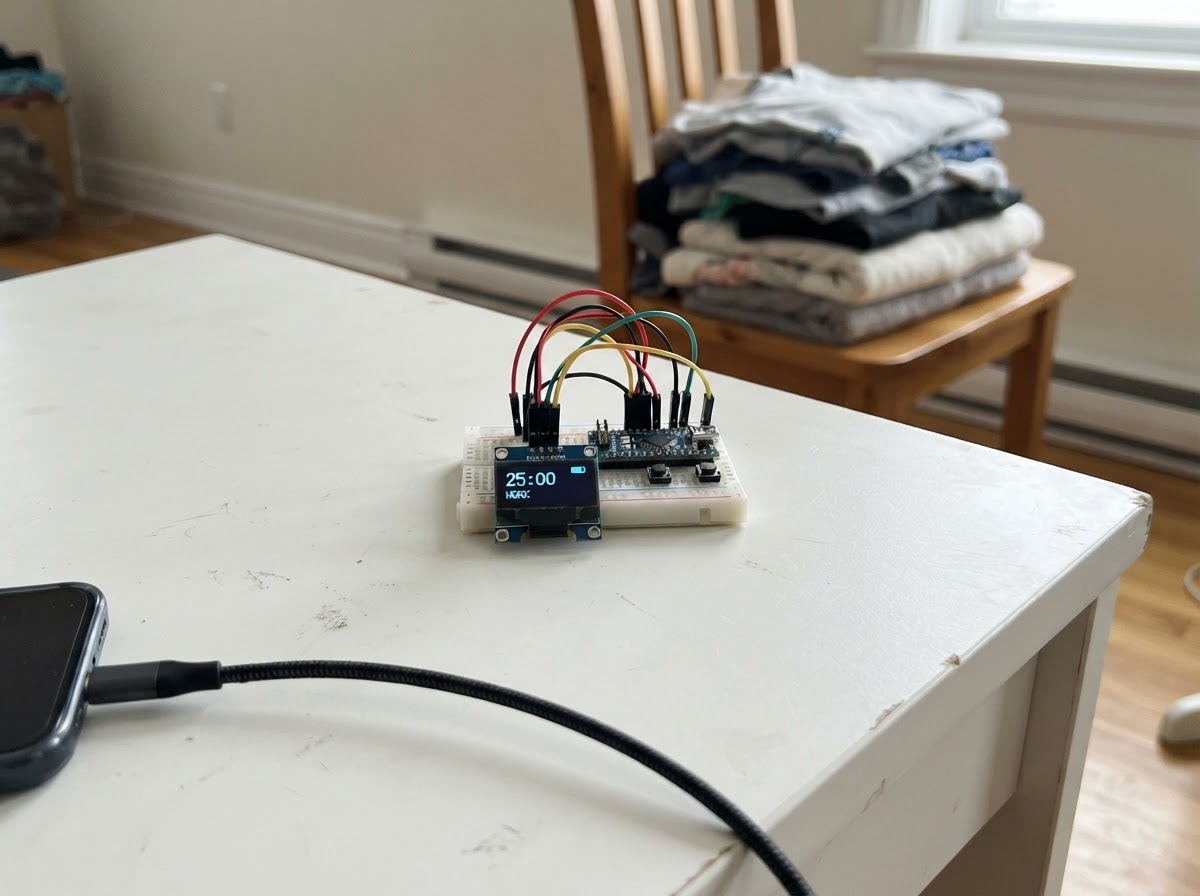
This project builds a WiFi-connected Pomodoro timer using an ESP32 and SH1106 OLED display. The timer runs the classic 25-minute focus sessions with 5-minute breaks, displaying the countdown on the OLED screen while tracking completed sessions.
The guide provides a complete wiring diagram for connecting the OLED display via I2C, a full parts list, and ready-to-flash firmware that creates a mobile-friendly web portal. Control the timer from any smartphone on the same network—start, pause, and switch between focus and break modes without touching the device.
Wiring diagram

Gather all the parts
Assemble it in 4 steps
1. Keep power disconnected
Place the ESP32 DevKit v1 and the 1.3-inch SH1106 I2C OLED where their pin labels are visible. Do not connect USB power while making connections.
- This version has no external buttons; every timer control is from the phone portal.
- Use a 3.3 V-compatible OLED module. Do not wire its VCC pin to the ESP32 5V/VIN pin.
2. Wire OLED power
Connect OLED VCC to the ESP32 3V3 pin. Connect OLED GND to an ESP32 GND pin.
- Keep the power and ground wires short and verify the labels before applying power.
- Reversing VCC and GND can damage the OLED.
3. Wire the I2C display signals
Connect OLED SDA to ESP32 GPIO 21 and OLED SCL to ESP32 GPIO 22.
- Most 1.3-inch SH1106 I2C modules use address 0x3C, which this project expects.
- Do not swap SDA and SCL. Do not attach other I2C modules at address 0x3C unless their address can be changed.
4. Power and use the phone portal
After checking all four OLED wires, power the ESP32 through its USB connector. On the phone, join the Wi-Fi network named “Pomodoro Timer” using password “focus25”. The captive portal should open; if it does not, browse to 192.168.4.1. Use Start/Pause and Skip phase on the page.
- The timer automatically changes from a 25-minute focus session to a 5-minute break, then repeats. The display and timer state are saved across restarts.
- While connected to the ESP32 timer Wi-Fi, the phone may report that the network has no internet; this is expected.
Review all connections
1. Connections between "oled_1" and "ESP32"
Deploy the firmware
#include <Arduino.h>
#include <WiFi.h>
#include <WebServer.h>
#include <DNSServer.h>
#include <Wire.h>
#include <Adafruit_GFX.h>
#include <Adafruit_SH110X.h>
#include <Preferences.h>

enum TimerMode : uint8_t { FOCUS, BREAK };

// Forward declarations
const char* modeName();
uint32_t duration();
void save();
void formatTime(char *s,size_t n,uint32_t t);
void centered(const char *s,int y,uint8_t sz);
void draw(bool force);
void nextPhase(bool count);
void advance();
String state();
void portal();
void toggle();

constexpr int OLED_SDA=14, OLED_SCL=13;
constexpr uint8_t OLED_ADDRESS=0x3C, DNS_PORT=53;
constexpr uint32_t FOCUS_SECONDS=1500UL, BREAK_SECONDS=300UL;
const char *AP_NAME="Pomodoro Timer", *AP_PASSWORD="focus25";
Adafruit_SH1106G display(128,64,&Wire,-1);
WebServer server(80); DNSServer dns; Preferences prefs;
TimerMode mode=FOCUS; bool running=false;
uint32_t leftSeconds=FOCUS_SECONDS, sessions=0, lastTick=0;
uint32_t oldLeft=UINT32_MAX, oldSessions=UINT32_MAX; bool oldRunning=true; TimerMode oldMode=BREAK;

const char* modeName(){ return mode==FOCUS?"Focus":"Break"; }
uint32_t duration(){ return mode==FOCUS?FOCUS_SECONDS:BREAK_SECONDS; }
void save(){ prefs.putBool("run",running); prefs.putUChar("mode",mode); prefs.putUInt("left",leftSeconds); prefs.putUInt("done",sessions); }
void formatTime(char *s,size_t n,uint32_t t){ snprintf(s,n,"%02lu:%02lu",t/60UL,t%60UL); }
void centered(const char *s,int y,uint8_t sz){ int16_t x1,y1;uint16_t w,h;display.setTextSize(sz);display.getTextBounds(s,0,y,&x1,&y1,&w,&h);display.setCursor((128-w)/2,y);display.print(s); }

void draw(bool force=false){
 if(!force&&leftSeconds==oldLeft&&sessions==oldSessions&&running==oldRunning&&mode==oldMode)return;
 char clockText[8], doneText[20];formatTime(clockText,sizeof(clockText),leftSeconds);snprintf(doneText,sizeof(doneText),"DONE %lu",sessions);
 uint8_t width=(uint8_t)(120UL*leftSeconds/duration());
 display.clearDisplay();display.setTextColor(SH110X_WHITE);
 display.fillCircle(7,6,3,running?SH110X_WHITE:SH110X_BLACK);display.drawCircle(7,6,3,SH110X_WHITE);
 display.setTextSize(1);display.setCursor(15,2);display.print(mode==FOCUS?"FOCUS SESSION":"BREAK TIME");display.setCursor(102,2);display.print("WEB");display.drawFastHLine(0,13,128,SH110X_WHITE);
 centered(clockText,18,4);
 display.drawRoundRect(3,51,122,7,3,SH110X_WHITE);if(width)display.fillRoundRect(4,52,width,5,2,SH110X_WHITE);
 display.setTextSize(1);display.setCursor(2,56);display.print(running?"RUN":"PAUSED");int16_t x1,y1;uint16_t w,h;display.getTextBounds(doneText,0,56,&x1,&y1,&w,&h);display.setCursor(126-w,56);display.print(doneText);display.display();
 oldLeft=leftSeconds;oldSessions=sessions;oldRunning=running;oldMode=mode;
}
void nextPhase(bool count){if(count&&mode==FOCUS)sessions++;mode=(mode==FOCUS)?BREAK:FOCUS;leftSeconds=duration();lastTick=millis();save();draw(true);}
void advance(){if(!running)return;uint32_t now=millis();while(now-lastTick>=1000UL){lastTick+=1000UL;if(leftSeconds)leftSeconds--;if(!leftSeconds)nextPhase(true);}}
String state(){return String("{\"mode\":\"")+modeName()+"\",\"running\":"+(running?"true":"false")+",\"remaining\":"+String(leftSeconds)+",\"total\":"+String(duration())+",\"sessions\":"+String(sessions)+"}";}

const char PAGE[] PROGMEM=R"HTML(<!doctype html><html><head><meta name="viewport" content="width=device-width,initial-scale=1,viewport-fit=cover"><meta name="theme-color" content="#101827"><title>Focus Flow</title><style>:root{--ink:#f5f7ff;--mute:#aab6cc;--line:#3a4b68;--focus:#ff7869;--break:#64ddc1}*{box-sizing:border-box}body{margin:0;min-height:100vh;color:var(--ink);font-family:system-ui,-apple-system,Segoe UI,sans-serif;background:radial-gradient(circle at 50% -15%,#3c5a88 0,#101827 55%);display:grid;place-items:center;padding:20px}.app{width:min(100%,440px)}header{display:flex;align-items:center;justify-content:space-between;margin:4px 4px 20px}.brand{font-size:19px;font-weight:850}.dot{display:inline-block;width:10px;height:10px;border-radius:9px;background:var(--focus);margin-right:7px}.status{font-size:12px;color:var(--mute)}.card{background:#1b2940e8;border:1px solid #ffffff1f;border-radius:30px;padding:27px 22px 21px;box-shadow:0 24px 60px #0006}.eyebrow{text-align:center;color:var(--mute);font-size:12px;letter-spacing:2px;font-weight:800}.clock{text-align:center;font-size:74px;line-height:1;font-weight:850;font-variant-numeric:tabular-nums;letter-spacing:-5px;margin:13px 0 19px}.track{height:9px;background:#0d1421;border-radius:99px;overflow:hidden}.bar{height:100%;width:100%;background:var(--focus);border-radius:99px;transition:width .35s,background .25s}.buttons,.stats{display:grid;grid-template-columns:1fr 1fr;gap:12px}.buttons{margin-top:22px}button{border:0;border-radius:17px;min-height:56px;color:#141722;font:800 16px inherit}.primary{background:var(--focus)}.secondary{color:var(--ink);background:#30415e}.stats{margin-top:15px}.stat{border:1px solid var(--line);border-radius:17px;background:#142036;padding:14px}.label{font-size:10px;letter-spacing:1.1px;color:var(--mute);font-weight:800}.value{font-size:25px;font-weight:800;margin-top:4px}.hint,.foot{font-size:12px;color:var(--mute);text-align:center}.hint{line-height:1.45;margin:18px 7px}.foot{opacity:.75}</style></head><body><main class="app"><header><div class="brand"><i id="dot" class="dot"></i>focus flow</div><div id="status" class="status">Connecting...</div></header><section class="card"><div id="mode" class="eyebrow">FOCUS SESSION</div><div id="time" class="clock">25:00</div><div class="track"><div id="bar" class="bar"></div></div><div class="buttons"><button id="toggle" class="primary" onclick="act('toggle')">Start focus</button><button class="secondary" onclick="act('skip')">Skip phase</button></div><div class="stats"><div class="stat"><div class="label">COMPLETED</div><div class="value"><span id="sessions">0</span> sessions</div></div><div class="stat"><div class="label">UP NEXT</div><div id="next" class="value">5 min break</div></div></div></section><p class="hint">25-minute focus and 5-minute break cycles run automatically. State is saved if power is interrupted.</p><div class="foot">Phone-only controls</div></main><script>let busy=0;function act(a){if(busy)return;busy=1;fetch('/api/'+a,{method:'POST'}).then(load).finally(()=>busy=0)}function load(){fetch('/api/state',{cache:'no-store'}).then(r=>r.json()).then(s=>{let m=Math.floor(s.remaining/60),q=s.remaining%60;time.textContent=String(m).padStart(2,'0')+':'+String(q).padStart(2,'0');mode.textContent=s.mode.toUpperCase()+(s.mode==='Focus'?' SESSION':' TIME');status.textContent=s.running?'Timer running':'Timer paused';toggle.textContent=s.running?'Pause timer':'Start '+s.mode.toLowerCase();sessions.textContent=s.sessions;next.textContent=s.mode==='Focus'?'5 min break':'25 min focus';let c=s.mode==='Focus'?'var(--focus)':'var(--break)';bar.style.width=(100*s.remaining/s.total)+'%';bar.style.background=c;dot.style.background=c}).catch(()=>status.textContent='Reconnecting...')}load();setInterval(load,1000);</script></body></html>)HTML";
void portal(){server.send_P(200,"text/html",PAGE);}void api(){server.send(200,"application/json",state());}
void toggle(){running=!running;lastTick=millis();save();draw(true);api();}void skip(){nextPhase(true);api();}
void setup(){Wire.begin(OLED_SDA,OLED_SCL);display.begin(OLED_ADDRESS,true);prefs.begin("pomodoro",false);mode=(TimerMode)prefs.getUChar("mode",FOCUS);if(mode!=FOCUS&&mode!=BREAK)mode=FOCUS;leftSeconds=prefs.getUInt("left",duration());if(!leftSeconds||leftSeconds>duration())leftSeconds=duration();sessions=prefs.getUInt("done",0);running=prefs.getBool("run",false);lastTick=millis();WiFi.mode(WIFI_AP);WiFi.softAP(AP_NAME,AP_PASSWORD);dns.start(DNS_PORT,"*",WiFi.softAPIP());server.on("/",HTTP_GET,portal);server.on("/api/state",HTTP_GET,api);server.on("/api/toggle",HTTP_POST,toggle);server.on("/api/skip",HTTP_POST,skip);server.on("/generate_204",HTTP_GET,portal);server.on("/hotspot-detect.html",HTTP_GET,portal);server.on("/connecttest.txt",HTTP_GET,portal);server.on("/ncsi.txt",HTTP_GET,portal);server.onNotFound(portal);server.begin();draw(true);}void loop(){dns.processNextRequest();server.handleClient();advance();draw();}
Remix this project
Make it yours in one click
Open a full copy of this project in your own Schematik workspace — diagram, code, parts, and assembly steps included. Swap the sensor, add features, or redesign the whole thing with AI. The author's original stays untouched.