Community project
Starfall
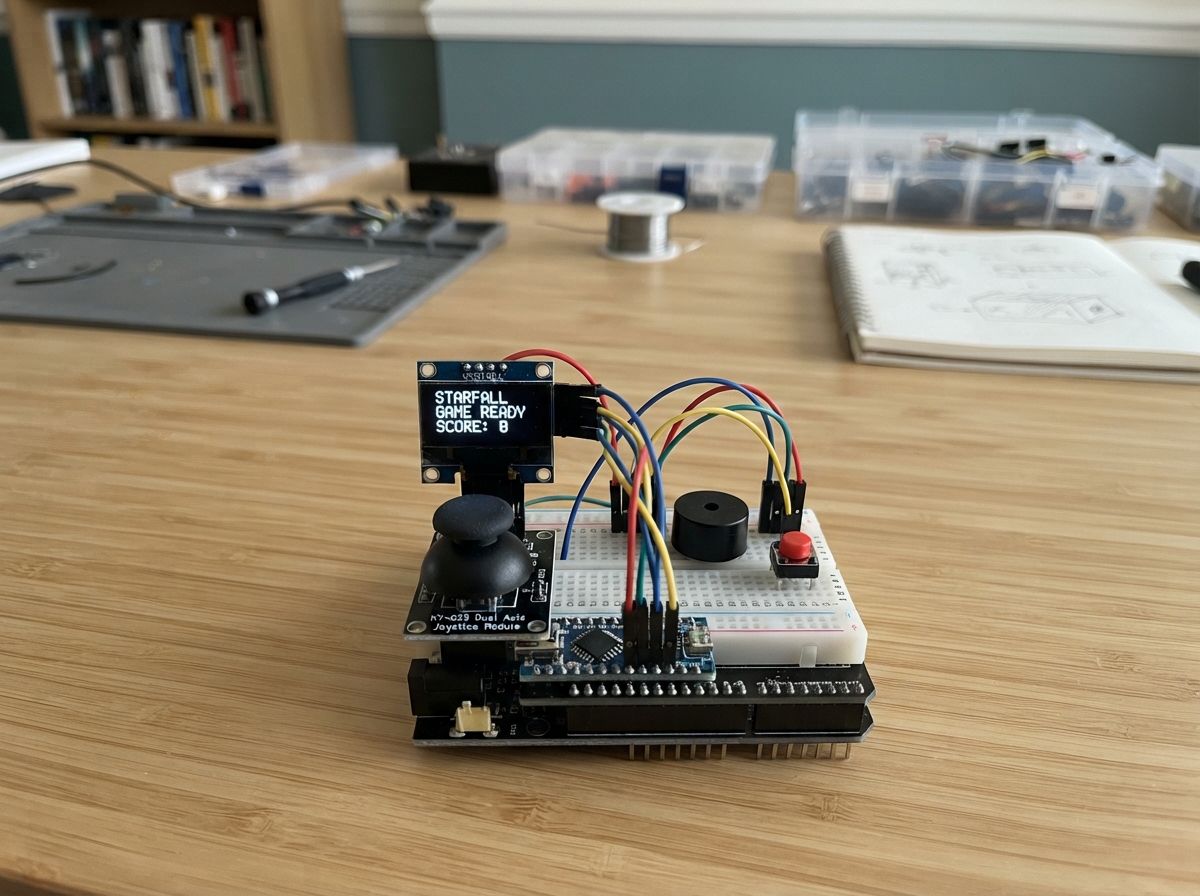
Starfall is a classic arcade-style shooter game built on an Arduino Uno with a small OLED display. The player controls a ship using a joystick module, dodges incoming asteroids, and destroys them by pressing a button to fire. The game features multiple lives, progressive difficulty levels, high score tracking stored in EEPROM, and sound effects from a piezo buzzer.
This guide provides a complete parts list, wiring diagram showing connections for the SSD1306 display, joystick controls, push button, and buzzer, step-by-step assembly instructions, and the full Arduino firmware. By following along, makers will learn how to integrate input controls, manage game state, render graphics on a small display, and add audio feedback to create an engaging handheld game.
Wiring diagram

Gather all the parts
Assemble it in 6 steps
1. Place the board and breadboard
Put the Uno R4 WiFi beside the breadboard with its USB socket easy to reach. Leave it unplugged while placing wires so a misplaced wire cannot heat up a part.
- Use one long breadboard rail as ground so every part can share it.
- Do not power the board until the screen and joystick power wires have been checked.
2. Wire the OLED game screen
Connect the OLED VCC pin to the Uno 3.3V pin (power), OLED GND to Uno GND (ground), OLED SDA to A4/SDA or GPIO18 (data), and OLED SCL to A5/SCL or GPIO19 (clock).
- Most small OLED boards print SDA and SCL beside the four pins; match those labels rather than their left-to-right order.
- Make sure VCC and GND are not swapped — swapped power can damage the screen.
3. Wire the thumb controls
Connect joystick VCC to Uno 5V (power), joystick GND to Uno GND (ground), joystick VRx to A0 or GPIO14 (left-right signal), and joystick VRy to A1 or GPIO15 (up-down signal). Leave the joystick SW pin unconnected because the separate button starts the game.
- Match the printed VCC, GND, VRx, and VRy labels on the joystick module rather than relying on its physical layout.
- Keep the joystick VCC on 5V, not 3.3V, so its movement readings cover the full range.
4. Wire the four-leg play button
Use the small four-leg button in your photo. Push it across the breadboard’s center gap, with two legs on the left side of the gap and two on the right. Connect either left-side leg to Uno GND (ground). Connect either right-side leg to D2 or GPIO2 (start and retry signal). Do not connect both wires to two legs on the same side: those two legs are already joined inside the button, while pressing the button joins the left side to the right side.
- The button has no positive or negative side. If it does not sit flat, turn it 90 degrees and make sure its four legs cross the breadboard’s center gap.
- The button works because the Uno normally holds D2 high, and a press briefly connects it to ground.
- If the game starts by itself or never responds, unplug USB and move one wire to a leg on the other side of the button — using two legs on one side never makes a switched connection.
5. Add the sound maker
Connect either piezo buzzer lead to Uno GND (ground) and the other lead to D9 or GPIO9 (sound signal). The two leads can be swapped because this piezo has no positive or negative side.
- If the piezo has wire leads, put each wire in a separate breadboard row before adding jumper wires.
- Do not connect both piezo leads to power; the game drives one lead from D9 to make sound.
6. Play Starfall
Plug the Uno into USB. Press the separate four-leg button to launch, steer away from falling circles with the joystick, and press the same button after a crash to start a new run.
- Right moves up, up moves left, left moves down, and down moves right in this version of the game.
- If the screen stays blank, unplug USB and first check the OLED’s VCC, GND, SDA, and SCL labels.
Review all connections
1. Connections between "oled_1" and "Arduino"
2. Connections between "joystick_1" and "Arduino"
3. Connections between "buzzer_1" and "Arduino"
4. Connections between "play_button_1" and "Arduino"
Deploy the firmware
#include <Arduino.h>
#include <Wire.h>
#include <EEPROM.h>
#include <Adafruit_GFX.h>
#include <Adafruit_SSD1306.h>

struct Rock {
  int16_t x;
  int16_t y;
  int16_t targetX;
  uint8_t size;
  uint8_t speed;
  bool active;
  bool homing;
};

struct Star {
  int16_t x;
  int16_t y;
  uint8_t speed;
};

struct HighScoreData {
  uint16_t marker;
  uint16_t scores[3];
};

void chirp(unsigned int frequency, unsigned int duration);
void loadHighScores();
void saveHighScores();
void recordScore();
void resetGame();
void spawnRock();
bool buttonPressed();
void updateShip();
void updateWorld();
void drawShip();
void drawGame();
void drawTitle();
void drawGameOver();

constexpr uint8_t SCREEN_WIDTH = 128;
constexpr uint8_t SCREEN_HEIGHT = 64;
constexpr uint8_t OLED_RESET = 255;
constexpr uint8_t JOY_X_PIN = A0;
constexpr uint8_t JOY_Y_PIN = A1;
constexpr uint8_t JOY_BUTTON_PIN = 2;
constexpr uint8_t BUZZER_PIN = 9;
constexpr uint8_t MAX_ROCKS = 8;
constexpr uint8_t MAX_STARS = 22;
constexpr unsigned long FRAME_MS = 50;
constexpr uint16_t HIGH_SCORE_MARKER = 0x53A7;
constexpr int EEPROM_ADDRESS = 0;

Adafruit_SSD1306 display(SCREEN_WIDTH, SCREEN_HEIGHT, &Wire, OLED_RESET);
Rock rocks[MAX_ROCKS];
Star stars[MAX_STARS];
HighScoreData highScores;
int16_t shipX = 60;
int16_t shipY = 52;
uint16_t score = 0;
uint8_t lives = 3;
uint8_t level = 1;
uint16_t asteroidCount = 0;
bool playing = false;
bool scoreRecorded = false;
unsigned long lastFrame = 0;
unsigned long lastSpawn = 0;
bool buttonWasDown = false;

void chirp(unsigned int frequency, unsigned int duration) {
  tone(BUZZER_PIN, frequency, duration);
}

void loadHighScores() {
  EEPROM.get(EEPROM_ADDRESS, highScores);
  if (highScores.marker != HIGH_SCORE_MARKER) {
    highScores.marker = HIGH_SCORE_MARKER;
    highScores.scores[0] = 0;
    highScores.scores[1] = 0;
    highScores.scores[2] = 0;
    saveHighScores();
  }
}

void saveHighScores() {
  EEPROM.put(EEPROM_ADDRESS, highScores);
}

void recordScore() {
  if (scoreRecorded) return;
  scoreRecorded = true;
  for (uint8_t i = 0; i < 3; i++) {
    if (score > highScores.scores[i]) {
      for (int8_t j = 2; j > i; j--) highScores.scores[j] = highScores.scores[j - 1];
      highScores.scores[i] = score;
      saveHighScores();
      chirp(1500, 120);
      return;
    }
  }
}

void resetGame() {
  score = 0;
  lives = 3;
  level = 1;
  asteroidCount = 0;
  shipX = 60;
  shipY = 52;
  lastSpawn = millis();
  scoreRecorded = false;
  for (uint8_t i = 0; i < MAX_ROCKS; i++) rocks[i].active = false;
  playing = true;
  chirp(880, 80);
}

void spawnRock() {
  uint8_t activeRocks = 0;
  for (uint8_t i = 0; i < MAX_ROCKS; i++) if (rocks[i].active) activeRocks++;
  uint8_t allowedRocks = min(MAX_ROCKS, (uint8_t)(2 + level));
  if (activeRocks >= allowedRocks) return;

  for (uint8_t i = 0; i < MAX_ROCKS; i++) {
    if (!rocks[i].active) {
      asteroidCount++;
      rocks[i].active = true;
      rocks[i].homing = (asteroidCount % 15 == 0);
      rocks[i].size = random(3, min(8, 5 + level / 3));
      rocks[i].y = 10;
      rocks[i].speed = random(1 + level / 3, 3 + level / 2);

      // Every 15th asteroid keeps steering toward the ship. Every 7th one
      // aims at where the ship was when it appeared, then falls straight.
      if (rocks[i].homing || asteroidCount % 7 == 0) {
        rocks[i].targetX = shipX;
        rocks[i].x = random(rocks[i].size, SCREEN_WIDTH - rocks[i].size);
      } else {
        rocks[i].x = random(rocks[i].size, SCREEN_WIDTH - rocks[i].size);
        rocks[i].targetX = rocks[i].x;
      }
      return;
    }
  }
}

bool buttonPressed() {
  bool down = digitalRead(JOY_BUTTON_PIN) == LOW;
  bool pressed = down && !buttonWasDown;
  buttonWasDown = down;
  return pressed;
}

void updateShip() {
  int xValue = analogRead(JOY_X_PIN);
  int yValue = analogRead(JOY_Y_PIN);
  // Right moves up, up moves left, left moves down, down moves right.
  if (xValue < 350) shipY += 2;
  if (xValue > 670) shipY -= 2;
  if (yValue < 350) shipX -= 3;
  if (yValue > 670) shipX += 3;
  shipX = constrain(shipX, 3, SCREEN_WIDTH - 4);
  shipY = constrain(shipY, 15, SCREEN_HEIGHT - 4);
}

void updateWorld() {
  for (uint8_t i = 0; i < MAX_STARS; i++) {
    stars[i].y += stars[i].speed;
    if (stars[i].y >= SCREEN_HEIGHT) {
      stars[i].y = 10;
      stars[i].x = random(SCREEN_WIDTH);
    }
  }

  unsigned long spawnDelay = max(140L, 720L - (long)level * 58L);
  if (millis() - lastSpawn >= spawnDelay) {
    spawnRock();
    lastSpawn = millis();
  }

  for (uint8_t i = 0; i < MAX_ROCKS; i++) {
    if (!rocks[i].active) continue;
    if (rocks[i].homing) rocks[i].targetX = shipX;
    if (rocks[i].x < rocks[i].targetX) rocks[i].x++;
    if (rocks[i].x > rocks[i].targetX) rocks[i].x--;
    rocks[i].x = constrain(rocks[i].x, rocks[i].size, SCREEN_WIDTH - rocks[i].size - 1);
    rocks[i].y += rocks[i].speed;
    if (rocks[i].y - rocks[i].size > SCREEN_HEIGHT) {
      rocks[i].active = false;
      score += 10;
      // Raise the level after every 80 points (eight escaped asteroids), not every point.
      uint8_t newLevel = min((uint8_t)12, (uint8_t)(1 + score / 80));
      if (newLevel > level) {
        level = newLevel;
        chirp(1200 + level * 35, 110);
      }
      continue;
    }
    int16_t dx = rocks[i].x - shipX;
    int16_t dy = rocks[i].y - shipY;
    int16_t hitDistance = rocks[i].size + 4;
    if (dx * dx + dy * dy < hitDistance * hitDistance) {
      rocks[i].active = false;
      if (lives > 0) lives--;
      chirp(180, 180);
      if (lives == 0) {
        playing = false;
        recordScore();
        chirp(110, 500);
      }
    }
  }
}

void drawShip() {
  display.drawTriangle(shipX, shipY - 4, shipX - 4, shipY + 4, shipX + 4, shipY + 4, SSD1306_WHITE);
  display.drawFastHLine(shipX - 2, shipY + 5, 5, SSD1306_WHITE);
}

void drawGame() {
  display.clearDisplay();
  for (uint8_t i = 0; i < MAX_STARS; i++) display.drawPixel(stars[i].x, stars[i].y, SSD1306_WHITE);
  for (uint8_t i = 0; i < MAX_ROCKS; i++) {
    if (rocks[i].active) display.drawCircle(rocks[i].x, rocks[i].y, rocks[i].size, SSD1306_WHITE);
  }
  display.drawFastHLine(0, 9, SCREEN_WIDTH, SSD1306_WHITE);
  display.setTextColor(SSD1306_WHITE);
  display.setTextSize(1);
  display.setCursor(1, 0);
  display.print(F("S:"));
  display.print(score);
  display.setCursor(56, 0);
  display.print(F("L:"));
  display.print(lives);
  display.setCursor(96, 0);
  display.print(F("LV"));
  display.print(level);
  drawShip();
  display.display();
}

void drawTitle() {
  display.clearDisplay();
  display.setTextColor(SSD1306_WHITE);
  display.setTextSize(2);
  display.setCursor(19, 3);
  display.print(F("STARFALL"));
  display.setTextSize(1);
  display.setCursor(8, 25);
  display.print(F("Top: "));
  display.print(highScores.scores[0]);
  display.print(F("  "));
  display.print(highScores.scores[1]);
  display.print(F("  "));
  display.print(highScores.scores[2]);
  display.setCursor(17, 43);
  display.print(F("Press button to launch"));
  display.display();
}

void drawGameOver() {
  display.clearDisplay();
  display.setTextColor(SSD1306_WHITE);
  display.setTextSize(2);
  display.setCursor(22, 2);
  display.print(F("CRASHED"));
  display.setTextSize(1);
  display.setCursor(31, 23);
  display.print(F("Score: "));
  display.print(score);
  display.setCursor(13, 36);
  display.print(F("Top: "));
  display.print(highScores.scores[0]);
  display.print(F("  "));
  display.print(highScores.scores[1]);
  display.print(F("  "));
  display.print(highScores.scores[2]);
  display.setCursor(15, 52);
  display.print(F("Press button: retry"));
  display.display();
}

void setup() {
  pinMode(JOY_BUTTON_PIN, INPUT_PULLUP);
  pinMode(BUZZER_PIN, OUTPUT);
  randomSeed(analogRead(A2) + micros());
  loadHighScores();
  if (!display.begin(SSD1306_SWITCHCAPVCC, 0x3C)) {
    while (true) delay(1000);
  }
  for (uint8_t i = 0; i < MAX_STARS; i++) {
    stars[i].x = random(SCREEN_WIDTH);
    stars[i].y = random(10, SCREEN_HEIGHT);
    stars[i].speed = random(1, 3);
  }
  drawTitle();
}

void loop() {
  if (buttonPressed() && !playing) resetGame();
  if (!playing) {
    if (lives == 0) drawGameOver();
    return;
  }
  if (millis() - lastFrame < FRAME_MS) return;
  lastFrame = millis();
  updateShip();
  updateWorld();
  drawGame();
}
Remix this project
Make it yours in one click
Open a full copy of this project in your own Schematik workspace, diagram, code, parts, and assembly steps included. Swap the sensor, add features, or redesign the whole thing with AI. The author's original stays untouched.