Community project
Sunset Sunrise Switch
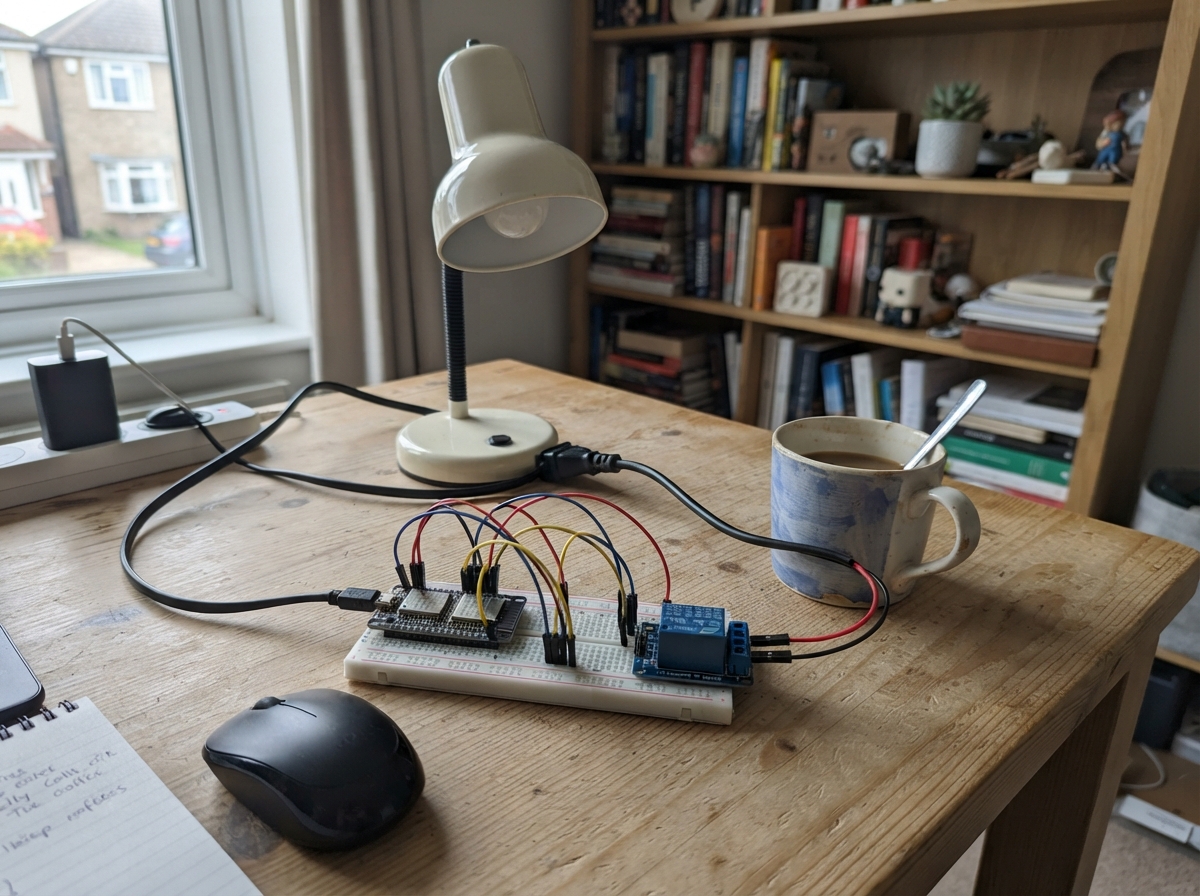
The Sunset Sunrise Switch is an ESP32-based automation controller that turns devices on and off based on sunrise and sunset times at your location. It calculates solar events using your geographic coordinates and automatically switches a relay-controlled load at dawn and dusk, making it ideal for outdoor lighting, irrigation systems, or other time-of-day automation.
This guide provides a complete wiring diagram, parts list, and step-by-step assembly instructions for connecting the relay module to the ESP32. You'll also get the full firmware with a web-based setup page where you enter your Wi-Fi credentials and location coordinates. The device stores these settings in non-volatile memory and begins controlling your load immediately after setup.
Wiring diagram

Gather all the parts
Assemble it in 5 steps
1. Keep the load side safe
Mount the ESP32 and relay module where you can reach their low-voltage pins. If you are switching a mains-powered lamp or appliance, use a fully enclosed, correctly rated relay enclosure and have a qualified electrician make the mains connections; do not put mains wiring on a breadboard.
- Test the project first with a battery-powered low-voltage lamp or other low-voltage load.
- The relay screw terminals are the load side; keep them physically separated from the ESP32 pins.
- Touching exposed mains wiring can cause serious injury or fire.
2. Power the relay board
With the ESP32 unplugged, connect relay_1 VCC to the ESP32 VIN/5V pin (power) and relay_1 GND to an ESP32 GND pin (ground).
- Use short wires for these two connections so the relay has steady power.
- Make sure VCC and GND are not swapped — swapped power can damage the relay board.
3. Connect the relay control wire
Connect relay_1 IN to ESP32 GPIO27 (signal). This relay turns on when GPIO27 is pulled low by the ESP32.
- GPIO27 is the only control wire needed between the ESP32 and relay board.
- Do not connect relay_1 IN directly to the 5V pin — that can leave the load permanently switched on.
4. Connect the load through the relay
Route the supply wire that you want to switch into relay_1 COM, then route relay_1 NO to the load's supply connection (switched power). Leave NC unused so the load starts off whenever the relay is off.
- COM and NO act like a switch that closes only after sunset.
- For a low-voltage test load, switch its positive wire and connect its negative wire directly back to the supply negative terminal.
- Never exceed the relay's printed contact rating, and do not use exposed mains wiring.
5. Enter Wi-Fi and location on the setup page
Plug the ESP32 into USB. On a phone or computer, join the Wi-Fi network named Astronomical-Switch-Setup and open http://192.168.4.1. Select your normal Wi-Fi network, enter its password, then enter the installation latitude and longitude before pressing Save and connect.
- Latitude is positive north of the equator and negative south; longitude is positive east of Greenwich and negative west.
- The ESP32 saves the Wi-Fi details and coordinates even after it is unplugged, then restarts and obtains UTC time from the internet.
- The switch stays off until it has both a saved location and valid UTC network time, so an incomplete first setup will not accidentally turn the load on.
Review all connections
1. Connections between "relay_1" and "ESP32"
Deploy the firmware
#include <Arduino.h>
#include <WiFi.h>
#include <WebServer.h>
#include <Preferences.h>
#include <time.h>
#include <math.h>

// Set the installation position. North/east are positive; south/west are negative.

// Forward declarations
double toRadians(double degrees);
double toDegrees(double radians);
bool clockIsValid();
String pageHeader(const String &title);
void handleRoot();
void handleSave();
void startSetupServer();
int solarEventMinuteUtc(const tm &utcTime, bool sunrise);
void setRelay(bool on);
void updateSwitch();
void connectWiFi();

// These values are entered on the first-run setup page and retained after power is removed.
double latitude = 0.0;
double longitude = 0.0;
bool locationSaved = false;

constexpr int RELAY_PIN = 27;
constexpr bool RELAY_ON_LEVEL = LOW;   // This relay module is active-low.
constexpr bool RELAY_OFF_LEVEL = HIGH;
constexpr unsigned long WIFI_RETRY_MS = 30000;
constexpr unsigned long CLOCK_RETRY_MS = 10000;
constexpr double PI_VALUE = 3.14159265358979323846;

WebServer server(80);
Preferences preferences;
String savedSsid;
String savedPassword;
bool setupServerRunning = false;
bool relayState = false;
int cachedYear = -1;
int cachedDayOfYear = -1;
int sunriseMinute = -1;
int sunsetMinute = -1;
unsigned long lastWifiAttempt = 0;
unsigned long lastClockAttempt = 0;

double toRadians(double degrees) { return degrees * PI_VALUE / 180.0; }
double toDegrees(double radians) { return radians * 180.0 / PI_VALUE; }
bool clockIsValid() { return time(nullptr) > 1700000000; }

String pageHeader(const String &title) {
  return "<!doctype html><html><head><meta name='viewport' content='width=device-width,initial-scale=1'>"
         "<title>" + title + "</title><style>body{font-family:sans-serif;max-width:36rem;margin:2rem auto;padding:0 1rem}"
         "input,select,button{box-sizing:border-box;width:100%;padding:.7rem;margin:.35rem 0;font-size:1rem}button{background:#1769aa;color:white;border:0;border-radius:.25rem}small{color:#444}</style></head><body>";
}

void handleRoot() {
  String html = pageHeader("Astronomical Switch Setup");
  html += "<h1>Connect the switch to Wi-Fi</h1><p>Select your network, then enter its password. The switch uses network time in UTC.</p>";
  int networkCount = WiFi.scanNetworks();
  html += "<form action='/save' method='post'><label>Wi-Fi network</label><select name='ssid' required>";
  if (networkCount <= 0) html += "<option value=''>No networks found — refresh this page and try again.</option>";
  for (int i = 0; i < networkCount; ++i) {
    String network = WiFi.SSID(i);
    if (network.length() == 0) continue;
    html += "<option value='" + network + "'" + (network == savedSsid ? " selected" : "") + ">" + network + " (" + String(WiFi.RSSI(i)) + " dBm)</option>";
  }
  html += "</select><label>Password</label><input name='password' type='password' required autocomplete='current-password'>"
          "<label>Latitude</label><input name='latitude' type='number' step='any' min='-90' max='90' required value='" + String(latitude, 6) + "' placeholder='Example: 40.7128'>"
          "<small>Use positive numbers north of the equator and negative numbers south.</small>"
          "<label>Longitude</label><input name='longitude' type='number' step='any' min='-180' max='180' required value='" + String(longitude, 6) + "' placeholder='Example: -74.0060'>"
          "<small>Use positive numbers east of Greenwich and negative numbers west.</small>"
          "<button type='submit'>Save and connect</button></form><p><small>The Wi-Fi details and location are kept even if power is removed. The switch uses network time in UTC.</small></p></body></html>";
  server.send(200, "text/html", html);
}

void handleSave() {
  String ssid = server.arg("ssid");
  String password = server.arg("password");
  double enteredLatitude = server.arg("latitude").toDouble();
  double enteredLongitude = server.arg("longitude").toDouble();
  if (ssid.length() == 0 || server.arg("latitude").length() == 0 || server.arg("longitude").length() == 0 ||
      enteredLatitude < -90.0 || enteredLatitude > 90.0 || enteredLongitude < -180.0 || enteredLongitude > 180.0) {
    server.send(400, "text/html", pageHeader("Check your details") + "<h1>Enter a network and valid location</h1><p>Latitude must be from -90 to 90 and longitude from -180 to 180.</p><p><a href='/'>Return to setup</a></p></body></html>");
    return;
  }
  preferences.begin("astro-switch", false);
  preferences.putString("ssid", ssid);
  preferences.putString("password", password);
  preferences.putDouble("latitude", enteredLatitude);
  preferences.putDouble("longitude", enteredLongitude);
  preferences.putBool("location-set", true);
  preferences.end();
  server.send(200, "text/html", pageHeader("Saved") + "<h1>Wi-Fi details saved</h1><p>The switch is now trying to join <b>" + ssid + "</b>. You can close this page.</p></body></html>");
  delay(750);
  ESP.restart();
}

void startSetupServer() {
  if (setupServerRunning) return;
  WiFi.mode(WIFI_AP_STA);
  WiFi.softAP("Astronomical-Switch-Setup");
  server.on("/", HTTP_GET, handleRoot);
  server.on("/save", HTTP_POST, handleSave);
  server.begin();
  setupServerRunning = true;
  Serial.println("Setup Wi-Fi: Astronomical-Switch-Setup, browse to http://192.168.4.1");
}

int solarEventMinuteUtc(const tm &utcTime, bool sunrise) {
  const double zenith = 90.833;
  const int dayOfYear = utcTime.tm_yday + 1;
  const double longitudeHour = longitude / 15.0;
  const double approximateTime = dayOfYear + ((sunrise ? 6.0 : 18.0) - longitudeHour) / 24.0;
  const double meanAnomaly = (0.9856 * approximateTime) - 3.289;
  double trueLongitude = meanAnomaly + 1.916 * sin(toRadians(meanAnomaly)) + 0.020 * sin(2.0 * toRadians(meanAnomaly)) + 282.634;
  trueLongitude = fmod(trueLongitude + 360.0, 360.0);
  double rightAscension = toDegrees(atan(0.91764 * tan(toRadians(trueLongitude))));
  rightAscension = fmod(rightAscension + 360.0, 360.0);
  rightAscension = (rightAscension + floor(trueLongitude / 90.0) * 90.0 - floor(rightAscension / 90.0) * 90.0) / 15.0;
  const double sinDeclination = 0.39782 * sin(toRadians(trueLongitude));
  const double cosDeclination = cos(asin(sinDeclination));
  const double cosHourAngle = (cos(toRadians(zenith)) - sinDeclination * sin(toRadians(latitude))) / (cosDeclination * cos(toRadians(latitude)));
  if (cosHourAngle > 1.0 || cosHourAngle < -1.0) return -1;
  double hourAngle = toDegrees(acos(cosHourAngle));
  if (sunrise) hourAngle = 360.0 - hourAngle;
  const double utcHours = fmod(hourAngle / 15.0 + rightAscension - 0.06571 * approximateTime - 6.622 - longitudeHour + 24.0, 24.0);
  return static_cast<int>(round(utcHours * 60.0)) % 1440;
}

void setRelay(bool on) {
  if (relayState == on) return;
  relayState = on;
  digitalWrite(RELAY_PIN, on ? RELAY_ON_LEVEL : RELAY_OFF_LEVEL);
  Serial.printf("Relay is now %s\n", on ? "ON" : "OFF");
}

void updateSwitch() {
  if (!clockIsValid()) { setRelay(false); return; }
  time_t now = time(nullptr);
  tm utcTime;
  gmtime_r(&now, &utcTime);
  if (cachedYear != utcTime.tm_year || cachedDayOfYear != utcTime.tm_yday) {
    cachedYear = utcTime.tm_year;
    cachedDayOfYear = utcTime.tm_yday;
    sunriseMinute = solarEventMinuteUtc(utcTime, true);
    sunsetMinute = solarEventMinuteUtc(utcTime, false);
    Serial.printf("UTC sunrise=%d min, sunset=%d min\n", sunriseMinute, sunsetMinute);
  }
  if (sunriseMinute < 0 || sunsetMinute < 0) { setRelay(false); return; }
  const int nowMinute = utcTime.tm_hour * 60 + utcTime.tm_min;
  const bool shouldBeOn = (sunsetMinute < sunriseMinute) ? (nowMinute >= sunsetMinute || nowMinute < sunriseMinute) : (nowMinute >= sunsetMinute && nowMinute < sunriseMinute);
  setRelay(shouldBeOn);
}

void connectWiFi() {
  if (savedSsid.length() == 0 || WiFi.status() == WL_CONNECTED || millis() - lastWifiAttempt < WIFI_RETRY_MS) return;
  lastWifiAttempt = millis();
  WiFi.mode(setupServerRunning ? WIFI_AP_STA : WIFI_STA);
  WiFi.begin(savedSsid.c_str(), savedPassword.c_str());
  Serial.println("Connecting to saved Wi-Fi...");
}

void setup() {
  Serial.begin(115200);
  pinMode(RELAY_PIN, OUTPUT);
  digitalWrite(RELAY_PIN, RELAY_OFF_LEVEL);
  preferences.begin("astro-switch", true);
  savedSsid = preferences.getString("ssid", "");
  savedPassword = preferences.getString("password", "");
  latitude = preferences.getDouble("latitude", 0.0);
  longitude = preferences.getDouble("longitude", 0.0);
  locationSaved = preferences.getBool("location-set", false);
  preferences.end();
  setenv("TZ", "UTC0", 1);
  tzset();
  if (savedSsid.length() == 0 || !locationSaved) startSetupServer();
  lastWifiAttempt = millis() - WIFI_RETRY_MS;
}

void loop() {
  if (setupServerRunning) server.handleClient();
  connectWiFi();
  if (WiFi.status() == WL_CONNECTED && !clockIsValid() && millis() - lastClockAttempt >= CLOCK_RETRY_MS) {
    lastClockAttempt = millis();
    configTime(0, 0, "pool.ntp.org", "time.nist.gov");
  }
  updateSwitch();
  delay(250);
}
Remix this project
Make it yours in one click
Open a full copy of this project in your own Schematik workspace — diagram, code, parts, and assembly steps included. Swap the sensor, add features, or redesign the whole thing with AI. The author's original stays untouched.