Community project
Tiny ESP DeskBuddy Dashboard
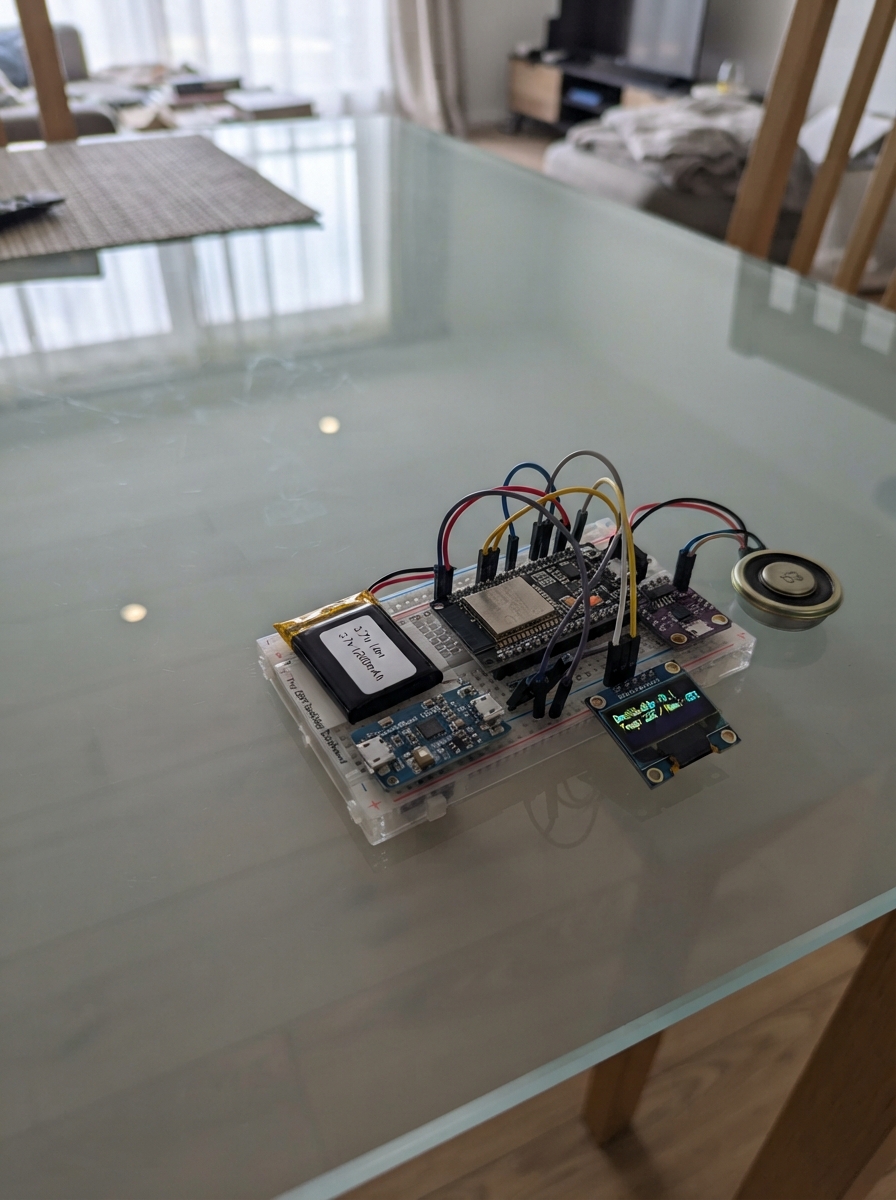
Tiny ESP DeskBuddy Dashboard is a compact, battery-powered companion device built around an ESP32 that combines a touchscreen display with audio input and output capabilities. The device runs custom firmware to display information like time, weather, and mood-based responses, while the INMP441 microphone and MAX98357A amplifier enable voice interaction and audio feedback.
This guide provides everything needed to assemble and program the DeskBuddy: a complete parts list, wiring diagrams for the I2S audio connections and touchscreen interface, step-by-step assembly instructions for the 3D-printed enclosure, and the Arduino firmware with configuration details. Builders will learn how to integrate WiFi connectivity, handle touch input, manage battery power with the PowerBoost charger, and implement audio processing on the ESP32.
Wiring diagram

Gather all the parts
Assemble it in 7 steps
1. Prepare the printed enclosure
Print the enclosure in a heat-resistant material such as PETG, with a clear opening for the 1.47-inch screen, a separate grille in front of the speaker, and small holes directly above the microphone. Test-fit the Waveshare board without forcing its screen or USB connector.
- Keep the microphone hole away from the speaker grille so spoken sound does not feed straight back into the microphone.
- Leave the Waveshare USB connector reachable so you can power and deploy it.
- Do not seal the LiPo battery inside a glued enclosure; it must remain inspectable and replaceable if it swells or is damaged.
2. Mount the display and audio board
Use nylon screws or thin foam tape to secure the Waveshare board screen-first behind its window. Mount the audio ESP32 on a separate standoff so none of its solder joints can touch the display board.
- Keep metal screws and loose wires away from the exposed back of the display.
- The touchscreen and motion sensor are already built into the Waveshare board; do not add another touch module.
- A short circuit between the two boards can permanently damage them or the battery.
3. Wire the shared command link
Connect audio-esp32-1 SDA GPIO21 to the Waveshare board GPIO18 (data), audio-esp32-1 SCL GPIO22 to the Waveshare board GPIO19 (clock), and connect both boards to the same GND rail (ground). These two signal wires let the display controller request recording and receive recognised command text.
- Keep these three wires short and route them away from the speaker wires.
- Both boards use 3.3 V logic on these signal wires; do not connect either signal wire to 5 V.
- Swapping a signal wire with 5 V can damage the Waveshare board.
4. Wire the microphone
Connect INMP441 SCK to audio-esp32-1 I2S BCLK GPIO26 (clock), WS to I2S LRCLK GPIO25 (clock), SD to MIC DIN GPIO34 (speech signal), VDD to the audio ESP32 3V3 pin (power), GND to GND (ground), and L/R to GND (selects the left microphone channel). Point the microphone opening toward the enclosure sound hole.
- Use the 3V3 pin, not the 5V/VIN pin, for INMP441 VDD.
- Keep the microphone wires away from the boost converter to reduce electrical noise.
- Connecting the INMP441 VDD pin to 5 V can damage the microphone module.
5. Wire the spoken-audio amplifier and speaker
Connect audio-esp32-1 I2S BCLK GPIO26 to MAX98357A BCLK (clock), I2S LRCLK GPIO25 to MAX98357A LRC (clock), AMP DOUT GPIO27 to MAX98357A DIN (speech signal), MAX98357A VIN to PowerBoost 5V (power), and MAX98357A GND to GND (ground). Connect MAX98357A SPK+ to speaker-1 POS and SPK- to speaker-1 NEG; these two wires go only between amplifier and speaker.
- Twist the two speaker wires together and keep them short for cleaner sound.
- The MAX98357A is the speech amplifier; do not replace it with a buzzer.
- Never connect either speaker terminal to GND; the amplifier drives both speaker wires and grounding one can damage the amplifier.
6. Connect and protect the battery power
Plug the LiPo battery into the PowerBoost BAT connection (battery power). Connect PowerBoost 5V to audio-esp32-1 VIN and to MAX98357A VIN (power), and connect every GND pin to the common GND rail (ground). Power the Waveshare board through its own USB connector while developing; do not feed the PowerBoost 5V rail into an unknown USB pin.
- Use strain relief so pulling the enclosure cable cannot pull on the small battery connector.
- Charge only with the enclosure open or vented, on a non-flammable surface, while you are nearby.
- A punctured, swollen, hot, or damaged LiPo battery is a fire hazard: disconnect it and do not charge or use it.
7. Close the enclosure and perform the first check
Before closing the case, turn on power and make sure the screen shows the face, a tap produces a response, and the speaker is not pressed against the microphone. Then close the enclosure without pinching any wire or the battery pouch.
- A long press shows the listening symbol; the microphone is only intended to record after that action, not constantly.
- Keep the touchscreen window clean and free of thick tape so taps and swipes still register.
- If anything becomes hot, smells unusual, or the battery changes shape, unplug USB power and disconnect the battery immediately.
Review all connections
1. Connections between "lipo-battery-1" and "ESP32"
2. Connections between "powerboost-1" and "ESP32"
3. Connections between "audio-esp32-1" and "ESP32"
4. Connections between "inmp441-1" and "ESP32"
5. Connections between "max98357a-1" and "ESP32"
Deploy the firmware
#include <Arduino.h>
#include <Arduino_GFX_Library.h>
#include <ArduinoJson.h>
#include <HTTPClient.h>
#include <WiFi.h>
#include <Wire.h>
#include <Preferences.h>
#include <time.h>
#include <math.h>
// Desk Buddy for Estella. This file deliberately contains no Wi-Fi password.
// Copy include/secrets.example.h to include/secrets.h and fill in your own values.
#include "secrets.h"
#define TOUCH_SCL 19
#define TOUCH_RST 20
#define TOUCH_INT 21
#ifndef WIFI_SSID
#define WIFI_SSID ""
#endif
#ifndef WIFI_PASSWORD
#define WIFI_PASSWORD ""
#endif
#ifndef GITHUB_USER
#define GITHUB_USER ""
#endif
// Hoisted type definitions
enum Page:uint8_t { FACE,TIME_PAGE,DATE_PAGE,MOOD_PAGE,JOKE_PAGE,CHAT_PAGE,STUDY_PAGE,TIMER_PAGE,WEATHER_PAGE,STATUS_PAGE,SETTINGS_PAGE,PAGE_COUNT };
enum Mood:uint8_t { HAPPY,NORMAL,SAD,ANGRY,EXCITED,SURPRISED,TIRED };
// Forward declarations
void say(const String &s, Mood m);
void action(const char *s);
void chooseReply();
void lcdInit();
void txt(const String&s,int y,uint8_t size,uint16_t c);
void arrows();
void faceEye(int cx,int cy,int ew,int eh,bool closed);
void drawFace();
void drawPage();
void render();
bool touch(uint16_t &x,uint16_t&y);
void nextPage(int d);
void handleGesture();
void taps();
void readTouch();
void updateTime();
void fetchWeather();
void daily();
void idle();
void readAudio();
constexpr int LCD_BL=23, LCD_DC=15, LCD_CS=14, LCD_SCK=1, LCD_MOSI=2, LCD_RST=22;
constexpr int TOUCH_SDA=18, TOUCH_SCL=19, TOUCH_RST=20, TOUCH_INT=21;
constexpr uint8_t TOUCH_ADDR=0x63, IMU_ADDR=0x6B, AUDIO_ADDR=0x42;
constexpr int W=320, H=172;
constexpr uint16_t BG=RGB565_BLACK, FG=RGB565_WHITE, DIM=0x7BEF;
Arduino_DataBus *bus=new Arduino_HWSPI(LCD_DC,LCD_CS,LCD_SCK,LCD_MOSI);
Arduino_GFX *panel=new Arduino_ST7789(bus,LCD_RST,0,false,172,320,34,0,34,0);
Arduino_Canvas *screen=new Arduino_Canvas(W,H,panel);
Preferences prefs;
Page page=FACE; Mood mood=NORMAL; bool touchDown=false, moved=false, returnedFromIdle=false;
uint16_t sx,sy,lx,ly; uint32_t downAt, lastRelease, lastInput, lastFrame, lastMinute, idleStage;
uint8_t tapCount=0; bool pageDirty=true, blink=false, listening=false, focusRunning=false, breakMode=false;
uint32_t blinkAt=0, blinkEnd=0, timerStarted=0; int eyeX=0, eyeY=0; String banner=""; uint32_t bannerUntil=0;
String weather="Weather offline"; float temperature=0; bool weatherOK=false; String heard="";
const char* moodNames[]={"Happy","Normal","Sad","Angry","Excited","Surprised","Tired"};
const char* greetings[]={"Hi, Estella!","How are you feeling today?","What are you working on?","I am happy to see you!","Have an amazing day!"};
const char* encouragement[]={"You are doing great!","Would you like a study break?","What are we learning today?","Want to hear a joke?","Yay! You finished your work!"};
const char* jokes[]={"Why did the robot study? To become a little brighter!","What do robots eat? Micro chips!","Why was the calendar calm? Its days were numbered."};
int lastReply=-1, dailyGreeting=0, dailyJoke=0, dailyTip=0, dailyMood=0;
void say(const String &s, Mood m=NORMAL) { banner=s; bannerUntil=millis()+4200; mood=m; pageDirty=true; Serial.print("RESPONSE: ");Serial.println(s); Wire.beginTransmission(AUDIO_ADDR); Wire.write((uint8_t)0x01); Wire.write(s.c_str()); Wire.endTransmission(); }
void action(const char *s){Serial.println(s); lastInput=millis(); idleStage=0; if(returnedFromIdle){returnedFromIdle=false; say("You are back! I missed you!",EXCITED);} }
void chooseReply(){ int n; do n=random(0,10);while(n==lastReply);lastReply=n; if(n<5) say(greetings[n], n==3?HAPPY:NORMAL); else say(encouragement[n-5],HAPPY); }
void lcdInit(){
// Waveshare panel wake/colour commands; rotation is set exactly once in setup.
bus->beginWrite(); bus->writeCommand(0x11); bus->endWrite(); delay(120);
bus->beginWrite(); bus->writeCommand(0x3A); bus->write(0x05); bus->writeCommand(0x21); bus->writeCommand(0x29); bus->endWrite();
}
void txt(const String&s,int y,uint8_t size=2,uint16_t c=FG){screen->setTextSize(size);screen->setTextColor(c);int x=(W-(int)s.length()*6*size)/2;screen->setCursor(max(2,x),y);screen->print(s);}
void arrows(){screen->setTextSize(2);screen->setTextColor(DIM);screen->setCursor(5,H-17);screen->print("<");screen->setCursor(W-16,H-17);screen->print(">");}
void faceEye(int cx,int cy,int ew,int eh,bool closed){if(closed){screen->fillRoundRect(cx-ew/2,cy-2,ew,5,3,FG);return;}screen->fillRoundRect(cx-ew/2,cy-eh/2,ew,eh,eh/2,FG);screen->fillRoundRect(cx-7+eyeX,cy-8+eyeY,14,16,7,BG);}
void drawFace(){
screen->fillScreen(BG); uint32_t n=millis(); if(n>blinkAt){blinkEnd=n+110;blinkAt=n+1100+random(0,2600);} blink=n<blinkEnd;
int ew=52,eh=64; if(mood==TIRED)eh=22; if(mood==ANGRY)eh=40; if(mood==SURPRISED){ew=48;eh=72;} eyeX=(int)(sin(n*.0013)*5);eyeY=(int)(cos(n*.0011)*3);
faceEye(108,73,ew,eh,blink); faceEye(212,73,ew,eh,blink);
if(mood==HAPPY||mood==EXCITED){screen->drawArc(160,104,38,29,25,155,FG);screen->drawArc(160,105,37,28,25,155,FG);}
else if(mood==SAD){screen->drawArc(160,139,35,29,205,335,FG);}
else if(mood==ANGRY){screen->drawLine(76,39,126,50,FG);screen->drawLine(244,39,194,50,FG);screen->fillRoundRect(135,115,50,5,3,FG);}
else if(mood==SURPRISED)screen->drawCircle(160,116,12,FG); else if(mood==TIRED)screen->drawLine(139,116,181,116,FG);
if(listening){screen->fillCircle(18,18,9,FG);screen->fillRoundRect(15,8,6,16,3,BG);txt("I'm listening...",143,1);}
if(millis()<bannerUntil){screen->fillRoundRect(25,137,270,24,10,0x18E3);txt(banner,145,1);} arrows();
}
void drawPage(){
screen->fillScreen(BG); arrows(); String line;
if(page==TIME_PAGE){struct tm t;if(getLocalTime(&t,10)){char b[18];strftime(b,sizeof b,"%I:%M %p",&t);txt(b,53,5);strftime(b,sizeof b,"AEST (UTC+10)",&t);txt(b,126,1);}else txt("Time waiting for Wi-Fi",76,2);}
else if(page==DATE_PAGE){struct tm t;if(getLocalTime(&t,10)){char b[28];strftime(b,sizeof b,"%A",&t);txt(b,38,3);strftime(b,sizeof b,"%-d %B %Y",&t);txt(b,90,2);}else txt("Date unavailable offline",76,2);}
else if(page==MOOD_PAGE){txt("I feel",45,2);txt(moodNames[mood],80,4);}
else if(page==JOKE_PAGE){txt("Joke",20,2);txt(jokes[dailyJoke],55,1);txt("Tap for another",135,1,DIM);}
else if(page==CHAT_PAGE){txt("Let's chat",25,3);txt("Ask me about time, date,",65,1);txt("weather, jokes or studying.",84,1);}
else if(page==STUDY_PAGE){txt("Study buddy",25,3);txt("One small step counts.",67,2);txt("You can do this, Estella!",105,1);}
else if(page==TIMER_PAGE){uint32_t total=breakMode?300:1500;uint32_t used=focusRunning?(millis()-timerStarted)/1000:0;uint32_t left=used>=total?0:total-used;char b[12];snprintf(b,sizeof b,"%02lu:%02lu",left/60,left%60);txt(b,48,5);txt(breakMode?"5 minute break":"25 minute focus",124,2);}
else if(page==WEATHER_PAGE){txt("Queensland weather",20,2);if(weatherOK){txt(String(round(temperature))+" C",52,5);txt(weather,124,2);}else {txt("Offline weather",66,2);txt("Connect Wi-Fi to update",101,1);}}
else if(page==STATUS_PAGE){txt("Status",22,3);txt(WiFi.status()==WL_CONNECTED?"Wi-Fi connected":"Wi-Fi offline",60,2);txt("Battery: check charger LED",96,1);txt("Audio link: I2C 0x42",120,1);}
else if(page==SETTINGS_PAGE){txt("Settings",20,3);txt("Tap: friendly reply",53,1);txt("Hold: listen",72,1);txt("Up: menu Down: face",91,1);txt("Wi-Fi: include/secrets.h",123,1);}
if(millis()<bannerUntil){screen->fillRoundRect(25,137,270,24,10,0x18E3);txt(banner,145,1);}
}
void render(){if(page==FACE)drawFace();else drawPage();screen->flush();pageDirty=false;}
bool touch(uint16_t &x,uint16_t&y){Wire.beginTransmission(TOUCH_ADDR);Wire.write(0x01);if(Wire.endTransmission()!=0)return false;if(Wire.requestFrom(TOUCH_ADDR,(uint8_t)6)!=6)return false;uint8_t b[6];for(int i=0;i<6;i++)b[i]=Wire.read();if(!(b[1]&15))return false;uint16_t rx=((b[2]&15)<<8)|b[3],ry=((b[4]&15)<<8)|b[5];x=min((uint16_t)(W-1),(uint16_t)((uint32_t)ry*(W-1)/319));y=min((uint16_t)(H-1),(uint16_t)((uint32_t)rx*(H-1)/171));return true;}
void nextPage(int d){page=(Page)((page+PAGE_COUNT+d)%PAGE_COUNT);pageDirty=true;lastInput=millis();}
void handleGesture(){uint32_t held=millis()-downAt;int dx=(int)lx-sx,dy=(int)ly-sy;if(held>800&&!moved){action("LONG PRESS");listening=true;say("I am listening...",SURPRISED);Wire.beginTransmission(AUDIO_ADDR);Wire.write((uint8_t)0x10);Wire.endTransmission();return;}if(abs(dx)>55&&abs(dx)>abs(dy)){if(dx<0){action("SWIPE LEFT");nextPage(1);}else{action("SWIPE RIGHT");nextPage(-1);}return;}if(abs(dy)>45){if(dy<0){action("SWIPE UP");page=SETTINGS_PAGE;}else{action("SWIPE DOWN");page=FACE;}pageDirty=true;return;}if(held<650&&!moved){tapCount++;lastRelease=millis();}}
void taps(){if(!tapCount||millis()-lastRelease<380)return;uint8_t n=tapCount;tapCount=0;if(n>=5){action("MANY FAST TAPS");say("Hey! That tickles!",ANGRY);}else if(n==3){action("TRIPLE TAP");page=JOKE_PAGE;say(jokes[random(0,3)],HAPPY);}else if(n==2){action("DOUBLE TAP");page=TIME_PAGE;}else{action("TAP DETECTED");chooseReply();}pageDirty=true;}
void readTouch(){uint16_t x,y;bool now=touch(x,y);if(now&&!touchDown){touchDown=true;moved=false;sx=lx=x;sy=ly=y;downAt=millis();}else if(now){lx=x;ly=y;if(abs((int)x-sx)>10||abs((int)y-sy)>10)moved=true;}else if(touchDown){touchDown=false;handleGesture();}taps();}
void updateTime(){if(WiFi.status()==WL_CONNECTED)return;if(strlen(WIFI_SSID)==0)return;WiFi.mode(WIFI_STA);WiFi.begin(WIFI_SSID,WIFI_PASSWORD);uint32_t start=millis();while(WiFi.status()!=WL_CONNECTED&&millis()-start<3500)delay(25);if(WiFi.status()==WL_CONNECTED){configTime(10*3600,0,"pool.ntp.org","time.google.com");Serial.println("Wi-Fi connected; requesting Queensland time");}else Serial.println("Offline mode: Wi-Fi unavailable");}
void fetchWeather(){if(WiFi.status()!=WL_CONNECTED)return;HTTPClient h;h.setTimeout(5000);if(!h.begin("http://api.open-meteo.com/v1/forecast?latitude=-27.47&longitude=153.03¤t=temperature_2m,weather_code&timezone=Australia%2FBrisbane"))return;if(h.GET()==200){JsonDocument d;if(!deserializeJson(d,h.getString())){temperature=d["current"]["temperature_2m"].as<float>();int c=d["current"]["weather_code"].as<int>();weather=c==0?"Clear":c<4?"Cloudy":c<70?"Rain":"Changeable";weatherOK=true;}}h.end();}
void daily(){struct tm t;if(!getLocalTime(&t,1))return;char key[12];strftime(key,sizeof key,"%Y-%m-%d",&t);String old=prefs.getString("date","");if(old!=key){int oldG=prefs.getInt("g",-1);do dailyGreeting=random(0,5);while(dailyGreeting==oldG);dailyJoke=random(0,3);dailyTip=random(0,5);dailyMood=random(0,7);prefs.putString("date",key);prefs.putInt("g",dailyGreeting);prefs.putInt("j",dailyJoke);prefs.putInt("tip",dailyTip);prefs.putInt("m",dailyMood);say(greetings[dailyGreeting],(Mood)dailyMood);}}
void idle(){uint32_t d=millis()-lastInput;if(d>600000&&idleStage<3){idleStage=3;mood=TIRED;say("I'll wait here for you.",TIRED);}else if(d>300000&&idleStage<2){idleStage=2;mood=SAD;say("I'm feeling a little lonely.",SAD);}else if(d>120000&&idleStage<1){idleStage=1;say("Estella, are you still there?",SAD);}}
void readAudio(){Wire.requestFrom(AUDIO_ADDR,(uint8_t)31);String r="";while(Wire.available())r+=(char)Wire.read();r.trim();if(r.length()){heard=r;listening=false;Serial.print("HEARD: ");Serial.println(r);String q=r;q.toLowerCase();if(q.indexOf("time")>=0)page=TIME_PAGE;else if(q.indexOf("date")>=0)page=DATE_PAGE;else if(q.indexOf("weather")>=0)page=WEATHER_PAGE;else if(q.indexOf("joke")>=0){page=JOKE_PAGE;say(jokes[random(0,3)],HAPPY);}else if(q.indexOf("stop")>=0){say("Okay, I stopped listening.",NORMAL);listening=false;}else if(q.indexOf("study")>=0)page=STUDY_PAGE;else if(q.indexOf("focus")>=0){page=TIMER_PAGE;focusRunning=true;timerStarted=millis();}else say("Sorry, could you say that again?",NORMAL);pageDirty=true;}}
void setup(){Serial.begin(115200);delay(100);randomSeed(micros());panel->begin(40000000);lcdInit();panel->setRotation(1); // permanent horizontal landscape; the sole rotation call
pinMode(LCD_BL,OUTPUT);digitalWrite(LCD_BL,HIGH);Wire.begin(TOUCH_SDA,TOUCH_SCL);Wire.setClock(100000);pinMode(TOUCH_RST,OUTPUT);digitalWrite(TOUCH_RST,LOW);delay(10);digitalWrite(TOUCH_RST,HIGH);pinMode(TOUCH_INT,INPUT_PULLUP);prefs.begin("deskbuddy",false);dailyGreeting=prefs.getInt("g",0);dailyJoke=prefs.getInt("j",0);dailyTip=prefs.getInt("tip",0);dailyMood=prefs.getInt("m",NORMAL);lastInput=millis();blinkAt=millis()+1000;updateTime();fetchWeather();Serial.println("Desk Buddy touch ready: TAP, SWIPE LEFT/RIGHT/UP/DOWN and LONG PRESS are logged.");}
void loop(){readTouch();readAudio();idle();if(millis()-lastMinute>60000){lastMinute=millis();daily();fetchWeather();pageDirty=true;}if(page!=FACE&&millis()-lastInput>5000){page=FACE;pageDirty=true;}if(page==FACE&&millis()-lastFrame>50){lastFrame=millis();render();}else if(pageDirty)render();delay(8);}Remix this project
Make it yours in one click
Open a full copy of this project in your own Schematik workspace, diagram, code, parts, and assembly steps included. Swap the sensor, add features, or redesign the whole thing with AI. The author's original stays untouched.