Community project
Touchscreen Demo App
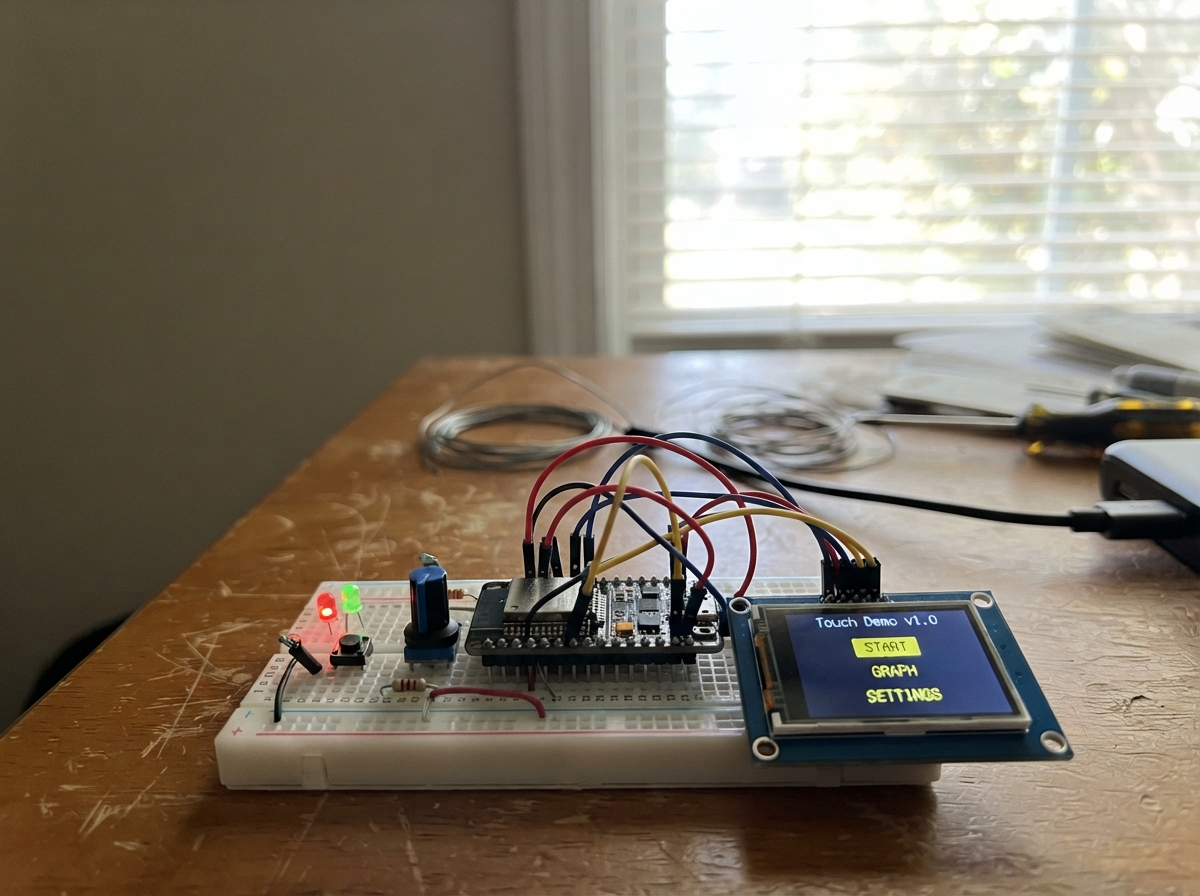
This project demonstrates a touchscreen interface running on an ESP32 microcontroller with a 320x240 ILI9341 display and XPT2046 touch controller. The guide covers wiring the display and touch panel to the ESP32, uploading the firmware, and validating touch responsiveness with a four-corner calibration check.
Builders will receive a complete parts list, wiring diagram, and step-by-step assembly instructions. The firmware uses the LovyanGFX library to render graphics and handle touch input, providing a foundation for interactive applications. After assembly, the touch check screen confirms proper connectivity before moving on to more complex interactions.
Wiring diagram
Assemble it in 3 steps
1. Set the display board down safely
Place the L0496 smart display face-up on a dry, non-metal surface. Its screen and touch layer are already built in, so do not add any jumper wires for this game.
- Keep the clear touch surface clean so taps register reliably.
- Do not place the powered board on loose metal objects; they can touch the pins underneath and damage the board.
2. Connect it by USB
Use a data-capable USB cable to connect the L0496 board to your computer. The USB cable supplies power and lets Schematik place the game on the board.
- If nothing happens when you later deploy, try a different USB cable because some cables provide power only.
- Do not force the USB plug; forcing it can damage the connector.
3. Complete the four-corner touch check
After the game starts, touch the orange TAP square in the highlighted upper-left, upper-right, lower-left, and lower-right corners in that order. The game uses those four touches to match the quiz buttons to your screen automatically.
- Touch near the middle of each orange square and lift your finger before moving to the next one.
- Do not skip a highlighted square or touch a different area first; the game uses this short check to decide which touch direction needs correcting.
Deploy the firmware
#include <Arduino.h>
#include <LovyanGFX.hpp>


enum AppScreen { TOUCH_CHECK, GRADE_PICKER, QUIZ };


// Forward declarations
void centered(const String &text, int x, int y, uint16_t foreground, uint16_t background, uint8_t size);
void button(int x, int y, int w, int h, uint16_t colour, const String &label, uint8_t size);
int randomDifferent(int forbidden, int spread);
void makeQuestion();
void drawGradePicker();
void drawQuiz();
void showResult(bool correct);
void startQuiz(int selectedGrade);
void drawTouchCheck();
void handleTouchCheck(uint16_t x, uint16_t y);
void handleTap(uint16_t x, uint16_t y);

constexpr int SCREEN_W = 320;
constexpr int SCREEN_H = 240;
constexpr int TFT_MISO_PIN = 12;
constexpr int TFT_MOSI_PIN = 13;
constexpr int TFT_SCLK_PIN = 14;
constexpr int TFT_CS_PIN = 15;
constexpr int TFT_DC_PIN = 2;
constexpr int TFT_BACKLIGHT_PIN = 21;
constexpr int TOUCH_SCLK_PIN = 25;
constexpr int TOUCH_MOSI_PIN = 32;
constexpr int TOUCH_MISO_PIN = 39;
constexpr int TOUCH_CS_PIN = 33;
constexpr int TOUCH_IRQ_PIN = 36;

class L0496Display : public lgfx::LGFX_Device {
  lgfx::Panel_ILI9341 panel;
  lgfx::Bus_SPI displayBus;
  lgfx::Light_PWM backlight;
  lgfx::Touch_XPT2046 touch;
public:
  L0496Display() {
    auto busConfig = displayBus.config();
    busConfig.spi_host = HSPI_HOST;
    busConfig.spi_mode = 0;
    busConfig.freq_write = 40000000;
    busConfig.freq_read = 16000000;
    busConfig.spi_3wire = false;
    busConfig.use_lock = true;
    busConfig.dma_channel = 1;
    busConfig.pin_sclk = TFT_SCLK_PIN;
    busConfig.pin_mosi = TFT_MOSI_PIN;
    busConfig.pin_miso = TFT_MISO_PIN;
    busConfig.pin_dc = TFT_DC_PIN;
    displayBus.config(busConfig);
    panel.setBus(&displayBus);

    auto panelConfig = panel.config();
    panelConfig.pin_cs = TFT_CS_PIN;
    panelConfig.pin_rst = -1;
    panelConfig.panel_width = 240;
    panelConfig.panel_height = 320;
    panelConfig.offset_x = 0;
    panelConfig.offset_y = 0;
    panelConfig.readable = true;
    panelConfig.invert = true;
    panelConfig.rgb_order = false;
    panel.config(panelConfig);

    auto lightConfig = backlight.config();
    lightConfig.pin_bl = TFT_BACKLIGHT_PIN;
    lightConfig.invert = false;
    lightConfig.freq = 44100;
    lightConfig.pwm_channel = 7;
    backlight.config(lightConfig);
    panel.setLight(&backlight);

    auto touchConfig = touch.config();
    // Landscape calibration: reverse left/right only; keep top/bottom normal.
    touchConfig.x_min = 3800;
    touchConfig.x_max = 300;
    touchConfig.y_min = 300;
    touchConfig.y_max = 3800;
    // Poll the touch controller directly. Some L0496 revisions do not present
    // the XPT2046 interrupt line reliably, even though touch SPI is available.
    touchConfig.pin_int = -1;
    touchConfig.bus_shared = false;
    touchConfig.offset_rotation = 0;
    touchConfig.spi_host = VSPI_HOST;
    touchConfig.freq = 1000000;
    touchConfig.pin_sclk = TOUCH_SCLK_PIN;
    touchConfig.pin_mosi = TOUCH_MOSI_PIN;
    touchConfig.pin_miso = TOUCH_MISO_PIN;
    touchConfig.pin_cs = TOUCH_CS_PIN;
    touch.config(touchConfig);
    panel.setTouch(&touch);
    setPanel(&panel);
  }
};

L0496Display display;


AppScreen appScreen = GRADE_PICKER;
int grade = 1;
int score = 0;
int questionNumber = 0;
int answer = 0;
int choices[4];
String questionText;
bool wasTouched = false;
bool showingResult = false;
unsigned long resultStartedAt = 0;

// The four-corner check learns whether this particular panel is mirrored.
uint16_t cornerX[4] = {0, 0, 0, 0};
uint16_t cornerY[4] = {0, 0, 0, 0};
uint8_t cornerStep = 0;
bool touchFlipX = false;
bool touchFlipY = false;

constexpr uint16_t NAVY = 0x10A4;
constexpr uint16_t BLUE = 0x249F;
constexpr uint16_t PURPLE = 0x79B8;
constexpr uint16_t GREEN = 0x0640;
constexpr uint16_t ORANGE = 0xFD20;
constexpr uint16_t RED = 0xD904;
constexpr uint16_t WHITE = 0xFFFF;
constexpr uint16_t PALE = 0xD6BF;

void centered(const String &text, int x, int y, uint16_t foreground, uint16_t background, uint8_t size = 1) {
  display.setTextSize(size);
  display.setTextColor(foreground, background);
  display.setTextDatum(middle_center);
  display.drawString(text, x, y);
}

void button(int x, int y, int w, int h, uint16_t colour, const String &label, uint8_t size = 1) {
  display.fillRoundRect(x, y, w, h, 9, colour);
  centered(label, x + w / 2, y + h / 2, WHITE, colour, size);
}

int randomDifferent(int forbidden, int spread) {
  int value;
  do {
    value = answer + random(-spread, spread + 1);
    if (value < 0) value = random(0, spread * 2 + 1);
  } while (value == forbidden || value == answer);
  return value;
}

void makeQuestion() {
  int a = 0;
  int b = 0;
  int kind = 0;
  int limit = 10;

  if (grade == 1) {
    a = random(0, 11); b = random(0, 11 - a); answer = a + b;
    questionText = String(a) + " + " + String(b) + " = ?";
  } else if (grade == 2) {
    limit = 20; kind = random(0, 2);
    a = random(0, limit + 1); b = random(0, limit + 1);
    if (kind == 0 && a + b <= limit) { answer = a + b; questionText = String(a) + " + " + String(b) + " = ?"; }
    else { if (b > a) { int t = a; a = b; b = t; } answer = a - b; questionText = String(a) + " - " + String(b) + " = ?"; }
  } else if (grade == 3) {
    limit = 100; kind = random(0, 2); a = random(0, limit + 1); b = random(0, limit + 1);
    if (kind == 0 && a + b <= limit) { answer = a + b; questionText = String(a) + " + " + String(b) + " = ?"; }
    else { if (b > a) { int t = a; a = b; b = t; } answer = a - b; questionText = String(a) + " - " + String(b) + " = ?"; }
  } else {
    kind = random(0, grade == 6 ? 3 : 2);
    if (kind == 0) {
      a = random(2, grade == 4 ? 11 : 13); b = random(2, grade == 4 ? 11 : 21);
      answer = a * b; questionText = String(a) + " x " + String(b) + " = ?";
    } else if (kind == 1) {
      b = random(2, grade == 4 ? 11 : 13); answer = random(2, grade == 4 ? 11 : 21); a = b * answer;
      questionText = String(a) + " / " + String(b) + " = ?";
    } else {
      a = random(100, 501); b = random(10, 200); answer = a + b;
      questionText = String(a) + " + " + String(b) + " = ?";
    }
  }

  int correctSlot = random(0, 4);
  for (int i = 0; i < 4; ++i) choices[i] = -1;
  choices[correctSlot] = answer;
  int spread = max(5, answer / 3 + 2);
  for (int i = 0; i < 4; ++i) {
    if (i == correctSlot) continue;
    int candidate;
    bool duplicate;
    do {
      candidate = randomDifferent(-9999, spread);
      duplicate = false;
      for (int j = 0; j < 4; ++j) if (choices[j] == candidate) duplicate = true;
    } while (duplicate);
    choices[i] = candidate;
  }
  ++questionNumber;
}

void drawTouchCheck() {
  static const char *cornerNames[] = {"upper-left", "upper-right", "lower-left", "lower-right"};
  display.fillScreen(NAVY);
  centered("Touch check", 160, 26, WHITE, NAVY, 2);
  centered("Touch the highlighted corner", 160, 52, PALE, NAVY);
  centered(String("Step ") + String(cornerStep + 1) + " of 4", 160, 76, WHITE, NAVY);
  const int markerSize = 48;
  const int margin = 12;
  int markerX = (cornerStep == 1 || cornerStep == 3) ? SCREEN_W - margin - markerSize : margin;
  int markerY = (cornerStep >= 2) ? SCREEN_H - margin - markerSize : 92;
  display.fillRoundRect(markerX, markerY, markerSize, markerSize, 10, ORANGE);
  centered("TAP", markerX + markerSize / 2, markerY + markerSize / 2, WHITE, ORANGE);
  centered(cornerNames[cornerStep], 160, 218, PALE, NAVY);
}

void drawGradePicker() {
  display.fillScreen(NAVY);
  centered("Maths Quest", 160, 27, WHITE, NAVY, 2);
  centered("Choose your school grade", 160, 52, PALE, NAVY);
  for (int i = 0; i < 6; ++i) {
    int column = i % 2;
    int row = i / 2;
    button(24 + column * 148, 76 + row * 48, 124, 38, column == 0 ? BLUE : PURPLE, String("Grade ") + String(i + 1));
  }
  centered("Answer questions to earn points!", 160, 228, PALE, NAVY);
}

void drawQuiz() {
  display.fillScreen(NAVY);
  display.fillRect(0, 0, SCREEN_W, 34, BLUE);
  centered(String("Grade ") + String(grade), 52, 17, WHITE, BLUE);
  centered(String("Score: ") + String(score), 160, 17, WHITE, BLUE);
  button(258, 5, 54, 24, RED, "Home");
  centered(questionText, 160, 73, WHITE, NAVY, 2);
  for (int i = 0; i < 4; ++i) {
    int x = 20 + (i % 2) * 145;
    int y = 112 + (i / 2) * 58;
    button(x, y, 135, 46, i % 2 == 0 ? GREEN : ORANGE, String(choices[i]), 2);
  }
  centered("Tap the correct answer", 160, 222, PALE, NAVY);
}

void showResult(bool correct) {
  display.fillRoundRect(48, 83, 224, 60, 10, correct ? GREEN : RED);
  centered(correct ? "Great job! +1 point" : String("Not quite. It is ") + String(answer), 160, 113, WHITE, correct ? GREEN : RED, 1);
  showingResult = true;
  resultStartedAt = millis();
}

void startQuiz(int selectedGrade) {
  grade = selectedGrade;
  score = 0;
  questionNumber = 0;
  appScreen = QUIZ;
  makeQuestion();
  drawQuiz();
}

void handleTouchCheck(uint16_t x, uint16_t y) {
  cornerX[cornerStep] = x;
  cornerY[cornerStep] = y;
  ++cornerStep;
  if (cornerStep < 4) {
    drawTouchCheck();
    return;
  }
  // Compare physical left/right and top/bottom taps. If their reported order is
  // backwards, reverse only that coordinate before the quiz uses it.
  touchFlipX = cornerX[0] > cornerX[1];
  touchFlipY = cornerY[0] > cornerY[2];
  Serial.printf("Touch check complete: flipX=%d flipY=%d\n", touchFlipX, touchFlipY);
  appScreen = GRADE_PICKER;
  drawGradePicker();
}

void handleTap(uint16_t x, uint16_t y) {
  if (appScreen == TOUCH_CHECK) {
    handleTouchCheck(x, y);
    return;
  }
  if (touchFlipX) x = SCREEN_W - 1 - x;
  if (touchFlipY) y = SCREEN_H - 1 - y;
  if (appScreen == GRADE_PICKER) {
    int row = -1;
    if (y >= 76 && y < 114) row = 0;
    else if (y >= 124 && y < 162) row = 1;
    else if (y >= 172 && y < 210) row = 2;
    if (row >= 0) {
      if (x >= 24 && x < 148) startQuiz(row * 2 + 1);
      else if (x >= 172 && x < 296) startQuiz(row * 2 + 2);
    }
    return;
  }
  if (showingResult) return;
  if (y < 34 && x >= 258) { appScreen = GRADE_PICKER; drawGradePicker(); return; }
  // Only score a tap that falls inside one of the four visible answer buttons.
  // This leaves the small spaces between buttons inactive instead of selecting a neighbour.
  for (int i = 0; i < 4; ++i) {
    const int buttonX = 20 + (i % 2) * 145;
    const int buttonY = 112 + (i / 2) * 58;
    const bool insideButton = x >= buttonX && x < buttonX + 135 &&
                              y >= buttonY && y < buttonY + 46;
    if (insideButton) {
      const bool correct = choices[i] == answer;
      if (correct) ++score;
      showResult(correct);
      return;
    }
  }
}

void setup() {
  Serial.begin(115200);
  delay(100);
  display.init();
  display.setRotation(1);
  display.setBrightness(255);
  randomSeed(esp_random());
  Serial.println("Maths Quest started");
  appScreen = TOUCH_CHECK;
  drawTouchCheck();
}

void loop() {
  uint16_t x, y;
  bool touched = display.getTouch(&x, &y);
  if (touched && !wasTouched) {
    handleTap(x, y);
  }
  wasTouched = touched;
  if (showingResult && millis() - resultStartedAt >= 900) {
    showingResult = false;
    makeQuestion();
    drawQuiz();
  }
  delay(20);
}
Remix this project
Make it yours in one click
Open a full copy of this project in your own Schematik workspace, diagram, code, parts, and assembly steps included. Swap the sensor, add features, or redesign the whole thing with AI. The author's original stays untouched.