Community project
UIP-6 Control Panel
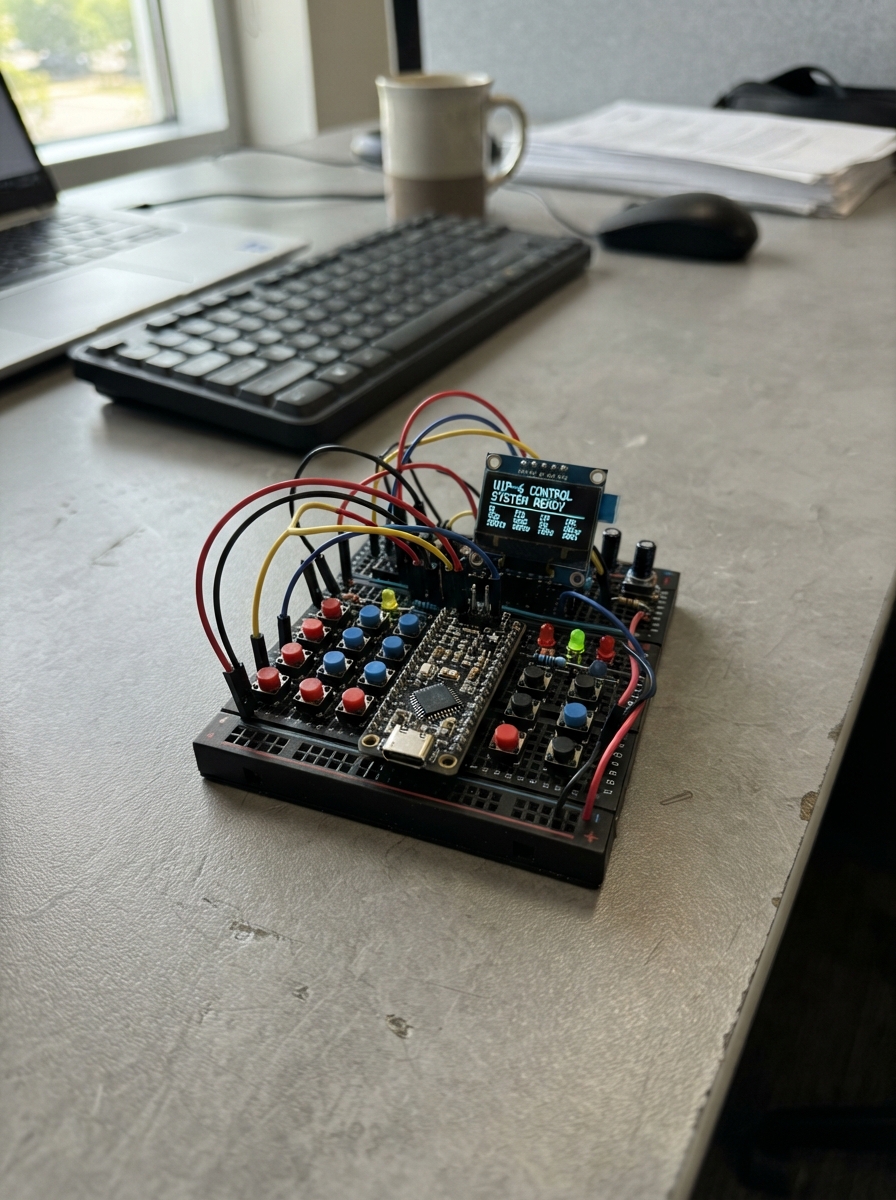
The UIP-6 Control Panel is a touchscreen interface built around an ESP32 microcontroller and a 2.8-inch ILI9341 display with XPT2046 capacitive touch sensing. This guide provides everything needed to assemble a responsive control panel that can monitor and manage multiple system areas including process control, motion detection, and safety functions.
Builders will receive a complete wiring diagram showing SPI connections for both the display and touch controller, a full parts list with pinout specifications, and ready-to-compile Arduino firmware featuring button rendering, touch event handling, and multi-zone screen layout management. Assembly takes just a few steps: preparing the display module, mounting the panel in a secure location, and verifying the screen layout responds correctly to touch input.
Wiring diagram
Assemble it in 3 steps
1. Подготовьте экранный модуль
Возьмите плату Sunton ESP32-2432S028R — это готовая плата с цветным экраном и сенсорным стеклом. Для этого макета больше никаких деталей, проводов к станку или к шкафу 380 В не подключайте.
- Снимите защитную плёнку с экрана только после установки платы в корпус, чтобы не поцарапать стекло.
- Не подключайте эту плату к клеммам станка, контакторам или сети 380 В: текущая версия служит только интерактивным макетом интерфейса.
2. Установите панель в безопасном месте
Закрепите плату за монтажные отверстия в пластиковом корпусе или временно положите её на сухую непроводящую поверхность экраном вверх. Оставьте доступ к USB-разъёму — через него плата получает питание и загружается программа.
- Для показа интерфейса рядом со станком используйте отдельный пластиковый корпус с прозрачным окном перед экраном.
- Не кладите плату внутрь существующего силового шкафа: рядом с проводами 380 В она может быть повреждена и создаст опасную ситуацию.
3. Проверьте экранный макет
Подключите плату USB-кабелем к компьютеру. После загрузки программы касайтесь кнопок «VODA», «KLEY», «+» и «−», а также стрелок: они меняют только надписи и цвета на экране. Красная кнопка STOP выключает только нарисованные состояния; «SBROS» возвращает макет в ожидание.
- Начальное значение подачи клея — 50%; кнопки «+» и «−» меняют его шагом 10%.
- Экранная кнопка STOP не является аварийной остановкой станка и не должна заменять отдельную физическую грибовидную кнопку аварийного останова.
Deploy the firmware
#include <Arduino.h>
#include <SPI.h>
#include <Adafruit_GFX.h>
#include <Adafruit_ILI9341.h>
#include <XPT2046_Touchscreen.h>

// Built-in screen and touch wiring on the Sunton ESP32-2432S028R board.

struct Button { int16_t x, y, w, h; };


// Forward declarations
bool inside(const Button &b, int16_t x, int16_t y);
void labelCentered(const String &text, int16_t x, int16_t y, int16_t w, uint8_t size, uint16_t color);
void drawRoundedButton(const Button &b, uint16_t fill, const String &top, const String &bottom);
void drawHeader();
void drawProcessArea();
void drawMotionArea();
void drawSafetyArea();
void drawScreen();
void updateScreen();
bool readTouch(int16_t &screenX, int16_t &screenY);
void handleTap(int16_t x, int16_t y);

constexpr int TFT_CS = 15;
constexpr int TFT_DC = 2;
constexpr int TFT_RST = -1;
constexpr int TFT_SCK = 14;
constexpr int TFT_MISO = 12;
constexpr int TFT_MOSI = 13;
constexpr int TOUCH_CS = 33;
constexpr int TOUCH_IRQ = 36;
constexpr int TOUCH_SCK = 25;
constexpr int TOUCH_MISO = 39;
constexpr int TOUCH_MOSI = 32;

SPIClass tftSPI(HSPI);
SPIClass touchSPI(VSPI);
// The real ESP32 uses its dedicated HSPI instance. The browser facade only
// exposes Adafruit's explicit-pin constructor, so keep that compatibility
// path separate without changing the device-side wiring.
#if defined(ARDUINO_ARCH_ESP32)
Adafruit_ILI9341 tft(&tftSPI, TFT_CS, TFT_DC, TFT_RST);
#else
Adafruit_ILI9341 tft(TFT_CS, TFT_DC, TFT_MOSI, TFT_SCK, TFT_RST, TFT_MISO);
#endif
XPT2046_Touchscreen touch(TOUCH_CS, TOUCH_IRQ);

constexpr uint16_t NAVY = 0x0841;
constexpr uint16_t PANEL = 0x18C3;
constexpr uint16_t CYAN = 0x05FF;
constexpr uint16_t GREEN = 0x05A0;
constexpr uint16_t RED = 0xF800;
constexpr uint16_t ORANGE = 0xFD20;
constexpr uint16_t WHITE = ILI9341_WHITE;
constexpr uint16_t GREY = 0x7BEF;

bool waterOn = false;
bool glueOn = false;
bool emergencyStop = false;
int glueLevel = 50;
String motion = "ОЖИДАНИЕ";


const Button waterButton = {8, 55, 94, 42};
const Button glueButton = {110, 55, 94, 42};
const Button minusButton = {212, 55, 48, 42};
const Button plusButton = {264, 55, 48, 42};
const Button upButton = {134, 119, 52, 35};
const Button leftButton = {76, 158, 52, 35};
const Button downButton = {134, 158, 52, 35};
const Button rightButton = {192, 158, 52, 35};
const Button stopButton = {252, 119, 60, 74};
const Button resetButton = {252, 202, 60, 28};

bool inside(const Button &b, int16_t x, int16_t y) {
  return x >= b.x && x < b.x + b.w && y >= b.y && y < b.y + b.h;
}

void labelCentered(const String &text, int16_t x, int16_t y, int16_t w, uint8_t size, uint16_t color) {
  tft.setTextSize(size);
  tft.setTextColor(color);
  int16_t textWidth = text.length() * 6 * size;
  tft.setCursor(x + (w - textWidth) / 2, y);
  tft.print(text);
}

void drawRoundedButton(const Button &b, uint16_t fill, const String &top, const String &bottom = "") {
  tft.fillRoundRect(b.x, b.y, b.w, b.h, 7, fill);
  tft.drawRoundRect(b.x, b.y, b.w, b.h, 7, WHITE);
  if (bottom.length() == 0) {
    labelCentered(top, b.x, b.y + (b.h - 16) / 2, b.w, 2, WHITE);
  } else {
    labelCentered(top, b.x, b.y + 6, b.w, 1, WHITE);
    labelCentered(bottom, b.x, b.y + 21, b.w, 1, WHITE);
  }
}

void drawHeader() {
  tft.fillRect(0, 0, 320, 47, NAVY);
  tft.setTextColor(WHITE);
  tft.setTextSize(2);
  tft.setCursor(10, 7);
  tft.print("UIP-6");
  tft.setTextSize(1);
  tft.setCursor(10, 29);
  tft.print("TELEZHKA KLEYA I VODY");
  tft.fillRoundRect(228, 10, 82, 25, 6, emergencyStop ? RED : GREEN);
  labelCentered(emergencyStop ? "STOP" : "MAKET", 228, 17, 82, 1, WHITE);
}

void drawProcessArea() {
  drawRoundedButton(waterButton, waterOn ? GREEN : PANEL, "VODA", waterOn ? "VKLUCHENO" : "VYKL");
  drawRoundedButton(glueButton, glueOn ? GREEN : PANEL, "KLEY", glueOn ? "VKLUCHENO" : "VYKL");
  drawRoundedButton(minusButton, PANEL, "-");
  drawRoundedButton(plusButton, PANEL, "+");

  tft.fillRoundRect(212, 102, 100, 12, 5, PANEL);
  int fillWidth = map(glueLevel, 0, 100, 0, 96);
  tft.fillRoundRect(214, 104, fillWidth, 8, 4, ORANGE);
  tft.setTextSize(1);
  tft.setTextColor(WHITE);
  tft.setCursor(212, 38);
  tft.print("PODACHA KLEYA");
  tft.fillRect(212, 48, 100, 7, NAVY);
  labelCentered(String(glueLevel) + "%", 212, 61, 100, 1, WHITE);
}

void drawMotionArea() {
  tft.fillRoundRect(8, 108, 236, 122, 8, PANEL);
  tft.setTextColor(CYAN);
  tft.setTextSize(1);
  tft.setCursor(15, 114);
  tft.print("DVIJENIE TELEZHKI");
  drawRoundedButton(upButton, NAVY, "VERH");
  drawRoundedButton(leftButton, NAVY, "NAZAD");
  drawRoundedButton(downButton, NAVY, "VNIZ");
  drawRoundedButton(rightButton, NAVY, "VPERED");
  tft.fillRoundRect(15, 202, 222, 21, 5, NAVY);
  labelCentered(motion, 15, 208, 222, 1, WHITE);
}

void drawSafetyArea() {
  drawRoundedButton(stopButton, RED, "STOP", "MAKET");
  drawRoundedButton(resetButton, emergencyStop ? ORANGE : PANEL, "SBROS");
}

void drawScreen() {
  tft.fillScreen(ILI9341_BLACK);
  drawHeader();
  drawProcessArea();
  drawMotionArea();
  drawSafetyArea();
}

void updateScreen() {
  // This UI redraws only the regions whose displayed state changed.
  tft.fillRect(0, 0, 320, 47, ILI9341_BLACK);
  drawHeader();
  tft.fillRect(8, 55, 304, 59, ILI9341_BLACK);
  drawProcessArea();
  tft.fillRect(8, 108, 304, 122, ILI9341_BLACK);
  drawMotionArea();
  drawSafetyArea();
}

bool readTouch(int16_t &screenX, int16_t &screenY) {
  if (!touch.touched()) return false;
  TS_Point point = touch.getPoint();
  // Calibration for the built-in XPT2046 touch panel in landscape orientation.
  screenX = constrain(map(point.y, 3800, 240, 0, 320), 0, 319);
  screenY = constrain(map(point.x, 200, 3700, 0, 240), 0, 239);
  return true;
}

void handleTap(int16_t x, int16_t y) {
  if (inside(stopButton, x, y)) {
    emergencyStop = true;
    waterOn = false;
    glueOn = false;
    motion = "OSTANOVLENO";
  } else if (inside(resetButton, x, y) && emergencyStop) {
    emergencyStop = false;
    motion = "OZHIDANIE";
  } else if (!emergencyStop && inside(waterButton, x, y)) {
    waterOn = !waterOn;
  } else if (!emergencyStop && inside(glueButton, x, y)) {
    glueOn = !glueOn;
  } else if (!emergencyStop && inside(minusButton, x, y)) {
    glueLevel = max(0, glueLevel - 10);
  } else if (!emergencyStop && inside(plusButton, x, y)) {
    glueLevel = min(100, glueLevel + 10);
  } else if (!emergencyStop && inside(upButton, x, y)) {
    motion = "KOMANDA: VERH";
  } else if (!emergencyStop && inside(downButton, x, y)) {
    motion = "KOMANDA: VNIZ";
  } else if (!emergencyStop && inside(leftButton, x, y)) {
    motion = "KOMANDA: NAZAD";
  } else if (!emergencyStop && inside(rightButton, x, y)) {
    motion = "KOMANDA: VPERED";
  } else {
    return;
  }
  updateScreen();
}

void setup() {
  tftSPI.begin(TFT_SCK, TFT_MISO, TFT_MOSI, TFT_CS);
  tft.begin();
  tft.setRotation(1);
  touchSPI.begin(TOUCH_SCK, TOUCH_MISO, TOUCH_MOSI, TOUCH_CS);
  touch.begin(touchSPI);
  touch.setRotation(1);
  drawScreen();
}

void loop() {
  static bool wasTouched = false;
  static uint32_t lastTapMs = 0;
  int16_t x, y;
  bool isTouched = readTouch(x, y);
  if (isTouched && !wasTouched && millis() - lastTapMs > 180) {
    handleTap(x, y);
    lastTapMs = millis();
  }
  wasTouched = isTouched;
  delay(15);
}
Remix this project
Make it yours in one click
Open a full copy of this project in your own Schematik workspace — diagram, code, parts, and assembly steps included. Swap the sensor, add features, or redesign the whole thing with AI. The author's original stays untouched.