Community project
USB GPS Dashboard
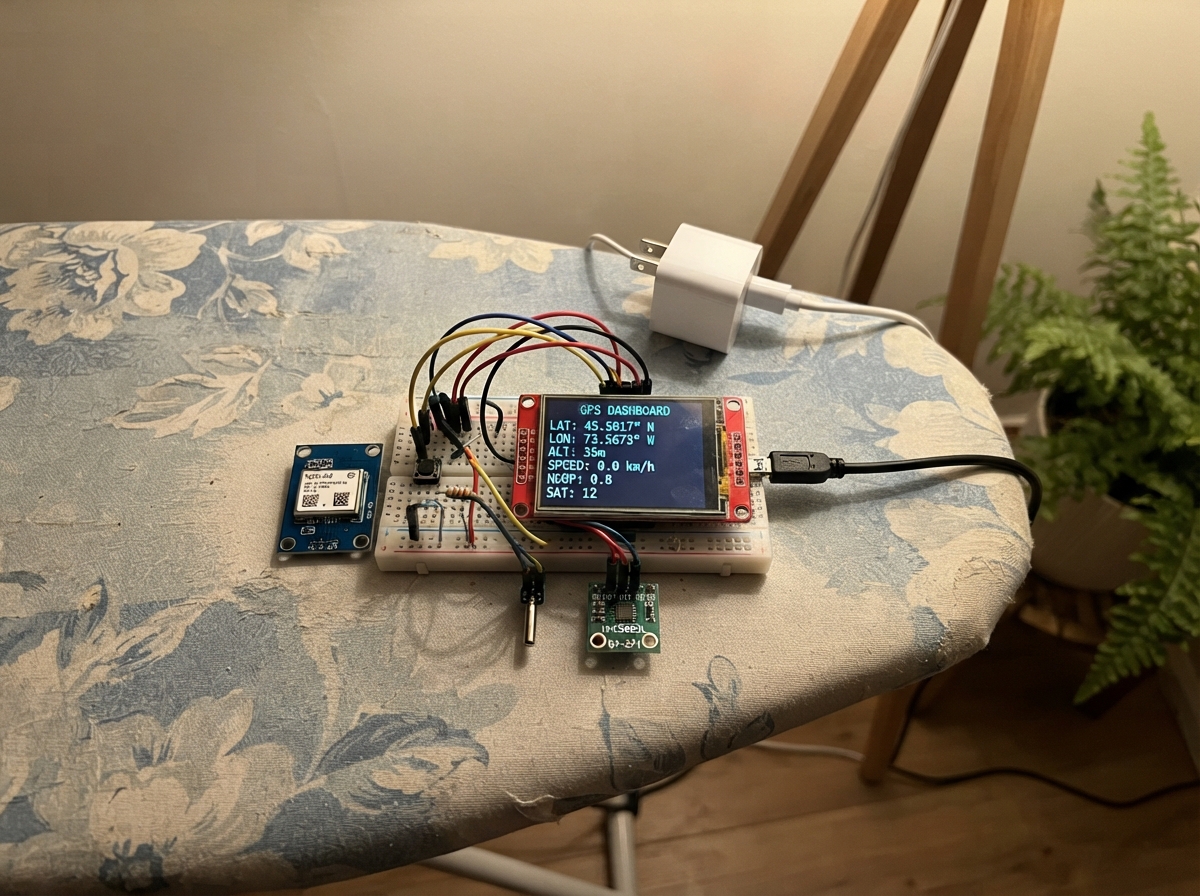
Build a compact GPS dashboard that displays real-time location data, heading, temperature, and speed on a colorful touchscreen. This project combines an ESP32 microcontroller with a NEO-6M GPS receiver, ILI9341 TFT display, HMC5883L magnetometer, and DS18B20 temperature sensor to create a portable navigation and environmental monitoring device.
The guide includes a complete wiring diagram showing all sensor connections, a full parts list with recommended suppliers, ready-to-upload firmware with support for local time calculation and directional headings, and step-by-step assembly instructions. Builders will learn how to integrate multiple I2C and serial sensors, configure the display for real-time updates, and calibrate the compass module for accurate heading readings.
Wiring diagram

Gather all the parts
Assemble it in 7 steps
1. Mount the screen and board
Fit the ESP32 board and the ILI9341 screen into a non-metal dashboard enclosure. Turn the screen sideways so its long edge runs across the dashboard, and leave the ESP32 USB socket reachable.
- Use short mounting screws or double-sided foam tape; do not let metal screws touch the back of the screen circuit board.
- Do not mount this where it blocks the driver’s view, airbags, steering wheel movement, or vehicle controls.
2. Wire the display
With USB unplugged, connect display_1 VCC to ESP32 3V3 (power), GND to ESP32 GND (ground), MOSI to GPIO23 (data), MISO to GPIO19 (data), SCK to GPIO18 (clock), TFT_CS to GPIO27 (screen select), TFT_DC to GPIO32 (screen control), TFT_RST to GPIO33 (screen reset), TOUCH_CS to GPIO25 (unused touch-controller select), and TFT_BL to 3V3 (backlight power).
- Keep the three SPI wires—MOSI, MISO, and SCK—short and routed together so the picture stays stable.
- Connect the screen only to 3V3, not the ESP32 5V/VIN pin—5 V on a 3.3 V screen can damage it.
3. Wire the GPS receiver
Put the GPS antenna where it can see the sky, such as near the windscreen but clear of airbags. Connect gps_1 VCC to ESP32 3V3 (power), GND to ESP32 GND (ground), and TX to GPIO16 (data). Leave the GPS RX pin unconnected.
- The first location fix can take several minutes, especially indoors or after the module has been moved a long distance.
- Do not place the antenna where it can become a flying object in a sudden stop; secure it firmly.
4. Wire the temperature probe and its resistor
Connect temperature_1 VCC to ESP32 3V3 (power), GND to ESP32 GND (ground), and DATA to GPIO13 (signal). Put temperature_pullup_1 between the same DATA connection and 3V3: one resistor leg to 3V3 (power), the other resistor leg to the DS18B20 DATA/GPIO13 connection (signal).
- If using the small loose three-legged DS18B20, view its flat face toward you: left is VCC, middle is DATA, and right is GND. A waterproof probe’s wire colors can vary, so check its label before connecting it.
- Keep the temperature sensor away from the ESP32, screen, and direct sun; those heat sources make it read warmer than the car cabin air.
5. Wire the heading sensor
Connect compass_1 VCC to ESP32 3V3 (power), GND to ESP32 GND (ground), SDA to GPIO21 (data), and SCL to GPIO22 (clock). Mount this small sensor flat, with its printed direction arrow facing the front of the car if it has one.
- Place the compass at least 20 cm from the ESP32, display, USB cable, speakers, steel screws, and magnets; these can pull the heading away from north.
- A compass mounted close to vehicle metal or wiring can show the wrong direction even though the rest of the dashboard works.
6. Add the two control buttons
Connect one mode_button_1 terminal to ESP32 GPIO14 (signal) and its other terminal to ESP32 GND (ground). Connect one rotate_button_1 terminal to ESP32 GPIO4 (signal) and its other terminal to ESP32 GND (ground). For each four-leg tactile button, use two legs on opposite sides of its center gap, not two legs on the same side.
- Put both buttons where they can be pressed without looking away from the road. Press the day/night button once to change colours. Each press of the new rotate button turns the displayed dashboard one quarter-turn clockwise.
- Do not install either button where a loose wire could interfere with pedals, steering, or airbags.
7. Power and test the dashboard
Recheck that every part shares GND and that all VCC wires go to 3V3. Then connect the ESP32 USB socket to a good-quality 5 V USB car charger using a USB cable, secure the enclosure, and keep the GPS antenna facing upward.
- The display will show dashes for GPS-derived time, speed, and altitude until the GPS receiver has a satellite fix. The rotate button lets you choose the orientation that matches how your particular screen is mounted.
- Use a reputable fused USB car charger. Never connect vehicle 12 V directly to any ESP32 or sensor pin; doing so can destroy the electronics.
Review all connections
1. Connections between "display_1" and "ESP32"
2. Connections between "gps_1" and "ESP32"
3. Connections between "temperature_1" and "ESP32"
4. Connections between "compass_1" and "ESP32"
5. Connections between "mode_button_1" and "ESP32"
6. Connections between "temperature_pullup_1" and "ESP32"
7. Connections between "rotate_button_1" and "ESP32"
Deploy the firmware
#include <Arduino.h>
#include <SPI.h>
#include <Wire.h>
#include <Adafruit_GFX.h>
#include <Adafruit_ILI9341.h>
#include <TinyGPS++.h>
#include <OneWire.h>
#include <DallasTemperature.h>
#include <Adafruit_Sensor.h>
#include <Adafruit_HMC5883_U.h>


// Forward declarations
uint16_t backgroundColor();
uint16_t foregroundColor();
uint16_t accentColor();
String twoDigits(uint8_t value);
bool isLeapYear(int year);
uint8_t daysInMonth(int year, uint8_t month);
void addOneDay(int &year, uint8_t &month, uint8_t &day);
uint8_t weekDay(int year, uint8_t month, uint8_t day);
uint8_t lastSunday(int year, uint8_t month);
bool pragueSummerTime(int year, uint8_t month, uint8_t day, uint8_t hourUtc);
String localDateTimeText();
String directionFromDegrees(float value);
String temperatureText();
String speedText();
String altitudeText();
String headingText();
void printClipped(const String &text, int16_t x, int16_t y, uint8_t size, int16_t maxWidth);
void printClippedScaled(const String &text, int16_t x, int16_t y, uint8_t widthSize, uint8_t heightSize, int16_t maxWidth);
void printCompressedTall(const String &text, int16_t x, int16_t y, uint8_t heightSize, int16_t maxWidth);
void drawStaticLayout();
void drawValues();
void redrawScreen();
void updateHeading();
void updateTemperature();
void handleButtons();

constexpr int TFT_CS_PIN = 27;
constexpr int TFT_DC_PIN = 32;
constexpr int TFT_RST_PIN = 33;
constexpr int GPS_RX_PIN = 16;
constexpr int ONEWIRE_PIN = 13;
constexpr int BUTTON_PIN = 14;
constexpr int ROTATE_BUTTON_PIN = 4;
constexpr int I2C_SDA_PIN = 21;
constexpr int I2C_SCL_PIN = 22;

Adafruit_ILI9341 tft(TFT_CS_PIN, TFT_DC_PIN, TFT_RST_PIN);
TinyGPSPlus gps;
HardwareSerial gpsSerial(2);
OneWire oneWire(ONEWIRE_PIN);
DallasTemperature temperatureSensor(&oneWire);
Adafruit_HMC5883_Unified compass(12345);

bool nightMode = false;
bool compassReady = false;
bool temperaturePending = false;
float outsideTempC = NAN;
float headingDegrees = NAN;
uint8_t displayRotation = 3; // Starts wide; each rotate-button press advances one quarter-turn clockwise.
unsigned long lastScreenUpdate = 0;
unsigned long lastTemperatureRequest = 0;
unsigned long lastModeButtonChange = 0;
unsigned long lastRotateButtonChange = 0;
bool lastModeReading = HIGH, modeButtonState = HIGH;
bool lastRotateReading = HIGH, rotateButtonState = HIGH;

uint16_t backgroundColor() { return nightMode ? ILI9341_BLACK : ILI9341_WHITE; }
uint16_t foregroundColor() { return nightMode ? ILI9341_GREEN : ILI9341_BLACK; }
uint16_t accentColor() { return nightMode ? ILI9341_CYAN : ILI9341_BLUE; }
String twoDigits(uint8_t value) { return value < 10 ? "0" + String(value) : String(value); }
bool isLeapYear(int year) { return (year % 4 == 0 && year % 100 != 0) || year % 400 == 0; }
uint8_t daysInMonth(int year, uint8_t month) { static const uint8_t days[] = {31,28,31,30,31,30,31,31,30,31,30,31}; return month == 2 && isLeapYear(year) ? 29 : days[month - 1]; }
void addOneDay(int &year, uint8_t &month, uint8_t &day) { if (++day > daysInMonth(year, month)) { day = 1; if (++month > 12) { month = 1; ++year; } } }
uint8_t weekDay(int year, uint8_t month, uint8_t day) { static const int offsets[] = {0,3,2,5,0,3,5,1,4,6,2,4}; int y = year - (month < 3); return (y + y / 4 - y / 100 + y / 400 + offsets[month - 1] + day) % 7; }
uint8_t lastSunday(int year, uint8_t month) { uint8_t day = daysInMonth(year, month); return day - weekDay(year, month, day); }
bool pragueSummerTime(int year, uint8_t month, uint8_t day, uint8_t hourUtc) { if (month < 3 || month > 10) return false; if (month > 3 && month < 10) return true; uint8_t change = lastSunday(year, month); return month == 3 ? (day > change || (day == change && hourUtc >= 1)) : (day < change || (day == change && hourUtc < 1)); }

String localDateTimeText() {
#if !defined(ESP32)
  // The browser has no GPS receiver, so use a fixed example only in its preview.
  return "26.09.2026 Sat 14:30";
#else
  if (!gps.date.isValid() || !gps.time.isValid()) return "Waiting for GPS time";
  int year = gps.date.year(); uint8_t month = gps.date.month(), day = gps.date.day(), hour = gps.time.hour();
  hour += pragueSummerTime(year, month, day, hour) ? 2 : 1;
  if (hour >= 24) { hour -= 24; addOneDay(year, month, day); }
  static const char *names[] = {"Sun","Mon","Tue","Wed","Thu","Fri","Sat"};
  return twoDigits(day) + "." + twoDigits(month) + "." + String(year) + " " + names[weekDay(year, month, day)] + " " + twoDigits(hour) + ":" + twoDigits(gps.time.minute());
#endif
}
String directionFromDegrees(float value) { if (isnan(value)) return "---"; static const char* names[] = {"N","NE","E","SE","S","SW","W","NW"}; return names[(int)((value + 22.5f) / 45.0f) % 8]; }
String temperatureText() {
#if !defined(ESP32)
  return "18.6 C";
#else
  return isnan(outsideTempC) || outsideTempC <= -126 ? "--.- C" : String(outsideTempC, 1) + " C";
#endif
}
String speedText() {
#if !defined(ESP32)
  return "68 km/h";
#else
  return gps.speed.isValid() ? String((int)round(gps.speed.kmph())) + " km/h" : "--- km/h";
#endif
}
String altitudeText() {
#if !defined(ESP32)
  return "245 m";
#else
  return gps.altitude.isValid() ? String((int)round(gps.altitude.meters())) + " m" : "---- m";
#endif
}
String headingText() {
#if !defined(ESP32)
  return "72 NE";
#else
  return isnan(headingDegrees) ? "---" : String((int)round(headingDegrees)) + " " + directionFromDegrees(headingDegrees);
#endif
}

void printClipped(const String &text, int16_t x, int16_t y, uint8_t size, int16_t maxWidth) {
  tft.setTextSize(size);
  String shown = text;
  while (shown.length() && (int16_t)(shown.length() * 6 * size) > maxWidth) shown = shown.substring(0, shown.length() - 1);
  tft.setCursor(x, y);
  tft.print(shown);
}

// Scale built-in text independently in each direction, clipping only if it cannot fit.
void printClippedScaled(const String &text, int16_t x, int16_t y, uint8_t widthSize, uint8_t heightSize, int16_t maxWidth) {
  tft.setTextSize(widthSize, heightSize);
  String shown = text;
  while (shown.length() && (int16_t)(shown.length() * 6 * widthSize) > maxWidth) shown = shown.substring(0, shown.length() - 1);
  tft.setCursor(x, y);
  tft.print(shown);
}

// The standard font has a blank column at each glyph edge.  Let adjacent letters share
// that blank space so this line can be wider without losing any date or time characters.
void printCompressedTall(const String &text, int16_t x, int16_t y, uint8_t heightSize, int16_t maxWidth) {
  const int16_t characterAdvance = 11;
  const int16_t count = min((int16_t)text.length(), (int16_t)(maxWidth / characterAdvance));
  tft.setTextSize(2, heightSize);
  for (int16_t i = 0; i < count; ++i) {
    char character[2] = { text[i], '\0' };
    tft.setCursor(x + i * characterAdvance, y);
    tft.print(character);
  }
}

void drawStaticLayout() {
  const int w = tft.width(), h = tft.height();
  const bool wide = w > h;
  const uint16_t bg = backgroundColor(), accent = accentColor();
  tft.fillScreen(bg);
  tft.setTextWrap(false);
  tft.drawRoundRect(2, 2, w - 4, h - 4, 7, accent);
  tft.setTextColor(accent, bg);
  tft.setTextSize(1);
  if (wide) {
    tft.drawFastHLine(7, 68, w - 14, accent);
    tft.drawFastHLine(7, 151, w - 14, accent);
    tft.setCursor(10, 10); tft.print("PRAGUE LOCAL TIME");
    tft.setCursor(w - 45, 10); tft.print(nightMode ? "NIGHT" : "DAY");
    tft.setCursor(10, 78); tft.print("SPEED"); tft.setCursor(w / 2 + 12, 78); tft.print("HEADING");
    tft.setCursor(10, 161); tft.print("ALTITUDE"); tft.setCursor(w / 2 + 12, 161); tft.print("OUTSIDE");
  } else {
    // Compact 4:3 view: use the entire panel as three equal information rows.
    const int row1 = h / 3, row2 = (h * 2) / 3;
    const int dividerX = w / 2;
    tft.drawFastHLine(6, row1, w - 12, accent);
    tft.drawFastHLine(6, row2, w - 12, accent);
    tft.drawFastVLine(dividerX, row1 + 14, row2 - row1 - 28, accent);
    tft.drawFastVLine(dividerX, row2 + 14, h - row2 - 28, accent);
    tft.setCursor(8, row1 + 8); tft.print("SPEED");
    tft.setCursor(dividerX + 8, row1 + 8); tft.print("HEADING");
    tft.setCursor(8, row2 + 8); tft.print("ALTITUDE");
    tft.setCursor(dividerX + 8, row2 + 8); tft.print("TEMP");
  }
}

void drawValues() {
  const int w = tft.width(), h = tft.height();
  const bool wide = w > h;
  const uint16_t bg = backgroundColor(), fg = foregroundColor();
  tft.setTextColor(fg, bg);
  if (wide) {
    tft.fillRect(8, 24, w - 16, 38, bg);
    tft.fillRect(8, 94, w / 2 - 12, 44, bg); tft.fillRect(w / 2 + 8, 94, w / 2 - 16, 44, bg);
    tft.fillRect(8, 177, w / 2 - 12, 44, bg); tft.fillRect(w / 2 + 8, 177, w / 2 - 16, 44, bg);
    printClipped(localDateTimeText(), 10, 34, 2, w - 20);
    printClipped(speedText(), 10, 105, 3, w / 2 - 18);
    printClipped(headingText(), w / 2 + 12, 105, 3, w / 2 - 20);
    printClipped(altitudeText(), 10, 188, 3, w / 2 - 18);
    printClipped(temperatureText(), w / 2 + 12, 188, 3, w / 2 - 20);
  } else {
    const int row1 = h / 3, row2 = (h * 2) / 3;
    const int dividerX = w / 2;
    // Erase only changing text; the row separators and vertical dividers remain visible.
    tft.fillRect(7, 7, w - 14, row1 - 14, bg);
    tft.fillRect(7, row1 + 22, dividerX - 15, row2 - row1 - 29, bg);
    tft.fillRect(dividerX + 7, row1 + 22, w - dividerX - 14, row2 - row1 - 29, bg);
    tft.fillRect(7, row2 + 22, dividerX - 15, h - row2 - 29, bg);
    tft.fillRect(dividerX + 7, row2 + 22, w - dividerX - 14, h - row2 - 29, bg);
    // The top panel is the TODAY area: a clear title plus tall date, day, and time.
    // The built-in font keeps the browser preview and real ESP32 display consistent.
    tft.setTextColor(accentColor(), bg);
    tft.setTextSize(2);
    tft.setCursor(8, 12);
    tft.print("TODAY");
    tft.setTextColor(fg, bg);
    printCompressedTall(localDateTimeText(), 8, 53, 4, w - 16);
    // Larger, taller readings make full use of the two lower information rows.
    printClippedScaled(speedText(), 8, row1 + 38, 2, 3, dividerX - 16);
    printClippedScaled(headingText(), dividerX + 8, row1 + 38, 2, 3, w - dividerX - 16);
    printClippedScaled(altitudeText(), 8, row2 + 38, 2, 3, dividerX - 16);
    printClippedScaled(temperatureText(), dividerX + 8, row2 + 38, 2, 3, w - dividerX - 16);
  }
}

void redrawScreen() { tft.setRotation(displayRotation); drawStaticLayout(); drawValues(); }
void updateHeading() { if (!compassReady) return; sensors_event_t event; compass.getEvent(&event); float angle = atan2(event.magnetic.y, event.magnetic.x) * 180.0f / PI; headingDegrees = angle < 0 ? angle + 360.0f : angle; }
void updateTemperature() { unsigned long now = millis(); if (!temperaturePending && now - lastTemperatureRequest >= 1000) { temperatureSensor.requestTemperatures(); temperaturePending = true; lastTemperatureRequest = now; } if (temperaturePending && now - lastTemperatureRequest >= 800) { float value = temperatureSensor.getTempCByIndex(0); if (value > -126) outsideTempC = value; temperaturePending = false; } }

void handleButtons() {
  bool modeReading = digitalRead(BUTTON_PIN);
  if (modeReading != lastModeReading) lastModeButtonChange = millis();
  if (millis() - lastModeButtonChange > 35 && modeReading != modeButtonState) { modeButtonState = modeReading; if (modeButtonState == LOW) { nightMode = !nightMode; redrawScreen(); } }
  lastModeReading = modeReading;
  bool rotateReading = digitalRead(ROTATE_BUTTON_PIN);
  if (rotateReading != lastRotateReading) lastRotateButtonChange = millis();
  if (millis() - lastRotateButtonChange > 35 && rotateReading != rotateButtonState) { rotateButtonState = rotateReading; if (rotateButtonState == LOW) { displayRotation = (displayRotation + 1) % 4; redrawScreen(); } }
  lastRotateReading = rotateReading;
}

void setup() {
  pinMode(BUTTON_PIN, INPUT_PULLUP); pinMode(ROTATE_BUTTON_PIN, INPUT_PULLUP);
  Wire.begin(I2C_SDA_PIN, I2C_SCL_PIN); gpsSerial.begin(9600, SERIAL_8N1, GPS_RX_PIN, -1);
  tft.begin(); temperatureSensor.begin(); temperatureSensor.setWaitForConversion(false); compassReady = compass.begin(); redrawScreen();
}
void loop() {
  while (gpsSerial.available()) gps.encode(gpsSerial.read());
  handleButtons(); updateTemperature();
  if (millis() - lastScreenUpdate >= 1000) { updateHeading(); drawValues(); lastScreenUpdate = millis(); }
}
Remix this project
Make it yours in one click
Open a full copy of this project in your own Schematik workspace — diagram, code, parts, and assembly steps included. Swap the sensor, add features, or redesign the whole thing with AI. The author's original stays untouched.
Related projects
Waveshare Esp32-s3 1 47inch Display Development
ESP32 · September 26, 2026Micro Search
Bitcoin Price Ticker
ESP32 · September 26, 2026schematik
Autonomous Surveillances Drone Manual Autopilot
ESP32 · September 26, 2026Muhammad Ahtisham