Community project
VitalQ Health Monitor
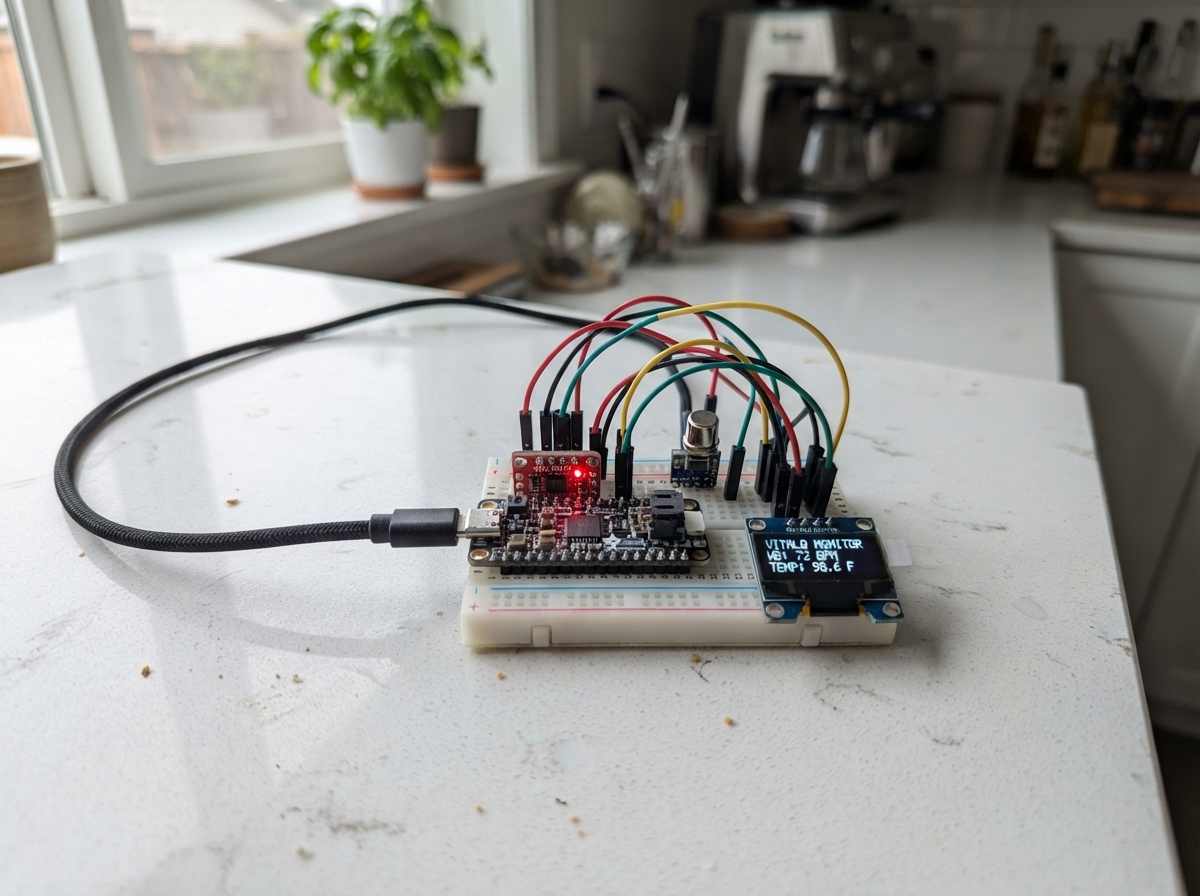
VitalQ is a wearable health monitor that tracks heart rate and body temperature on a compact OLED display. Built around an ESP32 microcontroller, it combines a MAX30105 optical heart-rate sensor, an MLX90614 infrared temperature sensor, and a 128×64 OLED screen to deliver real-time vital signs in a maker-friendly package.
This guide provides a complete wiring diagram, parts list, and step-by-step assembly instructions for connecting all three sensors to the ESP32 via a shared I2C bus. You'll also get the full firmware source code, which handles sensor initialization, data acquisition, heart-rate calculation, and live display updates—everything needed to build and deploy your own health monitor.
Wiring diagram
Gather all the parts
Assemble it in 4 steps
1. Keep power off while wiring
Leave the ESP32 unplugged from USB. Put the ESP32, MAX30105, MLX90614, and OLED where you can read each module's printed pin labels; all three modules will share the same two signal rows.
- A breadboard makes it easy to share one 3.3 V row and one GND row.
- Do not connect power while moving wires; a misplaced wire can damage a module.
2. Give every module safe power
Connect MAX30105 VIN to ESP32 3V3 (power) and MAX30105 GND to ESP32 GND (ground). Connect MLX90614 VCC to ESP32 3V3 (power) and MLX90614 GND to ESP32 GND (ground). Connect OLED VCC to ESP32 3V3 (power) and OLED GND to ESP32 GND (ground).
- Use red wires for 3V3 and black wires for GND so the shared power connections are easy to inspect.
- Make sure VCC/VIN and GND are not swapped; swapped power can permanently damage the sensor or screen.
- Use the ESP32 3V3 pin, not its 5 V/VIN pin, so the shared I2C signal wires stay safe for the ESP32.
3. Connect the shared data wires
Connect MAX30105 SDA, MLX90614 SDA, and OLED SDA together to ESP32 GPIO21 (data). Connect MAX30105 SCL, MLX90614 SCL, and OLED SCL together to ESP32 GPIO22 (clock). Leave the MAX30105 INT pin unconnected; this program reads the sensor directly.
- The OLED header order varies between makers, so follow the labels printed beside its four pins rather than their physical order.
- A single SDA row and a single SCL row on a breadboard are a simple way to join all three modules.
- Do not swap SDA and SCL; the screen and both sensors will fail to communicate if the two signal wires are crossed.
4. Check the display and sensors
Recheck every wire against its printed label, then plug the ESP32 into USB. The OLED should show VitalQ and then show a heart-rate prompt plus object and ambient temperatures. Rest a fingertip lightly and steadily over the MAX30105 optical window for several seconds.
- The MLX90614 measures the surface in its view; hold the target still and close enough for consistent readings.
- For a steadier pulse result, keep outside light away from the MAX30105 sensor window.
- This prototype is not a medical device and must not be used for diagnosis or emergency decisions.
Review all connections
1. Connections between "max30105_1" and "ESP32"
2. Connections between "mlx90614_1" and "ESP32"
3. Connections between "oled_1" and "ESP32"
Deploy the firmware
#include <Wire.h>
#include <MAX30105.h>
#include "heartRate.h"
#include <Adafruit_MLX90614.h>
#include <Adafruit_GFX.h>
#include <Adafruit_SSD1306.h>
#include <math.h>

// VitalQ shared I2C bus on the ESP32 Dev Module.
constexpr int I2C_SDA_PIN = 21;
constexpr int I2C_SCL_PIN = 22;
constexpr uint8_t OLED_ADDRESS = 0x3C;
constexpr int SCREEN_WIDTH = 128;
constexpr int SCREEN_HEIGHT = 64;
constexpr uint32_t TEMPERATURE_INTERVAL_MS = 750;
constexpr uint32_t DISPLAY_MIN_INTERVAL_MS = 250;
constexpr long FINGER_THRESHOLD = 50000;

MAX30105 heartSensor;
Adafruit_MLX90614 temperatureSensor;
Adafruit_SSD1306 display(SCREEN_WIDTH, SCREEN_HEIGHT, &Wire, -1);

bool heartSensorReady = false;
bool temperatureSensorReady = false;
bool displayReady = false;

float bpm = 0.0f;
// Wellness-only estimate from MAX30105 red and IR light signals; not clinical SpO2.
float estimatedSpo2 = NAN;
uint16_t spo2SampleCount = 0;
double redSum = 0.0;
double irSum = 0.0;
double redSquareSum = 0.0;
double irSquareSum = 0.0;
float objectTemperatureC = NAN;
float ambientTemperatureC = NAN;
long lastIrValue = 0;
uint32_t lastBeatMs = 0;
uint32_t lastTemperatureReadMs = 0;
uint32_t lastDisplayDrawMs = 0;
uint8_t recentRates[4] = {0, 0, 0, 0};
uint8_t rateIndex = 0;
uint8_t rateCount = 0;
char lastScreen[160] = "";

void updateSpo2Estimate(uint32_t red, uint32_t ir) {
  redSum += red;
  irSum += ir;
  redSquareSum += static_cast<double>(red) * red;
  irSquareSum += static_cast<double>(ir) * ir;
  ++spo2SampleCount;

  // Use a short window so the number settles rather than jumping on every sample.
  if (spo2SampleCount < 100) {
    return;
  }

  const double count = spo2SampleCount;
  const double redMean = redSum / count;
  const double irMean = irSum / count;
  const double redAc = sqrt(fmax(0.0, redSquareSum / count - redMean * redMean));
  const double irAc = sqrt(fmax(0.0, irSquareSum / count - irMean * irMean));

  if (redMean > 1.0 && irMean > 1.0 && redAc > 1.0 && irAc > 1.0) {
    const float candidate = static_cast<float>(110.0 - 25.0 * ((redAc / redMean) / (irAc / irMean)));
    if (candidate >= 70.0f && candidate <= 100.0f) {
      estimatedSpo2 = isnan(estimatedSpo2) ? candidate : estimatedSpo2 * 0.70f + candidate * 0.30f;
    }
  }

  spo2SampleCount = 0;
  redSum = irSum = redSquareSum = irSquareSum = 0.0;
}

void resetSpo2Estimate() {
  spo2SampleCount = 0;
  redSum = irSum = redSquareSum = irSquareSum = 0.0;
  estimatedSpo2 = NAN;
}

void drawScreenIfChanged(bool force = false) {
  if (!displayReady) {
    return;
  }

  char screenState[160];
  char bpmText[20];
  char spo2Text[16];
  char objectText[24];
  char ambientText[24];

  if (!heartSensorReady) {
    snprintf(bpmText, sizeof(bpmText), "HR sensor missing");
  } else if (lastIrValue < FINGER_THRESHOLD) {
    snprintf(bpmText, sizeof(bpmText), "Place fingertip");
  } else if (rateCount == 0) {
    snprintf(bpmText, sizeof(bpmText), "Measuring...");
  } else {
    snprintf(bpmText, sizeof(bpmText), "BPM: %.0f", bpm);
  }

  if (!heartSensorReady || lastIrValue < FINGER_THRESHOLD || isnan(estimatedSpo2)) {
    snprintf(spo2Text, sizeof(spo2Text), "SpO2: --%%");
  } else {
    snprintf(spo2Text, sizeof(spo2Text), "SpO2: %.0f%%", estimatedSpo2);
  }

  if (!temperatureSensorReady || isnan(objectTemperatureC)) {
    snprintf(objectText, sizeof(objectText), "Object: --.- C");
  } else {
    snprintf(objectText, sizeof(objectText), "Object: %.1f C", objectTemperatureC);
  }

  if (!temperatureSensorReady || isnan(ambientTemperatureC)) {
    snprintf(ambientText, sizeof(ambientText), "Ambient: --.- C");
  } else {
    snprintf(ambientText, sizeof(ambientText), "Ambient: %.1f C", ambientTemperatureC);
  }

  snprintf(screenState, sizeof(screenState), "%s|%s|%s|%s|%d|%d", bpmText, spo2Text,
           objectText, ambientText, heartSensorReady, temperatureSensorReady);

  const uint32_t now = millis();
  if (!force && strcmp(screenState, lastScreen) == 0) {
    return;
  }
  if (!force && now - lastDisplayDrawMs < DISPLAY_MIN_INTERVAL_MS) {
    return;
  }

  display.clearDisplay();
  display.setTextColor(SSD1306_WHITE);
  display.setTextSize(1);
  display.setCursor(0, 0);
  display.println("VitalQ");
  display.drawLine(0, 10, SCREEN_WIDTH - 1, 10, SSD1306_WHITE);
  display.setCursor(0, 16);
  display.println(bpmText);
  display.setCursor(0, 30);
  display.println(spo2Text);
  display.setCursor(0, 42);
  display.println(objectText);
  display.setCursor(0, 53);
  display.println(ambientText);


  display.display();
  strncpy(lastScreen, screenState, sizeof(lastScreen) - 1);
  lastScreen[sizeof(lastScreen) - 1] = '\0';
  lastDisplayDrawMs = now;
}

void readHeartRate() {
  if (!heartSensorReady) {
    return;
  }

  lastIrValue = heartSensor.getIR();
  const uint32_t redValue = heartSensor.getRed();
  if (lastIrValue < FINGER_THRESHOLD) {
    rateCount = 0;
    bpm = 0.0f;
    resetSpo2Estimate();
    return;
  }

  updateSpo2Estimate(redValue, static_cast<uint32_t>(lastIrValue));

  if (checkForBeat(lastIrValue)) {
    const uint32_t now = millis();
    if (lastBeatMs != 0) {
      const float instantBpm = 60.0f / ((now - lastBeatMs) / 1000.0f);
      // Reject impossible optical pulse intervals caused by movement or noise.
      if (instantBpm >= 35.0f && instantBpm <= 220.0f) {
        recentRates[rateIndex++] = static_cast<uint8_t>(instantBpm);
        rateIndex %= sizeof(recentRates);
        if (rateCount < sizeof(recentRates)) {
          rateCount++;
        }

        uint16_t total = 0;
        for (uint8_t i = 0; i < rateCount; ++i) {
          total += recentRates[i];
        }
        bpm = static_cast<float>(total) / rateCount;
        Serial.printf("BPM: %.0f  SpO2 estimate: %.0f%%  IR: %ld\n", bpm, estimatedSpo2, lastIrValue);
      }
    }
    lastBeatMs = now;
  }
}

void readTemperatures() {
  if (!temperatureSensorReady) {
    return;
  }

  const uint32_t now = millis();
  if (now - lastTemperatureReadMs < TEMPERATURE_INTERVAL_MS) {
    return;
  }
  lastTemperatureReadMs = now;

  const float newAmbientC = temperatureSensor.readAmbientTempC();
  const float newObjectC = temperatureSensor.readObjectTempC();
  if (!isnan(newAmbientC)) {
    ambientTemperatureC = newAmbientC;
  }
  if (!isnan(newObjectC)) {
    objectTemperatureC = newObjectC;
  }

  Serial.printf("Object: %.1f C, Ambient: %.1f C\n", objectTemperatureC, ambientTemperatureC);
}

void setup() {
  Serial.begin(115200);
  delay(100);
  Serial.println("VitalQ starting");

  Wire.begin(I2C_SDA_PIN, I2C_SCL_PIN);
  Wire.setClock(100000);  // Compatible with the MLX90614 SMBus interface.

  displayReady = display.begin(SSD1306_SWITCHCAPVCC, OLED_ADDRESS);
  if (displayReady) {
    display.clearDisplay();
    display.setTextColor(SSD1306_WHITE);
    display.setTextSize(1);
    display.setCursor(0, 0);
    display.println("VitalQ starting...");
    display.display();
  } else {
    Serial.println("OLED not found at 0x3C");
  }

  heartSensorReady = heartSensor.begin(Wire, I2C_SPEED_STANDARD);
  if (heartSensorReady) {
    heartSensor.setup();
    heartSensor.setPulseAmplitudeRed(0x1F);
    heartSensor.setPulseAmplitudeIR(0x1F);
    heartSensor.setPulseAmplitudeGreen(0);
    Serial.println("MAX30105 ready");
  } else {
    Serial.println("MAX30105 not found at 0x57");
  }

  temperatureSensorReady = temperatureSensor.begin();
  if (temperatureSensorReady) {
    Serial.println("MLX90614 ready");
  } else {
    Serial.println("MLX90614 not found at 0x5A");
  }

  drawScreenIfChanged(true);
}

void loop() {
  readHeartRate();
  readTemperatures();
  drawScreenIfChanged();
  delay(5);
}
Remix this project
Make it yours in one click
Open a full copy of this project in your own Schematik workspace, diagram, code, parts, and assembly steps included. Swap the sensor, add features, or redesign the whole thing with AI. The author's original stays untouched.