Community project
Voice AI Cube Assistant
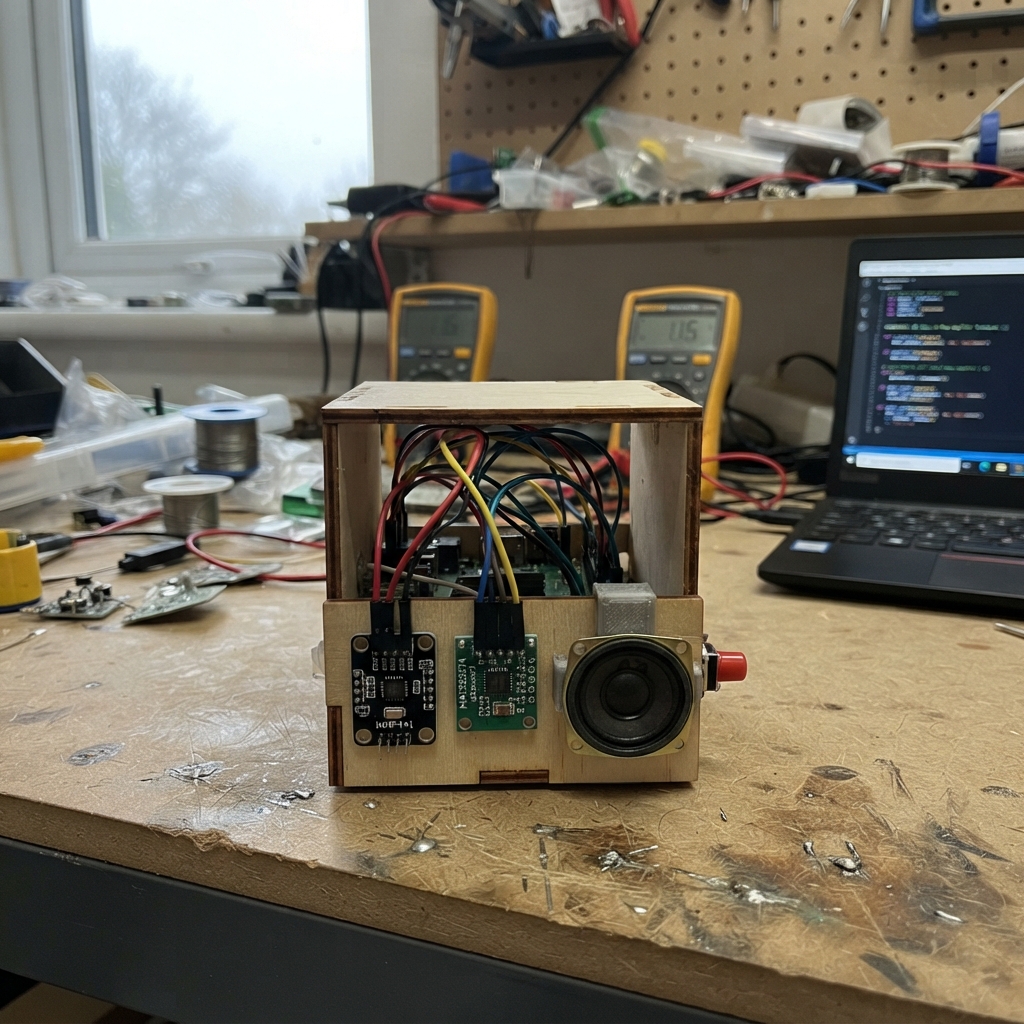
The Voice AI Cube Assistant is a compact, 3D-printed smart speaker that captures voice commands through an I²S microphone and plays back AI-generated responses through a built-in amplifier and speaker. The ESP32 microcontroller handles audio I/O, WiFi connectivity, and communication with a voice processing bridge that can transcribe speech, query AI services, and synthesize replies.
This guide provides everything needed to build a functioning voice assistant: a complete wiring diagram connecting the INMP441 microphone and MAX98357A amplifier to the ESP32, a full parts list, step-by-step 3D printing and assembly instructions for the cube enclosure, and ready-to-deploy firmware that records audio on button press and streams it to a local bridge server for processing.
Wiring diagram

Gather all the parts
Assemble it in 7 steps
1. Print the rounded two-part cube
Print an 80 mm × 80 mm × 80 mm cube as a main shell with a separate back lid. Round every outside edge with a 6 mm radius, including the edges around the back lid, so it feels softly beveled rather than sharp. Use 2 mm walls, 3 perimeters, and 15–20% infill. Put the USB-C opening in the back face, the talk button in the top face, the microphone opening in the top-front corner, and the speaker grille in the front face. Print with the open back face on the print bed so the front grille and top openings need no supports.
- PETG is tougher; PLA is also fine for an indoor desk cube.
- Use four M3 × 8 mm screws and matching heat-set inserts, or small self-tapping screws, to hold the back lid.
- Make the lid overlap the shell by about 5 mm so it closes without a visible gap.
- Do not make the walls thinner than 1.6 mm around the screw points; they can crack when the lid is tightened.
- Do not print a sealed microphone pocket; the microphone needs a clear path for your voice.
2. Add the low-pixel dot texture
Cover all six outside faces with scattered 2 mm wide, 0.6 mm deep round recessed dots. Lay them out as a loose staggered grid with 5–9 mm gaps, then leave occasional gaps so the pattern looks like widely spread low-resolution pixels instead of a perfect drilled grid. Keep every dot at least 4 mm from an edge or screw post. On the front face, put the dots around the speaker grille; on the top face, leave clear circles around the button and microphone hole; and on the back face, leave a clear rectangle around the USB-C opening. These dots are shallow dimples only: do not make them go all the way through the walls.
- Use the same dot pattern on opposite faces or vary the gaps slightly for a more playful pixel effect.
- A dark filament makes the recessed dot pattern more subtle; a light filament makes it easier to see.
- You can add a small amount of paint into the dimples after printing if you want the pixels to stand out.
- Do not turn the decorative dimples into through-holes; holes can let dust into the electronics and make the speaker sound less controlled.
- Keep the dots away from the microphone opening so your voice has a clear route to the microphone.
3. Add the functional openings
Make the front speaker grille a 42 mm diameter circle made from 3 mm round holes on 5 mm centres. Add a 7 mm round button hole in the top face. Add a 3 mm microphone hole near the top-front edge, at least 35 mm away from the centre of the speaker grille. Add a 13 mm × 7 mm USB-C cable opening in the back face, low enough for the ESP32-S3 connector to reach it. Blend the edges of these openings with a small 1 mm round-over so they match the soft exterior.
- Make a quick one-layer test print of the button and USB-C openings before printing the whole case.
- The 7 mm button hole fits many small panel buttons; widen it only after measuring the button you bought.
- Keep the microphone hole away from the speaker grille; otherwise the cube can pick up its own reply and make unwanted noise.
4. Build the mounting features inside
Inside the front face, add a 2 mm deep, 43 mm diameter circular recess for speaker_1, with three small tabs around its rim to hold the speaker frame. Behind the top microphone hole, add a small 18 mm × 18 mm flat shelf for mic_1. Add a 28 mm × 18 mm shelf near the speaker for amp_1, but keep it at least 25 mm from mic_1. Add two internal rails or four standoffs that hold the ESP32-S3 board just behind the USB-C opening without blocking its antenna end.
- Use 1 mm foam tape on the speaker rim to stop air leaks and rattles.
- Use removable foam tape or small screws for the microphone and amplifier so you can service them later.
- Leave at least 8 mm above the ESP32-S3 board for its wires.
- Do not put metal screws, foil tape, or the speaker magnet directly over the ESP32-S3 antenna end; that can reduce Wi-Fi range.
- Do not let the speaker cone touch a grille, screw, or mounting tab; it needs room to move.
5. Fit the button and speaker
Push talk_button_1 into the 7 mm top hole. Mount speaker_1 in the front recess with its cone facing the grille, using a thin foam ring or tiny dabs of flexible glue on the outer metal frame only. Connect speaker_1 POS to amp_1 SPK+ (speaker signal) and speaker_1 NEG to amp_1 SPK- (speaker signal).
- Test-fit the button before soldering: it should move freely and not fall through the hole.
- Mark the speaker positive terminal before fitting it, even though a single mono speaker will still make sound if reversed.
- Never connect either speaker wire to GND; the amplifier drives both SPK+ and SPK- and grounding one can damage it.
- Do not press on the paper or plastic speaker cone; it dents easily.
6. Wire the audio boards
With USB unplugged, connect mic_1 VDD to 3V3 (power), mic_1 GND to GND (ground), mic_1 SCK to GPIO4 (clock), mic_1 WS to GPIO5 (clock), mic_1 SD to GPIO6 (microphone signal), and mic_1 L/R to GND (channel selection). Connect amp_1 VIN to 3V3 (power), amp_1 GND to GND (ground), amp_1 BCLK to the same GPIO4 wire (clock), amp_1 LRC to the same GPIO5 wire (clock), amp_1 DIN to GPIO7 (speaker signal), and amp_1 SD to 3V3 (amplifier enable).
- Keep the microphone wires short and route them along a different inside edge from the speaker wires.
- Twist each speaker wire pair together loosely to reduce electrical noise.
- Make sure 3V3 and GND are not swapped — swapped power can damage the microphone or amplifier.
- Do not use the board's 5V/VIN pin for mic_1; it is a 3.3 V part.
7. Wire the talk button and close the cube
Connect one talk_button_1 leg to GPIO1 (button signal) and the opposite-side leg to GND (ground). Place the ESP32-S3 so its USB-C connector lines up with the rear opening. Tuck the wires into the side space, keeping them away from the speaker cone and microphone hole, then screw on the back lid.
- A four-leg tactile button has two legs already joined on each side; choose one leg from each opposite side.
- Before final closure, connect USB and test the button, microphone, and speaker while the lid is still off.
- Only plug in USB after checking every 3V3 wire and every GND wire. Swapped power can damage the audio boards.
- Make sure the lid does not pinch a wire against the speaker or the board.
Review all connections
1. Connections between "mic_1" and "ESP32"
2. Connections between "amp_1" and "ESP32"
3. Connections between "talk_button_1" and "ESP32"
Deploy the firmware
#include <Arduino.h>
#include <WiFi.h>
#include <WiFiClient.h>
#include <WiFiClientSecure.h>
#include "driver/i2s.h"

// ---- Change these four settings before Deploy. ----
const char *WIFI_SSID = "YOUR_WIFI_NAME";
const char *WIFI_PASSWORD = "YOUR_WIFI_PASSWORD";
const char *BRIDGE_HOST = "192.168.1.50";
const uint16_t BRIDGE_PORT = 8080;
const char *BRIDGE_PATH = "/v1/voice";
const bool BRIDGE_USE_TLS = false;
// Set true only for an HTTPS bridge. This starter uses encrypted TLS but does
// not validate its certificate; use a private network or add certificate
// validation before exposing the bridge to the public Internet.

// Bridge request: POST BRIDGE_PATH with Content-Type audio/pcm;rate=16000;channels=1;format=s16le.
// Body: little-endian signed 16-bit, 16 kHz, mono microphone samples.
// Bridge reply: HTTP 200, Content-Type audio/pcm;rate=16000;channels=1;format=s16le,
// Content-Length required, followed by the same raw PCM format. The bridge may
// transcribe, call any AI provider, synthesize its answer, and return that speech.

constexpr int BUTTON_PIN = 1;
constexpr int I2S_BCLK_PIN = 4;
constexpr int I2S_LRCLK_PIN = 5;
constexpr int I2S_MIC_DATA_PIN = 6;
constexpr int I2S_SPK_DATA_PIN = 7;
constexpr uint32_t SAMPLE_RATE = 16000;
constexpr size_t MAX_RECORD_SECONDS = 6;
constexpr size_t MAX_SAMPLES = SAMPLE_RATE * MAX_RECORD_SECONDS;
constexpr i2s_port_t AUDIO_PORT = I2S_NUM_0;

int16_t recorded[MAX_SAMPLES];
WiFiClient plainClient;
WiFiClientSecure tlsClient;

void connectWiFi() {
  if (WiFi.status() == WL_CONNECTED) return;
  WiFi.mode(WIFI_STA);
  WiFi.begin(WIFI_SSID, WIFI_PASSWORD);
  Serial.print("Connecting to Wi-Fi");
  const unsigned long start = millis();
  while (WiFi.status() != WL_CONNECTED && millis() - start < 15000) {
    delay(250);
    Serial.print('.');
  }
  Serial.println();
  if (WiFi.status() == WL_CONNECTED) Serial.println("Wi-Fi connected");
  else Serial.println("Wi-Fi connection failed");
}

void configureAudio() {
  i2s_config_t config = {};
  config.mode = (i2s_mode_t)(I2S_MODE_MASTER | I2S_MODE_TX | I2S_MODE_RX);
  config.sample_rate = SAMPLE_RATE;
  config.bits_per_sample = I2S_BITS_PER_SAMPLE_32BIT;
  config.channel_format = I2S_CHANNEL_FMT_ONLY_LEFT;
  config.communication_format = I2S_COMM_FORMAT_STAND_I2S;
  config.intr_alloc_flags = 0;
  config.dma_buf_count = 8;
  config.dma_buf_len = 256;
  config.use_apll = false;
  config.tx_desc_auto_clear = true;
  config.fixed_mclk = 0;
  i2s_driver_install(AUDIO_PORT, &config, 0, nullptr);

  i2s_pin_config_t pins = {};
  pins.bck_io_num = I2S_BCLK_PIN;
  pins.ws_io_num = I2S_LRCLK_PIN;
  pins.data_out_num = I2S_SPK_DATA_PIN;
  pins.data_in_num = I2S_MIC_DATA_PIN;
  i2s_set_pin(AUDIO_PORT, &pins);
  i2s_zero_dma_buffer(AUDIO_PORT);
}

size_t recordWhilePressed() {
  Serial.println("Listening: hold the button while speaking");
  size_t sampleCount = 0;
  while (digitalRead(BUTTON_PIN) == LOW && sampleCount < MAX_SAMPLES) {
    int32_t raw = 0;
    size_t bytesRead = 0;
    esp_err_t result = i2s_read(AUDIO_PORT, &raw, sizeof(raw), &bytesRead, pdMS_TO_TICKS(30));
    if (result == ESP_OK && bytesRead == sizeof(raw)) {
      // INMP441 supplies a 24-bit sample in a 32-bit I2S word.
      recorded[sampleCount++] = (int16_t)(raw >> 14);
    }
    delay(1);
  }
  Serial.printf("Captured %u samples\n", (unsigned)sampleCount);
  return sampleCount;
}

bool readHttpHeaders(Client &client) {
  String status = client.readStringUntil('\n');
  status.trim();
  if (!status.startsWith("HTTP/1.1 200") && !status.startsWith("HTTP/1.0 200")) {
    Serial.printf("Bridge returned: %s\n", status.c_str());
    return false;
  }
  while (client.connected() || client.available()) {
    String line = client.readStringUntil('\n');
    if (line == "\r" || line.length() == 0) return true;
  }
  return false;
}

void playBridgeReply(Client &client) {
  uint8_t input[256];
  while (client.connected() || client.available()) {
    int available = client.available();
    if (available <= 0) {
      delay(1);
      continue;
    }
    size_t want = (size_t)min(available, (int)sizeof(input));
    size_t got = client.readBytes(input, want);
    for (size_t i = 0; i + 1 < got; i += 2) {
      int16_t sample = (int16_t)((uint16_t)input[i] | ((uint16_t)input[i + 1] << 8));
      int32_t output = (int32_t)sample * 65536;
      size_t written = 0;
      i2s_write(AUDIO_PORT, &output, sizeof(output), &written, portMAX_DELAY);
    }
  }
  i2s_zero_dma_buffer(AUDIO_PORT);
}

void sendToBridge(size_t sampleCount) {
  if (sampleCount < SAMPLE_RATE / 4) {
    Serial.println("Recording too short; try holding the button longer");
    return;
  }
  connectWiFi();
  if (WiFi.status() != WL_CONNECTED) return;

  Client *client = nullptr;
  if (BRIDGE_USE_TLS) {
    tlsClient.setInsecure();
    client = &tlsClient;
  } else {
    client = &plainClient;
  }
  client->setTimeout(15000);
  if (!client->connect(BRIDGE_HOST, BRIDGE_PORT)) {
    Serial.println("Could not reach the AI bridge");
    return;
  }

  const size_t byteCount = sampleCount * sizeof(int16_t);
  client->printf("POST %s HTTP/1.1\r\n", BRIDGE_PATH);
  client->printf("Host: %s\r\n", BRIDGE_HOST);
  client->print("Content-Type: audio/pcm;rate=16000;channels=1;format=s16le\r\n");
  client->print("Accept: audio/pcm;rate=16000;channels=1;format=s16le\r\n");
  client->print("X-Voice-Cube: esp32-s3\r\n");
  client->printf("Content-Length: %u\r\nConnection: close\r\n\r\n", (unsigned)byteCount);
  client->write((const uint8_t *)recorded, byteCount);

  if (readHttpHeaders(*client)) {
    Serial.println("Playing AI reply");
    playBridgeReply(*client);
  } else {
    Serial.println("Bridge response must be HTTP 200 with raw PCM audio");
  }
  client->stop();
}

void setup() {
  Serial.begin(115200);
  pinMode(BUTTON_PIN, INPUT_PULLUP);
  configureAudio();
  connectWiFi();
  Serial.println("Voice cube ready. Hold the button, speak, then release it.");
}

void loop() {
  static bool wasPressed = false;
  const bool pressed = digitalRead(BUTTON_PIN) == LOW;
  if (pressed && !wasPressed) {
    delay(25); // ignore the switch's first mechanical bounce
    if (digitalRead(BUTTON_PIN) == LOW) sendToBridge(recordWhilePressed());
  }
  wasPressed = pressed;
  delay(10);
}
Remix this project
Make it yours in one click
Open a full copy of this project in your own Schematik workspace — diagram, code, parts, and assembly steps included. Swap the sensor, add features, or redesign the whole thing with AI. The author's original stays untouched.