Community project
WiFi RC Car Control
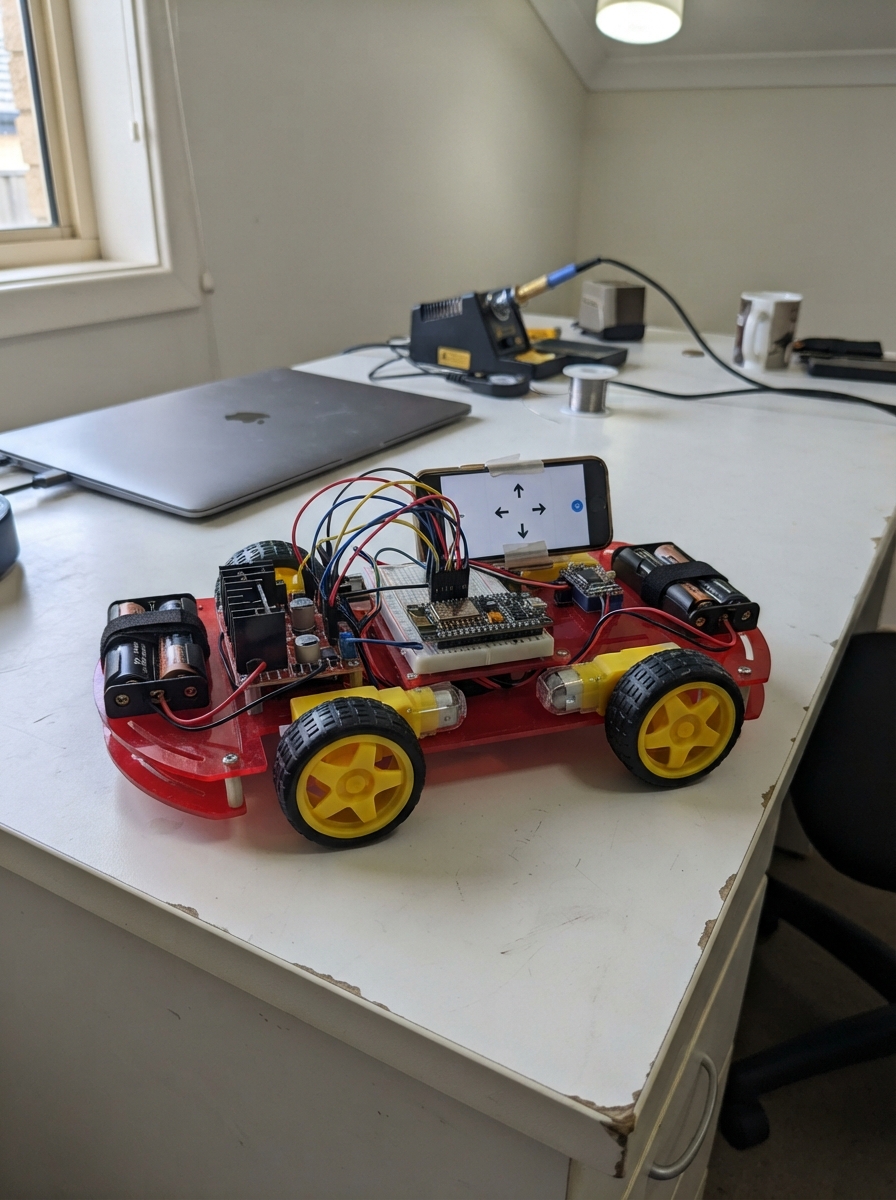
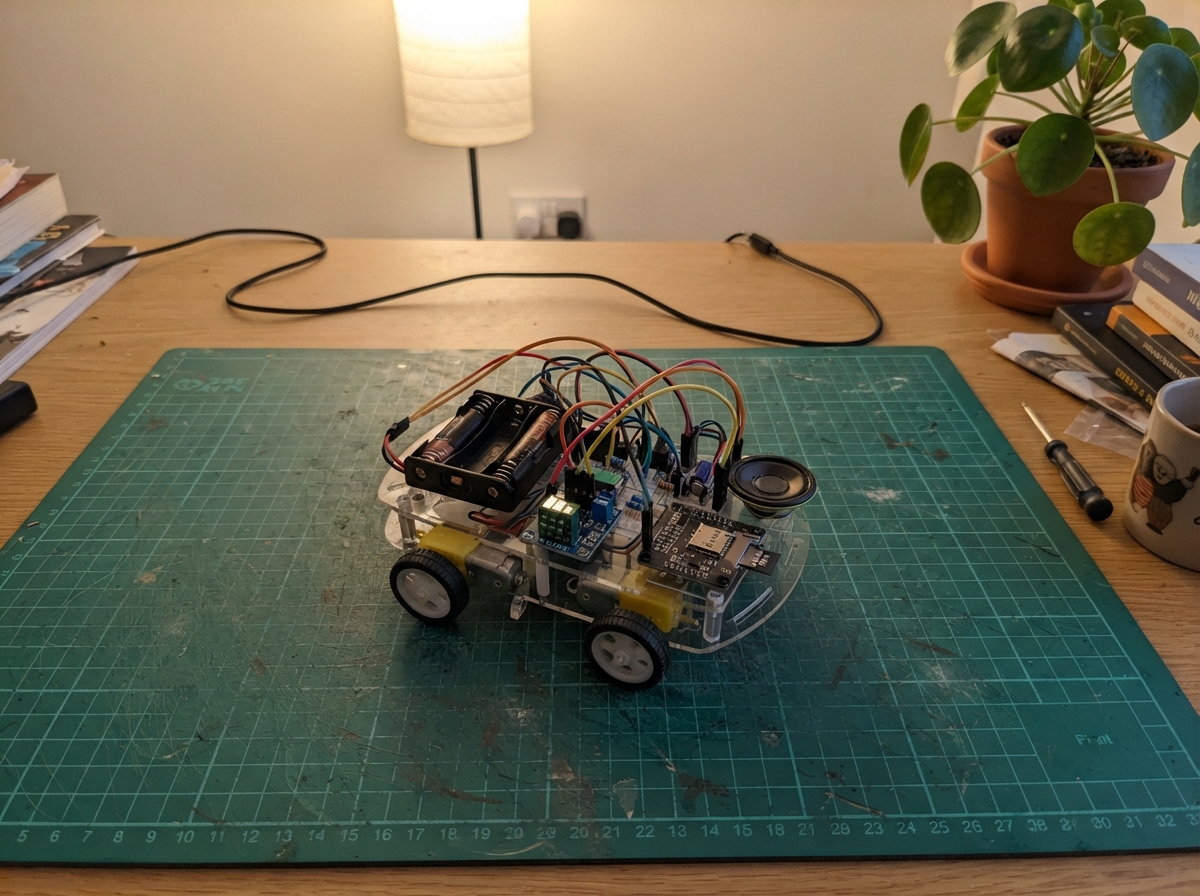
This WiFi-controlled RC car uses an ESP32 microcontroller to receive commands over a web interface and drive four independently controlled motors through dual L298N motor drivers. The car features front-mounted ultrasonic obstacle detection for autonomous navigation and can switch between manual web control and automatic avoidance modes.
The guide provides a complete wiring diagram showing how to connect the motor drivers, motors, sensor, and power supplies to the ESP32, along with a full parts list, Arduino firmware with web server and obstacle detection logic, and step-by-step assembly instructions. Builders will have everything needed to construct and program a responsive WiFi RC car with both remote control and autonomous capabilities.
Wiring diagram

Gather all the parts
Assemble it in 8 steps
1. Place the drivers and motors
Mount left_l298n near the two motors on the car’s left side and right_l298n near the two motors on the right. Keep the motor wires away from the ESP32 antenna area so the Wi-Fi signal has room.
- Label the four motors front-left, rear-left, front-right, and rear-right before wiring them.
- Do not let any bare motor wires touch each other; a short circuit can overheat the battery wires and driver board.
2. Connect the four motor pairs
On left_l298n, connect OUT1 to front_left_motor M1 and OUT2 to front_left_motor M2; connect OUT3 to rear_left_motor M1 and OUT4 to rear_left_motor M2. On right_l298n, connect OUT1 to front_right_motor M1 and OUT2 to front_right_motor M2; connect OUT3 to rear_right_motor M1 and OUT4 to rear_right_motor M2. These are the motor power wires.
- If a wheel later spins the wrong way, swap only that motor’s two wires at its L298N OUT terminals.
- Never connect a motor straight to an ESP32 pin; the motor current can damage the board.
3. Wire the left driver controls
Remove the ENA and ENB jumpers from left_l298n. Connect ENA to ESP32 GPIO1 (speed signal), ENB to GPIO2 (speed signal), IN1 to GPIO3 (front-left direction), IN2 to GPIO5 (front-left direction), IN3 to GPIO4 (rear-left direction), and IN4 to GPIO6 (rear-left direction).
- The jumper is the small removable black cap over two pins. Keep it in a labeled bag after removing it.
- Do not leave an ENA or ENB jumper fitted while its pin is also connected to an ESP32 output; the jumper would force that input on instead of letting the ESP32 vary its speed.
4. Wire the right driver controls
Remove the ENA and ENB jumpers from right_l298n. Connect ENA to ESP32 GPIO7 (speed signal), ENB to GPIO10 (speed signal), IN1 to GPIO11 (front-right direction), IN2 to GPIO13 (front-right direction), IN3 to GPIO12 (rear-right direction), and IN4 to GPIO14 (rear-right direction).
- Use a different wire color for direction wires than for power wires to make tracing easier.
- Make sure a control wire goes to the printed IN or EN pin, not an OUT motor terminal; swapped connections can make the car behave unpredictably.
5. Connect the sensor at the front
Mount front_ultrasonic facing straight ahead, with both round sensor openings unobstructed. Connect VCC to the ESP32 3V3 pin (power), GND to an ESP32 GND pin (ground), TRIG to GPIO15 (start-distance signal), and ECHO to GPIO16 (distance signal back to the ESP32).
- Mount it high enough that it sees objects in front of the bumper rather than the floor.
- This 3.3 V wiring is only safe for an HC-SR04P, HC-SR04-33, or another sensor marked 3.3 V-compatible. A normal 5 V-only HC-SR04 can send 5 V into GPIO16 and damage the ESP32; do not connect its ECHO pin directly.
6. Connect logic power and the shared ground
Remove each L298N board’s 5V-EN jumper. Connect each driver’s 5V terminal to the ESP32 5V pin (power). Connect each driver’s GND terminal to an ESP32 GND pin (ground). The two driver grounds and both battery negative wires must all meet at this common ground.
- Use a small screw-terminal splitter or a common ground row so several ground wires can meet securely.
- Do not connect either 6 V battery positive wire to the ESP32 5V pin — that can damage the ESP32. The 5V connection here powers only the L298N logic section from USB.
7. Connect the two 6 V motor batteries
With USB unplugged and both battery packs switched off or disconnected, connect left_6v_battery positive to left_l298n VS (motor power) and its negative to left_l298n GND (ground). Connect right_6v_battery positive to right_l298n VS (motor power) and its negative to right_l298n GND (ground).
- Use thicker wire for these battery and motor wires than for the thin ESP32 control wires.
- Make sure positive and negative are not swapped — reversed battery power can damage an L298N module. Keep the wheels lifted off the table for the first test.
8. Power and test the car
Lift the car so all four wheels are clear. Plug the ESP32 into USB for its power and Wi-Fi. Connect the two 6 V battery packs, join the open Wi-Fi network named ESP32-RC-Car on your phone, then open 192.168.4.1. Start with manual buttons, then press Start obstacle avoidance; the car drives forward and backs up then turns when it sees an object closer than about 30 cm.
- Start with the speed slider low. If forward makes one side roll backward, swap the two motor wires for the affected motor.
- Keep fingers, hair, and loose wires clear of spinning wheels. Disconnect both motor batteries before changing any wiring. The sensor cannot see every surface, especially soft fabric, narrow legs, or angled shiny objects, so keep the test area clear.
Review all connections
1. Connections between "left_6v_battery" and "ESP32"
2. Connections between "right_6v_battery" and "ESP32"
3. Connections between "left_l298n" and "ESP32"
4. Connections between "right_l298n" and "ESP32"
5. Connections between "front_ultrasonic" and "ESP32"
Deploy the firmware
#include <Arduino.h>
#include <WiFi.h>
#include <WebServer.h>

// Left L298N: OUT1/OUT2 = front-left, OUT3/OUT4 = rear-left.
static const int LEFT_FRONT_EN = 1;
static const int LEFT_REAR_EN = 2;
static const int LEFT_FRONT_IN1 = 3;
static const int LEFT_REAR_IN1 = 4;
static const int LEFT_FRONT_IN2 = 5;
static const int LEFT_REAR_IN2 = 6;

// Right L298N: OUT1/OUT2 = front-right, OUT3/OUT4 = rear-right.
static const int RIGHT_FRONT_EN = 7;
static const int RIGHT_REAR_EN = 10;
static const int RIGHT_FRONT_IN1 = 11;
static const int RIGHT_REAR_IN1 = 12;
static const int RIGHT_FRONT_IN2 = 13;
static const int RIGHT_REAR_IN2 = 14;

// Front-facing HC-SR04P (3.3 V version) ultrasonic sensor.
static const int ULTRASONIC_TRIG = 15;
static const int ULTRASONIC_ECHO = 16;
static const uint16_t OBSTACLE_CM = 30;

static const uint32_t PWM_FREQUENCY = 20000;
static const uint8_t PWM_RESOLUTION = 8;
static const uint32_t COMMAND_TIMEOUT_MS = 600;

WebServer server(80);
uint8_t driveSpeed = 200;
uint32_t lastCommandMs = 0;
bool autonomousMode = false;
uint32_t autoStageStartedMs = 0;
uint8_t autoStage = 0;
bool turnRightNext = true;
int lastDistanceCm = -1;
uint32_t lastPingMs = 0;

const char INDEX_HTML[] PROGMEM = R"HTML(
<!doctype html><html><head><meta name="viewport" content="width=device-width,initial-scale=1,user-scalable=no">
<style>
body{margin:0;background:#10151c;color:#f4f7fb;font-family:Arial,sans-serif;text-align:center}main{max-width:420px;margin:auto;padding:18px}h1{font-size:25px;margin:8px 0}p{color:#b9c3d0}.pad{display:grid;grid-template-columns:repeat(3,1fr);gap:12px;margin:24px auto;max-width:340px}.btn{border:0;border-radius:16px;background:#2674d9;color:#fff;font-size:30px;font-weight:bold;height:82px;box-shadow:0 4px #124477;touch-action:none}.btn:active{transform:translateY(3px);box-shadow:0 1px #124477}.stop{background:#d93636;box-shadow:0 4px #801c1c;grid-column:2}.ai{background:#1a9b62;box-shadow:0 4px #09633e;font-size:20px;width:90%;margin:16px auto 2px}.blank{visibility:hidden}.speed{width:90%;accent-color:#2674d9}output{font-weight:bold;color:#70b4ff}small{display:block;color:#aeb8c4;margin-top:20px}
</style></head><body><main><h1>ESP32 RC Car</h1><p>Connected to <b>192.168.4.1</b></p><label>Speed: <output id="speedText">78%</output></label><br><input class="speed" id="speed" type="range" min="0" max="255" value="200"><button class="btn ai" id="ai">Start obstacle avoidance</button><p id="status">Distance: measuring...</p><div class="pad"><div class="blank"></div><button class="btn" data-cmd="forward">▲</button><div class="blank"></div><button class="btn" data-cmd="left">◀</button><button class="btn stop" data-cmd="stop">■</button><button class="btn" data-cmd="right">▶</button><div class="blank"></div><button class="btn" data-cmd="reverse">▼</button><div class="blank"></div></div><small>Hold a direction to drive. Releasing it stops the car.</small></main><script>
let active='',timer=0,ai=false;const send=c=>fetch('/cmd?d='+c,{cache:'no-store'}).catch(()=>{});function start(c){ai=false;document.getElementById('ai').textContent='Start obstacle avoidance';active=c;send(c);clearInterval(timer);timer=setInterval(()=>send(active),200)}function stop(){ai=false;document.getElementById('ai').textContent='Start obstacle avoidance';clearInterval(timer);timer=0;active='';send('stop')}document.querySelectorAll('[data-cmd]').forEach(b=>{let c=b.dataset.cmd;b.addEventListener('pointerdown',e=>{e.preventDefault();c==='stop'?stop():start(c)});b.addEventListener('pointerup',stop);b.addEventListener('pointerleave',stop);b.addEventListener('pointercancel',stop)});document.getElementById('ai').onclick=()=>{ai=!ai;document.getElementById('ai').textContent=ai?'Stop obstacle avoidance':'Start obstacle avoidance';send(ai?'auto':'stop')};const s=document.getElementById('speed');s.oninput=()=>{document.getElementById('speedText').textContent=Math.round(s.value*100/255)+'%';fetch('/speed?v='+s.value,{cache:'no-store'}).catch(()=>{})};setInterval(()=>fetch('/status',{cache:'no-store'}).then(r=>r.json()).then(x=>{document.getElementById('status').textContent='Distance: '+(x.distance<0?'out of range':x.distance+' cm')+(x.auto?' — avoiding obstacles':'')}).catch(()=>{}),400);
</script></body></html>
)HTML";

void setOneMotor(int enablePin, int in1Pin, int in2Pin, int direction, uint8_t speedValue) {
  if (direction > 0) {
    digitalWrite(in1Pin, HIGH);
    digitalWrite(in2Pin, LOW);
    ledcWrite(enablePin, speedValue);
  } else if (direction < 0) {
    digitalWrite(in1Pin, LOW);
    digitalWrite(in2Pin, HIGH);
    ledcWrite(enablePin, speedValue);
  } else {
    digitalWrite(in1Pin, LOW);
    digitalWrite(in2Pin, LOW);
    ledcWrite(enablePin, 0);
  }
}

void setDrive(int leftDirection, int rightDirection) {
  setOneMotor(LEFT_FRONT_EN, LEFT_FRONT_IN1, LEFT_FRONT_IN2, leftDirection, driveSpeed);
  setOneMotor(LEFT_REAR_EN, LEFT_REAR_IN1, LEFT_REAR_IN2, leftDirection, driveSpeed);
  setOneMotor(RIGHT_FRONT_EN, RIGHT_FRONT_IN1, RIGHT_FRONT_IN2, rightDirection, driveSpeed);
  setOneMotor(RIGHT_REAR_EN, RIGHT_REAR_IN1, RIGHT_REAR_IN2, rightDirection, driveSpeed);
}

void stopCar() { setDrive(0, 0); }

void handleCommand() {
  String command = server.arg("d");
  if (command == "auto") {
    autonomousMode = true;
    autoStage = 0;
    autoStageStartedMs = millis();
  } else {
    autonomousMode = false;
    if (command == "forward") setDrive(1, 1);
    else if (command == "reverse") setDrive(-1, -1);
    else if (command == "left") setDrive(-1, 1);
    else if (command == "right") setDrive(1, -1);
    else stopCar();
  }
  lastCommandMs = millis();
  server.send(200, "text/plain", "OK");
}

int readDistanceCm() {
  digitalWrite(ULTRASONIC_TRIG, LOW);
  delayMicroseconds(3);
  digitalWrite(ULTRASONIC_TRIG, HIGH);
  delayMicroseconds(10);
  digitalWrite(ULTRASONIC_TRIG, LOW);
  unsigned long duration = pulseIn(ULTRASONIC_ECHO, HIGH, 18000);
  if (duration == 0) return -1;
  return (int)(duration * 0.0343f / 2.0f);
}

void runAutonomousDrive() {
  const uint32_t now = millis();
  if (now - lastPingMs >= 80) {
    lastDistanceCm = readDistanceCm();
    lastPingMs = now;
  }
  if (autoStage == 0) {
    if (lastDistanceCm > 0 && lastDistanceCm < OBSTACLE_CM) {
      stopCar();
      autoStage = 1;
      autoStageStartedMs = now;
    } else {
      setDrive(1, 1);
    }
  } else if (autoStage == 1 && now - autoStageStartedMs >= 120) {
    setDrive(-1, -1);
    autoStage = 2;
    autoStageStartedMs = now;
  } else if (autoStage == 2 && now - autoStageStartedMs >= 350) {
    if (turnRightNext) setDrive(1, -1); else setDrive(-1, 1);
    turnRightNext = !turnRightNext;
    autoStage = 3;
    autoStageStartedMs = now;
  } else if (autoStage == 3 && now - autoStageStartedMs >= 500) {
    stopCar();
    autoStage = 0;
  }
}

void handleStatus() {
  String response = String("{\"distance\":") + lastDistanceCm + ",\"auto\":" + (autonomousMode ? "true" : "false") + "}";
  server.send(200, "application/json", response);
}

void handleSpeed() {
  if (server.hasArg("v")) driveSpeed = constrain(server.arg("v").toInt(), 0, 255);
  lastCommandMs = millis();
  server.send(200, "text/plain", String(driveSpeed));
}

void setup() {
  const int outputPins[] = {LEFT_FRONT_IN1, LEFT_FRONT_IN2, LEFT_REAR_IN1, LEFT_REAR_IN2, RIGHT_FRONT_IN1, RIGHT_FRONT_IN2, RIGHT_REAR_IN1, RIGHT_REAR_IN2};
  for (int pin : outputPins) { pinMode(pin, OUTPUT); digitalWrite(pin, LOW); }
  pinMode(ULTRASONIC_TRIG, OUTPUT);
  pinMode(ULTRASONIC_ECHO, INPUT);
  digitalWrite(ULTRASONIC_TRIG, LOW);
  const int pwmPins[] = {LEFT_FRONT_EN, LEFT_REAR_EN, RIGHT_FRONT_EN, RIGHT_REAR_EN};
  for (int pin : pwmPins) { ledcAttach(pin, PWM_FREQUENCY, PWM_RESOLUTION); ledcWrite(pin, 0); }

  WiFi.mode(WIFI_AP);
  WiFi.softAP("ESP32-RC-Car"); // Intentionally open: no password.

  server.on("/", HTTP_GET, []() { server.send_P(200, "text/html", INDEX_HTML); });
  server.on("/cmd", HTTP_GET, handleCommand);
  server.on("/speed", HTTP_GET, handleSpeed);
  server.on("/status", HTTP_GET, handleStatus);
  server.onNotFound([]() { server.send(404, "text/plain", "Not found"); });
  server.begin();
  lastCommandMs = millis();
}

void loop() {
  server.handleClient();
  if (autonomousMode) runAutonomousDrive();
  else if (millis() - lastCommandMs > COMMAND_TIMEOUT_MS) stopCar();
  delay(5);
}
Remix this project
Make it yours in one click
Open a full copy of this project in your own Schematik workspace — diagram, code, parts, and assembly steps included. Swap the sensor, add features, or redesign the whole thing with AI. The author's original stays untouched.