Community project
Water Hazard Prevention System
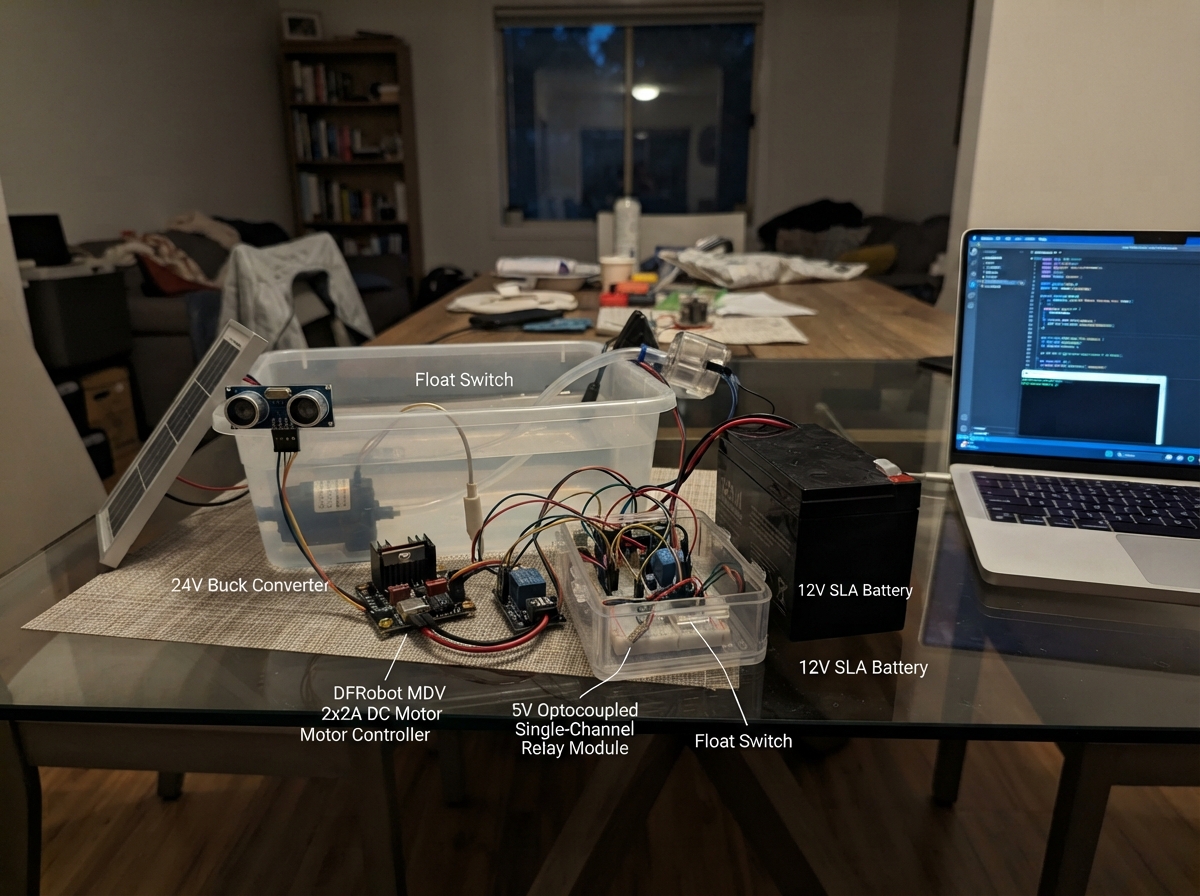
This water hazard prevention system uses an ESP32 to monitor water levels and distance, automatically deploying physical barriers and debris removal when flooding is detected. Built around dual float switches and an HC-SR04 ultrasonic sensor, the system triggers a high-torque barrier motor and a scraper motor via an L298N motor driver, while a relay module controls a 12 V warning light and siren.
The guide provides a complete wiring diagram, detailed parts list, and step-by-step assembly instructions for integrating the 24 V buck converter, solar and hydro power sources with battery backup, and all sensor and actuator connections. Included firmware implements hazard detection logic, motor timing control, and alert activation—ready to load onto the ESP32 DevKit v1.
Wiring diagram

Gather all the parts
Assemble it in 7 steps
1. Build the fused power section
Mount CHARGER1, F1_load, F2_logic, D1_tvs, C1_12v_bulk, and U2_lm2596 inside a covered power enclosure. Keep the thick battery and motor wires away from the thin ESP32 and sensor wires so motor noise is less likely to disturb the controller.
- A 12 V SLA battery can melt thin wire or start a fire during a short circuit, so put both fuses close to the charge-controller load output.
- Set the buck converter to exactly 5.0 V with a meter before connecting the ESP32 or any 5 V module; more than 5 V can damage them.
2. Connect the sources and battery
With the battery disconnected, connect PV1_solar positive to CHARGER1 SOLAR+ and negative to SOLAR-. Connect GEN1_hydro positive to AUX+ and negative to AUX-. Connect BT1_12v_sla BAT+ to BAT+ and BAT- to BAT-.
- The hydro generator must provide regulated DC compatible with the controller AUX input; do not connect raw AC generator wires.
- Do not reverse the battery wires — reversed battery power can permanently damage the controller and connected electronics.
3. Make the 12 V and 5 V rails
Connect CHARGER1 LOAD+ through F1_load to the 12 V bus and LOAD- to GND_COMMON. Connect D1_tvs cathode to the 12 V bus and anode to GND_COMMON. Feed F2_logic from the 12 V bus into U2_lm2596 VIN+. Connect VIN- to GND_COMMON, VOUT+ to the 5 V rail, and VOUT- to GND_COMMON. Put C1_12v_bulk across 12 V and ground, then C2_5v_bulk and C3_5v_ceramic across 5 V and ground.
- The striped side of each electrolytic capacitor goes to GND_COMMON; reversed capacitors can burst.
4. Wire the ESP32 water inputs
Connect the ESP32 DevKit 5V/VIN pin to the 5 V rail and a GND pin to GND_COMMON. Connect each float switch's GND terminal to GND_COMMON: S1_low_float SIGNAL goes to GPIO32 (signal) and S2_high_float SIGNAL goes to GPIO33 (signal). Connect U4_hcsr04 VCC to 5 V (power), GND to GND_COMMON (ground), and TRIG to GPIO18 (signal). Connect HC-SR04 ECHO to R1_echo_top pin 1; connect R1 pin 2 to GPIO19 and R2_echo_bottom pin 1; connect R2 pin 2 to GND_COMMON.
- Never connect the HC-SR04 ECHO pin straight to an ESP32 pin — its 5 V pulse can damage the 3.3 V ESP32 input.
- If a float reports the opposite water state, turn the float over or invert that input in the firmware.
5. Wire the motor driver and motors
Connect U3_l298n VS to the 12 V bus (power), GND to GND_COMMON (ground), and 5V, ENA, and ENB to the 5 V rail. Connect IN1 to GPIO21, IN2 to GPIO22, IN3 to GPIO23, and IN4 to GPIO25 (signals). Connect OUT1 and OUT2 to M1_barrier M+ and M-; connect OUT3 and OUT4 to M2_scraper M+ and M-. Solder C4_m1_suppress directly across M1's two terminals and C5_m2_suppress across M2's two terminals.
- Check the barrier motor's stall current: an L298N may overheat if the motor needs more current than the module can continuously supply.
- Keep hands clear of the gate and scraper during the first powered test because a detected hazard can move them.
6. Add the protected warning relay control
Connect R3_relay_base pin 1 to ESP32 GPIO26 (signal) and pin 2 to Q1_relay_driver B. Connect Q1 C to K1_relay IN and Q1 E to GND_COMMON. Connect K1 VCC to 5 V (power) and K1 GND to GND_COMMON (ground). Connect K1 COM to the 12 V bus, K1 NO to ALERT1 V+, and ALERT1 GND to GND_COMMON.
- Do not connect ESP32 GPIO26 directly to the 5 V relay IN pin — the transistor circuit protects the 3.3 V controller.
- Do not touch exposed relay contacts or warning-load wiring while the battery is connected; a short can make wires dangerously hot.
7. Inspect before applying power
Check that every ground wire returns to GND_COMMON and measure the 5 V rail one final time. With motors mechanically unloaded, power the ESP32 from the regulated 5 V rail, then test the two floats and ultrasonic sensor before allowing the barrier mechanism to move.
- The ESP32 uses its USB connection for flashing, but the motors and 5 V modules still use the regulated supply.
Review all connections
1. Connections between "PV1_solar" and "ESP32"
2. Connections between "GEN1_hydro" and "ESP32"
3. Connections between "CHARGER1" and "ESP32"
4. Connections between "BT1_12v_sla" and "ESP32"
5. Connections between "F1_load" and "ESP32"
6. Connections between "D1_tvs" and "ESP32"
7. Connections between "C1_12v_bulk" and "ESP32"
8. Connections between "F2_logic" and "ESP32"
9. Connections between "U2_lm2596" and "ESP32"
10. Connections between "C2_5v_bulk" and "ESP32"
11. Connections between "C3_5v_ceramic" and "ESP32"
12. Connections between "U3_l298n" and "ESP32"
13. Connections between "C4_m1_suppress" and "ESP32"
14. Connections between "C5_m2_suppress" and "ESP32"
15. Connections between "U4_hcsr04" and "ESP32"
16. Connections between "S1_low_float" and "ESP32"
17. Connections between "S2_high_float" and "ESP32"
18. Connections between "K1_relay" and "ESP32"
19. Connections between "ALERT1" and "ESP32"
20. Connections between "R1_echo_top" and "ESP32"
21. Connections between "R2_echo_bottom" and "ESP32"
22. Connections between "R3_relay_base" and "ESP32"
23. Connections between "Q1_relay_driver" and "ESP32"
Deploy the firmware
// D.P.W.H. AI - flood hazard controller for ESP32 DevKit v1.
// Float switches connect their input to GND and use the ESP32 internal pull-ups.
// HC-SR04 ECHO passes through the 10 kΩ / 18 kΩ divider before GPIO19.

const uint8_t TRIG_PIN = 18;
const uint8_t ECHO_PIN = 19;
const uint8_t BARRIER_UP_PIN = 21;
const uint8_t BARRIER_DOWN_PIN = 22;
const uint8_t SCRAPER_START_PIN = 23;
const uint8_t SCRAPER_DIRECTION_PIN = 25;
const uint8_t RELAY_PIN = 26;
const uint8_t LOW_FLOAT_PIN = 32;
const uint8_t HIGH_FLOAT_PIN = 33;

// GPIO26 HIGH turns on Q1, pulling the relay module's active-low IN pin down.
const bool RELAY_ACTIVE_LOW = false;
const unsigned long SAMPLE_INTERVAL_MS = 250UL;
const unsigned long BARRIER_MAX_RUN_MS = 3000UL;
const unsigned long SCRAPER_ON_MS = 2000UL;
const unsigned long SCRAPER_PERIOD_MS = 10000UL;
const int HAZARD_DISTANCE_CM = 25;

bool hazardLatched = false;
bool barrierRunning = false;
unsigned long barrierStartMs = 0;
unsigned long lastSampleMs = 0;

void stopBarrier() {
  digitalWrite(BARRIER_UP_PIN, LOW);
  digitalWrite(BARRIER_DOWN_PIN, LOW);
  barrierRunning = false;
}

void raiseBarrierForMaximumTime() {
  // Never drive both L298N direction inputs high.
  digitalWrite(BARRIER_DOWN_PIN, LOW);
  digitalWrite(BARRIER_UP_PIN, HIGH);
  barrierStartMs = millis();
  barrierRunning = true;
}

void stopScraper() {
  digitalWrite(SCRAPER_START_PIN, LOW);
  digitalWrite(SCRAPER_DIRECTION_PIN, LOW);
}

void setAlert(bool on) {
  digitalWrite(RELAY_PIN, (on == RELAY_ACTIVE_LOW) ? LOW : HIGH);
}

int readDistanceCm() {
  digitalWrite(TRIG_PIN, LOW);
  delayMicroseconds(2);
  digitalWrite(TRIG_PIN, HIGH);
  delayMicroseconds(10);
  digitalWrite(TRIG_PIN, LOW);

  unsigned long durationUs = pulseIn(ECHO_PIN, HIGH, 30000UL);
  if (durationUs == 0) return -1;
  return (int)(durationUs / 58UL);
}

void setup() {
  pinMode(TRIG_PIN, OUTPUT);
  pinMode(ECHO_PIN, INPUT);
  pinMode(BARRIER_UP_PIN, OUTPUT);
  pinMode(BARRIER_DOWN_PIN, OUTPUT);
  pinMode(SCRAPER_START_PIN, OUTPUT);
  pinMode(SCRAPER_DIRECTION_PIN, OUTPUT);
  pinMode(RELAY_PIN, OUTPUT);
  pinMode(LOW_FLOAT_PIN, INPUT_PULLUP);
  pinMode(HIGH_FLOAT_PIN, INPUT_PULLUP);

  stopBarrier();
  stopScraper();
  setAlert(false);
  Serial.begin(9600);
}

void loop() {
  const unsigned long now = millis();

  if (barrierRunning && (now - barrierStartMs >= BARRIER_MAX_RUN_MS)) {
    stopBarrier();
  }

  if (now - lastSampleMs >= SAMPLE_INTERVAL_MS) {
    lastSampleMs = now;
    const bool lowWaterDetected = (digitalRead(LOW_FLOAT_PIN) == LOW);
    const bool highWaterDetected = (digitalRead(HIGH_FLOAT_PIN) == LOW);
    const int distanceCm = readDistanceCm();
    const bool closeWaterDetected = (distanceCm > 0 && distanceCm <= HAZARD_DISTANCE_CM);
    const bool hazardNow = highWaterDetected || closeWaterDetected;

    setAlert(hazardNow);

    if (hazardNow && !hazardLatched) {
      raiseBarrierForMaximumTime();
    }
    hazardLatched = hazardNow;

    // Pulse the scraper rather than leaving a water-exposed motor running continuously.
    if (hazardNow && (now % SCRAPER_PERIOD_MS) < SCRAPER_ON_MS) {
      digitalWrite(SCRAPER_DIRECTION_PIN, LOW);
      digitalWrite(SCRAPER_START_PIN, HIGH);
    } else {
      stopScraper();
    }

    Serial.print("low_float=");
    Serial.print(lowWaterDetected);
    Serial.print(" high_float=");
    Serial.print(highWaterDetected);
    Serial.print(" distance_cm=");
    Serial.print(distanceCm);
    Serial.print(" hazard=");
    Serial.println(hazardNow);
  }

  delay(5);
}
Remix this project
Make it yours in one click
Open a full copy of this project in your own Schematik workspace — diagram, code, parts, and assembly steps included. Swap the sensor, add features, or redesign the whole thing with AI. The author's original stays untouched.