Community project
Stereo FM Radio Dashboard
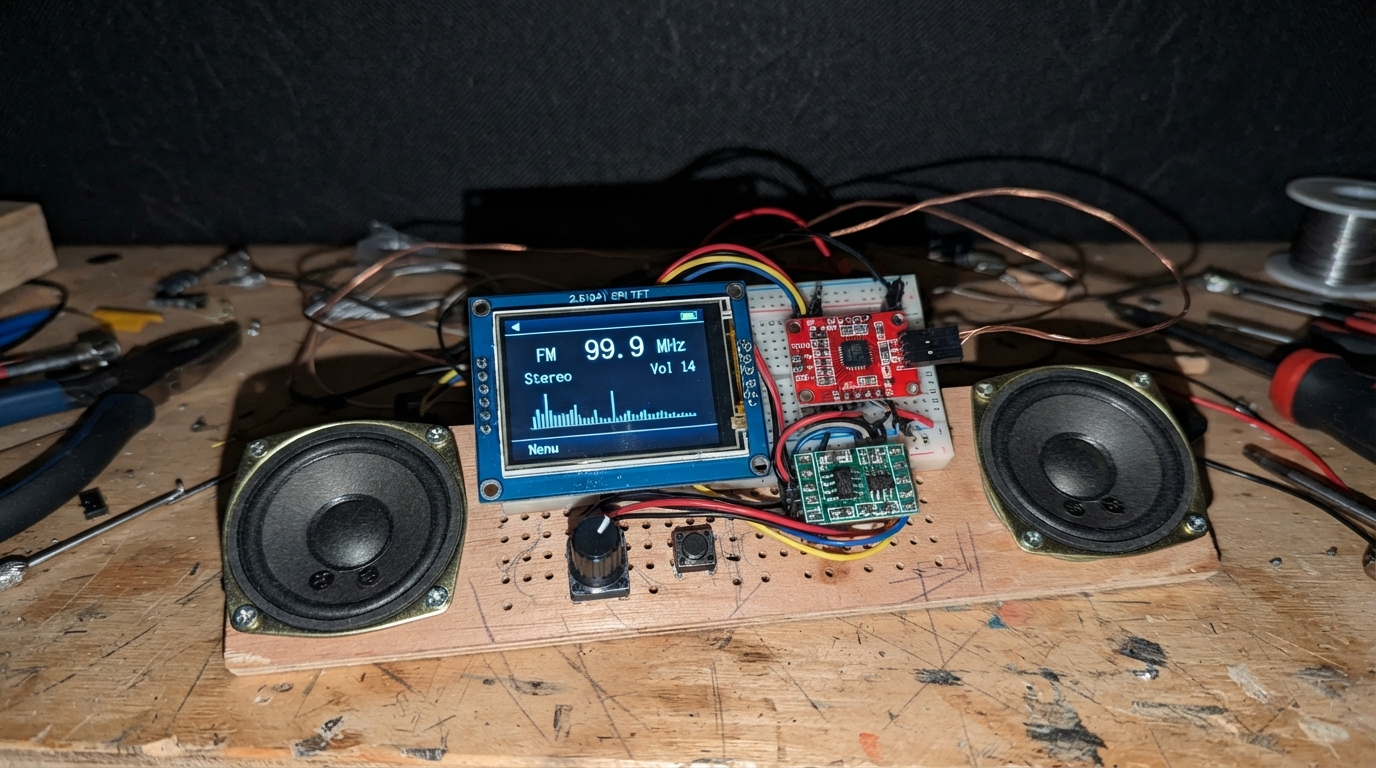
Build a full-featured FM radio with a colorful touchscreen dashboard powered by the ESP32. This project combines the Si4703 FM receiver module with a 2.8-inch ILI9341 display, stereo amplifier, and rotary encoder to create an interactive radio tuner that displays station information, supports preset storage, and integrates weather data via WiFi.
The guide provides a complete wiring diagram showing how to connect the display via SPI, the FM radio module via I2C, dual speakers through the PAM8403 amplifier, and the rotary encoder for intuitive frequency and volume control. Assembly steps walk through power distribution, component integration, and initial firmware upload to get your radio on the air.
Wiring diagram

Gather all the parts
Assemble it in 6 steps
1. Ortak güç hatlarını hazırlayın
ESP32-S3 kartın 3V3, 5V ve GND pinlerinden üç ayrı bağlantı hattı çıkarın. TFT ekranın VCC ucunu 3V3 hattına, GND ucunu GND hattına bağlayın (ekran gücü). Si4703 modülünün 3V3 ucunu 3V3 hattına ve GND ucunu GND hattına bağlayın (radyo gücü). PAM8403 modülünün 5V ucunu kartın 5V/VIN hattına, GND ve IN_GND uçlarını GND hattına bağlayın (yükselteç gücü ve ses referansı).
- Önce USB kablosunu çıkarın; bütün güç bağlantılarını sonradan kontrol etmek daha kolay olur.
- Si4703 ve ekranın 3,3 V uçlarına 5 V bağlamayın; fazla voltaj modüllere zarar verebilir.
2. Renkli ekranı bağlayın
ILI9341 ekranın SCK ucunu ESP32-S3 GPIO12 pinine bağlayın (ekran saat sinyali). MOSI ucunu GPIO11 pinine bağlayın (ekran görüntü verisi). CS ucunu GPIO10 pinine bağlayın (ekran seçimi). DC ucunu GPIO4 pinine bağlayın (komut veya görüntü verisi seçimi). RST ucunu GPIO5 pinine bağlayın (ekranı başlatma). VCC → 3V3 (power), GND → GND (ground).
- Ekranın VCC ve GND uçlarını ters bağlamayın; ters güç ekranı bozabilir.
3. FM radyo modülünü bağlayın
Si4703 modülünün SDIO ucunu GPIO8 pinine bağlayın (radyo veri hattı). SCLK ucunu GPIO9 pinine bağlayın (radyo saat hattı). RST ucunu GPIO6 pinine bağlayın (radyo modülünü doğru haberleşme biçiminde başlatır). Si4703 LOUT ucunu PAM8403 L_IN ucuna, ROUT ucunu PAM8403 R_IN ucuna bağlayın (sol ve sağ ses). Si4703 ANT ucuna yaklaşık 75 cm uzunluğunda tek damarlı bir tel bağlayın (FM anteni). 3V3 → 3V3 (power), GND → GND (ground).
- Anten telini ekrandan ve güç kablolarından olabildiğince uzak tutmak paraziti azaltır.
- Si4703 modülünüzde güç pinlerinin baskısı farklıysa, mutlaka modül üzerindeki 3V3 ve GND yazılarını izleyin; bazı eski kartlarda yerleri değişebilir.
4. İki hoparlörü yükseltece bağlayın
Sol hoparlörün iki kablosunu PAM8403 üzerindeki L+ ve L- uçlarına bağlayın (sol ses). Sağ hoparlörün iki kablosunu R+ ve R- uçlarına bağlayın (sağ ses).
- Hoparlörün L- veya R- ucunu GND’ye bağlamayın; PAM8403 bu iki ucu kendi arasında sürer ve GND bağlantısı yükseltece zarar verebilir.
5. Rotary encoder ve hava durumu butonunu bağlayın
KY-040 encoder kartında VCC → 3V3 (power), GND → GND (ground), CLK → GPIO15 (döndürme sinyali), DT → GPIO16 (döndürme yönü), SW → GPIO17 (encoder basma anahtarı) bağlayın. Ayrı butonun bir bacağını GPIO18 pinine, diğer bacağını GND’ye bağlayın (hava durumu ekranı sinyali).
- Butonun aynı taraftaki iki bacağını kullanmayın; karşılıklı iki bacağı kullanın. Basınca hiç değişiklik olmuyorsa butonu kart üzerinde 90 derece çevirin.
6. İlk açılışı yapın
Tüm bağlantıları gözle yeniden kontrol edin. Kartı USB ile bilgisayara bağlayın. İlk açılışta telefon veya bilgisayardan StereoRadyo-Ayar adlı geçici Wi-Fi ağına bağlanıp ev ağınızı seçin; bu bağlantı hava durumu ve saat için gereklidir.
- Encoder’a basmak frekans, ses ve kayıtlı istasyon seçimini sırayla değiştirir. Ayrı buton radyo ile hava durumu ekranı arasında geçiş yapar.
Review all connections
1. Connections between "tft_ili9341" and "ESP32"
2. Connections between "si4703" and "ESP32"
3. Connections between "pam8403" and "ESP32"
4. Connections between "encoder" and "ESP32"
5. Connections between "weather_button" and "ESP32"
Deploy the firmware
#include <Arduino.h>
#include <SPI.h>
#include <Wire.h>
#include <WiFi.h>
#include <WiFiManager.h>
#include <HTTPClient.h>
#include <ArduinoJson.h>
#include <time.h>
#include <Adafruit_GFX.h>
#include <Adafruit_ILI9341.h>
#include <U8g2_for_Adafruit_GFX.h>
#define TFT_CS 10
#define TFT_DC 4
#define TFT_RST 5
#define TFT_MOSI 11
#define TFT_SCK 12
#define FM_SDA 8
#define FM_SCL 9
#define FM_RST 6
#define ENC_CLK 15
#define ENC_DT 16
#define ENC_SW 17
#define WEATHER_BUTTON 18
const uint8_t SI4703_ADDR = 0x10;
Adafruit_ILI9341 tft(TFT_CS, TFT_DC, TFT_RST);
U8G2_FOR_ADAFRUIT_GFX u8g2;
uint16_t fmReg[16];
const int presets[] = {885, 945, 1017, 1042, 1065};
const uint8_t PRESET_COUNT = sizeof(presets) / sizeof(presets[0]);
int frequency10 = 1017, volumeLevel = 8, presetIndex = 2;
uint8_t encoderMode = 0; // 0 frekans, 1 ses, 2 hafiza
bool weatherScreen = false, needsFullDraw = true, weatherValid = false;
String stationName = "RDS bekleniyor";
char ps[9] = " ";
String weatherNow = "Veri bekleniyor", weatherTomorrow = "Veri bekleniyor";
int tempNow = 0, humNow = 0, maxTomorrow = 0, minTomorrow = 0;
int dailyMax[3] = {0}, dailyMin[3] = {0}, dailyCode[3] = {0};
uint32_t lastClockDraw = 0, lastWeatherFetch = 0, lastInput = 0;
int lastClk = HIGH;
// Unifont's Polish Latin set also contains the Turkish Latin characters used here.
void fontSmall() { u8g2.setFont(u8g2_font_unifont_t_polish); }
void fontLarge() { u8g2.setFont(u8g2_font_unifont_t_polish); }
void text(int x, int y, const String &s, uint16_t color) { u8g2.setForegroundColor(color); u8g2.drawUTF8(x, y, s.c_str()); }
void siRead() {
Wire.requestFrom((int)SI4703_ADDR, 32);
for (int i = 0x0A; i <= 0x0F && Wire.available(); i++) fmReg[i] = (Wire.read() << 8) | Wire.read();
for (int i = 0; i <= 0x09 && Wire.available(); i++) fmReg[i] = (Wire.read() << 8) | Wire.read();
}
void siWrite() {
Wire.beginTransmission(SI4703_ADDR);
for (int i = 0x02; i <= 0x07; i++) { Wire.write(fmReg[i] >> 8); Wire.write(fmReg[i] & 0xFF); }
Wire.endTransmission();
}
void setVolume() { siRead(); fmReg[0x05] = (fmReg[0x05] & 0xFFF0) | constrain(volumeLevel, 0, 15); siWrite(); }
void tuneFM(int f) {
frequency10 = constrain(f, 875, 1080);
siRead();
fmReg[0x03] = (fmReg[0x03] & 0xFE00) | (frequency10 - 875) | 0x8000;
siWrite();
uint32_t started = millis();
do { delay(12); siRead(); } while (!(fmReg[0x0A] & 0x4000) && millis() - started < 700);
siRead(); fmReg[0x03] &= ~0x8000; siWrite();
stationName = "RDS aranıyor";
memset(ps, ' ', 8); ps[8] = 0;
}
void initRadio() {
pinMode(FM_SDA, OUTPUT); digitalWrite(FM_SDA, LOW);
pinMode(FM_RST, OUTPUT); digitalWrite(FM_RST, LOW); delay(2); digitalWrite(FM_RST, HIGH); delay(5);
Wire.begin(FM_SDA, FM_SCL); Wire.setClock(100000);
siRead(); fmReg[0x07] = 0x8100; siWrite(); delay(550);
siRead();
fmReg[0x02] = 0x4001; // normal calisma
fmReg[0x04] |= 0x1800; // RDS ve Avrupa 50 us de-emphasis
fmReg[0x05] = (fmReg[0x05] & 0xFF00) | 0x0010 | volumeLevel; // 100 kHz aralik
siWrite(); delay(120);
tuneFM(frequency10);
}
void readRDS() {
siRead();
if (!(fmReg[0x0A] & 0x8000)) return;
uint16_t blockB = fmReg[0x0D], blockC = fmReg[0x0E], blockD = fmReg[0x0F];
uint8_t group = (blockB >> 12) & 0x0F, versionB = (blockB >> 11) & 1;
if (group == 0) {
uint8_t at = (blockB & 3) * 2;
ps[at] = char(blockD >> 8); ps[at + 1] = char(blockD & 0xFF);
String candidate = String(ps); candidate.trim(); if (candidate.length()) stationName = candidate;
} else if (group == 2) {
String rt;
if (versionB) { rt += char(blockD >> 8); rt += char(blockD & 0xFF); }
else { rt += char(blockC >> 8); rt += char(blockC & 0xFF); rt += char(blockD >> 8); rt += char(blockD & 0xFF); }
rt.trim(); if (rt.length() > 1) stationName = rt;
}
}
String weatherLabel(int code) {
if (code == 0) return "Açık";
if (code <= 2) return "Az bulutlu";
if (code == 3) return "Bulutlu";
if (code <= 48) return "Sisli";
if (code <= 57) return "Çiseleme";
if (code <= 67) return "Yağmurlu";
if (code <= 77) return "Karlı";
if (code <= 82) return "Sağanak";
return "Fırtınalı";
}
void getWeather() {
if (WiFi.status() != WL_CONNECTED) { weatherNow = "Wi-Fi bağlı değil"; weatherTomorrow = "Hava verisi alınamadı"; weatherValid = false; return; }
HTTPClient http;
const char *url = "https://api.open-meteo.com/v1/forecast?latitude=41.0082&longitude=28.9784¤t=temperature_2m,relative_humidity_2m,weather_code&daily=weather_code,temperature_2m_max,temperature_2m_min&timezone=Europe%2FIstanbul&forecast_days=3";
http.begin(url); int code = http.GET();
if (code == HTTP_CODE_OK) {
JsonDocument doc; DeserializationError err = deserializeJson(doc, http.getStream());
if (!err) {
tempNow = lround(doc["current"]["temperature_2m"].as<float>());
humNow = doc["current"]["relative_humidity_2m"].as<float>();
weatherNow = weatherLabel(doc["current"]["weather_code"].as<int>());
for (int i = 0; i < 3; i++) { dailyCode[i] = doc["daily"]["weather_code"][i]; dailyMax[i] = lround(doc["daily"]["temperature_2m_max"][i].as<float>()); dailyMin[i] = lround(doc["daily"]["temperature_2m_min"][i].as<float>()); }
weatherTomorrow = weatherLabel(dailyCode[1]); maxTomorrow = dailyMax[1]; minTomorrow = dailyMin[1]; weatherValid = true;
}
}
http.end(); lastWeatherFetch = millis(); needsFullDraw = true;
}
void drawWeatherGraphic(int x, int y, int code) {
uint16_t sun = ILI9341_YELLOW, cloud = ILI9341_LIGHTGREY, rain = ILI9341_CYAN;
if (code <= 2) { tft.fillCircle(x + 26, y + 25, 17, sun); for (int a = 0; a < 8; a++) { float r = a * PI / 4; tft.drawLine(x + 26 + cos(r) * 23, y + 25 + sin(r) * 23, x + 26 + cos(r) * 30, y + 25 + sin(r) * 30, sun); } }
if (code >= 1) { tft.fillCircle(x + 25, y + 37, 15, cloud); tft.fillCircle(x + 42, y + 35, 19, cloud); tft.fillRect(x + 13, y + 37, 48, 16, cloud); }
if (code >= 51 && code <= 82) for (int i = 0; i < 4; i++) tft.drawLine(x + 16 + i * 12, y + 59, x + 11 + i * 12, y + 70, rain);
if (code >= 95) { tft.drawLine(x + 38, y + 49, x + 27, y + 68, ILI9341_YELLOW); tft.drawLine(x + 27, y + 68, x + 36, y + 68, ILI9341_YELLOW); }
}
void drawHeader(const String &title) {
tft.fillScreen(ILI9341_NAVY); tft.fillRect(0, 0, 320, 34, ILI9341_DARKCYAN); fontLarge(); text(9, 24, title, ILI9341_WHITE);
}
void drawClock() {
struct tm tm; if (!getLocalTime(&tm, 5)) return;
char b[32]; strftime(b, sizeof(b), "%d.%m.%Y %H:%M", &tm);
tft.fillRect(126, 7, 188, 23, ILI9341_DARKCYAN); fontSmall(); text(128, 24, String(b), ILI9341_WHITE);
}
void drawRadio() {
drawHeader("STEREO FM");
tft.drawRoundRect(8, 45, 304, 91, 8, ILI9341_CYAN);
fontLarge(); text(23, 77, "Frekans", ILI9341_LIGHTGREY);
tft.setTextColor(ILI9341_YELLOW); tft.setTextSize(4); tft.setCursor(43, 125); tft.printf("%d.%d", frequency10 / 10, frequency10 % 10);
tft.setTextSize(1); fontSmall(); text(205, 123, "MHz", ILI9341_YELLOW);
tft.fillRoundRect(8, 146, 304, 41, 7, ILI9341_BLACK); fontSmall(); text(16, 172, "RDS: " + stationName, ILI9341_GREEN);
tft.drawRoundRect(8, 199, 304, 31, 6, ILI9341_DARKGREY);
String mode = encoderMode == 0 ? "Frekans" : (encoderMode == 1 ? "Ses" : "Kayıtlı");
text(17, 221, "Encoder: " + mode + " Ses: " + String(volumeLevel) + "/15", ILI9341_WHITE);
drawClock();
}
void drawWeather() {
drawHeader("İSTANBUL HAVA DURUMU");
fontSmall(); text(10, 58, "Bugün", ILI9341_WHITE); drawWeatherGraphic(15, 65, weatherValid ? dailyCode[0] : 3);
text(96, 88, weatherNow, ILI9341_WHITE); text(96, 112, String(tempNow) + "°C Nem: %" + String(humNow), ILI9341_YELLOW);
tft.drawFastHLine(8, 141, 304, ILI9341_DARKGREY);
text(10, 165, "Yarın", ILI9341_WHITE); drawWeatherGraphic(15, 170, weatherValid ? dailyCode[1] : 3);
text(96, 191, weatherTomorrow, ILI9341_WHITE); text(96, 216, "En düşük " + String(minTomorrow) + "°C En yüksek " + String(maxTomorrow) + "°C", ILI9341_YELLOW);
for (int i = 0; i < 3; i++) { int x = 215 + i * 34; int y = 229 - (dailyMax[i] + 10) * 2; tft.fillCircle(x, constrain(y, 150, 225), 3, ILI9341_RED); if (i) tft.drawLine(x - 34, constrain(229 - (dailyMax[i - 1] + 10) * 2, 150, 225), x, constrain(y, 150, 225), ILI9341_RED); }
drawClock();
}
void drawScreen() { if (weatherScreen) drawWeather(); else drawRadio(); needsFullDraw = false; }
bool pressed(int pin) {
static uint32_t lastPress[2] = {0, 0}; int slot = (pin == ENC_SW) ? 0 : 1;
if (digitalRead(pin) == LOW && millis() - lastPress[slot] > 250) { lastPress[slot] = millis(); return true; }
return false;
}
void handleInput() {
int c = digitalRead(ENC_CLK);
if (lastClk == HIGH && c == LOW && millis() - lastInput > 3) {
int d = (digitalRead(ENC_DT) == HIGH) ? 1 : -1;
if (encoderMode == 0) tuneFM(frequency10 + d); else if (encoderMode == 1) { volumeLevel = constrain(volumeLevel + d, 0, 15); setVolume(); } else { presetIndex = (presetIndex + d + PRESET_COUNT) % PRESET_COUNT; tuneFM(presets[presetIndex]); }
lastInput = millis(); needsFullDraw = true;
}
lastClk = c;
if (pressed(ENC_SW)) { encoderMode = (encoderMode + 1) % 3; needsFullDraw = true; }
if (pressed(WEATHER_BUTTON)) { weatherScreen = !weatherScreen; needsFullDraw = true; if (weatherScreen && millis() - lastWeatherFetch > 60000) getWeather(); }
}
void setup() {
pinMode(ENC_CLK, INPUT_PULLUP); pinMode(ENC_DT, INPUT_PULLUP); pinMode(ENC_SW, INPUT_PULLUP); pinMode(WEATHER_BUTTON, INPUT_PULLUP);
SPI.begin(TFT_SCK, -1, TFT_MOSI, TFT_CS); tft.begin(); tft.setRotation(1); u8g2.begin(tft); tft.fillScreen(ILI9341_NAVY);
fontSmall(); text(24, 110, "Stereo radyo başlatılıyor...", ILI9341_WHITE);
WiFiManager wm; wm.setConfigPortalTimeout(180); wm.autoConnect("StereoRadyo-Ayar");
configTime(3 * 3600, 0, "pool.ntp.org", "time.google.com");
initRadio(); getWeather(); needsFullDraw = true;
}
void loop() {
handleInput(); readRDS();
if (millis() - lastWeatherFetch > 900000) getWeather();
if (needsFullDraw) drawScreen();
if (millis() - lastClockDraw > 1000) { drawClock(); lastClockDraw = millis(); }
delay(5);
}Remix this project
Make it yours in one click
Open a full copy of this project in your own Schematik workspace — diagram, code, parts, and assembly steps included. Swap the sensor, add features, or redesign the whole thing with AI. The author's original stays untouched.