Community project
Self-Regulating Cooling Jacket
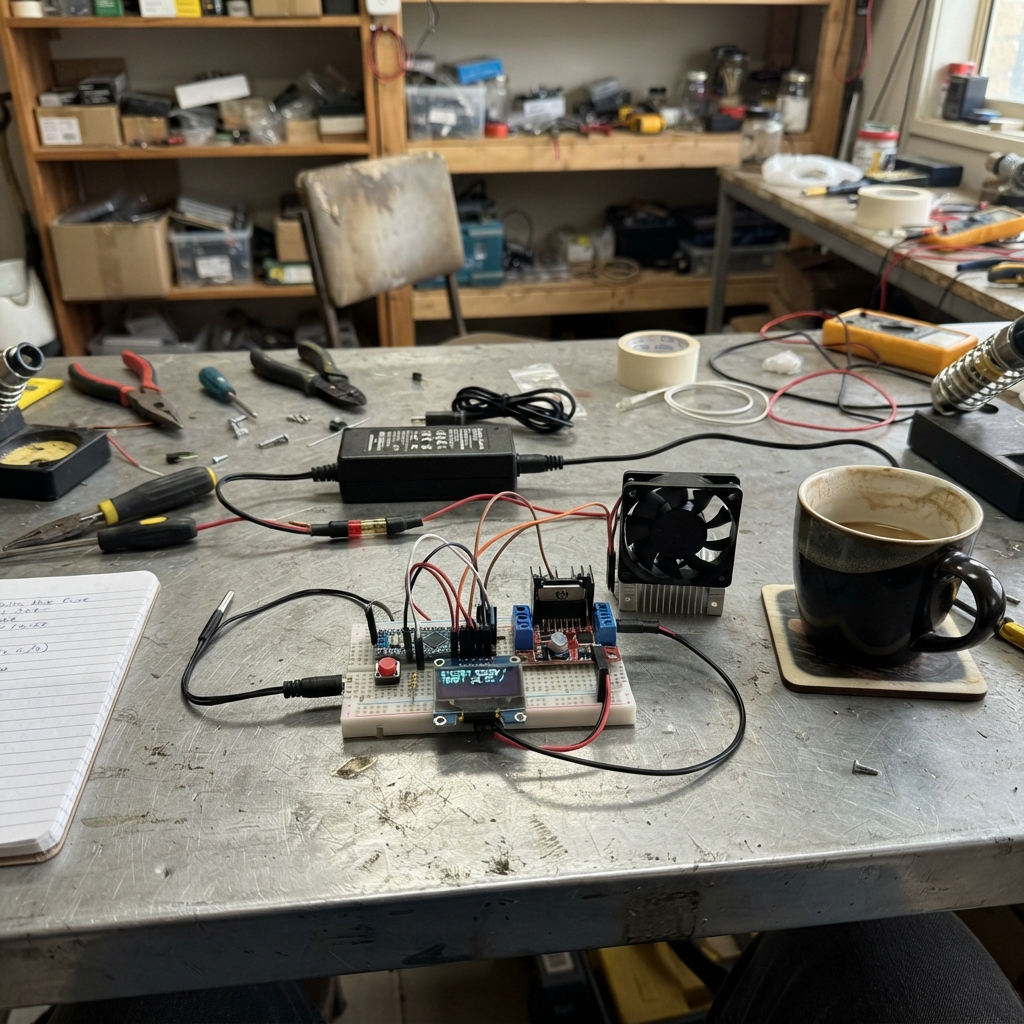
The Self-Regulating Cooling Jacket uses an ESP32 to monitor three independent temperature zones and automatically control cooling fans based on user-selected setpoints. Built around a single breadboard, the system reads DS18B20 temperature sensors, displays live zone status on an OLED screen, and switches 12 V fans via an L298N motor driver with proper fusing and power isolation.
This guide provides a complete wiring diagram, parts list, and step-by-step assembly instructions for integrating the temperature sensing, fan control, and user interface. The included firmware implements hysteresis-based fan control with fault detection—if any sensor fails, all fans stay on for safety. Builders will learn to work with one-wire temperature buses, PWM fan control, and designing a removable wearable enclosure after bench testing.
Wiring diagram

Gather all the parts
Assemble it in 9 steps
1. Use exactly one 830-point breadboard
Use exactly one standard 830-point solderless breadboard with rows numbered 1–63 and columns a–j, plus insulated jumper wires. No second breadboard is needed. Place the ESP32 beside it and connect its header pins with female-to-male jumpers; this avoids wide ESP32 boards covering the usable holes. Keep the three driver modules, fans, supply and fuses beside the breadboard, not plugged into it. Disconnect USB and the 12 V supply before wiring. A group of five holes on each side of the center gap is normally connected internally; opposite sides are separate. Use separate groups for different signals. Do not assume every board has the same rail connections.
- This is a tabletop layout, not suitable for wearing. Never put 12 V or fan-current paths through breadboard contacts.
2. Combine all low-power wiring on the same breadboard
Use only the left-side red and blue rails for all low-power connections, leaving the right-side rails unused. Connect ESP32 3V3 to the left red rail and ESP32 GND to the left blue rail. All OLED and probe supply wires share this red rail; their ground wires, the button ground and all three resistor ground ends share this blue rail. The circuit drawing shows electrical connections; the row positions here describe their physical placement on one breadboard. Label them 3.3 V and GND. If a rail is split midway, bridge its two halves with a jumper. Do not connect red and blue together. Use the a–e side of this same breadboard. Row 5 is probe DATA: a5 to GPIO18, b5/c5/d5 to the three probe DATA leads, and e5 to one end of the 4.7 kilohm resistor (other end to the 3.3 V rail). Row 10 is fan 1 control: a10 to GPIO19, b10 to driver 1 IN1, c10 to one end of its 10 kilohm resistor (other end to GND rail). Repeat on row 15 for GPIO26/driver 2 and row 20 for GPIO33/driver 3. Row 25 joins GPIO21 to OLED SDA; row 30 joins GPIO22 to OLED SCL. Row 35 joins GPIO27 to one button contact; the other switched contact connects to GND. Mount the button across the center gap where its lead spacing fits, and jumper it to row 35 and GND; do not force its legs into specified holes. Use only holes within the same numbered a–e group when following these row assignments; f–j is a separate group. Keep all different numbered signal groups separate. Use only this one breadboard for every low-power signal group and resistor. Probe VCC and OLED VCC go to its 3.3 V rail; their GND leads go to its GND rail. Connect supply negative and all driver power GND terminals together outside the breadboard with secure connectors, then run one reference-ground wire from that junction to the blue rail. Ground the unused driver inputs locally at each module. Keep all fan current in the external wiring.
- Never connect the 12 V supply positive, a driver 5V terminal, or fan output terminals to either breadboard rail. Use USB for ESP32 power.
3. Check the fan ratings before building
Use three guarded, two-wire 12 V fans, each rated at 0.20 A or less and specified to start at 9 V or lower. L298N modules lose voltage and become warm. This design switches fans fully on or off; it does not power Peltier cooling plates. Power the ESP32 separately by USB.
- Do not connect Peltier plates or larger heat-sink fans. Their power needs exceed this design. This is a ventilation prototype, not medical protection against heat illness.
4. Build the fused 12 V power chain
With power unplugged, connect supply positive to the 2 A main fuse, then split its output to three 0.5 A branch fuses. Each branch output feeds one driver 12V terminal. Supply negative and all driver GND terminals join ESP32 GND. Use the listed 12–14 AWG wire for the main chain and 16 AWG for branches, with correctly sized terminals and heat-shrink over joints. Keep mains inside the certified supply.
- Replace the listed 25 A and 7.5 A fuses with 2 A and 0.5 A fuses in compatible holders. Never put 12 V on the ESP32, OLED or probes. Never carry an open mains-powered prototype on your body.
5. Prepare and wire the three drivers
Use common red L298N modules with onboard regulator and flyback diodes. Leave 5V-EN and ENA jumpers fitted. Leave each 5V terminal unconnected: do not join it to USB or another module. Remove ENB jumper and connect ENB, IN3, IN4 and IN2 to ground. IN1 goes to GPIO19 for zone 1, GPIO26 for zone 2 and GPIO33 for zone 3. Each IN1 also gets its own 10 kilohm resistor to ground. OUT1 goes to fan positive and OUT2 to fan negative.
- Disconnect power before moving jumpers. ENA is held at 5 V by its jumper; never connect it to an ESP32 pin. Keep heatsinks away from skin and fabric.
6. Connect the three temperature probes
All three VCC leads go to 3V3, all ground leads to GND, and all data leads to GPIO18. Fit the single 4.7 kilohm resistor between GPIO18 and 3V3. Confirm each probe supplier’s lead functions; colors are not universal. Use three-wire powered operation, not parasite power. Keep the data bundle short and away from fan power wires.
7. Connect the screen and button
OLED VCC goes to 3V3 and GND to GND. SDA goes to GPIO21 (data); SCL goes to GPIO22 (clock). Use a 128 by 64 SSD1306 I2C screen at address 0x3C. Button connects GPIO27 to GND when pressed. On a four-legged button, use contacts that are not permanently joined.
8. Identify zones and test on the bench
Connect all probes before starting. Warm one probe in your hand to identify the displayed zone, then label it to match its fan. Probe address order defines zones, not cable order. Restart and recheck labels if a probe is replaced or missing. The serial output also lists each address. Default target is 30 C; each button press cycles 32, 28, 30 C. A fan turns on 0.5 C above target and off 0.5 C below. Disconnect one probe during testing: every fan should run and the screen should show FAULT. Reconnect and verify recovery. Confirm every fan starts reliably and no wire, terminal or driver becomes hot. There is no fan-stall detection.
9. Plan a removable wearable enclosure only after testing
Keep fans guarded against hair and fingers. Insulate joints, provide strain relief, and keep drivers and electronics in a ventilated splash-resistant enclosure away from skin. Only probe tips are waterproof. Do not apply thermal paste to skin; it is not needed for ventilation. Remove all electronics before washing. This supplied design is a tethered bench prototype, not a finished battery-powered wearable.
- Do not wear while connected to a wall adapter. A portable battery system needs a separate protected battery and power design. Fans cannot guarantee safe body temperature, especially in very hot air. Stop use if uncomfortable or overheated.
Review all connections
1. Connections between "oled" and "ESP32"
2. Connections between "button" and "ESP32"
3. Connections between "pullup" and "ESP32"
4. Connections between "supply" and "ESP32"
5. Connections between "sensor1" and "ESP32"
6. Connections between "mainfuse" and "ESP32"
7. Connections between "fuse1" and "ESP32"
8. Connections between "driver1" and "ESP32"
9. Connections between "pulldown1" and "ESP32"
10. Connections between "sensor2" and "ESP32"
11. Connections between "fuse2" and "ESP32"
12. Connections between "driver2" and "ESP32"
13. Connections between "pulldown2" and "ESP32"
14. Connections between "sensor3" and "ESP32"
15. Connections between "fuse3" and "ESP32"
16. Connections between "driver3" and "ESP32"
17. Connections between "pulldown3" and "ESP32"
Deploy the firmware
#include <Arduino.h>
#include <Wire.h>
#include <OneWire.h>
#include <DallasTemperature.h>
#include <Adafruit_GFX.h>
#include <Adafruit_SSD1306.h>
OneWire bus(18);
DallasTemperature sensors(&bus);
Adafruit_SSD1306 oled(128,64,&Wire,-1);
const uint8_t fans[3]={19,26,33};
DeviceAddress addresses[3];
bool found[3]={}, valid[3]={}, running[3]={};
float temp[3]={};
const float targets[3]={28,30,32};
uint8_t mode=1;
bool screen=false, dirty=true, pending=true;
uint32_t started=0, buttonChanged=0;
bool lastRaw=HIGH, stable=HIGH;
String previous;
void control() {
  bool fault=false;
  for(int i=0;i<3;i++) fault |= !valid[i];
  for(int i=0;i<3;i++) {
    bool on=running[i];
    if(fault) on=true; // Loss of measurement keeps ventilation on, not off.
    else if(temp[i]>=targets[mode]+0.5f) on=true;
    else if(temp[i]<=targets[mode]-0.5f) on=false;
    if(on!=running[i]) dirty=true;
    running[i]=on; digitalWrite(fans[i],on?HIGH:LOW);
  }
}
void draw() {
  String text="THERMOFLEX  "+String((int)targets[mode])+"C\n";
  bool fault=false;
  for(int i=0;i<3;i++) {
    fault |= !valid[i];
    text += "Z"+String(i+1)+" "+(valid[i]?String(temp[i],1):String("ERR"))+"C "+(running[i]?"ON":"OFF")+"\n";
  }
  text += fault?"FAULT: ALL FANS ON\n":"Button: 28/30/32 C\n";
  if(text!=previous) {
    previous=text; Serial.print(text);
    if(screen) {oled.clearDisplay(); oled.setCursor(0,0); oled.print(text); oled.display();}
  }
  dirty=false;
}
void setup() {
  Serial.begin(115200);
  for(auto pin:fans) {digitalWrite(pin,LOW); pinMode(pin,OUTPUT);}
  pinMode(27,INPUT_PULLUP);
  Wire.begin(21,22);
  Wire.setTimeOut(50);
  Wire.beginTransmission(0x3C);
  if(Wire.endTransmission()==0) screen=oled.begin(SSD1306_SWITCHCAPVCC,0x3C);
  if(screen) {oled.setTextSize(1); oled.setTextColor(SSD1306_WHITE);}
  sensors.begin(); sensors.setResolution(12); sensors.setWaitForConversion(false);
  for(int i=0;i<3;i++) {
    found[i]=sensors.getAddress(addresses[i],i);
    Serial.printf("Zone %d sensor: ",i+1);
    if(found[i]) for(uint8_t b:addresses[i]) Serial.printf("%02X",b);
    else Serial.print("missing - restart after reconnecting");
    Serial.println();
  }
  control(); draw();
  sensors.requestTemperatures(); started=millis();
}
void loop() {
  uint32_t now=millis();
  bool raw=digitalRead(27);
  if(raw!=lastRaw) {lastRaw=raw; buttonChanged=now;}
  if(now-buttonChanged>=40 && raw!=stable) {
    stable=raw;
    if(stable==LOW) {mode=(mode+1)%3; control(); dirty=true;}
  }
  if(pending && now-started>=800) {
    for(int i=0;i<3;i++) {
      float t=found[i]?sensors.getTempC(addresses[i]):DEVICE_DISCONNECTED_C;
      // Conservative wearable operating envelope. Reject startup/error values.
      valid[i]=found[i] && isfinite(t) && t>=-10 && t<=60;
      temp[i]=t;
    }
    control(); dirty=true; pending=false;
  }
  if(!pending && now-started>=1200) {
    sensors.requestTemperatures(); started=now; pending=true;
  }
  if(dirty) draw();
  delay(2);
}
Remix this project
Make it yours in one click
Open a full copy of this project in your own Schematik workspace — diagram, code, parts, and assembly steps included. Swap the sensor, add features, or redesign the whole thing with AI. The author's original stays untouched.