Community project
Mobile-Controlled Lock Opener
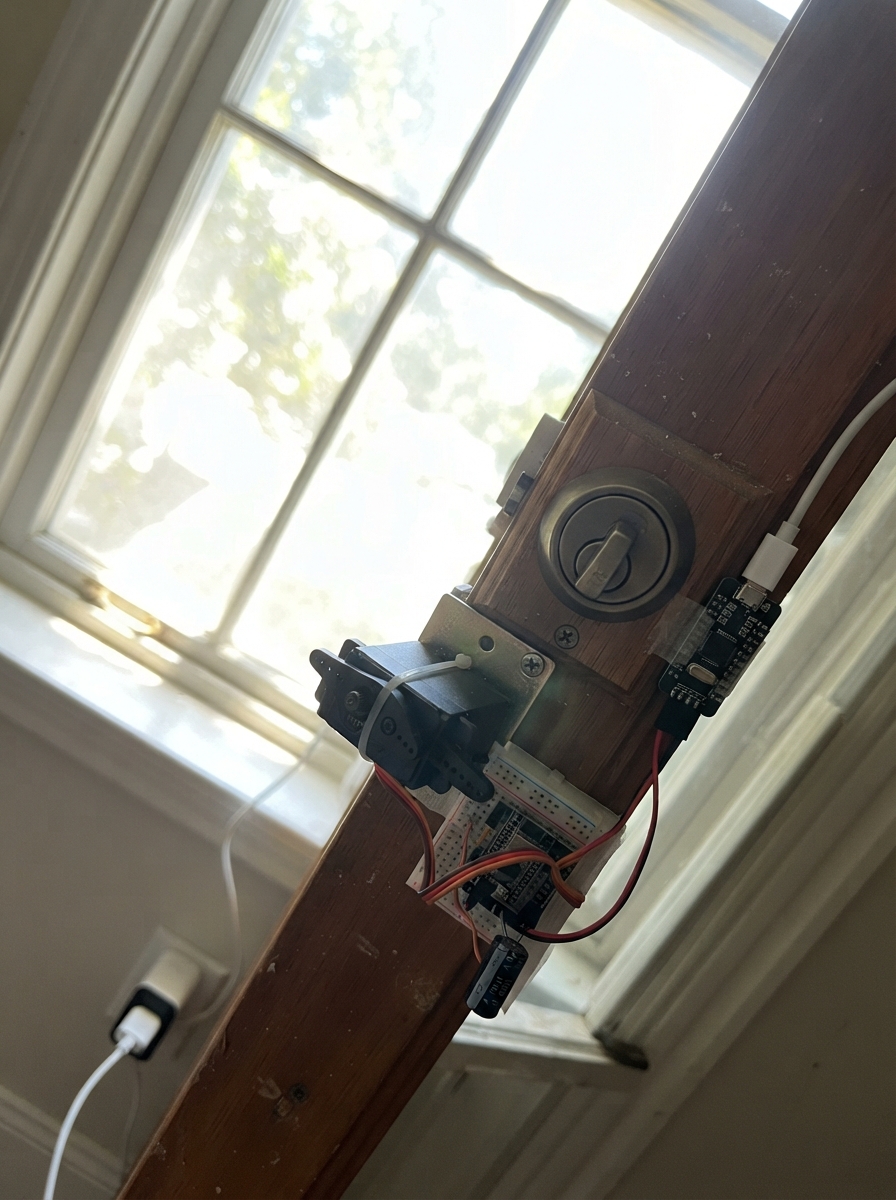
This project builds a Wi-Fi-controlled door handle actuator using an ESP32 microcontroller and MG996R servo motor. The servo mounts to a door frame and presses down on an interior lever handle when triggered, allowing remote unlocking via a mobile device or web browser on the same Wi-Fi network.
The guide provides a complete wiring diagram, parts list, and step-by-step assembly instructions for mechanically attaching the servo, making power connections with the smoothing capacitor, and configuring the firmware. Builders will learn how to adjust servo angles for their specific door handle, set up a password-protected Wi-Fi access point, and safely test the mechanism before deployment.
Wiring diagram
Gather all the parts
Assemble it in 6 steps
1. Test the handle travel by hand
Stand on the inside of the door and press the lever down by hand. Mark a spot beside the handle where a servo arm can push the lever down without covering the key, blocking the handle, or preventing anyone inside from opening the door by hand.
- Mount the servo body to the door or a rigid bracket, not to the moving handle.
- Keep the original handle usable if the electronics lose power.
- Do not mount the arm where it can trap the lever down or stop an emergency exit from opening.
2. Attach the servo to the door
With all power disconnected, screw or firmly bond the MG996R servo body to the marked rigid spot. Fit the supplied servo horn so it rests clear of the handle at its starting position, then use a short smooth pad on the horn where it touches the lever so it does not scratch the handle.
- Make the horn push the handle down rather than pull it sideways.
- Before powering it, move the horn through its path by hand and make sure it cannot hit the door, lock, or frame.
- A loose servo can swing unexpectedly and may jam the handle, so secure the servo body before testing.
3. Make the shared 5 V power connections
Use the 5 V USB-C adapter's 5 V output wires: connect the servo red VCC wire to 5 V (power), connect the servo brown or black GND wire to GND (ground), and also connect those same two supply wires to the ESP32 pins marked 5V and GND. Keep the ESP32 and servo ground wires joined; without this shared ground the orange control wire cannot work reliably.
- Use a USB-C adapter rated for 5 V and at least 4 A.
- Do not connect the servo red wire to the ESP32 pin marked 3V3.
- Do not use a small phone charger of unknown rating: the servo can demand a large burst of current and can make the ESP32 restart.
4. Add the power-smoothing capacitor
With the supply still unplugged, put the capacitor directly across the servo power wires: its long positive leg goes to 5 V (power) and its short leg with the stripe marking goes to GND (ground).
- Keep its two leads short and close to the servo power connection.
- A capacitor marked 10 V, 16 V, or higher is suitable for this 5 V supply.
- Make sure the capacitor's striped negative side goes to GND — reversing it can damage the capacitor.
5. Connect the control wire
Connect the servo orange SIG wire to ESP32 GPIO25 (signal). This is the only servo wire that goes to a numbered ESP32 GPIO pin.
- The final wiring is: servo VCC → 5V (power), servo GND → GND (ground), servo SIG → GPIO25 (signal).
- Keep the orange signal wire away from the moving horn so it cannot be pulled loose.
- Do not swap the red and brown servo wires — swapped power can damage the servo.
6. Power and adjust safely
Plug in the 5 V supply while keeping hands clear of the servo arm. The arm should move to its resting position. If it touches the handle at rest or pushes too far when opened, unplug power and adjust the horn position or the REST_ANGLE and PRESS_ANGLE values in the firmware before trying again.
- Check that pushing the inside handle by hand still opens the door even if the ESP32 is unplugged.
- Test with the door open first so an incorrect angle cannot lock you out.
- Never perform the first servo-motion test with the door closed; a wrong travel setting can jam the door.
Review all connections
1. Connections between "usb_power" and "ESP32"
2. Connections between "lever_servo" and "ESP32"
3. Connections between "servo_capacitor" and "ESP32"
Deploy the firmware
#include <WiFi.h>
#include <WebServer.h>
#include <ESP32Servo.h>

// Change these before deployment. The Wi-Fi password must be at least 8 characters.
const char *AP_NAME = "Door-Lever-Control";
const char *AP_PASSWORD = "LeverDoor_4829";

constexpr int SERVO_PIN = 25;
constexpr int REST_ANGLE = 15;       // Adjust so the arm is clear of the handle.
constexpr int PRESS_ANGLE = 105;     // Adjust so the arm presses the handle down.
constexpr unsigned long PRESS_TIME_MS = 850;

WebServer server(80);
Servo leverServo;
bool handleIsPressed = false;
unsigned long releaseAt = 0;

const char PAGE[] PROGMEM = R"HTML(
<!doctype html><html><head><meta name="viewport" content="width=device-width,initial-scale=1">
<title>Door Lever</title><style>
body{margin:0;font-family:Arial,sans-serif;background:#12202b;color:#fff;text-align:center}
main{max-width:420px;margin:10vh auto;padding:28px}h1{font-size:2rem}p{color:#c9d8e3;line-height:1.5}
button{width:100%;padding:24px;border:0;border-radius:14px;background:#23a559;color:white;font-size:1.5rem;font-weight:bold;cursor:pointer}
button:active{background:#187841}.note{font-size:.9rem;margin-top:24px}
</style></head><body><main><h1>Inside Door Lever</h1>
<p>Tap once to press the inside handle briefly.</p>
<form action="/open" method="post"><button type="submit">OPEN</button></form>
<p class="note">Only people connected to this device's password-protected Wi-Fi can reach this page.</p>
</main></body></html>
)HTML";

void showPage() {
  server.send(200, "text/html", PAGE);
}

void openHandle() {
  if (!handleIsPressed) {
    leverServo.write(PRESS_ANGLE);
    handleIsPressed = true;
    releaseAt = millis() + PRESS_TIME_MS;
  }
  server.sendHeader("Location", "/");
  server.send(303);
}

void setup() {
  leverServo.setPeriodHertz(50);
  leverServo.attach(SERVO_PIN, 500, 2500);
  leverServo.write(REST_ANGLE);

  WiFi.mode(WIFI_AP);
  WiFi.softAP(AP_NAME, AP_PASSWORD);

  server.on("/", HTTP_GET, showPage);
  server.on("/open", HTTP_POST, openHandle);
  server.onNotFound(showPage);
  server.begin();
}

void loop() {
  server.handleClient();

  if (handleIsPressed && (long)(millis() - releaseAt) >= 0) {
    leverServo.write(REST_ANGLE);
    handleIsPressed = false;
  }

  delay(1);
}
Remix this project
Make it yours in one click
Open a full copy of this project in your own Schematik workspace — diagram, code, parts, and assembly steps included. Swap the sensor, add features, or redesign the whole thing with AI. The author's original stays untouched.