Community project
Waveshare Esp32-s3 1 47inch Display Development
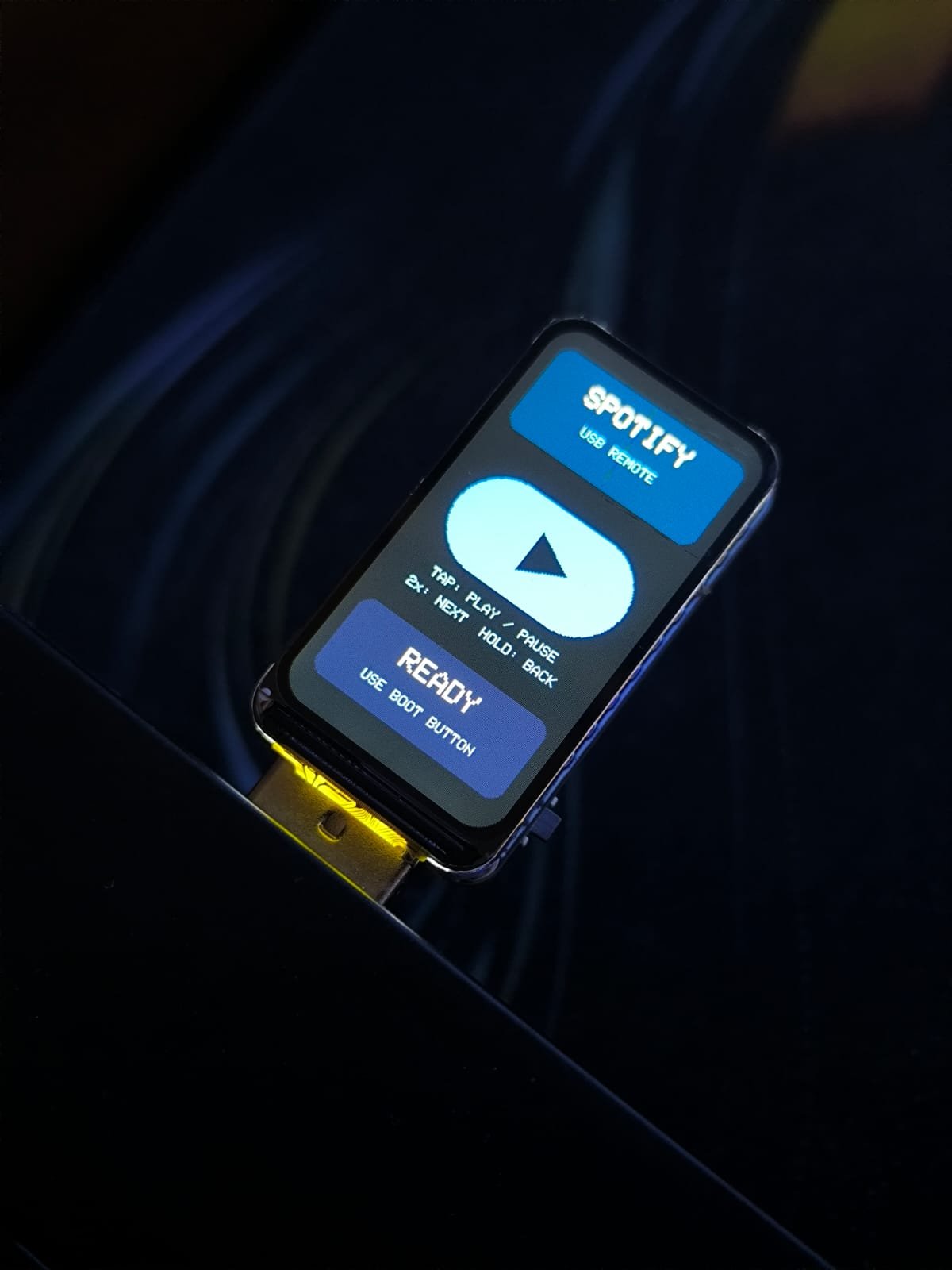
This guide builds a Spotify controller using the Waveshare ESP32-S3 with a 1.47-inch display. The BOOT button on the board sends media control commands (play/pause, next track, previous track) to your computer via USB HID, while the display shows real-time feedback of each action. An RGB LED provides visual confirmation of button presses.
You'll receive a complete parts list, wiring diagram, and ready-to-flash firmware that handles button debouncing, tap detection, and hold gestures. The project connects directly to your laptop with no additional hardware required—just upload the code and start controlling your music.
Wiring diagram
Assemble it in 2 steps
1. Connect the board to your laptop
Plug the Waveshare board straight into a USB port on your Windows laptop using a data-capable USB cable. The board gets power and sends Spotify control commands through this one cable.
- If the screen stays dark, try another USB cable; some cables only carry power and cannot send data.
- Do not press and hold the BOOT button while plugging the board in, because that can put the board into programming mode instead of its normal Spotify-control mode.
2. Control Spotify with the BOOT button
Open Spotify on the laptop, then use the small BOOT button on the board: tap it once for play or pause, tap it twice quickly for the next track, or hold it for about one second to go back to the previous track. The screen briefly names the command it sent.
- The controls are standard Windows media commands, so they also work with other music or video apps when Spotify is not the active media app.
- Start music in Spotify before testing, because the button controls the Windows media session that is currently available.
Deploy the firmware
#include <Arduino.h>
#include <SPI.h>
#include <Arduino_GFX_Library.h>
#include <Adafruit_NeoPixel.h>
#include <USB.h>
#include <USBHIDConsumerControl.h>


// Forward declarations
uint16_t color565(uint8_t red, uint8_t green, uint8_t blue);
void drawCentered(const char *text, int y, uint8_t size, uint16_t color);
void drawStaticScreen();
void showAction(const char *action);
void restoreReadyMessage();
void sendPlayPause();
void sendNextTrack();
void sendPreviousTrack();

constexpr int LCD_MOSI = 45;
constexpr int LCD_SCLK = 40;
constexpr int LCD_CS = 42;
constexpr int LCD_DC = 41;
constexpr int LCD_RST = 39;
constexpr int LCD_BL = 48;
constexpr int RGB_LED_PIN = 38;
constexpr int BOOT_BUTTON_PIN = 0;

constexpr uint16_t SCREEN_WIDTH = 172;
constexpr uint16_t SCREEN_HEIGHT = 320;
constexpr uint16_t BACKGROUND = 0x0861;
constexpr uint16_t WHITE = 0xFFFF;
constexpr uint16_t ACCENT = 0x05FF;
constexpr uint16_t PANEL = 0x212A;
constexpr uint32_t DEBOUNCE_MS = 35;
constexpr uint32_t MESSAGE_MS = 1200;
constexpr uint32_t DOUBLE_TAP_MS = 350;
constexpr uint32_t HOLD_MS = 700;

Arduino_DataBus *lcdBus = new Arduino_ESP32SPI(
  LCD_DC, LCD_CS, LCD_SCLK, LCD_MOSI, GFX_NOT_DEFINED
);
Arduino_GFX *lcd = new Arduino_ST7789(
  lcdBus, LCD_RST, 0, true, SCREEN_WIDTH, SCREEN_HEIGHT, 34, 0, 34, 0
);
Adafruit_NeoPixel rgbLed(1, RGB_LED_PIN, NEO_GRB + NEO_KHZ800);
USBHIDConsumerControl mediaKeys;

bool stableButtonState = HIGH;
bool lastRawButtonState = HIGH;
bool holdWasSent = false;
uint8_t pendingTaps = 0;
unsigned long lastBounceAt = 0;
unsigned long pressBeganAt = 0;
unsigned long lastReleaseAt = 0;
unsigned long clearMessageAt = 0;

uint16_t color565(uint8_t red, uint8_t green, uint8_t blue) {
  return lcd->color565(red, green, blue);
}

void drawCentered(const char *text, int y, uint8_t size, uint16_t color) {
  lcd->setTextSize(size);
  lcd->setTextColor(color);
  const int16_t textWidth = strlen(text) * 6 * size;
  lcd->setCursor((SCREEN_WIDTH - textWidth) / 2, y);
  lcd->print(text);
}

void drawStaticScreen() {
  lcd->fillScreen(BACKGROUND);
  lcd->fillRoundRect(10, 16, 152, 70, 10, color565(18, 74, 122));
  drawCentered("SPOTIFY", 29, 2, WHITE);
  drawCentered("USB REMOTE", 56, 1, color565(174, 230, 255));

  lcd->fillRoundRect(18, 112, 136, 72, 36, ACCENT);
  lcd->fillTriangle(78, 132, 78, 164, 108, 148, BACKGROUND);
  drawCentered("TAP: PLAY / PAUSE", 194, 1, color565(174, 230, 255));
  drawCentered("2x: NEXT  HOLD: BACK", 208, 1, color565(174, 230, 255));

  lcd->fillRoundRect(10, 236, 152, 62, 10, PANEL);
  drawCentered("READY", 248, 2, WHITE);
  drawCentered("USE BOOT BUTTON", 276, 1, color565(174, 230, 255));
}

void showAction(const char *action) {
  lcd->fillRoundRect(10, 236, 152, 62, 10, color565(14, 105, 83));
  drawCentered("SENT", 248, 2, WHITE);
  drawCentered(action, 276, 1, color565(189, 255, 228));
  rgbLed.setPixelColor(0, rgbLed.Color(0, 20, 4));
  rgbLed.show();
  clearMessageAt = millis() + MESSAGE_MS;
}

void restoreReadyMessage() {
  lcd->fillRoundRect(10, 236, 152, 62, 10, PANEL);
  drawCentered("READY", 248, 2, WHITE);
  drawCentered("USE BOOT BUTTON", 276, 1, color565(174, 230, 255));
  rgbLed.setPixelColor(0, rgbLed.Color(0, 0, 8));
  rgbLed.show();
}

void sendPlayPause() {
  mediaKeys.press(CONSUMER_CONTROL_PLAY_PAUSE);
  mediaKeys.release();
  showAction("PLAY / PAUSE");
}

void sendNextTrack() {
  mediaKeys.press(CONSUMER_CONTROL_SCAN_NEXT);
  mediaKeys.release();
  showAction("NEXT TRACK");
}

void sendPreviousTrack() {
  mediaKeys.press(CONSUMER_CONTROL_SCAN_PREVIOUS);
  mediaKeys.release();
  showAction("PREVIOUS TRACK");
}

void setup() {
  pinMode(LCD_BL, OUTPUT);
  digitalWrite(LCD_BL, HIGH);
  pinMode(BOOT_BUTTON_PIN, INPUT_PULLUP);

  rgbLed.begin();
  rgbLed.clear();
  rgbLed.show();

  lcd->begin();
  drawStaticScreen();
  restoreReadyMessage();

  mediaKeys.begin();
  USB.begin();
}

void loop() {
  const unsigned long now = millis();
  const bool rawButtonState = digitalRead(BOOT_BUTTON_PIN);

  if (rawButtonState != lastRawButtonState) {
    lastRawButtonState = rawButtonState;
    lastBounceAt = now;
  }

  if ((now - lastBounceAt) >= DEBOUNCE_MS && rawButtonState != stableButtonState) {
    stableButtonState = rawButtonState;
    if (stableButtonState == LOW) {
      pressBeganAt = now;
      holdWasSent = false;
    } else if (!holdWasSent) {
      pendingTaps++;
      lastReleaseAt = now;
    }
  }

  if (stableButtonState == LOW && !holdWasSent && (now - pressBeganAt) >= HOLD_MS) {
    holdWasSent = true;
    pendingTaps = 0;
    sendPreviousTrack();
  }

  if (pendingTaps != 0 && (now - lastReleaseAt) >= DOUBLE_TAP_MS) {
    if (pendingTaps >= 2) {
      sendNextTrack();
    } else {
      sendPlayPause();
    }
    pendingTaps = 0;
  }

  if (clearMessageAt != 0 && now >= clearMessageAt) {
    clearMessageAt = 0;
    restoreReadyMessage();
  }
}
Remix this project
Make it yours in one click
Open a full copy of this project in your own Schematik workspace — diagram, code, parts, and assembly steps included. Swap the sensor, add features, or redesign the whole thing with AI. The author's original stays untouched.