Community project
8x8 LED Matrix Puzzle Game
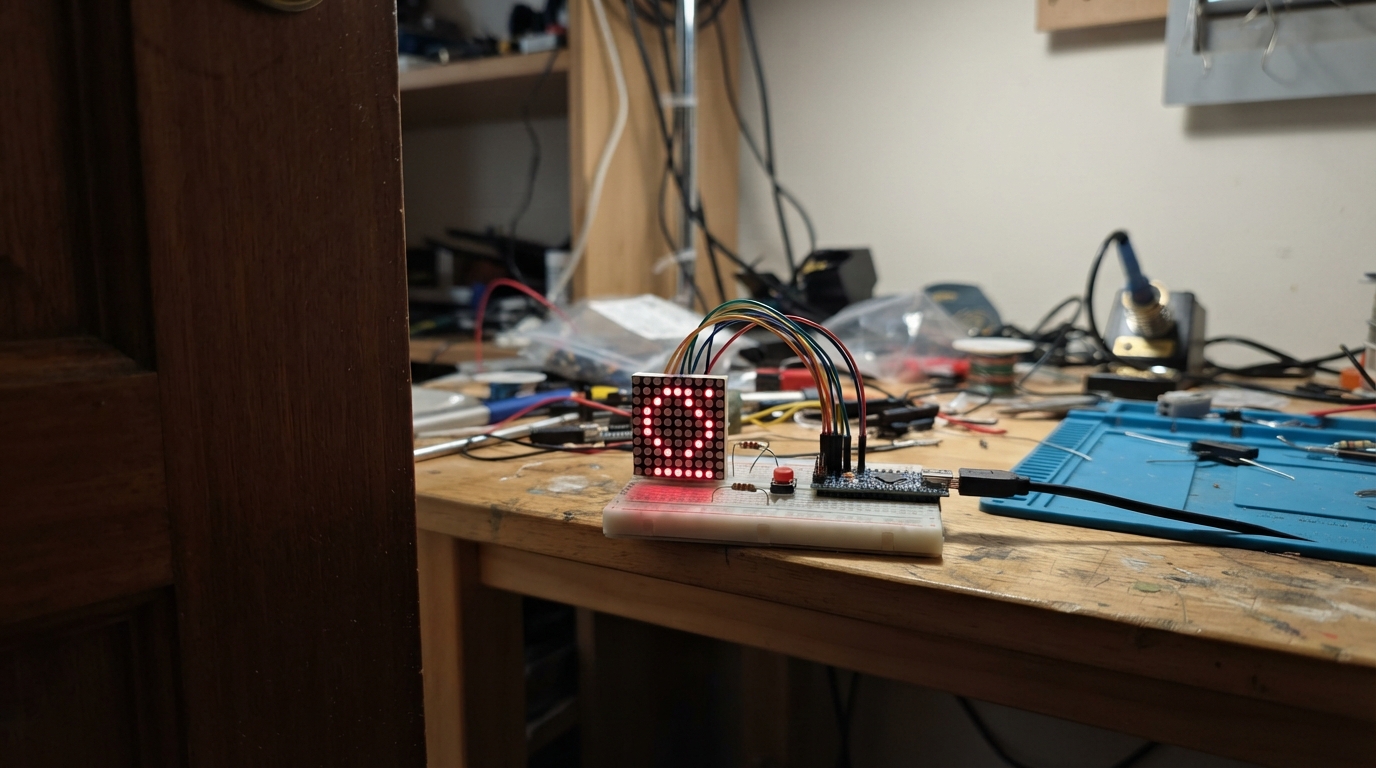
Build a classic falling-block puzzle game on an 8x8 LED matrix powered by an ESP32 microcontroller. This project combines hardware assembly with embedded firmware to create an interactive game where players rotate and drop pieces to clear rows, with real-time visual feedback on the LED display.
This guide provides a complete parts list, wiring diagram showing all row and column connections to the ESP32, step-by-step assembly instructions for the 1088AS bare LED matrix with protective resistors, and ready-to-upload Arduino firmware. Builders will learn matrix display multiplexing, button input handling, and game logic implementation on a microcontroller platform.
Wiring diagram

Gather all the parts
Assemble it in 5 steps
1. Identify the correct bare matrix
Use a 1088AS bare 8×8 red LED matrix, not a board with a display driver. Hold its printed face toward you and find the small mark that identifies pin 1; the numbered pin positions below apply only to a 1088AS.
- The display has two rows of eight legs, for 16 legs total. Do not use the old four-pin HT16K33 or MAX7219 board.
- A 1088BS or another matrix type has different internal connections. Connecting it with this 1088AS layout can make the picture scrambled or leave it dark, but the 1.5 kΩ resistors still protect the ESP32-S3 pins.
2. Connect the eight row legs
Run eight jumper wires directly from the bare matrix row legs to the ESP32-S3: matrix physical pin 9 → GPIO5 (row 1), pin 14 → GPIO6 (row 2), pin 8 → GPIO7 (row 3), pin 12 → GPIO8 (row 4), pin 1 → GPIO9 (row 5), pin 7 → GPIO10 (row 6), pin 2 → GPIO11 (row 7), and pin 5 → GPIO12 (row 8). These wires select one horizontal line at a time.
- Put the matrix across the center gap of a breadboard so its two leg rows cannot touch each other.
- Do not connect any matrix leg straight to 3V3 or GND; every one of its 16 legs is controlled by the program.
3. Add the eight protective resistors and column wires
Use one separate 1.5 kΩ resistor for every column. Connect matrix pin 13 → resistor 1 → GPIO13 (column 1), pin 3 → resistor 2 → GPIO14 (column 2), pin 4 → resistor 3 → GPIO15 (column 3), pin 10 → resistor 4 → GPIO16 (column 4), pin 6 → resistor 5 → GPIO17 (column 5), pin 11 → resistor 6 → GPIO18 (column 6), pin 15 → resistor 7 → GPIO21 (column 7), and pin 16 → resistor 8 → GPIO38 (column 8). The resistor has no direction; it limits the current so the ESP32-S3 is protected.
- A 1.5 kΩ resistor has brown, green, red, and gold bands. Keep each resistor in series: one end to the GPIO wire and its other end to the named matrix leg.
- Do not replace these with plain wires — too much current can damage an ESP32-S3 pin.
4. Keep the four game buttons
For each push button, place it across the breadboard center gap. Connect one leg of the left button to GPIO1 and its opposite leg to GND (signal and ground); right button GPIO2 to GND (signal and ground); rotate button GPIO3 to GND (signal and ground); and drop button GPIO4 to GND (signal and ground).
- The program uses the ESP32-S3's built-in pull-up, so no extra resistor is needed for the buttons. A quick tap counts exactly once.
- Make sure each button's two used legs are opposite each other, not the two legs already joined on the same side of the button.
5. Power and test
Check that no bare matrix legs touch before plugging the ESP32-S3 into USB. The USB cable powers the board; the matrix has no separate VCC or GND wire because all 16 of its legs are already connected through the row and column wiring.
- After deploying, the falling blocks should appear. Press left, right, rotate, and drop to play.
- If all LEDs glow, the matrix is likely fitted the wrong way around or a row and column wire is in the wrong hole; unplug USB before moving wires.
Review all connections
1. Connections between "button_left" and "ESP32"
2. Connections between "button_right" and "ESP32"
3. Connections between "button_rotate" and "ESP32"
4. Connections between "button_drop" and "ESP32"
5. Connections between "matrix_1" and "ESP32"
6. Connections between "column_resistor_1" and "ESP32"
7. Connections between "column_resistor_2" and "ESP32"
8. Connections between "column_resistor_3" and "ESP32"
9. Connections between "column_resistor_4" and "ESP32"
10. Connections between "column_resistor_5" and "ESP32"
11. Connections between "column_resistor_6" and "ESP32"
12. Connections between "column_resistor_7" and "ESP32"
13. Connections between "column_resistor_8" and "ESP32"
Deploy the firmware
#include <Arduino.h>

const uint8_t LEFT_BUTTON_PIN = 1;
const uint8_t RIGHT_BUTTON_PIN = 2;
const uint8_t ROTATE_BUTTON_PIN = 3;
const uint8_t DROP_BUTTON_PIN = 4;
const uint8_t ROW1_PIN = 5;
const uint8_t ROW2_PIN = 6;
const uint8_t ROW3_PIN = 7;
const uint8_t ROW4_PIN = 8;
const uint8_t ROW5_PIN = 9;
const uint8_t ROW6_PIN = 10;
const uint8_t ROW7_PIN = 11;
const uint8_t ROW8_PIN = 12;
const uint8_t COL1_PIN = 13;
const uint8_t COL2_PIN = 14;
const uint8_t COL3_PIN = 15;
const uint8_t COL4_PIN = 16;
const uint8_t COL5_PIN = 17;
const uint8_t COL6_PIN = 18;
const uint8_t COL7_PIN = 21;
const uint8_t COL8_PIN = 38;
const uint8_t rowPins[8] = {ROW1_PIN, ROW2_PIN, ROW3_PIN, ROW4_PIN, ROW5_PIN, ROW6_PIN, ROW7_PIN, ROW8_PIN};
const uint8_t columnPins[8] = {COL1_PIN, COL2_PIN, COL3_PIN, COL4_PIN, COL5_PIN, COL6_PIN, COL7_PIN, COL8_PIN};
// Each shape uses four stored positions. Repeated positions intentionally make 1- and 2-dot pieces.
const uint8_t SHAPES[5][4][4][2] = {
  {{{0,0},{0,0},{0,0},{0,0}},{{0,0},{0,0},{0,0},{0,0}},{{0,0},{0,0},{0,0},{0,0}},{{0,0},{0,0},{0,0},{0,0}}},
  {{{0,0},{1,0},{0,0},{1,0}},{{0,0},{0,1},{0,0},{0,1}},{{0,0},{1,0},{0,0},{1,0}},{{0,0},{0,1},{0,0},{0,1}}},
  {{{0,0},{1,0},{2,0},{2,0}},{{0,0},{0,1},{0,2},{0,2}},{{0,0},{1,0},{2,0},{2,0}},{{0,0},{0,1},{0,2},{0,2}}},
  {{{0,0},{0,1},{1,1},{1,1}},{{0,0},{1,0},{0,1},{0,1}},{{0,0},{1,0},{1,1},{1,1}},{{1,0},{0,1},{1,1},{1,1}}},
  {{{1,0},{0,1},{1,1},{1,1}},{{0,0},{0,1},{1,1},{1,1}},{{0,0},{1,0},{0,1},{0,1}},{{1,0},{1,1},{0,1},{0,1}}}
};
uint8_t boardCells[8] = {}; int pieceType, rotation, pieceX, pieceY; unsigned long lastFall, fallInterval = 550, gameOverAt = 0, nextScanAt = 0; bool gameOver = false; uint8_t scanRow = 0;
struct Button { uint8_t pin; bool stableState; bool lastReading; unsigned long changedAt; };
Button buttons[] = {{LEFT_BUTTON_PIN,HIGH,HIGH,0},{RIGHT_BUTTON_PIN,HIGH,HIGH,0},{ROTATE_BUTTON_PIN,HIGH,HIGH,0},{DROP_BUTTON_PIN,HIGH,HIGH,0}};
bool buttonPressed(Button &b) { bool r=digitalRead(b.pin); unsigned long n=millis(); if(r!=b.lastReading){b.changedAt=n;b.lastReading=r;} if(n-b.changedAt>25 && r!=b.stableState){b.stableState=r;return r==LOW;} return false; }
bool collides(int tx,int ty,int tr) { for(uint8_t i=0;i<4;i++){int x=tx+SHAPES[pieceType][tr][i][0],y=ty+SHAPES[pieceType][tr][i][1]; if(x<0||x>=8||y>=8||(y>=0&&(boardCells[y]&(1<<x)))) return true;} return false; }
bool pixelOn(uint8_t x,uint8_t y) { if(gameOver) return x==y||x==7-y; if(boardCells[y]&(1<<x)) return true; for(uint8_t i=0;i<4;i++) if(pieceX+SHAPES[pieceType][rotation][i][0]==x&&pieceY+SHAPES[pieceType][rotation][i][1]==y) return true; return false; }
void refreshMatrix(){ unsigned long n=micros(); if((long)(n-nextScanAt)<0)return; nextScanAt=n+1000; digitalWrite(rowPins[(scanRow+7)%8],HIGH); for(uint8_t x=0;x<8;x++)digitalWrite(columnPins[x],LOW); for(uint8_t x=0;x<8;x++)if(pixelOn(x,scanRow))digitalWrite(columnPins[x],HIGH); digitalWrite(rowPins[scanRow],LOW); scanRow=(scanRow+1)%8; }
void clearFullRows(){for(int y=7;y>=0;y--)if(boardCells[y]==0xFF){for(int a=y;a>0;a--)boardCells[a]=boardCells[a-1];boardCells[0]=0;y++;if(fallInterval>180)fallInterval-=20;}}
void spawnPiece(){pieceType=random(0,5);rotation=0;pieceX=3;pieceY=0;if(collides(pieceX,pieceY,rotation)){gameOver=true;gameOverAt=millis();}}
void lockPiece(){for(uint8_t i=0;i<4;i++){int x=pieceX+SHAPES[pieceType][rotation][i][0],y=pieceY+SHAPES[pieceType][rotation][i][1];if(x>=0&&x<8&&y>=0&&y<8)boardCells[y]|=(1<<x);}clearFullRows();spawnPiece();}
void stepDown(){if(!collides(pieceX,pieceY+1,rotation))pieceY++;else lockPiece();}
void newGame(){for(uint8_t y=0;y<8;y++)boardCells[y]=0;fallInterval=550;gameOver=false;spawnPiece();}
void setup(){for(Button &b:buttons)pinMode(b.pin,INPUT_PULLUP);for(uint8_t p:rowPins){pinMode(p,OUTPUT);digitalWrite(p,HIGH);}for(uint8_t p:columnPins){pinMode(p,OUTPUT);digitalWrite(p,LOW);}randomSeed(micros());newGame();lastFall=millis();}
void loop(){refreshMatrix();unsigned long n=millis();if(gameOver){if(n-gameOverAt>1200)newGame();return;}if(buttonPressed(buttons[0])&&!collides(pieceX-1,pieceY,rotation))pieceX--;if(buttonPressed(buttons[1])&&!collides(pieceX+1,pieceY,rotation))pieceX++;if(buttonPressed(buttons[2])){int r=(rotation+1)%4;if(!collides(pieceX,pieceY,r))rotation=r;}if(buttonPressed(buttons[3])){while(!collides(pieceX,pieceY+1,rotation))pieceY++;lockPiece();}if(n-lastFall>=fallInterval){lastFall=n;stepDown();}}
Remix this project
Make it yours in one click
Open a full copy of this project in your own Schematik workspace — diagram, code, parts, and assembly steps included. Swap the sensor, add features, or redesign the whole thing with AI. The author's original stays untouched.