Community project
WiFi-Controlled Model Boat
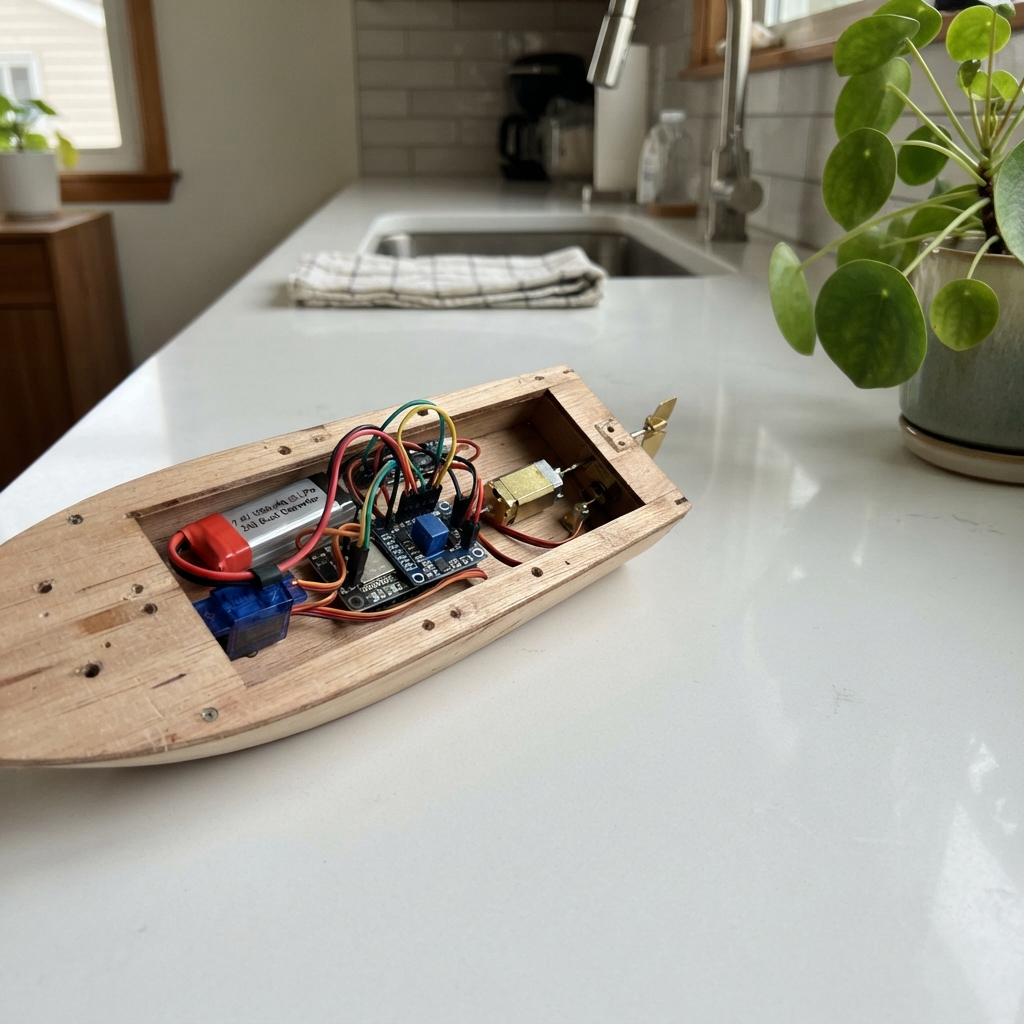
This WiFi-controlled model boat uses an ESP32 microcontroller to receive steering and throttle commands over a local wireless network. The boat is powered by a 7.4V lithium battery that feeds a buck converter for clean 5V logic power, while dual motors handle propulsion and rudder control through an H-bridge driver.
The guide includes a complete wiring diagram showing how to connect the micro metal gear motor and servo to the TB6612FNG driver, a parts list with battery specifications, and Arduino firmware that creates a web-based control interface. Assembly steps cover mounting the propulsion system, configuring the power distribution, and safety testing procedures before launching.
Wiring diagram
Gather all the parts
Assemble it in 6 steps
1. Fit the propulsion and steering parts
Mount the N20 gear motor low in the hull and connect its shaft to a small propeller shaft with a flexible coupler. Mount the SG90 servo above the waterline, then use its servo horn and a stiff pushrod to move the rudder. Centre the rudder by hand before fitting the horn so it has equal left and right travel.
- Keep the propeller shaft seal below the waterline and keep the motor, servo, and pushrod inside the dry hull.
- Turn the propeller by hand; it must spin freely without rubbing the hull.
- Water reaching the servo, motor driver, or ESP32 can short them and make the boat uncontrollable.
2. Set the 5 V power supply
Before connecting the ESP32 or servo, connect the 2-cell battery to the LM2596 input: battery BAT+ to buck VIN+ (battery power), and battery BAT- to buck VIN- (battery ground). With a multimeter, turn the tiny LM2596 adjustment screw until VOUT+ to VOUT- measures 5.0 V.
- Mark the adjusted module “5 V” so it is not changed later.
- Do this on a dry bench with the propeller removed or clear of fingers.
- A setting above 5 V can damage the ESP32 and servo.
- Charge the 2-cell LiPo only with a proper 2-cell balance charger and never charge it inside the sealed boat.
3. Wire the shared power lines
Make a 5 V positive line from buck VOUT+ (power) and a shared ground line from buck VOUT- (ground). Connect ESP32 VIN/5V to the 5 V line (power) and ESP32 GND to the ground line (ground). Connect the motor-driver VM to 5 V (motor power), its VCC to ESP32 3V3 (logic power), and its GND to ground (ground). Connect servo VCC to 5 V (power) and servo GND to ground (ground).
- Use thicker wire for the battery, buck converter, driver VM, and motor path; these carry the larger current.
- All ground wires must meet on the same ground line so the control signals have a reference.
- Make sure VCC and GND are not swapped on the servo or driver — swapped power can damage them.
4. Wire the propeller motor and driver controls
Connect motor-driver AO1 to propeller motor M+ (motor output), and motor-driver AO2 to propeller motor M- (motor output). Connect AIN1 to ESP32 GPIO25 (direction), AIN2 to GPIO26 (direction), PWMA to GPIO27 (speed), and STBY to GPIO14 (enable). Connect the unused BIN1, BIN2, and PWMB pins to GND (keeps the unused second driver channel off).
- If forward makes the boat reverse, swap the two motor wires at AO1 and AO2; do not change the battery wiring.
- Keep the motor wires away from the ESP32 antenna as much as the hull permits.
- Never connect the propeller motor directly to an ESP32 pin; the motor current will damage the board.
5. Connect the rudder signal and seal the hull
Connect the SG90 SIGNAL wire to ESP32 GPIO13 (steering signal). Put the ESP32, buck converter, and motor driver on a raised dry tray inside the hull. Arrange wires so the lid closes without pinching them, but leave the ESP32 antenna area clear of metal and thick battery wiring.
- The servo wires are usually brown or black for ground, red for 5 V, and orange or yellow for signal.
- Use a removable hatch so you can unplug the battery after every run.
- Do not seal a battery inside where it cannot be unplugged quickly if a wire becomes hot.
6. Test safely before launching
Lift the hull so the propeller is clear of hands and water, connect the battery, and check that the rudder first moves to centre. After deployment, join the phone to the Boat-Control Wi-Fi network using password sail-safe1, then open 192.168.4.1. Hold each on-screen button briefly: releasing forward or reverse stops the motor, and releasing left or right returns the rudder to centre.
- Test the emergency STOP button before putting the boat in water.
- The firmware also stops the motor if control messages stop for about seven-tenths of a second.
- Keep fingers, loose clothing, and the boat out of the water while the propeller is powered.
Review all connections
1. Connections between "battery_2s" and "ESP32"
2. Connections between "buck_5v" and "ESP32"
3. Connections between "motor_driver" and "ESP32"
4. Connections between "rudder_servo" and "ESP32"
Deploy the firmware
#include <WiFi.h>
#include <WebServer.h>
#include <ESP32Servo.h>

#define MOTOR_AIN1 25
#define MOTOR_AIN2 26
#define MOTOR_PWM  27
#define MOTOR_STBY 14
#define RUDDER_PIN 13

const char *AP_NAME = "Boat-Control";
const char *AP_PASSWORD = "sail-safe1";
WebServer server(80);
Servo rudder;

const int PWM_FREQUENCY = 20000;
const int PWM_RESOLUTION = 8;
const int CRUISE_SPEED = 210;
const int RUDDER_CENTER = 90;
const int RUDDER_LEFT = 55;
const int RUDDER_RIGHT = 125;
const unsigned long COMMAND_TIMEOUT_MS = 700;
unsigned long lastCommandMs = 0;
bool motorRunning = false;

void stopMotor() {
  ledcWrite(MOTOR_PWM, 0);
  digitalWrite(MOTOR_AIN1, LOW);
  digitalWrite(MOTOR_AIN2, LOW);
  motorRunning = false;
}

void driveMotor(bool forward) {
  digitalWrite(MOTOR_STBY, HIGH);
  digitalWrite(MOTOR_AIN1, forward ? HIGH : LOW);
  digitalWrite(MOTOR_AIN2, forward ? LOW : HIGH);
  ledcWrite(MOTOR_PWM, CRUISE_SPEED);
  motorRunning = true;
}

void handleCommand() {
  if (!server.hasArg("cmd")) {
    server.send(400, "text/plain", "Missing command");
    return;
  }
  String command = server.arg("cmd");
  lastCommandMs = millis();
  if (command == "forward") driveMotor(true);
  else if (command == "reverse") driveMotor(false);
  else if (command == "stop") stopMotor();
  else if (command == "left") rudder.write(RUDDER_LEFT);
  else if (command == "right") rudder.write(RUDDER_RIGHT);
  else if (command == "center") rudder.write(RUDDER_CENTER);
  else {
    server.send(400, "text/plain", "Unknown command");
    return;
  }
  server.send(204);
}

void handleRoot() {
  const char page[] PROGMEM = R"HTML(
<!doctype html><html><head><meta name="viewport" content="width=device-width,initial-scale=1"><title>Boat Control</title><style>body{margin:0;background:#082f49;color:#f8fafc;font-family:system-ui;text-align:center}main{max-width:430px;margin:auto;padding:22px}h1{margin:4px 0 8px}.hint{color:#bae6fd}button{touch-action:none;border:0;border-radius:18px;background:#0284c7;color:white;font-size:22px;font-weight:700;width:130px;height:84px;margin:8px;box-shadow:0 5px #075985}button:active{transform:translateY(4px);box-shadow:0 1px #075985}.stop{background:#dc2626;box-shadow:0 5px #991b1b}.row{display:flex;justify-content:center;align-items:center}</style></head><body><main><h1>Model Boat</h1><p class="hint">Hold a button to move. Releasing it stops the propeller.</p><div><button id="forward">FORWARD</button></div><div class="row"><button id="left">LEFT</button><button class="stop" id="stop">STOP</button><button id="right">RIGHT</button></div><div><button id="reverse">REVERSE</button></div><p class="hint">Connect to Boat-Control, then open 192.168.4.1.</p></main><script>const send=c=>fetch('/command?cmd='+c,{cache:'no-store'}).catch(()=>{});let repeatTimer=null;function hold(id,command,release){const b=document.getElementById(id);const begin=e=>{e.preventDefault();send(command);clearInterval(repeatTimer);repeatTimer=setInterval(()=>send(command),250)};const end=e=>{e.preventDefault();clearInterval(repeatTimer);repeatTimer=null;send(release)};b.addEventListener('pointerdown',begin);b.addEventListener('pointerup',end);b.addEventListener('pointercancel',end);b.addEventListener('pointerleave',e=>{if(e.buttons)end(e)})}hold('forward','forward','stop');hold('reverse','reverse','stop');hold('left','left','center');hold('right','right','center');document.getElementById('stop').onclick=()=>{clearInterval(repeatTimer);send('stop');send('center')};</script></body></html>
)HTML";
  server.send(200, "text/html", page);
}

void setup() {
  pinMode(MOTOR_AIN1, OUTPUT);
  pinMode(MOTOR_AIN2, OUTPUT);
  pinMode(MOTOR_STBY, OUTPUT);
  digitalWrite(MOTOR_STBY, HIGH);
  ledcAttach(MOTOR_PWM, PWM_FREQUENCY, PWM_RESOLUTION);
  stopMotor();
  rudder.setPeriodHertz(50);
  rudder.attach(RUDDER_PIN, 500, 2400);
  rudder.write(RUDDER_CENTER);
  WiFi.mode(WIFI_AP);
  WiFi.softAP(AP_NAME, AP_PASSWORD);
  server.on("/", HTTP_GET, handleRoot);
  server.on("/command", HTTP_GET, handleCommand);
  server.onNotFound(handleRoot);
  server.begin();
  lastCommandMs = millis();
}

void loop() {
  server.handleClient();
  if (motorRunning && millis() - lastCommandMs > COMMAND_TIMEOUT_MS) {
    stopMotor();
    rudder.write(RUDDER_CENTER);
  }
  delay(1);
}
Remix this project
Make it yours in one click
Open a full copy of this project in your own Schematik workspace — diagram, code, parts, and assembly steps included. Swap the sensor, add features, or redesign the whole thing with AI. The author's original stays untouched.