Community project
AI Nutritional Smart Scale
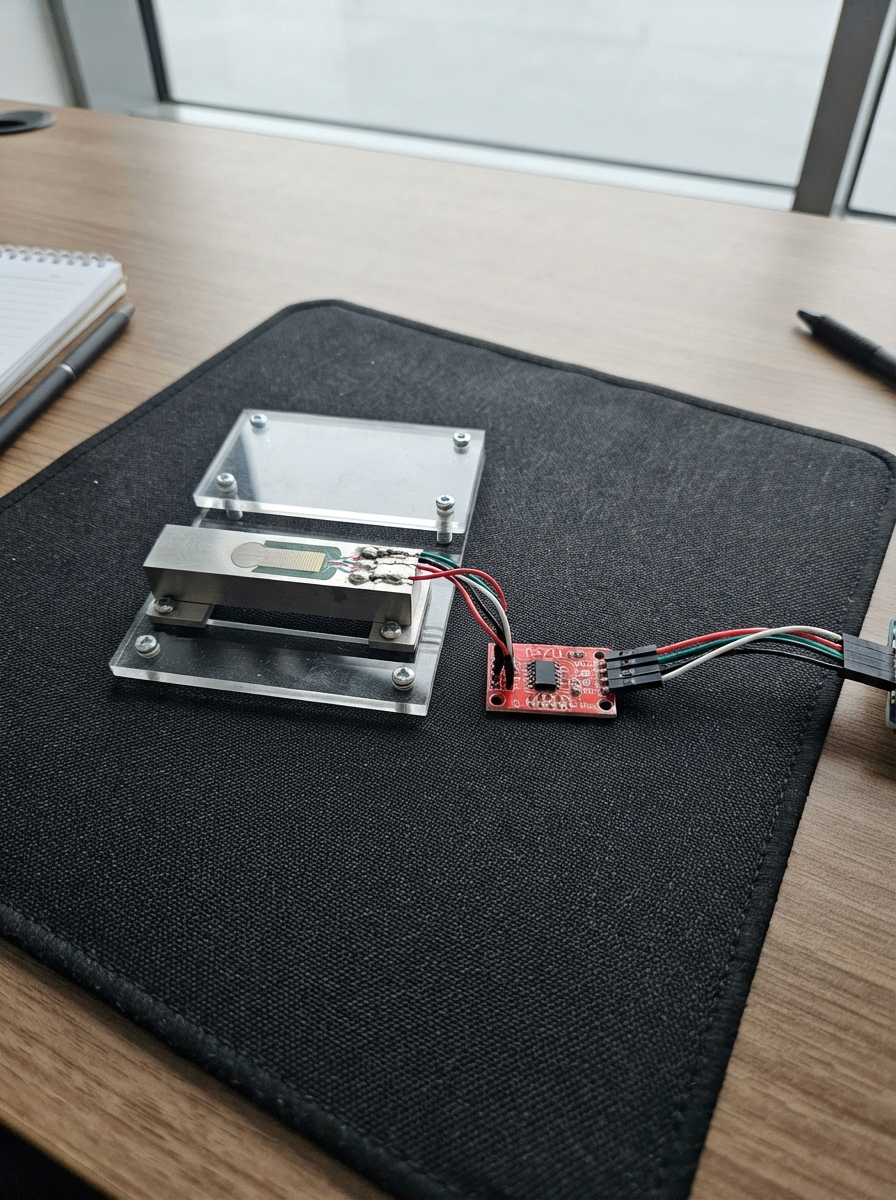
This project combines an ESP32-CAM with a precision load cell to create a smart scale that weighs food and captures images for nutritional analysis. The scale uses an HX711 amplifier to convert load cell readings into accurate weight measurements, while the built-in OV2640 camera provides visual data for food identification. The guide includes a complete wiring diagram, parts list, calibration procedure, and firmware to get the scale operational.
Builders will learn how to integrate analog weight sensing with computer vision on a microcontroller, set up a local web interface for the scale, and implement food recognition with nutritional lookup tables. The assembly process covers mounting the load cell, connecting the HX711 amplifier, configuring camera pins, and performing the critical tare and calibration steps needed for accurate measurements.
Wiring diagram
Gather all the parts
Assemble it in 5 steps
1. Mount the weighing bar
Screw one end of the load cell's metal bar firmly to a rigid base and screw the other end to a small platform. The platform must not touch the base anywhere else, because the bar needs to bend slightly under the food.
- Put the food in the middle of the platform for the most repeatable readings.
- Do not bend the load cell by hand or load it beyond 5 kg; permanent bending makes weight readings wrong.
2. Connect the load cell to its amplifier
Join the four load-cell wires to the matching labeled terminals on the HX711: E+ to E+, E- to E-, A+ to A+, and A- to A-. These wires carry the tiny measuring signal from the metal bar to the amplifier.
- Use the labels printed on the HX711 board rather than wire colours, because load-cell wire colours vary by maker.
- Do not connect the load cell directly to an ESP32-CAM pin; it needs the HX711 amplifier.
3. Power and connect the HX711
Connect HX711 VCC to the ESP32-CAM 3V3 pin (power), HX711 GND to ESP32-CAM GND (ground), HX711 DT to GPIO13 (weight data), and HX711 SCK to GPIO14 (clock signal). Do not fit a microSD card while these two pins are used for the scale.
- Keep the four wires between the load cell and HX711 away from the camera and USB power wires where possible.
- Make sure VCC and GND are not swapped — swapped power can damage the HX711.
4. Position the camera
Aim the ESP32-CAM's built-in camera at the centre of the platform from above or at an angle where it sees the food. Add steady, even room lighting so food colour is not strongly changed by shadows.
- Keep the camera view and lighting similar whenever you use the food classifier.
- Keep all electronics away from spills; food or liquid on the board can short its connections.
5. Tare and calibrate the scale
With the empty platform installed, power the ESP32-CAM from USB. On your phone or tablet, join the Wi-Fi network named SmartScale-AI using password weigh-food, then open 192.168.4.1. Tap Tare empty scale, place a known weight on the platform, enter its grams, and tap Calibrate.
- A sealed 500 g or 1000 g kitchen weight gives better calibration than guessing an object's mass.
- Remove the known weight after calibration before weighing food.
Review all connections
1. Connections between "hx711_1" and "ESP32"
Deploy the firmware
#include <Arduino.h>
#include <WiFi.h>
#include <WebServer.h>
#include <Preferences.h>
#include <HX711.h>
#include "esp_camera.h"

// HX711 wiring: DT -> GPIO13, SCK -> GPIO14.
#define HX711_DT_PIN 13
#define HX711_SCK_PIN 14

// AI Thinker ESP32-CAM's built-in OV2640 camera wiring.
#define PWDN_GPIO_NUM     32
#define RESET_GPIO_NUM    -1
#define XCLK_GPIO_NUM      0
#define SIOD_GPIO_NUM     26
#define SIOC_GPIO_NUM     27
#define Y9_GPIO_NUM       35
#define Y8_GPIO_NUM       34
#define Y7_GPIO_NUM       39
#define Y6_GPIO_NUM       36
#define Y5_GPIO_NUM       21
#define Y4_GPIO_NUM       19
#define Y3_GPIO_NUM       18
#define Y2_GPIO_NUM        5
#define VSYNC_GPIO_NUM    25
#define HREF_GPIO_NUM     23
#define PCLK_GPIO_NUM     22

const char *AP_SSID = "SmartScale-AI";
const char *AP_PASSWORD = "weigh-food";
const float DEFAULT_CALIBRATION = 420.0f;
const uint8_t TREE_COUNT = 64;

HX711 scale;
WebServer server(80);
Preferences preferences;
float calibrationFactor = DEFAULT_CALIBRATION;
float weightG = 0.0f;
uint32_t lastWeightMs = 0;
uint32_t lastVisionMs = 0;
uint8_t avgR = 0, avgG = 0, avgB = 0;
String foodName = "Scanning";
uint8_t confidence = 0;

const char *foodNames[] = {"Apple", "Banana", "Orange", "Tomato", "Unknown"};
const float kcal100[] = {52.0f, 89.0f, 47.0f, 18.0f, 0.0f};
const float carb100[] = {13.8f, 22.8f, 11.8f, 3.9f, 0.0f};
const float protein100[] = {0.3f, 1.1f, 0.9f, 0.9f, 0.0f};
const float fat100[] = {0.2f, 0.3f, 0.1f, 0.2f, 0.0f};

const char PAGE[] PROGMEM = R"HTML(
<!doctype html><html><head><meta name="viewport" content="width=device-width,initial-scale=1">
<title>Smart Scale AI</title><style>
*{box-sizing:border-box}body{margin:0;background:#071a19;color:#ecfff4;font-family:Arial,sans-serif;min-height:100vh;background:radial-gradient(circle at top,#125a49,#071a19 62%)}main{max-width:760px;margin:auto;padding:20px}.tag{display:inline-block;background:#d8f447;color:#172400;padding:6px 10px;border-radius:20px;font-size:12px;font-weight:bold;letter-spacing:1px}h1{margin:12px 0 4px;font-size:30px}.sub{color:#a2c5bc;margin:0 0 18px}.grid{display:grid;grid-template-columns:1.2fr .8fr;gap:14px}.card{background:rgba(13,43,40,.9);border:1px solid #28796a;border-radius:20px;padding:18px;box-shadow:0 10px 30px #00100d}.label{color:#9fc8bd;font-size:12px;text-transform:uppercase;letter-spacing:1px}.weight{font-size:62px;font-weight:800;line-height:1;margin-top:8px}.unit{font-size:19px;color:#d8f447}.food{font-size:32px;font-weight:bold;margin:9px 0}.confidence{font-size:26px;color:#d8f447;margin:7px 0}.bar{height:10px;background:#183e38;border-radius:8px;overflow:hidden}.bar i{display:block;height:100%;background:linear-gradient(90deg,#d8f447,#52e6a6);width:0}.vision{font-size:13px;color:#9fc8bd;margin-top:12px}.nutrition{margin-top:14px}.nut{display:flex;justify-content:space-between;border-bottom:1px solid #24574e;padding:10px 0}.nut b{color:#d8f447}.controls{margin-top:14px;display:flex;gap:9px;flex-wrap:wrap}button,input{border-radius:10px;padding:11px 13px;font-size:15px;border:1px solid #4b9c88}button{background:#d8f447;color:#142400;font-weight:bold}input{background:#102f2b;color:#fff;width:115px}.hint{font-size:12px;color:#a2c5bc;margin-top:14px;line-height:1.45}@media(max-width:560px){.grid{grid-template-columns:1fr}.weight{font-size:54px}}
</style></head><body><main><span class="tag">ESP32-CAM • 64 TREE CLASSIFIER</span><h1>AI Smart Scale</h1><p class="sub">Live food estimate and nutrition</p><div class="grid"><section class="card"><div class="label">Live weight</div><div class="weight"><span id="w">0</span> <span class="unit">g</span></div><div class="controls"><button onclick="tare()">Tare empty scale</button><input id="known" type="number" placeholder="known g"><button onclick="cal()">Calibrate</button></div><div class="hint">First use: remove everything, tap Tare, then place a known weight and enter its grams before tapping Calibrate.</div></section><section class="card"><div class="label">AI result</div><div class="food" id="food">Scanning</div><div class="confidence"><span id="conf">0</span>% confidence</div><div class="bar"><i id="bar"></i></div><div class="vision">Camera colour sample: <span id="rgb">—</span></div></section></div><section class="card nutrition"><div class="label">Estimated nutrition for this weight</div><div class="nut"><span>Energy</span><b><span id="kcal">0</span> kcal</b></div><div class="nut"><span>Carbohydrate</span><b><span id="carb">0</span> g</b></div><div class="nut"><span>Protein</span><b><span id="protein">0</span> g</b></div><div class="nut"><span>Fat</span><b><span id="fat">0</span> g</b></div></section></main><script>
async function refresh(){let d=await (await fetch('/data')).json();for(let k of ['w','food','conf','kcal','carb','protein','fat','rgb'])document.getElementById(k).textContent=d[k];document.getElementById('bar').style.width=d.conf+'%'}
async function tare(){await fetch('/tare');setTimeout(refresh,400)}async function cal(){let g=document.getElementById('known').value;if(g>0){await fetch('/calibrate?g='+g);setTimeout(refresh,600)}}refresh();setInterval(refresh,750);
</script></body></html>)HTML";

void initCamera() {
  camera_config_t c = {};
  c.ledc_channel = LEDC_CHANNEL_0; c.ledc_timer = LEDC_TIMER_0;
  c.pin_d0 = Y2_GPIO_NUM; c.pin_d1 = Y3_GPIO_NUM; c.pin_d2 = Y4_GPIO_NUM; c.pin_d3 = Y5_GPIO_NUM;
  c.pin_d4 = Y6_GPIO_NUM; c.pin_d5 = Y7_GPIO_NUM; c.pin_d6 = Y8_GPIO_NUM; c.pin_d7 = Y9_GPIO_NUM;
  c.pin_xclk = XCLK_GPIO_NUM; c.pin_pclk = PCLK_GPIO_NUM; c.pin_vsync = VSYNC_GPIO_NUM; c.pin_href = HREF_GPIO_NUM;
  c.pin_sccb_sda = SIOD_GPIO_NUM; c.pin_sccb_scl = SIOC_GPIO_NUM; c.pin_pwdn = PWDN_GPIO_NUM; c.pin_reset = RESET_GPIO_NUM;
  c.xclk_freq_hz = 20000000; c.pixel_format = PIXFORMAT_RGB565; c.frame_size = FRAMESIZE_QQVGA;
  c.jpeg_quality = 12; c.fb_count = 1;
  if (esp_camera_init(&c) != ESP_OK) { foodName = "Camera error"; }
}

void sampleCamera() {
  camera_fb_t *fb = esp_camera_fb_get();
  if (!fb || fb->format != PIXFORMAT_RGB565) { if (fb) esp_camera_fb_return(fb); return; }
  uint32_t sr = 0, sg = 0, sb = 0, n = 0;
  for (size_t i = 0; i + 1 < fb->len; i += 160) {
    uint16_t px = ((uint16_t)fb->buf[i] << 8) | fb->buf[i + 1];
    sr += ((px >> 11) & 0x1F) << 3; sg += ((px >> 5) & 0x3F) << 2; sb += (px & 0x1F) << 3; n++;
  }
  esp_camera_fb_return(fb);
  if (n) { avgR = sr / n; avgG = sg / n; avgB = sb / n; }
}

uint8_t runForest() {
  if (weightG < 3.0f) { confidence = 0; foodName = "No food detected"; return 4; }
  uint8_t votes[5] = {0, 0, 0, 0, 0};
  for (uint8_t t = 0; t < TREE_COUNT; t++) {
    // Each index is a small decision tree with slightly shifted colour/weight splits.
    int apple = avgR > (avgG + 7 - (t % 5)) && avgG > avgB + (t % 6) && weightG < 1200;
    int banana = avgR > avgB + 12 && avgG > avgB + 10 && avgG > 68 + (t % 9) && weightG < 900;
    int orange = avgR > avgG + (8 - (t % 5)) && avgG > avgB + 4 && weightG < 1000;
    int tomato = avgR > avgG + 10 && avgR > avgB + 17 && weightG < 1000;
    uint8_t pick = 4;
    switch (t % 4) { case 0: if (apple) pick=0; else if (tomato) pick=3; else if (orange) pick=2; else if (banana) pick=1; break;
      case 1: if (banana) pick=1; else if (apple) pick=0; else if (orange) pick=2; else if (tomato) pick=3; break;
      case 2: if (orange) pick=2; else if (tomato) pick=3; else if (apple) pick=0; else if (banana) pick=1; break;
      default: if (tomato) pick=3; else if (apple) pick=0; else if (banana) pick=1; else if (orange) pick=2; }
    votes[pick]++;
  }
  uint8_t best = 0; for (uint8_t i = 1; i < 5; i++) if (votes[i] > votes[best]) best = i;
  confidence = (uint8_t)((100UL * votes[best]) / TREE_COUNT); foodName = foodNames[best]; return best;
}

String jsonData() {
  uint8_t kind = runForest(); float portion = weightG / 100.0f;
  String s = "{\"w\":\"" + String(weightG, 1) + "\",\"food\":\"" + foodName + "\",\"conf\":\"" + String(confidence) + "\",\"rgb\":\"R" + String(avgR) + " G" + String(avgG) + " B" + String(avgB) + "\",\"kcal\":\"" + String(kcal100[kind] * portion, 1) + "\",\"carb\":\"" + String(carb100[kind] * portion, 1) + "\",\"protein\":\"" + String(protein100[kind] * portion, 1) + "\",\"fat\":\"" + String(fat100[kind] * portion, 1) + "\"}"; return s;
}

void setup() {
  Serial.begin(115200); scale.begin(HX711_DT_PIN, HX711_SCK_PIN);
  preferences.begin("smartscale", false); calibrationFactor = preferences.getFloat("cal", DEFAULT_CALIBRATION); scale.set_scale(calibrationFactor); scale.tare(15);
  initCamera(); WiFi.mode(WIFI_AP); WiFi.softAP(AP_SSID, AP_PASSWORD);
  server.on("/", [](){ server.send_P(200, "text/html", PAGE); });
  server.on("/data", [](){ server.send(200, "application/json", jsonData()); });
  server.on("/tare", [](){ scale.tare(15); server.send(200, "text/plain", "Tared"); });
  server.on("/calibrate", [](){ if (!server.hasArg("g") || server.arg("g").toFloat() <= 0) { server.send(400, "text/plain", "Enter known grams"); return; } scale.set_scale(1.0f); float raw = scale.get_value(20); calibrationFactor = raw / server.arg("g").toFloat(); scale.set_scale(calibrationFactor); preferences.putFloat("cal", calibrationFactor); server.send(200, "text/plain", "Calibrated"); });
  server.begin();
}

void loop() {
  server.handleClient(); uint32_t now = millis();
  if (now - lastWeightMs >= 350 && scale.is_ready()) { lastWeightMs = now; weightG = scale.get_units(8); if (weightG < 0.0f && weightG > -3.0f) weightG = 0.0f; }
  if (now - lastVisionMs >= 2200) { lastVisionMs = now; sampleCamera(); }
  delay(5);
}
Remix this project
Make it yours in one click
Open a full copy of this project in your own Schematik workspace — diagram, code, parts, and assembly steps included. Swap the sensor, add features, or redesign the whole thing with AI. The author's original stays untouched.