Community project
Vehicle GPS Tracker
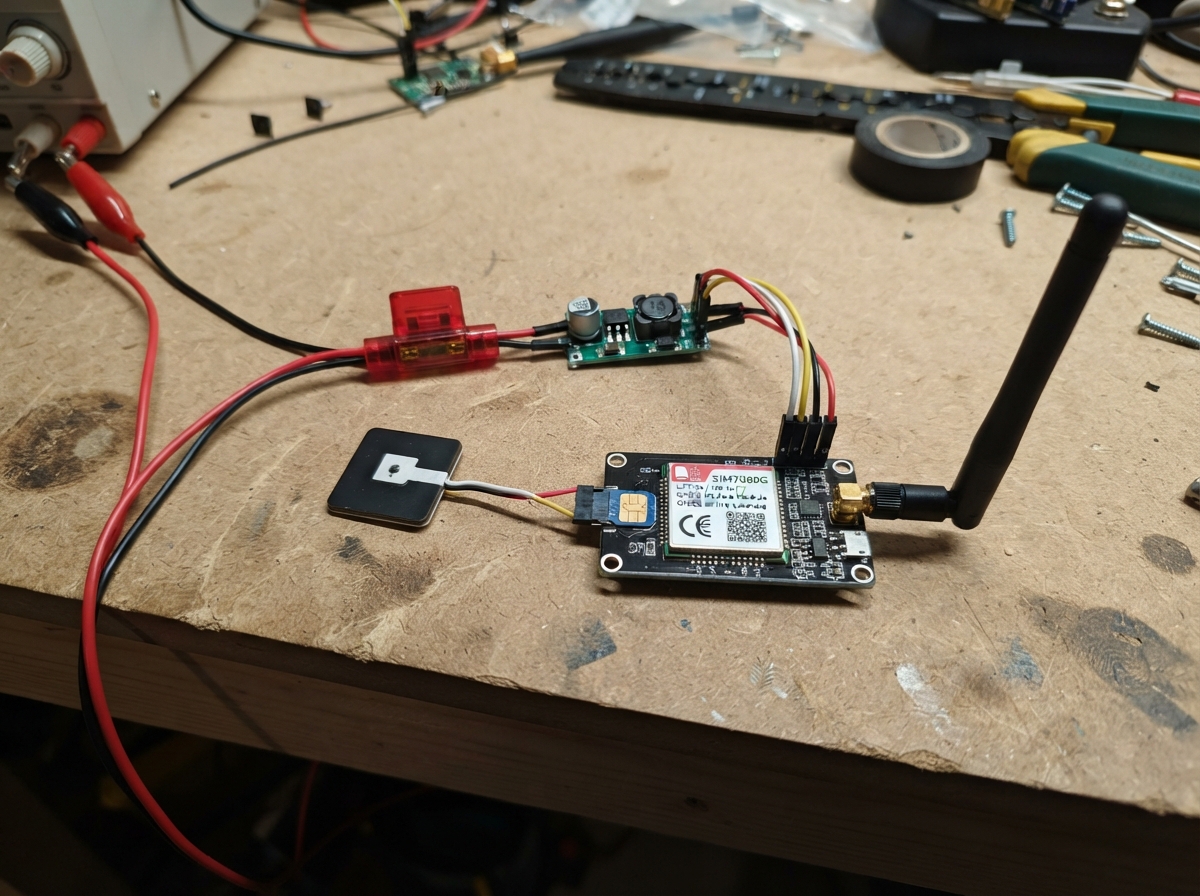
This vehicle GPS tracker uses an ESP32 microcontroller paired with a SIM7080G modem to provide real-time location updates over LTE-M or NB-IoT cellular networks. The tracker draws power from the vehicle's 12V supply through a fused connection and voltage converter, then transmits GPS coordinates to a Traccar server at regular intervals for fleet monitoring or asset tracking.
This guide provides a complete wiring diagram, parts list, and step-by-step assembly instructions to build a production-ready tracker. The included firmware handles modem initialization, GNSS positioning, and cellular communication, requiring only configuration of your SIM card's APN, Traccar server details, and device ID before deployment.
Wiring diagram
Gather all the parts
Assemble it in 6 steps
1. Prepare the fused vehicle feed
With the vehicle power off, connect the vehicle_12v POSITIVE wire to the inline_fuse IN terminal and fit a 1 A blade fuse. Connect vehicle_12v NEGATIVE to the common ground connection. The fuse is placed close to the 12 V source so a damaged tracker wire cannot carry high battery current.
- Use a switched 12 V accessory feed if you want the tracker to turn off with the ignition.
- Use crimp terminals and heat-shrink tubing so vibration cannot loosen a wire.
- Never connect this tracker directly to mains electricity. Reversing the vehicle positive and negative wires can damage the converters and electronics.
2. Set both voltage converters before connecting electronics
Connect inline_fuse OUT to VIN+ on both buck_5v and buck_3v. Connect each converter's VIN- to the common ground. Before connecting the ESP32 or modem, power the fused feed briefly and use a multimeter to adjust buck_5v VOUT+ to exactly 5.0 V and buck_3v8 VOUT+ to exactly 3.8 V. Connect both VOUT- terminals to the common ground.
- Mark the adjusted converters with tape: one says 5.0 V and the other says 3.8 V.
- Disconnect vehicle power again after measuring the outputs.
- Do not connect the SIM7080G to the 5 V converter — 5 V can damage its VBAT input. Do not adjust a converter while its output is connected to the ESP32 or modem.
3. Power the ESP32 and modem
Connect buck_5v VOUT+ to the ESP32 VIN or 5V pin (power) and buck_5v VOUT- to an ESP32 GND pin (ground). Connect buck_3v8 VOUT+ to sim7080g_1 VBAT (power) and buck_3v8 VOUT- to sim7080g_1 GND (ground). Make sure every ground wire joins the same ground connection.
- Keep the 3.8 V modem power wires short and reasonably thick because cellular transmissions draw brief current bursts.
- Make sure the 5.0 V and 3.8 V outputs are not swapped — swapped power can permanently damage the modem or board.
4. Connect the modem control wires
Connect sim7080g_1 TX to ESP32 GPIO16 (data), sim7080g_1 RX to ESP32 GPIO17 (data), sim7080g_1 PWRKEY to ESP32 GPIO27 (power-on control), and sim7080g_1 RESET to ESP32 GPIO26 (reset control). These are 3.3 V signal wires; do not attach them to 5 V.
- Cross the two data wires: TX goes to RX and RX goes to TX.
- Leave the ESP32 USB connector accessible for initial power and deployment.
- Do not connect the modem's TX or RX pins to an ESP32 5 V pin — the modem signal pins use 3.3 V.
5. Install the SIM and antennas
With all power disconnected, insert lte_m_sim into the sim7080g_1 nano-SIM slot. Snap lte_antenna onto the module ANT_LTE connector and gnss_antenna onto ANT_GNSS. Put the GNSS antenna where it can see the sky, such as under a non-metal dashboard surface or near a window.
- The first satellite position can take a minute or more after moving the tracker outdoors.
- Keep both antennas away from large metal parts and from each other where possible.
- Do not power the cellular modem without its LTE antenna connected; transmitting without the correct antenna can damage the radio. The tiny antenna connectors can be damaged if forced or pulled sideways.
6. Mount the tracker safely
Place the ESP32, converters, and modem in a non-metal enclosure, secure it against vibration, and route wires away from airbags, pedals, steering parts, hot engine surfaces, and sharp metal edges. Reconnect the vehicle feed only after checking every positive and ground connection once more.
- Use cable ties and grommets where wires pass through a panel.
- Keep the modem where it has reasonable cellular reception, but do not block the GNSS antenna's view of the sky.
- A loose tracker or wire can interfere with vehicle controls or become a projectile in a sudden stop. Do not place wiring in an airbag deployment path.
Review all connections
1. Connections between "vehicle_12v" and "ESP32"
2. Connections between "inline_fuse" and "ESP32"
3. Connections between "buck_5v" and "ESP32"
4. Connections between "buck_3v8" and "ESP32"
5. Connections between "sim7080g_1" and "ESP32"
Deploy the firmware
#include <Arduino.h>

// Replace every value between angle brackets before deploying.
// This sketch uses Traccar's OsmAnd HTTP protocol by default.
const char APN[] = "<YOUR_SIM_APN>";
const char APN_USER[] = "";       // Fill only if your carrier supplied one.
const char APN_PASSWORD[] = "";   // Fill only if your carrier supplied one.
const char TRACCAR_HOST[] = "<YOUR_TRACCAR_HOST>";
const uint16_t TRACCAR_PORT = 5055; // Replace with your OsmAnd HTTP port.
const char DEVICE_ID[] = "<YOUR_TRACCAR_DEVICE_ID>";

const int MODEM_RX_PIN = 16;      // ESP32 receives from SIM7080G TX
const int MODEM_TX_PIN = 17;      // ESP32 transmits to SIM7080G RX
const int MODEM_PWRKEY_PIN = 27;  // Active-low SIM7080G power key
const int MODEM_RESET_PIN = 26;   // Active-low SIM7080G reset
const unsigned long REPORT_INTERVAL_MS = 30000UL;

HardwareSerial modem(2);
unsigned long lastReportMs = 0;

String readModem(unsigned long timeoutMs) {
  String response;
  const unsigned long deadline = millis() + timeoutMs;
  while ((long)(deadline - millis()) > 0) {
    while (modem.available()) {
      response += static_cast<char>(modem.read());
    }
    delay(5);
  }
  if (response.length()) {
    Serial.print(response);
  }
  return response;
}

String command(const String &text, unsigned long timeoutMs = 1500) {
  while (modem.available()) modem.read();
  Serial.print(">> ");
  Serial.println(text);
  modem.println(text);
  return readModem(timeoutMs);
}

bool commandOK(const String &text, unsigned long timeoutMs = 1500) {
  return command(text, timeoutMs).indexOf("OK") >= 0;
}

void powerOnModem() {
  pinMode(MODEM_PWRKEY_PIN, OUTPUT);
  pinMode(MODEM_RESET_PIN, OUTPUT);
  digitalWrite(MODEM_PWRKEY_PIN, HIGH);
  digitalWrite(MODEM_RESET_PIN, HIGH);
  delay(200);
  // A low pulse longer than one second requests SIM7080G power-on.
  digitalWrite(MODEM_PWRKEY_PIN, LOW);
  delay(1200);
  digitalWrite(MODEM_PWRKEY_PIN, HIGH);
  delay(5000);
}

bool initialiseModem() {
  for (int attempt = 0; attempt < 5; ++attempt) {
    if (commandOK("AT", 1000)) break;
    delay(1000);
    if (attempt == 4) return false;
  }
  commandOK("ATE0");
  commandOK("AT+CMEE=2");
  commandOK("AT+CGNSPWR=1", 2000);
  // Configure PDP context 0 for the SIM carrier. Quote marks are required by AT syntax.
  if (!commandOK(String("AT+CGDCONT=0,\"IP\",\"") + APN + "\"", 3000)) return false;
  commandOK("AT+CNACT=0,0", 3000); // Drop any stale mobile-data session.
  if (!commandOK("AT+CNACT=0,1", 10000)) return false;
  String state = command("AT+CNACT?", 2000);
  return state.indexOf(",1,") >= 0 || state.indexOf("+CNACT: 0,1") >= 0;
}

bool getGnssFix(String &latitude, String &longitude) {
  String answer = command("AT+CGNSINF", 2500);
  int prefix = answer.indexOf("+CGNSINF:");
  if (prefix < 0) return false;
  String fields = answer.substring(prefix + 9);
  int lineEnd = fields.indexOf('\r');
  if (lineEnd >= 0) fields.remove(lineEnd);

  String values[8];
  int start = 0;
  for (int i = 0; i < 8; ++i) {
    int comma = fields.indexOf(',', start);
    if (comma < 0) {
      values[i] = fields.substring(start);
      break;
    }
    values[i] = fields.substring(start, comma);
    start = comma + 1;
  }
  // Fields are: run status, fix status, UTC, latitude, longitude, ...
  if (values[1] != "1" || values[3].length() == 0 || values[4].length() == 0) return false;
  latitude = values[3];
  longitude = values[4];
  return true;
}

bool sendToTraccar(const String &latitude, const String &longitude) {
  String hostPort = String(TRACCAR_HOST) + ":" + String(TRACCAR_PORT);
  String path = String("/?id=") + DEVICE_ID + "&lat=" + latitude + "&lon=" + longitude;

  commandOK("AT+SHDISC", 3000);
  if (!commandOK(String("AT+SHCONF=\"URL\",\"") + hostPort + "\"", 3000)) return false;
  if (!commandOK("AT+SHCONF=\"BODYLEN\",350", 2000)) return false;
  if (!commandOK("AT+SHCONF=\"HEADERLEN\",350", 2000)) return false;
  if (!commandOK("AT+SHCONN", 10000)) return false;
  String response = command(String("AT+SHREQ=\"") + path + "\",1", 15000);
  commandOK("AT+SHDISC", 3000);
  // Traccar normally returns HTTP 200 for an accepted OsmAnd update.
  return response.indexOf("200") >= 0;
}

void setup() {
  Serial.begin(115200);
  modem.begin(115200, SERIAL_8N1, MODEM_RX_PIN, MODEM_TX_PIN);
  delay(300);
  Serial.println("Vehicle tracker starting");
  powerOnModem();
  if (!initialiseModem()) {
    Serial.println("Modem setup failed. Check the SIM, APN, antennas, and 3.8 V modem supply.");
  }
}

void loop() {
  if (millis() - lastReportMs < REPORT_INTERVAL_MS) return;
  lastReportMs = millis();

  String latitude;
  String longitude;
  if (!getGnssFix(latitude, longitude)) {
    Serial.println("Waiting for a satellite position fix.");
    return;
  }

  Serial.print("Position: ");
  Serial.print(latitude);
  Serial.print(", ");
  Serial.println(longitude);

  if (sendToTraccar(latitude, longitude)) {
    Serial.println("Traccar accepted the location update.");
  } else {
    Serial.println("Location was not accepted. Check the placeholders and network registration.");
  }
}
Remix this project
Make it yours in one click
Open a full copy of this project in your own Schematik workspace — diagram, code, parts, and assembly steps included. Swap the sensor, add features, or redesign the whole thing with AI. The author's original stays untouched.