Community project
AI-Assisted Pen Plotter
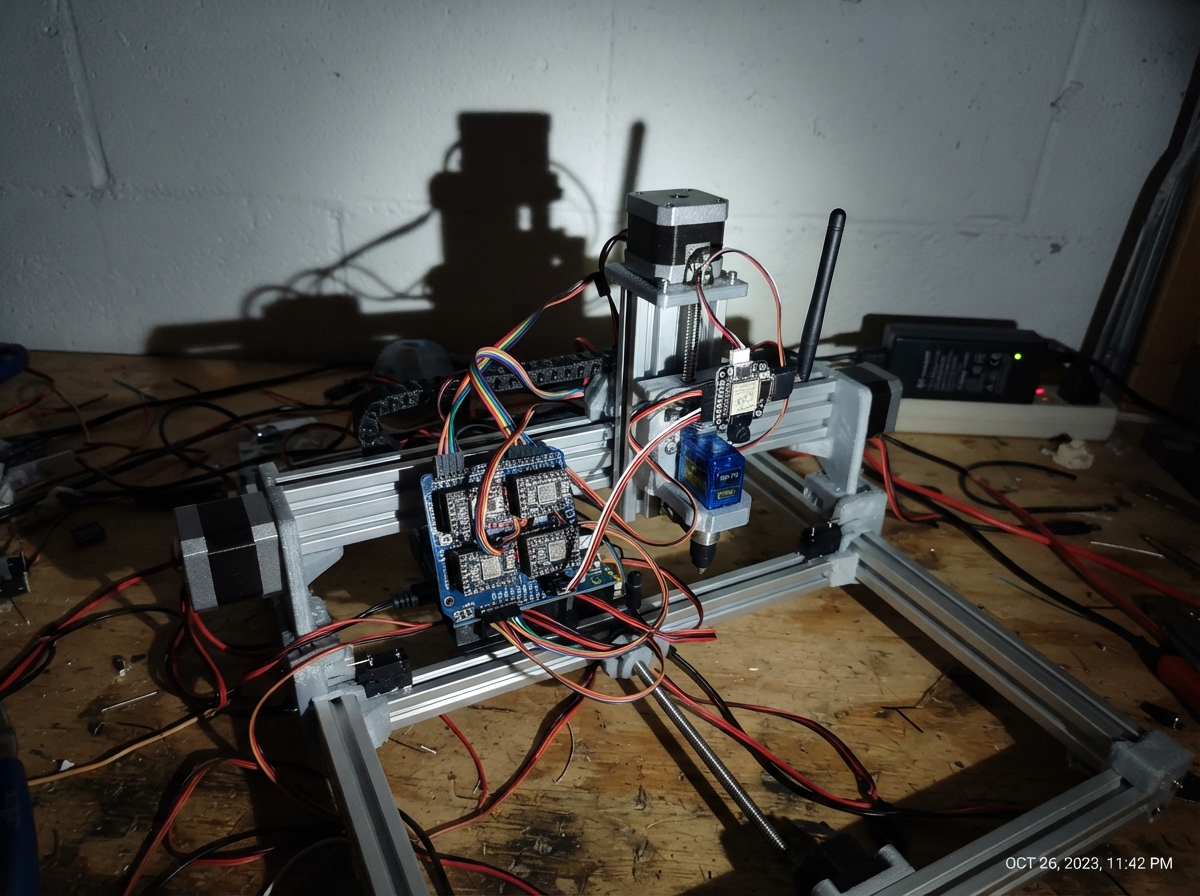
This AI-assisted pen plotter combines an Arduino Uno with a CNC Shield V3.00 to automatically draw designs on A4 paper. The system uses stepper motors for X and Y axis movement, a servo for pen up/down control, and an ESP32S3 camera module for vision feedback. Builders will receive a complete wiring diagram, detailed parts list, and tested firmware that handles motor control, emergency stop logic, and pen servo timing.
The assembly guide walks through frame construction, power distribution with safety interlocks, stepper driver configuration, and calibration procedures. Before operation, the guide covers voltage verification, motor current checks, and mechanical alignment of the pen servo linkage. Once commissioned, the plotter can accept drawing commands via serial interface while monitoring approval buttons and emergency stop inputs for safe operation.
Wiring diagram

Gather all the parts
Assemble it in 11 steps
1. Build the A4 frame first
Use an ordinary Cartesian XY gantry: one motor moves the pen carriage left/right, the second moves the entire X rail front/back. Do not build a CoreXY or H-bot mechanism for this firmware. Use GT2 2 mm belts, 20-tooth pulleys, idlers, linear guides, two 1.8-degree (200 step/revolution) NEMA 17 motors, and a spring-loaded pen holder. Provide at least 220 mm X and 310 mm Y clear pen-tip travel. A4 paper is 210 by 297 mm. Mount it on a flat bed with low-profile clips outside the travel area. The motor catalogue denotes frame size, not a guaranteed current rating: select motors rated at least 0.8 A per phase for the proposed starting current.
- Allow extra frame clearance for the carriage, pen offset and switch overtravel; a roughly 400 by 500 mm base is a starting envelope, not a fabrication drawing.
- The design supplies electronics and travel requirements, not printable carriage CAD or a complete mechanical kit.
2. Fit the power-off switches
Fit X and Y lever switches at the minimum ends. Each lever must operate before the carriage hits a hard stop, with room to overtravel. Connect X COM to shield GND and X NC to the X-limit signal (Uno D9). Connect Y COM to GND and Y NC to the Y-limit signal (D10). Use normally closed contacts, not NO. The plus/minus X limit headers are parallel, not separate maximum inputs. Route these wires away from motor cables.
- The firmware uses internal pull-up resistors: closed means LOW, pressed or broken wire means HIGH.
3. Seat the shield and drivers with all power removed
Unplug USB and the 12 V adapter. Stack a fully assembled CNC Shield V3.00 on the Uno without shifting any header. Fit all three microstep shunts below X and all three below Y (1/16 microstepping). Leave Z and A driver sockets empty, with no A-axis clone jumpers. Seat both A4988 carriers so their ENABLE and VMOT labels match the shield socket labels; do not judge orientation by potentiometer position or PCB colour. Their RESET and SLEEP pins must be linked HIGH by the shield; verify continuity with power off. Both driver ground pins are seated in their socket ground contacts.
- The wiring view includes shield PCB nets. Driver STEP to shield X_STEP to D2 is one built-in connection, not an extra wire to add.
- Add the separate 10 kohm resistor from shared ENABLE (D8) to shield 5V. HIGH disables both drivers; LOW enables them.
- Never insert or remove a driver or motor connector while any power is connected. Reversed drivers can destroy the Uno and shield.
4. Identify each motor's two coils
With power removed, use a multimeter to find the two pairs of wires that have a few ohms between them. Connect one pair to driver 1A/1B (A+/A-), the other pair to 2A/2B (B+/B-), using the shield X or Y motor header. Wire colours vary; do not guess. Each header's first adjacent pair is one coil, the other pair is the second. Verify socket continuity against the driver output labels.
5. Wire the fused 12 volt motor supply
Use an enclosed regulated 12 V 5 A adapter. Keep mains electricity inside its sealed case. Connect adapter positive through the 3 A inline fuse, then through one NC emergency-stop pole, then to the shield's positive motor screw terminal. Adapter negative goes to shield motor GND. Connect the 100 uF 35 V capacitor across that switched motor input, close to the shield: PLUS to positive, striped MINUS to GND. Use screw terminals and 18–20 AWG insulated power wire, not a solderless breadboard for motor current. Mount the latching stop where your hand can reach it.
- The shield's motor input is NOT the Uno 5V or VIN pin. Never put 12 V onto either 5V rail.
- Observe capacitor polarity; a reversed electrolytic capacitor can vent or burst. The fuse protects wiring, not fingers or software.
6. Give the pen servo its own 5 volt supply
Connect the regulator VIN to the same emergency-stop-switched 12 V supply, GND to shield GND, and VOUT to SG90 red. SG90 brown goes to GND. Connect its orange signal through the 1 kohm resistor to Uno D11, available at the shield spindle-enable net on V3.00. Place 470 uF 10 V across servo red and brown, stripe to brown. Leave regulator EN and PG unconnected. Uno uses its own USB power; camera uses separate USB. Never connect regulator VOUT to Uno 5V.
- Do not power the servo from the Uno or shield 5V header. Its current surges can reset or damage the controller.
- The stock GRBL spindle output is not used: this is custom pen-plotter firmware. No spindle, laser, heater or Z motor is supported.
7. Connect approval and emergency-stop feedback
Connect the separate, electrically isolated second NC stop pole between A1 and GND. Never connect this pole to 12 V. Connect the normally open APPROVE button between A0 and GND. A0 and A1 are also exposed as shield Abort and Hold signals; use them only as described here. The physical stop opens both poles: motor/servo power is cut and the Uno latches a fault. Releasing it never resumes a job automatically.
- Confirm the two stop poles are isolated using a meter before connecting the Uno. This DIY stop is not a certified machinery safety system.
- Stored capacitor energy means power does not fall to zero instantly. Keep fingers out of belts and pulleys even when stopped.
8. Check supply voltages and motor current before motion
With motors and USB unplugged, verify no short between power and ground. Verify 12 V at the shield motor input and 5 V at regulator VOUT. Press the emergency stop and check both outputs lose power as capacitors discharge. Disconnect power before installing motors again. Set each driver's current limit using the manufacturer's VREF procedure and an insulated tool. Start at 0.6 A per phase, never above your motor rating. For the selected genuine Pololu Black Edition with 0.068 ohm sense resistors, VREF = 8 × 0.068 × 0.6 = 0.326 V. Other A4988 clones use different resistors: calculate from their actual sense resistor, not this number.
- Do not put a multimeter in current mode across the supply. That creates a short circuit.
- Drivers and motors can get hot. Use ventilation and conservative current; stop if a driver overheats or a motor skips.
9. Align the pen and test the switches without a pen installed
Keep the pen removed. Position both carriages well away from hard stops. Check the COM–NC circuits with a meter: closed normally, open when pressed. Test the second stop contact the same way. The pen UP pulse is 1500 microseconds and DOWN is 1200 microseconds; attach the servo horn so 1500 microseconds raises the holder, then adjust linkage to achieve gentle spring-loaded contact at 1200. Do not force the servo against its stops.
- Homing seeks the minimum switch, backs off, approaches slowly, then parks 3 mm inside it. The logical page origin is this park point.
- If motion goes away from a minimum switch, hit the stop immediately. Unplug ALL power before reversing one coil's polarity on the affected motor. Never reverse an entire four-wire connector by guesswork.
10. Set the A4 paper origin and check travel
After safe homing, align the paper's upper-left corner to the pen-tip parked origin, with X positive to the right and Y positive down the page. The firmware allows 210 by 297 mm from here. Mechanically verify the pen tip can reach every corner without hitting a clip or hard stop. Use a ruler for a 100 mm test: expected scale is 80 microsteps/mm for 200-step motors, 16 microsteps and a 40 mm belt pulley circumference. Correct belt/pulley choice or calibration before writing. Fit the pen only after a pen-free complete dry run.
- Review interface leaves 10 mm page margins. There are only two minimum switches; maximum-end protection is by homed position and software, so a missed step or mechanical fault can invalidate it.
11. Mount the separate worksheet camera
With USB unplugged, seat the Sense camera expansion board and OV2640 ribbon/connector according to Seeed's guide and attach its supplied antenna. Mount it rigidly above the page, looking straight down with all four A4 corners visible. Keep the gantry out of the picture by parking it clear. Use even lighting without glare. Adjust camera height and focus until small printed text is readable; OCR accuracy is not guaranteed. Power it only through its separate USB-C connector. Do not connect its GPIO pins to the Uno.
- The camera firmware is a separate processor target, not deployed by this Uno project's Deploy button. See include/CAMERA_NOTES.h.
- No touchscreen is included. Reserve the Uno A4/A5 pins for possible 5V I2C expansion; 3.3V-only displays would require proper level conversion. Prefer a touchscreen on the separate AI computer. Sense microphone hardware is present but voice-command software is a future extension.
Review all connections
1. Connections between "shield" and "Arduino"
2. Connections between "xdriver" and "Arduino"
3. Connections between "xlimit" and "Arduino"
4. Connections between "ydriver" and "Arduino"
5. Connections between "ylimit" and "Arduino"
6. Connections between "pen" and "Arduino"
7. Connections between "camera" and "Arduino"
8. Connections between "supply" and "Arduino"
9. Connections between "fuse" and "Arduino"
10. Connections between "stop" and "Arduino"
11. Connections between "buck" and "Arduino"
12. Connections between "capmotor" and "Arduino"
13. Connections between "capservo" and "Arduino"
14. Connections between "approve" and "Arduino"
15. Connections between "enablepull" and "Arduino"
16. Connections between "servor" and "Arduino"
Deploy the firmware
#include <Arduino.h>
#include <avr/interrupt.h>
#include <math.h>
#include <stdlib.h>
#include <string.h>
// CNC Shield V3.00 routing; NOT stock GRBL. GT2 2mm, 20T, 200 steps/rev, 1/16.
constexpr uint8_t XS=2, YS=3, XD=5, YD=6, EN=8, XL=9, YL=10, PEN=11;
constexpr uint8_t APPROVE=A0, ESTOP=A1;
constexpr long SPM=80, XMAX=210*SPM, YMAX=297*SPM;
// Set direction constants for your assembly before fitting the pen.
constexpr bool X_POS_HIGH=true, Y_POS_HIGH=true;
volatile uint16_t servoTicks=3000; // 1500us raised; tune linkage mechanically first
volatile bool servoPhase=false;
ISR(TIMER1_COMPA_vect) {
 servoPhase=!servoPhase;
 digitalWrite(PEN,servoPhase?HIGH:LOW);
 OCR1A=servoPhase?servoTicks:40000-servoTicks;
}
void servoOn(){pinMode(PEN,OUTPUT);digitalWrite(PEN,LOW);cli();servoPhase=false;TCCR1A=0;TCCR1B=_BV(WGM12)|_BV(CS11);TCNT1=0;OCR1A=40000;TIMSK1=_BV(OCIE1A);sei();}
void servoOff(){TIMSK1=0;digitalWrite(PEN,LOW);pinMode(PEN,INPUT);}
void pen(bool down){cli();servoTicks=down?2400:3000;sei();}
long px=0,py=0;bool homed=false,armed=false,approved=false,blocked=false;
char line[64];uint8_t used=0;bool overflow=false;unsigned long activity=0,armTime=0;
bool buttonReleased=false;unsigned long pressTime=0;
void fault(const __FlashStringHelper* why){digitalWrite(EN,HIGH);pen(false);homed=false;armed=false;approved=false;blocked=true;Serial.print(F("ERR "));Serial.println(why);}
bool safe(){if(digitalRead(ESTOP)){fault(F("ESTOP: release then H to rehome"));servoOff();return false;}return !blocked;}
bool pollStop(){
 if(!safe())return false;
 if(Serial.peek()=='!'){Serial.read();fault(F("ABORT"));return false;}
 return true;
}
bool waitSafe(unsigned long ms){unsigned long start=millis();while(millis()-start<ms)if(!pollStop())return false;return true;}
void pulse(uint8_t p){digitalWrite(p,HIGH);delayMicroseconds(4);digitalWrite(p,LOW);}
void direction(uint8_t pin,bool positive,bool high){digitalWrite(pin,positive==high?HIGH:LOW);delayMicroseconds(5);}
bool homeAxis(uint8_t step,uint8_t dir,uint8_t lim,bool high,long travel){
 // Release a switch already pressed, seek minimum, back off, re-approach slowly.
 direction(dir,true,high);
 long n=0;while(digitalRead(lim)){if(n++>800){fault(F("HOME SWITCH OPEN"));return false;}if(!pollStop())return false;pulse(step);delayMicroseconds(3000);}
 direction(dir,false,high);n=0;
 while(!digitalRead(lim)){if(n++>travel+800){fault(F("HOME NOT FOUND"));return false;}if(!pollStop())return false;pulse(step);delayMicroseconds(2000);}
 direction(dir,true,high);for(int i=0;i<240;i++){if(!pollStop())return false;pulse(step);delayMicroseconds(3000);}
 if(digitalRead(lim)){fault(F("SWITCH DID NOT RELEASE"));return false;}
 direction(dir,false,high);n=0;while(!digitalRead(lim)){if(n++>400){fault(F("HOME RECHECK FAILED"));return false;}if(!pollStop())return false;pulse(step);delayMicroseconds(4000);}
 // Logical zero is 3mm inside the minimum switch, not at its trigger point.
 direction(dir,true,high);for(int i=0;i<240;i++){if(!pollStop())return false;pulse(step);delayMicroseconds(3000);}
 if(digitalRead(lim)){fault(F("SWITCH OPEN"));return false;}return true;
}
bool moveTo(long x,long y){
 long dx=labs(x-px),dy=labs(y-py),n=max(dx,dy),ex=0,ey=0;
 int sx=x>=px?1:-1,sy=y>=py?1:-1;
 direction(XD,sx>0,X_POS_HIGH);direction(YD,sy>0,Y_POS_HIGH);
 for(long i=0;i<n;i++){
  if(!pollStop())return false;
  if(digitalRead(XL)||digitalRead(YL)){fault(F("LIMIT / BROKEN WIRE"));return false;}
  ex+=dx;ey+=dy;bool xs=ex>=n,ys=ey>=n;
  if(xs){ex-=n;digitalWrite(XS,HIGH);px+=sx;}if(ys){ey-=n;digitalWrite(YS,HIGH);py+=sy;}
  delayMicroseconds(4);digitalWrite(XS,LOW);digitalWrite(YS,LOW);
  // Conservative ramp 250 -> 625 major-axis steps/s (max 7.8mm/s).
  long ramp=min(i,n-1-i);unsigned int us=ramp<120?4000-ramp*20:1600;
  delayMicroseconds(us);
 }
 return true;
}
void execute(){
 activity=millis();
 if(!strcmp(line,"?")){Serial.print(F("STATUS homed="));Serial.print(homed);Serial.print(F(" approved="));Serial.print(approved);Serial.print(F(" x="));Serial.print(px);Serial.print(F(" y="));Serial.println(py);return;}
 if(!strcmp(line,"H")){
  if(digitalRead(ESTOP)){fault(F("ESTOP"));return;}
  blocked=false;homed=false;armed=approved=false;servoOn();pen(false);
  if(!waitSafe(400))return;digitalWrite(EN,LOW);
  if(!homeAxis(XS,XD,XL,X_POS_HIGH,XMAX)||!homeAxis(YS,YD,YL,Y_POS_HIGH,YMAX))return;
  px=py=0;homed=true;Serial.println(F("ok HOME"));return;
 }
 if(!safe())return;
 if(!strcmp(line,"ARM")){
  if(!homed){Serial.println(F("ERR HOME FIRST"));return;}
  pen(false);armed=true;approved=false;armTime=millis();buttonReleased=false;pressTime=0;
  Serial.println(F("WAIT REVIEW THEN PRESS APPROVE"));return;
 }
 if(!strcmp(line,"END")){pen(false);armed=approved=false;Serial.println(F("ok END"));return;}
 if(!homed||!approved){Serial.println(F("ERR APPROVAL REQUIRED"));return;}
 if(!strcmp(line,"U")||!strcmp(line,"D")){pen(line[0]=='D');if(waitSafe(250))Serial.println(F("ok"));return;}
 if(line[0]=='M'&&line[1]==' '){
  char* e;double x=strtod(line+2,&e);if(e==line+2||*e!=' '){fault(F("BAD MOVE"));return;}
  char* last;double y=strtod(e+1,&last);
  if(last==e+1||*last||!isfinite(x)||!isfinite(y)||x<0||x>210||y<0||y>297){fault(F("OUT OF A4 RANGE"));return;}
  if(moveTo(lround(x*SPM),lround(y*SPM)))Serial.println(F("ok"));return;
 }
 fault(F("UNKNOWN COMMAND"));
}
void setup(){
 digitalWrite(EN,HIGH);pinMode(EN,OUTPUT);
 const uint8_t outs[]={XS,YS,XD,YD};
 for(uint8_t p: outs){pinMode(p,OUTPUT);digitalWrite(p,LOW);}
 pinMode(XL,INPUT_PULLUP);pinMode(YL,INPUT_PULLUP);pinMode(ESTOP,INPUT_PULLUP);pinMode(APPROVE,INPUT_PULLUP);
 servoOn();pen(false);Serial.begin(115200);Serial.println(F("NEXUS WRITER: H home; ARM; physical APPROVE; U/D; M x y; END; ! abort"));
}
void loop(){
 if(digitalRead(ESTOP)&&!blocked){fault(F("ESTOP"));servoOff();}
 if((armed||approved)&&digitalRead(ESTOP)){armed=approved=false;}
 if(armed){
  if(millis()-armTime>60000){armed=false;Serial.println(F("ERR APPROVAL TIMEOUT"));}
  else if(digitalRead(APPROVE)){buttonReleased=true;pressTime=0;}
  else if(buttonReleased){if(!pressTime)pressTime=millis();if(millis()-pressTime>50){armed=false;approved=true;activity=millis();Serial.println(F("ok APPROVED"));}}
 }
 if(approved&&millis()-activity>30000)fault(F("HOST TIMEOUT"));
 while(Serial.available()){
  char c=Serial.read();if(c=='!'){fault(F("ABORT"));used=0;overflow=false;continue;}
  if(c=='\r')continue;
  if(c=='\n'){if(overflow)fault(F("LINE TOO LONG"));else if(used){line[used]=0;execute();}used=0;overflow=false;}
  else if(used<sizeof(line)-1)line[used++]=c;else overflow=true;
 }
}
Remix this project
Make it yours in one click
Open a full copy of this project in your own Schematik workspace — diagram, code, parts, and assembly steps included. Swap the sensor, add features, or redesign the whole thing with AI. The author's original stays untouched.