Community project
Obstacle-Avoiding Robot Car
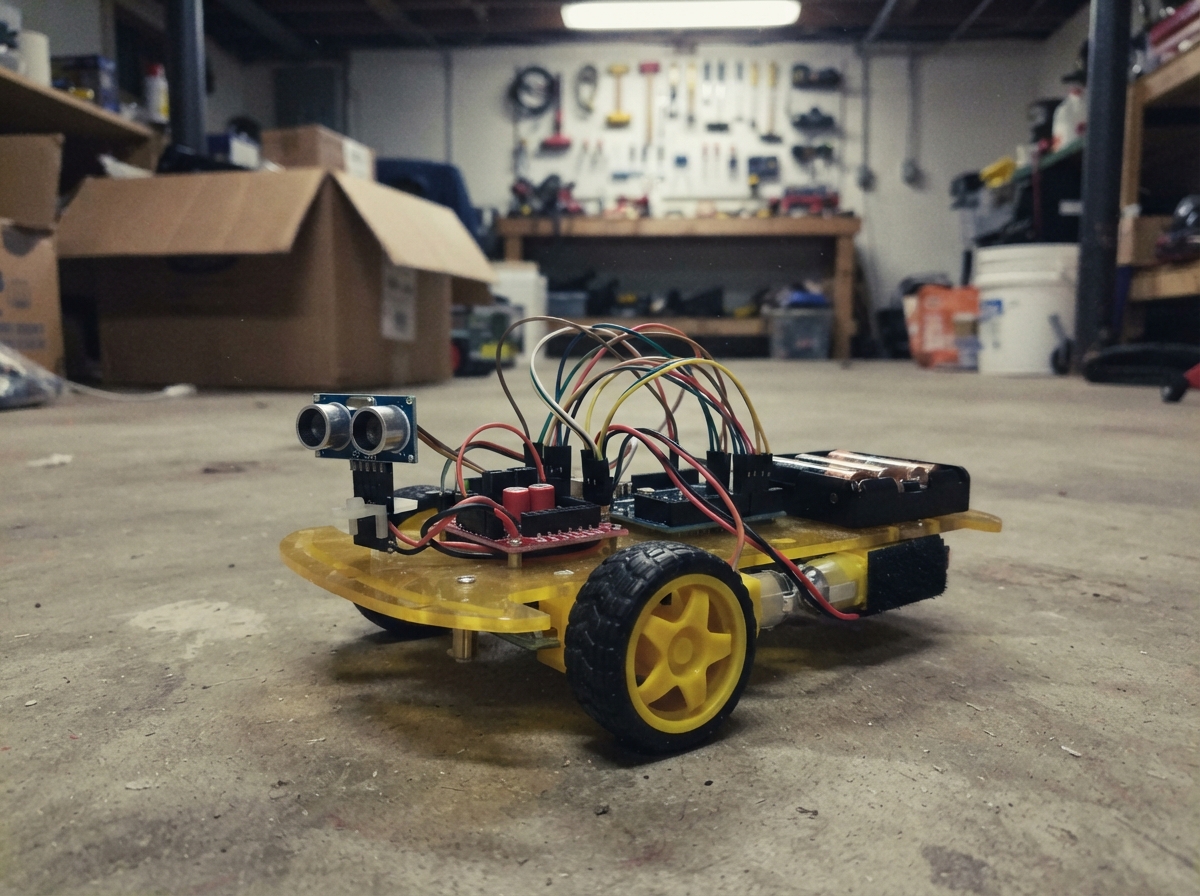
This obstacle-avoiding robot car uses an HC-SR04 ultrasonic distance sensor to detect barriers and navigate around them autonomously. Built on a 4WD chassis with dual DC motors controlled by an Arduino Uno and L298N motor driver, the car cruises forward until an obstacle appears within 25 cm, then stops, reverses, and pivots to find a clear path.
This guide provides a complete parts list, wiring diagram showing sensor and motor connections, step-by-step assembly instructions for the chassis and electronics, and Arduino firmware that handles distance measurement, motor control, and obstacle avoidance logic. Builders will have a fully functional autonomous robot ready to explore and navigate around obstacles.
Wiring diagram

Gather all the parts
Assemble it in 6 steps
1. Build the rolling frame
Screw left_front_motor and left_rear_motor to the left side of chassis_1, and right_front_motor and right_rear_motor to the right side. Push left_front_wheel, left_rear_wheel, right_front_wheel, and right_rear_wheel onto their matching motor shafts.
- Turn each wheel by hand. It should spin freely without rubbing the chassis.
- Keep all four motors the same way around on each side; a motor installed facing the opposite way can make that wheel fight the others.
2. Fit the sensor and electronics
Fasten ultrasonic_1 at the very front with its two round metal faces pointing straight ahead. Secure motor_driver_1 and battery_pack_1 low on chassis_1 with screws or strong double-sided tape. Place the Arduino Uno where its USB socket remains easy to reach.
- Keep the ultrasonic sensor clear of wheel arches and cables so it has an unobstructed view ahead.
- Do not let the metal underside of the Arduino or driver touch a bare metal chassis; a short circuit can damage them.
3. Wire the distance sensor
With USB and batteries disconnected, connect ultrasonic_1 VCC to the Uno 5V pin (power), GND to an Uno GND pin (ground), TRIG to Uno D8 (signal), and ECHO to Uno D9 (signal).
- Make sure VCC and GND are not swapped — swapped power can damage the sensor.
4. Wire the driver control side
Connect motor_driver_1 VD to Uno 5V (power) and motor_driver_1 GND to Uno GND (ground). Connect E1 to Uno D5 (left-side speed signal), M1 to Uno D4 (left-side direction signal), E2 to Uno D6 (right-side speed signal), and M2 to Uno D7 (right-side direction signal).
- The battery ground, motor-driver ground, and Uno GND must all be connected together; without this shared return wire, the car may move randomly or not at all.
5. Connect the motors and battery
Connect motor_driver_1 M1+ and M1- to the two leads of left_front_motor, then connect the same M1+ and M1- terminals to left_rear_motor (left-side power). Connect M2+ and M2- to right_front_motor and, in parallel, to right_rear_motor (right-side power). Connect battery_pack_1 VOUT to motor_driver_1 VS (motor power), and battery_pack_1 GND to motor_driver_1 GND (ground).
- Use short, thicker wires for the battery and motor connections because those wires carry the most current.
- Keep the battery switch OFF while wiring. Never connect the 6 V battery lead to the Uno 5V pin — it can damage the Uno.
6. Power and test the car safely
Lift the chassis so all four wheels are off the table. Plug the Uno into USB, then install four AA cells in battery_pack_1 and turn its switch on. Press Deploy in Schematik to load the program. The car should drive forward when nothing is close, then stop, back up, and turn when you place your hand about 25 cm in front of ultrasonic_1.
- If a wheel turns the wrong way, switch off the battery and swap that motor's two wires at the driver. Test with the car raised before setting it on the floor.
- Do not hold the robot by a spinning wheel, and keep fingers, hair, and loose wires away from the wheels.
Review all connections
1. Connections between "ultrasonic_1" and "Arduino"
2. Connections between "battery_pack_1" and "Arduino"
3. Connections between "motor_driver_1" and "Arduino"
Deploy the firmware
// Four-motor obstacle-avoiding car for Arduino Uno.
// Both left motors share channel 1; both right motors share channel 2.

const byte TRIG_PIN = 8;
const byte ECHO_PIN = 9;
const byte LEFT_ENABLE_PIN = 5;
const byte LEFT_DIRECTION_PIN = 4;
const byte RIGHT_ENABLE_PIN = 6;
const byte RIGHT_DIRECTION_PIN = 7;

const int CRUISE_SPEED = 175;
const int TURN_SPEED = 170;
const int STOP_DISTANCE_CM = 25;

long readDistanceCm() {
  digitalWrite(TRIG_PIN, LOW);
  delayMicroseconds(2);
  digitalWrite(TRIG_PIN, HIGH);
  delayMicroseconds(10);
  digitalWrite(TRIG_PIN, LOW);

  unsigned long duration = pulseIn(ECHO_PIN, HIGH, 25000UL);
  if (duration == 0) {
    return 400; // No echo: treat as clear space rather than locking up.
  }
  return (long)(duration / 58UL);
}

void setMotors(bool leftForward, int leftSpeed, bool rightForward, int rightSpeed) {
  digitalWrite(LEFT_DIRECTION_PIN, leftForward ? HIGH : LOW);
  digitalWrite(RIGHT_DIRECTION_PIN, rightForward ? HIGH : LOW);
  analogWrite(LEFT_ENABLE_PIN, constrain(leftSpeed, 0, 255));
  analogWrite(RIGHT_ENABLE_PIN, constrain(rightSpeed, 0, 255));
}

void stopMotors() {
  analogWrite(LEFT_ENABLE_PIN, 0);
  analogWrite(RIGHT_ENABLE_PIN, 0);
}

void driveForward() {
  setMotors(true, CRUISE_SPEED, true, CRUISE_SPEED);
}

void avoidObstacle() {
  stopMotors();
  delay(180);

  // Back away briefly, then pivot right to find a clear route.
  setMotors(false, CRUISE_SPEED, false, CRUISE_SPEED);
  delay(350);
  stopMotors();
  delay(100);

  setMotors(true, TURN_SPEED, false, TURN_SPEED);
  delay(520);
  stopMotors();
  delay(100);
}

void setup() {
  pinMode(TRIG_PIN, OUTPUT);
  pinMode(ECHO_PIN, INPUT);
  pinMode(LEFT_ENABLE_PIN, OUTPUT);
  pinMode(LEFT_DIRECTION_PIN, OUTPUT);
  pinMode(RIGHT_ENABLE_PIN, OUTPUT);
  pinMode(RIGHT_DIRECTION_PIN, OUTPUT);
  stopMotors();
}

void loop() {
  long distanceCm = readDistanceCm();

  if (distanceCm > 0 && distanceCm <= STOP_DISTANCE_CM) {
    avoidObstacle();
  } else {
    driveForward();
    delay(60);
  }
}
Remix this project
Make it yours in one click
Open a full copy of this project in your own Schematik workspace — diagram, code, parts, and assembly steps included. Swap the sensor, add features, or redesign the whole thing with AI. The author's original stays untouched.