Community project
AI Desk Companion Approval Console
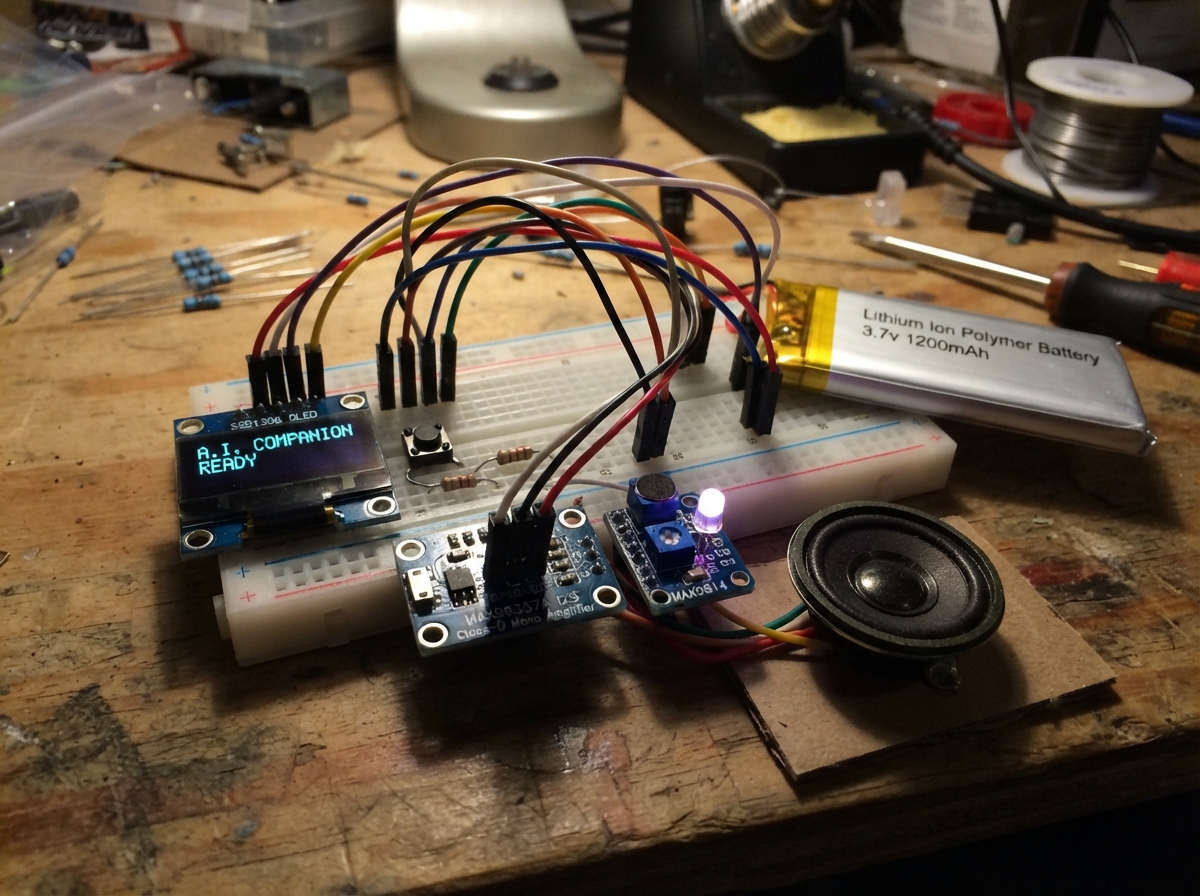
The AI Desk Companion Approval Console is an interactive ESP32-based device that brings personality to your workspace while managing approval workflows. It features an animated face on an OLED screen, motion detection, audio feedback, and a capacitive touch interface to approve or deny requests from a connected gateway.
This guide provides a complete wiring diagram, parts list, and step-by-step assembly instructions to build your own companion. The included firmware handles WiFi connectivity, gesture recognition via the MPU-6050 accelerometer, microphone input, speaker output with the MAX98357A amplifier, and RGB mood lighting. Simply configure your WiFi credentials and gateway address, then deploy to start interacting with your approval console.
Wiring diagram

Gather all the parts
Assemble it in 10 steps
1. Place the ESP32-S3 and screen
Put the ESP32-S3 board across the breadboard center gap. Connect oled_1 VCC to 3.3V (power), GND to GND (ground), SDA to GPIO8 (screen data), and SCL to GPIO9 (screen timing).
- Keep the screen wires short so the picture stays steady.
- Make sure VCC and GND are not swapped — swapped power can damage the screen.
2. Add the MPU-6050 motion sensor
Place imu_1 flat with its printed face upward. Connect VIN to 3.3V (power), GND to GND (ground), SDA to GPIO8 (shared motion data), and SCL to GPIO9 (shared motion timing). Leave INT unconnected.
- The OLED and motion sensor intentionally share GPIO8 and GPIO9.
- Keeping the sensor flat makes left and right tilt predictable.
- Connect VIN to 3.3V, not boosted 5V, so its signal wires stay safe for the ESP32.
3. Wire the three buttons
Put each button across the breadboard center gap. Button A has one leg to GPIO16 (choice signal) and the opposite leg to GND (ground); button B has one leg to GPIO17 (choice signal) and the opposite leg to GND (ground); button C has one leg to GPIO18 (choice signal) and the opposite leg to GND (ground). Connect pullup_a, pullup_b, and pullup_c: each 10 kΩ resistor goes from 3.3V to that button’s GPIO-side leg (keeps the signal steady until pressed).
- If a button acts pressed all the time, rotate it one quarter turn and make sure its legs straddle the breadboard gap.
- Do not connect a button signal directly to both 3.3V and GND — pressing it would short the power supply.
4. Connect the touch pad
Connect touch_1 VCC to 3.3V (power), GND to GND (ground), and SIG to GPIO21 (touch signal). A touch sends an attention event to the MAUS gateway.
- Mount the metal touch area where you can reach it easily.
- Use the 3.3V pin for this touch module; a 5V signal on SIG can damage the ESP32.
5. Wire the speaker and amplifier
Connect audio_amp VIN to 3.3V (power), GND to GND (ground), BCLK to GPIO12 (sound timing), LRC to GPIO11 (sound channel timing), and DIN to GPIO10 (sound data). Connect audio_amp SPK+ to speaker_1 POS (amplified sound) and SPK- to speaker_1 NEG (amplified sound return).
- BCLK can be printed BCK, and LRC can be printed LRCLK on the amplifier.
- Do not connect either speaker wire to GND — both speaker wires go only to the amplifier’s SPK+ and SPK- terminals.
6. Add the microphone and mood light
Connect microphone_1 VDD to 3.3V (power), GND to GND (ground), and OUT to GPIO1 (sound signal). For mood_led, connect its long common-cathode leg to GND (ground). Connect GPIO4 through led_resistor_r to R (red light), GPIO13 through led_resistor_g to G (green light), and GPIO14 through led_resistor_b to B (blue light).
- Keep the microphone hole away from the speaker so MAUS does not hear its own sounds.
- Each RGB LED color needs its own 220 Ω resistor — leaving them out can damage the LED or ESP32 pins.
7. Connect the battery power chain
With every USB cable unplugged, connect battery_1 BAT+ to charger_1 B+ (battery positive) and BAT- to charger_1 B- (battery negative). Connect charger_1 OUT+ to boost_1 IN+ (protected battery power) and charger_1 OUT- to boost_1 IN- (protected battery ground). Connect boost_1 OUT+ to ESP32-S3 5V/VIN (board power) and boost_1 OUT- to ESP32-S3 GND (ground). Charge only through charger_1’s USB-C socket.
- The USB-C plus/minus adapter is not needed for this battery circuit.
- Before connecting the booster to the ESP32, measure it and set it to 5.0V. Higher voltage can damage the board.
- Stop using the battery if it becomes hot, swollen, damaged, or has a torn wrapper.
8. Leave the vibration motor disconnected
Do not connect the vibration motor to the ESP32, battery, charger, or booster. Keep its two wires separated. MAUS uses the speaker and screen for touch feedback until you add a real motor-driver part.
- A future DRV2605L module is the easiest safe vibration upgrade.
- A motor connected directly to an ESP32 pin can draw too much current and permanently damage the board.
9. Add your WiFi and gateway address
In the firmware at the top of main.cpp, replace YOUR_WIFI_SSID and YOUR_WIFI_PASSWORD with your home network details. Replace http://192.168.1.XXX:3491 with the Windows PC’s local IPv4 address and the port used by your MAUS gateway. The PC and MAUS must use the same WiFi network.
- On Windows, run ipconfig and use the IPv4 Address from the Wi-Fi adapter, not an address beginning with 127.
- The Windows firewall must allow your gateway app to receive connections on its chosen port.
- Do not put WiFi passwords or API keys in messages you share with other people.
10. Power and deploy MAUS
Check that the ESP32-S3, charger, booster, screen, MPU-6050, touch pad, amplifier, microphone, and LED all share GND (ground). For the first test, power the ESP32-S3 from its normal USB cable and keep the battery power circuit unplugged while checking wires. Then press Deploy in Schematik. MAUS will connect, send button, touch, clap, tilt, and shake events to your gateway, and receive screen messages, expressions, and approval requests.
- Button A accepts and Button B rejects an approval request. Hold C for 800 ms to open quick replies; use A and B to choose, then tap C to send.
- Turn power off before moving wires. A loose wire touching a neighboring breadboard row can cause a short circuit.
Review all connections
1. Connections between "oled_1" and "ESP32"
2. Connections between "button_a" and "ESP32"
3. Connections between "button_b" and "ESP32"
4. Connections between "button_c" and "ESP32"
5. Connections between "pullup_a" and "ESP32"
6. Connections between "pullup_b" and "ESP32"
7. Connections between "pullup_c" and "ESP32"
8. Connections between "audio_amp" and "ESP32"
9. Connections between "microphone_1" and "ESP32"
10. Connections between "mood_led" and "ESP32"
11. Connections between "led_resistor_r" and "ESP32"
12. Connections between "led_resistor_g" and "ESP32"
13. Connections between "led_resistor_b" and "ESP32"
14. Connections between "imu_1" and "ESP32"
15. Connections between "battery_1" and "ESP32"
16. Connections between "charger_1" and "ESP32"
17. Connections between "boost_1" and "ESP32"
18. Connections between "touch_1" and "ESP32"
Deploy the firmware
#include <Arduino.h>
#include <Wire.h>
#include <WiFi.h>
#include <HTTPClient.h>
#include <ArduinoJson.h>
#include <U8g2lib.h>
#include <MPU6050.h>
#include <driver/i2s.h>
#include <math.h>

#define OLED_SCL 9
#define BUTTON_B 17
#define BUTTON_C 18
#define TOUCH_PIN 21
#define I2S_LRC 11
#define I2S_DIN 10
#define LED_R 4
#define LED_G 13
#define LED_B 14

// Fill these three lines in before pressing Deploy.

enum Expression { HAPPY, THINKING, WORKING, ALARMED, SAD, SLEEPY };

struct Button { uint8_t pin; bool stable = HIGH, raw = HIGH; uint32_t changed = 0; };


// Forward declarations
void lamp(uint8_t r, uint8_t g, uint8_t b);
void audioTone(uint16_t hz, uint16_t ms, uint8_t volume);
void twoTone(uint16_t a, uint16_t b);
void newMessageSound();
void approvedSound();
void deniedSound();
void wakeSound();
bool buttonPressed(uint8_t number);
String shortText(String text, uint8_t maximum);
void startTyping(const String &text);
void postEvent(const char* event, const String &text);
void sendApproval(bool approved);
Expression parseExpression(const String &value);
void pollGateway();
void drawEyes(bool closed);
void drawFace(uint32_t t);
void drawWrapped(const String &text, uint8_t y, uint8_t lines);
void render(uint32_t t);
void updateLight(uint32_t t);
void checkMotion(uint32_t t);
void checkMic(uint32_t t);

const char* WIFI_SSID = "YOUR_WIFI_SSID";
const char* WIFI_PASS = "YOUR_WIFI_PASSWORD";
const char* SERVER = "http://192.168.1.XXX:3491";

constexpr uint8_t OLED_SDA = 8, OLED_SCL = 9;
constexpr uint8_t BUTTON_A = 16, BUTTON_B = 17, BUTTON_C = 18, TOUCH_PIN = 21;
constexpr uint8_t I2S_BCLK = 12, I2S_LRC = 11, I2S_DIN = 10;
constexpr uint8_t MIC_PIN = 1, LED_R = 4, LED_G = 13, LED_B = 14;
constexpr uint32_t AUDIO_RATE = 16000;


U8G2_SSD1306_128X64_NONAME_F_HW_I2C oled(U8G2_R0, U8X8_PIN_NONE);
MPU6050 mpu;
Button buttons[] = {{BUTTON_A}, {BUTTON_B}, {BUTTON_C}};

Expression expression = HAPPY;
String message = "Starting MAUS...";
String approvalText;
String lastReply;
bool pendingApproval = false, imuOK = false, touchWas = false, asleep = false;
bool typing = false, inverted = false;
String typingText;
uint16_t typedChars = 0;
uint8_t menuIndex = 0;
const char* quickReplies[] = {"What's new?", "Any tasks for me?", "Check my email", "How's everything?"};
bool quickMenu = false;
uint32_t cDownAt = 0;
uint32_t lastFrame = 0, lastPoll = 0, lastInput = 0, lastNewMessage = 0;
uint32_t lastBlink = 0, blinkUntil = 0, lastMotion = 0, lastEvent = 0;
uint32_t lastClap = 0, lastInvert = 0, sadUntil = 0, lastWorkingFrame = 0;
uint8_t workingFrame = 0;

void lamp(uint8_t r, uint8_t g, uint8_t b) {
  ledcWrite(LED_R, r); ledcWrite(LED_G, g); ledcWrite(LED_B, b);
}

void audioTone(uint16_t hz, uint16_t ms, uint8_t volume = 10) {
  uint32_t frames = (uint32_t)AUDIO_RATE * ms / 1000;
  uint32_t phase = 0;
  int16_t samples[256];
  while (frames) {
    uint16_t n = min((uint32_t)128, frames);
    for (uint16_t i = 0; i < n; i++) {
      int16_t sample = (((phase + i) * hz * 2 / AUDIO_RATE) & 1) ? volume * 900 : -volume * 900;
      samples[i * 2] = sample; samples[i * 2 + 1] = sample;
    }
    size_t written;
    i2s_write(I2S_NUM_0, samples, n * 2 * sizeof(int16_t), &written, portMAX_DELAY);
    phase += n; frames -= n;
  }
}
void twoTone(uint16_t a, uint16_t b) { audioTone(a, 80); delay(20); audioTone(b, 80); }
void newMessageSound() { audioTone(1000, 70); delay(80); audioTone(1000, 70); }
void approvedSound() { audioTone(800, 60); audioTone(1000, 60); audioTone(1200, 60); }
void deniedSound() { audioTone(400, 200); }
void wakeSound() { twoTone(800, 1000); }

bool buttonPressed(uint8_t number) {
  Button &b = buttons[number]; bool now = digitalRead(b.pin); uint32_t t = millis();
  if (now != b.raw) { b.raw = now; b.changed = t; }
  if (t - b.changed > 28 && now != b.stable) { b.stable = now; return now == LOW; }
  return false;
}

String shortText(String text, uint8_t maximum) {
  text.replace("\n", " "); text.replace("\r", " ");
  if (text.length() > maximum) return text.substring(0, maximum - 3) + "...";
  return text;
}

void startTyping(const String &text) {
  typingText = shortText(text, 105); typedChars = 0; typing = true;
}

void postEvent(const char* event, const String &text = "") {
  if (WiFi.status() != WL_CONNECTED) return;
  HTTPClient http; http.begin(String(SERVER) + "/message");
  http.addHeader("Content-Type", "application/json");
  JsonDocument payload;
  payload["device"] = "MAUS"; payload["event"] = event; payload["text"] = text;
  String body; serializeJson(payload, body);
  http.POST(body); http.end();
}

void sendApproval(bool approved) {
  if (WiFi.status() != WL_CONNECTED) return;
  HTTPClient http; http.begin(String(SERVER) + "/approve");
  http.addHeader("Content-Type", "application/json");
  http.POST(approved ? "{\"approved\":true}" : "{\"approved\":false}");
  http.end();
}

Expression parseExpression(const String &value) {
  if (value == "THINKING") return THINKING;
  if (value == "WORKING") return WORKING;
  if (value == "ALARMED") return ALARMED;
  if (value == "SAD") return SAD;
  if (value == "SLEEPY") return SLEEPY;
  return HAPPY;
}

void pollGateway() {
  if (WiFi.status() != WL_CONNECTED) return;
  HTTPClient http; http.setTimeout(2500); http.begin(String(SERVER) + "/status");
  int code = http.GET();
  if (code == HTTP_CODE_OK) {
    JsonDocument doc;
    DeserializationError error = deserializeJson(doc, http.getString());
    if (!error) {
      String reply = doc["reply"] | "";
      bool newPending = doc["pending_approval"] | false;
      approvalText = shortText(String(doc["approval_text"] | ""), 84);
      Expression received = parseExpression(String(doc["expression"] | "HAPPY"));
      if (newPending) { pendingApproval = true; expression = ALARMED; typing = false; }
      else { pendingApproval = false; expression = received; }
      if (reply.length() && reply != lastReply) {
        lastReply = reply; startTyping(reply); newMessageSound(); lastNewMessage = millis();
        if (asleep) { asleep = false; wakeSound(); oled.setContrast(255); }
      }
    }
  }
  http.end();
}

void drawEyes(bool closed) {
  if (closed) { oled.drawHLine(38, 15, 10); oled.drawHLine(80, 15, 10); }
  else { oled.drawDisc(43, 14, 3); oled.drawDisc(85, 14, 3); }
}
void drawFace(uint32_t t) {
  bool closed = t < blinkUntil;
  if (expression == ALARMED) {
    oled.drawCircle(43, 14, 6); oled.drawCircle(85, 14, 6);
    oled.drawLine(51, 25, 57, 21); oled.drawLine(57, 21, 63, 26); oled.drawLine(63, 26, 69, 21); oled.drawLine(69, 21, 76, 25);
  } else if (expression == SAD) {
    oled.drawTriangle(38, 10, 48, 10, 43, 18); oled.drawTriangle(80, 10, 90, 10, 85, 18); oled.drawHLine(56, 26, 16);
  } else if (expression == SLEEPY) {
    oled.drawHLine(37, 15, 12); oled.drawHLine(79, 15, 12); oled.drawCircle(64, 24, 3);
  } else if (expression == THINKING) {
    oled.drawDisc(43, 14, 3); oled.drawBox(81, 13, 9, 2);
    uint8_t dots = (t / 450) % 4; for (uint8_t i = 0; i < dots; i++) oled.drawDisc(101 + i * 6, 27, 1);
    oled.drawHLine(57, 25, 14);
  } else if (expression == WORKING) {
    const int offsets[4][2] = {{0,-4},{4,0},{0,4},{-4,0}};
    for (uint8_t i = 0; i < 4; i++) { int p = (i + workingFrame) % 4; oled.drawFrame(43 + offsets[p][0] - 3, 14 + offsets[p][1] - 3, 7, 7); }
    for (uint8_t i = 0; i < 4; i++) { int p = (i + workingFrame + 2) % 4; oled.drawFrame(85 + offsets[p][0] - 3, 14 + offsets[p][1] - 3, 7, 7); }
    oled.drawHLine(57, 25, 14);
  } else {
    drawEyes(closed); oled.drawLine(55, 21, 60, 25); oled.drawLine(60, 25, 68, 26); oled.drawLine(68, 26, 76, 25); oled.drawLine(76, 25, 81, 21);
  }
}
void drawWrapped(const String &text, uint8_t y, uint8_t lines) {
  oled.setFont(u8g2_font_5x7_tf); String line; uint8_t row = 0;
  for (uint16_t i = 0; i <= text.length() && row < lines; i++) {
    char c = i < text.length() ? text[i] : ' ';
    if (c == ' ' || i == text.length()) {
      String candidate = line.length() ? line + " " + String(c) : String(c);
      if (candidate.length() > 25 || i == text.length()) { oled.drawStr(2, y + row * 8, line.c_str()); line = String(c); row++; }
      else line = candidate;
    }
  }
  if (row < lines && line.length()) oled.drawStr(2, y + row * 8, line.c_str());
}
void render(uint32_t t) {
  oled.clearBuffer();
  if (quickMenu) {
    oled.setFont(u8g2_font_6x12_tf); oled.drawStr(3, 12, "QUICK REPLY");
    for (uint8_t i = 0; i < 4; i++) { oled.setFont(u8g2_font_5x7_tf); if (i == menuIndex) oled.drawBox(0, 16 + i * 9, 128, 9); oled.setDrawColor(i == menuIndex ? 0 : 1); oled.drawStr(4, 23 + i * 9, quickReplies[i]); oled.setDrawColor(1); }
    oled.drawStr(2, 62, "A/B choose  C send");
  } else if (pendingApproval) {
    drawFace(t); drawWrapped(approvalText, 37, 2); oled.setFont(u8g2_font_5x7_tf); oled.drawStr(2, 62, "A=YES   B=NO");
  } else {
    drawFace(t);
    String shown = typing ? typingText.substring(0, typedChars) : message;
    drawWrapped(shown, 39, 3);
    if (WiFi.status() != WL_CONNECTED) { oled.setFont(u8g2_font_5x7_tf); oled.drawStr(2, 62, "connecting..."); }
  }
  oled.sendBuffer();
}

void updateLight(uint32_t t) {
  uint8_t breathe = 18 + (uint8_t)((sinf(t / 320.0f) + 1.0f) * 45.0f);
  if (expression == ALARMED) { if ((t / 200) % 2) lamp(100, 0, 0); else lamp(0, 0, 0); }
  else if (expression == THINKING) lamp(0, 0, breathe);
  else if (expression == WORKING) { uint8_t phase = (t / 180) % 3; lamp(phase == 0 ? 70 : 10, 0, phase == 2 ? 70 : 10); }
  else if (expression == SAD) lamp(0, 0, 12);
  else if (expression == SLEEPY) lamp(0, breathe / 8, breathe / 8);
  else lamp(70, 25, 0);
}

void checkMotion(uint32_t t) {
  if (!imuOK || t - lastMotion < 70) return; lastMotion = t;
  int16_t ax, ay, az, gx, gy, gz; mpu.getMotion6(&ax, &ay, &az, &gx, &gy, &gz);
  float force = sqrtf(sq(ax / 16384.0f) + sq(ay / 16384.0f) + sq(az / 16384.0f));
  if (force > 2.15f && t - lastEvent > 900) { lastEvent = t; postEvent("shake"); message = "Whoa! That was a shake."; expression = THINKING; }
  else if (fabs(ax / 16384.0f) > 0.48f && t - lastEvent > 700) { lastEvent = t; postEvent(ax > 0 ? "tilt_right" : "tilt_left"); }
}
void checkMic(uint32_t t) {
  long sum = 0; for (uint8_t i = 0; i < 12; i++) { sum += analogRead(MIC_PIN); delayMicroseconds(50); }
  static int middle = 2048; int value = sum / 12; middle = (middle * 15 + value) / 16;
  if (abs(value - middle) > 500 && t - lastClap > 1400) { lastClap = t; postEvent("clap"); message = "I heard that!"; expression = HAPPY; }
}

void setup() {
  pinMode(BUTTON_A, INPUT); pinMode(BUTTON_B, INPUT); pinMode(BUTTON_C, INPUT); pinMode(TOUCH_PIN, INPUT);
  ledcAttach(LED_R, 5000, 8); ledcAttach(LED_G, 5000, 8); ledcAttach(LED_B, 5000, 8); lamp(0, 0, 0);
  Wire.begin(OLED_SDA, OLED_SCL); oled.begin(); oled.setContrast(255);
  mpu.initialize(); imuOK = mpu.testConnection();
  i2s_config_t config = {}; config.mode = (i2s_mode_t)(I2S_MODE_MASTER | I2S_MODE_TX); config.sample_rate = AUDIO_RATE; config.bits_per_sample = I2S_BITS_PER_SAMPLE_16BIT; config.channel_format = I2S_CHANNEL_FMT_RIGHT_LEFT; config.communication_format = I2S_COMM_FORMAT_I2S_MSB; config.dma_buf_count = 8; config.dma_buf_len = 128; config.tx_desc_auto_clear = true;
  i2s_driver_install(I2S_NUM_0, &config, 0, nullptr);
  i2s_pin_config_t pins = {}; pins.bck_io_num = I2S_BCLK; pins.ws_io_num = I2S_LRC; pins.data_out_num = I2S_DIN; pins.data_in_num = I2S_PIN_NO_CHANGE; i2s_set_pin(I2S_NUM_0, &pins);
  WiFi.mode(WIFI_STA); WiFi.begin(WIFI_SSID, WIFI_PASS);
  lastInput = lastNewMessage = millis(); lastBlink = millis() + random(3000, 8000);
}

void loop() {
  uint32_t t = millis();
  bool a = buttonPressed(0), b = buttonPressed(1), c = buttonPressed(2);
  bool touch = digitalRead(TOUCH_PIN) == HIGH;
  if (!c && digitalRead(BUTTON_C) == LOW && !cDownAt) cDownAt = t;
  if (digitalRead(BUTTON_C) == HIGH) cDownAt = 0;
  if (cDownAt && t - cDownAt >= 800 && !quickMenu && !pendingApproval) { quickMenu = true; cDownAt = 0; message = "Choose a message"; audioTone(850, 45); }
  if (a || b || c || (touch && !touchWas)) { lastInput = t; if (asleep) { asleep = false; expression = HAPPY; oled.setContrast(255); wakeSound(); } }
  if (pendingApproval) {
    if (a) { sendApproval(true); pendingApproval = false; expression = HAPPY; message = "Approved and sent."; approvedSound(); }
    if (b) { sendApproval(false); pendingApproval = false; expression = SAD; sadUntil = t + 3000; message = "Denied. I understand."; deniedSound(); }
  } else if (quickMenu) {
    if (a) { menuIndex = (menuIndex + 1) % 4; audioTone(800, 25); }
    if (b) { menuIndex = (menuIndex + 3) % 4; audioTone(650, 25); }
    if (c) { postEvent("quick_reply", quickReplies[menuIndex]); quickMenu = false; message = "Sent: " + String(quickReplies[menuIndex]); audioTone(1100, 50); delay(35); audioTone(1100, 50); }
  } else {
    if (a) postEvent("button_a"); if (b) postEvent("button_b"); if (c) postEvent("button_c");
    if (touch && !touchWas) { postEvent("touch"); message = "Touch received."; expression = HAPPY; }
  }
  touchWas = touch;
  if (sadUntil && t >= sadUntil) { sadUntil = 0; expression = HAPPY; }
  checkMotion(t); checkMic(t);
  uint32_t pollEvery = asleep ? 20000 : 4000;
  if (t - lastPoll >= pollEvery) { lastPoll = t; pollGateway(); }
  if (typing && t - lastNewMessage >= typedChars * 35UL) { if (typedChars < typingText.length()) typedChars++; else { typing = false; message = typingText; } }
  if (!asleep && t - max(lastInput, lastNewMessage) > 600000UL) { asleep = true; expression = SLEEPY; oled.setContrast(38); }
  if ((expression == HAPPY || expression == THINKING) && t >= lastBlink) { blinkUntil = t + 150; lastBlink = t + random(3000, 8000); }
  bool shouldInvert = expression == ALARMED && ((t / 600UL) % 2UL == 1UL);
  if (shouldInvert != inverted) { oled.getU8x8()->sendF("c", shouldInvert ? 0xA7 : 0xA6); inverted = shouldInvert; }
  if (expression == WORKING && t - lastWorkingFrame >= 125) { lastWorkingFrame = t; workingFrame = (workingFrame + 1) % 4; }
  updateLight(t);
  if (t - lastFrame >= 50) { lastFrame = t; render(t); }
}
Remix this project
Make it yours in one click
Open a full copy of this project in your own Schematik workspace, diagram, code, parts, and assembly steps included. Swap the sensor, add features, or redesign the whole thing with AI. The author's original stays untouched.