Community project
AI Robot Companion
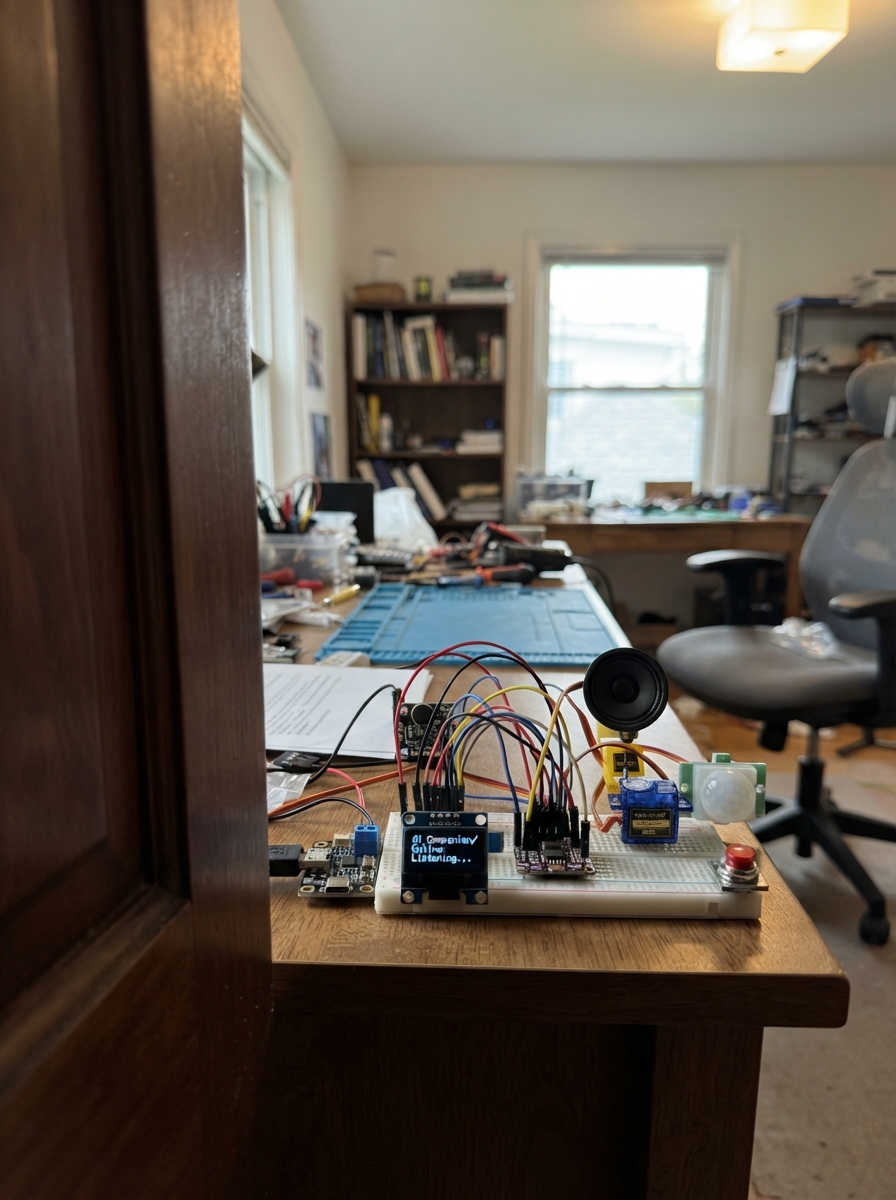
This project builds an interactive robot companion using an ESP32 microcontroller as the brain. The device listens for sound through an I²S microphone, displays expressive faces on a 128×64 OLED screen, plays audio responses through a Class-D amplifier and speaker, and can move a servo-controlled head or arm. Motion detection via PIR sensor triggers interactions, while a push button lets users initiate conversations or commands.
The guide provides a complete wiring diagram, full parts list with sourcing information, and step-by-step assembly instructions covering power distribution, sensor integration, and safety checks. Firmware code is included to handle audio capture, WiFi connectivity, mood states, and gesture control, allowing the robot to respond to its environment and user input.
Wiring diagram
Gather all the parts
Assemble it in 11 steps
1. Identify parts and disconnect all power
Use an ESP32-WROOM-32 DevKit V1-style board, a 128 by 64 SSD1306 I2C OLED, and the listed modules. Match printed pin names, not module positions or wire colours. Leave the speaker and servo mechanically unloaded at first.
- The selected OLED driver is SSD1306. A screen sold as compatible may actually use SH1106 and need a driver change.
- RGB LEDs, active buzzer and HC-SR04 are not used in V1.
- Do not connect mains wiring. Use an enclosed, regulated USB supply.
2. Build the fused five-volt distribution
Connect the supply positive to fuse IN. Fuse OUT is the desktop 5 V rail. Supply negative is common GND. Run separate short power and ground pairs from this point to amplifier VIN/GND and servo VCC/GND. Connect PIR VCC to this 5 V rail. Put the removable jumper between the 5 V rail and ESP32 VIN. Connect ESP32 GND to common GND.
- Use a regulated 5 V 3 A supply and short 22 AWG power wires. Keep speaker and servo current off the breadboard power rails.
- The board's 3V3 output powers only the OLED, microphone and PIR buffer.
- REMOVE the board-power jumper before connecting the ESP32 USB cable to a PC. Otherwise unknown clone-board USB circuits may backfeed the PC or supply.
- Do not power the servo from 3V3. Never apply 5 V to an ESP32 signal pin.
3. Add local supply capacitors
Put the 1000 uF capacitor across servo 5 V and GND, the 470 uF and one 100 nF across amplifier VIN and GND, the 220 uF across ESP32 VIN and GND, and one 100 nF across microphone VDD and GND. Keep their legs short and near the relevant module.
- Electrolytic positive goes to the power rail; the striped negative goes to GND. Reversal can rupture a capacitor. Use at least 10 V-rated electrolytics.
4. Connect the OLED face
OLED VCC goes to ESP32 3V3 and GND to common ground. SDA goes to GPIO21 for data, and SCL goes to GPIO22 for the clock. Use the pull-up resistors already fitted on the OLED module.
- Firmware checks addresses 0x3C and 0x3D. Pixels have the panel's fixed physical colour; software cannot turn a white panel cyan.
5. Connect the digital microphone
INMP441 VDD goes to 3V3; GND and L/R go to GND. SCK goes to GPIO26 for bit clock, WS to GPIO25 for channel clock, and SD to GPIO19 for sound data into the ESP32. Fit the 100 kohm resistor between SD and GND.
- Keep audio clock wires under about 10 cm. Leave the microphone's bottom sound opening clear.
- The microphone is a 3.3 V device. Connecting VDD to the desktop 5 V rail can destroy it.
6. Connect amplifier and floating speaker
MAX98357A BCLK goes to GPIO27, LRC to GPIO14 and DIN to GPIO13. SD goes to GPIO23; fit the 10 kohm mute resistor from SD to GND. Leave GAIN unconnected. Speaker leads connect only to SPK+ and SPK-. Amplifier VIN uses the separate desktop 5 V branch.
- Neither speaker terminal may be grounded or connected to ESP32 pins. This amplifier has two actively driven speaker outputs.
- Use a 4 or 8 ohm speaker rated 3 W. Start with the firmware's reduced volume.
7. Protect and connect the servo control signal
Power the 74AHCT125 at 5 V with common GND. GPIO18 goes to 1A; 1Y goes to servo SIGNAL. Tie 1OE to GND. Fit the second 10 kohm resistor from 1A to GND and the remaining 100 nF capacitor between buffer VCC and GND. Tie unused 2A, 3A and 4A to GND, and 2OE, 3OE and 4OE to 5 V; leave unused Y outputs open.
- This AHCT-family buffer converts the ESP32's 3.3 V control signal into a reliable 5 V servo signal. Use a labelled breakout or the exact chip package pinout.
- Use printed signal names and the correct package datasheet; do not assume a different logic chip has the same voltage thresholds.
8. Protect and connect the motion sensor
Use a SN74LVC1G17 breakout with an onboard bypass capacitor. Its VCC goes to 3V3, GND to common ground, A to PIR OUT, and Y to GPIO32. PIR VCC uses 5 V. This buffer accepts either a 3.3 V or a 5 V sensor signal without exposing GPIO32 to 5 V.
- Allow 60 seconds for PIR warm-up. Set a short delay and low sensitivity initially. A PIR detects movement, not distance or a motionless person's continued presence.
9. Fit the talk button
Connect the button SIGNAL terminal to GPIO33 and its GND terminal to common ground. Firmware provides the pull-up. On a bare four-legged switch, select two opposite switched contacts, not two legs already joined internally.
- A short press starts one three-second recording; watch for Listening before speaking. A one-second hold toggles the face demo.
10. Inspect before first power
Check every wire against the circuit. With power disconnected, check for a short between 5 V and GND and between 3V3 and GND. Inspect capacitor polarity and speaker isolation. Remove the board-power jumper before attaching PC USB. Keep the external 5 V supply feeding the servo and amplifier; grounds remain joined.
- Never change wiring with power connected. Stop immediately if a wire, module or capacitor becomes hot.
- When using PC USB, the external supply must not feed ESP32 VIN: the removable jumper stays OUT.
11. Fit a stationary cardboard case
Prototype a rounded, vintage-computer-style body about 125 mm wide, 145 mm tall and 105 mm deep. Cut the face opening to the actual OLED viewing area, a speaker grille, a small clear microphone opening, a PIR lens opening and rear access for USB and power. Keep ventilation at the back and use a removable rear cover.
- A full-size starter breadboard stays outside the first case. Move to a small breadboard or soldered assembly only after bench testing.
- Mount only a light, balanced OLED face panel on a cardboard hinge; fix the rest of the body to the desk. Connect the servo with a short linkage and provide slack in the OLED wires.
- Keep microphone away from speaker and servo. Separate them with soft mounting and an internal cardboard divider. Keep the ESP32 antenna clear of metal and speaker magnets.
- Centre the servo before fastening its horn. Limit movement to roughly 80–100 degrees. The panel should remain stable when the servo releases, without loading the gears.
- Do not ask an SG90 to lift the complete robot body. A jammed servo can overheat and cause resets.
Review all connections
1. Connections between "supply" and "ESP32"
2. Connections between "fuse" and "ESP32"
3. Connections between "link" and "ESP32"
4. Connections between "face" and "ESP32"
5. Connections between "mic" and "ESP32"
6. Connections between "amp" and "ESP32"
7. Connections between "servo" and "ESP32"
8. Connections between "pir" and "ESP32"
9. Connections between "talk" and "ESP32"
10. Connections between "rdata" and "ESP32"
11. Connections between "rmute" and "ESP32"
12. Connections between "cservo" and "ESP32"
13. Connections between "camp" and "ESP32"
14. Connections between "cboard" and "ESP32"
15. Connections between "cmic" and "ESP32"
16. Connections between "campHF" and "ESP32"
17. Connections between "pirbuffer" and "ESP32"
18. Connections between "servobuffer" and "ESP32"
19. Connections between "cshift" and "ESP32"
20. Connections between "rservo" and "ESP32"
Deploy the firmware
#include <Arduino.h>
#include <Wire.h>
#include <WiFi.h>
#include <Preferences.h>
#include <Adafruit_GFX.h>
#include <Adafruit_SSD1306.h>
#include <driver/i2s.h>
#include <esp_arduino_version.h>
#include "faces.h"

constexpr int SDA_PIN=21,SCL_PIN=22,MIC_BCLK=26,MIC_WS=25,MIC_DATA=19;
constexpr int AMP_BCLK=27,AMP_WS=14,AMP_DATA=13,AMP_SD=23;
constexpr int SERVO_PIN=18,PIR_PIN=32,BUTTON_PIN=33;
constexpr int SERVO_CHANNEL=6;
constexpr uint32_t SAMPLE_RATE=16000, RECORD_SAMPLES=48000;
Adafruit_SSD1306 oled(128,64,&Wire,-1);
Preferences prefs;
String ssid,password,proxyHost,proxyToken;
uint16_t proxyPort=8080;
volatile bool busy=false;
volatile int mood=12;
volatile uint32_t moodUntil=0;
volatile int requestedGesture=0;
bool displayReady=false,audioReady=false,demo=false;
uint32_t lastPresence=0;

void setMood(int m,uint32_t duration=3000){mood=constrain(m,0,24);moodUntil=millis()+duration;}
bool initAudio(){
 i2s_config_t c={};c.mode=(i2s_mode_t)(I2S_MODE_MASTER|I2S_MODE_RX);
 c.sample_rate=SAMPLE_RATE;c.bits_per_sample=I2S_BITS_PER_SAMPLE_32BIT;
 c.channel_format=I2S_CHANNEL_FMT_ONLY_LEFT;c.communication_format=I2S_COMM_FORMAT_STAND_I2S;
 c.intr_alloc_flags=0;c.dma_buf_count=6;c.dma_buf_len=128;c.use_apll=false;
 i2s_pin_config_t p={};p.bck_io_num=MIC_BCLK;p.ws_io_num=MIC_WS;p.data_out_num=I2S_PIN_NO_CHANGE;p.data_in_num=MIC_DATA;
 if(i2s_driver_install(I2S_NUM_0,&c,0,nullptr)!=ESP_OK)return false;
 if(i2s_set_pin(I2S_NUM_0,&p)!=ESP_OK)return false;
 c.mode=(i2s_mode_t)(I2S_MODE_MASTER|I2S_MODE_TX);c.sample_rate=24000;
 c.bits_per_sample=I2S_BITS_PER_SAMPLE_16BIT;c.channel_format=I2S_CHANNEL_FMT_RIGHT_LEFT;
 c.tx_desc_auto_clear=true;
 p.bck_io_num=AMP_BCLK;p.ws_io_num=AMP_WS;p.data_out_num=AMP_DATA;p.data_in_num=I2S_PIN_NO_CHANGE;
 if(i2s_driver_install(I2S_NUM_1,&c,0,nullptr)!=ESP_OK)return false;
 if(i2s_set_pin(I2S_NUM_1,&p)!=ESP_OK)return false;
 i2s_zero_dma_buffer(I2S_NUM_1);
 return true;
}
void stereoWrite(const int16_t* mono,size_t count){
 int16_t stereo[512];size_t written;
 for(size_t pos=0;pos<count;){size_t n=min((size_t)256,count-pos);
  for(size_t j=0;j<n;j++)stereo[2*j]=stereo[2*j+1]=mono[pos+j]/3;
  i2s_write(I2S_NUM_1,stereo,n*4,&written,pdMS_TO_TICKS(1000));pos+=n;
 }
}
void chime(){
 if(!audioReady)return;
 digitalWrite(AMP_SD,HIGH);int16_t samples[240];
 for(int k=0;k<12;k++){for(int j=0;j<240;j++)samples[j]=(int16_t)(2500*sinf(2*PI*(k<6?660:880)*(k*240+j)/24000.0));stereoWrite(samples,240);}
 vTaskDelay(pdMS_TO_TICKS(40));digitalWrite(AMP_SD,LOW);i2s_zero_dma_buffer(I2S_NUM_1);
}
bool writeAll(WiFiClient& c,const uint8_t* p,size_t n){
 uint32_t deadline=millis()+5000;
 while(n){size_t w=c.write(p,n);if(w){p+=w;n-=w;}else{if(!c.connected() || (int32_t)(millis()-deadline)>0)return false;vTaskDelay(1);}}
 return true;
}
bool readLine(WiFiClient& c,String& line,uint32_t timeout){
 line="";uint32_t start=millis();
 while(millis()-start<timeout){while(c.available()){char b=c.read();if(b=='\n')return true;if(b!='\r'){if(line.length()>=512)return false;line+=b;}}
  if(!c.connected())return false;vTaskDelay(pdMS_TO_TICKS(5));}
 return false;
}
void voiceTask(void*){
 bool ok=false;
 if(!audioReady){Serial.println("Audio initialization failed; check serial boot diagnostics.");goto done;}
 if(WiFi.status()!=WL_CONNECTED || proxyHost.isEmpty() || proxyToken.isEmpty()){
  Serial.println("Offline: configure Wi-Fi, backend and token. Local chime only.");chime();goto done;
 }
 {
 WiFiClient client;
 if(!client.connect(proxyHost.c_str(),proxyPort,5000)){Serial.println("Backend connection failed");goto done;}
 // Fixed-length streaming upload: no full recording buffer or TLS heap on robot.
 client.printf("POST /turn HTTP/1.1\r\nHost: %s\r\nAuthorization: Bearer %s\r\nContent-Type: application/octet-stream\r\nContent-Length: %u\r\nConnection: close\r\n\r\n",proxyHost.c_str(),proxyToken.c_str(),unsigned(RECORD_SAMPLES*2));
 digitalWrite(AMP_SD,LOW);
 int32_t raw[256];int16_t pcm[256];size_t got=0;uint64_t magnitude=0;
 // Flush stale microphone DMA; allow INMP441 startup clock settling.
 for(int n=0;n<24;n++)i2s_read(I2S_NUM_0,raw,sizeof(raw),&got,pdMS_TO_TICKS(100));
 setMood(7,180000);
 bool upload=true;
 for(uint32_t sent=0;sent<RECORD_SAMPLES;){
  size_t want=min((uint32_t)256,RECORD_SAMPLES-sent);
  if(i2s_read(I2S_NUM_0,raw,want*4,&got,pdMS_TO_TICKS(1000))!=ESP_OK || got==0){upload=false;break;}
  size_t count=got/4;
  for(size_t j=0;j<count;j++){int32_t v=raw[j]>>14;pcm[j]=(int16_t)constrain(v,-32768,32767);magnitude+=abs((int)pcm[j]);}
  if(!writeAll(client,(uint8_t*)pcm,count*2)){upload=false;break;}sent+=count;
 }
 Serial.printf("Mic average magnitude: %u (near zero = check wiring/channel)\n",unsigned(magnitude/RECORD_SAMPLES));
 if(!upload){Serial.println("Audio upload failed");client.stop();goto done;}
 setMood(6,180000);String line;
 if(!readLine(client,line,150000) || !line.startsWith("HTTP/1.1 200")){Serial.println("Backend returned error or timed out");client.stop();goto done;}
 int length=-1,rate=0,replyMood=0;bool headers=false;
 for(int n=0;n<40;n++){
  if(!readLine(client,line,5000))break;
  if(line.isEmpty()){headers=true;break;}
  if(line.startsWith("Content-Length:"))length=line.substring(15).toInt();
  if(line.startsWith("X-Sample-Rate:"))rate=line.substring(14).toInt();
  if(line.startsWith("X-Emotion:"))replyMood=line.substring(10).toInt();
 }
 if(!headers || rate!=24000 || length<=0 || length>24000*2*40 || length%2){Serial.println("Invalid backend PCM headers");client.stop();goto done;}
 setMood(8,180000);digitalWrite(AMP_SD,HIGH);client.setTimeout(5000);
 uint8_t bytes[512];int16_t out[256];int remaining=length;
 while(remaining>0){size_t need=min(remaining,512);size_t have=client.readBytes(bytes,need);
  if(have!=need)break;
  for(size_t j=0;j<have/2;j++)out[j]=(int16_t)(bytes[2*j]|(uint16_t(bytes[2*j+1])<<8));
  stereoWrite(out,have/2);remaining-=have;
 }
 vTaskDelay(pdMS_TO_TICKS(60));digitalWrite(AMP_SD,LOW);i2s_zero_dma_buffer(I2S_NUM_1);client.stop();
 if(remaining==0){setMood(constrain(replyMood,0,24),5000);requestedGesture=1;ok=true;}
 }
 done:
 digitalWrite(AMP_SD,LOW);
 if(!ok)setMood(24,5000);
 busy=false;vTaskDelete(nullptr);
}
void beginVoice(){
 if(busy)return;
 busy=true;demo=false;setMood(7,180000);
 if(xTaskCreate(voiceTask,"voice",8192,nullptr,1,nullptr)!=pdPASS){busy=false;setMood(24);}
}
void drawFace(){
 if(!displayReady)return;
 static uint32_t last=0;static uint8_t previous[1024]={};
 if(millis()-last<65)return;last=millis();
 int id=mood;const Face& f=faces[id];
 int phase=(millis()/180)%4;
 int bob=(id==1||id==15)?(phase%2):0;
 bool blink=(millis()%4700)>4550 && id!=7 && id!=8;
 int lh=blink?2:f.lh,rh=blink?2:f.rh;
 oled.clearDisplay();
 int xs[]={29+f.gaze,79+f.gaze};int hs[]={lh,rh};
 for(int i=0;i<2;i++){
  int y=26-hs[i]/2+bob;
  oled.fillRoundRect(xs[i],y,20,hs[i],min(5,hs[i]/2),SSD1306_WHITE);
  if(hs[i]>5)oled.fillRect(xs[i]+7,24+bob,5,5,SSD1306_BLACK);
  if(f.brows){int slope=f.brows==2?(i? -6:6):f.brows*3;
   oled.drawLine(xs[i]-2,9-(slope/2),xs[i]+22,9+(slope/2),SSD1306_WHITE);}
 }
 int mouth=f.mouth;if(id==8)mouth=(phase%2)?4:2;
 if(mouth==0)oled.drawFastHLine(54,47,20,SSD1306_WHITE);
 if(mouth==1||mouth==3){int a=mouth==1?44:50,b=mouth==1?50:44;oled.drawLine(51,a,60,b,1);oled.drawLine(60,b,68,b,1);oled.drawLine(68,b,77,a,1);}
 if(mouth==2)oled.fillRoundRect(52,42,25,11+(phase%2),4,1);
 if(mouth==4)oled.drawRoundRect(59,42,11,13,5,1);
 if(mouth==5){for(int x=51;x<75;x+=6){oled.drawLine(x,47,x+3,44,1);oled.drawLine(x+3,44,x+6,47,1);}}
 if(mouth==6){oled.drawLine(52,48,70,48,1);oled.drawLine(70,48,78,43,1);}
 // Per-expression accents: hearts, tears, ellipsis, listening waves, etc.
 if(f.mark==1){oled.drawLine(111,5,111,12,1);oled.drawPixel(111,15,1);}
 if(f.mark==2)oled.fillTriangle(23,33,20,41,26,41,1);
 if(f.mark==3){oled.setCursor(109,4);oled.print("Z");}
 if(f.mark==4){for(int i=0;i<3;i++)oled.fillCircle(103+i*7,44,((phase+i)%3==0)?2:1,1);}
 if(f.mark==5){oled.drawCircle(64,26,6+phase*2,1);oled.fillRect(53,12,23,30,0);oled.drawFastVLine(63,23,6+phase,1);}
 if(f.mark==6){oled.drawFastVLine(12,23,5+phase*3,1);oled.drawFastVLine(116,23,5+phase*3,1);}
 if(f.mark==7){oled.setCursor(112,4);oled.print("?");}
 if(f.mark==8){oled.fillTriangle(23,13,26,4,32,14,1);oled.fillTriangle(94,13,101,4,105,13,1);}
 if(f.mark==9){for(int x: {20,105}){oled.fillCircle(x-3,38,3,1);oled.fillCircle(x+3,38,3,1);oled.fillTriangle(x-6,39,x+6,39,x,46,1);}}
 if(f.mark==10){oled.drawLine(15,38,20,42,1);oled.drawLine(110,42,115,38,1);}
 if(f.mark==11)oled.drawRoundRect(111,17,4,10,2,1);
 if(f.mark==12){for(int x:{20,105})for(int j=0;j<3;j++)oled.drawLine(x+j*3,38,x+j*3+2,41,1);}
 if(f.mark==13){oled.drawLine(54,5,58,1,1);oled.drawLine(58,1,63,5,1);oled.drawLine(63,5,69,1,1);oled.drawLine(69,1,73,5,1);}
 if(f.mark==14){oled.drawLine(5,5,14,14,1);oled.drawLine(14,5,5,14,1);}
 oled.setTextSize(1);oled.setTextColor(1);oled.setCursor(0,57);oled.print(f.name);
 oled.setCursor(104,57);oled.print(WiFi.status()==WL_CONNECTED?"NET":"---");
 // Avoid retransmitting identical frames, including static face/idle phases.
 if(memcmp(previous,oled.getBuffer(),1024)){memcpy(previous,oled.getBuffer(),1024);oled.display();}
}
void servoAttach(){
#if ESP_ARDUINO_VERSION_MAJOR >= 3
 ledcAttachChannel(SERVO_PIN,50,16,SERVO_CHANNEL);
#else
 ledcSetup(SERVO_CHANNEL,50,16);ledcAttachPin(SERVO_PIN,SERVO_CHANNEL);
#endif
}
void servoAngle(int a){uint32_t duty=(uint32_t)(1500+(a-90)*10)*65535/20000;
#if ESP_ARDUINO_VERSION_MAJOR >= 3
 ledcWrite(SERVO_PIN,duty);
#else
 ledcWrite(SERVO_CHANNEL,duty);
#endif
}
void servoDetach(){
#if ESP_ARDUINO_VERSION_MAJOR >= 3
 ledcDetach(SERVO_PIN);
#else
 ledcDetachPin(SERVO_PIN);
#endif
 pinMode(SERVO_PIN,OUTPUT);digitalWrite(SERVO_PIN,LOW);
}
void updateServo(){
 static int step=-1;static uint32_t last=0;
 if(busy){if(step>=0){servoDetach();step=-1;}requestedGesture=0;return;}
 if(requestedGesture && step<0){requestedGesture=0;servoAttach();step=0;last=0;}
 if(step<0 || millis()-last<25)return;last=millis();
 // 90 -> 100 -> 80 -> 90, approximately one second, then release.
 int angle=step<=10?90+step:step<=30?110-step:step<=40?50+step:90;
 servoAngle(angle);if(++step>55){servoDetach();step=-1;}
}
void command(String s){
 s.trim();if(busy){Serial.println("Wait until JISCO finishes.");return;}
 if(s.startsWith("wifi ")){int sep=s.indexOf('|',5);if(sep<0)return;ssid=s.substring(5,sep);password=s.substring(sep+1);prefs.putString("ssid",ssid);prefs.putString("wifi",password);WiFi.begin(ssid.c_str(),password.c_str());Serial.println("Wi-Fi saved; connecting (values not echoed).");}
 else if(s.startsWith("backend ")){int sep=s.lastIndexOf(':');if(sep<9)return;String h=s.substring(8,sep);int port=s.substring(sep+1).toInt();if(port<1||port>65535)return;proxyHost=h;proxyPort=port;prefs.putString("host",h);prefs.putUInt("port",port);Serial.println("Backend saved; trusted LAN HTTP only.");}
 else if(s.startsWith("token ")){proxyToken=s.substring(6);if(proxyToken.indexOf('\r')>=0||proxyToken.length()>160)return;prefs.putString("token",proxyToken);Serial.println("Device token saved.");}
 else if(s=="talk")beginVoice();
 else if(s=="sound")chime();
 else if(s=="move")requestedGesture=1;
 else if(s=="demo"){demo=!demo;Serial.println(demo?"25-face demo enabled":"Demo disabled");}
 else if(s.startsWith("face ")){demo=false;setMood(s.substring(5).toInt(),10000);}
 else if(s=="status")Serial.printf("WiFi=%d IP=%s audio=%d display=%d heap=%u backend=%s:%u\n",WiFi.status(),WiFi.localIP().toString().c_str(),audioReady,displayReady,ESP.getFreeHeap(),proxyHost.c_str(),proxyPort);
 else if(s=="erase"){prefs.clear();ESP.restart();}
 else Serial.println("Commands: wifi SSID|PASSWORD ; backend IPv4:8080 ; token DEVICE_TOKEN ; talk ; sound ; move ; demo ; face 0..24 ; status ; erase");
}
void setup(){
 pinMode(AMP_SD,OUTPUT);digitalWrite(AMP_SD,LOW);
 pinMode(BUTTON_PIN,INPUT_PULLUP);pinMode(PIR_PIN,INPUT);servoDetach();
 Serial.begin(115200);Wire.begin(SDA_PIN,SCL_PIN);
 uint8_t address=0;for(uint8_t a:{0x3C,0x3D}){Wire.beginTransmission(a);if(Wire.endTransmission()==0){address=a;break;}}
 displayReady=address && oled.begin(SSD1306_SWITCHCAPVCC,address);
 if(displayReady){oled.setTextSize(1);oled.setTextColor(1);oled.clearDisplay();}
 Serial.printf("OLED address=0x%02x ready=%d\n",address,displayReady);
 audioReady=initAudio();Serial.printf("I2S ready=%d\n",audioReady);
 prefs.begin("jisco",false);ssid=prefs.getString("ssid","");password=prefs.getString("wifi","");proxyHost=prefs.getString("host","");proxyToken=prefs.getString("token","");proxyPort=prefs.getUInt("port",8080);
 WiFi.mode(WIFI_STA);WiFi.setAutoReconnect(true);if(ssid.length())WiFi.begin(ssid.c_str(),password.c_str());
 Serial.println("JISCO V1. Type help for configuration; 115200 baud. Short press: 3-second recording; hold 1 second: face demo.");setMood(0,4000);
}
void loop(){
 static String input;while(Serial.available()){char c=Serial.read();if(c=='\n'){command(input);input="";}else if(c!='\r' && input.length()<240)input+=c;}
 static bool rawLast=HIGH,stable=HIGH,longFired=false;static uint32_t changed=0,pressed=0;
 bool b=digitalRead(BUTTON_PIN);if(b!=rawLast){rawLast=b;changed=millis();}
 if(millis()-changed>35 && stable!=b){stable=b;if(!b){pressed=millis();longFired=false;}else if(!longFired)beginVoice();}
 if(!stable && !longFired && millis()-pressed>1000){longFired=true;if(!busy){demo=!demo;}}
 static uint32_t demoTime=0;static int demoFace=0;
 if(demo && !busy && millis()-demoTime>1500){demoTime=millis();setMood(demoFace++%25,2000);}
 if(!busy && !demo && (int32_t)(millis()-moodUntil)>0)mood=12;
 bool motion=digitalRead(PIR_PIN);static bool oldMotion=false;
 if(millis()>60000 && motion && !oldMotion && !busy && !demo && millis()-lastPresence>30000){lastPresence=millis();setMood(0,4000);requestedGesture=1;}
 oldMotion=motion;
 updateServo();drawFace();delay(5);
}
Remix this project
Make it yours in one click
Open a full copy of this project in your own Schematik workspace — diagram, code, parts, and assembly steps included. Swap the sensor, add features, or redesign the whole thing with AI. The author's original stays untouched.