Community project
Tactile Morse Speech Translator
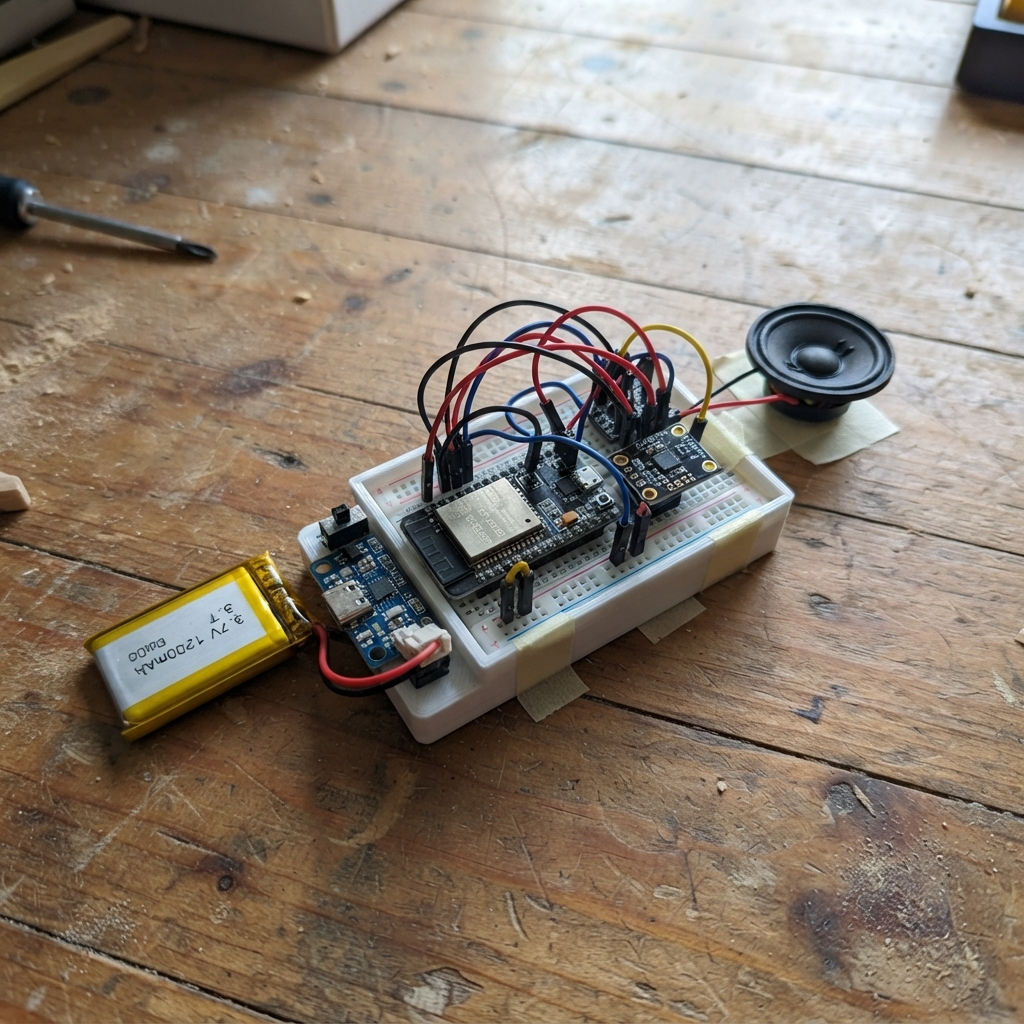
This project builds a wearable Morse code communication system with two independent ESP32-S3 units that communicate wirelessly via ESP-NOW. One unit features a microphone and speaker for audio feedback, while the glove-mounted unit provides tactile Morse input through vibration motors and button controls, allowing users to send and receive messages in real time.
The guide includes a complete parts list for both units, wiring diagrams for the microphone and amplifier circuits, battery charging setup, and step-by-step assembly instructions for mounting the components comfortably. Firmware is provided to handle Morse encoding, wireless pairing, message queuing, and tactile feedback via the vibration motor.
Wiring diagram

Gather all the parts
Assemble it in 5 steps
1. Build the two protected battery supplies
With both switches OFF, connect each LiPo battery BAT+ and BAT− to its own charger B+ and B− pads. Connect charger OUT+ through that unit's slide switch. Send the switched Unit A line to a 3.3 V regulator, and send the switched glove line both to its 3.3 V regulator and to the two motor positive leads.
- Never connect a LiPo backwards or charge it without the protection/charger module; reversed battery wiring can overheat or damage the cells.
2. Wire the microphone and speaker unit
Connect Unit A GPIO12 to SCK/BCLK on both audio modules, GPIO13 to WS/LRC on both, INMP441 SD to GPIO14, and GPIO15 to MAX98357A DIN. Connect the microphone L/R pin to GND. Connect MAX98357A SPK+ and SPK− directly to the two speaker tabs; do not connect either speaker tab to ground.
- Keep microphone wires short and place the microphone opening away from the speaker to reduce feedback.
3. Build each motor switch
Put each coin motor's negative lead on its AO3400A Drain and the Source on GND. Place a 1N5819 across each motor: striped cathode to motor positive, unstriped anode to the Drain/motor negative. Put a 100 ohm resistor from GPIO3 to the DOT Gate and GPIO4 to the DASH Gate, then place a 100 kilohm resistor from each Gate to GND.
- Make sure the striped end of each flyback diode goes to battery positive; reversing it creates a battery short when the motor turns on.
4. Add the glove controls
Connect one side of every tactile button to GND. Connect the other sides to GPIO0 for Yes, GPIO1 for No, GPIO5 for Please repeat, and GPIO6 for Thank you. The firmware turns on each pin's internal pull-up, so no separate button resistor is needed.
5. Mount it comfortably
Sew or bond the DOT motor on the back of the hand and the DASH motor about 3 to 4 cm away at the wrist. Put the C3, drivers, battery, and strain-relieved wires in a soft back-of-hand or wrist pouch. Keep LiPo cells flat, protected from sharp bends, and removable for inspection.
- Test motor locations with loose tape before sewing; the two sensations must be easy to tell apart.
Review all connections
1. Connections between "unit_a_s3" and "ESP32"
2. Connections between "mic" and "ESP32"
3. Connections between "amp" and "ESP32"
4. Connections between "a_battery" and "ESP32"
5. Connections between "a_charger" and "ESP32"
6. Connections between "a_switch" and "ESP32"
7. Connections between "a_regulator" and "ESP32"
8. Connections between "a_in_cap" and "ESP32"
9. Connections between "a_out_cap" and "ESP32"
10. Connections between "glove_battery" and "ESP32"
11. Connections between "glove_charger" and "ESP32"
12. Connections between "glove_switch" and "ESP32"
13. Connections between "glove_regulator" and "ESP32"
14. Connections between "g_in_cap" and "ESP32"
15. Connections between "g_out_cap" and "ESP32"
16. Connections between "motor_dot" and "ESP32"
17. Connections between "motor_dash" and "ESP32"
18. Connections between "fet_dot" and "ESP32"
19. Connections between "fet_dash" and "ESP32"
20. Connections between "dot_diode" and "ESP32"
21. Connections between "dash_diode" and "ESP32"
22. Connections between "dot_gate_r" and "ESP32"
23. Connections between "dash_gate_r" and "ESP32"
24. Connections between "dot_pulldown" and "ESP32"
25. Connections between "dash_pulldown" and "ESP32"
26. Connections between "button_yes" and "ESP32"
27. Connections between "button_no" and "ESP32"
28. Connections between "button_repeat" and "ESP32"
29. Connections between "button_thanks" and "ESP32"
30. Connections between "a_charge_port" and "ESP32"
31. Connections between "g_charge_port" and "ESP32"
Deploy the firmware
#include <Arduino.h>
#include <WiFi.h>
#include <esp_now.h>
#include <esp_wifi.h>

#define DOT_PIN 3
#define DASH_PIN 4
#define YES_PIN 0
#define NO_PIN 1
#define REPEAT_PIN 5
#define THANKS_PIN 6
constexpr uint8_t ESPNOW_CHANNEL=6, QUEUE_SIZE=192;
enum Kind:uint8_t{HELLO=1,TEXT=2,ACK=3,REPLY=4};
struct __attribute__((packed)) Packet { uint8_t kind; uint16_t seq; uint8_t len; char text[200]; };
char q[QUEUE_SIZE]; uint8_t head=0,tail=0; bool active=false,dash=false; uint32_t nextAt=0; uint16_t dotMs=120,lastSeq=0; bool keywordsOnly=false; uint8_t peer[6]; bool paired=false;
const char* morse(char c){ switch(c){case 'A':return ".-";case 'B':return "-...";case 'C':return "-.-.";case 'D':return "-..";case 'E':return ".";case 'F':return "..-.";case 'G':return "--.";case 'H':return "....";case 'I':return "..";case 'J':return ".---";case 'K':return "-.-";case 'L':return ".-..";case 'M':return "--";case 'N':return "-.";case 'O':return "---";case 'P':return ".--.";case 'Q':return "--.-";case 'R':return ".-.";case 'S':return "...";case 'T':return "-";case 'U':return "..-";case 'V':return "...-";case 'W':return ".--";case 'X':return "-..-";case 'Y':return "-.--";case 'Z':return "--..";case '0':return "-----";case '1':return ".----";case '2':return "..---";case '3':return "...--";case '4':return "....-";case '5':return ".....";case '6':return "-....";case '7':return "--...";case '8':return "---..";case '9':return "----.";case '.':return ".-.-.-";case ',':return "--..--";case '?':return "..--..";case '/':return "-..-.";case '-':return "-....-";default:return "";} }
void push(char c){uint8_t n=(head+1)%QUEUE_SIZE;if(n==tail)tail=(tail+1)%QUEUE_SIZE;q[head]=c;head=n;}
bool pop(char &c){if(tail==head)return false;c=q[tail];tail=(tail+1)%QUEUE_SIZE;return true;}
void sendPacket(uint8_t kind,uint16_t seq,const char* text=""){if(!paired)return;Packet p={};p.kind=kind;p.seq=seq;p.len=min((size_t)200,strlen(text));memcpy(p.text,text,p.len);esp_now_send(peer,(uint8_t*)&p,sizeof(p.kind)+sizeof(p.seq)+sizeof(p.len)+p.len);}
void onRecv(const esp_now_recv_info_t* info,const uint8_t* data,int len){if(len<4)return;Packet p={};memcpy(&p,data,min(len,(int)sizeof(p)));memcpy(peer,info->src_addr,6);paired=true;if(p.kind==TEXT){sendPacket(ACK,p.seq);if(p.seq==lastSeq)return;lastSeq=p.seq;for(uint8_t i=0;i<p.len;i++){char c=toupper((unsigned char)p.text[i]);if(!keywordsOnly || strchr(" YESNOHELPSTOPREPEATTHANKYOU",c))push(c);}}}
void schedule(){static const char* symbols="";static uint8_t i=0;uint32_t now=millis();if(now<nextAt)return;if(active){ledcWrite(DOT_PIN,0);ledcWrite(DASH_PIN,0);active=false;nextAt=now+dotMs;return;}if(symbols&&symbols[i]){dash=symbols[i++]== '-';ledcWrite(dash?DASH_PIN:DOT_PIN,180);active=true;nextAt=now+(dash?3*dotMs:dotMs);return;}char c; if(!pop(c))return;if(c==' '){nextAt=now+7*dotMs;return;}symbols=morse(c);i=0;if(*symbols)nextAt=now+2*dotMs;}
void buttons(){static uint32_t down[4]={};static bool held[4]={};int pins[4]={YES_PIN,NO_PIN,REPEAT_PIN,THANKS_PIN};for(int i=0;i<4;i++){bool low=!digitalRead(pins[i]);if(low&&!down[i])down[i]=millis();if(low&&down[i]&&!held[i]&&millis()-down[i]>900){held[i]=true;if(i==2){head=tail=0;}if(i==3){dotMs=dotMs==240?80:dotMs+20;}}if(!low&&down[i]){if(!held[i]){const char* r[]={"YES","NO","PLEASE_REPEAT","THANK_YOU"};sendPacket(REPLY,0,r[i]);}down[i]=0;held[i]=false;}}}
void setup(){for(int p:{YES_PIN,NO_PIN,REPEAT_PIN,THANKS_PIN})pinMode(p,INPUT_PULLUP);ledcAttach(DOT_PIN,180,8);ledcAttach(DASH_PIN,180,8);WiFi.mode(WIFI_STA);esp_wifi_set_channel(ESPNOW_CHANNEL,WIFI_SECOND_CHAN_NONE);if(esp_now_init()!=ESP_OK)return;esp_now_register_recv_cb(onRecv);esp_now_peer_info_t b={};memset(b.peer_addr,0xFF,6);b.channel=ESPNOW_CHANNEL;b.ifidx=WIFI_IF_STA;esp_now_add_peer(&b);Packet h={};h.kind=HELLO;esp_now_send(b.peer_addr,(uint8_t*)&h,4);}
void loop(){schedule();buttons();delay(1);}
Remix this project
Make it yours in one click
Open a full copy of this project in your own Schematik workspace — diagram, code, parts, and assembly steps included. Swap the sensor, add features, or redesign the whole thing with AI. The author's original stays untouched.