Community project
Child Presence Vehicle Alert
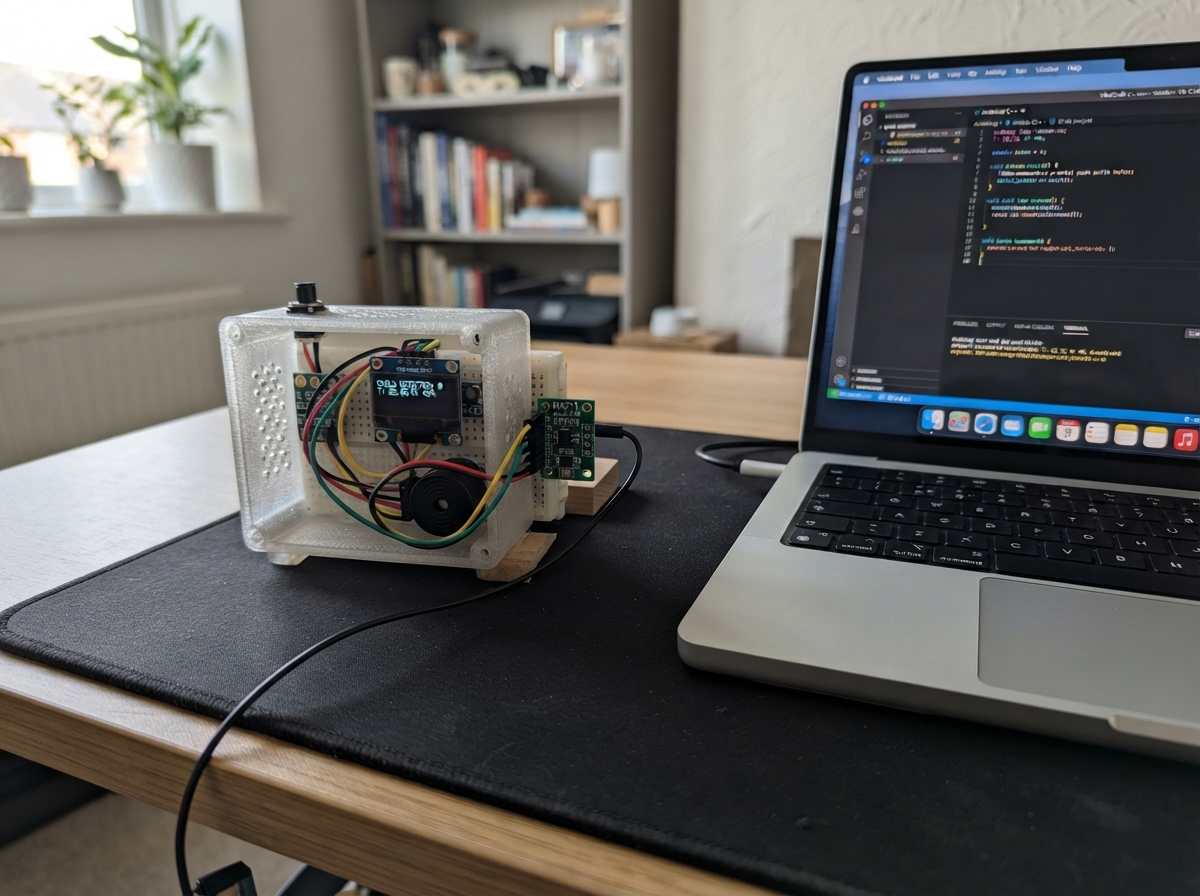
This project builds a weight-based child presence detection system for vehicles using an ESP32 microcontroller. When the vehicle's ACC signal is active, the system monitors a load cell to detect whether a child is seated on the platform. If a child is detected and the ACC signal turns off (indicating the driver has left), the system triggers an audible alarm to alert nearby adults.
The guide provides a complete wiring diagram, parts list, and step-by-step assembly instructions for mounting the weight platform, connecting the load cell amplifier, integrating the OLED display and temperature sensor, and wiring the vehicle ACC signal through an optocoupler. Firmware is included with calibration routines and a push-button interface for system setup and testing.
Wiring diagram

Gather all the parts
Assemble it in 6 steps
1. Mount the weight platform
Place the 50 kg load cell between the two rigid plates under the child seat exactly as its mechanical drawing requires. The load cell must carry the seat load through its sensing section, not be bent by side pressure or fastened so tightly that the sensing section cannot flex.
- Keep the sensor cable away from ignition wiring and route it to the electronics box without crushing it.
- The child seat and both plates must stay installed when you later perform Tare, because they are part of the empty-platform weight.
- A poorly supported or overloaded weight sensor can give an unsafe false reading or be permanently damaged.
2. Connect the load cell to the HX711
Inside the electronics box, connect the four load-cell wires to the HX711: red/E+ → E+ (excitation power), black/E- → E- (excitation return), green/A+ → A+ (weight signal), white/A- → A- (weight signal). If your particular load cell uses different wire colours, follow its printed colour table rather than forcing these usual colours.
- Use a cable clamp where the cable enters the box so pulling the cable cannot pull the wires from the HX711.
- Keep this four-wire cable separated from the vehicle 12 V wiring to reduce noise.
- Do not connect any load-cell wire directly to an ESP32 GPIO; it must connect through the HX711.
3. Wire the low-voltage electronics
With the USB power unplugged, make these connections on the expansion board: HX711 VCC → 3V3 (power), HX711 GND → GND (ground), HX711 DT → GPIO4 (weight data), HX711 SCK → GPIO5 (weight clock). OLED VCC → 3V3 (power), OLED GND → GND (ground), OLED SDA → GPIO8 (data), OLED SCL → GPIO9 (clock). AHT20 VIN → 3V3 (power), AHT20 GND → GND (ground), AHT20 SDA → GPIO8 (shared data), AHT20 SCL → GPIO9 (shared clock).
- GPIO8 and GPIO9 are deliberately shared by the OLED and AHT20; this is normal for these two small modules.
- Power both I2C modules from 3V3 so their signal wires never rise above the ESP32's safe 3.3 V level.
- Make sure VCC and GND are not swapped — swapped power can damage the OLED, AHT20, or HX711.
4. Wire the ACC signal and controls
On the isolated OUTPUT side of the PC817 module, connect VCC → ESP32 3V3 (power), GND → ESP32 GND (ground), and OUT → GPIO6 (ACC signal). Connect one button terminal → GPIO7 (button signal) and the other button terminal → GND (ground). Connect buzzer + → GPIO15 (alarm control) and buzzer - → GND (ground).
- A short button press acknowledges an active warning; holding it for 3 seconds performs Tare only while ACC is ON.
- The selected active buzzer must operate from 3.3 V and draw no more than the ESP32 GPIO can safely supply; its loudness can be lower than its 12 V rating at 3.3 V.
- Never connect the vehicle 12 V ACC line to GPIO6, 3V3, or ESP32 GND. It goes only to the optocoupler input terminals.
- If your HYD2310 is rated to run only at 12 V or draws more than a GPIO can provide, do not connect it to GPIO15; this listed-parts-only design cannot safely drive that variant at full volume.
5. Connect the USB power and ACC input
Use a stable 5 V USB supply and a USB-C cable to power the ESP32 through its USB-C connector (power). The USB supply must stay powered when you want the system to keep monitoring after ACC turns off. Separately, connect the vehicle ACC fuse tap to PC817 IN+ (ACC input), and connect the matching vehicle return to PC817 IN- (ACC input return).
- USB power and ACC are separate: USB keeps the ESP32 awake, while ACC only tells it whether the vehicle is on or off.
- Keep the PC817 input side isolated from the ESP32 side; do not add a ground wire between those two sides.
- Vehicle wiring can be dangerous and a wrong fuse connection can damage the vehicle. Disconnect the battery or use a qualified automotive installer before touching the fuse box.
- Confirm that the PC817 module you own is specifically the 12 V input version before connecting its IN+ terminal to ACC.
6. Calibrate before relying on the system
Power the ESP32 through its USB-C connection. In Schematik's serial output after deployment, type t and send it with the child removed but the empty child seat and plates in place. Then place a known mass on the platform, type c followed by a space and its mass in kilograms, for example c 5.000, and send it. The firmware saves the new calibration factor in the ESP32.
- Repeat the Tare and calibration if you change the child seat, plates, sensor mounting, or cable routing.
- Check the printed weight by placing and removing the known mass several times before using the system.
- Do not treat this prototype as the only safety measure for a child. Always physically check the rear seat before leaving a vehicle.
Review all connections
1. Connections between "load_cell_50kg" and "ESP32"
2. Connections between "hx711_1" and "ESP32"
3. Connections between "oled_1" and "ESP32"
4. Connections between "aht20_1" and "ESP32"
5. Connections between "acc_opto_1" and "ESP32"
6. Connections between "buzzer_1" and "ESP32"
7. Connections between "button_1" and "ESP32"
Deploy the firmware
9#include <Arduino.h> // טוען את פונקציות הבסיס של Arduino.
#include <Wire.h> // טוען תקשורת I2C למסך ולחיישן הטמפרטורה.
#include <HX711.h> // טוען את ספריית ממיר המשקל HX711.
#include <Adafruit_GFX.h> // טוען פונקציות ציור בסיסיות למסך.
#include <Adafruit_SSD1306.h> // טוען את מנהל מסך ה-OLED מסוג SSD1306.
#include <Adafruit_AHTX0.h> // טוען את מנהל חיישן הטמפרטורה AHT20.
#include <Preferences.h> // טוען זיכרון פנימי לשמירת מקדם הכיול.

// ====================== SETTINGS YOU MAY CHANGE ====================== // אזור הגדרות שקל לשנות.

// Forward declarations // הכרזות מוקדמות על פונקציות שיופיעו בהמשך.
bool readAccOn(); // קורא אם אות ACC מציין שהרכב דולק.
bool childPresent(); // בודק אם נוכחות אושרה בכמה מדידות.
void setBuzzer(bool on); // מפעיל או מכבה את הבאזר.
void updateBuzzer(); // מעדכן את תבנית הצפצוף של הבאזר.
float filteredWeightKg(); // קורא משקל מסונן בקילוגרמים.
void updateWeight(); // מעדכן את מדידת המשקל וספירת האימות.
void updateTemperature(); // מעדכן את מדידת הטמפרטורה.
void updateAcc(); // מעדכן את מצב ACC ומצב ההתראה.
void tareScale(); // מאפס את המשקל ביחס לכיסא ולפלטות הריקות.
void calibrateWithKnownWeight(float knownKg); // מחשב כיול בעזרת משקל ידוע.
void handleSerialCalibration(); // מטפל בפקודות כיול מה-Serial Monitor.
void handleButton(); // מטפל בלחיצה קצרה או ארוכה על הכפתור.
String makeScreenKey(); // יוצר מפתח שמזהה אם תוכן המסך השתנה.
void drawDisplayIfChanged(); // מצייר מסך רק כאשר המידע השתנה.

float CALIBRATION_FACTOR = 1000.0f; // מקדם ראשוני זמני עד כיול; ערך שמור מחליף אותו.
const float CHILD_WEIGHT_THRESHOLD = 4.0f; // סף זיהוי נוכחות בקילוגרמים.
const float HIGH_TEMPERATURE_THRESHOLD = 35.0f; // סף טמפרטורה להתראה מוגברת במעלות צלזיוס.
const uint8_t WEIGHT_SAMPLES = 15; // מספר קריאות HX711 שממוצעות בכל מדידה.
const uint8_t PRESENCE_CONFIRMATIONS = 4; // מספר מדידות רצופות מעל הסף לאישור נוכחות.
const uint32_t WEIGHT_READ_INTERVAL_MS = 500; // מרווח זמן בין מדידות משקל במילישניות.
const uint32_t TEMPERATURE_READ_INTERVAL_MS = 2000; // מרווח זמן בין מדידות טמפרטורה במילישניות.
const uint32_t ACC_DEBOUNCE_MS = 1000; // זמן אימות לשינוי אות ACC במילישניות.
const uint32_t ALARM_DELAY_AFTER_ACC_OFF_MS = 3000; // זמן המתנה אחרי כיבוי הרכב לפני התראה.
const uint32_t BUTTON_DEBOUNCE_MS = 40; // זמן סינון קפיצות מגע של הכפתור.
const uint32_t LONG_PRESS_MS = 3000; // משך לחיצה ארוכה לביצוע Tare כשה-ACC דולק.
const uint8_t OLED_ADDRESS = 0x3C; // כתובת I2C של המסך; שנה ל-0x3D רק אם צריך.
// ===================================================================== // סוף אזור ההגדרות.

const int HX711_DOUT_PIN = 4; // פין נתוני המשקל DT מה-HX711.
const int HX711_SCK_PIN = 5; // פין השעון SCK אל ה-HX711.
const int I2C_SDA_PIN = 8; // פין נתוני I2C המשותף למסך ול-AHT20.
const int I2C_SCL_PIN = 9; // פין השעון I2C המשותף למסך ול-AHT20.
const int ACC_PIN = 6; // פין כניסת אות ACC ממודול המבודד.
const int BUZZER_PIN = 15; // פין יציאת ההפעלה של הבאזר לפי טבלת החיבורים.
const int BUTTON_PIN = 7; // פין כניסת כפתור האישור לפי טבלת החיבורים.

Adafruit_SSD1306 display(128, 64, &Wire, -1); // יוצר אובייקט למסך 128x64 ללא פין איפוס.
Adafruit_AHTX0 aht; // יוצר אובייקט לחיישן AHT20.
HX711 scale; // יוצר אובייקט לממיר המשקל.
Preferences preferences; // יוצר אובייקט לזיכרון הקבוע של ESP32.

bool displayOk = false; // שומר אם המסך אותחל בהצלחה.
bool ahtOk = false; // שומר אם חיישן הטמפרטורה אותחל בהצלחה.
bool rawAccOn = false; // שומר את הקריאה האחרונה הלא מסוננת של ACC.
bool stableAccOn = false; // שומר את מצב ACC לאחר סינון רעשים.
bool alarmActive = false; // מציין אם התראת ילד פעילה.
bool alarmSilenced = false; // מציין אם המשתמש השתיק את ההתראה הנוכחית.
bool buttonWasDown = false; // שומר אם הכפתור היה לחוץ בלולאה הקודמת.
bool longPressHandled = false; // מונע ביצוע Tare חוזר באותה לחיצה ארוכה.
uint8_t presenceCount = 0; // סופר מדידות משקל רצופות מעל סף הנוכחות.
float weightKg = 0.0f; // שומר את המשקל האחרון בקילוגרמים.
float temperatureC = NAN; // שומר את הטמפרטורה האחרונה או ערך לא זמין.
uint32_t lastWeightRead = 0; // שומר את זמן קריאת המשקל האחרונה.
uint32_t lastTemperatureRead = 0; // שומר את זמן קריאת הטמפרטורה האחרונה.
uint32_t accChangedAt = 0; // שומר מתי אות ACC השתנה לאחרונה.
uint32_t accOffAt = 0; // שומר מתי ACC אומת ככבוי.
uint32_t buttonDownAt = 0; // שומר מתי המשתמש התחיל ללחוץ על הכפתור.
String lastScreen = ""; // שומר את תוכן המצב האחרון שהוצג.

bool readAccOn() { // מתחיל פונקציה לקריאת מצב ACC.
  // A usual PC817 module output is LOW when its 12 V input is active. // במודולים נפוצים יציאה נמוכה פירושה שיש 12V בכניסה.
  return digitalRead(ACC_PIN) == LOW; // מחזיר אמת כאשר הרכב דולק לפי המודול.
} // מסיים את פונקציית קריאת ACC.

bool childPresent() { // מתחיל פונקציה לבדיקת נוכחות מאומתת.
  return presenceCount >= PRESENCE_CONFIRMATIONS; // מחזיר אמת רק לאחר מספר המדידות הנדרש.
} // מסיים את פונקציית בדיקת הנוכחות.

void setBuzzer(bool on) { // מתחיל פונקציה להפעלת או כיבוי הבאזר.
  digitalWrite(BUZZER_PIN, on ? HIGH : LOW); // שולח מתח 3.3V להפעלה או 0V לכיבוי.
} // מסיים את פונקציית הבאזר.

void updateBuzzer() { // מתחיל עדכון של צליל ההתראה.
  if (!alarmActive || alarmSilenced) { // בודק אם אין התראה או שהיא אושרה.
    setBuzzer(false); // מכבה את הבאזר.
    return; // יוצא כי אין צורך להמשיך.
  } // מסיים את בדיקת מצב ההתראה.
  const bool hot = isfinite(temperatureC) && temperatureC >= HIGH_TEMPERATURE_THRESHOLD; // בודק אם הטמפרטורה גבוהה מהסף.
  const uint32_t phase = millis() % (hot ? 700 : 1600); // מחשב את נקודת הזמן בתוך מחזור הצפצוף.
  if (hot) setBuzzer(phase < 120 || (phase >= 240 && phase < 360)); // בטמפרטורה גבוהה מפעיל שני צפצופים מהירים.
  else setBuzzer(phase < 220); // בטמפרטורה רגילה מפעיל צפצוף קצר ואיטי.
} // מסיים את עדכון הבאזר.

float filteredWeightKg() { // מתחיל קריאת משקל מסוננת.
  if (!scale.is_ready()) { // בודק אם ה-HX711 מוכן לקריאה.
    Serial.println("HX711 not ready: check DT, SCK, 3V3 and GND."); // מדפיס הודעת בדיקת חיבורים.
    return weightKg; // שומר את המשקל הקודם אם אין קריאה חדשה.
  } // מסיים את בדיקת מוכנות HX711.
  const float result = scale.get_units(WEIGHT_SAMPLES); // מחשב ממוצע של מספר קריאות וממיר לקילוגרמים.
  if (!isfinite(result)) return weightKg; // מתעלם מערך שגוי ושומר את הקריאה הקודמת.
  if (result < 0.0f && result > -0.25f) return 0.0f; // מאפס רעש קטן של משקל שלילי.
  return result; // מחזיר את המשקל המסונן.
} // מסיים את קריאת המשקל.

void updateWeight() { // מתחיל עדכון מדידת המשקל.
  if (millis() - lastWeightRead < WEIGHT_READ_INTERVAL_MS) return; // מחכה עד לזמן המדידה הבא.
  lastWeightRead = millis(); // שומר את זמן המדידה הנוכחית.
  weightKg = filteredWeightKg(); // קורא ושומר את המשקל המסונן.
  if (weightKg >= CHILD_WEIGHT_THRESHOLD) { // בודק אם המשקל מעל סף זיהוי הילד.
    if (presenceCount < PRESENCE_CONFIRMATIONS) presenceCount++; // מוסיף אישור אחד בלי לעבור את הגבול.
  } else { // נכנס אם המשקל נמוך מהסף.
    presenceCount = 0; // מאפס את ספירת האימות כדי למנוע התראת שווא.
  } // מסיים את בדיקת סף המשקל.
  Serial.printf("Weight: %.2f kg | confirmation: %u/%u\n", weightKg, presenceCount, PRESENCE_CONFIRMATIONS); // מדפיס משקל ומספר אישורים לכיול ובדיקה.
} // מסיים את עדכון המשקל.

void updateTemperature() { // מתחיל עדכון טמפרטורה.
  if (!ahtOk || millis() - lastTemperatureRead < TEMPERATURE_READ_INTERVAL_MS) return; // יוצא אם החיישן לא זמין או עדיין מוקדם מדי.
  lastTemperatureRead = millis(); // שומר את זמן קריאת הטמפרטורה.
  sensors_event_t humidity, temp; // יוצר משתנים לאירועי לחות וטמפרטורה.
  aht.getEvent(&humidity, &temp); // מבקש מדידה חדשה מה-AHT20.
  if (isfinite(temp.temperature)) temperatureC = temp.temperature; // שומר טמפרטורה רק אם היא תקינה.
} // מסיים את עדכון הטמפרטורה.

void updateAcc() { // מתחיל עדכון מצב ACC והתראה.
  const bool newRawAccOn = readAccOn(); // קורא את מצב ACC הנוכחי.
  if (newRawAccOn != rawAccOn) { // בודק אם אות ACC השתנה.
    rawAccOn = newRawAccOn; // שומר את הקריאה החדשה.
    accChangedAt = millis(); // מתחיל לספור את זמן סינון הרעש.
  } // מסיים את בדיקת שינוי ACC.
  if (rawAccOn != stableAccOn && millis() - accChangedAt >= ACC_DEBOUNCE_MS) { // מאשר שינוי רק אם נשאר יציב מספיק זמן.
    stableAccOn = rawAccOn; // מעדכן את מצב ACC המאומת.
    Serial.printf("ACC is now %s\n", stableAccOn ? "ON" : "OFF"); // מדפיס את מצב הרכב החדש.
    alarmActive = false; // מאפס התראה בעת שינוי מצב הרכב.
    alarmSilenced = false; // מבטל השתקה מאירוע קודם.
    presenceCount = 0; // דורש אימות חדש של המשקל לאחר שינוי ACC.
    if (!stableAccOn) accOffAt = millis(); // שומר את רגע כיבוי הרכב.
  } // מסיים את אישור שינוי ACC.
  if (!stableAccOn && !alarmSilenced && millis() - accOffAt >= ALARM_DELAY_AFTER_ACC_OFF_MS && childPresent()) { // בודק אם הרכב כבוי, חלף זמן ההמתנה ויש נוכחות.
    alarmActive = true; // מפעיל את מצב ההתראה.
  } // מסיים את בדיקת הפעלת ההתראה.
  if (!childPresent() && !alarmSilenced) alarmActive = false; // מכבה התראה אם המשקל כבר אינו מצביע על נוכחות.
} // מסיים את עדכון ACC.

void tareScale() { // מתחיל איפוס משקל.
  if (!scale.is_ready()) { // בודק אם HX711 מוכן.
    Serial.println("Cannot tare: HX711 is not ready."); // מדפיס הודעה אם החיישן לא מוכן.
    return; // יוצא ללא איפוס.
  } // מסיים את בדיקת המוכנות.
  Serial.println("TARE: remove the child and loose items. Keep the installed child seat and plates in place."); // מנחה להשאיר את הכיסא והפלטות אך להסיר ילד וחפצים.
  delay(1000); // נותן שנייה להתייצבות לפני האיפוס.
  scale.tare(25); // מודד 25 קריאות ומגדיר אותן כאפס.
  presenceCount = 0; // מאפס אישורי נוכחות ישנים.
  Serial.println("TARE complete: readings are relative to the empty installed platform."); // מודיע שהאיפוס הסתיים.
} // מסיים את פונקציית האיפוס.

void calibrateWithKnownWeight(float knownKg) { // מתחיל כיול עם משקל ידוע.
  if (knownKg <= 0.0f || !scale.is_ready()) { // בודק שהמשקל חיובי ושה-HX711 מוכן.
    Serial.println("Calibration failed: use a positive known mass and ensure HX711 is ready."); // מדפיס הודעת שגיאה לכיול לא תקין.
    return; // יוצא ללא שינוי בכיול.
  } // מסיים את בדיקת התנאים לכיול.
  Serial.printf("Place exactly %.3f kg on the tared platform; sampling...\n", knownKg); // מבקש להניח את המשקל הידוע על הפלטפורמה.
  delay(2000); // ממתין שתי שניות לייצוב המשקל.
  const long rawValue = scale.get_value(30); // קורא ממוצע של 30 ערכים גולמיים אחרי Tare.
  if (rawValue == 0) { // בודק אם הקריאה הגולמית אפס.
    Serial.println("Calibration failed: raw value is zero."); // מדפיס הודעת שגיאה במקרה זה.
    return; // יוצא ללא שינוי בכיול.
  } // מסיים את בדיקת הערך הגולמי.
  CALIBRATION_FACTOR = (float)rawValue / knownKg; // מחשב את מקדם הכיול לפי המשקל הידוע.
  scale.set_scale(CALIBRATION_FACTOR); // מעדכן את ה-HX711 במקדם החדש.
  preferences.putFloat("calFactor", CALIBRATION_FACTOR); // שומר את המקדם בזיכרון גם לאחר ניתוק מתח.
  Serial.printf("CALIBRATION COMPLETE. Saved factor: %.6f\n", CALIBRATION_FACTOR); // מדפיס את המקדם שנשמר.
  Serial.printf("Verification reading: %.3f kg\n", scale.get_units(20)); // מדפיס מדידת בדיקה ממוצעת.
} // מסיים את פונקציית הכיול.

void handleSerialCalibration() { // מתחיל טיפול בפקודות מה-Serial Monitor.
  if (!Serial.available()) return; // יוצא אם לא התקבלה פקודה חדשה.
  String command = Serial.readStringUntil('\n'); // קורא טקסט עד סוף השורה.
  command.trim(); // מסיר רווחים ותווי סוף מיותרים.
  command.toLowerCase(); // ממיר את הפקודה לאותיות קטנות.
  if (command == "t") tareScale(); // מבצע Tare כאשר נשלחת האות t.
  else if (command.startsWith("c ")) calibrateWithKnownWeight(command.substring(2).toFloat()); // מכייל כאשר נשלחת פקודה כמו c 5.
  else if (command == "p") Serial.printf("Saved calibration factor: %.6f\n", CALIBRATION_FACTOR); // מדפיס את מקדם הכיול הפעיל.
  else if (command == "help") Serial.println("Commands: t = tare; c <kg> = calibrate; p = print factor."); // מציג את רשימת הפקודות.
} // מסיים את טיפול פקודות הכיול.

void handleButton() { // מתחיל טיפול בכפתור המשתמש.
  const bool down = digitalRead(BUTTON_PIN) == LOW; // קורא לחיצה; הכפתור מחבר את הפין ל-GND.
  if (down && !buttonWasDown) { // מזהה את תחילת הלחיצה.
    buttonDownAt = millis(); // שומר את זמן תחילת הלחיצה.
    longPressHandled = false; // מאפשר לזהות לחיצה ארוכה חדשה.
  } // מסיים את זיהוי תחילת הלחיצה.
  if (down && !longPressHandled && stableAccOn && millis() - buttonDownAt >= LONG_PRESS_MS) { // מזהה לחיצה ארוכה רק כשהרכב דולק.
    longPressHandled = true; // מונע Tare נוסף בזמן אותה לחיצה.
    tareScale(); // מאפס את המשקל בצורה בטוחה.
  } // מסיים את בדיקת הלחיצה הארוכה.
  if (!down && buttonWasDown && millis() - buttonDownAt >= BUTTON_DEBOUNCE_MS) { // מזהה שחרור תקין של הכפתור.
    if (millis() - buttonDownAt < LONG_PRESS_MS && alarmActive) { // בודק אם זו לחיצה קצרה בזמן התראה.
      alarmSilenced = true; // משתיק את הבאזר עד שה-ACC יחזור למצב דולק.
      Serial.println("Warning acknowledged: buzzer muted until ACC is turned ON again."); // מודיע שההתראה אושרה.
    } // מסיים את בדיקת לחיצת האישור.
  } // מסיים את בדיקת שחרור הכפתור.
  buttonWasDown = down; // שומר את מצב הכפתור ללולאה הבאה.
} // מסיים את טיפול הכפתור.

String makeScreenKey() { // מתחיל יצירת מפתח למצב המסך.
  const int displayWeightTenths = (int)roundf(weightKg * 10.0f); // ממיר משקל לעשיריות לצורך השוואת תצוגה.
  const int displayTempTenths = isfinite(temperatureC) ? (int)roundf(temperatureC * 10.0f) : -9999; // ממיר טמפרטורה לעשיריות או משתמש בערך שגיאה.
  return String(alarmActive && !alarmSilenced) + ":" + String(alarmSilenced) + ":" + String(stableAccOn) + ":" + String(displayWeightTenths) + ":" + String(displayTempTenths) + ":" + String(childPresent()); // מחבר את כל המידע שנראה במסך למחרוזת אחת.
} // מסיים את יצירת מפתח המסך.

void drawDisplayIfChanged() { // מתחיל עדכון המסך רק בעת שינוי.
  if (!displayOk) return; // יוצא אם המסך לא אותחל.
  const String screenKey = makeScreenKey(); // יוצר מפתח למצב הנוכחי.
  if (screenKey == lastScreen) return; // יוצא אם אין שינוי במה שהמשתמש רואה.
  lastScreen = screenKey; // שומר את המצב החדש כמוצג.
  display.clearDisplay(); // מנקה את זיכרון התצוגה לפני ציור חדש.
  display.setTextColor(SSD1306_WHITE); // בוחר צבע טקסט לבן.
  if (alarmActive && !alarmSilenced) { // בודק אם צריך להציג מסך אזהרה.
    display.setTextSize(2); // מגדיל את כותרת האזהרה.
    display.setCursor(14, 0); // ממקם את כותרת האזהרה.
    display.println("WARNING!"); // מציג כותרת אזהרה.
    display.setTextSize(1); // מחזיר את גודל הטקסט לרגיל.
    display.setCursor(8, 22); // ממקם את שורת זיהוי הילד.
    display.println("CHILD DETECTED"); // מציג שזוהתה נוכחות ילד.
    display.setCursor(8, 34); // ממקם את שורת בדיקת הרכב.
    display.println("CHECK VEHICLE"); // מבקש לבדוק את הרכב.
    display.setCursor(0, 48); // ממקם את נתוני המשקל והטמפרטורה.
    display.printf("W:%.1fkg T:", weightKg); // מציג את המשקל.
    if (isfinite(temperatureC)) display.printf("%.1fC", temperatureC); else display.print("--.-C"); // מציג טמפרטורה או סימן שגיאה.
  } else { // נכנס להצגת המסך הראשי.
    display.setTextSize(1); // בוחר גודל טקסט רגיל.
    display.setCursor(0, 0); // ממקם את כותרת המערכת.
    display.println("CAR SAFETY SYSTEM"); // מציג את שם המערכת.
    display.setCursor(0, 16); // ממקם את שורת ACC.
    display.printf("ACC: %s", stableAccOn ? "ON" : "OFF"); // מציג אם הרכב דולק או כבוי.
    display.setCursor(0, 28); // ממקם את שורת המשקל.
    display.printf("Weight: %.1f kg", weightKg); // מציג את המשקל הנמדד.
    display.setCursor(0, 40); // ממקם את שורת הטמפרטורה.
    if (isfinite(temperatureC)) display.printf("Temp: %.1f C", temperatureC); else display.print("Temp: sensor error"); // מציג טמפרטורה או שגיאת חיישן.
    display.setCursor(0, 52); // ממקם את שורת מצב המערכת.
    if (alarmSilenced) display.print("Status: ACKNOWLEDGED"); // מציג שההתראה אושרה והושתקה.
    else if (stableAccOn) display.print("Status: MONITORING"); // מציג שהמערכת מנטרת כשהרכב דולק.
    else display.print(childPresent() ? "Status: CHECKING" : "Status: SAFE"); // מציג בדיקה או מצב בטוח כשהרכב כבוי.
  } // מסיים בחירת סוג המסך.
  display.display(); // שולח את הציור המוכן למסך הפיזי.
} // מסיים את עדכון המסך.

void setup() { // מתחיל אתחול חד-פעמי בעת הפעלת הלוח.
  Serial.begin(115200); // פותח תקשורת Serial במהירות 115200.
  delay(300); // ממתין לזמן קצר להתייצבות התקשורת.
  Serial.println("\nCar child-presence safety system starting (powered by USB-C)."); // מודיע שהמערכת התחילה עם הזנת USB-C.
  Serial.println("Serial calibration: t = tare; c <known_kg> = calibrate; p = factor; help."); // מציג את פקודות הכיול הזמינות.
  pinMode(ACC_PIN, INPUT_PULLUP); // מגדיר את ACC ככניסה עם משיכה פנימית ל-3.3V.
  pinMode(BUZZER_PIN, OUTPUT); // מגדיר את GPIO15 של הבאזר כיציאה.
  pinMode(BUTTON_PIN, INPUT_PULLUP); // מגדיר את GPIO7 של הכפתור ככניסה עם משיכה פנימית ל-3.3V.
  setBuzzer(false); // מבטיח שהבאזר כבוי בעת ההפעלה.
  Wire.begin(I2C_SDA_PIN, I2C_SCL_PIN); // מתחיל I2C בפינים שנבחרו.
  displayOk = display.begin(SSD1306_SWITCHCAPVCC, OLED_ADDRESS); // מאתחל את מסך ה-OLED ושומר אם הצליח.
  if (!displayOk) Serial.println("OLED not found at 0x3C: verify I2C wiring/address."); // מדפיס הודעה אם המסך לא נמצא.
  ahtOk = aht.begin(&Wire); // מאתחל את חיישן הטמפרטורה על I2C.
  if (!ahtOk) Serial.println("AHT20 not found: verify 3V3, GND, SDA and SCL."); // מדפיס הודעה אם AHT20 לא נמצא.
  preferences.begin("carSafety", false); // פותח אזור זיכרון בשם carSafety לכתיבה.
  CALIBRATION_FACTOR = preferences.getFloat("calFactor", CALIBRATION_FACTOR); // טוען מקדם כיול שמור או משתמש בברירת המחדל.
  scale.begin(HX711_DOUT_PIN, HX711_SCK_PIN); // מאתחל את HX711 בפיני הנתונים והשעון.
  scale.set_scale(CALIBRATION_FACTOR); // מגדיר את מקדם הכיול הפעיל.
  Serial.printf("Calibration factor in use: %.6f\n", CALIBRATION_FACTOR); // מדפיס את מקדם הכיול הנוכחי.
  rawAccOn = readAccOn(); // קורא את ACC בעת ההפעלה.
  stableAccOn = rawAccOn; // קובע את מצב ACC הראשוני כמצב יציב.
  if (!stableAccOn) accOffAt = millis(); // מתחיל ספירת השהיה אם הרכב כבר כבוי.
  drawDisplayIfChanged(); // מצייר את המסך הראשוני.
} // מסיים את האתחול.

void loop() { // מתחיל לולאה שרצה שוב ושוב.
  handleSerialCalibration(); // בודק פקודות כיול מה-Serial Monitor.
  handleButton(); // בודק לחיצות על כפתור המשתמש.
  updateAcc(); // מעדכן את מצב הרכב ואת לוגיקת ההתראה.
  updateWeight(); // מעדכן את מדידת המשקל והנוכחות.
  updateTemperature(); // מעדכן את הטמפרטורה.
  updateBuzzer(); // מפעיל או מכבה את הבאזר לפי המצב.
  drawDisplayIfChanged(); // מעדכן את המסך רק אם משהו השתנה.
} // מסיים את הלולאה הנוכחית.
Remix this project
Make it yours in one click
Open a full copy of this project in your own Schematik workspace — diagram, code, parts, and assembly steps included. Swap the sensor, add features, or redesign the whole thing with AI. The author's original stays untouched.