Community project
Assistant De Bureau Multifonction
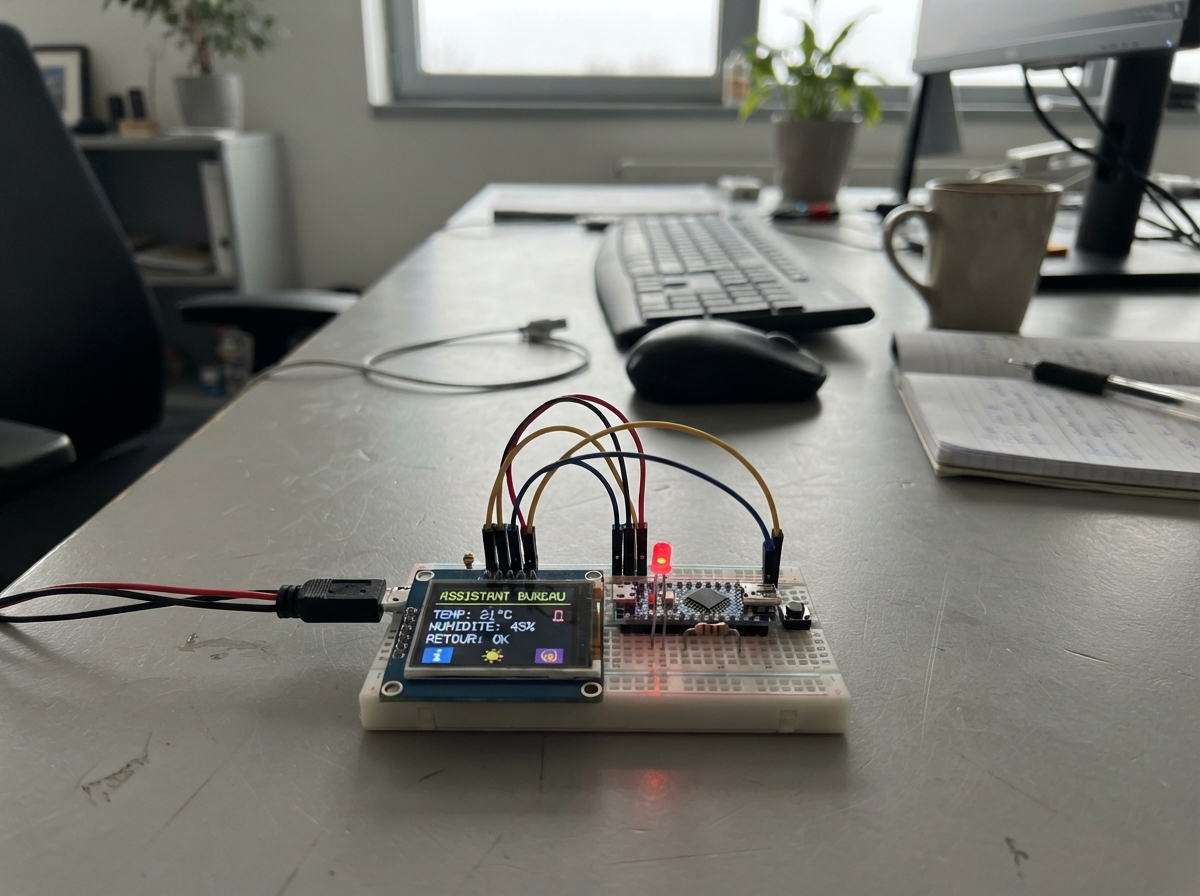
This multifunctional desk assistant runs on an ESP32 and displays useful information on a compact 2.0-inch TFT screen. The device features multiple modes including a clock, companion display, timer, message board, and screensaver, all controlled via three push buttons and configurable through a web interface.
This guide provides a complete parts list, wiring diagram, and step-by-step assembly instructions for connecting the ST7789 display, LED indicator, buttons, and resistors to the ESP32. Builders will also receive the firmware needed to run all five operational modes and access the web configuration panel to customize settings like WiFi credentials, timezone, and which features to enable.
Wiring diagram

Gather all the parts
Assemble it in 6 steps
1. Ne branche pas encore le module DS1307
Laisse le module DS1307 de côté : ce projet prend l’heure et la date automatiquement par Wi‑Fi, et le DS1307 peut envoyer une tension trop élevée pour le NodeMCU.
- Garde le DS1307 pour un futur montage avec un adaptateur de tension adapté.
- Ne relie pas les broches SDA ou SCL du DS1307 directement au NodeMCU : cela peut endommager la carte.
2. Alimente l’écran
Avec le NodeMCU débranché de l’USB, relie VCC de l’écran à 3V3 du NodeMCU et GND de l’écran à GND. Relie aussi BL à 3V3 : cela allume le rétroéclairage.
- Utilise deux fils courts et vérifie le texte imprimé près de chaque trou.
- Ne branche jamais VCC ou BL de cet écran au 5V/VIN : 5 V peut endommager l’écran.
3. Relie les données de l’écran
Relie SCL de l’écran à D5/GPIO14 (données d’horloge), SDA à D7/GPIO13 (données d’image), CS à D8/GPIO15 (sélection de l’écran) et DC à D2/GPIO4 (choix commande ou image). Relie enfin RST à 3V3 (maintient l’écran actif).
- Sur cet écran, SDA signifie les données SPI ; ce n’est pas le fil I²C habituel.
- Les libellés D5, D7, D8 et D2 sont imprimés sur le NodeMCU.
- Un fil placé une rangée trop loin peut empêcher l’écran de démarrer ; vérifie chaque nom de broche avant de brancher l’USB.
4. Monte la LED bleue avec sa résistance
Relie D0/GPIO16 à une patte de la résistance de 1 kΩ. Relie l’autre patte de la résistance à la patte longue de la LED bleue. Relie la patte courte de la LED à GND. La résistance peut être dans un sens ou dans l’autre.
- La patte longue est normalement le côté positif de la LED.
- La LED est volontairement assez douce avec 1 kΩ.
- Ne relie jamais la LED directement entre D0 et GND sans la résistance : la LED ou la sortie de la carte peut être abîmée.
5. Branche les trois boutons
Pour chaque bouton, utilise deux pattes qui ne sont pas déjà reliées ensemble sur le même côté. Relie une patte à GND. Relie l’autre patte du bouton précédent à D6/GPIO12, celle du bouton suivant à RX/GPIO3, et celle du bouton confirmer à TX/GPIO1. Les boutons utilisent les résistances internes de la carte, donc aucune résistance supplémentaire n’est nécessaire.
- Place un bouton à cheval sur la fente centrale de la plaque d’essai : ses deux côtés seront alors faciles à distinguer.
- Un appui relie le fil de signal à GND.
- Ne maintiens pas le bouton relié à TX ou RX appuyé pendant le démarrage : cela peut gêner le chargement du programme.
6. Utilise l’assistant de bureau
Branche le NodeMCU en USB. Après le déploiement, connecte un téléphone ou un ordinateur au Wi‑Fi nommé Assistant-Bureau avec le mot de passe monassistant, puis ouvre 192.168.4.1. Sur cette page, entre le nom et le mot de passe de ton Wi‑Fi pour que l’heure se règle automatiquement ; tu peux aussi afficher ou cacher les cinq modes et modifier le pense-bête.
- D6 et RX ouvrent puis déplacent le choix de mode ; TX confirme.
- Le mode Horloge est affiché au démarrage. Les autres modes inclus sont Compagnon animé, Veille, Minuteur et Pense-bête.
- Le mot de passe du point d’accès local est prévu pour une utilisation à la maison ; évite de l’utiliser dans un lieu public.
Review all connections
1. Connections between "tft_st7789p3" and "ESP32"
2. Connections between "resistance_led_1k" and "ESP32"
3. Connections between "led_bleue" and "ESP32"
4. Connections between "bouton_precedent" and "ESP32"
5. Connections between "bouton_suivant" and "ESP32"
6. Connections between "bouton_confirmer" and "ESP32"
Deploy the firmware
#include <Arduino.h>
#include <ESP8266WiFi.h>
#include <ESP8266WebServer.h>
#include <WiFiUdp.h>
#include <NTPClient.h>
#include <EEPROM.h>
#include <SPI.h>
#include <Adafruit_GFX.h>
#include <Adafruit_ST7789.h>

#define TFT_SCLK 14
#define TFT_MOSI 13
#define TFT_CS 15
#define TFT_DC 4
#define LED_PIN 16
#define BUTTON_PREVIOUS 12
#define BUTTON_NEXT 3
#define BUTTON_CONFIRM 1


// Hoisted type definitions
struct Settings {
  uint32_t magic;
  char ssid[33];
  char password[65];
  bool clockEnabled;
  bool companionEnabled;
  bool saverEnabled;
  bool timerEnabled;
  bool messageEnabled;
  char message[22];
};

enum Mode { CLOCK_MODE, COMPANION_MODE, SAVER_MODE, TIMER_MODE, MESSAGE_MODE };


// Forward declarations
void saveSettings();
void loadSettings();
bool enabled(Mode m);
Mode nextEnabled(Mode from, int direction);
void drawBackground();
void timeStrings(char *hm, size_t hms, char *date, size_t dates);
void drawClock(bool small);
void drawCompanion();
void drawTimer();
void drawMessage();
void drawSelector();
void render(bool force);
bool pressed(uint8_t pin);
void handleInputs();
String checked(bool state);
void handleRoot();
void handleSave();

const uint16_t SCREEN_W = 76;
const uint16_t SCREEN_H = 284;
const char *AP_NAME = "Assistant-Bureau";
const char *AP_PASSWORD = "monassistant";
const long UTC_OFFSET_SECONDS = 7200;  // France métropolitaine en heure d'été; modifiable sur la page web.

Adafruit_ST7789 tft = Adafruit_ST7789(TFT_CS, TFT_DC, -1);
ESP8266WebServer server(80);
WiFiUDP ntpUDP;
NTPClient ntp(ntpUDP, "pool.ntp.org", UTC_OFFSET_SECONDS, 60000);


Settings settings;
const uint32_t SETTINGS_MAGIC = 0x41535431;


Mode currentMode = CLOCK_MODE;
Mode selectedMode = CLOCK_MODE;
bool selecting = false;
uint32_t lastInputMs = 0;
uint32_t lastClockDraw = 0;
uint32_t lastAnimationMs = 0;
uint32_t timerStartMs = 0;
uint8_t faceFrame = 0;

void saveSettings() {
  EEPROM.put(0, settings);
  EEPROM.commit();
}

void loadSettings() {
  EEPROM.begin(256);
  EEPROM.get(0, settings);
  if (settings.magic != SETTINGS_MAGIC) {
    memset(&settings, 0, sizeof(settings));
    settings.magic = SETTINGS_MAGIC;
    settings.clockEnabled = true;
    settings.companionEnabled = true;
    settings.saverEnabled = true;
    settings.timerEnabled = true;
    settings.messageEnabled = true;
    strncpy(settings.message, "Bonne journee !", sizeof(settings.message) - 1);
    saveSettings();
  }
}

bool enabled(Mode m) {
  if (m == CLOCK_MODE) return settings.clockEnabled;
  if (m == COMPANION_MODE) return settings.companionEnabled;
  if (m == SAVER_MODE) return settings.saverEnabled;
  if (m == TIMER_MODE) return settings.timerEnabled;
  return settings.messageEnabled;
}

const char *modeName(Mode m) {
  if (m == CLOCK_MODE) return "Horloge";
  if (m == COMPANION_MODE) return "Compagnon";
  if (m == SAVER_MODE) return "Veille";
  if (m == TIMER_MODE) return "Minuteur";
  return "Message";
}

Mode nextEnabled(Mode from, int direction) {
  for (uint8_t tries = 0; tries < 5; tries++) {
    int n = ((int)from + direction + 5) % 5;
    from = (Mode)n;
    if (enabled(from)) return from;
  }
  return CLOCK_MODE;
}

void drawBackground() {
  tft.fillScreen(ST77XX_BLACK);
  for (int y = 0; y < SCREEN_H; y += 12) {
    uint16_t color = tft.color565(4, 10 + (y / 4), 32 + (y / 3));
    tft.fillRect(0, y, SCREEN_W, 12, color);
  }
  tft.fillCircle(62, 23, 21, tft.color565(16, 68, 116));
  tft.fillCircle(8, 255, 25, tft.color565(22, 30, 94));
}

void timeStrings(char *hm, size_t hms, char *date, size_t dates) {
  if (!ntp.isTimeSet()) {
    strncpy(hm, "--:--", hms);
    strncpy(date, "Connexion Wi-Fi", dates);
    return;
  }
  unsigned long raw = ntp.getEpochTime();
  time_t epoch = raw;
  struct tm *tmInfo = gmtime(&epoch);
  snprintf(hm, hms, "%02d:%02d", tmInfo->tm_hour, tmInfo->tm_min);
  const char *days[] = {"Dim", "Lun", "Mar", "Mer", "Jeu", "Ven", "Sam"};
  snprintf(date, dates, "%s %02d/%02d", days[tmInfo->tm_wday], tmInfo->tm_mday, tmInfo->tm_mon + 1);
}

void drawClock(bool small) {
  char hm[8], date[18];
  timeStrings(hm, sizeof(hm), date, sizeof(date));
  drawBackground();
  if (small) {
    tft.setTextColor(ST77XX_WHITE);
    tft.setTextSize(1);
    tft.setCursor(3, 4);
    tft.print(hm);
    tft.setCursor(31, 4);
    tft.print(date);
    tft.drawFastHLine(0, 16, SCREEN_W, ST77XX_CYAN);
    tft.setTextSize(3);
    tft.setCursor(5, 120);
    tft.setTextColor(ST77XX_CYAN);
    tft.print(hm);
  } else {
    tft.setTextColor(ST77XX_CYAN);
    tft.setTextSize(3);
    tft.setCursor(3, 105);
    tft.print(hm);
    tft.setTextColor(ST77XX_WHITE);
    tft.setTextSize(1);
    tft.setCursor(7, 150);
    tft.print(date);
    tft.setCursor(6, 185);
    tft.setTextColor(tft.color565(135, 206, 235));
    tft.print("Assistant bureau");
  }
}

void drawCompanion() {
  drawBackground();
  uint16_t skin = tft.color565(72, 180, 230);
  tft.fillRoundRect(8, 82, 60, 82, 18, skin);
  tft.fillCircle(26, 116, 7, ST77XX_BLACK);
  tft.fillCircle(50, 116, 7, ST77XX_BLACK);
  if (faceFrame == 0) {
    tft.drawFastHLine(22, 143, 32, ST77XX_BLACK);
  } else if (faceFrame == 1) {
    tft.drawCircle(38, 139, 13, ST77XX_BLACK);
    tft.fillRect(24, 126, 28, 13, skin);
  } else {
    tft.fillCircle(38, 141, 11, ST77XX_BLACK);
  }
  tft.setTextSize(1);
  tft.setTextColor(ST77XX_WHITE);
  tft.setCursor(12, 185);
  tft.print("Salut !");
}

void drawTimer() {
  drawBackground();
  uint32_t elapsed = (millis() - timerStartMs) / 1000;
  uint16_t mins = elapsed / 60;
  uint8_t secs = elapsed % 60;
  char text[8];
  snprintf(text, sizeof(text), "%02u:%02u", mins, secs);
  tft.setTextColor(ST77XX_YELLOW);
  tft.setTextSize(2);
  tft.setCursor(4, 88);
  tft.print("MINUTEUR");
  tft.setTextColor(ST77XX_WHITE);
  tft.setTextSize(3);
  tft.setCursor(2, 130);
  tft.print(text);
  tft.setTextSize(1);
  tft.setCursor(8, 185);
  tft.print("Confirmer: repartir");
}

void drawMessage() {
  drawBackground();
  tft.setTextColor(ST77XX_MAGENTA);
  tft.setTextSize(2);
  tft.setCursor(8, 90);
  tft.print("PENSE-BETE");
  tft.setTextColor(ST77XX_WHITE);
  tft.setTextSize(1);
  tft.setCursor(5, 130);
  tft.print(settings.message);
}

void drawSelector() {
  drawBackground();
  tft.setTextColor(ST77XX_CYAN);
  tft.setTextSize(1);
  tft.setCursor(7, 63);
  tft.print("CHOISIR UN MODE");
  tft.drawRoundRect(4, 107, 68, 35, 5, ST77XX_YELLOW);
  tft.setTextColor(ST77XX_WHITE);
  tft.setTextSize(2);
  tft.setCursor(8, 118);
  tft.print(modeName(selectedMode));
  tft.setTextSize(1);
  tft.setCursor(5, 166);
  tft.print("D6: precedent");
  tft.setCursor(5, 181);
  tft.print("RX: suivant");
  tft.setCursor(5, 196);
  tft.print("TX: confirmer");
}

void render(bool force = false) {
  if (selecting) {
    drawSelector();
    return;
  }
  if (currentMode == CLOCK_MODE) drawClock(false);
  else if (currentMode == COMPANION_MODE) drawCompanion();
  else if (currentMode == SAVER_MODE) drawClock(true);
  else if (currentMode == TIMER_MODE) drawTimer();
  else drawMessage();
  digitalWrite(LED_PIN, currentMode == COMPANION_MODE ? HIGH : LOW);
}

bool pressed(uint8_t pin) {
  if (digitalRead(pin) == LOW && millis() - lastInputMs > 220) {
    lastInputMs = millis();
    return true;
  }
  return false;
}

void handleInputs() {
  if (pressed(BUTTON_PREVIOUS)) {
    if (!selecting) { selecting = true; selectedMode = currentMode; }
    else selectedMode = nextEnabled(selectedMode, -1);
    render(true);
  }
  if (pressed(BUTTON_NEXT)) {
    if (!selecting) { selecting = true; selectedMode = currentMode; }
    else selectedMode = nextEnabled(selectedMode, 1);
    render(true);
  }
  if (pressed(BUTTON_CONFIRM)) {
    if (selecting) {
      currentMode = selectedMode;
      selecting = false;
      if (currentMode == TIMER_MODE) timerStartMs = millis();
    } else if (currentMode == TIMER_MODE) {
      timerStartMs = millis();
    } else {
      selecting = true;
      selectedMode = currentMode;
    }
    render(true);
  }
}

String checked(bool state) { return state ? " checked" : ""; }
void handleRoot() {
  String page = F("<!doctype html><html><meta name='viewport' content='width=device-width,initial-scale=1'><style>body{font-family:sans-serif;background:#07152d;color:#eef;padding:18px;max-width:560px;margin:auto}input{width:100%;box-sizing:border-box;margin:6px 0;padding:10px;border-radius:7px;border:0}button{padding:11px;background:#37bbed;border:0;border-radius:8px;font-weight:bold}label{display:block;padding:5px}</style><h1>Assistant de bureau</h1><p>Connecte le NodeMCU à ton Wi-Fi pour obtenir automatiquement l'heure et la date.</p><form action='/save' method='post'><h2>Wi-Fi de la maison</h2><input name='ssid' placeholder='Nom du Wi-Fi' value='");
  page += settings.ssid;
  page += F("'><input name='password' type='password' placeholder='Mot de passe Wi-Fi'><h2>Modes visibles</h2><label><input type='checkbox' name='clock'"); page += checked(settings.clockEnabled); page += F("> Horloge</label><label><input type='checkbox' name='companion'"); page += checked(settings.companionEnabled); page += F("> Compagnon animé</label><label><input type='checkbox' name='saver'"); page += checked(settings.saverEnabled); page += F("> Écran de veille</label><label><input type='checkbox' name='timer'"); page += checked(settings.timerEnabled); page += F("> Minuteur</label><label><input type='checkbox' name='messageMode'"); page += checked(settings.messageEnabled); page += F("> Pense-bête</label><h2>Texte du pense-bête</h2><input name='message' maxlength='21' value='");
  page += settings.message;
  page += F("'><button type='submit'>Enregistrer</button></form><hr><p>Réseau local du boîtier : <b>Assistant-Bureau</b><br>Mot de passe : <b>monassistant</b><br>Ouvre ensuite <b>192.168.4.1</b>.</p><p>Le fond graphique est inclus dans le programme ; pour le changer, il faut intégrer une nouvelle image avant le déploiement.</p></html>");
  server.send(200, "text/html; charset=utf-8", page);
}

void handleSave() {
  String ssid = server.arg("ssid");
  String pass = server.arg("password");
  String msg = server.arg("message");
  ssid.toCharArray(settings.ssid, sizeof(settings.ssid));
  if (pass.length() > 0) pass.toCharArray(settings.password, sizeof(settings.password));
  msg.toCharArray(settings.message, sizeof(settings.message));
  settings.clockEnabled = server.hasArg("clock");
  settings.companionEnabled = server.hasArg("companion");
  settings.saverEnabled = server.hasArg("saver");
  settings.timerEnabled = server.hasArg("timer");
  settings.messageEnabled = server.hasArg("messageMode");
  if (!settings.clockEnabled && !settings.companionEnabled && !settings.saverEnabled && !settings.timerEnabled && !settings.messageEnabled) settings.clockEnabled = true;
  saveSettings();
  server.sendHeader("Location", "/");
  server.send(303);
  if (settings.ssid[0]) WiFi.begin(settings.ssid, settings.password);
}

void setup() {
  pinMode(LED_PIN, OUTPUT);
  digitalWrite(LED_PIN, LOW);
  pinMode(BUTTON_PREVIOUS, INPUT_PULLUP);
  pinMode(BUTTON_NEXT, INPUT_PULLUP);
  pinMode(BUTTON_CONFIRM, INPUT_PULLUP);
  SPI.begin();
  tft.init(SCREEN_W, SCREEN_H);
  tft.setRotation(0);
  drawBackground();
  loadSettings();
  WiFi.mode(WIFI_AP_STA);
  WiFi.softAP(AP_NAME, AP_PASSWORD);
  if (settings.ssid[0]) WiFi.begin(settings.ssid, settings.password);
  ntp.begin();
  server.on("/", handleRoot);
  server.on("/save", HTTP_POST, handleSave);
  server.begin();
  render(true);
}

void loop() {
  server.handleClient();
  if (WiFi.status() == WL_CONNECTED) ntp.update();
  handleInputs();
  if (!selecting && currentMode == COMPANION_MODE && millis() - lastAnimationMs >= 500) {
    lastAnimationMs = millis();
    faceFrame = (faceFrame + 1) % 3;
    drawCompanion();
  }
  if (!selecting && currentMode != COMPANION_MODE && millis() - lastClockDraw >= 1000) {
    lastClockDraw = millis();
    render();
  }
}
Remix this project
Make it yours in one click
Open a full copy of this project in your own Schematik workspace — diagram, code, parts, and assembly steps included. Swap the sensor, add features, or redesign the whole thing with AI. The author's original stays untouched.