Community project
Average Temperature Humidity Announcer
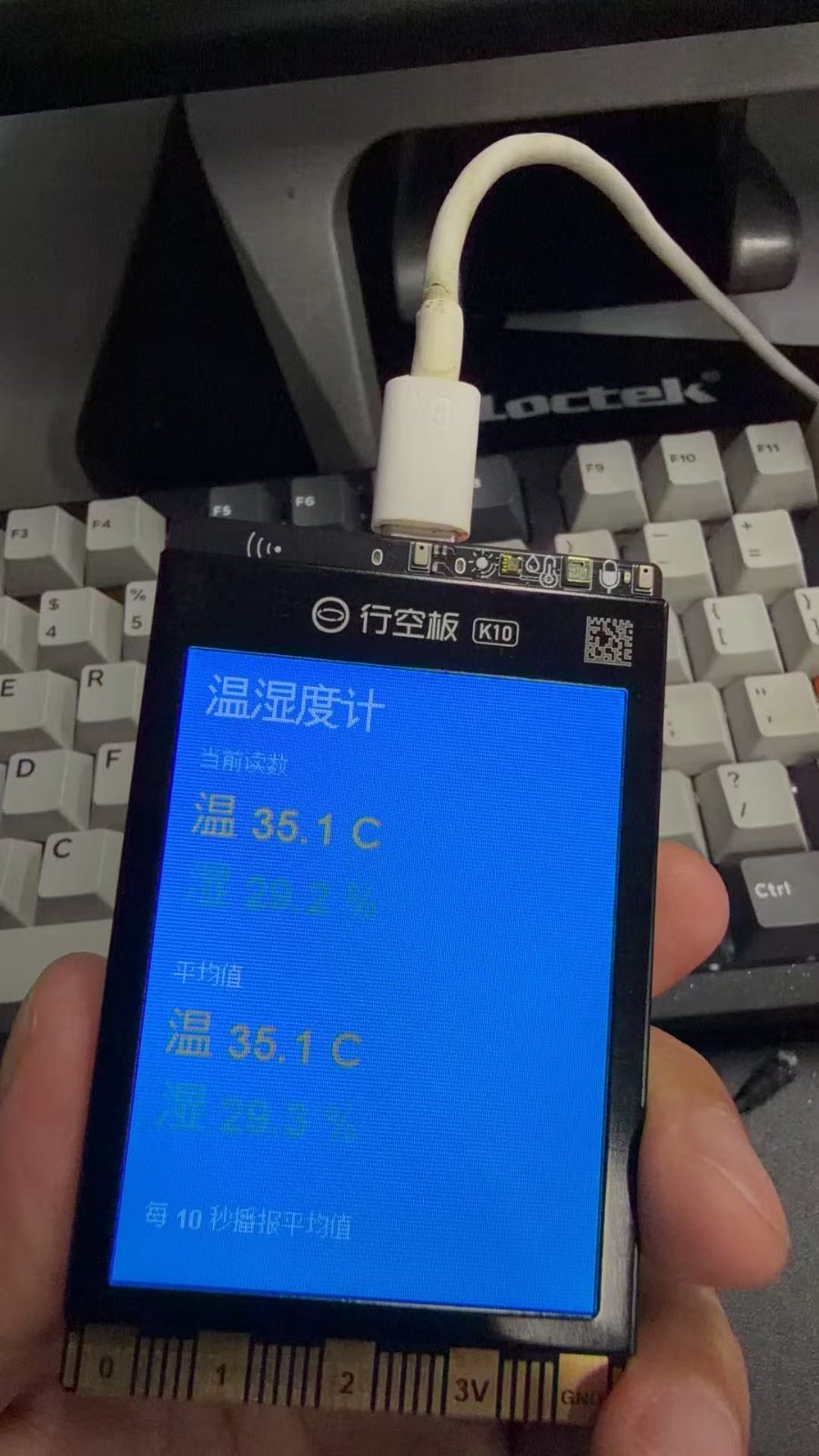
The Average Temperature Humidity Announcer uses an ESP32-based UNIHIKER K10 device with an AHT20 sensor to continuously monitor environmental conditions and periodically announce averaged readings aloud. The project samples temperature and humidity at regular intervals, calculates rolling averages, and uses text-to-speech to vocalize the results while displaying them on the K10's built-in screen.
This guide provides a complete parts list, wiring diagram, and step-by-step assembly instructions to get the device running. You'll also receive the full firmware code with customizable sampling and announcement intervals, allowing you to adjust how frequently the device takes measurements and speaks the averaged values.
Wiring diagram
Assemble it in 2 steps
1. 放置 K10
将 UNIHIKER K10 放在通风、干燥处,保持正面屏幕和底部/侧面的 AHT20 环境传感器开孔不被手、外壳或胶带遮住。该项目只使用 K10 的板载屏幕、AHT20 和扬声器,不需要外接传感器或跳线。
- 避免将板子紧贴发热的电脑、电源适配器或阳光直射处,否则温度读数会偏高。
- 如需安装外壳,请为传感器区域和扬声器预留通风孔。
- 仅通过 K10 的 USB 口供电;不要把外部电源接到未使用的引脚。
2. 接通 USB 电源
使用 USB 数据线将 K10 接到电脑或稳定的 USB 电源。屏幕启动后,程序会每秒采样一次温湿度,并从启动后的所有有效采样计算平均值。
- 前 10 秒用于收集首批平均值;约第 10 秒会开始第一次语音播报。
- 扬声器音量较小时,确认板子的扬声器孔没有被桌面或外壳遮住。
- 不要在高湿凝露、淋水或腐蚀性气体环境中裸板使用。
Deploy the firmware
#include <Arduino.h>
#include "unihiker_k10.h"
#include "asr.h"
#include <math.h>


// Forward declarations

// Forward declarations
static void drawLargeText(const String &text, int x, int y, uint32_t color, uint16_t width);

static void drawText(const String &text, int x, int y, uint32_t color, uint16_t width);
static void redrawScreen();
static void speakAverage(float averageTemperature, float averageHumidity);

UNIHIKER_K10 k10;
AHT20 aht20;
ASR asr;

static constexpr uint8_t SCREEN_DIRECTION = 2;
static constexpr unsigned long SAMPLE_INTERVAL_MS = 1000;
static constexpr unsigned long ANNOUNCE_INTERVAL_MS = 10000;

// One uniform canvas background. Text is rendered transparently on top of it.
static constexpr uint32_t BG_COLOR = 0x00BFFF;
static constexpr uint32_t TITLE_COLOR = 0xFFFFFF;
static constexpr uint32_t LABEL_COLOR = 0xE6F6FF;
static constexpr uint32_t TEMP_COLOR = 0xFFD166;
static constexpr uint32_t HUMI_COLOR = 0x70E1C1;
static constexpr uint32_t STATUS_COLOR = 0xE6F6FF;

static unsigned long lastSampleMs = 0;
static unsigned long lastAnnounceMs = 0;
static float temperatureSum = 0.0f;
static float humiditySum = 0.0f;
static uint32_t validSamples = 0;
static float currentTemperature = NAN;
static float currentHumidity = NAN;
static bool displayDirty = true;
static bool justAnnounced = false;

// This is K10's coordinate-based Canvas API.  The final false is essential:
// it draws glyphs without the opaque automatic text-row background.
static void drawText(const String &text, int x, int y, uint32_t color,
                     uint16_t width = 232) {
  k10.canvas->canvasText(text, x, y, color,
                         k10.canvas->eCNAndENFont16, width, false);
}

// Larger 24-pixel glyphs for the values that must be readable at a glance.
static void drawLargeText(const String &text, int x, int y, uint32_t color,
                          uint16_t width = 232) {
  k10.canvas->canvasText(text, x, y, color,
                         k10.canvas->eCNAndENFont24, width, false);
}

static void redrawScreen() {
  // The K10 Arduino Canvas API exposes only a whole-canvas submit.  Build a
  // complete, uniform frame in RAM and submit it once, never once per line.
  k10.canvas->canvasRectangle(0, 0, 240, 320, BG_COLOR, BG_COLOR, true);

  // Compact labels plus 24-pixel readings: the important numbers are now
  // legible from normal desk distance while the whole layout remains on 240x320.
  drawLargeText("温湿度计", 12, 12, TITLE_COLOR, 216);
  drawText("当前读数", 12, 52, LABEL_COLOR);

  if (validSamples == 0) {
    drawLargeText("读取中...", 12, 82, STATUS_COLOR);
  } else {
    const float averageTemperature = temperatureSum / validSamples;
    const float averageHumidity = humiditySum / validSamples;

    drawLargeText(String("温 ") + String(currentTemperature, 1) + " C",
                  12, 76, TEMP_COLOR);
    drawLargeText(String("湿 ") + String(currentHumidity, 1) + " %",
                  12, 112, HUMI_COLOR);

    drawText("平均值", 12, 164, LABEL_COLOR);
    drawLargeText(String("温 ") + String(averageTemperature, 1) + " C",
                  12, 188, TEMP_COLOR);
    drawLargeText(String("湿 ") + String(averageHumidity, 1) + " %",
                  12, 224, HUMI_COLOR);
    drawText(justAnnounced ? "已播报平均值" : "每 10 秒播报平均值",
             12, 282, STATUS_COLOR);
  }

  k10.canvas->updateCanvas();
  displayDirty = false;
}

static void speakAverage(float averageTemperature, float averageHumidity) {
  String speech = String("当前平均温度") + String(averageTemperature, 1) +
                  String("摄氏度,平均湿度") + String(averageHumidity, 1) +
                  String("百分比");
  asr.speak(speech);
}

void setup() {
  k10.begin();
  k10.initScreen(SCREEN_DIRECTION);
  k10.creatCanvas();

  asr.asrInit(CONTINUOUS, CN_MODE, 6000);
  while (asr._asrState == 0) {
    delay(100);
  }
  asr.setAsrSpeed(2);
  redrawScreen();
}

void loop() {
  const unsigned long now = millis();

  if (now - lastSampleMs >= SAMPLE_INTERVAL_MS) {
    lastSampleMs = now;
    const float temperature = aht20.getData(AHT20::eAHT20TempC);
    const float humidity = aht20.getData(AHT20::eAHT20HumiRH);

    if (isfinite(temperature) && isfinite(humidity) &&
        humidity >= 0.0f && humidity <= 100.0f) {
      currentTemperature = temperature;
      currentHumidity = humidity;
      temperatureSum += temperature;
      humiditySum += humidity;
      ++validSamples;
      justAnnounced = false;
      displayDirty = true;
    }
  }

  if (validSamples > 0 && now - lastAnnounceMs >= ANNOUNCE_INTERVAL_MS) {
    lastAnnounceMs = now;
    speakAverage(temperatureSum / validSamples, humiditySum / validSamples);
    justAnnounced = true;
    displayDirty = true;
  }

  if (displayDirty) {
    redrawScreen();
  }

  delay(5);
}
Remix this project
Make it yours in one click
Open a full copy of this project in your own Schematik workspace — diagram, code, parts, and assembly steps included. Swap the sensor, add features, or redesign the whole thing with AI. The author's original stays untouched.