Community project
Smart Temperature-Regulating Jacket
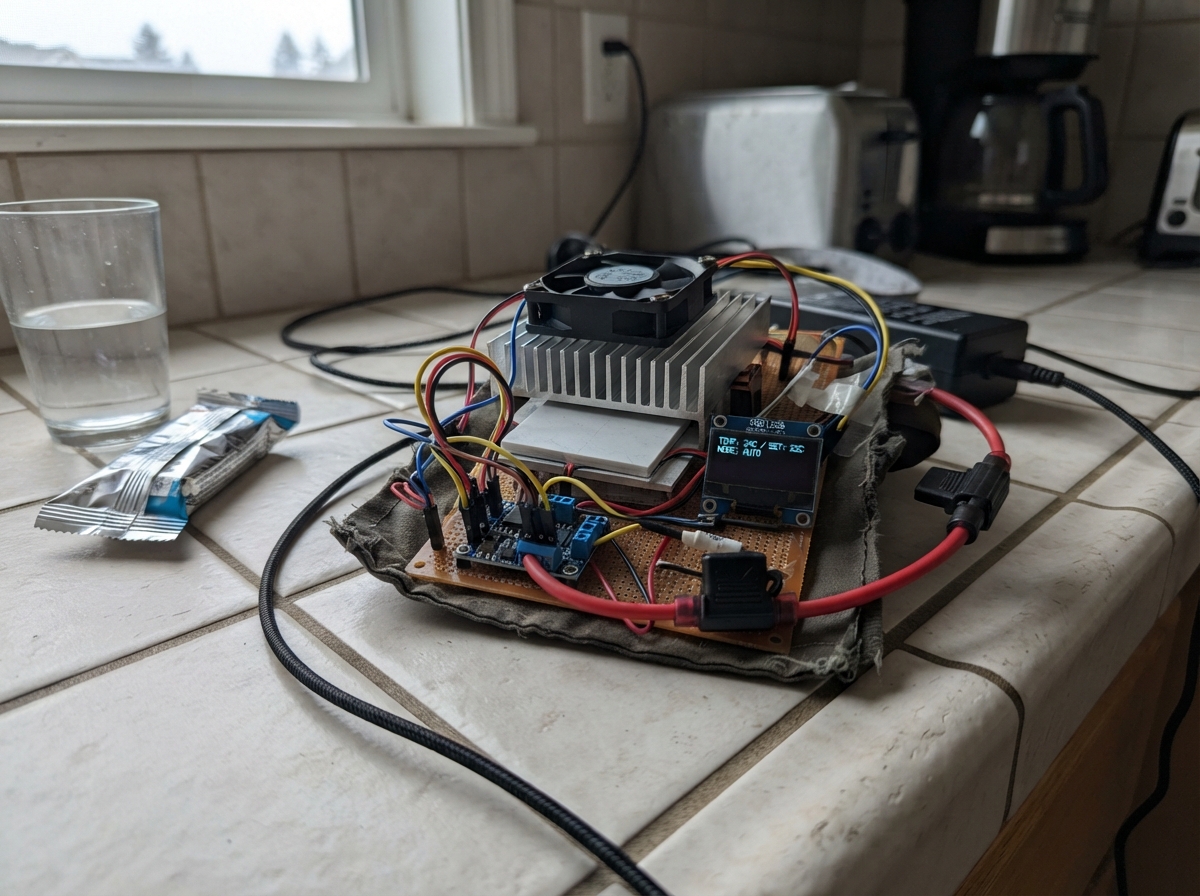
This smart jacket uses three independently controlled Peltier modules positioned across the back to actively heat or cool the wearer. An ESP32 microcontroller reads temperatures from three DS18B20 sensors and drives each thermal zone via its own H-bridge module, allowing precise temperature regulation across the center, left, and right back areas. A 12 V regulated power supply with fused protection delivers the high current needed for the Peltier elements.
This guide provides a complete wiring diagram, full parts list, and step-by-step assembly instructions for building the three thermal zones with integrated heat safety switches. The included firmware handles sensor reading, multi-zone temperature control with selectable setpoints, and real-time display of zone temperatures on an OLED screen. A bench-only safety test procedure ensures proper operation before wear.
Wiring diagram
Gather all the parts
Assemble it in 7 steps
1. Build the three thermal zones
Make three separate upper-back zones: centre, left, and right. Put thermal paste on both faces of each Peltier, clamp each one between a smooth inside heat-spreader plate and its own outside heat sink, and bolt one fan to each outside heat sink. Keep every heat sink and fan on the outside of the windbreaker where air can pass through it; the inside plate must be covered by padding and lining before it can touch your body.
- Leave a small air opening around each outer fan so it can push hot air away.
- Arrange the three plates across the upper back, not over the spine or directly against bare skin.
- Do not test a Peltier against skin or with a heat sink hidden under fabric — a small area can become painfully hot or cold and cause injury.
2. Add the three heat safety switches
Fasten one 45 °C normally-closed thermal cutoff tightly against each jacket-facing heat-spreader plate, with the metal sensing face touching the plate. Keep its two terminals insulated from the plate and fabric after you finish wiring it.
- Use the centre cutoff with the centre Peltier, the left cutoff with the left Peltier, and the right cutoff with the right Peltier.
- Use only cutoffs specifically marked normally closed and rated for at least 10 A DC; an AC-only rating is not safe for this 12 V high-current circuit.
3. Wire the high-current protected power
With the 12 V supply unplugged, run 12–14 AWG stranded wire from supply +12V to the 25 A main fuse IN. From main fuse OUT, split to the three 7.5 A branch fuse IN terminals and to buck_5v VIN. For each zone, run 16 AWG stranded wire from its branch fuse OUT to its thermal cutoff IN, then from cutoff OUT to the matching IBT-2 B+. Also run that branch fuse OUT to the matching fan + wire. Join every fan negative wire and all three IBT-2 B− terminals to supply GND.
- Supply +12V → main fuse IN (main protection); main fuse OUT → three branch-fuse IN terminals and buck VIN (protected distribution).
- Each branch fuse OUT → its fan + and thermal cutoff IN (zone protection); thermal cutoff OUT → its IBT-2 B+ (automatic over-temperature shutdown).
- All fan − wires and all IBT-2 B− terminals → supply GND (power return).
- Never use a breadboard, thin jumper wire, or loose twist connections for Peltier power — they can overheat at these currents.
- Fit the fuses only after checking every high-current connection twice.
4. Connect each Peltier to its own driver
Connect the red and black leads of each Peltier only to the M+ and M− terminals of its matching IBT-2. Centre Peltier goes to ibt2, left Peltier goes to ibt2_2, and right Peltier goes to ibt2_3. Do not join Peltier output leads between drivers.
- Peltier red → matching IBT-2 M+ (reversible load); black → matching IBT-2 M− (reversible load).
- If heat and cool feel reversed during the first bench test, swap only that one Peltier's M+ and M− leads while all power is disconnected.
- Each Peltier needs its own IBT-2. Connecting two Peltiers to one driver can overload it and defeat the separate fuse protection.
5. Wire the low-voltage controller
Set the MP1584 buck_5v output to exactly 5.0 V with a meter before connecting it to the ESP32 5V/VIN pin. Connect buck VOUT to ESP32 5V/VIN, both 74AHCT125 VCC pins, and all three IBT-2 VCC pins; connect buck GND, ESP32 GND, both buffer GND pins, and all IBT-2 logic GND pins together. Wire GPIO25 and GPIO26 through logic_buffer channels 1 and 2 to the centre IBT-2 RPWM and LPWM. Wire GPIO13/GPIO14 through logic_buffer_2 channels 1/2 to the left IBT-2 RPWM/LPWM, and GPIO16/GPIO17 through channels 3/4 to the right IBT-2 RPWM/LPWM. Tie every buffer OE pin to GND and every IBT-2 R_EN and L_EN pin to 5 V.
- ESP32 GPIO → buffer A input (3.3 V signal); matching buffer Y output → IBT-2 PWM input (safe 5 V signal).
- Do not connect any IBT-2 PWM or enable pin straight to an ESP32 pin.
- Adjust the buck converter before connecting the ESP32 — more than 5 V on its 5V/VIN pin can damage the board.
6. Connect the screen, button, and three probes
Connect each DS18B20 VCC wire to ESP32 3V3 and each GND wire to ESP32 GND. Join all three DATA wires together with GPIO4 and the 4.7 kΩ resistor; connect the resistor's other end to 3V3. Put one probe beside each inside heat-spreader plate, insulated from direct metal contact. Connect OLED VCC to 3V3, GND to GND, SDA to GPIO21, and SCL to GPIO22. Connect the push button between GPIO32 and GND.
- DS18B20 VCC → 3V3 (power), GND → GND (ground), and all DATA wires → GPIO4 (shared temperature signal).
- OLED VCC → 3V3 (power), GND → GND (ground), SDA → GPIO21 (screen data), SCL → GPIO22 (screen clock).
- The button uses GPIO32 and GND; a quick tap changes the target temperature once.
- Keep every DS18B20 probe on the jacket-facing plate, not on the outer heat sink — the code is protecting the wearer-facing temperature.
7. Do a bench-only safety test
Before wearing the jacket, leave it flat on a non-flammable table with all three fans exposed. Power the ESP32 from the correctly set 5 V buck output and then connect the 12 V supply. Confirm the OLED reports a reading from all three probes, every fan runs, and each Peltier can heat and cool. Press a thermal cutoff briefly only when the module is off and confirm its zone cannot power while it is open.
- The screen reports SENSOR FAULT and turns all Peltiers off if any of the three probes is absent.
- Use the button to choose 24, 26, or 28 °C; let the system settle before changing it again.
- Do not wear the jacket until the bench test is complete and every fan, probe, cutoff, fuse, and Peltier direction behaves correctly.
Review all connections
1. Connections between "supply" and "ESP32"
2. Connections between "fuse" and "ESP32"
3. Connections between "buck_5v" and "ESP32"
4. Connections between "branch_fuse_1" and "ESP32"
5. Connections between "thermal_cutoff_1" and "ESP32"
6. Connections between "fan" and "ESP32"
7. Connections between "ibt2" and "ESP32"
8. Connections between "branch_fuse_2" and "ESP32"
9. Connections between "thermal_cutoff_2" and "ESP32"
10. Connections between "fan_2" and "ESP32"
11. Connections between "ibt2_2" and "ESP32"
12. Connections between "branch_fuse_3" and "ESP32"
13. Connections between "thermal_cutoff_3" and "ESP32"
14. Connections between "fan_3" and "ESP32"
15. Connections between "ibt2_3" and "ESP32"
16. Connections between "temp_sensor" and "ESP32"
17. Connections between "temp_sensor_2" and "ESP32"
18. Connections between "temp_sensor_3" and "ESP32"
19. Connections between "onewire_pullup" and "ESP32"
20. Connections between "oled" and "ESP32"
21. Connections between "set_button" and "ESP32"
22. Connections between "logic_buffer" and "ESP32"
23. Connections between "logic_buffer_2" and "ESP32"
Deploy the firmware
#include <Arduino.h>
#include <Wire.h>
#include <OneWire.h>
#include <DallasTemperature.h>
#include <Adafruit_GFX.h>
#include <Adafruit_SSD1306.h>

const uint8_t TEMP_DATA_PIN = 4;
const uint8_t CENTER_RPWM_PIN = 25;
const uint8_t CENTER_LPWM_PIN = 26;
const uint8_t LEFT_RPWM_PIN = 13;
const uint8_t LEFT_LPWM_PIN = 14;
const uint8_t RIGHT_RPWM_PIN = 16;
const uint8_t RIGHT_LPWM_PIN = 17;
const uint8_t BUTTON_PIN = 32;
const uint8_t OLED_SDA_PIN = 21;
const uint8_t OLED_SCL_PIN = 22;
const uint8_t SCREEN_WIDTH = 128;
const uint8_t SCREEN_HEIGHT = 64;
const uint8_t OLED_ADDRESS = 0x3C;
const uint8_t ZONE_COUNT = 3;
const uint8_t CONTROL_PIN_COUNT = 6;
const uint8_t controlPins[CONTROL_PIN_COUNT] = {CENTER_RPWM_PIN, CENTER_LPWM_PIN, LEFT_RPWM_PIN, LEFT_LPWM_PIN, RIGHT_RPWM_PIN, RIGHT_LPWM_PIN};
const uint8_t forwardPins[ZONE_COUNT] = {CENTER_RPWM_PIN, LEFT_RPWM_PIN, RIGHT_RPWM_PIN};
const uint8_t reversePins[ZONE_COUNT] = {CENTER_LPWM_PIN, LEFT_LPWM_PIN, RIGHT_LPWM_PIN};
const float SETPOINTS_C[] = {24.0F, 26.0F, 28.0F};
const uint8_t SETPOINT_COUNT = sizeof(SETPOINTS_C) / sizeof(SETPOINTS_C[0]);
const float DEADBAND_C = 1.0F;
const float MAX_SAFE_C = 38.0F;
const uint32_t SENSOR_INTERVAL_MS = 1000UL;
const uint32_t BUTTON_DEBOUNCE_MS = 40UL;
const uint32_t REVERSAL_PAUSE_MS = 200UL;

OneWire oneWire(TEMP_DATA_PIN);
DallasTemperature sensors(&oneWire);
Adafruit_SSD1306 display(SCREEN_WIDTH, SCREEN_HEIGHT, &Wire, -1);

enum Mode { OFF, HEATING, COOLING, FAULT };
Mode currentMode = OFF;
Mode shownMode = FAULT;
uint8_t setpointIndex = 1;
float zoneTemperatureC[ZONE_COUNT] = {DEVICE_DISCONNECTED_C, DEVICE_DISCONNECTED_C, DEVICE_DISCONNECTED_C};
float averageTemperatureC = DEVICE_DISCONNECTED_C;
float shownAverageTemperatureC = -999.0F;
uint8_t shownSetpointIndex = 255;
uint32_t lastSensorMs = 0;
bool lastButtonReading = HIGH;
bool stableButtonState = HIGH;
uint32_t buttonChangedMs = 0;

const char *modeText(Mode mode) {
  if (mode == HEATING) return "HEATING";
  if (mode == COOLING) return "COOLING";
  if (mode == FAULT) return "SENSOR FAULT";
  return "COMFORT HOLD";
}

void disableAllPeltiers() {
  for (uint8_t zone = 0; zone < ZONE_COUNT; ++zone) {
    digitalWrite(forwardPins[zone], LOW);
    digitalWrite(reversePins[zone], LOW);
  }
}

void setAllZones(Mode requested) {
  if (requested == currentMode) return;
  disableAllPeltiers();
  delay(REVERSAL_PAUSE_MS);
  if (requested == HEATING) {
    for (uint8_t zone = 0; zone < ZONE_COUNT; ++zone) digitalWrite(forwardPins[zone], HIGH);
  } else if (requested == COOLING) {
    for (uint8_t zone = 0; zone < ZONE_COUNT; ++zone) digitalWrite(reversePins[zone], HIGH);
  }
  currentMode = requested;
}

bool temperaturesAreSafe() {
  if (sensors.getDeviceCount() < ZONE_COUNT) return false;
  float total = 0.0F;
  for (uint8_t zone = 0; zone < ZONE_COUNT; ++zone) {
    zoneTemperatureC[zone] = sensors.getTempCByIndex(zone);
    if (zoneTemperatureC[zone] == DEVICE_DISCONNECTED_C || zoneTemperatureC[zone] < -20.0F || zoneTemperatureC[zone] >= MAX_SAFE_C) return false;
    total += zoneTemperatureC[zone];
  }
  averageTemperatureC = total / ZONE_COUNT;
  return true;
}

void drawScreen(bool force) {
  if (!force && shownMode == currentMode && shownSetpointIndex == setpointIndex && fabsf(shownAverageTemperatureC - averageTemperatureC) < 0.05F) return;
  display.clearDisplay();
  display.setTextColor(SSD1306_WHITE);
  display.setTextSize(1);
  display.setCursor(0, 0);
  display.print("ThermoFlex: 3 zones");
  display.drawFastHLine(0, 10, SCREEN_WIDTH, SSD1306_WHITE);
  display.setTextSize(2);
  display.setCursor(0, 17);
  if (averageTemperatureC == DEVICE_DISCONNECTED_C) display.print("--.- C");
  else { display.print(averageTemperatureC, 1); display.print(" C"); }
  display.setTextSize(1);
  display.setCursor(0, 42);
  display.print("Target: ");
  display.print(SETPOINTS_C[setpointIndex], 0);
  display.print(" C");
  display.setCursor(0, 54);
  display.print(modeText(currentMode));
  display.display();
  shownAverageTemperatureC = averageTemperatureC;
  shownMode = currentMode;
  shownSetpointIndex = setpointIndex;
}

void checkButton() {
  const bool reading = digitalRead(BUTTON_PIN);
  const uint32_t now = millis();
  if (reading != lastButtonReading) buttonChangedMs = now;
  if ((now - buttonChangedMs) >= BUTTON_DEBOUNCE_MS && reading != stableButtonState) {
    stableButtonState = reading;
    if (stableButtonState == LOW) { setpointIndex = (setpointIndex + 1) % SETPOINT_COUNT; drawScreen(true); }
  }
  lastButtonReading = reading;
}

void setup() {
  Serial.begin(115200);
  for (uint8_t pin = 0; pin < CONTROL_PIN_COUNT; ++pin) {
    pinMode(controlPins[pin], OUTPUT);
    digitalWrite(controlPins[pin], LOW);
  }
  pinMode(BUTTON_PIN, INPUT_PULLUP);
  disableAllPeltiers();
  Wire.begin(OLED_SDA_PIN, OLED_SCL_PIN);
  display.begin(SSD1306_SWITCHCAPVCC, OLED_ADDRESS);
  display.clearDisplay();
  display.display();
  sensors.begin();
  sensors.setResolution(10);
  drawScreen(true);
}

void loop() {
  checkButton();
  const uint32_t now = millis();
  if (now - lastSensorMs >= SENSOR_INTERVAL_MS) {
    lastSensorMs = now;
    sensors.requestTemperatures();
    Mode requested = FAULT;
    if (temperaturesAreSafe()) {
      if (averageTemperatureC < SETPOINTS_C[setpointIndex] - DEADBAND_C) requested = HEATING;
      else if (averageTemperatureC > SETPOINTS_C[setpointIndex] + DEADBAND_C) requested = COOLING;
      else requested = OFF;
    } else {
      averageTemperatureC = DEVICE_DISCONNECTED_C;
    }
    setAllZones(requested);
    Serial.print("Average: ");
    Serial.print(averageTemperatureC, 1);
    Serial.print(" C, ");
    Serial.println(modeText(currentMode));
    drawScreen(false);
  }
  delay(10);
}
Remix this project
Make it yours in one click
Open a full copy of this project in your own Schematik workspace — diagram, code, parts, and assembly steps included. Swap the sensor, add features, or redesign the whole thing with AI. The author's original stays untouched.