Community project
Wristband Vibrotactile Receiver
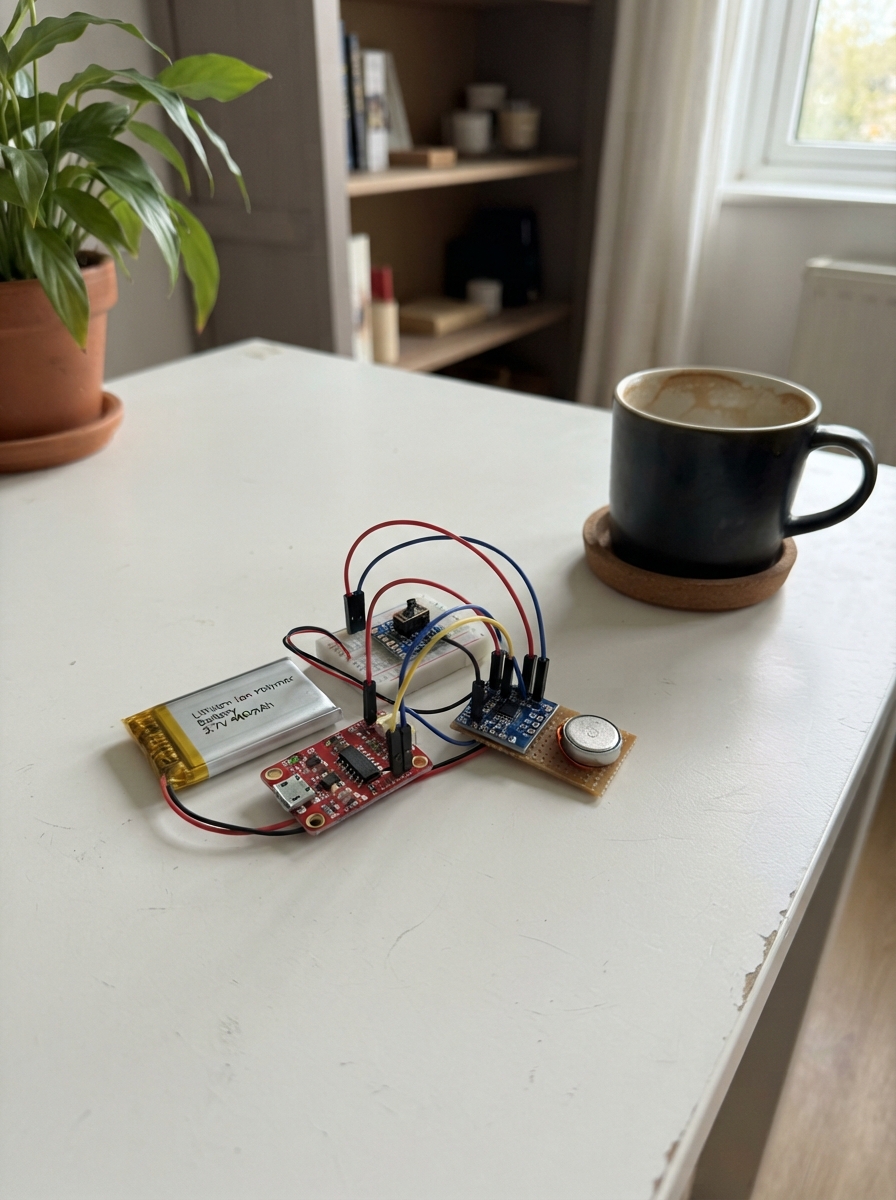
This wristband receiver delivers haptic feedback via a coin vibration motor, making it ideal for notification systems, gesture recognition, or immersive wearable applications. Built around an ESP32 microcontroller, the device combines a compact LiPo battery with intelligent power management and a haptic driver capable of playing dozens of pre-programmed vibration effects.
The guide provides a complete wiring diagram, full parts list, and step-by-step assembly instructions that walk through battery integration, power switching, fuel-gauge monitoring, and haptic driver configuration. Included firmware demonstrates battery state tracking, low-battery alerts, and LRA auto-resonance calibration to ensure consistent vibration performance from the 10 mm motor.
Wiring diagram
Gather all the parts
Assemble it in 7 steps
1. Prepare the charger and battery
With all power disconnected, connect the LiPo positive lead to tp4056_1 B+ and the LiPo negative lead to tp4056_1 B-. Use the TP4056 module pads labelled B+ and B−, not OUT+ and OUT−.
- The TP4056 USB connector is only for charging; its OUT pads feed the wristband.
- Do not reverse B+ and B− — a reversed LiPo connection can destroy the charger module or heat the battery. Set the TP4056 charge current to no more than 400 mA for this 400 mAh cell before charging.
2. Build the switched power path
Connect tp4056_1 OUT− to the ESP32-C3 GND pin. Connect tp4056_1 OUT+ to power_switch COM. Connect power_switch A to the ESP32-C3 5V/VIN pin. Leave power_switch B physically unconnected; the switch is on when COM connects to A.
- Verify which slider position joins COM to A with a continuity meter before mounting it in the wristband.
- A LiPo is 4.2 V when full, not regulated 5 V. Verify that your specific ESP32-C3 SuperMini’s VIN input will run correctly from the full 4.2 V to the protection cutoff before relying on this direct path.
3. Place both power capacitors
Place c_bulk_22uf and c_bypass_100nf in parallel at the ESP32-C3 power entry. Connect the 22 µF capacitor’s positive lead to 5V/VIN and its striped negative lead to GND. Connect either 100 nF ceramic lead to 5V/VIN and the other to GND.
- Keep both capacitors physically close to the ESP32 power and GND pins.
- The 22 µF capacitor is polarized — reversing it can make it fail or burst.
4. Wire the battery monitor
Connect max17048_1 VIN to ESP32 3V3, GND to ESP32 GND, SDA to GPIO6, SCL to GPIO7, and ALRT to GPIO3. Run max17048_1 BAT directly to the LiPo positive/B+ node, not to the switched VIN node.
- The BAT wire remains connected to the cell so the gauge can measure the actual battery voltage.
- Keep the MAX17048 VIN pin at 3.3 V; do not connect it to the LiPo or 5V/VIN node.
5. Wire the haptic driver and LRA
Connect drv2605l_1 VIN to ESP32 3V3, GND to ESP32 GND, SDA to the same GPIO6 wire, and SCL to the same GPIO7 wire. Connect drv2605l_1 OUT+ to lra_10mm LRA+ and OUT− to lra_10mm LRA−.
- Keep the two LRA wires short and route them away from the I²C wires where possible.
- Do not connect the LRA leads to ESP32 pins or to a power rail; they must connect only across the DRV2605L OUT+ and OUT− terminals.
6. Add the two visible I²C pull-ups
Connect one end of r_sda_pullup to the shared SDA/GPIO6 wire and its other end to ESP32 3V3. Connect one end of r_scl_pullup to the shared SCL/GPIO7 wire and its other end to ESP32 3V3.
- These are ordinary non-polarized resistors, so either physical lead can be the 3.3 V end.
- Do not connect either pull-up resistor to 5V/VIN — GPIO6 and GPIO7 are 3.3 V-only ESP32 signals.
7. Inspect before powering
With the switch off, inspect every power connection, then check that the LRA only reaches the DRV2605L outputs. Charge the battery through tp4056_1’s USB connector, turn the switch on, and expect one short vibration when the firmware starts.
- A continuity check between 3V3 and GND before inserting the LiPo is a useful last check.
- Stop immediately if any part becomes hot, the battery swells, or you smell overheating; disconnect the LiPo first.
Review all connections
1. Connections between "lipo_400mah" and "ESP32"
2. Connections between "tp4056_1" and "ESP32"
3. Connections between "power_switch" and "ESP32"
4. Connections between "c_bulk_22uf" and "ESP32"
5. Connections between "c_bypass_100nf" and "ESP32"
6. Connections between "max17048_1" and "ESP32"
7. Connections between "drv2605l_1" and "ESP32"
8. Connections between "r_sda_pullup" and "ESP32"
9. Connections between "r_scl_pullup" and "ESP32"
Deploy the firmware
#include <Arduino.h>
#include <Wire.h>
#include <Adafruit_DRV2605.h>
#include <Adafruit_MAX1704X.h>

constexpr int I2C_SDA_PIN = 6;
constexpr int I2C_SCL_PIN = 7;
constexpr int FUEL_ALERT_PIN = 3;
constexpr float LOW_BATTERY_PERCENT = 15.0F;
constexpr uint32_t BATTERY_POLL_MS = 10000UL;

Adafruit_DRV2605 haptic;
Adafruit_MAX17048 fuelGauge;

bool hapticReady = false;
bool fuelGaugeReady = false;
float lastPercent = -1.0F;
uint32_t lastBatteryPoll = 0;

void playEffect(uint8_t effect) {
  if (!hapticReady) {
    return;
  }

  haptic.setMode(DRV2605_MODE_INTTRIG);
  haptic.setWaveform(0, effect);
  haptic.setWaveform(1, 0);
  haptic.go();
  delay(80);
}

void configureLraAutoResonance() {
  // LRA mode enables the DRV2605L closed-loop resonance tracking path.
  haptic.useLRA();

  // Run the driver's built-in calibration routine once at power-up so it
  // measures this particular coin LRA before normal waveform playback.
  haptic.setMode(DRV2605_MODE_AUTOCAL);
  haptic.go();
  delay(1000);
  haptic.setMode(DRV2605_MODE_INTTRIG);
}

void readBatteryAndAlertIfNeeded() {
  if (!fuelGaugeReady) {
    return;
  }

  const float percent = fuelGauge.cellPercent();
  const bool alertLow = digitalRead(FUEL_ALERT_PIN) == LOW;

  if (alertLow || (percent >= 0.0F && percent <= LOW_BATTERY_PERCENT &&
                   (lastPercent < 0.0F || lastPercent > LOW_BATTERY_PERCENT))) {
    // Two short taps distinguish the low-battery condition from the single
    // acknowledgement pulse played at power-up.
    playEffect(47);
    delay(180);
    playEffect(47);
  }

  lastPercent = percent;
}

void setup() {
  pinMode(FUEL_ALERT_PIN, INPUT_PULLUP);
  Wire.begin(I2C_SDA_PIN, I2C_SCL_PIN);

  hapticReady = haptic.begin(&Wire);
  fuelGaugeReady = fuelGauge.begin(&Wire);

  if (hapticReady) {
    configureLraAutoResonance();
    playEffect(47);  // One medium click confirms the wristband is powered.
  }

  if (fuelGaugeReady) {
    readBatteryAndAlertIfNeeded();
    lastBatteryPoll = millis();
  }
}

void loop() {
  const uint32_t now = millis();
  if (fuelGaugeReady && now - lastBatteryPoll >= BATTERY_POLL_MS) {
    lastBatteryPoll = now;
    readBatteryAndAlertIfNeeded();
  }

  delay(10);
}
Remix this project
Make it yours in one click
Open a full copy of this project in your own Schematik workspace — diagram, code, parts, and assembly steps included. Swap the sensor, add features, or redesign the whole thing with AI. The author's original stays untouched.