Community project
ESP32 Macro Control Pad
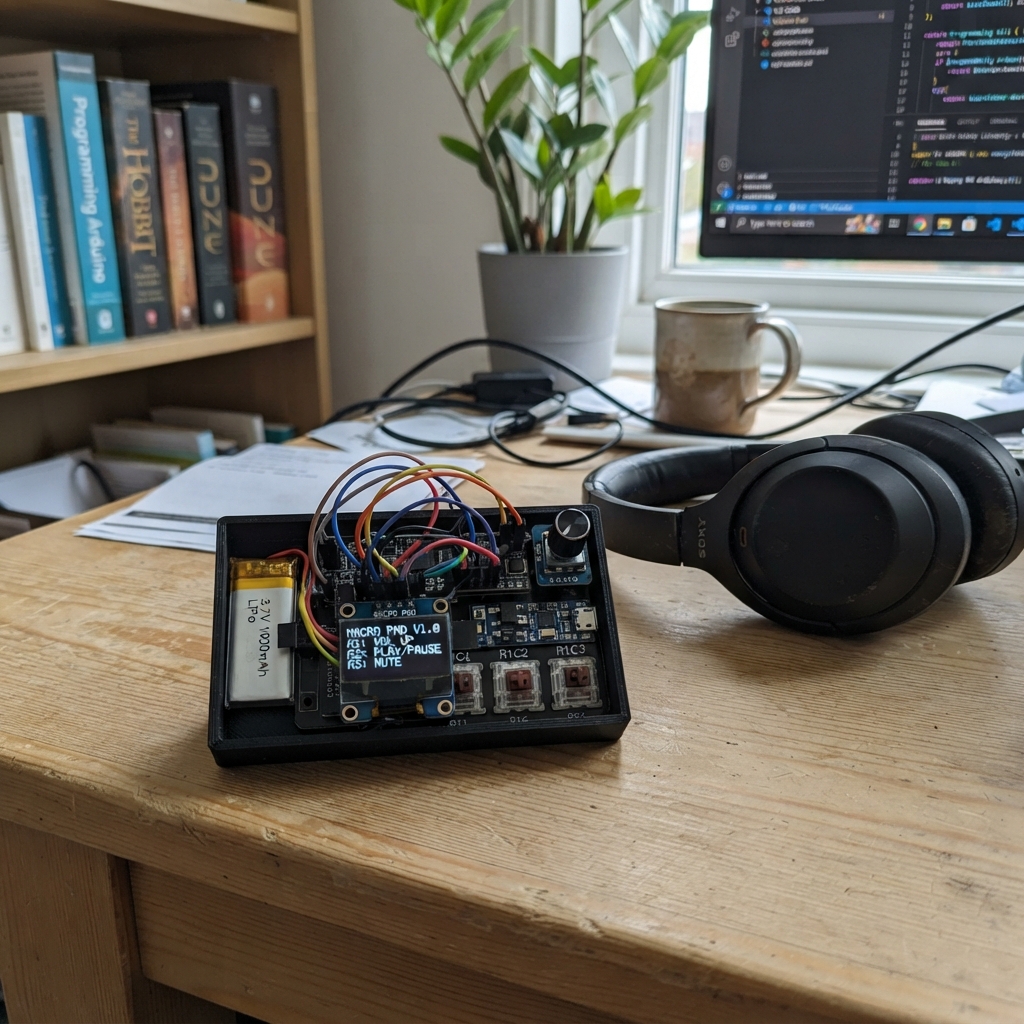
The ESP32 Macro Control Pad is a programmable 9-key macro keyboard with dual rotary encoders and an OLED display. It connects via USB to send custom keystrokes, macros, and commands to a computer, with layer switching and a menu system for configuration.
This guide provides a complete wiring diagram, parts list, and step-by-step assembly instructions for building the pad from scratch. The included Arduino firmware handles the 3x3 key matrix, rotary encoder inputs, OLED display rendering, and USB HID keyboard output, with optional Wi-Fi clock synchronization.
Wiring diagram
Gather all the parts
Assemble it in 7 steps
1. Place the board and keep USB pins free
Mount the ESP32-S3-DevKitC-1 where its native USB connector remains reachable. Do not connect anything to GPIO19 or GPIO20 because those two pins carry the USB keyboard connection to the computer.
- GPIO19 and GPIO20 are intentionally absent from the rest of this wiring.
- Do not feed battery power into the USB data pins; it can damage the board or computer.
2. Build the three switch rows
Arrange the nine keyboard switches in three rows of three. Join one terminal of the three top-row switches together and take that row wire to GPIO1; join the middle row and take it to GPIO2; join the bottom row and take it to GPIO3. These are the row-scan wires.
- A mechanical switch has two electrically joined terminals on each side; use one terminal from each side, not two terminals on the same side.
3. Add one diode to every key
Connect the unused terminal of each switch to the striped end (cathode) of its own 1N4148 diode. Join the unstriped diode ends from column 1 to GPIO4, column 2 to GPIO5, and column 3 to GPIO6. The stripe must face the switch/row side.
- The black or silver band on each diode identifies the striped cathode end.
- A diode installed backwards can make its key fail or cause several keys to appear pressed together.
4. Wire the screen and layer knob
Connect the OLED VCC → 3V3 (power), GND → GND (ground), SDA → GPIO8 (data), and SCL → GPIO9 (clock). Connect the layer encoder VCC → 3V3 (power), GND → GND (ground), CLK → GPIO10 (turn signal), DT → GPIO11 (turn signal), and SW → GPIO12 (push signal).
- Make sure OLED VCC and GND are not swapped — swapped power can damage the screen.
5. Wire the menu knob
Connect the menu encoder VCC → 3V3 (power), GND → GND (ground), CLK → GPIO13 (turn signal), DT → GPIO14 (turn signal), and SW → GPIO15 (push signal).
- If a knob scrolls backwards, swap only its CLK and DT wires.
6. Build the protected battery supply
Connect LiPo +V → TP4056 B+ (battery positive) and LiPo GND → TP4056 B- (battery negative). Connect TP4056 OUT+ → boost VIN+ (power) and OUT- → boost VIN- (ground). Set the boost converter output to exactly 5.0 V with a multimeter before connecting it, then connect VOUT+ → ESP32 VIN/5V (power) and VOUT- → ESP32 GND (ground). Connect a separate 5 V USB charger to TP4056 IN+ and IN- for charging.
- Use a TP4056 module with B+/B-/OUT+/OUT- pads so its protection circuit is in the battery-to-load path.
- Never connect the LiPo directly to the ESP32 5 V/VIN pin — a single LiPo cell is not a regulated 5 V supply.
- Do not leave the boost converter at an unknown voltage; output above 5 V can damage the ESP32.
7. Make the first USB connection
After checking every power and ground wire, plug the ESP32-S3 native USB connector into the computer. This cable is the HID keyboard connection and is also used by Schematik to deploy the firmware.
- Do not use a charge-only USB cable; the computer needs the data wires for keyboard emulation.
Review all connections
1. Connections between "oled_1" and "ESP32"
2. Connections between "encoder_layer" and "ESP32"
3. Connections between "encoder_menu" and "ESP32"
4. Connections between "lipo_1" and "ESP32"
5. Connections between "charger_1" and "ESP32"
6. Connections between "boost_5v" and "ESP32"
7. Connections between "key_r1c1" and "ESP32"
8. Connections between "diode_r1c1" and "ESP32"
9. Connections between "key_r1c2" and "ESP32"
10. Connections between "diode_r1c2" and "ESP32"
11. Connections between "key_r1c3" and "ESP32"
12. Connections between "diode_r1c3" and "ESP32"
13. Connections between "key_r2c1" and "ESP32"
14. Connections between "key_r2c2" and "ESP32"
15. Connections between "key_r2c3" and "ESP32"
16. Connections between "key_r3c1" and "ESP32"
17. Connections between "key_r3c2" and "ESP32"
18. Connections between "key_r3c3" and "ESP32"
19. Connections between "diode_r2c1" and "ESP32"
20. Connections between "diode_r3c1" and "ESP32"
21. Connections between "diode_r2c2" and "ESP32"
22. Connections between "diode_r3c2" and "ESP32"
23. Connections between "diode_r2c3" and "ESP32"
24. Connections between "diode_r3c3" and "ESP32"
Deploy the firmware
#include <Arduino.h>
#include <Wire.h>
#include <WiFi.h>
#include <time.h>
#include <USB.h>
#include <USBHIDKeyboard.h>
#include <Adafruit_GFX.h>
#include <Adafruit_SSD1306.h>

// Set these before deployment to enable the automatic Wi-Fi/NTP clock sync.
// The macro pad still works as a USB keyboard without Wi-Fi after the boot attempt.
static const char *WIFI_SSID = "";
static const char *WIFI_PASSWORD = "";
static const char *TZ_INFO = "UTC0";  // Change to a POSIX TZ string for local time.

constexpr int ROW1_PIN = 1;
constexpr int ROW2_PIN = 2;
constexpr int ROW3_PIN = 3;
constexpr int COL1_PIN = 4;
constexpr int COL2_PIN = 5;
constexpr int COL3_PIN = 6;
constexpr int OLED_SDA_PIN = 8;
constexpr int OLED_SCL_PIN = 9;
constexpr int LAYER_CLK_PIN = 10;
constexpr int LAYER_DT_PIN = 11;
constexpr int LAYER_SW_PIN = 12;
constexpr int MENU_CLK_PIN = 13;
constexpr int MENU_DT_PIN = 14;
constexpr int MENU_SW_PIN = 15;

constexpr uint8_t SCREEN_WIDTH = 128;
constexpr uint8_t SCREEN_HEIGHT = 64;
constexpr uint8_t OLED_ADDRESS = 0x3C;
constexpr uint8_t LAYER_COUNT = 3;
constexpr uint8_t KEY_COUNT = 9;
constexpr uint16_t KEY_DEBOUNCE_MS = 18;
constexpr uint16_t ENCODER_BUTTON_DEBOUNCE_MS = 30;
constexpr uint16_t MATRIX_SCAN_MS = 5;

const uint8_t rowPins[3] = {ROW1_PIN, ROW2_PIN, ROW3_PIN};
const uint8_t colPins[3] = {COL1_PIN, COL2_PIN, COL3_PIN};
const char *menuItems[] = {"Macro mode", "Key labels", "Clock"};
constexpr uint8_t MENU_ITEM_COUNT = sizeof(menuItems) / sizeof(menuItems[0]);

Adafruit_SSD1306 display(SCREEN_WIDTH, SCREEN_HEIGHT, &Wire, -1);
USBHIDKeyboard Keyboard;

struct EncoderState {
  uint8_t clkPin;
  uint8_t dtPin;
  uint8_t swPin;
  uint8_t lastAB;
  int8_t accumulator;
  bool lastSwitchReading;
  bool stablePressed;
  uint32_t switchChangedAt;
};

EncoderState layerEncoder = {LAYER_CLK_PIN, LAYER_DT_PIN, LAYER_SW_PIN, 0, 0, false, false, 0};
EncoderState menuEncoder = {MENU_CLK_PIN, MENU_DT_PIN, MENU_SW_PIN, 0, 0, false, false, 0};

bool rawKeys[3][3] = {};
bool stableKeys[3][3] = {};
uint32_t keyChangedAt[3][3] = {};
uint8_t activeLayer = 0;
uint8_t menuIndex = 0;
String statusLine = "Ready";
bool uiDirty = true;
time_t shownSecond = -1;
uint32_t lastMatrixScan = 0;

void sendKeyWithCtrl(uint8_t key) {
  Keyboard.press(KEY_LEFT_CTRL);
  Keyboard.press(key);
  delay(8);
  Keyboard.releaseAll();
}

void runMacro(uint8_t layer, uint8_t key) {
  // Edit this switch to assign your own macro sequences for all 27 layer/key slots.
  if (layer == 0) {
    switch (key) {
      case 0: sendKeyWithCtrl('c'); break;
      case 1: sendKeyWithCtrl('v'); break;
      case 2: sendKeyWithCtrl('z'); break;
      case 3: sendKeyWithCtrl('x'); break;
      case 4: sendKeyWithCtrl('s'); break;
      case 5: Keyboard.write(KEY_RETURN); break;
      case 6: Keyboard.write(KEY_LEFT_ARROW); break;
      case 7: Keyboard.write(KEY_UP_ARROW); break;
      case 8: Keyboard.write(KEY_RIGHT_ARROW); break;
    }
  } else if (layer == 1) {
    const uint8_t functionKeys[KEY_COUNT] = {KEY_F1, KEY_F2, KEY_F3, KEY_F4, KEY_F5, KEY_F6, KEY_F7, KEY_F8, KEY_F9};
    Keyboard.write(functionKeys[key]);
  } else {
    const char *textMacros[KEY_COUNT] = {
      "Hello!", "Thank you!", "On my way.",
      "// TODO", "[DONE]", "https://",
      "user@example.com", "Meeting notes: ", "Regards,"
    };
    Keyboard.print(textMacros[key]);
  }
}

String keyCoordinate(uint8_t index) {
  return "R" + String(index / 3 + 1) + "C" + String(index % 3 + 1);
}

void handleKeyEvent(uint8_t row, uint8_t col, bool pressed) {
  const uint8_t index = row * 3 + col;
  if (pressed) {
    statusLine = keyCoordinate(index) + " pressed";
    runMacro(activeLayer, index);
  } else {
    bool anotherKeyHeld = false;
    for (uint8_t r = 0; r < 3; ++r) {
      for (uint8_t c = 0; c < 3; ++c) {
        if (stableKeys[r][c]) {
          statusLine = keyCoordinate(r * 3 + c) + " pressed";
          anotherKeyHeld = true;
          break;
        }
      }
      if (anotherKeyHeld) break;
    }
    if (!anotherKeyHeld) statusLine = "Ready";
  }
  uiDirty = true;
}

void scanMatrix() {
  const uint32_t now = millis();
  if (now - lastMatrixScan < MATRIX_SCAN_MS) return;
  lastMatrixScan = now;

  for (uint8_t r = 0; r < 3; ++r) {
    pinMode(rowPins[r], OUTPUT);
    digitalWrite(rowPins[r], LOW);
    delayMicroseconds(3);
    for (uint8_t c = 0; c < 3; ++c) {
      const bool pressed = digitalRead(colPins[c]) == LOW;
      if (pressed != rawKeys[r][c]) {
        rawKeys[r][c] = pressed;
        keyChangedAt[r][c] = now;
      }
      if (rawKeys[r][c] != stableKeys[r][c] && now - keyChangedAt[r][c] >= KEY_DEBOUNCE_MS) {
        stableKeys[r][c] = rawKeys[r][c];
        handleKeyEvent(r, c, stableKeys[r][c]);
      }
    }
    pinMode(rowPins[r], INPUT);
  }
}

int8_t pollEncoder(EncoderState &encoder) {
  const uint8_t ab = (digitalRead(encoder.clkPin) << 1) | digitalRead(encoder.dtPin);
  const uint8_t transition = (encoder.lastAB << 2) | ab;
  encoder.lastAB = ab;
  switch (transition) {
    case 0b0001: case 0b0111: case 0b1110: case 0b1000: encoder.accumulator++; break;
    case 0b0010: case 0b1011: case 0b1101: case 0b0100: encoder.accumulator--; break;
    default: break;
  }
  if (encoder.accumulator >= 4) { encoder.accumulator = 0; return 1; }
  if (encoder.accumulator <= -4) { encoder.accumulator = 0; return -1; }
  return 0;
}

bool encoderPressed(EncoderState &encoder) {
  const bool pressedNow = digitalRead(encoder.swPin) == LOW;
  const uint32_t now = millis();
  if (pressedNow != encoder.lastSwitchReading) {
    encoder.lastSwitchReading = pressedNow;
    encoder.switchChangedAt = now;
  }
  if (pressedNow != encoder.stablePressed && now - encoder.switchChangedAt >= ENCODER_BUTTON_DEBOUNCE_MS) {
    encoder.stablePressed = pressedNow;
    return pressedNow;
  }
  return false;
}

void drawUi() {
  struct tm timeInfo;
  char dateText[16] = "No time";
  char timeText[12] = "--:--:--";
  const time_t now = time(nullptr);
  if (getLocalTime(&timeInfo, 10)) {
    strftime(dateText, sizeof(dateText), "%Y-%m-%d", &timeInfo);
    strftime(timeText, sizeof(timeText), "%H:%M:%S", &timeInfo);
  }

  display.clearDisplay();
  display.setTextColor(SSD1306_WHITE);
  display.setTextSize(1);
  display.setCursor(0, 0);
  display.print(dateText);
  display.setCursor(76, 0);
  display.print(timeText);
  display.drawFastHLine(0, 10, SCREEN_WIDTH, SSD1306_WHITE);

  display.setTextSize(2);
  display.setCursor(8, 17);
  display.print("Layer ");
  display.print(activeLayer + 1);

  display.setTextSize(1);
  display.setCursor(0, 38);
  display.print("Menu: ");
  display.print(menuItems[menuIndex]);
  display.drawRect(0, 49, SCREEN_WIDTH, 15, SSD1306_WHITE);
  display.setCursor(4, 53);
  display.print(statusLine);
  display.display();
  uiDirty = false;
  shownSecond = now;
}

void syncClockAtBoot() {
  if (strlen(WIFI_SSID) == 0) {
    statusLine = "Clock: set Wi-Fi";
    return;
  }
  statusLine = "Wi-Fi clock sync";
  uiDirty = true;
  WiFi.mode(WIFI_STA);
  WiFi.begin(WIFI_SSID, WIFI_PASSWORD);
  const uint32_t started = millis();
  while (WiFi.status() != WL_CONNECTED && millis() - started < 12000) {
    delay(100);
  }
  if (WiFi.status() == WL_CONNECTED) {
    configTzTime(TZ_INFO, "pool.ntp.org", "time.nist.gov");
    struct tm timeInfo;
    if (getLocalTime(&timeInfo, 8000)) statusLine = "Clock synchronized";
    else statusLine = "NTP unavailable";
    WiFi.disconnect(true);
    WiFi.mode(WIFI_OFF);
  } else {
    statusLine = "Wi-Fi unavailable";
  }
  uiDirty = true;
}

void setup() {
  for (uint8_t c = 0; c < 3; ++c) pinMode(colPins[c], INPUT_PULLUP);
  for (uint8_t r = 0; r < 3; ++r) pinMode(rowPins[r], INPUT);

  for (EncoderState *encoder : {&layerEncoder, &menuEncoder}) {
    pinMode(encoder->clkPin, INPUT_PULLUP);
    pinMode(encoder->dtPin, INPUT_PULLUP);
    pinMode(encoder->swPin, INPUT_PULLUP);
    encoder->lastAB = (digitalRead(encoder->clkPin) << 1) | digitalRead(encoder->dtPin);
    encoder->lastSwitchReading = digitalRead(encoder->swPin) == LOW;
  }

  Wire.begin(OLED_SDA_PIN, OLED_SCL_PIN);
  display.begin(SSD1306_SWITCHCAPVCC, OLED_ADDRESS);
  display.clearDisplay();
  display.display();

  Keyboard.begin();
  USB.begin();
  syncClockAtBoot();
  uiDirty = true;
}

void loop() {
  scanMatrix();

  const int8_t layerStep = pollEncoder(layerEncoder);
  if (layerStep != 0) {
    activeLayer = (activeLayer + LAYER_COUNT + layerStep) % LAYER_COUNT;
    statusLine = "Layer " + String(activeLayer + 1) + " active";
    uiDirty = true;
  }
  if (encoderPressed(layerEncoder)) {
    activeLayer = 0;
    statusLine = "Layer reset";
    uiDirty = true;
  }

  const int8_t menuStep = pollEncoder(menuEncoder);
  if (menuStep != 0) {
    menuIndex = (menuIndex + MENU_ITEM_COUNT + menuStep) % MENU_ITEM_COUNT;
    statusLine = String("Select: ") + menuItems[menuIndex];
    uiDirty = true;
  }
  if (encoderPressed(menuEncoder)) {
    statusLine = String("Selected: ") + menuItems[menuIndex];
    uiDirty = true;
  }

  const time_t now = time(nullptr);
  if (now != shownSecond) uiDirty = true;
  if (uiDirty) drawUi();
  delay(1);
}
Remix this project
Make it yours in one click
Open a full copy of this project in your own Schematik workspace — diagram, code, parts, and assembly steps included. Swap the sensor, add features, or redesign the whole thing with AI. The author's original stays untouched.