Community project
Build A Tiny Esp Deskbuddy Using Waveshare Esp32
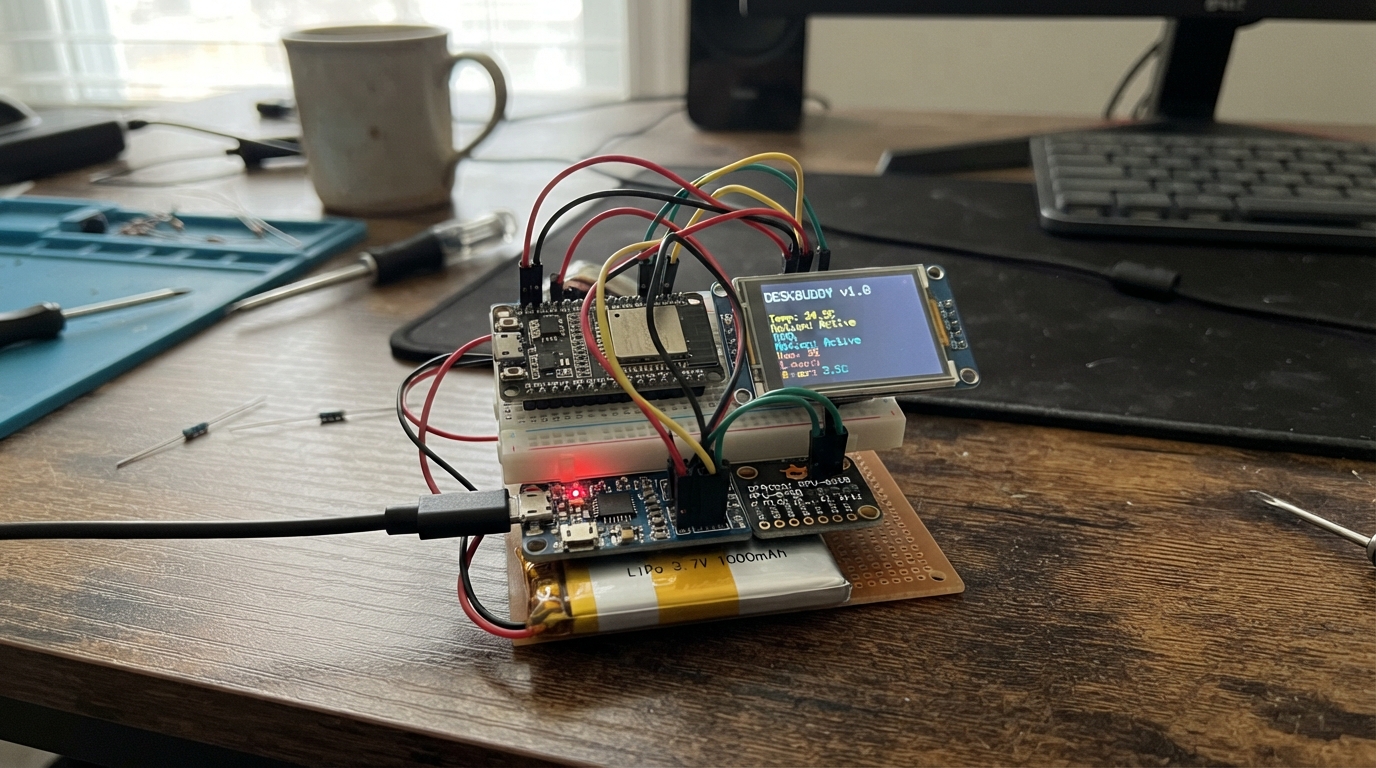
Build a pocket-sized companion device that fits on any desk. This project combines an ESP32 microcontroller with a 2.4-inch touchscreen, motion sensor, and rechargeable battery to create an interactive display that shows weather, time, stock prices, GitHub activity, moon phases, and more. The device responds to touch and motion gestures, making it both functional and fun to interact with.
This guide provides everything needed to assemble the DeskBuddy: a complete wiring diagram connecting the ILI9341 display, XPT2046 touch panel, MPU-6050 motion sensor, and battery charging circuit; a full parts list with recommended suppliers; Arduino firmware with WiFi connectivity and API integrations; and step-by-step assembly instructions from case preparation through final configuration.
Wiring diagram

Gather all the parts
Assemble it in 5 steps
1. Prepare the case
Print or make a front opening that matches your 2.4-inch 240 × 320 screen, plus openings for the DOIT board USB socket and the charger USB-C socket. Use plastic standoffs, screws, or foam tape so no bare solder joints can touch another board or the battery.
- Make the screen opening slightly smaller than the display’s outer edge so the front lip holds it in place.
- Keep both USB sockets reachable after the case is closed.
- Do not trap, bend, puncture, or tightly compress the LiPo battery. A damaged LiPo can overheat or catch fire.
2. Wire the colour screen and touch panel
With the battery unplugged, connect the 2.4-inch display: VCC → 3V3 (power), GND → GND (ground), SCK → GPIO18 (shared screen and touch clock), MOSI → GPIO23 (picture and touch data sent from the board), MISO → GPIO19 (touch data back to the board), TFT_CS → GPIO4 (screen select), TFT_DC → GPIO25 (screen command/data signal), TFT_RST → GPIO26 (screen reset), and TOUCH_CS → GPIO27 (touch controller select). Leave TOUCH_IRQ unconnected because this firmware checks the touch panel directly. If the module has a TFT_BL pin, connect TFT_BL → 3V3 (backlight power).
- Keep the SCK, MOSI, and MISO wires short and separate so the colourful screen remains stable.
- This project uses 3.3 V signals and power; do not connect the display VCC pin to 5 V.
- Make sure VCC and GND are not swapped — swapped power can damage the display.
3. Wire your MPU-6050 motion sensor
Connect the MPU-6050 or GY-521 module: VIN → 3V3 (power), GND → GND (ground), SDA → GPIO21 (motion data), and SCL → GPIO22 (motion clock). Leave INT unconnected because the firmware reads tilt over the two shared data wires.
- Mount the sensor flat and firmly so tilting the case makes the eyes drift in the direction you expect.
- If your module has an AD0 pin, leave it in its normal low position; that lets it answer at its usual address on the shared wires.
- Use the module VIN pin only with 3.3 V in this build. Do not connect an unknown MPU-6050 board directly to 5 V when it shares data wires with the 3.3 V ESP32.
4. Wire the battery and charger
Plug the LiPo into the charger board: battery +V → BAT (battery positive) and battery GND → GND (battery negative). Connect charger 3V3 → DOIT 3V3 (regulated power) and charger GND → DOIT GND (ground). Use the charger board USB-C socket only for its 5 V USB charging cable.
- Use the matching JST connector if your battery has one; never force a plug that does not fit.
- Unplug the battery while changing any wiring.
- Never connect the LiPo straight to the DOIT board 3V3 pin. A full LiPo reaches 4.2 V and can damage the board and display.
- Do not charge a hot, swollen, damaged, or unattended battery.
5. Set your private details and close the case
Keep src/secrets.h private and enter your Wi-Fi name, password, location coordinates, and optional GitHub name there. The DeskBuddy uses those values for the clock, Open-Meteo weather, and GitHub page. Fit the screen into the front, secure the boards, place the battery where it cannot move, then close the enclosure without pinching wires.
- Tap the face to change its mood. Swipe left or right across the touch panel to change pages.
- If taps land in the wrong place, change the four XPT2046 calibration limits in readTouch() to suit your exact display module.
- Keep Wi-Fi passwords out of screenshots and shared project files.
- Do not operate the unit with a loose battery inside an open enclosure.
Review all connections
1. Connections between "lipo-battery-1" and "ESP32"
2. Connections between "charger-3v3-1" and "ESP32"
3. Connections between "touch-lcd-1" and "ESP32"
4. Connections between "imu-1" and "ESP32"
Deploy the firmware
#include <Arduino.h>
#include <Adafruit_GFX.h>
#include <Adafruit_ILI9341.h>
#include <ArduinoJson.h>
#include <HTTPClient.h>
#include <WiFi.h>
#include <WiFiClientSecure.h>
#include <Wire.h>
#include <XPT2046_Touchscreen.h>
#include <MPU6050.h>
#include <time.h>
#include <math.h>
#include "secrets.h"
// DOIT ESP32 DEVKIT V1 with a 2.4-inch ILI9341/XPT2046 SPI touch display.
#define TFT_SCK 18
#define TFT_MOSI 23
#define TFT_MISO 19
#define TFT_CS 4
#define TFT_DC 25
#define TFT_RST 26
#define TOUCH_CS 27
#define I2C_SDA 21
#define I2C_SCL 22
enum Page { FACE, CLOCK_PAGE, DATE_PAGE, WEATHER_PAGE, MOON_PAGE, STOCK_PAGE, GITHUB_PAGE, PAGE_COUNT };
// Forward declarations
void text(const String &s, int x, int y, uint8_t size);
void center(const String &s, int y, uint8_t size);
void header(const char *title);
void dots();
bool wifiReady();
bool readTouch(uint16_t &x, uint16_t &y);
bool setupIMU();
void updateIMU();
void fetchWeather();
void fetchStock();
void fetchGitHub();
void face();
void clockPage();
void datePage();
void weatherPage();
void moonPage();
void stockPage();
void githubPage();
void draw();
void handleTouch();
const int W = 320, H = 240;
const uint16_t WHITE = ILI9341_WHITE, BLACK = ILI9341_BLACK, GREY = 0x8410;
Adafruit_ILI9341 tft(TFT_CS, TFT_DC, TFT_RST);
XPT2046_Touchscreen touch(TOUCH_CS);
MPU6050 mpu;
Page page = FACE;
uint8_t mood = 0;
bool redraw = true, touched = false, wifiTried = false, imuOK = false;
uint16_t downX = 0, lastX = 0;
uint32_t downAt = 0, lastFace = 0, lastSecond = UINT32_MAX, lastFetch = 0;
float eyeX = 0, eyeY = 0;
String weatherText = "WAITING";
int weatherF = 0, humidity = 0, windMph = 0, followers = 0, repos = 0;
float aapl = 0;
bool weatherOK = false, stockOK = false, githubOK = false;
void text(const String &s, int x, int y, uint8_t size = 1) { tft.setTextSize(size); tft.setTextColor(WHITE); tft.setCursor(x, y); tft.print(s); }
void center(const String &s, int y, uint8_t size = 1) { text(s, max(0, (W - (int)s.length() * 6 * size) / 2), y, size); }
void header(const char *title) { tft.fillScreen(BLACK); text(title, 8, 8, 2); tft.drawFastHLine(0, 29, W, WHITE); }
void dots() { for (int i = 0; i < PAGE_COUNT; i++) tft.fillCircle(112 + i * 16, 230, 3, i == page ? WHITE : GREY); }
bool wifiReady() {
if (WiFi.status() == WL_CONNECTED) return true;
if (wifiTried || strlen(WIFI_SSID) == 0) return false;
wifiTried = true; WiFi.mode(WIFI_STA); WiFi.begin(WIFI_SSID, WIFI_PASSWORD);
uint32_t started = millis();
while (WiFi.status() != WL_CONNECTED && millis() - started < 8000) delay(100);
if (WiFi.status() == WL_CONNECTED) configTime(UTC_OFFSET_SECONDS, 0, "pool.ntp.org", "time.nist.gov");
return WiFi.status() == WL_CONNECTED;
}
bool readTouch(uint16_t &x, uint16_t &y) {
if (!touch.touched()) return false;
TS_Point p = touch.getPoint();
x = constrain(map(p.y, 200, 3800, 0, W - 1), 0, W - 1);
y = constrain(map(p.x, 200, 3800, H - 1, 0), 0, H - 1);
lastX = x;
return true;
}
bool setupIMU() {
mpu.initialize();
return mpu.testConnection();
}
void updateIMU() {
if (!imuOK) { eyeX = sin(millis() / 1100.0f) * 5; eyeY = cos(millis() / 1400.0f) * 3; return; }
int16_t ax, ay, az;
mpu.getAcceleration(&ax, &ay, &az);
eyeX = constrain(eyeX * .85f - (ay / 8192.0f) * 2.5f, -9, 9);
eyeY = constrain(eyeY * .85f + (ax / 8192.0f) * 2.0f, -6, 6);
}
const char *weatherName(int c) { if (c == 0) return "CLEAR"; if (c < 3) return "PARTLY CLOUDY"; if (c == 3) return "CLOUDY"; if (c < 49) return "FOG"; if (c < 68 || (c > 79 && c < 83)) return "RAIN"; if (c < 78) return "SNOW"; return "STORM"; }
void fetchWeather() {
if (!wifiReady()) return;
HTTPClient h;
String url = "https://api.open-meteo.com/v1/forecast?latitude=" + String(WEATHER_LAT, 4) + "&longitude=" + String(WEATHER_LON, 4) + "¤t=temperature_2m,relative_humidity_2m,weather_code,wind_speed_10m&temperature_unit=fahrenheit&wind_speed_unit=mph";
h.begin(url); h.setTimeout(6000);
if (h.GET() == 200) { JsonDocument d; if (!deserializeJson(d, h.getString())) { weatherF = round(d["current"]["temperature_2m"].as<float>()); humidity = d["current"]["relative_humidity_2m"].as<int>(); windMph = round(d["current"]["wind_speed_10m"].as<float>()); weatherText = weatherName(d["current"]["weather_code"].as<int>()); weatherOK = true; } }
h.end();
}
void fetchStock() {
if (!wifiReady()) return;
WiFiClientSecure c; c.setInsecure(); HTTPClient h; h.begin(c, "https://stooq.com/q/l/?s=aapl.us&f=sd2t2ohlcv&h&e=csv"); h.setTimeout(7000);
if (h.GET() == 200) { String s = h.getString(); int line = s.indexOf('\n'), comma = line; for (int i = 0; i < 6 && comma >= 0; i++) comma = s.indexOf(',', comma + 1); if (comma > 0) { int end = s.indexOf(',', comma + 1); aapl = s.substring(comma + 1, end).toFloat(); stockOK = aapl > 0; } }
h.end();
}
void fetchGitHub() {
if (!wifiReady() || strlen(GITHUB_USER) == 0) return;
WiFiClientSecure c; c.setInsecure(); HTTPClient h; h.begin(c, String("https://api.github.com/users/") + GITHUB_USER); h.addHeader("User-Agent", "DeskBuddy"); h.setTimeout(7000);
if (h.GET() == 200) { JsonDocument d; if (!deserializeJson(d, h.getString())) { followers = d["followers"] | 0; repos = d["public_repos"] | 0; githubOK = true; } }
h.end();
}
void face() { header("DESKBUDDY"); int ex = (int)eyeX, ey = (int)eyeY; for (int cx : {110, 210}) { tft.fillRoundRect(cx - 34, 60, 68, 58, 28, WHITE); tft.fillCircle(cx + ex, 89 + ey, 13, BLACK); } if (mood == 0) tft.drawCircle(160, 130, 24, WHITE); else if (mood == 1) tft.fillCircle(160, 143, 14, WHITE); else if (mood == 2) tft.drawFastHLine(130, 144, 60, WHITE); else tft.drawLine(132, 148, 188, 134, WHITE); center("TAP: MOOD SWIPE: PAGES", 197, 1); dots(); }
void clockPage() { header("CLOCK"); struct tm now; if (getLocalTime(&now, 20)) { char b[16]; strftime(b, sizeof b, "%H:%M:%S", &now); center(b, 82, 4); } else center("WAITING FOR TIME", 110, 2); dots(); }
void datePage() { header("DATE"); struct tm now; if (getLocalTime(&now, 20)) { char b[28]; strftime(b, sizeof b, "%A", &now); center(b, 75, 3); strftime(b, sizeof b, "%d %b %Y", &now); center(b, 125, 3); } else center("CONNECT WIFI FOR TIME", 110, 2); dots(); }
void weatherPage() { header("WEATHER"); if (!wifiReady()) center("ADD WIFI TO secrets.h", 105, 2); else if (!weatherOK) center("UPDATING...", 105, 2); else { center(String(weatherF) + " F", 58, 6); center(weatherText, 142, 2); center("H " + String(humidity) + "% WIND " + String(windMph) + " MPH", 175, 1); } dots(); }
void moonPage() { header("MOON"); time_t now = time(nullptr); float p = fmod((now / 86400.0f - 10962.76f) / 29.53059f, 1); if (p < 0) p += 1; int r = 48, cx = 240, cy = 122; tft.fillCircle(cx, cy, r, WHITE); tft.fillCircle(cx + (int)(cos(p * 6.28318f) * r), cy, r, BLACK); center(p < .25 ? "WAXING" : p < .5 ? "FULL MOON" : p < .75 ? "WANING" : "NEW MOON", 68, 2); text("ILLUMINATION", 25, 118); text(String((int)((1 - cos(p * 6.28318f)) * 50)) + "%", 48, 142, 3); dots(); }
void stockPage() { header("AAPL QUOTE"); if (!wifiReady()) center("ADD WIFI TO secrets.h", 105, 2); else if (!stockOK) center("UPDATING...", 105, 2); else center("$" + String(aapl, 2), 92, 5); dots(); }
void githubPage() { header("GITHUB"); if (strlen(GITHUB_USER) == 0) center("SET GITHUB_USER IN secrets.h", 105, 1); else if (!githubOK) center("UPDATING...", 105, 2); else { center("@" + String(GITHUB_USER), 65, 2); center(String(followers) + " FOLLOWERS", 112, 3); center(String(repos) + " PUBLIC REPOS", 158, 2); } dots(); }
void draw() { switch (page) { case FACE: face(); break; case CLOCK_PAGE: clockPage(); break; case DATE_PAGE: datePage(); break; case WEATHER_PAGE: weatherPage(); break; case MOON_PAGE: moonPage(); break; case STOCK_PAGE: stockPage(); break; default: githubPage(); } redraw = false; }
void handleTouch() { uint16_t x, y; bool down = readTouch(x, y); if (down && !touched) { touched = true; downX = x; downAt = millis(); } if (!down && touched) { int dx = (int)lastX - (int)downX; if (abs(dx) > 45) page = (Page)((page + (dx < 0 ? 1 : PAGE_COUNT - 1)) % PAGE_COUNT); else if (millis() - downAt < 700 && page == FACE) mood = (mood + 1) % 4; redraw = true; touched = false; } }
void setup() { Serial.begin(115200); SPI.begin(TFT_SCK, TFT_MISO, TFT_MOSI, TFT_CS); tft.begin(); tft.setRotation(1); tft.fillScreen(BLACK); touch.begin(); touch.setRotation(1); Wire.begin(I2C_SDA, I2C_SCL); Wire.setClock(400000); imuOK = setupIMU(); }
void loop() { handleTouch(); updateIMU(); uint32_t now = millis(); if (page == FACE && now - lastFace >= 50) { lastFace = now; redraw = true; } if ((page == CLOCK_PAGE || page == DATE_PAGE) && now / 1000 != lastSecond) { lastSecond = now / 1000; redraw = true; } if (now - lastFetch > 600000 || (lastFetch == 0 && wifiReady())) { lastFetch = now; fetchWeather(); fetchStock(); fetchGitHub(); redraw = true; } if (redraw) draw(); delay(8); }Remix this project
Make it yours in one click
Open a full copy of this project in your own Schematik workspace — diagram, code, parts, and assembly steps included. Swap the sensor, add features, or redesign the whole thing with AI. The author's original stays untouched.