Community project
Dual-Controller Mini Drone (copy)
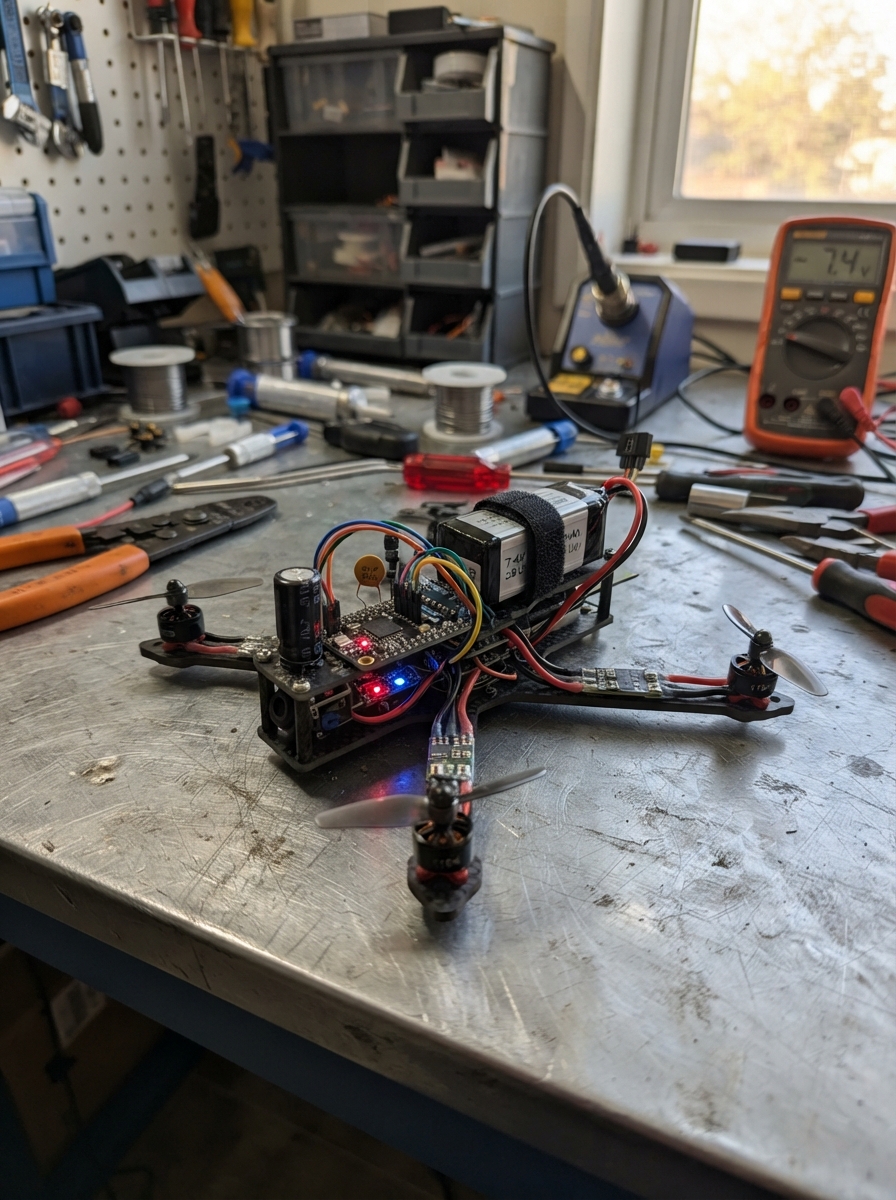
This guide builds a quadcopter flight controller using an ESP32 microcontroller, four brushless motors, and ESC modules for independent motor control. The system reads orientation data from an MPU-6050 inertial measurement unit and accepts wireless gamepad commands via the Dabble app, enabling stable flight with roll, pitch, yaw, and throttle control.
The guide provides a complete wiring diagram, parts list, and step-by-step assembly instructions for integrating the 7.4V LiPo battery, regulated 5V supply, motor controllers, and sensor breakout. Firmware is included with conservative throttle limits for safe first-flight testing and a motor-mixing algorithm optimized for X-frame quadcopter geometry.
Wiring diagram

Gather all the parts
Assemble it in 6 steps
1. Make the battery power junction
With the battery unplugged, join lipo_2s BAT+ to buck_5v IN+, cap_input_470uf +, and the red V+ lead from each ESC using short, heavy red wire. Join lipo_2s BAT- to buck_5v IN-, cap_input_470uf -, and the black V- lead from each ESC using matching heavy black wire. This is the high-current motor-power junction.
- Keep the 470 µF capacitor close to the battery/buck junction.
- Use wire, connectors, and solder joints rated for the combined motor current.
- Make sure the capacitor’s striped negative lead goes to battery negative — reversing it can cause it to overheat or burst.
- Never connect the LiPo while soldering or while propellers are fitted.
2. Set the regulated 5 V supply
Before attaching the ESP32, adjust buck_5v OUT+ and OUT- to exactly 5.0 V with a meter. Connect buck_5v OUT+ to the ESP32 VIN/5V pin and cap_5v_ceramic lead 1 (power). Connect buck_5v OUT- to ESP32 GND and cap_5v_ceramic lead 2 (ground).
- Put the 0.1 µF ceramic capacitor physically close to the ESP32 power pins.
- Run the controller ground back to the same battery-negative junction as the ESCs.
- Do not connect 5 V to the ESP32 3V3 pin — that can damage the board.
- Do not connect the LiPo until the buck output has been checked at 5.0 V.
3. Mount the ESP32 and motion sensor
Mount the ESP32 and mpu6050_1 at the frame’s center of mass, away from the battery and motors. Connect MPU6050 VIN → ESP32 3V3 (power), MPU6050 GND → ESP32 GND (ground), MPU6050 SDA → GPIO21 (data), and MPU6050 SCL → GPIO22 (clock).
- Align the printed MPU6050 axes with the frame axes.
- Soft mounting can reduce motor vibration reaching the sensor.
- Keep these short sensor wires away from the thick battery, ESC, and three-phase motor wires — electrical noise can make readings unstable.
4. Wire the four ESC control leads
Connect esc_1 SIGNAL → ESP32 GPIO12 (motor-1 command), esc_2 SIGNAL → GPIO13 (motor-2 command), esc_3 SIGNAL → GPIO14 (motor-3 command), and esc_4 SIGNAL → GPIO27 (motor-4 command). Connect each ESC SIGNAL_GND → the shared ESP32/battery-negative ground point (ground). Leave every ESC BEC_5V red lead disconnected and cover its exposed metal with heat-shrink tubing.
- Label every ESC and command wire before closing the frame.
- Route thin command leads separately from the battery and motor-phase wires.
- GPIO12 is a startup-sensitive ESP32 pin. If the ESP32 will not start reliably, move only esc_1 SIGNAL to GPIO25 and update the firmware pin constant.
- Do not connect the ESC red BEC leads to the buck output — power sources connected together can damage equipment.
5. Connect every motor
Connect esc_1 M1/M2/M3 → motor_1 A/B/C, esc_2 M1/M2/M3 → motor_2 A/B/C, esc_3 M1/M2/M3 → motor_3 A/B/C, and esc_4 M1/M2/M3 → motor_4 A/B/C. These three wires are motor phases, so they do not have positive and negative polarity.
- Keep each motor’s three phase wires together and away from the MPU6050 leads.
- If a motor spins the wrong way later, unplug the battery and swap any two phase wires for that motor.
- Remove every propeller before testing because a motor can start unexpectedly.
6. Inspect before applying battery power
With no propellers fitted, confirm that every low-power ground reaches the same battery-negative/common-ground junction. Check capacitor polarity, confirm the buck is exactly 5.0 V, and confirm all four ESC BEC red wires are insulated. Keep the heavy battery/ESC/motor wiring on the outside of the frame and the MPU6050 wiring toward the center.
- For the first battery connection, use a current-limited supply or smoke stopper if available.
- The Bluetooth name used by the Dabble app is MiniDrone.
- A 2S LiPo and four ESCs can supply enough current to melt wires or cause serious injury. Disconnect immediately if anything becomes hot, swells, or smells burnt.
Review all connections
1. Connections between "lipo_2s" and "ESP32"
2. Connections between "buck_5v" and "ESP32"
3. Connections between "cap_5v_ceramic" and "ESP32"
4. Connections between "mpu6050_1" and "ESP32"
5. Connections between "esc_1" and "ESP32"
6. Connections between "esc_2" and "ESP32"
7. Connections between "esc_3" and "ESP32"
8. Connections between "esc_4" and "ESP32"
Deploy the firmware
#define CUSTOM_SETTINGS
#define INCLUDE_GAMEPAD_MODULE
#include <Arduino.h>
#include <Wire.h>
#include <DabbleESP32.h>

constexpr uint8_t ESC1_PIN = 12;
constexpr uint8_t ESC2_PIN = 13;
constexpr uint8_t ESC3_PIN = 14;
constexpr uint8_t ESC4_PIN = 27;
constexpr uint8_t MPU_SDA_PIN = 21;
constexpr uint8_t MPU_SCL_PIN = 22;

constexpr uint32_t ESC_FREQUENCY_HZ = 50;
constexpr uint8_t ESC_RESOLUTION_BITS = 16;
constexpr uint16_t ESC_MIN_US = 1000;
constexpr uint16_t ESC_MAX_US = 1600;  // Conservative first-test limit.
constexpr uint32_t PWM_PERIOD_US = 20000;
constexpr uint8_t MPU6050_ADDRESS = 0x68;
constexpr uint32_t CONTROL_PERIOD_MS = 20;
constexpr int16_t JOYSTICK_DEADBAND = 8;

bool armed = false;
uint16_t throttleUs = ESC_MIN_US;
uint32_t lastControlMs = 0;

uint32_t pulseToDuty(uint16_t pulseUs) {
  const uint32_t maxDuty = (1UL << ESC_RESOLUTION_BITS) - 1UL;
  return (static_cast<uint32_t>(pulseUs) * maxDuty) / PWM_PERIOD_US;
}

void writeEsc(uint8_t pin, uint16_t pulseUs) {
  ledcWrite(pin, pulseToDuty(constrain(pulseUs, ESC_MIN_US, ESC_MAX_US)));
}

void stopMotors() {
  writeEsc(ESC1_PIN, ESC_MIN_US);
  writeEsc(ESC2_PIN, ESC_MIN_US);
  writeEsc(ESC3_PIN, ESC_MIN_US);
  writeEsc(ESC4_PIN, ESC_MIN_US);
}

void setMotorMix(uint16_t collectiveUs, int16_t roll, int16_t pitch, int16_t yaw) {
  // X-frame: ESC1 front-left, ESC2 front-right, ESC3 rear-right, ESC4 rear-left.
  writeEsc(ESC1_PIN, collectiveUs + pitch - roll - yaw);
  writeEsc(ESC2_PIN, collectiveUs + pitch + roll + yaw);
  writeEsc(ESC3_PIN, collectiveUs - pitch + roll - yaw);
  writeEsc(ESC4_PIN, collectiveUs - pitch - roll + yaw);
}

bool wakeMpu6050() {
  Wire.beginTransmission(MPU6050_ADDRESS);
  Wire.write(0x6B);
  Wire.write(0x00);
  return Wire.endTransmission() == 0;
}

void setup() {
  Serial.begin(115200);

  ledcAttach(ESC1_PIN, ESC_FREQUENCY_HZ, ESC_RESOLUTION_BITS);
  ledcAttach(ESC2_PIN, ESC_FREQUENCY_HZ, ESC_RESOLUTION_BITS);
  ledcAttach(ESC3_PIN, ESC_FREQUENCY_HZ, ESC_RESOLUTION_BITS);
  ledcAttach(ESC4_PIN, ESC_FREQUENCY_HZ, ESC_RESOLUTION_BITS);
  stopMotors();

  Wire.begin(MPU_SDA_PIN, MPU_SCL_PIN);
  const bool imuFound = wakeMpu6050();
  Dabble.begin("MiniDrone");
  Serial.println(imuFound ? "MPU6050 ready. Connect Dabble, then press Start to arm." : "MPU6050 not found. Connect Dabble, then press Start to arm.");
}

void loop() {
  Dabble.processInput();
  const uint32_t now = millis();

  // Select is an immediate motor stop. Start only arms when throttle is at minimum.
  if (GamePad.isSelectPressed()) {
    armed = false;
    throttleUs = ESC_MIN_US;
    stopMotors();
  }

  if (GamePad.isStartPressed() && throttleUs <= ESC_MIN_US + 10) {
    armed = true;
  }

  if (now - lastControlMs >= CONTROL_PERIOD_MS) {
    lastControlMs = now;

    // Dabble GamePad: the centre joystick controls roll and pitch.
    const int16_t rollInput = GamePad.getXaxisData();
    const int16_t pitchInput = GamePad.getYaxisData();
    const int16_t yawInput = (GamePad.isLeftPressed() ? -1 : 0) +
                             (GamePad.isRightPressed() ? 1 : 0);

    // Up/Down adjust collective throttle in small steps.
    if (GamePad.isUpPressed()) {
      throttleUs = min<uint16_t>(ESC_MAX_US, throttleUs + 4);
    } else if (GamePad.isDownPressed()) {
      throttleUs = max<uint16_t>(ESC_MIN_US, throttleUs - 4);
    }

    if (armed) {
      const int16_t roll = abs(rollInput) > JOYSTICK_DEADBAND
                               ? map(rollInput, -100, 100, -80, 80)
                               : 0;
      const int16_t pitch = abs(pitchInput) > JOYSTICK_DEADBAND
                                ? map(pitchInput, -100, 100, -80, 80)
                                : 0;
      const int16_t yaw = yawInput * 50;
      setMotorMix(throttleUs, roll, pitch, yaw);
    } else {
      stopMotors();
    }
  }
}
Remix this project
Make it yours in one click
Open a full copy of this project in your own Schematik workspace — diagram, code, parts, and assembly steps included. Swap the sensor, add features, or redesign the whole thing with AI. The author's original stays untouched.